
1minAI vs SocialPilot: Which Is the Best AI Social Media Agent?

Tram Ta
20 novembre 2026
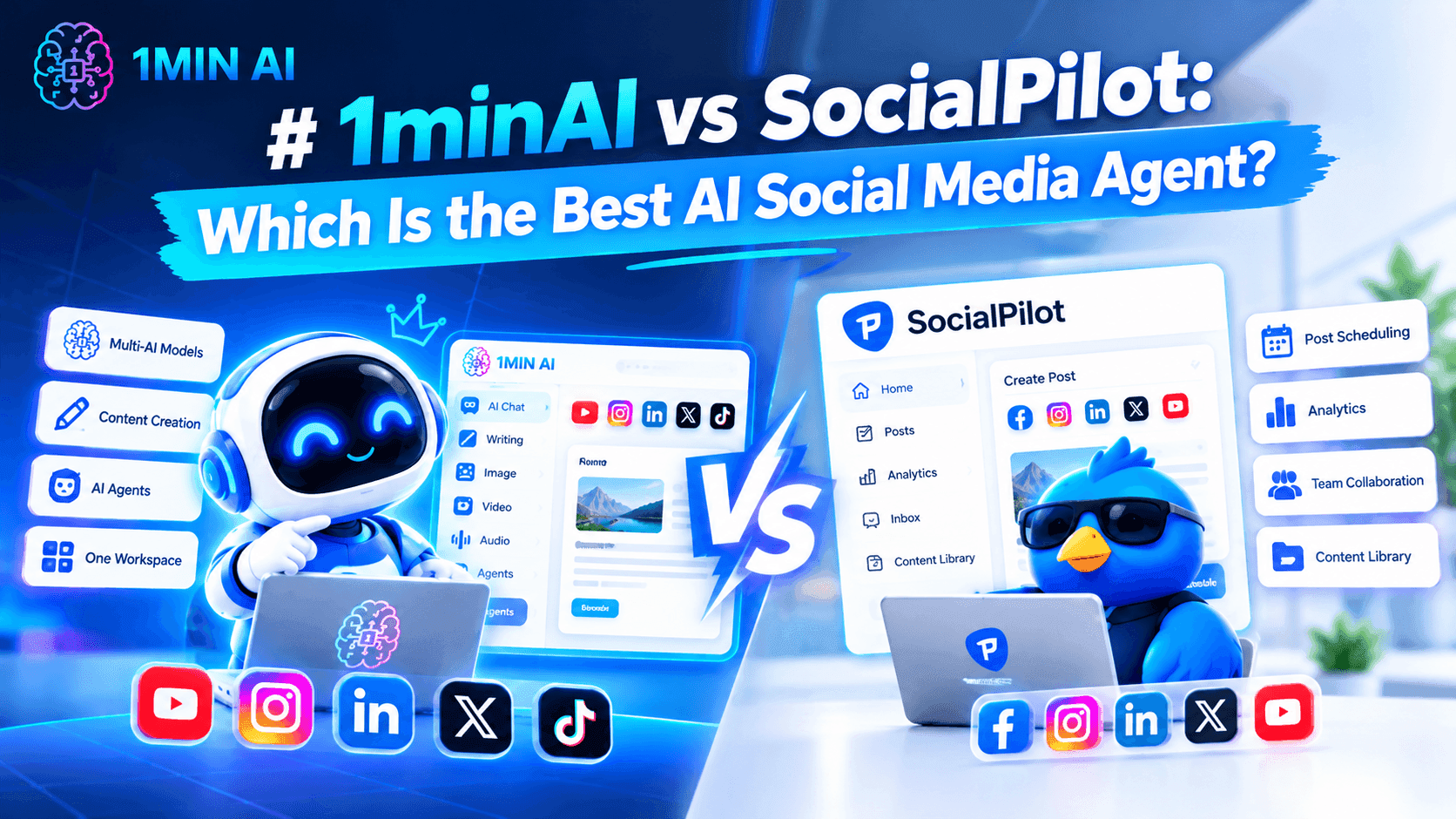
Looking for a SocialPilot alternative? Compare 1minAI vs SocialPilot for AI content creation, LinkedIn automation, scheduling, and social media management.
Platforms such as SocialPilot help businesses and agencies organize these activities across multiple social networks. But what if your biggest challenge isn't managing accounts? What if you spend too much time researching topics, writing posts, and creating content every week?
That's where an AI-powered content workflow can make a difference.
1minAI and SocialPilot solve different parts of the social media workload. SocialPilot focuses on social media management, publishing, analytics, and agency collaboration. 1minAI focuses on connecting AI-powered research, content writing, visual creation, and publishing through its Social Agents.
In this guide, we'll compare 1minAI vs SocialPilot, explore their strengths and limitations, and help you decide which platform fits your social media workflow.
What Is SocialPilot?
SocialPilot is a social media management platform designed for businesses, marketing teams, and agencies. It helps users manage multiple social accounts, plan content, schedule posts, monitor engagement, and analyze performance from one dashboard.
The platform supports major social networks, including LinkedIn, Facebook, Instagram, TikTok, YouTube, Pinterest, Threads, and X.
Its main value is centralized social media management. Instead of logging into multiple platforms to publish content and review performance, teams can coordinate much of their work through one interface.
SocialPilot's Key Features
1. Social Media Scheduling and Bulk Publishing
SocialPilot provides a social media calendar where users can plan and schedule posts across connected accounts.
Its bulk scheduling and CSV upload features help teams prepare multiple posts in advance rather than publishing each one manually.
2. AI-Powered Content Creation
SocialPilot includes AI-assisted content generation to help users create captions, post variations, and other social media copy.
This can reduce the time spent drafting content, especially when managing several accounts or campaigns.
3. Multi-Account Management
One of SocialPilot's major strengths is its ability to manage multiple social media accounts from a centralized dashboard.
This is particularly useful for agencies that handle several clients or businesses with multiple brands and locations.
4. Analytics and Reporting
SocialPilot provides social media analytics and reporting features to help users understand post performance and review account activity.
Higher-tier plans include advanced analytics, competitor reports, scheduled reports, and white-label reporting.
5. Team and Client Collaboration
SocialPilot supports team management, content approval workflows, and client collaboration.
These features help agencies coordinate publishing with clients and internal team members without relying entirely on email or separate approval processes.
6. Media and Carousel Publishing
The platform supports multiple-image and carousel posts, video publishing, LinkedIn document publishing, and first-comment scheduling.
These features are useful for teams that publish different content formats and need more control over their publishing process.
SocialPilot's Pricing
SocialPilot offers multiple subscription plans. Its pricing page displays the following annual-billing rates at the time of research:
| Plan | Starting price (annual billing) | Main audience |
|---|---|---|
| Essentials | $25.50/month | Individual professionals |
| Standard | $42.50/month | Small businesses and teams |
| Premium | $85/month | Growing agencies |
| Ultimate | $170/month | Established agencies and multi-location brands |
The plans differ in supported social accounts, team members, analytics, bulk scheduling, client approvals, and white-label capabilities.
For example, the Premium plan includes 25 social media accounts, six users, bulk scheduling, advanced analytics, client approvals, and white-label reports. The Ultimate plan supports 50 social accounts and unlimited users.
Pricing and plan limits can change. Check the official SocialPilot pricing page before making a purchase decision.
SocialPilot's Strengths
SocialPilot is a strong option for organizations that need structured social media management.
Its main advantages include:
- Multi-account management: Manage multiple social profiles from one dashboard.
- Bulk scheduling: Prepare and schedule many posts in advance.
- Agency collaboration: Coordinate team members, clients, and approval workflows.
- Advanced reporting: Review social media performance and create branded reports.
- Flexible publishing: Support multiple images, carousels, videos, LinkedIn documents, and first comments.
- Multi-platform support: Manage social media activities across several networks.
For agencies managing many client accounts, these capabilities can be particularly valuable.
Where SocialPilot May Not Be the Best Fit
SocialPilot offers a broad set of management features, but not every user needs an agency-oriented social media management platform.
Consider these points when evaluating it:
- Its main strength is managing, scheduling, and analyzing social media activity rather than connecting every stage of AI content production.
- Users who spend most of their time researching topics and developing original LinkedIn posts may want a more content-focused AI workflow.
- Advanced agency features, such as white-label reports and client management, are available in higher-tier plans.
- A scheduling platform does not automatically eliminate the work involved in finding relevant topics, developing ideas, and creating original content.
These are differences in product focus rather than evidence that SocialPilot performs poorly. The right choice depends on where your team spends the most time.
What Is 1minAI Social Agents?
1minAI is an AI workspace that brings together AI chat, writing, image generation, document tools, and AI agents.
Its Social Agents help users connect content-related tasks into more structured workflows.
For LinkedIn content, the 1minAI LinkedIn Content Agent follows a sequence:
Gather Information → Write Content → Design Image → Post to Social
Instead of treating research, writing, visual creation, and publishing as completely separate tasks, the agent connects them in one workflow.
You can explore the feature directly through 1minAI Social Agents.
Key Capabilities of 1minAI Social Agents
1. Gather Information Before Creating Content
Start with relevant information about your company, product, service, or topic.
The LinkedIn workflow can use saved assets and supplied information as context for content generation. This helps the AI work from your business information rather than producing generic posts from a vague prompt.
2. Generate LinkedIn Content
After gathering information, the agent moves to content creation.
You can configure writing settings and available AI model options to generate LinkedIn-ready drafts. This supports a workflow that begins with your business knowledge and turns it into content for your target audience.
3. Generate Supporting Images
The workflow also includes an image-generation stage.
You can create visuals that complement the post rather than searching for unrelated stock images or preparing every graphic manually.
4. Schedule and Publish Content
Once the content is ready, the workflow can move to the social publishing stage.
The LinkedIn Agent supports connecting a LinkedIn destination and configuring publishing schedules, including recurring scheduling options where available.
5. Customize the Workflow
The agent provides settings for content generation, including writing and image model options. Where available, saved Brand Voice settings can help guide the tone and wording.
This makes it easier to establish a repeatable process for producing content around your business, products, or services.
1minAI vs SocialPilot: Feature Comparison
Both platforms can support social media workflows, but their primary focus is different.
| Feature | SocialPilot | 1minAI Social Agents |
|---|---|---|
| Main focus | Social media management | AI-powered content production and publishing |
| AI content generation | AI captions and content assistance | AI-assisted research and LinkedIn post creation |
| Topic and source research | Content planning and discovery tools | Gather information from topics and supplied assets |
| LinkedIn content creation | Supported | Core workflow capability |
| AI image generation | Image and media publishing tools | AI-generated visuals connected to content |
| Scheduling | Multi-platform scheduling and bulk publishing | Scheduling through the Social Agent workflow |
| Multi-account management | Strong agency-oriented account management | Check current Social Agent account and destination options |
| Analytics and reporting | Detailed analytics and advanced reports | Not positioned as a replacement for SocialPilot's advanced reporting suite |
| Client approvals | Available in eligible plans | Check current collaboration options |
| White-label reports | Available in higher-tier plans | Not a direct equivalent to SocialPilot's white-label reporting |
| Broader AI workspace | Primarily social media management | Writing, images, documents, AI chat, and agents |
The comparison highlights an important distinction: SocialPilot is built for managing social media operations at scale, while 1minAI focuses on using AI to reduce the work involved in creating content.
Why Consider 1minAI as a SocialPilot Alternative?
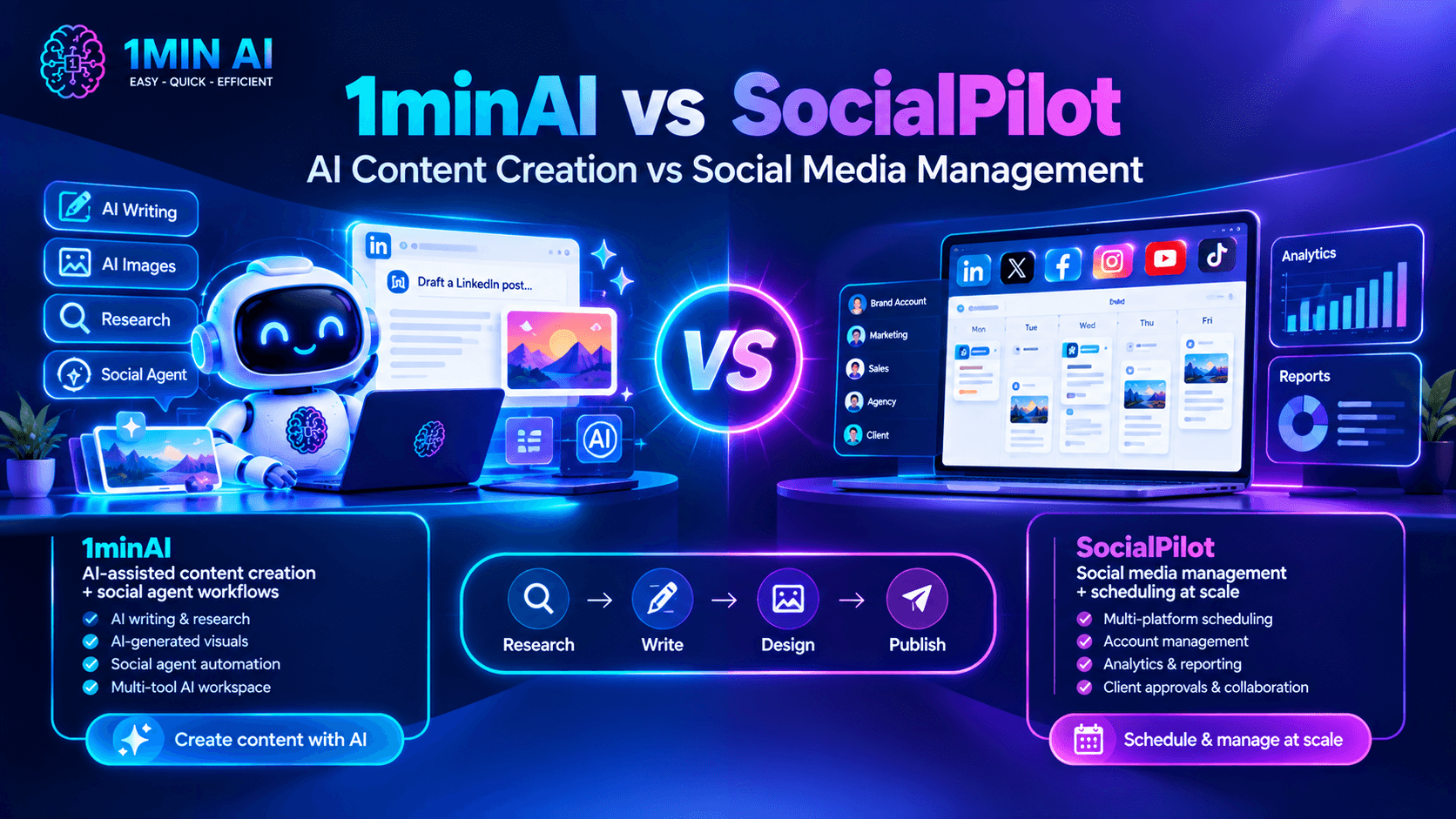
If you're searching for a SocialPilot alternative, first identify which part of your social media workflow takes the most time.
If your team already has content ready and mainly needs account management, reporting, and bulk scheduling, SocialPilot may be the better fit.
But if creating content is the biggest bottleneck, 1minAI offers a different approach.
1. Move Beyond Scheduling to AI-Assisted Content Creation
Scheduling solves one part of social media management: deciding when a post should go live.
It doesn't necessarily solve the work required to create that post.
Before publishing, someone still needs to:
- Find a relevant topic.
- Research the subject.
- Identify an interesting angle.
- Write the post.
- Edit the wording.
- Prepare a supporting image.
- Review the final content.
1minAI's Social Agent connects several of these steps into one workflow.
For example, a founder can provide company information, select a topic, generate a LinkedIn post, create a supporting image, and move the result toward publishing.
This is useful when you want to spend less time on repetitive content tasks and more time developing ideas that matter to your audience.
2. Turn Business Information into Personalized Content
Generic AI-generated posts often lack the details that make business content interesting.
A more useful approach is to start with information about your actual products, services, customers, and expertise.
With 1minAI, you can use saved assets and relevant business information as context for the content-generation process.
For example, a SaaS founder could provide:
- Product descriptions.
- Target audience information.
- Customer pain points.
- Product updates.
- Key differentiators.
- Relevant industry insights.
The agent can then use this information as a starting point for LinkedIn content.
You should still review the generated copy and add personal experience or opinions. AI can help maintain a consistent starting point, but authentic thought leadership requires your perspective.
3. Connect Post Writing with AI Image Generation
Creating a LinkedIn post often involves more than writing text.
A visual can make a complex idea easier to understand, highlight an important statistic, or give a post a more recognizable format.
1minAI connects writing and image generation within its Social Agent workflow.
For example, if you're creating a post about a new product feature, you can generate the copy and then create a supporting visual that illustrates the feature.
This reduces the need to move between separate writing and image-generation tools for every post.
4. Build a More Consistent LinkedIn Publishing Workflow
Consistency is difficult when every post requires starting from scratch.
A repeatable workflow makes content production more manageable.
With 1minAI, you can establish a sequence for gathering information, writing content, designing images, and scheduling posts.
This is particularly useful for:
- Solo founders building a personal brand.
- B2B marketers sharing industry insights.
- Consultants publishing educational content.
- Small teams promoting products and services.
- Content creators who want a more structured production process.
The objective isn't to publish as frequently as possible. It's to make it easier to publish useful content consistently.
5. Access More AI Capabilities in One Workspace
Social media content is often connected to other marketing activities.
A LinkedIn post may originate from a blog article, a customer case study, a product document, or a research report.
1minAI provides a broader AI workspace that can support these related tasks.
You can explore its AI writing, image, document, and chat tools alongside Social Agents.
This is useful if your team wants to use AI for more than social media scheduling.
How to Automate Your LinkedIn Content Workflow with 1minAI
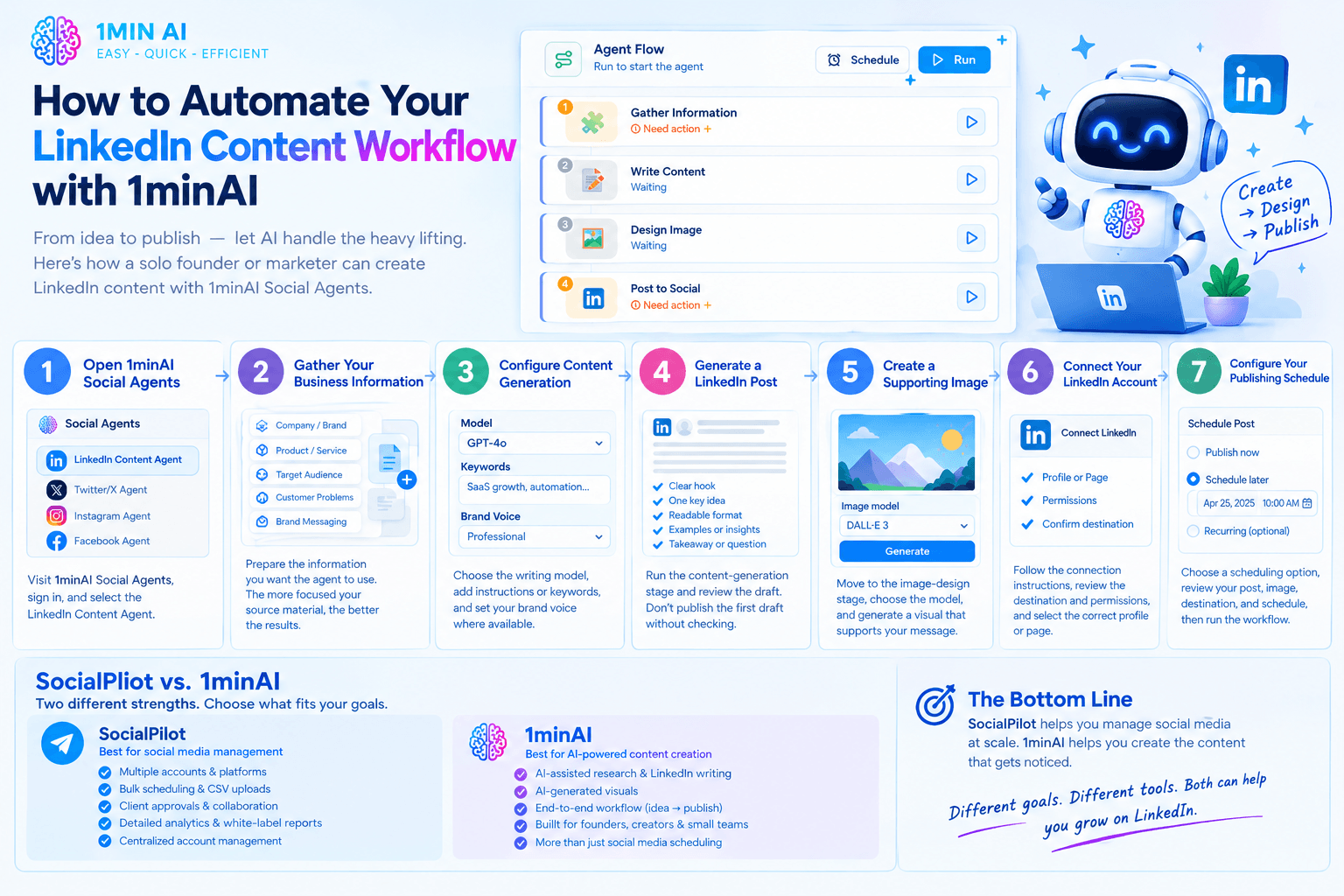
Let's look at a practical example of how a solo founder or marketer can use 1minAI Social Agents to create LinkedIn content.
Step 1: Open 1minAI Social Agents
Visit 1minAI Social Agents and sign in to your account.
Open the available Social Agent options and select the LinkedIn Content Agent.
Step 2: Gather Your Business Information
Prepare the information you want the agent to use.
This could include:
- Company or personal brand details.
- Product or service descriptions.
- Target audience.
- Customer problems.
- Brand messaging.
- Relevant source material.
Select the appropriate saved asset or provide the relevant information through the available input options.
The more focused your source material is, the easier it is to create content that matches your actual business.
Step 3: Configure Content Generation
Open the content-writing stage and review the available settings.
Choose the writing model and provide relevant instructions, keywords, or content preferences where supported.
For example, a B2B founder might focus on topics such as:
- SaaS growth.
- Customer acquisition.
- Business automation.
- Startup challenges.
- Product development.
- Industry trends.
You can also use Brand Voice settings where available to guide the generated content.
Step 4: Generate a LinkedIn Post
Run the content-generation stage and review the draft.
A useful LinkedIn post generally needs:
- A clear opening hook.
- One central idea.
- Readable formatting.
- Relevant examples or supporting information.
- A useful takeaway or discussion question.
Don't publish the first draft automatically without reviewing it. Check whether the post sounds natural and accurately reflects your business.
Step 5: Create a Supporting Image
Move to the image-design stage.
Choose the available image model and review the visual settings. Generate an image that supports the message of your post.
For example, a post about workflow automation could use a simple process illustration rather than a generic technology-themed image.
Step 6: Connect Your LinkedIn Account
Open the publishing stage and follow the available connection instructions.
Review the destination and permissions carefully before authorizing publishing.
Make sure you select the correct LinkedIn profile or page for your content.
Step 7: Configure Your Publishing Schedule
Choose the scheduling option that matches your content plan.
Depending on the available settings, you can generate content on demand, schedule a one-time post, or configure a recurring workflow.
Review the generated post, image, destination, and schedule before running the workflow.
Explore the feature here: 1minAI Social Agents.
Who Should Choose SocialPilot vs 1minAI?
The best platform depends on your team's priorities, not simply the number of features.
Choose SocialPilot If:
- You manage multiple social media accounts across several platforms.
- You work at an agency with many client profiles.
- You need bulk scheduling and CSV uploads.
- Your team relies on client approvals and collaboration.
- You need detailed analytics and white-label reports.
- Your main priority is centralized social media management.
SocialPilot is particularly suitable for agencies and marketing teams that need structured account management and reporting.
Consider 1minAI If:
- Your biggest challenge is creating content consistently.
- You want AI assistance with research and LinkedIn post writing.
- You want to connect content creation with AI-generated visuals.
- You want a repeatable workflow from business information to publishing.
- You are a founder, creator, consultant, or small marketing team.
- You already use AI for other content and productivity tasks.
1minAI is worth exploring if you want an AI-powered content workflow rather than primarily a social media management dashboard.
Frequently Asked Questions
Is 1minAI a good SocialPilot alternative?
It depends on what you need. SocialPilot offers extensive social media management features, including multi-account scheduling, analytics, client approvals, and white-label reporting. 1minAI is more focused on AI-assisted content production, connecting research, writing, image generation, and publishing. It is worth considering if content creation is your main bottleneck.
Does 1minAI support LinkedIn content automation?
Yes. 1minAI's LinkedIn Content Agent connects information gathering, content writing, image generation, and social publishing. It also supports scheduling options through the available workflow settings.
Can I use 1minAI to generate LinkedIn posts?
Yes. The LinkedIn Content Agent helps turn business information and topics into LinkedIn-ready content. You can review the generated draft and adjust it before publishing.
Can 1minAI create images for LinkedIn posts?
Yes. The Social Agent workflow includes an image-design stage that can generate visuals to accompany your content. Review the generated image to ensure it matches your brand and message.
Does SocialPilot support LinkedIn scheduling?
Yes. SocialPilot supports LinkedIn publishing and scheduling, including features such as bulk scheduling, multiple-image posts, LinkedIn document publishing, and first comments. Exact feature availability depends on the subscription plan.
Is SocialPilot better for agencies?
SocialPilot has strong agency-oriented capabilities, including multi-account management, team collaboration, client approvals, advanced analytics, and white-label reports. If these are essential to your agency, it may be the more suitable platform.
Can I use 1minAI for social media platforms beyond LinkedIn?
1minAI provides a broader Social Agents offering. Available agents and publishing destinations may differ, so check the current Social Agents workspace for the options available to your account.
Conclusion: 1minAI vs SocialPilot
SocialPilot and 1minAI address different challenges in social media marketing.
SocialPilot is a strong choice for managing social media operations. Its multi-account scheduling, analytics, client approvals, and white-label reporting make it particularly useful for agencies and teams managing multiple brands.
1minAI is worth considering when AI-powered content creation is the priority. Its Social Agents connect information gathering, LinkedIn post writing, visual generation, and publishing into a more structured workflow.
If your main challenge is managing dozens of social accounts and delivering client reports, SocialPilot may be the better fit.
But if you spend too much time researching topics, drafting posts, creating visuals, and coordinating content production, 1minAI offers a workflow worth exploring.
Ready to make LinkedIn content creation more efficient?
- #Commerce
- #Information
Alternative
Scopri le migliori alternative a 1minAI e confronta funzionalità, prezzi e casi d'uso.

1min.AI vs OpenRouter
1min.AI vs. OpenRouter: Confronta il prodotto di creazione AI pronto all'uso con lo strumento API tecnico. Scopri se hai bisogno di uno studio creativo senza codice o di un hub di infrastruttura di codifica.
 Ngoc Hong

1min AI vs Buffer
Compare 1min.AI vs Buffer for Facebook content creation, AI writing, image generation, scheduling, pricing, and everyday marketing workflows.
Ngoc Hong
1min.AI vs. Hootsuite: Which Social Media Tool Fits Your Workflow?
Compare 1min.AI vs. Hootsuite to explore their AI content creation, social media publishing, analytics, pricing, and collaboration features. Find the right tool for your workflow.
Strumenti AI
Scopri i migliori strumenti AI per aumentare la produttività, la creatività e il lavoro quotidiano.

I 4 migliori strumenti AI economici per i fondatori di startup
Scopri i 4 migliori strumenti AI economici per i fondatori di startup per validare idee, costruire prodotti, creare contenuti e lanciarsi più velocemente senza spendere troppo.
 Tram Ta

POV: Hai 10+ post da creare ogni giorno
Scopri come costruire un workflow di contenuti AI che aiuta i content creator a produrre più velocemente 10+ post al giorno per i social con brainstorming AI, generazione di immagini e creazione di contenuti.
 Lien Anh Vu

Trasforma “Rendilo migliore” in contenuti migliori con l’AI
Usa l’AI per trasformare feedback client vaghi in revisioni chiare, ridurre le modifiche inutili e consegnare contenuti migliori più velocemente.
Lien Anh VuFunzionalità AI
Funzionalità AI complete che semplificano i flussi di lavoro, migliorano l'efficienza e consentono ai team di ottenere di più.

1minAI: Correttore grammaticale AI gratuito
Controlla la grammatica gratis con il correttore grammaticale AI di 1minAI. Trova errori di grammatica, ortografia e scrittura, migliora la chiarezza e rifinisci i tuoi contenuti in pochi secondi.
Tram Ta
Crea un sito web portfolio più velocemente con 1min.AI
Scopri come i creativi freelance possono usare 1min.AI per pianificare, scrivere, progettare e generare un sito web portfolio professionale più rapidamente, anche senza forti competenze di codifica.
Lien Anh Vu
Commento AI X gratuito
Crea commenti divertenti, spiritosi o perspicaci per Twitter con il nostro Generatore di commenti Twitter basato su AI. Aumenta il tuo engagement e distinguoti dalla massa!
Casi d'uso dell'IA
Una raccolta curata di casi d'uso dell'IA per il business, la produttività e le applicazioni specifiche del settore.

Il momento migliore per pubblicare su Instagram: una guida pratica per aumentare l’engagement
Scopri il momento migliore per pubblicare su Instagram, inclusi i giorni e gli orari migliori per diversi tipi di pubblico, oltre ai consigli per trovare il calendario di pubblicazione ideale per il tuo account.
Tram TaCrea un sito web portfolio più velocemente con 1min.AI
Scopri come i creativi freelance possono usare 1min.AI per pianificare, scrivere, progettare e generare un sito web portfolio professionale più rapidamente, anche senza forti competenze di codifica.
Lien Anh VuTrasforma “Rendilo migliore” in contenuti migliori con l’AI
Usa l’AI per trasformare feedback client vaghi in revisioni chiare, ridurre le modifiche inutili e consegnare contenuti migliori più velocemente.
Lien Anh VuTutorial AI
Impara a usare l'IA con tutorial pratici e passo dopo passo.

Offerte Black Friday per strumenti AI nel 2026
Scopri cosa offrono le offerte Black Friday per strumenti AI nel 2026. Scopri come ottenere l’offerta lifetime di 1min.AI tramite AppSumo, Dealify, Stack Social e verificarla su Trustpilot, Slashdot e Software Advice.
 Hang Nguyen

Vivi la Fashion Week a $0 con 1minAI Face Swap
Vivi la Fashion Week a $0 con 1minAI Face Swap. Carica la tua foto, scegli un video di Fashion Week e crea il tuo momento fashion con l’AI.
Ngoc Hong
Reel virali in pochi minuti: come usare il Text-to-Speech di 1minAI per voiceover satirici
Scopri come gli admin di pagine satiriche usano la funzione Text-to-Speech di 1minAI per generare subito voiceover da telegiornale e drammatici per TikTok, Shorts e Instagram Reels.
Guide sull'IA
Impara l'IA più velocemente con guide pratiche, esempi reali e migliori pratiche attuabili.

Acquista in sicurezza strumenti AI online: guida al Black Friday 2026
Scopri come trovare e assicurarti le migliori offerte Black Friday sull’AI online. Impara strategie esperte per evitare truffe, combattere la subscription fatigue e verificare il software.
Hang Nguyen
Come avviare un business AI senza partire da zero
Scopri come avviare un business AI, validare la tua idea e lanciare più velocemente senza costruire da zero costose infrastrutture AI.
Ngoc Hong
AI Fashion Video Generator With Seedance 2.5 and HeyGen
Learn how to create AI fashion videos with Seedance 2.5 and HeyGen. Turn outfit photos into cinematic videos featuring your own face with 1min.AI.
Lien Anh VuSoluzioni AI
Sfoglia le migliori soluzioni AI per automazione, codifica, ricerca, produttività, assistenza clienti, marketing e flussi di lavoro aziendali.

Generatore AI Gratuito di Tatuaggi: Design Personalizzati
Trasforma qualsiasi idea in un design tatuaggio personalizzato con il generatore AI gratuito di 1min.AI. Descrivi la tua idea, scegli uno stile e scarica in pochi secondi.
 Trang Tran
Acquista in sicurezza strumenti AI online: guida al Black Friday 2026
Scopri come trovare e assicurarti le migliori offerte Black Friday sull’AI online. Impara strategie esperte per evitare truffe, combattere la subscription fatigue e verificare il software.
Hang NguyenVivi la Fashion Week a $0 con 1minAI Face Swap
Vivi la Fashion Week a $0 con 1minAI Face Swap. Carica la tua foto, scegli un video di Fashion Week e crea il tuo momento fashion con l’AI.
Ngoc HongModelli di IA
Esplora i modelli di IA leader nel mondo in un unico posto.

Free AI Chat With Claude Fable 5.2 On 1min.AI
Free AI chat with Claude Fable 5.2 on 1min.AI. Compare Fable 5.2 vs Opus 5.5, see Fable 5.2 benchmarks, and start chatting in minutes.
Trang Tran
GPT-6.2 Sol: Specs, Pricing & Free Access
Explore GPT-6.2 Sol specs, pricing, and how it compares with GPT-6.1 Sol and Claude Opus 5.5, then try it free in 1min.AI Multi AI Chat.
Trang Tran
GPT 6.2 Astra: Pricing, Benchmarks & Free Access
GPT 6.2 Astra release date, pricing, Reddit feedback and Opus 5.5 comparison. See what it does best and chat with it on 1min.AI for free.
Trang TranConfronti di IA
Confronta strumenti, modelli e piattaforme AI per trovare la soluzione migliore per le tue esigenze.

Gemini 4 Neon vs Hydrogen: Specs, Price & Picks
Gemini 4 Neon vs Hydrogen, Carbon and Argon: compare price, benchmarks and use cases to pick the right model, then test them side by side on 1min.AI.
Trang Tran
Kling AI Vs Veo 3: Quale modello vince?
Kling AI vs Veo 3: confronta movimento, audio nativo, prezzi e piani gratuiti per vedere quale generatore video AI vince per il tuo progetto - prova entrambi su 1min.AI.
Trang Tran
Confronto DeepSeek V4 Pro vs Flash
Confronta le metriche di DeepSeek V4 Pro vs DeepSeek V4 Flash. Ottimizza le tue app agentiche e migliora la verifica dei fatti AI su 1min.ai oggi stesso.
Integrazioni AI
Integra l'IA senza soluzione di continuità con gli strumenti che già utilizzi per automatizzare il lavoro e aumentare la produttività.
POV: Hai 10+ post da creare ogni giorno
Scopri come costruire un workflow di contenuti AI che aiuta i content creator a produrre più velocemente 10+ post al giorno per i social con brainstorming AI, generazione di immagini e creazione di contenuti.
Lien Anh Vu
Smetti di passare da un'app AI all'altra: come l'integrazione AI trasforma l'Employer Branding
Scopri come l'integrazione dell'IA aiuta i team HR a semplificare l'employer branding combinando scrittura AI, documenti, immagini, video e più modelli AI in un unico spazio di lavoro.
Tram Ta
AI API Aggregator Spiegato per gli Sviluppatori
Un aggregatore di API AI fornisce agli sviluppatori un'unica API unificata per chiamare più modelli AI, riducendo i tempi di integrazione e il vendor lock-in.
Trang TranAI per le industrie
Trova i migliori strumenti e flussi di lavoro AI per sanità, finanza, istruzione, legale, manifatturiero, vendita al dettaglio, immobiliare e altro ancora.

Voice Cloning AI Free: How to Clone Any Voice Online in Minutes
Try voice cloning AI free with 1min.AI. Upload a 5-second clip, pick an ElevenLabs model, choose from 32 languages, and turn text to speech in your own voice.
Trang Tran
Claude Personal Finance Setup and Safety Guide
Claude personal finance explained: how Personal Finance in Claude works and what Claude finance can see. Plus a safe CSV method for non-US users.
Trang Tran
Free AI Image Editor With Prompt No Restrictions
Looking for a free AI image editor with prompt no restrictions? Edit backgrounds, objects and text by typing, no watermark. Try 1min.AI’s flexible editor now.
Trang TranAgenti AI
Scopri ed esegui agenti AI per automatizzare le attività nel tuo lavoro e nella vita quotidiana.
1minAI: Correttore grammaticale AI gratuito
Controlla la grammatica gratis con il correttore grammaticale AI di 1minAI. Trova errori di grammatica, ortografia e scrittura, migliora la chiarezza e rifinisci i tuoi contenuti in pochi secondi.
Tram Ta
Agenti AI per Facebook
Usa un Agente AI per Facebook per creare contenuti, generare immagini, programmare i post e pubblicare dai tuoi documenti e dalle tue conversazioni.
Ngoc Hong
AI Agent vs AI Assistant: Quale fa davvero risparmiare più tempo ai designer?
Scopri la differenza tra AI Agent e AI Assistant e quale soluzione aiuta i designer ad automatizzare il lavoro ripetitivo, ridurre le revisioni e risparmiare più tempo.
Lien Anh VuFlussi di lavoro AI
Esplora i flussi di lavoro AI pronti all'uso per produttività, marketing, vendite, supporto e altro ancora.
POV: Hai 10+ post da creare ogni giorno
Scopri come costruire un workflow di contenuti AI che aiuta i content creator a produrre più velocemente 10+ post al giorno per i social con brainstorming AI, generazione di immagini e creazione di contenuti.
Lien Anh VuAI Fashion Video Generator With Seedance 2.5 and HeyGen
Learn how to create AI fashion videos with Seedance 2.5 and HeyGen. Turn outfit photos into cinematic videos featuring your own face with 1min.AI.
Lien Anh Vu
Is Seedance 2.5 the Best AI Video Generator of 2026?
Is Seedance 2.5 the best AI video generator in 2026? Explore its features, compare it with Kling and Veo, and learn how to create AI videos on 1min.AI.
Lien Anh VuNewsletter
Innovazioni settimanali di IA con 1minAI

🔮 Weekly AI Innovations #145: X Content Agent & GPT 6.1 Terra on 1min.ai
Scale viral reach with the X Content Agent on 1min.ai. Discover an end-to-end 4-stage pipeline with zero token burn, plus the launch of GPT 6.1 Terra.
Hang Nguyen
🔮 Weekly AI Innovations #144: LinkedIn Content Agent: Complete B2B Publishing Pipeline
Scale B2B influence with the LinkedIn Content Agent on 1min.ai. Discover an end-to-end 4-stage pipeline with zero redundant token burn and 1-click publishing.
Hang Nguyen
🔮 Weekly AI Innovations #146: Mistral 3.5, Qwen Image & Cohere A+ are ready on 1min.ai
Deploy Mistral Large 3, Qwen Image 3.0, and Cohere Command A+ on 1min.ai. Boost RAG accuracy and cut visual generation latency in one unified AI workspace.
Hang Nguyen