
Claude Personal Finance Setup and Safety Guide

Trang Tran
20 novembre 2026

Claude personal finance explained: how Personal Finance in Claude works and what Claude finance can see. Plus a safe CSV method for non-US users.
Claude personal finance (officially “Personal Finance in Claude”) is an Anthropic beta feature. It links your bank and card accounts through Plaid so you can ask Claude about balances, spending, and bills in plain language. Access is read-only. It is available only to US users on Pro, Max, and Ultra plans. Outside the US, you can get similar results by uploading a redacted CSV statement to a Claude model in 1min.AI.
It is the end of the month and payday is still ten days away. You do not need a spreadsheet to answer “Where did my money go?” You need a clear answer you can trust. This guide covers what the feature does, how to set it up, how safe it is, and how to get similar value if you live outside the US.
What Is Claude Personal Finance?
Personal Finance in Claude is a section of the Claude app where you connect financial accounts and ask questions about your own money. It works on Claude web, Claude Desktop, iOS, and Android. Anthropic states that it has no ads or sponsored recommendations and that it does not offer credit cards, loans, or savings accounts of its own.
Watch the official walkthrough:
What Claude Finance Can Do
Claude finance covers four main jobs:
- Spending summaries: Ask “Where did my money go this month?” and get totals grouped by category such as rent, food, and shopping.
- Problem spotting: Claude can flag duplicate charges, unexpected fees, and bills that crept up over the year.
- Concept explanations: Ask “What is an APR?” and Claude explains the term, then adds up the interest you were charged.
- Dashboard building: Ask for a weekly spending chart, a calendar of what is due, or a custom set of numbers.
Who Can Use Personal Finance in Claude
| Requirement | Details |
|---|---|
| Plans | Pro, Max, and Ultra (not Free, Team, or Enterprise) |
| Region | US banks and US users only |
| Status | Beta with gradual rollout |
| Data access | Read-only: balances, credit limits, up to 24 months of transactions |
| Bank limit | Up to 16 linked banks |
How to Use Personal Finance in Claude
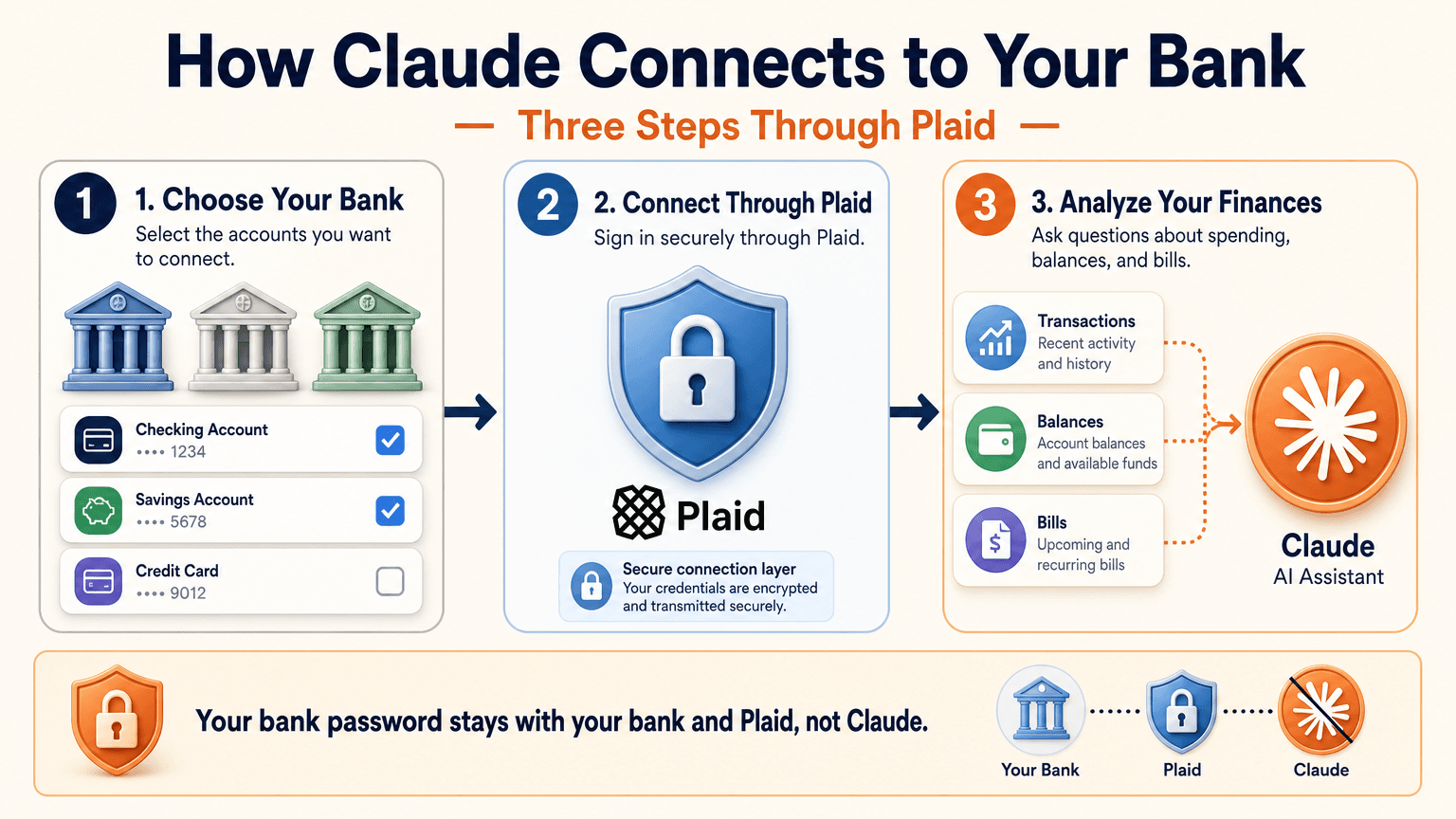
Link Your Bank Through Plaid
- Open Claude and select Personal Finance in the side menu. If you do not see it, check More.
- Select Get started and choose your goals or skip them.
- Select Link accounts with Plaid and review what Claude will be able to access.
- Sign in to your bank inside Plaid and choose the accounts to share.
- Return to Claude within 10 minutes and wait for your accounts to appear.
You sign in through Plaid, so Claude does not ask for or see your bank password. New transactions can take a few minutes to sync.
Use the Claude Personal Finance Dashboard
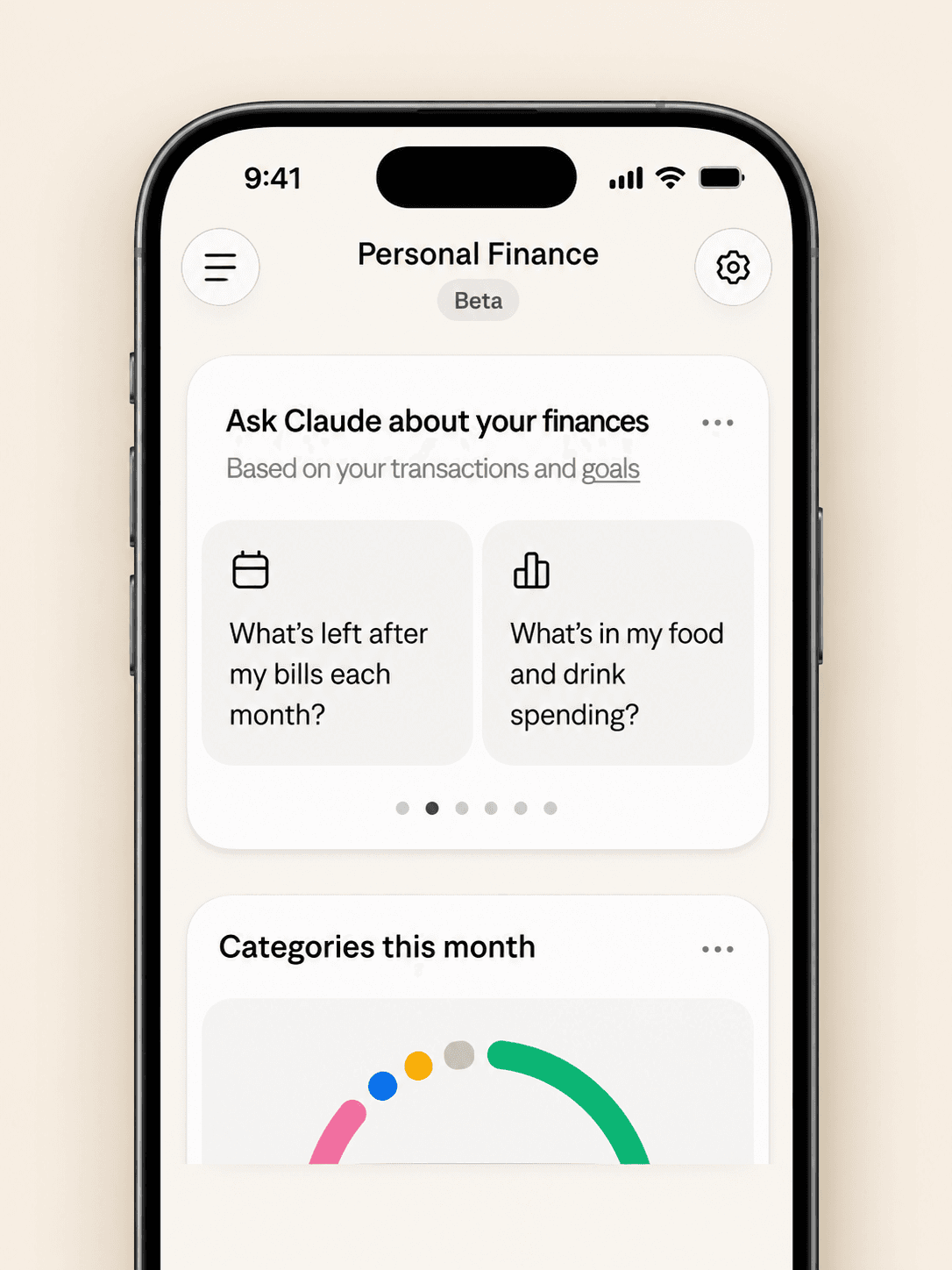
The dashboard puts spending, cash flow, accounts, subscriptions, and upcoming bills on one page. Widgets can be added, edited, removed, and reordered. Start with one account and one question, such as “Can I afford a trip this spring?”
Claude Personal Finance Prompts to Try
Spending and Bills
- “Where did my money go last month, grouped by category?”
- “Which subscriptions am I paying for, and which ones went up in price?”
- “What payments will leave my checking account before payday?”
Smarter Follow-Ups
- “Is that more than usual? Compare the last three months.”
- “Which transactions are behind this number?”
- “Do any charges look duplicated or unexpected?”
The second follow-up matters most. Anthropic itself advises asking which transactions sit behind a figure and checking important numbers with your bank.
Is Claude Personal Finance Safe?
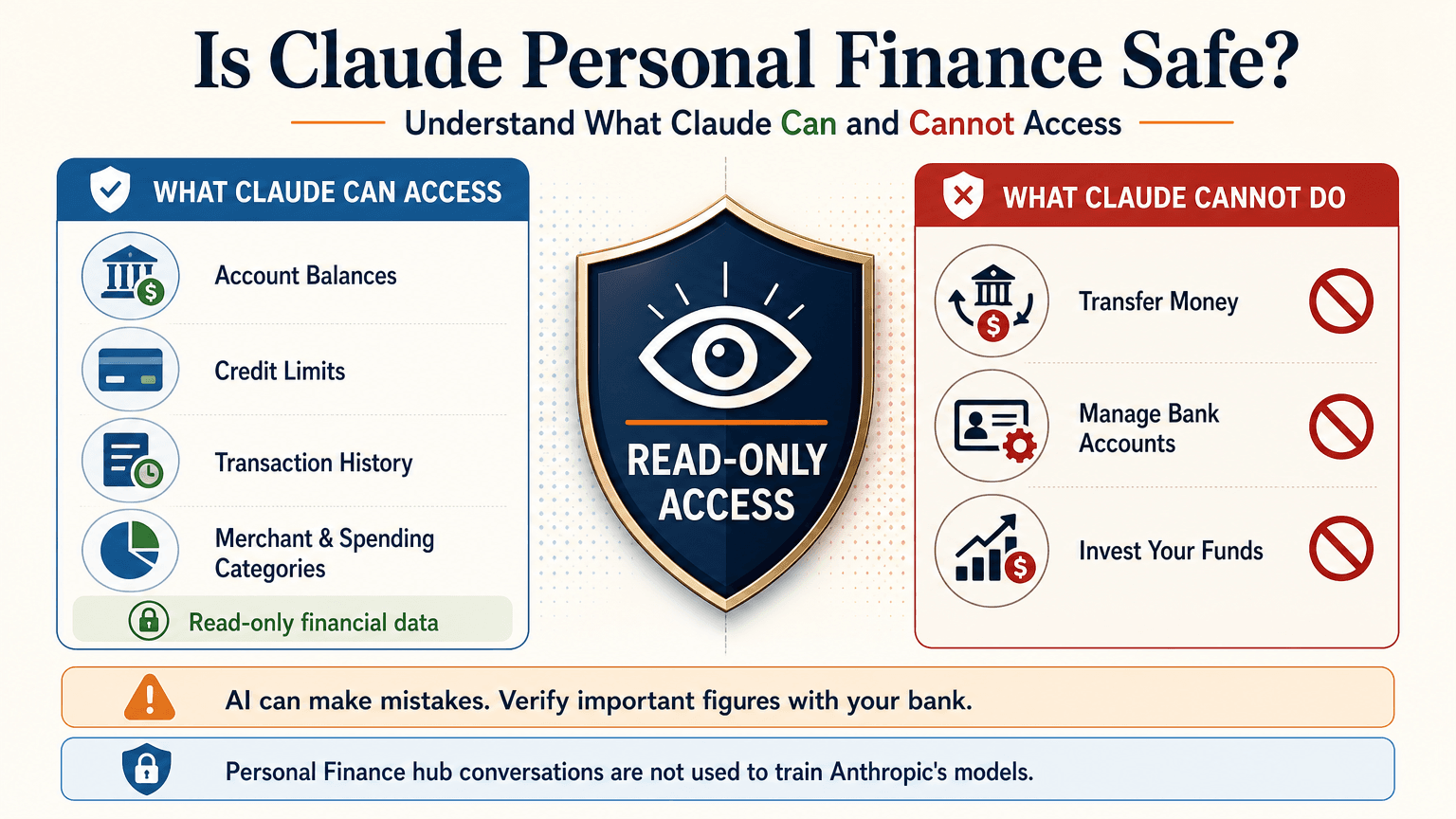
Read-Only Access Through Plaid
Claude cannot move, manage, or invest your money. Plaid handles the bank sign-in, so your password stays between you and your bank. You can unlink a bank at any time, and Claude can no longer see its data.
What Claude Can See
For the accounts you choose, Claude can read:
- Bank names, account names, types, and last four digits
- Balances and credit limits
- Up to 24 months of transactions with amount, date, merchant, category, and bank description
For investment accounts, loans, and cards, Claude reads balances and credit limits, not holdings, trades, or rates. Conversations in the Personal Finance hub are not used to train Anthropic’s models. For anything you share outside the hub, your normal privacy settings apply.
Accuracy Limits
Claude is AI and can make mistakes. Balances can be a day or two old. An account linked through two logins may be counted twice. Anthropic also says the feature is not designed to give investment advice. Treat Claude as an analyst that organizes and explains your data rather than the final decision maker.
Current Limitations
- US banks only
- No use of linked accounts in scheduled tasks, Cowork tasks, or Claude Code
- Not available on Free, Team, or Enterprise plans
- Saved dashboards are not yet included in data exports
Claude Personal Finance on Reddit: What People Did Before Launch
Personal Finance in Claude only just started rolling out, so real-world reviews of the official feature are still limited. For context, earlier discussions on r/ClaudeAI show how people were managing money with Claude before this feature existed. These are community workflows, not feedback on the new feature.
- Retirement planning: Running Monte Carlo simulations to estimate safe spending rates.
- Custom dashboards: Replacing spreadsheets with net worth and budget views.
- Fee hunting: Comparing bank statements with a fee schedule PDF to dispute wrong charges.
- Bank connections: A few users automated budget emails through Plaid or SimpleFIN, while many preferred uploading redacted CSV files to protect privacy.
That privacy split is useful to know. It is the same trade-off between convenience and control that the official feature and a CSV workflow now represent.
Use Claude Finance Outside the US With a CSV
You do not need account linking to get useful answers. A bank statement export contains the same raw material: dates, merchants, and amounts.
Build a Claude Personal Finance Tracker With 1min.AI
- Export one to three months of transactions from your bank as a CSV.
- Redact account numbers, full names, and addresses before sharing.
- Open Multi AI Chat in 1min.AI and select a Claude model.
- Paste or upload the cleaned data and run your prompt.
- Save the prompt in Prompt List so you can reuse it every month.
A starter prompt: “Categorize these transactions and total each category. List recurring subscriptions and flag duplicates or unusual fees. Show a table and mark any rows you are unsure about.”
1min.AI is not the official Personal Finance in Claude feature and does not connect to your bank. It gives you access to Claude models in one workspace, so this workflow works from any country. For model details, see the page for Claude Opus 5.5 and the guide to Claude Fable 5.1.
Which Claude Model Fits Which Money Task
| Task | Suggested model | Why |
|---|---|---|
| Categorizing many transactions | Claude 5.5 Haiku | Fast and low cost |
| Monthly budget and subscription audit | Claude 5.5 Sonnet | Balanced quality and cost |
| Retirement scenarios and multi-step analysis | Claude 5.5 Opus or 5.1 Fable | Stronger reasoning on complex questions |
Curious how the top models compare? Watch this test:
Claude Personal Finance Plugin Options
Community plugins can extend Claude for finance work. The Claude Cowork guide lists a Finance Tracker plugin for expense tracking and budget analysis. Review any plugin’s permissions before installing it, and never give a tool more financial data than the task needs.
Official Feature vs a CSV Workflow on 1min.AI
| Personal Finance in Claude | CSV workflow on 1min.AI | |
|---|---|---|
| Availability | US beta on paid plans | Global |
| Data source | Live accounts via Plaid | Redacted CSV or pasted rows |
| Dashboard | Built-in widgets | Tables and charts you request |
| Reusable prompts | Suggested questions | Prompt List |
| Model choice | Claude | Haiku, Sonnet, Opus, Fable, and more |
| Best for | Hands-off tracking | Privacy control and non-US users |
Teams that share finance prompts can use Shared Zone. Writers who turn results into reports can try Claude 4.6 for writing. 1min.AI is rated Excellent on Trustpilot and recognized on SourceForge, Slashdot, Capterra, Software Advice, and GetApp. If you want to see how an earlier flagship handles long analysis, try Claude 5 Fable.
Claude Personal Finance FAQ
What is Claude personal finance?
It is Anthropic’s beta feature, officially called Personal Finance in Claude. It links bank and card accounts through Plaid so you can ask about spending, balances, and bills.
Is Personal Finance in Claude free?
No. It is available on Pro, Max, and Ultra plans in the US. It is not available on Free, Team, or Enterprise.
Can Claude move my money?
No. Access is read-only. Claude cannot move, manage, or invest funds.
Can I use Claude finance features outside the US?
The official feature supports US banks only. Outside the US, you can upload a redacted CSV statement to a Claude model and prompt it for categories, subscriptions, and budgets.
Is Claude accurate with financial data?
It can make mistakes. Ask which transactions support each figure and verify key numbers with your bank.
Is this financial advice?
No. This article is educational and is not financial, tax, or investment advice. Consult a licensed professional for major decisions.
Final Thoughts
Claude personal finance turns scattered statements into clear answers. It is still a beta with strict regional limits and normal AI error risk. Use it to organize, categorize, and explain, and verify important figures yourself. If you live outside the US or prefer to keep bank access closed, a redacted CSV with the right Claude model delivers much of the same insight.
- #Information
Alternative
Scopri le migliori alternative a 1minAI e confronta funzionalità, prezzi e casi d'uso.

1min.AI vs OpenRouter
1min.AI vs. OpenRouter: Confronta il prodotto di creazione AI pronto all'uso con lo strumento API tecnico. Scopri se hai bisogno di uno studio creativo senza codice o di un hub di infrastruttura di codifica.
 Ngoc Hong

1min AI vs Buffer
Compare 1min.AI vs Buffer for Facebook content creation, AI writing, image generation, scheduling, pricing, and everyday marketing workflows.
Ngoc Hong
1min.AI vs. Hootsuite: Which Social Media Tool Fits Your Workflow?
Compare 1min.AI vs. Hootsuite to explore their AI content creation, social media publishing, analytics, pricing, and collaboration features. Find the right tool for your workflow.
Strumenti AI
Scopri i migliori strumenti AI per aumentare la produttività, la creatività e il lavoro quotidiano.

I 4 migliori strumenti AI economici per i fondatori di startup
Scopri i 4 migliori strumenti AI economici per i fondatori di startup per validare idee, costruire prodotti, creare contenuti e lanciarsi più velocemente senza spendere troppo.
 Tram Ta

POV: Hai 10+ post da creare ogni giorno
Scopri come costruire un workflow di contenuti AI che aiuta i content creator a produrre più velocemente 10+ post al giorno per i social con brainstorming AI, generazione di immagini e creazione di contenuti.
 Lien Anh Vu

Trasforma “Rendilo migliore” in contenuti migliori con l’AI
Usa l’AI per trasformare feedback client vaghi in revisioni chiare, ridurre le modifiche inutili e consegnare contenuti migliori più velocemente.
Lien Anh VuFunzionalità AI
Funzionalità AI complete che semplificano i flussi di lavoro, migliorano l'efficienza e consentono ai team di ottenere di più.

1minAI: Correttore grammaticale AI gratuito
Controlla la grammatica gratis con il correttore grammaticale AI di 1minAI. Trova errori di grammatica, ortografia e scrittura, migliora la chiarezza e rifinisci i tuoi contenuti in pochi secondi.
Tram Ta
Crea un sito web portfolio più velocemente con 1min.AI
Scopri come i creativi freelance possono usare 1min.AI per pianificare, scrivere, progettare e generare un sito web portfolio professionale più rapidamente, anche senza forti competenze di codifica.
Lien Anh Vu
Commento AI X gratuito
Crea commenti divertenti, spiritosi o perspicaci per Twitter con il nostro Generatore di commenti Twitter basato su AI. Aumenta il tuo engagement e distinguoti dalla massa!
Casi d'uso dell'IA
Una raccolta curata di casi d'uso dell'IA per il business, la produttività e le applicazioni specifiche del settore.

Il momento migliore per pubblicare su Instagram: una guida pratica per aumentare l’engagement
Scopri il momento migliore per pubblicare su Instagram, inclusi i giorni e gli orari migliori per diversi tipi di pubblico, oltre ai consigli per trovare il calendario di pubblicazione ideale per il tuo account.
Tram TaCrea un sito web portfolio più velocemente con 1min.AI
Scopri come i creativi freelance possono usare 1min.AI per pianificare, scrivere, progettare e generare un sito web portfolio professionale più rapidamente, anche senza forti competenze di codifica.
Lien Anh VuTrasforma “Rendilo migliore” in contenuti migliori con l’AI
Usa l’AI per trasformare feedback client vaghi in revisioni chiare, ridurre le modifiche inutili e consegnare contenuti migliori più velocemente.
Lien Anh VuTutorial AI
Impara a usare l'IA con tutorial pratici e passo dopo passo.

Offerte Black Friday per strumenti AI nel 2026
Scopri cosa offrono le offerte Black Friday per strumenti AI nel 2026. Scopri come ottenere l’offerta lifetime di 1min.AI tramite AppSumo, Dealify, Stack Social e verificarla su Trustpilot, Slashdot e Software Advice.
 Hang Nguyen

Vivi la Fashion Week a $0 con 1minAI Face Swap
Vivi la Fashion Week a $0 con 1minAI Face Swap. Carica la tua foto, scegli un video di Fashion Week e crea il tuo momento fashion con l’AI.
Ngoc Hong
Reel virali in pochi minuti: come usare il Text-to-Speech di 1minAI per voiceover satirici
Scopri come gli admin di pagine satiriche usano la funzione Text-to-Speech di 1minAI per generare subito voiceover da telegiornale e drammatici per TikTok, Shorts e Instagram Reels.
Guide sull'IA
Impara l'IA più velocemente con guide pratiche, esempi reali e migliori pratiche attuabili.

Acquista in sicurezza strumenti AI online: guida al Black Friday 2026
Scopri come trovare e assicurarti le migliori offerte Black Friday sull’AI online. Impara strategie esperte per evitare truffe, combattere la subscription fatigue e verificare il software.
Hang Nguyen
Come avviare un business AI senza partire da zero
Scopri come avviare un business AI, validare la tua idea e lanciare più velocemente senza costruire da zero costose infrastrutture AI.
Ngoc Hong
AI Fashion Video Generator With Seedance 2.5 and HeyGen
Learn how to create AI fashion videos with Seedance 2.5 and HeyGen. Turn outfit photos into cinematic videos featuring your own face with 1min.AI.
Lien Anh VuSoluzioni AI
Sfoglia le migliori soluzioni AI per automazione, codifica, ricerca, produttività, assistenza clienti, marketing e flussi di lavoro aziendali.

Generatore AI Gratuito di Tatuaggi: Design Personalizzati
Trasforma qualsiasi idea in un design tatuaggio personalizzato con il generatore AI gratuito di 1min.AI. Descrivi la tua idea, scegli uno stile e scarica in pochi secondi.
 Trang Tran
Acquista in sicurezza strumenti AI online: guida al Black Friday 2026
Scopri come trovare e assicurarti le migliori offerte Black Friday sull’AI online. Impara strategie esperte per evitare truffe, combattere la subscription fatigue e verificare il software.
Hang NguyenVivi la Fashion Week a $0 con 1minAI Face Swap
Vivi la Fashion Week a $0 con 1minAI Face Swap. Carica la tua foto, scegli un video di Fashion Week e crea il tuo momento fashion con l’AI.
Ngoc HongModelli di IA
Esplora i modelli di IA leader nel mondo in un unico posto.

Free AI Chat With Claude Fable 5.2 On 1min.AI
Free AI chat with Claude Fable 5.2 on 1min.AI. Compare Fable 5.2 vs Opus 5.5, see Fable 5.2 benchmarks, and start chatting in minutes.
Trang Tran
GPT-6.2 Sol: Specs, Pricing & Free Access
Explore GPT-6.2 Sol specs, pricing, and how it compares with GPT-6.1 Sol and Claude Opus 5.5, then try it free in 1min.AI Multi AI Chat.
Trang Tran
GPT 6.2 Astra: Pricing, Benchmarks & Free Access
GPT 6.2 Astra release date, pricing, Reddit feedback and Opus 5.5 comparison. See what it does best and chat with it on 1min.AI for free.
Trang TranConfronti di IA
Confronta strumenti, modelli e piattaforme AI per trovare la soluzione migliore per le tue esigenze.

Gemini 4 Neon vs Hydrogen: Specs, Price & Picks
Gemini 4 Neon vs Hydrogen, Carbon and Argon: compare price, benchmarks and use cases to pick the right model, then test them side by side on 1min.AI.
Trang Tran
Kling AI Vs Veo 3: Quale modello vince?
Kling AI vs Veo 3: confronta movimento, audio nativo, prezzi e piani gratuiti per vedere quale generatore video AI vince per il tuo progetto - prova entrambi su 1min.AI.
Trang Tran
Confronto DeepSeek V4 Pro vs Flash
Confronta le metriche di DeepSeek V4 Pro vs DeepSeek V4 Flash. Ottimizza le tue app agentiche e migliora la verifica dei fatti AI su 1min.ai oggi stesso.
Integrazioni AI
Integra l'IA senza soluzione di continuità con gli strumenti che già utilizzi per automatizzare il lavoro e aumentare la produttività.
POV: Hai 10+ post da creare ogni giorno
Scopri come costruire un workflow di contenuti AI che aiuta i content creator a produrre più velocemente 10+ post al giorno per i social con brainstorming AI, generazione di immagini e creazione di contenuti.
Lien Anh Vu
Smetti di passare da un'app AI all'altra: come l'integrazione AI trasforma l'Employer Branding
Scopri come l'integrazione dell'IA aiuta i team HR a semplificare l'employer branding combinando scrittura AI, documenti, immagini, video e più modelli AI in un unico spazio di lavoro.
Tram Ta
AI API Aggregator Spiegato per gli Sviluppatori
Un aggregatore di API AI fornisce agli sviluppatori un'unica API unificata per chiamare più modelli AI, riducendo i tempi di integrazione e il vendor lock-in.
Trang TranAI per le industrie
Trova i migliori strumenti e flussi di lavoro AI per sanità, finanza, istruzione, legale, manifatturiero, vendita al dettaglio, immobiliare e altro ancora.

Voice Cloning AI Free: How to Clone Any Voice Online in Minutes
Try voice cloning AI free with 1min.AI. Upload a 5-second clip, pick an ElevenLabs model, choose from 32 languages, and turn text to speech in your own voice.
Trang TranClaude Personal Finance Setup and Safety Guide
Claude personal finance explained: how Personal Finance in Claude works and what Claude finance can see. Plus a safe CSV method for non-US users.
Trang Tran
Free AI Image Editor With Prompt No Restrictions
Looking for a free AI image editor with prompt no restrictions? Edit backgrounds, objects and text by typing, no watermark. Try 1min.AI’s flexible editor now.
Trang TranAgenti AI
Scopri ed esegui agenti AI per automatizzare le attività nel tuo lavoro e nella vita quotidiana.
1minAI: Correttore grammaticale AI gratuito
Controlla la grammatica gratis con il correttore grammaticale AI di 1minAI. Trova errori di grammatica, ortografia e scrittura, migliora la chiarezza e rifinisci i tuoi contenuti in pochi secondi.
Tram Ta
Agenti AI per Facebook
Usa un Agente AI per Facebook per creare contenuti, generare immagini, programmare i post e pubblicare dai tuoi documenti e dalle tue conversazioni.
Ngoc Hong
AI Agent vs AI Assistant: Quale fa davvero risparmiare più tempo ai designer?
Scopri la differenza tra AI Agent e AI Assistant e quale soluzione aiuta i designer ad automatizzare il lavoro ripetitivo, ridurre le revisioni e risparmiare più tempo.
Lien Anh VuFlussi di lavoro AI
Esplora i flussi di lavoro AI pronti all'uso per produttività, marketing, vendite, supporto e altro ancora.
POV: Hai 10+ post da creare ogni giorno
Scopri come costruire un workflow di contenuti AI che aiuta i content creator a produrre più velocemente 10+ post al giorno per i social con brainstorming AI, generazione di immagini e creazione di contenuti.
Lien Anh VuAI Fashion Video Generator With Seedance 2.5 and HeyGen
Learn how to create AI fashion videos with Seedance 2.5 and HeyGen. Turn outfit photos into cinematic videos featuring your own face with 1min.AI.
Lien Anh Vu
Is Seedance 2.5 the Best AI Video Generator of 2026?
Is Seedance 2.5 the best AI video generator in 2026? Explore its features, compare it with Kling and Veo, and learn how to create AI videos on 1min.AI.
Lien Anh VuNewsletter
Innovazioni settimanali di IA con 1minAI

🔮 Weekly AI Innovations #145: X Content Agent & GPT 6.1 Terra on 1min.ai
Scale viral reach with the X Content Agent on 1min.ai. Discover an end-to-end 4-stage pipeline with zero token burn, plus the launch of GPT 6.1 Terra.
Hang Nguyen
🔮 Weekly AI Innovations #144: LinkedIn Content Agent: Complete B2B Publishing Pipeline
Scale B2B influence with the LinkedIn Content Agent on 1min.ai. Discover an end-to-end 4-stage pipeline with zero redundant token burn and 1-click publishing.
Hang Nguyen
🔮 Weekly AI Innovations #146: Mistral 3.5, Qwen Image & Cohere A+ are ready on 1min.ai
Deploy Mistral Large 3, Qwen Image 3.0, and Cohere Command A+ on 1min.ai. Boost RAG accuracy and cut visual generation latency in one unified AI workspace.
Hang Nguyen