
Free AI Image Editor With Prompt No Restrictions

Trang Tran
20 de noviembre de 2026

Looking for a free AI image editor with prompt no restrictions? Edit backgrounds, objects and text by typing, no watermark. Try 1min.AI’s flexible editor now.
You have a photo and a clear idea of how it should look. What you do not have is time for layers, masks and menus that only accept five preset commands. A free AI image editor with prompt no restrictions solves that. You type the change in plain English and the edit appears in seconds: a new background, a different jacket color, a stray object gone, sale text rewritten.
1min.AI puts these prompt-based tools in one workspace. Open an image, describe the edit and download the result with no watermark.
Quick answer: An AI image editor with prompt no restrictions lets you describe any edit in your own words instead of choosing from a locked list of actions. With 1min.AI you can replace backgrounds, swap objects, edit text inside images, repaint masked areas, expand and upscale, all from one place. Legal rules and each AI model’s safety policies still apply.
What Does “No Restrictions” Mean in an AI Image Editor?
Most people searching for an unrestricted AI image editor are not trying to break rules. They are tired of tools that get in the way. In practice, “no restrictions” usually means four things:
| What you run into | What “no restrictions” should mean |
|---|---|
| A short list of approved commands | Full-sentence prompts: object, position, result |
| One action available, the rest locked | Many edit types on the same image |
| Watermarked downloads | Clean results you can use right away |
| Registration before you can test anything | Open the tool and start editing |
A modern AI image editor reads your picture and your sentence together, works out which pixels need to change and leaves the rest alone. That is why one plain-language prompt can replace hours of manual selection.
Where the Limits Still Are
“No restrictions” describes freedom of workflow, not freedom from the law. Illegal content, content involving minors, and non-consensual or deceptive images of real people are off limits with any responsible provider. 1min.AI follows the usage policies of the AI models it offers. Inside those boundaries, you decide what to change and how to say it.
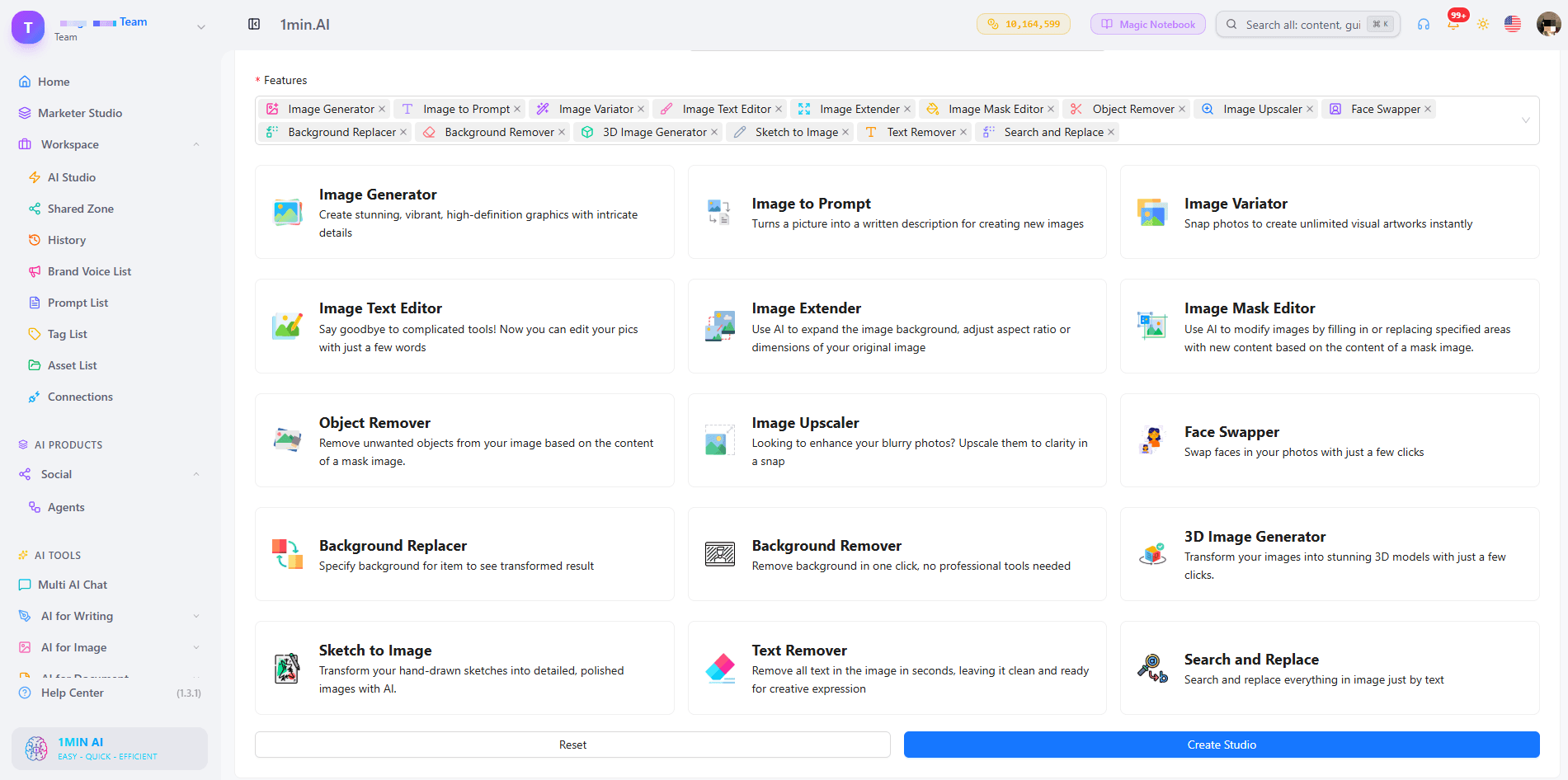
What Can You Edit With a Prompt in 1min.AI?
| Edit goal | Example prompt | 1min.AI tool |
|---|---|---|
| Swap an object or outfit | “Replace the blue jacket with a red leather jacket” | Search and Replace |
| Build a new scene | “Place the sneaker on a wet city street at dusk” | Background Replacer |
| Fix one precise area | Paint the area, then “Add a small window with a plant” | Image Mask Editor |
| Change wording in a design | “Change 20% OFF to 30% OFF” | Image Text Editor |
| Clean up clutter | “Remove the person behind the table” | Object Remover |
| Resize or sharpen | Widen the canvas, then upscale | Image Extender, Image Upscaler |
Replace Objects and Outfits With Search and Replace
Name what you want to find and what should replace it. The tool handles the selection, so you can run object search and replace edits, such as changing a sofa’s fabric or a product’s packaging color, without drawing an outline. Add “keep everything else unchanged” to protect the rest of the scene. For a deeper walkthrough, see this guide to object search and replace.
Swap Backgrounds Without Cutting Anything Out
Background Replacer removes the old scene and builds a new one from your description. Mention the place, time of day and mood, for example “sunlit studio with a soft white backdrop”. Here is a quick walkthrough:
Repaint Only the Area You Choose
The Image Mask Editor is for edits that need precision. Paint over a region, then describe what belongs there. This kind of mask-based editing keeps faces, logos and everything outside the mask untouched.
Edit Text Inside an Image
Image Text Editor lets you rewrite text that already sits inside a banner, label or screenshot. Type the new wording and the tool works to match the surrounding style. It is a fast way to update prices, dates and captions without rebuilding the design.
Start From Scratch, Then Edit
No source photo yet? Generate a base image first, then refine it with the editing tools. Creating and editing in one workspace means you never export, re-upload and start over.
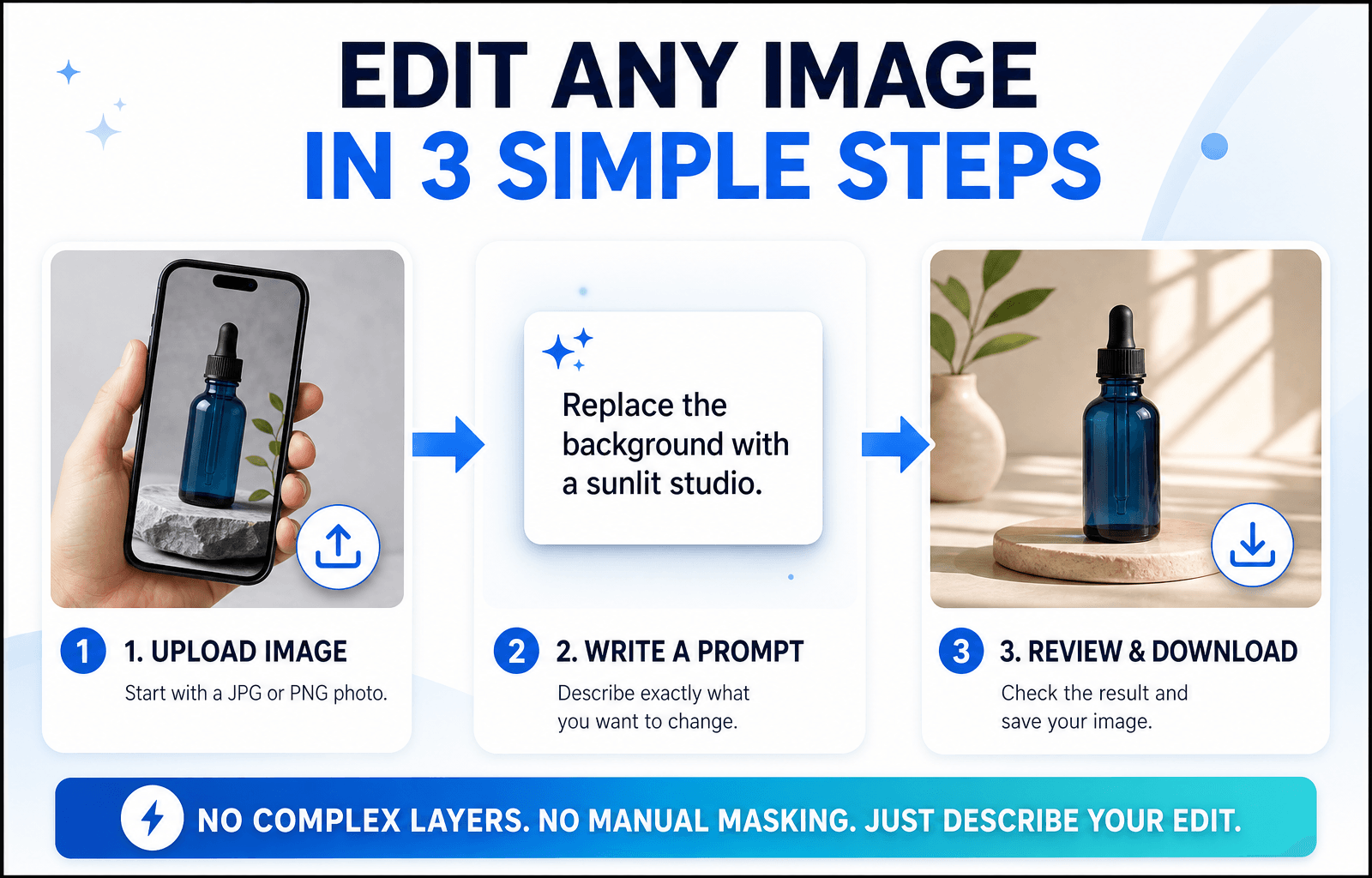
How to Edit an Image With a Prompt in 3 Steps
Step 1: Open the Editor and Upload Your Image
Choose the tool that matches your goal and upload a JPG or PNG. A sharp, well-lit photo with a clear subject gives the AI more to work with, so your edit looks more accurate.
Step 2: Write a Specific Prompt
Specific beats clever. Say what should change and what should stay the same.
The Prompt Formula
Object + Action + Style or Lighting + What stays unchanged
Three Prompts You Can Copy
- “Change the red jacket on the left to dark green denim. Keep the face and background unchanged.”
- “Replace the background with a sunlit studio and a soft white backdrop. Keep natural shadows under the product.”
- “Remove the cables on the desk and fill the area with the same wood texture.”
Edits usually miss because the prompt is too broad. This short video covers the most common mistakes:
Step 3: Review, Refine and Download
Zoom in and check edges, hands, text and shadows. If one detail is off, run a second prompt on that detail instead of stacking several requests in one line. Then download your image, which has no watermark. Save prompts that worked to your Prompt List so you can reuse them.
Editing People, Products or Landscapes: Which Setup Fits?
Photos of People
Describe clothing, hair color or background changes and add “keep the face unchanged”. For small fixes, use the mask tool so only the chosen area changes.
Product Photos
Swap backgrounds, remove reflections and recolor packaging while keeping labels sharp. Consistent backgrounds help a whole catalog look uniform.
Landscapes and Travel Shots
Remove crowds, adjust the sky or extend the frame to a wider format. Mention light and weather (“golden hour, clear sky”) so the edit blends naturally.
Browser Editor or Local Open-Source Model?
Open-source models run on your own computer. They offer deep control, but you manage installation, hardware and updates. A browser-based editor like 1min.AI needs none of that: open a tab, choose a tool and edit. If you want to start quickly or work across devices, the browser route is simpler. If you enjoy tuning models yourself, a local setup may suit you better.
What to Look for in the Best Free AI Image Editor With No Restrictions Online
Use this checklist for any tool you test:
- Full-sentence prompts rather than a fixed command menu
- Several edit types on the same image
- Precise control, such as masks for local changes
- Clean exports without a watermark
- Reusable prompts and assets so repeat work gets faster
- Clear policies about what the models can and cannot do
1min.AI covers each point in one workspace, with tools for text editing, object swapping, backgrounds, masks, extending and upscaling. AI Studio, Prompt List and Asset List are ready to use, and you can add a Shared Zone and History when you create an account.
You can also check how others rate the platform. 1min.AI holds SourceForge and Slashdot Top Business Software badges, is rated Excellent on Trustpilot and is listed on Capterra, Software Advice and GetApp.


FAQ
What is an AI image editor with prompt no restrictions?
It is an editor where you describe any change in your own words instead of picking from a locked list of actions. It still follows legal and model safety rules.
Is there a free AI image editor with prompt no restrictions?
Yes. You can try 1min.AI’s image editing tools free and download results without a watermark.
Does “no restrictions” mean anything goes?
No. Illegal content, content involving minors and deceptive or non-consensual images of real people are not allowed. Everything else is up to your creativity.
Which 1min.AI tool should I use to change text in an image?
Use Image Text Editor. Type the new wording and it updates the text inside the picture.
Do I need design skills?
No. If you can describe the change the way you would to a designer, you can edit with a prompt.
How do I write better edit prompts?
Name the object, state the action and add what should stay unchanged. Make one change per pass for the cleanest result.
Ready to Edit Your First Image?
Your next edit is one sentence away. Upload an image, type what you want to change and see the result in seconds.
- #Transaction
Alternativas
Descubre las mejores alternativas a 1minAI y compara características, precios y casos de uso.

1min.AI vs OpenRouter
1min.AI vs. OpenRouter: Compare el producto de creación de IA listo para usar con la herramienta API técnica. Descubra si necesita un estudio creativo sin código o un centro de infraestructura de codificación.
 Ngoc Hong

1min AI vs Buffer
Compare 1min.AI vs Buffer for Facebook content creation, AI writing, image generation, scheduling, pricing, and everyday marketing workflows.
Ngoc Hong
1min.AI vs. Hootsuite: Which Social Media Tool Fits Your Workflow?
Compare 1min.AI vs. Hootsuite to explore their AI content creation, social media publishing, analytics, pricing, and collaboration features. Find the right tool for your workflow.
Herramientas de IA
Descubre las mejores herramientas de IA para aumentar la productividad, la creatividad y el trabajo diario.

Las 4 herramientas de IA asequibles principales para fundadores de startups
Descubre las 4 herramientas de IA asequibles principales para fundadores de startups para validar ideas, construir productos, crear contenido y lanzar más rápido sin gastar de más.
 Tram Ta

POV: Tienes más de 10 publicaciones que hacer cada día
Aprende a crear un flujo de trabajo de contenido con IA que ayuda a los creadores a producir más de 10 publicaciones al día más rápido con lluvia de ideas, generación de imágenes y creación de contenido con IA.
 Lien Anh Vu

Convierte “Hazlo mejor” en mejor contenido con IA
Usa la IA para convertir comentarios vagos de clientes en revisiones claras, reducir ediciones innecesarias y entregar mejor contenido más rápido.
Lien Anh VuFunciones de IA
Funciones de IA completas que optimizan los flujos de trabajo, mejoran la eficiencia y capacitan a los equipos para lograr más.

1minAI: Corrector gramatical con IA gratis
Comprueba la gramática gratis con el corrector gramatical con IA de 1minAI. Encuentra errores de gramática, ortografía y redacción, mejora la claridad y pule tu contenido en segundos.
Tram Ta
Cree un sitio web de portfolio más rápido con 1min.AI
Aprenda cómo los creativos freelancers pueden usar 1min.AI para planificar, escribir, diseñar y generar un sitio web de portfolio profesional más rápido, incluso sin sólidas habilidades de codificación.
Lien Anh Vu
Comentario de IA X gratuito
Crea comentarios divertidos, ingeniosos o perspicaces para Twitter con nuestro Generador de comentarios de Twitter impulsado por IA. ¡Aumenta tu engagement y destaca entre la multitud!
Casos de Uso de la IA
Una colección curada de casos de uso de IA para negocios, productividad y aplicaciones específicas de la industria.

Mejor momento para publicar en Instagram: una guía práctica para mejorar la interacción
Descubre el mejor momento para publicar en Instagram, incluidos los mejores días y horas para distintas audiencias, además de consejos para encontrar el horario ideal para tu cuenta.
Tram TaCree un sitio web de portfolio más rápido con 1min.AI
Aprenda cómo los creativos freelancers pueden usar 1min.AI para planificar, escribir, diseñar y generar un sitio web de portfolio profesional más rápido, incluso sin sólidas habilidades de codificación.
Lien Anh VuConvierte “Hazlo mejor” en mejor contenido con IA
Usa la IA para convertir comentarios vagos de clientes en revisiones claras, reducir ediciones innecesarias y entregar mejor contenido más rápido.
Lien Anh VuTutoriales de IA
Aprende a usar la IA con tutoriales prácticos y paso a paso.

Ofertas de herramientas de IA para Black Friday en 2026
Descubre qué ofrecen las ofertas de herramientas de IA para Black Friday 2026. Averigua cómo conseguir la oferta de por vida de 1min.AI a través de AppSumo, Dealify, Stack Social, y verifica en Trustpilot, Slashdot y Software Advice.
 Hang Nguyen

Experimenta la Semana de la Moda por $0 con 1minAI Face Swap
Experimenta la Semana de la Moda por $0 con 1minAI Face Swap. Sube tu foto, elige un video de la Semana de la Moda y crea tu propio momento de moda con IA.
Ngoc Hong
Reels virales en minutos: cómo usar el texto a voz de 1minAI para locuciones satíricas
Aprende cómo los administradores de páginas satíricas usan la función de texto a voz de 1minAI para generar al instante locuciones de presentador de noticias y dramáticas para TikToks, Shorts e Instagram Reels.
Guías de IA
Aprenda IA más rápido con guías prácticas, ejemplos del mundo real y mejores prácticas aplicables.

Compra con seguridad herramientas de IA online: Guía de Black Friday 2026
Descubre cómo encontrar y asegurar las mejores ofertas de Black Friday en IA online. Aprende estrategias de expertos para evitar estafas, combatir la fatiga de suscripciones y verificar software.
Hang Nguyen
Cómo iniciar un negocio de IA sin construir desde cero
Aprende cómo iniciar un negocio de IA, validar tu idea y lanzar más rápido sin construir desde cero una infraestructura de IA costosa.
Ngoc Hong
AI Fashion Video Generator With Seedance 2.5 and HeyGen
Learn how to create AI fashion videos with Seedance 2.5 and HeyGen. Turn outfit photos into cinematic videos featuring your own face with 1min.AI.
Lien Anh VuSoluciones de IA
Explore las mejores soluciones de IA para automatización, codificación, investigación, productividad, atención al cliente, marketing y flujos de trabajo empresariales.

Generador Gratis de Tatuajes con IA: Diseños Personalizados
Convierte cualquier idea en un diseño de tatuaje personalizado con el generador gratis de tatuajes con IA de 1min.AI. Describe tu idea, elige un estilo y descárgalo en segundos.
 Trang Tran
Compra con seguridad herramientas de IA online: Guía de Black Friday 2026
Descubre cómo encontrar y asegurar las mejores ofertas de Black Friday en IA online. Aprende estrategias de expertos para evitar estafas, combatir la fatiga de suscripciones y verificar software.
Hang NguyenExperimenta la Semana de la Moda por $0 con 1minAI Face Swap
Experimenta la Semana de la Moda por $0 con 1minAI Face Swap. Sube tu foto, elige un video de la Semana de la Moda y crea tu propio momento de moda con IA.
Ngoc HongModelos de IA
Explore los modelos de IA líderes en el mundo en un solo lugar.

Free AI Chat With Claude Fable 5.2 On 1min.AI
Free AI chat with Claude Fable 5.2 on 1min.AI. Compare Fable 5.2 vs Opus 5.5, see Fable 5.2 benchmarks, and start chatting in minutes.
Trang Tran
GPT-6.2 Sol: Specs, Pricing & Free Access
Explore GPT-6.2 Sol specs, pricing, and how it compares with GPT-6.1 Sol and Claude Opus 5.5, then try it free in 1min.AI Multi AI Chat.
Trang Tran
GPT 6.2 Astra: Pricing, Benchmarks & Free Access
GPT 6.2 Astra release date, pricing, Reddit feedback and Opus 5.5 comparison. See what it does best and chat with it on 1min.AI for free.
Trang TranComparativas de IA
Compare herramientas, modelos y plataformas de IA para encontrar la que mejor se adapte a sus necesidades.

Gemini 4 Neon vs Hydrogen: Specs, Price & Picks
Gemini 4 Neon vs Hydrogen, Carbon and Argon: compare price, benchmarks and use cases to pick the right model, then test them side by side on 1min.AI.
Trang Tran
Kling AI vs Veo 3: ¿qué modelo gana?
Kling AI vs Veo 3: compara movimiento, audio nativo, precios y planes gratis para ver qué generador de video con IA gana para tu proyecto - prueba ambos en 1min.AI.
Trang Tran
Comparación DeepSeek V4 Pro vs. Flash
Compare las métricas de DeepSeek V4 Pro vs. DeepSeek V4 Flash. Optimice sus aplicaciones de agentes y mejore la verificación de hechos de IA en 1min.ai hoy mismo.
Integraciones de IA
Integre la IA sin problemas con las herramientas que ya utiliza para automatizar el trabajo y aumentar la productividad.
POV: Tienes más de 10 publicaciones que hacer cada día
Aprende a crear un flujo de trabajo de contenido con IA que ayuda a los creadores a producir más de 10 publicaciones al día más rápido con lluvia de ideas, generación de imágenes y creación de contenido con IA.
Lien Anh Vu
Deja de cambiar entre aplicaciones de IA: Cómo la integración de IA transforma el Employer Branding
Descubre cómo la integración de IA ayuda a los equipos de RRHH a optimizar el employer branding al combinar escritura con IA, documentos, imágenes, vídeo y múltiples modelos de IA en un solo espacio de trabajo.
Tram Ta
Explicación del Agregador de API de IA para Desarrolladores
Un agregador de API de IA ofrece a los desarrolladores una única API unificada para llamar a múltiples modelos de IA, reduciendo el tiempo de integración y el bloqueo del proveedor.
Trang TranIA para Industrias
Encuentre las mejores herramientas y flujos de trabajo de IA para atención médica, finanzas, educación, legal, manufactura, comercio minorista, bienes raíces y más.

Voice Cloning AI Free: How to Clone Any Voice Online in Minutes
Try voice cloning AI free with 1min.AI. Upload a 5-second clip, pick an ElevenLabs model, choose from 32 languages, and turn text to speech in your own voice.
Trang Tran
Claude Personal Finance Setup and Safety Guide
Claude personal finance explained: how Personal Finance in Claude works and what Claude finance can see. Plus a safe CSV method for non-US users.
Trang TranFree AI Image Editor With Prompt No Restrictions
Looking for a free AI image editor with prompt no restrictions? Edit backgrounds, objects and text by typing, no watermark. Try 1min.AI’s flexible editor now.
Trang TranAgentes de IA
Descubre y ejecuta agentes de IA para automatizar tareas en tu trabajo y vida diaria.
1minAI: Corrector gramatical con IA gratis
Comprueba la gramática gratis con el corrector gramatical con IA de 1minAI. Encuentra errores de gramática, ortografía y redacción, mejora la claridad y pule tu contenido en segundos.
Tram Ta
Agentes de IA para Facebook
Usa un Agente de IA para Facebook para crear contenido, generar imágenes, programar publicaciones y publicar desde tus documentos y conversaciones.
Ngoc Hong
AI Agent vs AI Assistant: ¿Cuál realmente ahorra más tiempo a los diseñadores?
Aprende la diferencia entre AI Agent y AI Assistant y descubre qué solución ayuda a los diseñadores a automatizar el trabajo repetitivo, reducir revisiones y ahorrar más tiempo.
Lien Anh VuFlujos de trabajo de IA
Explore flujos de trabajo de IA listos para usar para productividad, marketing, ventas, soporte y más.
POV: Tienes más de 10 publicaciones que hacer cada día
Aprende a crear un flujo de trabajo de contenido con IA que ayuda a los creadores a producir más de 10 publicaciones al día más rápido con lluvia de ideas, generación de imágenes y creación de contenido con IA.
Lien Anh VuAI Fashion Video Generator With Seedance 2.5 and HeyGen
Learn how to create AI fashion videos with Seedance 2.5 and HeyGen. Turn outfit photos into cinematic videos featuring your own face with 1min.AI.
Lien Anh Vu
Is Seedance 2.5 the Best AI Video Generator of 2026?
Is Seedance 2.5 the best AI video generator in 2026? Explore its features, compare it with Kling and Veo, and learn how to create AI videos on 1min.AI.
Lien Anh VuBoletín informativo
Innovaciones semanales de IA con 1minAI

🔮 Weekly AI Innovations #145: X Content Agent & GPT 6.1 Terra on 1min.ai
Scale viral reach with the X Content Agent on 1min.ai. Discover an end-to-end 4-stage pipeline with zero token burn, plus the launch of GPT 6.1 Terra.
Hang Nguyen
🔮 Weekly AI Innovations #144: LinkedIn Content Agent: Complete B2B Publishing Pipeline
Scale B2B influence with the LinkedIn Content Agent on 1min.ai. Discover an end-to-end 4-stage pipeline with zero redundant token burn and 1-click publishing.
Hang Nguyen
🔮 Weekly AI Innovations #146: Mistral 3.5, Qwen Image & Cohere A+ are ready on 1min.ai
Deploy Mistral Large 3, Qwen Image 3.0, and Cohere Command A+ on 1min.ai. Boost RAG accuracy and cut visual generation latency in one unified AI workspace.
Hang Nguyen