
TikTok Studio Analytics Tips for Better Content Performance

Lien Anh Vu
20 de noviembre de 2026
Learn how to use TikTok Studio Analytics to track views, watch time, and engagement. Turn your insights into better TikTok content with practical tips.
Ever wondered why one TikTok video gets thousands of views while another barely gets noticed?
Instead of guessing, you can use TikTok Studio to see what's working and what needs improvement.
The good news? You don't need to understand complicated analytics. A few simple numbers can help you create better videos.
Here's how to get started.
1. How to Check Your TikTok Studio Analytics
TikTok Studio is TikTok's free tool for managing content and tracking video performance.
To find your analytics:
- Open TikTok and go to your profile.
- Tap the menu (☰) and select TikTok Studio.
- Open Analytics.
- Check your video views, watch time, and audience activity.
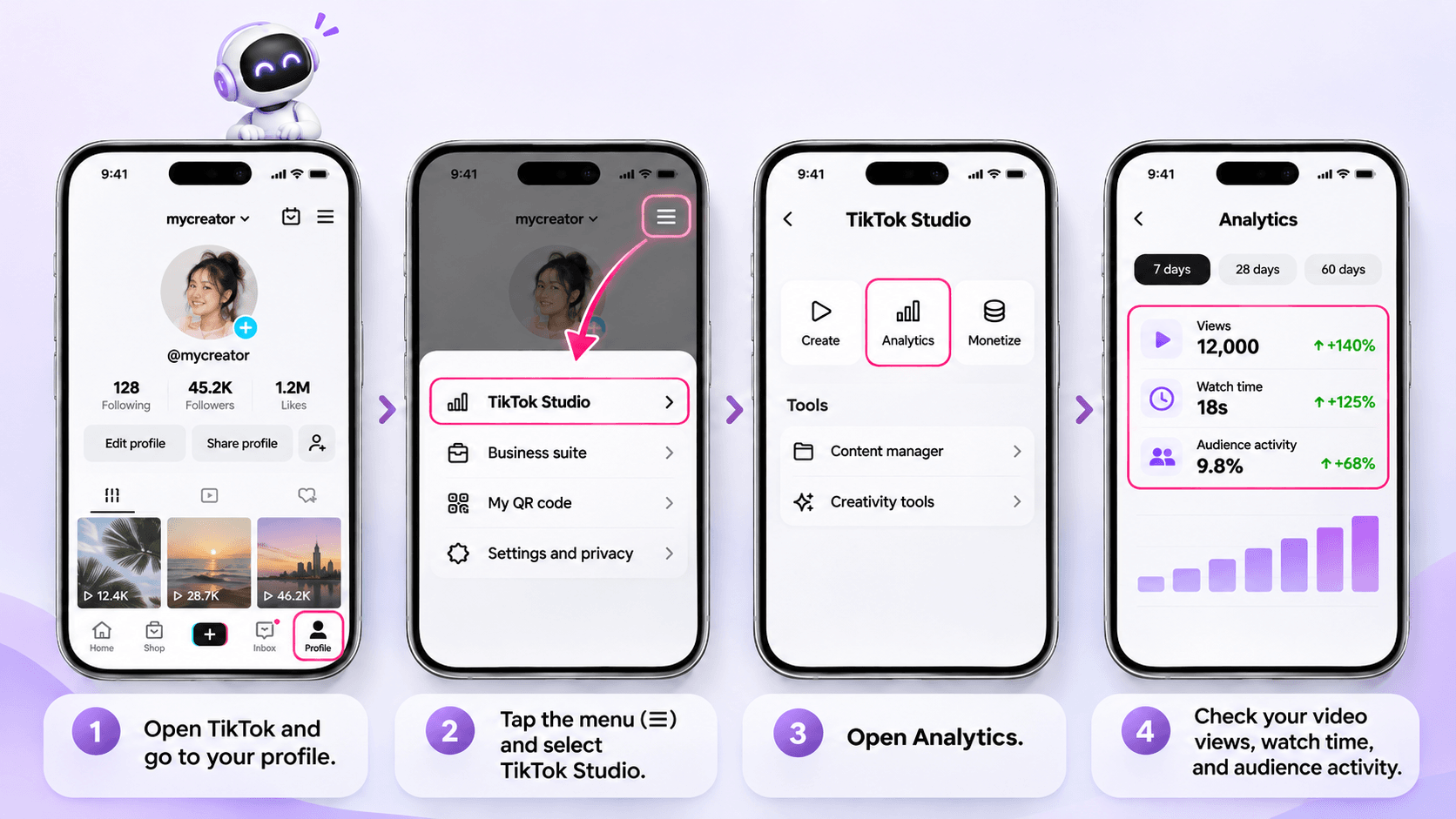
You can also use TikTok Studio on desktop.
Not sure which numbers matter? Start with these four.
| Metric | What It Tells You | What You Can Do |
|---|---|---|
| Views | Which videos attract attention | Explore similar topics |
| Watch Time | How long people keep watching | Make your opening more interesting |
| Retention | Where viewers stop watching | Remove slow or unnecessary parts |
| Comments & Shares | What people enjoy or find useful | Create more content around those interests |
For a closer look at these metrics, check Buffer's TikTok Analytics Guide.
2. Turn Your Analytics Into Better Video Ideas
Let's say you're a fashion influencer.
You posted two 30-second videos:
| Video A | Video B | |
|---|---|---|
| Content | Daily outfit vlog | Outfit transformation |
| Views | 5,000 | 12,000 |
| Average Watch Time | 8 seconds | 18 seconds |
These are example numbers for illustration.
Video B received more views, and people watched it for longer.
What's different?
Maybe Video B showed the outfit transformation immediately, while Video A started with a long introduction.
What should you try next?
Create another outfit transformation, but test a stronger opening.
For example:
Instead of:
"Hey everyone! Today I'm going to show you my outfit..."
Try:
"One jacket, three completely different looks!"
The second hook gets to the point faster.
You can use this simple approach for almost any niche:
- Beauty: Viewers leave early? Show the makeup result first.
- Fitness: Workout tutorials get more saves? Try another beginner routine.
- Lifestyle: Followers keep asking questions? Turn those questions into videos.
Don't change everything at once. Try one improvement, then compare the results.
For more examples of using performance data, explore Later's TikTok Analytics Guide.
3. Create Better TikTok Videos With 1min.AI
Once you know what needs improvement, the next challenge is coming up with a better idea.
This is where 1min.AI Multi AI Chat can help.
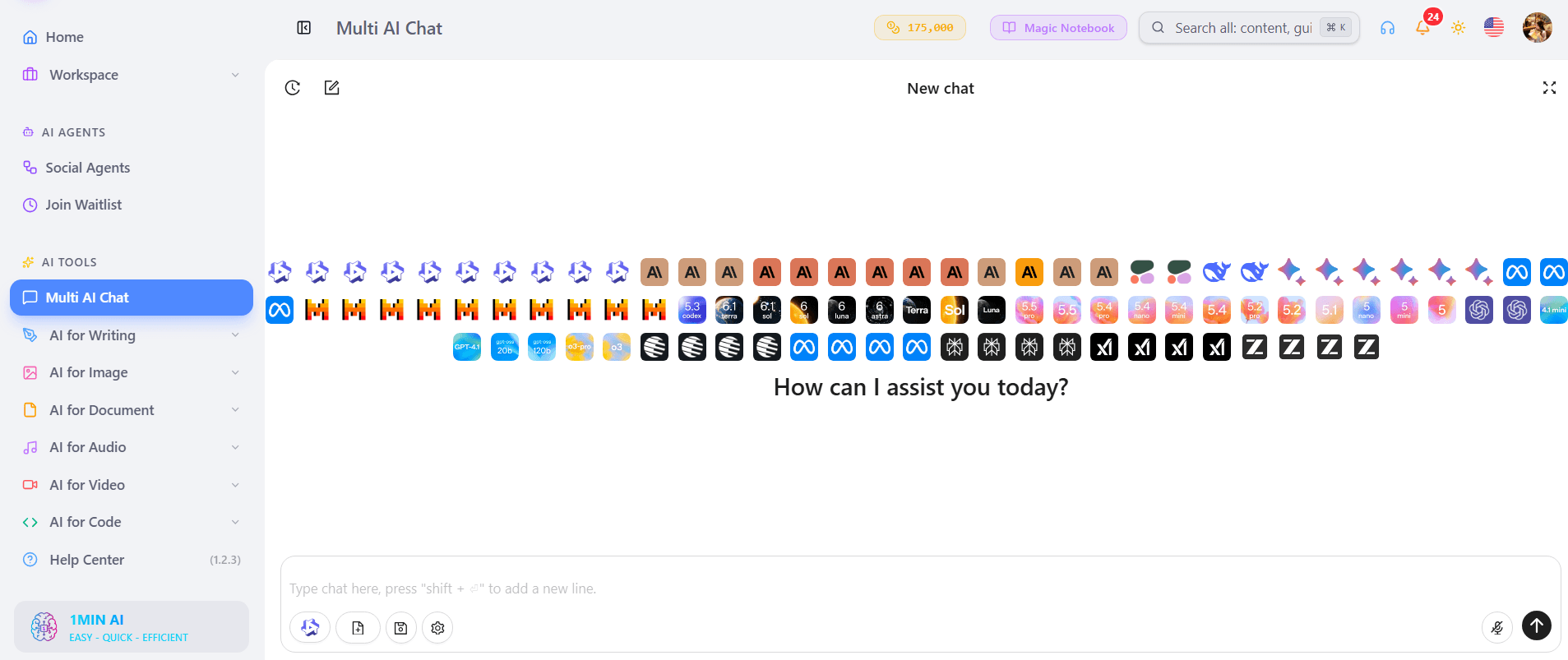
You can share what you've learned from your analytics and ask AI to suggest new hooks or video concepts.
Step 1 Share What You've Learned
Let's continue with the fashion example:
- Niche: Everyday fashion
- What worked: Outfit transformation videos
- What needs improvement: Slow introductions
- Audience: Young adults looking for simple outfit ideas
- Goal: Create a more engaging 30-second TikTok
Step 2 Brainstorm With Multi AI Chat
Open 1min.AI and use Multi AI Chat.
Copy this prompt:
Role: Act as a TikTok content strategist for influencers.
My niche: Everyday fashion.
My audience: Young adults who enjoy simple outfits.
What I learned: My outfit transformation videos had better watch time than my daily vlogs. I want to improve my opening hooks.
Task: Suggest 3 TikTok video ideas with attention-grabbing opening hooks and simple 30-second outlines.
Output: Create a table with Video Idea, Opening Hook, and Video Outline.
Requirements: Keep everything natural, easy to film, and relevant to my personal style. Don't promise viral results.
You can choose an available AI model or compare ideas from different models.
Want to see how the tool works? Read How Multiple AI Chat Helps Content Creators Create Better Content.
Step 3 Pick One Idea and Test It
Here are a few example ideas:
| Video Idea | Opening Hook |
|---|---|
| One Jacket Three Outfits | "Can one jacket work for three occasions?" |
| Casual to Work Look | "Watch how I transform this casual outfit!" |
| Simple Outfit Upgrade | "One small change makes a big difference!" |
Choose one that fits your style, film it, and check its performance afterward.
Remember, 1min.AI helps you brainstorm using the information you provide. It doesn't automatically collect data from TikTok Studio.
For more content creation ideas, check 5 AI Tools Every TikTok Creator Should Use Daily.
4. Your 5-Minute Weekly TikTok Analytics Routine
You don't need to check your analytics every hour.
Once a week, try this quick routine:
- Find your three best-performing videos.
- Check their watch time and engagement.
- Notice what they have in common.
- Read comments for new content ideas.
- Choose one thing to improve next week.
That's it!
Over time, this simple habit can help you understand what your audience responds to.
Frequently Asked Questions
Is TikTok Studio Free?
Yes. TikTok Studio offers free content management and analytics tools for eligible creators.
What Should I Check First in TikTok Analytics?
Start with views, average watch time, and engagement. Then compare similar videos to understand what might be working.
Can 1min.AI Improve My TikTok Videos?
1min.AI can help you brainstorm ideas, write hooks, and develop scripts based on your observations. It doesn't guarantee higher views or automatically analyze your TikTok account.
Final Thoughts
You don't need to become a data expert to improve your TikTok content.
Start small:
Check Your Analytics → Find What Works → Improve One Thing → Try Again.
Use TikTok Studio to understand your audience, and let AI help when you need fresh ideas.
🚀 Turn Your TikTok Insights Into Better Video Ideas With 1min.AI
- #Navigational
Alternativas
Descubre las mejores alternativas a 1minAI y compara características, precios y casos de uso.

1min.AI vs OpenRouter
1min.AI vs. OpenRouter: Compara el producto de creación de IA listo para usar con la herramienta técnica de API. Descubre si necesitas un estudio creativo sin código o una infraestructura para desarrolladores.
 Ngoc Hong

1min. AI vs Dola AI
¿Buscas una alternativa a Dola AI? Compara 1min.AI vs Dola AI en generación de video, planes gratis, precios y privacidad para elegir la app de IA adecuada.
Ngoc Hong
1minAI vs Hix AI
Compara 5 alternativas a HIX AI para chat con IA, investigación, redacción, imágenes, video, precios y flujos de trabajo de IA flexibles.
Ngoc HongHerramientas de IA
Descubre las mejores herramientas de IA para aumentar la productividad, la creatividad y el trabajo diario.

Un producto, 10 creativos UGC: cómo la IA facilita la prueba de contenido
Crea UGC más auténtico con un generador de videos UGC con IA, prueba más ángulos creativos y escala contenido de afiliados sin filmar cada versión.
 Lien Anh Vu

Crea contenido animado constante en solo unos pasos
Crea videos animados para TikTok y Reels en 3 pasos simples con 1min.AI, desde investigar ideas hasta personajes y videos animados.
Lien Anh Vu
Las 4 mejores herramientas de IA asequibles para fundadores de startups
Descubre las 4 mejores herramientas de IA asequibles para fundadores de startups para validar ideas, crear productos, generar contenido y lanzar más rápido sin gastar de más.
 Tram Ta
Funciones de IA
Funciones de IA completas que agilizan los flujos de trabajo, mejoran la eficiencia y permiten a los equipos lograr más.
Un producto, 10 creativos UGC: cómo la IA facilita la prueba de contenido
Crea UGC más auténtico con un generador de videos UGC con IA, prueba más ángulos creativos y escala contenido de afiliados sin filmar cada versión.
Lien Anh VuCrea contenido animado constante en solo unos pasos
Crea videos animados para TikTok y Reels en 3 pasos simples con 1min.AI, desde investigar ideas hasta personajes y videos animados.
Lien Anh Vu
1minAI: Corrector gramatical de IA gratis
Revisa la gramática gratis con el corrector gramatical de IA de 1minAI. Encuentra errores de gramática, ortografía y redacción, mejora la claridad y pule tu contenido en segundos.
Tram TaCasos de uso de IA
Una colección curada de casos de uso de IA para negocios, productividad y aplicaciones específicas por industria.
Un producto, 10 creativos UGC: cómo la IA facilita la prueba de contenido
Crea UGC más auténtico con un generador de videos UGC con IA, prueba más ángulos creativos y escala contenido de afiliados sin filmar cada versión.
Lien Anh VuCrea contenido animado constante en solo unos pasos
Crea videos animados para TikTok y Reels en 3 pasos simples con 1min.AI, desde investigar ideas hasta personajes y videos animados.
Lien Anh Vu
Mejor hora para publicar en Instagram: una guía práctica para mejorar la interacción
Descubre la mejor hora para publicar en Instagram, incluidos los mejores días y horas para distintas audiencias, además de consejos para encontrar el horario ideal de publicación para tu cuenta.
Tram TaTutoriales de IA
Aprende a usar la IA con tutoriales prácticos paso a paso.
Crea contenido animado constante en solo unos pasos
Crea videos animados para TikTok y Reels en 3 pasos simples con 1min.AI, desde investigar ideas hasta personajes y videos animados.
Lien Anh Vu
Ofertas de herramientas de IA para Black Friday en 2026
Descubre qué ofrecen las ofertas de herramientas de IA para Black Friday 2026. Averigua cómo asegurar la oferta de por vida de 1min.AI a través de AppSumo, Dealify y Stack Social, y verifica en Trustpilot, Slashdot y Software Advice.
 Hang Nguyen

Consistencia de producto de imagen a video con IA y Seedance para detener la deformación y escalar reseñas de productos
Detén la deformación de los logos con consistencia de producto de imagen a video con IA y genera hoy videos de reseñas con calidad de estudio en 1min.AI.
Lien Anh VuGuías de IA
Aprende IA más rápido con guías prácticas, ejemplos del mundo real y mejores prácticas aplicables.
Crea contenido animado constante en solo unos pasos
Crea videos animados para TikTok y Reels en 3 pasos simples con 1min.AI, desde investigar ideas hasta personajes y videos animados.
Lien Anh Vu
Compra con seguridad herramientas de IA en línea: Guía de Black Friday 2026
Descubre cómo encontrar y asegurar las mejores ofertas de Black Friday en IA en línea. Aprende estrategias expertas para evitar estafas, combatir la fatiga de suscripciones y verificar software.
Hang NguyenConsistencia de producto de imagen a video con IA y Seedance para detener la deformación y escalar reseñas de productos
Detén la deformación de los logos con consistencia de producto de imagen a video con IA y genera hoy videos de reseñas con calidad de estudio en 1min.AI.
Lien Anh VuSoluciones de IA
Explore las mejores soluciones de IA para automatización, codificación, investigación, productividad, atención al cliente, marketing y flujos de trabajo empresariales.
Un producto, 10 creativos UGC: cómo la IA facilita la prueba de contenido
Crea UGC más auténtico con un generador de videos UGC con IA, prueba más ángulos creativos y escala contenido de afiliados sin filmar cada versión.
Lien Anh VuCrea contenido animado constante en solo unos pasos
Crea videos animados para TikTok y Reels en 3 pasos simples con 1min.AI, desde investigar ideas hasta personajes y videos animados.
Lien Anh Vu
Generador Gratis de Tatuajes con IA: Diseños Personalizados
Convierte cualquier idea en un diseño de tatuaje personalizado con el generador gratis de tatuajes con IA de 1min.AI. Describe tu idea, elige un estilo y descarga en segundos.
 Trang Tran
Modelos de IA
Explora los modelos de IA líderes del mundo en un solo lugar.
Un producto, 10 creativos UGC: cómo la IA facilita la prueba de contenido
Crea UGC más auténtico con un generador de videos UGC con IA, prueba más ángulos creativos y escala contenido de afiliados sin filmar cada versión.
Lien Anh VuCrea contenido animado constante en solo unos pasos
Crea videos animados para TikTok y Reels en 3 pasos simples con 1min.AI, desde investigar ideas hasta personajes y videos animados.
Lien Anh VuConsistencia de producto de imagen a video con IA y Seedance para detener la deformación y escalar reseñas de productos
Detén la deformación de los logos con consistencia de producto de imagen a video con IA y genera hoy videos de reseñas con calidad de estudio en 1min.AI.
Lien Anh VuComparaciones de IA
Compara herramientas, modelos y plataformas de IA para encontrar la que mejor se adapte a tus necesidades.

Kling AI vs Veo 3: ¿qué modelo gana?
Kling AI vs Veo 3: compara movimiento, audio nativo, precios y planes gratis para ver qué generador de video con IA gana para tu proyecto. Prueba ambos en 1min.AI.
Trang TranConsistencia de producto de imagen a video con IA y Seedance para detener la deformación y escalar reseñas de productos
Detén la deformación de los logos con consistencia de producto de imagen a video con IA y genera hoy videos de reseñas con calidad de estudio en 1min.AI.
Lien Anh Vu
Comparación DeepSeek V4 Pro vs Flash
Compara métricas de DeepSeek V4 Pro y DeepSeek V4 Flash. Optimiza tus aplicaciones agentivas y mejora la verificación de hechos de IA en 1min.ai hoy.
Ngoc HongIntegraciones de IA
Integra la IA de forma fluida con las herramientas que ya usas para automatizar tareas y aumentar la productividad.

Cómo usar un generador de video de moda con IA para Fashion Week 2026
Convierte ideas de Fashion Week 2026 en videos de moda impactantes con IA. Aprende a idear, crear visuales y transformar imágenes en videos con un flujo de trabajo simple.
Lien Anh Vu
POV: Tienes más de 10 publicaciones que hacer cada día
Aprende a crear un flujo de trabajo de contenido con IA que ayuda a los creadores de contenido a producir más de 10 publicaciones al día más rápido con lluvia de ideas, generación de imágenes y creación de contenido con IA.
Lien Anh Vu
Deja de Cambiar entre Apps de IA: Cómo la Integración de IA Transforma el Employer Branding
Descubre cómo la integración de IA ayuda a los equipos de RR. HH. a optimizar el employer branding al combinar redacción con IA, documentos, imágenes, video y múltiples modelos de IA en un solo espacio de trabajo.
Tram TaIA para Industrias
Encuentre las mejores herramientas y flujos de trabajo de IA para atención médica, finanzas, educación, legal, manufactura, comercio minorista, bienes raíces y más.

Generador gratuito de descripciones de producto con IA
Escribe descripciones de producto que vendan en minutos. Usa este generador gratuito de descripciones de producto con IA para convertir detalles o una foto en texto alineado con tu marca. Prueba 1min.AI.
Trang Tran
Las mejores herramientas de productividad empresarial para startups para maximizar las ganancias | 1minAI
Descubre las mejores herramientas de productividad empresarial para startups para ahorrar tiempo, optimizar flujos de trabajo, reducir tareas repetitivas y apoyar un crecimiento rentable con IA.
Tram Ta
La mejor herramienta de IA para marketing de contenidos |1minAI
¿Buscas la mejor herramienta de IA para marketing de contenidos? Mira cómo 1minAI ayuda a los especialistas en marketing a investigar, escribir, reutilizar, crear elementos visuales y escalar contenido desde un solo espacio de trabajo de IA.
Tram TaAgentes de IA
Descubre y ejecuta agentes de IA para automatizar tareas en tu trabajo y vida diaria.
1minAI: Corrector gramatical de IA gratis
Revisa la gramática gratis con el corrector gramatical de IA de 1minAI. Encuentra errores de gramática, ortografía y redacción, mejora la claridad y pule tu contenido en segundos.
Tram Ta
Agentes de IA para Facebook
Usa un Agente de IA para Facebook para crear contenido, generar imágenes, programar publicaciones y publicar desde tus documentos y conversaciones.
Ngoc Hong
Agente de IA vs Asistente de IA: ¿Cuál realmente les ahorra más tiempo a los diseñadores?
Conoce la diferencia entre Agente de IA vs Asistente de IA y descubre qué solución ayuda a los diseñadores a automatizar tareas repetitivas, reducir revisiones y ahorrar más tiempo.
Lien Anh VuFlujos de trabajo de IA
Explore flujos de trabajo de IA listos para usar para productividad, marketing, ventas, soporte y más.
Un producto, 10 creativos UGC: cómo la IA facilita la prueba de contenido
Crea UGC más auténtico con un generador de videos UGC con IA, prueba más ángulos creativos y escala contenido de afiliados sin filmar cada versión.
Lien Anh VuCrea contenido animado constante en solo unos pasos
Crea videos animados para TikTok y Reels en 3 pasos simples con 1min.AI, desde investigar ideas hasta personajes y videos animados.
Lien Anh VuCómo usar un generador de video de moda con IA para Fashion Week 2026
Convierte ideas de Fashion Week 2026 en videos de moda impactantes con IA. Aprende a idear, crear visuales y transformar imágenes en videos con un flujo de trabajo simple.
Lien Anh VuBoletín
Innovaciones semanales en IA con 1minAI

🔮 Innovaciones semanales de IA #142: Grok 4.7, Opus 5.5 y Sonnet 5.5 en 1min.ai
Accede a Grok 4.7, Claude Opus 5.5 y Sonnet 5.5 en 1min.ai. Reduce los costos de suscripción hasta en 70% y procesa millones de tokens en un solo espacio de trabajo unificado.
Hang Nguyen
🔮 Weekly AI Innovations #143: Actualización Actualización GPT-6, GPT-6.1 y Ideogram 4.0 y Ideogram 4.0
Accede a GPT-6 Sol, Luna, GPT-6.1 Sol e Ideogram 4.0 en 1min.ai. Mejora la precisión tipográfica al 98.4% y reduce la latencia de razonamiento en un 45% en una sola plataforma.
Hang Nguyen
🔮 Innovaciones semanales de IA #141: Seedance 2.5 y Stable Audio 3: IA de próxima generación
Explora Seedance 2.0, 2.5 y Stable Audio 3 de StabilityAI en 1min.ai. Genera audio de calidad de estudio y movimiento sincronizado con IA generativa de próxima generación.
Hang Nguyen