
GPT-6.1 Sol vs GPT-6.1 Terra: Which AI Model Should You Choose?

Tram Ta
20 de noviembre de 2026
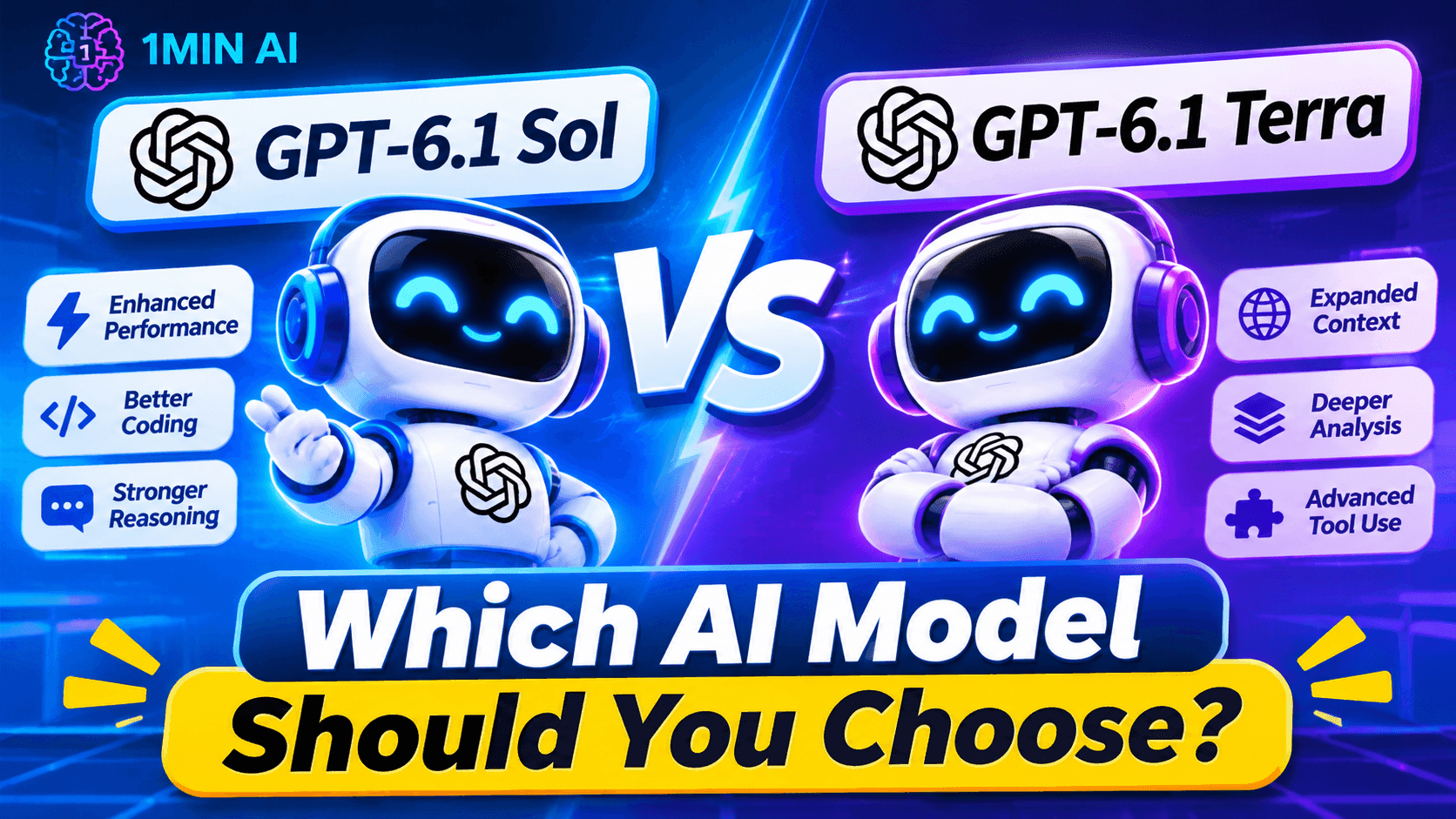
Compare GPT-6.1 Sol vs GPT-6.1 Terra by capabilities, speed, API pricing, coding, visual reasoning, and computer use. Find the right model for your workflow.
GPT-6.1 Sol is designed for complex coding, computer use, and professional work where you need strong reasoning at a lower cost than the flagship model. GPT-6.1 Terra focuses on speed and efficiency, with particular strengths in visual reasoning, precise computer use, and clear writing.
In this guide, we'll compare GPT-6.1 Sol vs GPT-6.1 Terra across features, performance, pricing, coding, and real-world use cases to help you decide which model fits your needs.
The specifications and prices above refer to OpenAI's documented API offerings. Access, available tools, and context limits may differ in ChatGPT Work, Codex, and third-party platforms.
What Is GPT-6.1 Sol?
GPT-6.1 Sol is an OpenAI model built to balance intelligence, cost, and performance on demanding tasks. It is positioned for complex coding, computer use, and professional work that may involve multiple steps or substantial context.
Rather than relying on a single short prompt, you can give Sol a detailed project brief, relevant documents, constraints, and a desired outcome. It can then help organize the work, reason through potential problems, and produce a structured deliverable.
Key strengths of GPT-6.1 Sol
- Complex coding: Analyze larger code changes, debug difficult issues, and help plan implementation.
- Professional deliverables: Turn extensive source material into reports, presentations, plans, or structured documents.
- Multi-step reasoning: Work through tasks with several requirements, dependencies, or constraints.
- Computer-use workflows: Support longer interactions with software when the necessary tools are enabled.
- Configurable reasoning: Adjust reasoning effort to suit the task and the desired balance between quality, speed, and usage.
What Is GPT-6.1 Terra?
GPT-6.1 Terra is an OpenAI model designed for fast, efficient work involving visual information, computer interfaces, and natural writing.
It is especially relevant when a task has a clearly defined objective and the model needs to interpret supplied material or interact with a supported application environment.
Key strengths of GPT-6.1 Terra
- Visual reasoning: Interpret supported images, product photos, screenshots, and technical drawings.
- Computer use: Help complete defined tasks in compatible software environments.
- Natural writing: Draft, revise, and summarize content with a clear, readable style.
- Scoped coding: Assist with targeted bug fixes, small edits, and code explanations.
- Cost efficiency: Its standard API token prices are half those of GPT-6.1 Sol.
GPT-6.1 Sol vs GPT-6.1 Terra: The Main Differences
1. Reasoning and Task Complexity
The biggest difference is how OpenAI positions the two models.
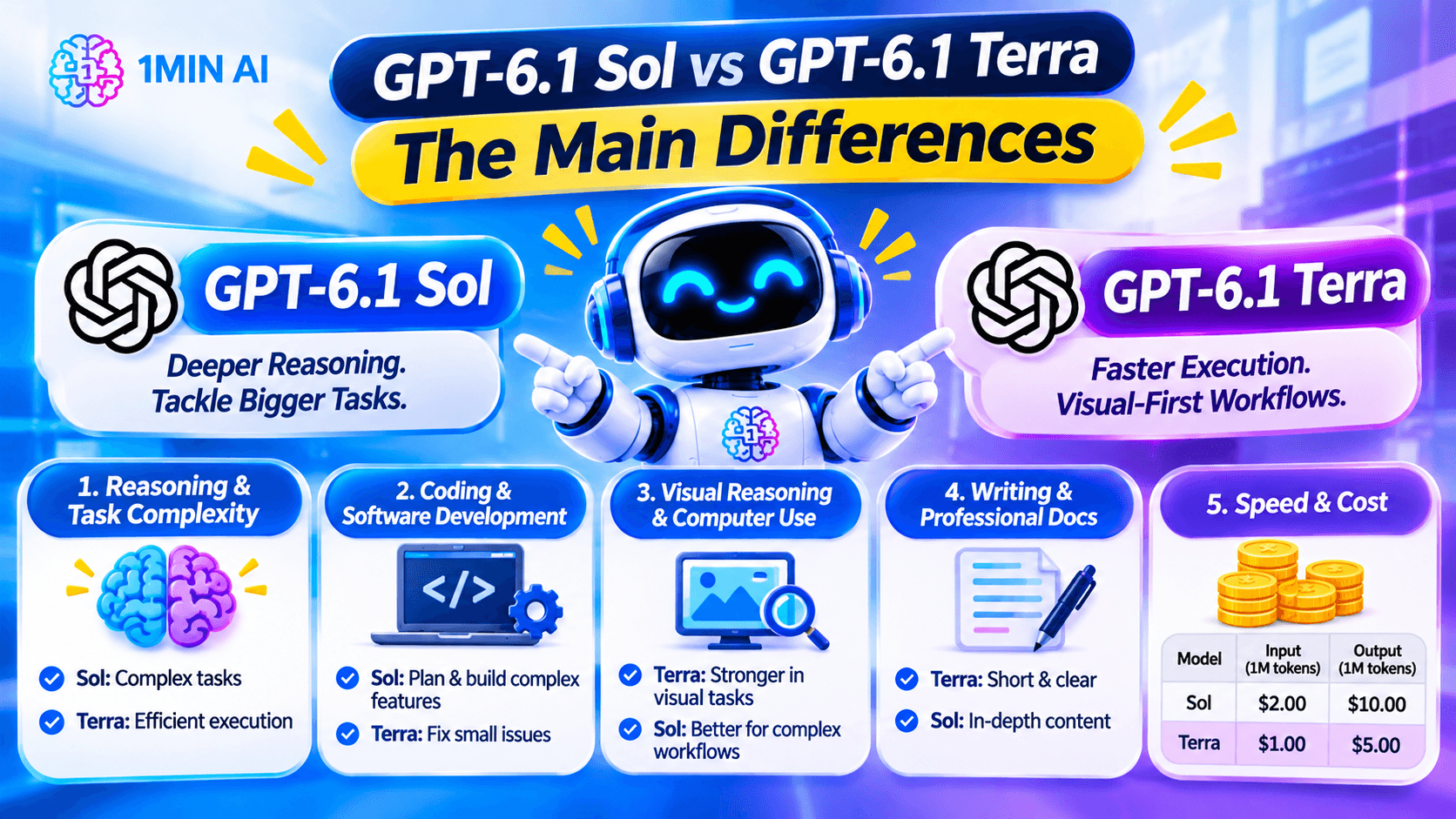
GPT-6.1 Sol is intended for complex work where the model must coordinate multiple requirements, handle technical details, or produce a substantial deliverable. GPT-6.1 Terra is aimed at efficient execution of defined tasks, including visual interpretation and interface-based workflows.
For example, creating an implementation plan for a large software project may favor Sol. Extracting information from a screenshot and organizing it into a table may be a better starting point for Terra.
This is a practical distinction, not a rule that one model always wins. The actual results depend on the prompt, reasoning settings, available tools, and task complexity.
2. Coding and Software Development
If coding is your main use case, consider how much reasoning the task requires.
Choose GPT-6.1 Sol when you need to:
- Plan a significant feature across multiple files.
- Investigate a complicated bug with several possible causes.
- Review technical decisions and dependencies.
- Build a structured implementation and testing plan.
- Work through a substantial development task with multiple stages.
Try GPT-6.1 Terra when you need to:
- Explain a short function.
- Identify a likely issue in a small code snippet.
- Make a narrowly scoped code change.
- Suggest a straightforward test case.
- Fix a clearly described interface or formatting problem.
Example: if a single button is misaligned on a webpage, Terra may be sufficient. If the problem involves state management, API behavior, authentication, and several connected components, Sol is a stronger starting point.
Regardless of the model, run tests and review proposed changes in your own development environment before deploying them.
3. Visual Reasoning and Computer Use
Both models can support computer-related workflows, but Terra's positioning puts particular emphasis on visual reasoning and precise interface tasks.
For example, Terra may be a good fit for extracting fields from an invoice image, interpreting a technical drawing, or working with a clearly defined task in a supported business application.
Sol is worth considering when computer use is part of a larger project involving planning, multiple dependencies, or complex decisions.
Remember that computer-use features depend on the environment. A model's ability to interpret a screenshot does not automatically mean it can click buttons, edit files, or submit forms in every chat interface.
4. Writing and Professional Documents
Both models can assist with writing, but the right choice depends on the deliverable.
GPT-6.1 Terra is worth trying for concise summaries, clear email drafts, editing supplied material, and routine content production.
GPT-6.1 Sol is a better starting point when the writing task requires synthesizing many sources, resolving conflicting requirements, or producing a more involved professional deliverable.
For example:
- Terra: Rewrite a customer email in a friendlier tone without changing the facts.
- Sol: Synthesize a long project brief, stakeholder feedback, financial constraints, and technical dependencies into a decision document.
For editing and rewriting workflows, you can also explore 1minAI's AI content rewriter.
5. Speed and Cost
Cost is one of the clearest differences between the two models. GPT-6.1 Terra's standard API rates are half the standard token rates of GPT-6.1 Sol.
| Standard API pricing | GPT-6.1 Sol | GPT-6.1 Terra |
|---|---|---|
| Input per 1 million tokens | $2.00 | $1.00 |
| Cached input per 1 million tokens | $0.10 | $0.05 |
| Output per 1 million tokens | $10.00 | $5.00 |
These are published standard API token prices, not a guarantee of total cost for a particular task. Tool calls, reasoning-token usage, processing modes, and long-context pricing adjustments can affect the final bill.
Terra is attractive when you run many relatively focused tasks. Sol may justify the higher token cost when better performance on a complex task saves substantial review time or reduces repeated attempts.
GPT-6.1 Sol vs GPT-6.1 Terra: Which Model Is Better for Your Use Case?
| Use case | Model to try first | Why |
|---|---|---|
| Complex software engineering | GPT-6.1 Sol | Designed for demanding coding and professional work |
| Small code fixes | GPT-6.1 Terra | Efficient for well-defined changes |
| Long, multi-stage project planning | GPT-6.1 Sol | Better aligned with complex deliverables |
| Reading product photos or technical drawings | GPT-6.1 Terra | Strong emphasis on visual reasoning |
| Routine email drafting | GPT-6.1 Terra | Clear writing at a lower standard token cost |
| Synthesizing extensive project materials | GPT-6.1 Sol | Suitable for involved professional tasks |
| High-volume document extraction | GPT-6.1 Terra | Lower standard token rates can help control cost |
| Computer workflows with many dependencies | GPT-6.1 Sol | Worth testing when planning and coordination are important |
Use these recommendations as a starting point. For a critical workflow, test both models on representative examples and measure accuracy, completion time, and the amount of human correction required.
Frequently Asked Questions
Is GPT-6.1 Sol better than GPT-6.1 Terra?
Neither model is best for every task. Sol is designed for complex coding and professional work, while Terra emphasizes efficient visual reasoning, computer use, and clear writing. The better choice depends on your task and the quality of the results you need.
Is GPT-6.1 Terra cheaper than GPT-6.1 Sol?
Yes. At standard API rates, Terra costs $1 per million input tokens and $5 per million output tokens, compared with Sol at $2 per million input tokens and $10 per million output tokens. Actual task costs can vary with token usage and other charges.
Which model is better for coding?
GPT-6.1 Sol is the stronger starting point for complex software-engineering work. GPT-6.1 Terra can be useful for smaller, well-defined code fixes and explanations. Test and review all generated code before using it in production.
Can I compare both models in one place?
You can check 1minAI Multi AI Chat to see whether both models are available to your account. When both are selectable, use the same prompt and compare their responses against consistent criteria.
Final: GPT-6.1 Sol or GPT-6.1 Terra?
The choice between GPT-6.1 Sol and GPT-6.1 Terra is less about finding one universally superior model and more about matching capability to the task.
Choose GPT-6.1 Sol when your work involves complex coding, extensive reasoning, or substantial professional deliverables. Choose GPT-6.1 Terra when you need efficient visual reasoning, clear writing, targeted code assistance, or high-volume tasks at a lower standard API token cost.
If you are unsure, test both models on a real task and compare the quality of their outputs alongside the time and effort required to review them. You can start with 1minAI Multi AI Chat to explore the models currently available to your account and find the best fit for your workflow.
- #Commerce
- #Information
Alternativas
Descubre las mejores alternativas a 1minAI y compara características, precios y casos de uso.

1min.AI vs OpenRouter
1min.AI vs. OpenRouter: Compara el producto de creación de IA listo para usar con la herramienta técnica de API. Descubre si necesitas un estudio creativo sin código o una infraestructura para desarrolladores.
 Ngoc Hong

1min. AI vs Dola AI
¿Buscas una alternativa a Dola AI? Compara 1min.AI vs Dola AI en generación de video, planes gratis, precios y privacidad para elegir la app de IA adecuada.
Ngoc Hong
1minAI vs Hix AI
Compara 5 alternativas a HIX AI para chat con IA, investigación, redacción, imágenes, video, precios y flujos de trabajo de IA flexibles.
Ngoc HongHerramientas de IA
Descubre las mejores herramientas de IA para aumentar la productividad, la creatividad y el trabajo diario.

Un producto, 10 creativos UGC: cómo la IA facilita la prueba de contenido
Crea UGC más auténtico con un generador de videos UGC con IA, prueba más ángulos creativos y escala contenido de afiliados sin filmar cada versión.
 Lien Anh Vu

Crea contenido animado constante en solo unos pasos
Crea videos animados para TikTok y Reels en 3 pasos simples con 1min.AI, desde investigar ideas hasta personajes y videos animados.
Lien Anh Vu
Las 4 mejores herramientas de IA asequibles para fundadores de startups
Descubre las 4 mejores herramientas de IA asequibles para fundadores de startups para validar ideas, crear productos, generar contenido y lanzar más rápido sin gastar de más.
 Tram Ta
Funciones de IA
Funciones de IA completas que agilizan los flujos de trabajo, mejoran la eficiencia y permiten a los equipos lograr más.
Un producto, 10 creativos UGC: cómo la IA facilita la prueba de contenido
Crea UGC más auténtico con un generador de videos UGC con IA, prueba más ángulos creativos y escala contenido de afiliados sin filmar cada versión.
Lien Anh VuCrea contenido animado constante en solo unos pasos
Crea videos animados para TikTok y Reels en 3 pasos simples con 1min.AI, desde investigar ideas hasta personajes y videos animados.
Lien Anh Vu
1minAI: Corrector gramatical de IA gratis
Revisa la gramática gratis con el corrector gramatical de IA de 1minAI. Encuentra errores de gramática, ortografía y redacción, mejora la claridad y pule tu contenido en segundos.
Tram TaCasos de uso de IA
Una colección curada de casos de uso de IA para negocios, productividad y aplicaciones específicas por industria.
Un producto, 10 creativos UGC: cómo la IA facilita la prueba de contenido
Crea UGC más auténtico con un generador de videos UGC con IA, prueba más ángulos creativos y escala contenido de afiliados sin filmar cada versión.
Lien Anh VuCrea contenido animado constante en solo unos pasos
Crea videos animados para TikTok y Reels en 3 pasos simples con 1min.AI, desde investigar ideas hasta personajes y videos animados.
Lien Anh Vu
Mejor hora para publicar en Instagram: una guía práctica para mejorar la interacción
Descubre la mejor hora para publicar en Instagram, incluidos los mejores días y horas para distintas audiencias, además de consejos para encontrar el horario ideal de publicación para tu cuenta.
Tram TaTutoriales de IA
Aprende a usar la IA con tutoriales prácticos paso a paso.
Crea contenido animado constante en solo unos pasos
Crea videos animados para TikTok y Reels en 3 pasos simples con 1min.AI, desde investigar ideas hasta personajes y videos animados.
Lien Anh Vu
Ofertas de herramientas de IA para Black Friday en 2026
Descubre qué ofrecen las ofertas de herramientas de IA para Black Friday 2026. Averigua cómo asegurar la oferta de por vida de 1min.AI a través de AppSumo, Dealify y Stack Social, y verifica en Trustpilot, Slashdot y Software Advice.
 Hang Nguyen

Consistencia de producto de imagen a video con IA y Seedance para detener la deformación y escalar reseñas de productos
Detén la deformación de los logos con consistencia de producto de imagen a video con IA y genera hoy videos de reseñas con calidad de estudio en 1min.AI.
Lien Anh VuGuías de IA
Aprende IA más rápido con guías prácticas, ejemplos del mundo real y mejores prácticas aplicables.
Crea contenido animado constante en solo unos pasos
Crea videos animados para TikTok y Reels en 3 pasos simples con 1min.AI, desde investigar ideas hasta personajes y videos animados.
Lien Anh Vu
Compra con seguridad herramientas de IA en línea: Guía de Black Friday 2026
Descubre cómo encontrar y asegurar las mejores ofertas de Black Friday en IA en línea. Aprende estrategias expertas para evitar estafas, combatir la fatiga de suscripciones y verificar software.
Hang NguyenConsistencia de producto de imagen a video con IA y Seedance para detener la deformación y escalar reseñas de productos
Detén la deformación de los logos con consistencia de producto de imagen a video con IA y genera hoy videos de reseñas con calidad de estudio en 1min.AI.
Lien Anh VuSoluciones de IA
Explore las mejores soluciones de IA para automatización, codificación, investigación, productividad, atención al cliente, marketing y flujos de trabajo empresariales.
Un producto, 10 creativos UGC: cómo la IA facilita la prueba de contenido
Crea UGC más auténtico con un generador de videos UGC con IA, prueba más ángulos creativos y escala contenido de afiliados sin filmar cada versión.
Lien Anh VuCrea contenido animado constante en solo unos pasos
Crea videos animados para TikTok y Reels en 3 pasos simples con 1min.AI, desde investigar ideas hasta personajes y videos animados.
Lien Anh Vu
Generador Gratis de Tatuajes con IA: Diseños Personalizados
Convierte cualquier idea en un diseño de tatuaje personalizado con el generador gratis de tatuajes con IA de 1min.AI. Describe tu idea, elige un estilo y descarga en segundos.
 Trang Tran
Modelos de IA
Explora los modelos de IA líderes del mundo en un solo lugar.
Un producto, 10 creativos UGC: cómo la IA facilita la prueba de contenido
Crea UGC más auténtico con un generador de videos UGC con IA, prueba más ángulos creativos y escala contenido de afiliados sin filmar cada versión.
Lien Anh VuCrea contenido animado constante en solo unos pasos
Crea videos animados para TikTok y Reels en 3 pasos simples con 1min.AI, desde investigar ideas hasta personajes y videos animados.
Lien Anh VuConsistencia de producto de imagen a video con IA y Seedance para detener la deformación y escalar reseñas de productos
Detén la deformación de los logos con consistencia de producto de imagen a video con IA y genera hoy videos de reseñas con calidad de estudio en 1min.AI.
Lien Anh VuComparaciones de IA
Compara herramientas, modelos y plataformas de IA para encontrar la que mejor se adapte a tus necesidades.

Kling AI vs Veo 3: ¿qué modelo gana?
Kling AI vs Veo 3: compara movimiento, audio nativo, precios y planes gratis para ver qué generador de video con IA gana para tu proyecto. Prueba ambos en 1min.AI.
Trang TranConsistencia de producto de imagen a video con IA y Seedance para detener la deformación y escalar reseñas de productos
Detén la deformación de los logos con consistencia de producto de imagen a video con IA y genera hoy videos de reseñas con calidad de estudio en 1min.AI.
Lien Anh Vu
Comparación DeepSeek V4 Pro vs Flash
Compara métricas de DeepSeek V4 Pro y DeepSeek V4 Flash. Optimiza tus aplicaciones agentivas y mejora la verificación de hechos de IA en 1min.ai hoy.
Ngoc HongIntegraciones de IA
Integra la IA de forma fluida con las herramientas que ya usas para automatizar tareas y aumentar la productividad.

Cómo usar un generador de video de moda con IA para Fashion Week 2026
Convierte ideas de Fashion Week 2026 en videos de moda impactantes con IA. Aprende a idear, crear visuales y transformar imágenes en videos con un flujo de trabajo simple.
Lien Anh Vu
POV: Tienes más de 10 publicaciones que hacer cada día
Aprende a crear un flujo de trabajo de contenido con IA que ayuda a los creadores de contenido a producir más de 10 publicaciones al día más rápido con lluvia de ideas, generación de imágenes y creación de contenido con IA.
Lien Anh Vu
Deja de Cambiar entre Apps de IA: Cómo la Integración de IA Transforma el Employer Branding
Descubre cómo la integración de IA ayuda a los equipos de RR. HH. a optimizar el employer branding al combinar redacción con IA, documentos, imágenes, video y múltiples modelos de IA en un solo espacio de trabajo.
Tram TaIA para Industrias
Encuentre las mejores herramientas y flujos de trabajo de IA para atención médica, finanzas, educación, legal, manufactura, comercio minorista, bienes raíces y más.

Generador gratuito de descripciones de producto con IA
Escribe descripciones de producto que vendan en minutos. Usa este generador gratuito de descripciones de producto con IA para convertir detalles o una foto en texto alineado con tu marca. Prueba 1min.AI.
Trang Tran
Las mejores herramientas de productividad empresarial para startups para maximizar las ganancias | 1minAI
Descubre las mejores herramientas de productividad empresarial para startups para ahorrar tiempo, optimizar flujos de trabajo, reducir tareas repetitivas y apoyar un crecimiento rentable con IA.
Tram Ta
La mejor herramienta de IA para marketing de contenidos |1minAI
¿Buscas la mejor herramienta de IA para marketing de contenidos? Mira cómo 1minAI ayuda a los especialistas en marketing a investigar, escribir, reutilizar, crear elementos visuales y escalar contenido desde un solo espacio de trabajo de IA.
Tram TaAgentes de IA
Descubre y ejecuta agentes de IA para automatizar tareas en tu trabajo y vida diaria.
1minAI: Corrector gramatical de IA gratis
Revisa la gramática gratis con el corrector gramatical de IA de 1minAI. Encuentra errores de gramática, ortografía y redacción, mejora la claridad y pule tu contenido en segundos.
Tram Ta
Agentes de IA para Facebook
Usa un Agente de IA para Facebook para crear contenido, generar imágenes, programar publicaciones y publicar desde tus documentos y conversaciones.
Ngoc Hong
Agente de IA vs Asistente de IA: ¿Cuál realmente les ahorra más tiempo a los diseñadores?
Conoce la diferencia entre Agente de IA vs Asistente de IA y descubre qué solución ayuda a los diseñadores a automatizar tareas repetitivas, reducir revisiones y ahorrar más tiempo.
Lien Anh VuFlujos de trabajo de IA
Explore flujos de trabajo de IA listos para usar para productividad, marketing, ventas, soporte y más.
Un producto, 10 creativos UGC: cómo la IA facilita la prueba de contenido
Crea UGC más auténtico con un generador de videos UGC con IA, prueba más ángulos creativos y escala contenido de afiliados sin filmar cada versión.
Lien Anh VuCrea contenido animado constante en solo unos pasos
Crea videos animados para TikTok y Reels en 3 pasos simples con 1min.AI, desde investigar ideas hasta personajes y videos animados.
Lien Anh VuCómo usar un generador de video de moda con IA para Fashion Week 2026
Convierte ideas de Fashion Week 2026 en videos de moda impactantes con IA. Aprende a idear, crear visuales y transformar imágenes en videos con un flujo de trabajo simple.
Lien Anh VuBoletín
Innovaciones semanales en IA con 1minAI

🔮 Innovaciones semanales de IA #142: Grok 4.7, Opus 5.5 y Sonnet 5.5 en 1min.ai
Accede a Grok 4.7, Claude Opus 5.5 y Sonnet 5.5 en 1min.ai. Reduce los costos de suscripción hasta en 70% y procesa millones de tokens en un solo espacio de trabajo unificado.
Hang Nguyen
🔮 Weekly AI Innovations #143: Actualización Actualización GPT-6, GPT-6.1 y Ideogram 4.0 y Ideogram 4.0
Accede a GPT-6 Sol, Luna, GPT-6.1 Sol e Ideogram 4.0 en 1min.ai. Mejora la precisión tipográfica al 98.4% y reduce la latencia de razonamiento en un 45% en una sola plataforma.
Hang Nguyen
🔮 Innovaciones semanales de IA #141: Seedance 2.5 y Stable Audio 3: IA de próxima generación
Explora Seedance 2.0, 2.5 y Stable Audio 3 de StabilityAI en 1min.ai. Genera audio de calidad de estudio y movimiento sincronizado con IA generativa de próxima generación.
Hang Nguyen