
Free AI Chat With Kimi K3.1 Pro

Trang Tran
20 de noviembre de 2026
Chat with Kimi K3.1 Pro on 1min.AI. Explore the API, price, benchmark data and use cases, then try it on real tasks in one workspace.
Kimi K3.1 Pro is Moonshot AI’s newest open-weight multimodal reasoning model, built for long-horizon coding and agentic knowledge work. You can chat with it on 1min.AI today, in the same workspace you already use for writing, research, documents and code. There is no separate Moonshot account and no API key to set up. Open a chat, pick the model and give it a real task.
What Is Kimi K3.1 Pro?
Kimi K3.1 Pro (also searched as Kimi 3.1 Pro or Kimi K 3.1 Pro) is the first model in Moonshot AI’s K3.1 series. It is post-trained from Kimi K3 with substantially more reinforcement learning compute. It reasons through every request, with selectable effort up to max. Public coverage of the launch describes a mixture-of-experts design with about 2.8 trillion total parameters and roughly 104 billion active per request.
Kimi K3.1 Pro Specs at a Glance
| Feature | Details |
|---|---|
| Developer | Moonshot AI |
| Model type | Open-weight multimodal reasoning model |
| Base model | Post-trained from Kimi K3 |
| Context window | Up to 1,048,576 tokens |
| Reasoning | Always on, effort up to max |
| Best for | Long-horizon coding, 3D creation, financial research, agentic work |
| Faster variant | K3.1 Pro Highspeed, 2 to 3 times the speed (per Moonshot) |
Is Kimi K3.1 Pro Open Source?
Moonshot AI calls it an open-weight model and announced that the full weights would be released by November 4, 2026. Open weight means the trained parameters are published, which is not the same as releasing all training code and data. A model of this scale also cannot run on a regular laptop. So even if you search for a Kimi K3.1 Pro free download or GitHub repository, most people still reach the model through a hosted service. Check Moonshot’s official channels for the latest release status.
Chat With Kimi K3.1 Pro on 1min.AI
1min.AI puts Kimi K3.1 Pro next to your other AI tools, so you can move from a question to a finished draft, translation or script without switching tabs. New users can try it for free and judge the results on their own work.
Where Kimi K3.1 Pro Works Inside 1min.AI
Kimi K3.1 Pro is integrated into these 1min.AI features:
- Multi AI Chat: reason through complex questions and long conversations
- Keyword Research: build keyword clusters and content angles
- Content Generator: draft articles, posts, ads and emails
- Rewriter, Paraphraser and Grammar Checker: polish tone, clarity and accuracy
- Content Expander and Content Shortener: adjust length without losing meaning
- Content Translator and Document Translator: localize text and full files
- Summarizer: condense long reports into key points
- Presentation Generator: turn an outline into slides
- Code Generator: plan, write and debug multi-step projects
How to Start in 3 Steps
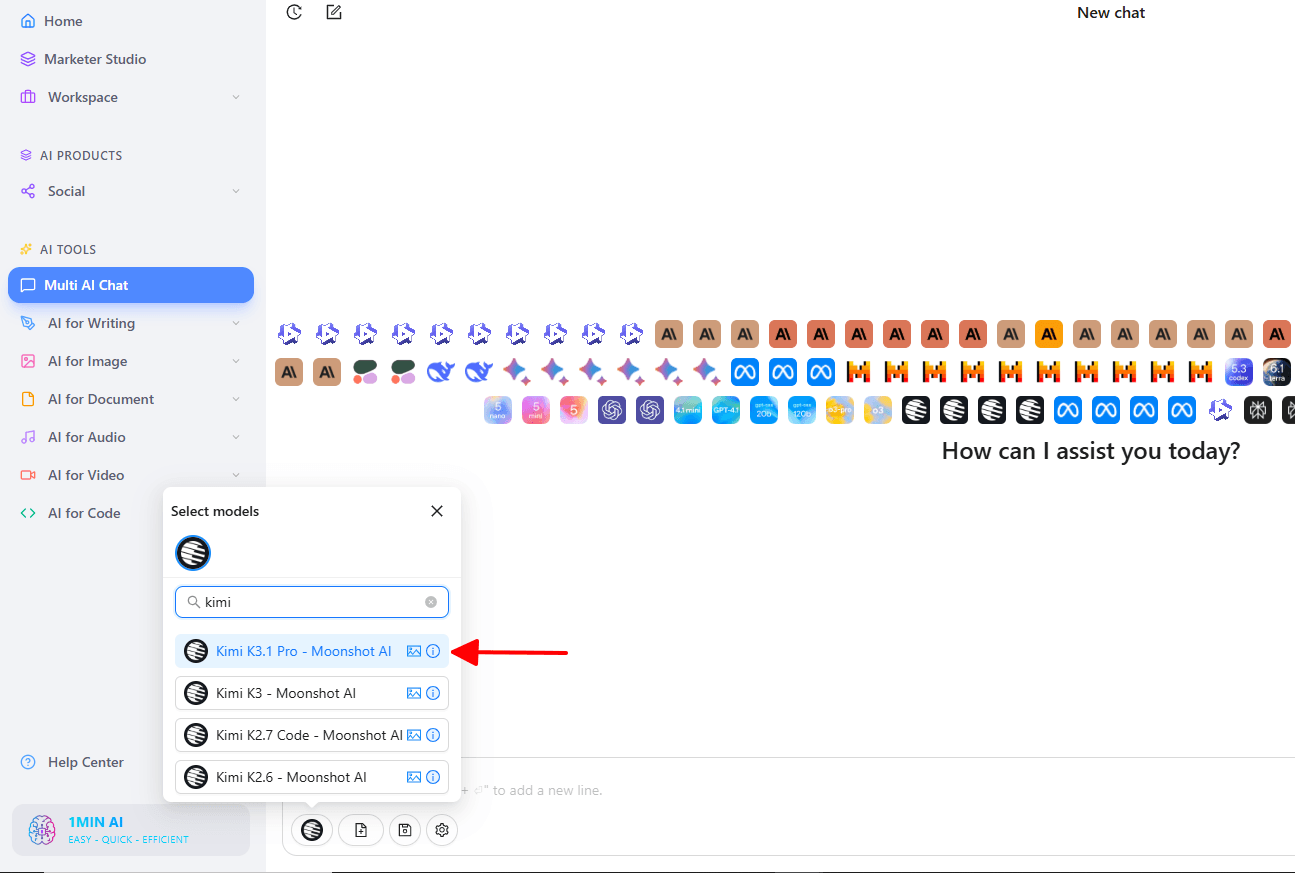
- Open 1min.AI and go to Multi AI Chat.
- Select Kimi K3.1 Pro from the model list.
- Paste a real task, such as a code review, a report or a research brief, and send it.
A short walkthrough of switching between models in one chat window is here:
Want to compare the model with its predecessor? You can also try Kimi K3 on 1min.AI in the same interface.
What Kimi K3.1 Pro Does Best
Long-Horizon Coding
Moonshot built K3.1 Pro for sustained engineering work. It plans, builds and iterates across many steps, from quick fixes in a real codebase to full-project builds. In Moonshot’s own tests it also writes Three.js scenes and scripts for Blender. On 1min.AI, Code Generator is the natural place to test this with your own repository snippets.
Financial Research and Agentic Knowledge Work
K3.1 Pro handles analysis that depends on documents, numbers and tool calling. Moonshot reports state-of-the-art results on OfficeQA Pro v2, a test of fiscal data analysis across real financial documents. It also reports a claim-level hallucination rate of 8.3% on its hard internal factual accuracy stress test, down from 23.4% for K3. That test is deliberately difficult, so the figure does not represent everyday error rates. Use Summarizer and Multi AI Chat to work through filings, reports and market notes, and always verify key figures against the source.
Long-Context Analysis
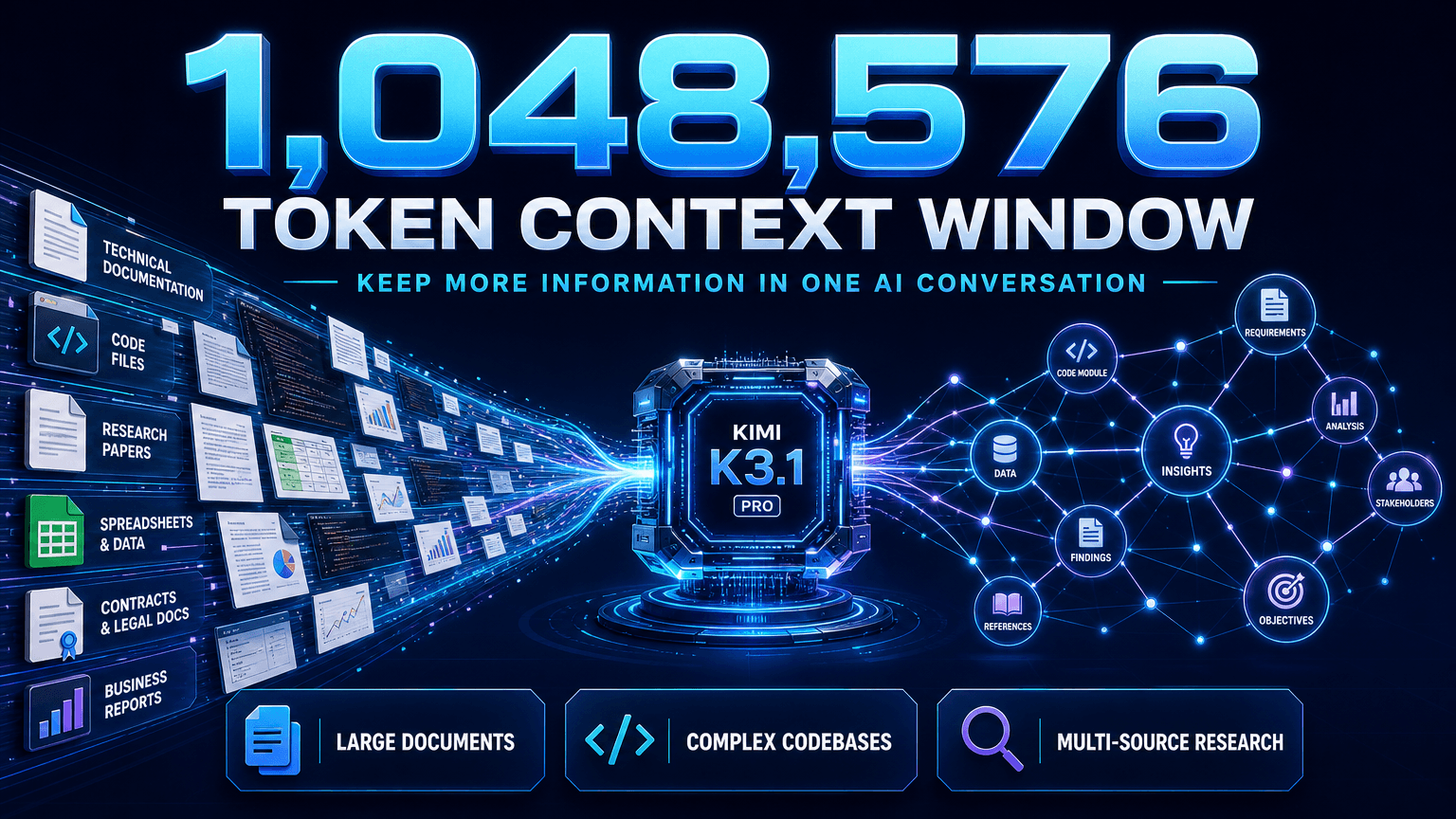
The 1,048,576-token context window lets you keep very large documents or codebases in a single conversation. This suits contract reviews, research synthesis and technical documentation, where splitting the material would lose connections between sections. For multi-file work, this video shows how 1min.AI handles several documents in one chat:
Kimi K3.1 Pro Benchmark Results
The Kimi K3.1 Pro benchmark scores below come from Moonshot’s launch blog. They are company-reported and have not all been independently verified.
| Benchmark | Kimi K3.1 Pro | Claude Opus 5.5 | GPT-6 Astra |
|---|---|---|---|
| Terminal-Bench 4.0 | 65.7 | 66.4 | 58.2 |
| BenchCAD (with tools) | 92.7 | 96.2 | 95.9 |
| OfficeQA Pro v2 | 64.4 | 62.2 | 54.4 |
| HLE-Full (with tools) | 70.0 | 67.7 | 57.2 |
| BrowseComp | 92.1 | 90.8 | 91.5 |
| GPQA-Diamond | 94.2 | 93.9 | 96.1 |
Kimi K3.1 Pro vs Opus 5.5
On the reported numbers, Kimi K3.1 Pro vs Opus 5.5 is a close contest. The two are within one point on Terminal-Bench 4.0, and K3.1 Pro leads on OfficeQA Pro v2, HLE-Full with tools and BrowseComp. Opus 5.5 leads on BenchCAD. The most useful test is your own workload, and with 1min.AI you can run the same prompt through both. Here is a closer look at Claude Opus 5.5 on 1min.AI. For another frontier option, GPT-6 Astra is available too.
Kimi K3.1 Pro API, Price and Credits
Kimi K3.1 Pro API Pricing
For developers, Moonshot offers the model through its API under the identifiers kimi-k3.1-pro and kimi-k3.1-pro-highspeed, with Zero Data Retention available. Launch coverage lists Kimi K3.1 Pro pricing at $2 per million input tokens and $10 per million output tokens. Check Moonshot’s pricing page for current rates.
Kimi K3.1 Pro Credits on 1min.AI
You do not need to manage tokens in the chat interface. 1min.AI estimates usage per page, where one page is about 500 words:
| Usage | Credits |
|---|---|
| Input | 4,002 credits per page |
| Output | 20,010 credits per page |
Moonshot’s K3.1 Pro Highspeed variant is aimed at faster, more responsive interactions. Start with standard K3.1 Pro to judge quality, then decide what your workflow needs.
Frequently Asked Questions
What is Kimi K3.1 Pro?
It is Moonshot AI’s open-weight multimodal reasoning model, post-trained from Kimi K3 for long-horizon coding and agentic knowledge work, with a context window of up to 1,048,576 tokens.
Can I chat with Kimi K3.1 Pro on 1min.AI?
Yes. Select it in Multi AI Chat, or use it inside Keyword Research, Content Generator, Rewriter, Content Expander, Content Shortener, Content Translator, Paraphraser, Summarizer, Grammar Checker, Document Translator, Presentation Generator and Code Generator.
Is Kimi K3.1 Pro open source?
Moonshot describes it as open weight and announced a weight release by November 4, 2026. That is different from publishing all training code and data.
How does Kimi K3.1 Pro compare with Opus 5.5?
Moonshot reports 65.7% on Terminal-Bench 4.0 against 66.4% for Claude Opus 5.5. K3.1 Pro leads on several agentic and finance benchmarks, while Opus 5.5 leads on others.
Can I use Kimi K3.1 Pro with documents?
Yes. Its long context suits large files, and 1min.AI’s Summarizer, Document Translator and Presentation Generator work with it.
Start Chatting With Kimi K3.1 Pro
Kimi K3.1 Pro rewards real tasks: a stubborn bug, a dense report, a multilingual draft, a deck outline. 1min.AI gives you one place to run all of them. Open a chat, send your first prompt and see what it builds.
- #Transaction
Alternativas
Descubre las mejores alternativas a 1minAI y compara características, precios y casos de uso.

1min.AI vs OpenRouter
1min.AI vs. OpenRouter: Compara el producto de creación de IA listo para usar con la herramienta técnica de API. Descubre si necesitas un estudio creativo sin código o una infraestructura para desarrolladores.
 Ngoc Hong

1min. AI vs Dola AI
¿Buscas una alternativa a Dola AI? Compara 1min.AI vs Dola AI en generación de video, planes gratis, precios y privacidad para elegir la app de IA adecuada.
Ngoc Hong
1minAI vs Hix AI
Compara 5 alternativas a HIX AI para chat con IA, investigación, redacción, imágenes, video, precios y flujos de trabajo de IA flexibles.
Ngoc HongHerramientas de IA
Descubre las mejores herramientas de IA para aumentar la productividad, la creatividad y el trabajo diario.

Un producto, 10 creativos UGC: cómo la IA facilita la prueba de contenido
Crea UGC más auténtico con un generador de videos UGC con IA, prueba más ángulos creativos y escala contenido de afiliados sin filmar cada versión.
 Lien Anh Vu

Crea contenido animado constante en solo unos pasos
Crea videos animados para TikTok y Reels en 3 pasos simples con 1min.AI, desde investigar ideas hasta personajes y videos animados.
Lien Anh Vu
Las 4 mejores herramientas de IA asequibles para fundadores de startups
Descubre las 4 mejores herramientas de IA asequibles para fundadores de startups para validar ideas, crear productos, generar contenido y lanzar más rápido sin gastar de más.
 Tram Ta
Funciones de IA
Funciones de IA completas que agilizan los flujos de trabajo, mejoran la eficiencia y permiten a los equipos lograr más.
Un producto, 10 creativos UGC: cómo la IA facilita la prueba de contenido
Crea UGC más auténtico con un generador de videos UGC con IA, prueba más ángulos creativos y escala contenido de afiliados sin filmar cada versión.
Lien Anh VuCrea contenido animado constante en solo unos pasos
Crea videos animados para TikTok y Reels en 3 pasos simples con 1min.AI, desde investigar ideas hasta personajes y videos animados.
Lien Anh Vu
1minAI: Corrector gramatical de IA gratis
Revisa la gramática gratis con el corrector gramatical de IA de 1minAI. Encuentra errores de gramática, ortografía y redacción, mejora la claridad y pule tu contenido en segundos.
Tram TaCasos de uso de IA
Una colección curada de casos de uso de IA para negocios, productividad y aplicaciones específicas por industria.
Un producto, 10 creativos UGC: cómo la IA facilita la prueba de contenido
Crea UGC más auténtico con un generador de videos UGC con IA, prueba más ángulos creativos y escala contenido de afiliados sin filmar cada versión.
Lien Anh VuCrea contenido animado constante en solo unos pasos
Crea videos animados para TikTok y Reels en 3 pasos simples con 1min.AI, desde investigar ideas hasta personajes y videos animados.
Lien Anh Vu
Mejor hora para publicar en Instagram: una guía práctica para mejorar la interacción
Descubre la mejor hora para publicar en Instagram, incluidos los mejores días y horas para distintas audiencias, además de consejos para encontrar el horario ideal de publicación para tu cuenta.
Tram TaTutoriales de IA
Aprende a usar la IA con tutoriales prácticos paso a paso.
Crea contenido animado constante en solo unos pasos
Crea videos animados para TikTok y Reels en 3 pasos simples con 1min.AI, desde investigar ideas hasta personajes y videos animados.
Lien Anh Vu
Ofertas de herramientas de IA para Black Friday en 2026
Descubre qué ofrecen las ofertas de herramientas de IA para Black Friday 2026. Averigua cómo asegurar la oferta de por vida de 1min.AI a través de AppSumo, Dealify y Stack Social, y verifica en Trustpilot, Slashdot y Software Advice.
 Hang Nguyen

Consistencia de producto de imagen a video con IA y Seedance para detener la deformación y escalar reseñas de productos
Detén la deformación de los logos con consistencia de producto de imagen a video con IA y genera hoy videos de reseñas con calidad de estudio en 1min.AI.
Lien Anh VuGuías de IA
Aprende IA más rápido con guías prácticas, ejemplos del mundo real y mejores prácticas aplicables.
Crea contenido animado constante en solo unos pasos
Crea videos animados para TikTok y Reels en 3 pasos simples con 1min.AI, desde investigar ideas hasta personajes y videos animados.
Lien Anh Vu
Compra con seguridad herramientas de IA en línea: Guía de Black Friday 2026
Descubre cómo encontrar y asegurar las mejores ofertas de Black Friday en IA en línea. Aprende estrategias expertas para evitar estafas, combatir la fatiga de suscripciones y verificar software.
Hang NguyenConsistencia de producto de imagen a video con IA y Seedance para detener la deformación y escalar reseñas de productos
Detén la deformación de los logos con consistencia de producto de imagen a video con IA y genera hoy videos de reseñas con calidad de estudio en 1min.AI.
Lien Anh VuSoluciones de IA
Explore las mejores soluciones de IA para automatización, codificación, investigación, productividad, atención al cliente, marketing y flujos de trabajo empresariales.
Un producto, 10 creativos UGC: cómo la IA facilita la prueba de contenido
Crea UGC más auténtico con un generador de videos UGC con IA, prueba más ángulos creativos y escala contenido de afiliados sin filmar cada versión.
Lien Anh VuCrea contenido animado constante en solo unos pasos
Crea videos animados para TikTok y Reels en 3 pasos simples con 1min.AI, desde investigar ideas hasta personajes y videos animados.
Lien Anh Vu
Generador Gratis de Tatuajes con IA: Diseños Personalizados
Convierte cualquier idea en un diseño de tatuaje personalizado con el generador gratis de tatuajes con IA de 1min.AI. Describe tu idea, elige un estilo y descarga en segundos.
 Trang Tran
Modelos de IA
Explora los modelos de IA líderes del mundo en un solo lugar.
Un producto, 10 creativos UGC: cómo la IA facilita la prueba de contenido
Crea UGC más auténtico con un generador de videos UGC con IA, prueba más ángulos creativos y escala contenido de afiliados sin filmar cada versión.
Lien Anh VuCrea contenido animado constante en solo unos pasos
Crea videos animados para TikTok y Reels en 3 pasos simples con 1min.AI, desde investigar ideas hasta personajes y videos animados.
Lien Anh VuConsistencia de producto de imagen a video con IA y Seedance para detener la deformación y escalar reseñas de productos
Detén la deformación de los logos con consistencia de producto de imagen a video con IA y genera hoy videos de reseñas con calidad de estudio en 1min.AI.
Lien Anh VuComparaciones de IA
Compara herramientas, modelos y plataformas de IA para encontrar la que mejor se adapte a tus necesidades.

Kling AI vs Veo 3: ¿qué modelo gana?
Kling AI vs Veo 3: compara movimiento, audio nativo, precios y planes gratis para ver qué generador de video con IA gana para tu proyecto. Prueba ambos en 1min.AI.
Trang TranConsistencia de producto de imagen a video con IA y Seedance para detener la deformación y escalar reseñas de productos
Detén la deformación de los logos con consistencia de producto de imagen a video con IA y genera hoy videos de reseñas con calidad de estudio en 1min.AI.
Lien Anh Vu
Comparación DeepSeek V4 Pro vs Flash
Compara métricas de DeepSeek V4 Pro y DeepSeek V4 Flash. Optimiza tus aplicaciones agentivas y mejora la verificación de hechos de IA en 1min.ai hoy.
Ngoc HongIntegraciones de IA
Integra la IA de forma fluida con las herramientas que ya usas para automatizar tareas y aumentar la productividad.

Cómo usar un generador de video de moda con IA para Fashion Week 2026
Convierte ideas de Fashion Week 2026 en videos de moda impactantes con IA. Aprende a idear, crear visuales y transformar imágenes en videos con un flujo de trabajo simple.
Lien Anh Vu
POV: Tienes más de 10 publicaciones que hacer cada día
Aprende a crear un flujo de trabajo de contenido con IA que ayuda a los creadores de contenido a producir más de 10 publicaciones al día más rápido con lluvia de ideas, generación de imágenes y creación de contenido con IA.
Lien Anh Vu
Deja de Cambiar entre Apps de IA: Cómo la Integración de IA Transforma el Employer Branding
Descubre cómo la integración de IA ayuda a los equipos de RR. HH. a optimizar el employer branding al combinar redacción con IA, documentos, imágenes, video y múltiples modelos de IA en un solo espacio de trabajo.
Tram TaIA para Industrias
Encuentre las mejores herramientas y flujos de trabajo de IA para atención médica, finanzas, educación, legal, manufactura, comercio minorista, bienes raíces y más.

Generador gratuito de descripciones de producto con IA
Escribe descripciones de producto que vendan en minutos. Usa este generador gratuito de descripciones de producto con IA para convertir detalles o una foto en texto alineado con tu marca. Prueba 1min.AI.
Trang Tran
Las mejores herramientas de productividad empresarial para startups para maximizar las ganancias | 1minAI
Descubre las mejores herramientas de productividad empresarial para startups para ahorrar tiempo, optimizar flujos de trabajo, reducir tareas repetitivas y apoyar un crecimiento rentable con IA.
Tram Ta
La mejor herramienta de IA para marketing de contenidos |1minAI
¿Buscas la mejor herramienta de IA para marketing de contenidos? Mira cómo 1minAI ayuda a los especialistas en marketing a investigar, escribir, reutilizar, crear elementos visuales y escalar contenido desde un solo espacio de trabajo de IA.
Tram TaAgentes de IA
Descubre y ejecuta agentes de IA para automatizar tareas en tu trabajo y vida diaria.
1minAI: Corrector gramatical de IA gratis
Revisa la gramática gratis con el corrector gramatical de IA de 1minAI. Encuentra errores de gramática, ortografía y redacción, mejora la claridad y pule tu contenido en segundos.
Tram Ta
Agentes de IA para Facebook
Usa un Agente de IA para Facebook para crear contenido, generar imágenes, programar publicaciones y publicar desde tus documentos y conversaciones.
Ngoc Hong
Agente de IA vs Asistente de IA: ¿Cuál realmente les ahorra más tiempo a los diseñadores?
Conoce la diferencia entre Agente de IA vs Asistente de IA y descubre qué solución ayuda a los diseñadores a automatizar tareas repetitivas, reducir revisiones y ahorrar más tiempo.
Lien Anh VuFlujos de trabajo de IA
Explore flujos de trabajo de IA listos para usar para productividad, marketing, ventas, soporte y más.
Un producto, 10 creativos UGC: cómo la IA facilita la prueba de contenido
Crea UGC más auténtico con un generador de videos UGC con IA, prueba más ángulos creativos y escala contenido de afiliados sin filmar cada versión.
Lien Anh VuCrea contenido animado constante en solo unos pasos
Crea videos animados para TikTok y Reels en 3 pasos simples con 1min.AI, desde investigar ideas hasta personajes y videos animados.
Lien Anh VuCómo usar un generador de video de moda con IA para Fashion Week 2026
Convierte ideas de Fashion Week 2026 en videos de moda impactantes con IA. Aprende a idear, crear visuales y transformar imágenes en videos con un flujo de trabajo simple.
Lien Anh VuBoletín
Innovaciones semanales en IA con 1minAI

🔮 Innovaciones semanales de IA #142: Grok 4.7, Opus 5.5 y Sonnet 5.5 en 1min.ai
Accede a Grok 4.7, Claude Opus 5.5 y Sonnet 5.5 en 1min.ai. Reduce los costos de suscripción hasta en 70% y procesa millones de tokens en un solo espacio de trabajo unificado.
Hang Nguyen
🔮 Weekly AI Innovations #143: Actualización Actualización GPT-6, GPT-6.1 y Ideogram 4.0 y Ideogram 4.0
Accede a GPT-6 Sol, Luna, GPT-6.1 Sol e Ideogram 4.0 en 1min.ai. Mejora la precisión tipográfica al 98.4% y reduce la latencia de razonamiento en un 45% en una sola plataforma.
Hang Nguyen
🔮 Innovaciones semanales de IA #141: Seedance 2.5 y Stable Audio 3: IA de próxima generación
Explora Seedance 2.0, 2.5 y Stable Audio 3 de StabilityAI en 1min.ai. Genera audio de calidad de estudio y movimiento sincronizado con IA generativa de próxima generación.
Hang Nguyen