
Text To Video AI Free Without Watermark Online

Trang Tran
20 ኖቬምበር 2026
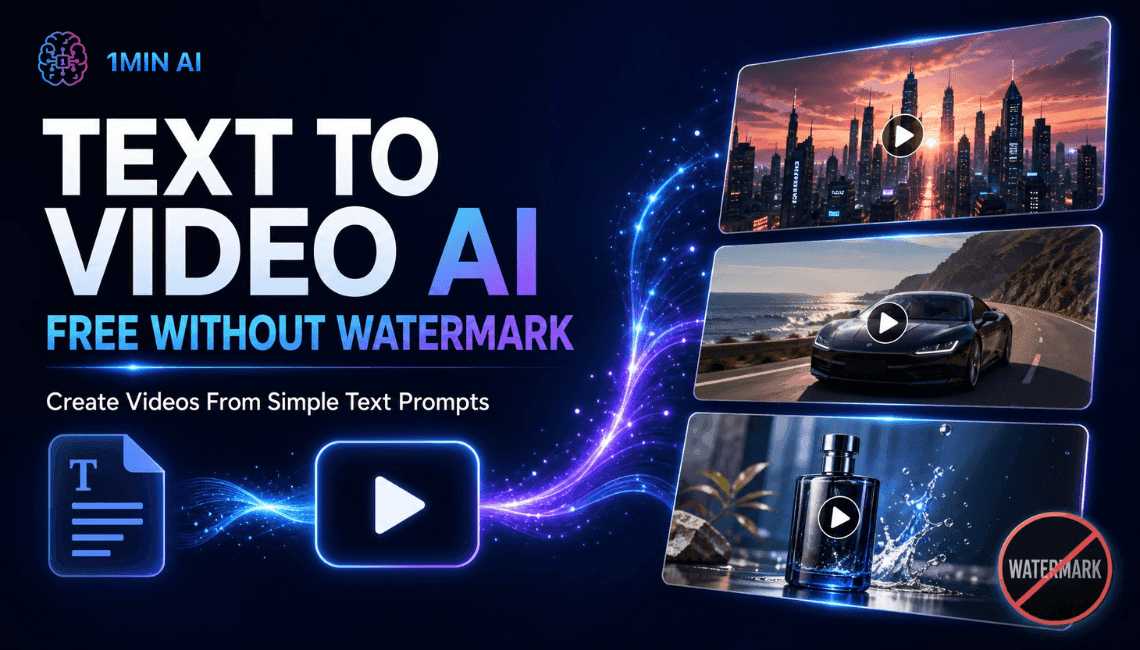
Create text to video AI free without watermark online with 1min.AI. Pick top models, turn prompts into HD clips, and download clean videos fast. Try it free.
You can create text to video AI free without watermark on 1min.AI. Open the text to video tool, choose a model such as Kling, Veo 3.1, Seedance, or Wan, type your prompt, and download a clean clip with no watermark. You can open 1min.AI and start right away without filling in a sign-up form. Turn one sentence into a short video in minutes, with no camera, no editing timeline, and no stock footage hunt.
Quick facts
- Best for: marketers, creators, small business owners, and beginners
- Output: short HD clips, vertical, horizontal, or square depending on the model
- Watermark: none on your downloads
- Works in: your browser, so no app or APK to install
- Reviewed by: the 1min.AI team, who test these models and settings inside our own workspace
Why Free Text to Video Often Ends in Frustration
You write a perfect prompt, wait for the render, and then find a logo across the corner of your clip. Or the tool asks for an account, a download, and a login before showing any result. Or you cannot tell how long the video can be, which style the model handles best, or what a setting does.
Those are the three problems this guide solves:
- Watermarks that make clips unusable for social posts and ads
- Unclear limits on length, resolution, and aspect ratio
- Too many choices, with no guidance on which model fits your idea
Text to Video AI Free Without Watermark on 1min.AI
1min.AI brings leading video models into one workspace, so you can switch models without switching tabs. Start from a text prompt, then adjust length, ratio, audio, and camera settings to match your platform.
Top Text to Video Models in One Place
| Model | Best for | Key settings |
|---|---|---|
| Kling 3.0 and 3.0 Omni | Cinematic motion and multi-scene stories | 3 to 15 seconds, audio toggle, up to 6 shots |
| Kling 2.5, 2.1 Master, 2.1, 2.0, 1.6 | Reliable short clips with camera control | 5 or 10 seconds, standard or professional mode, camera presets |
| Veo 3.1 and Veo 3 (Fast versions too) | Realistic detail and clips with sound | Fixed 8 seconds, 720p or 1080p, audio toggle |
| Seedance 2.5 | Reference-guided videos | 4 to 30 seconds, reference images, videos, and audio |
| Seedance 2.0, 2.0 Fast, 2.0 Mini | Quick, controlled clips | 4 to 15 seconds, same reference options |
| Wan 2.7 | Flexible ratios and your own audio track | 2 to 15 seconds, five aspect ratios, custom WAV or MP3 |
| Pika | Fast social clips | 5 or 10 seconds, seven aspect ratios, 720p or 1080p |
| Hailuo | Prompt-expanded short clips | v2 offers 6 or 10 seconds |
You will also find Hunyuan AI, Wanx AI, and Animate Diff for creative experiments.
Free Online, No App or APK Needed
1min.AI runs in your browser on desktop or mobile. There is nothing to install, which also means no unofficial APK files to worry about. Open the page, write your prompt, and generate.
Your Workspace Works Around Your Videos
Save reusable prompts in Prompt List, store images and clips in Asset List, and organize work with Tag List. These workspace tools in AI Studio are ready to use, while Shared Zone and History keep your work synced once you create an account.
How to Create Text to Video AI Free Without Watermark in 3 Steps
Step 1: Pick a Model and Write Your Prompt
Open the text to video tool, choose a model, and describe your scene. A strong prompt covers five things:
- Subject: who or what is on screen
- Action: what moves or changes
- Setting: where and when it happens
- Style: cinematic, anime, 3D, product shot, documentary
- Camera: slow pan, zoom in, aerial shot
Example prompt: “A barista pours latte art in a sunlit cafe, slow zoom in, warm tones, cinematic, shallow depth of field.”
Step 2: Adjust Your Settings
Settings differ by model, so here is what matters for each family.
Kling Settings
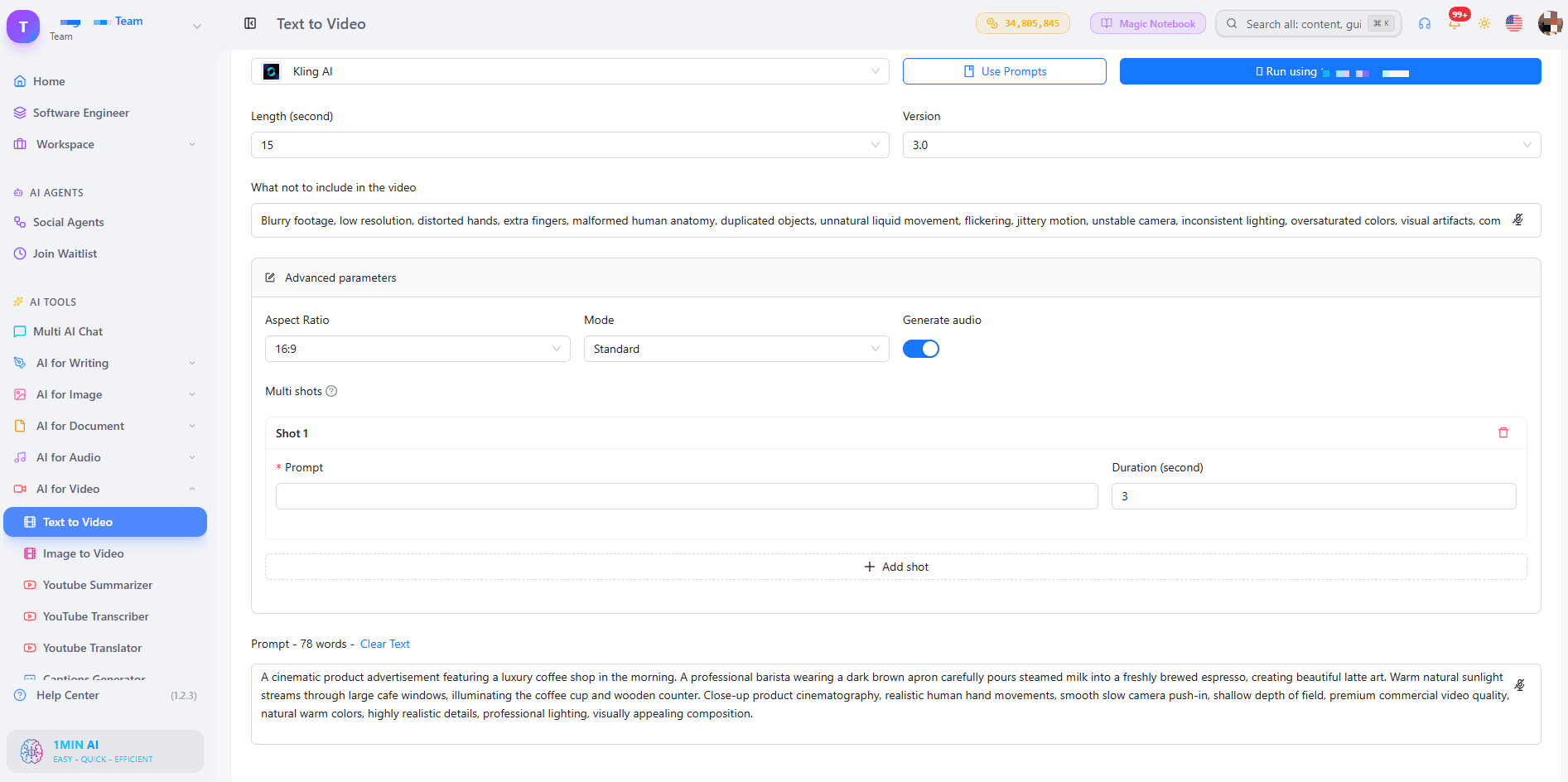
For Kling 1.6 to 2.5, choose a 5 or 10 second length and a camera control such as zoom, pan, tilt, or roll. Standard mode suits quick drafts, while professional mode suits your final version. The default CFG Scale of 0.5 is a good starting point, and raising it makes the clip follow your prompt more strictly. Use the “what not to include” field to remove unwanted elements. Kling 3.0 adds audio and lets you build a multi-shot video of up to 6 shots, each with its own prompt, within 15 seconds total.
Veo Settings
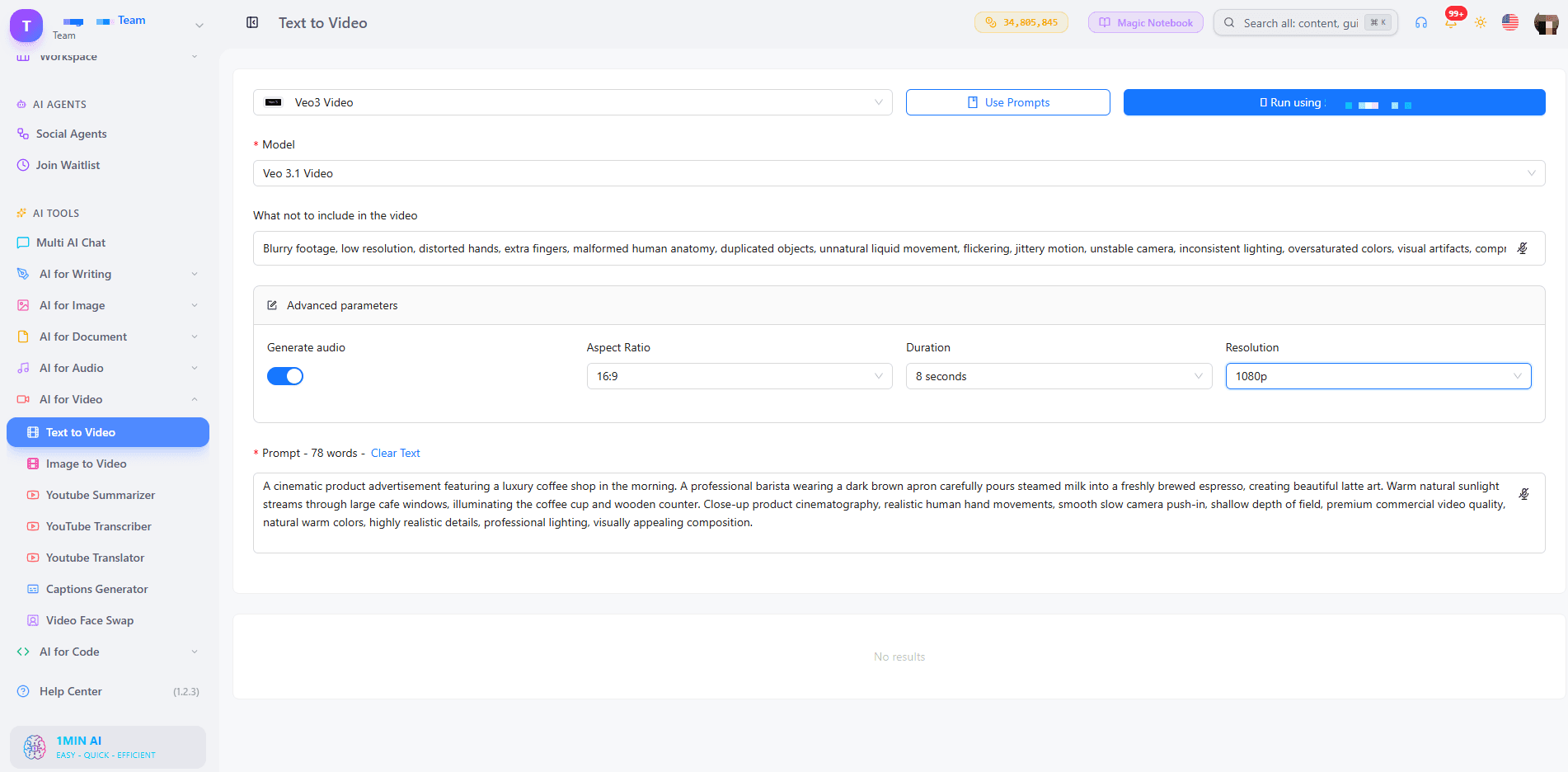
Choose Veo 3.1 when you want the strongest quality, or a Fast version when you are testing ideas. Turn on Generate Audio if you want sound with your picture. Duration is fixed at 8 seconds, with 9:16, 16:9, or auto aspect ratio and 720p or 1080p resolution. Our guide to free AI video generation with Veo 3.1 goes deeper on prompts for this model.
Seedance and Wan Settings
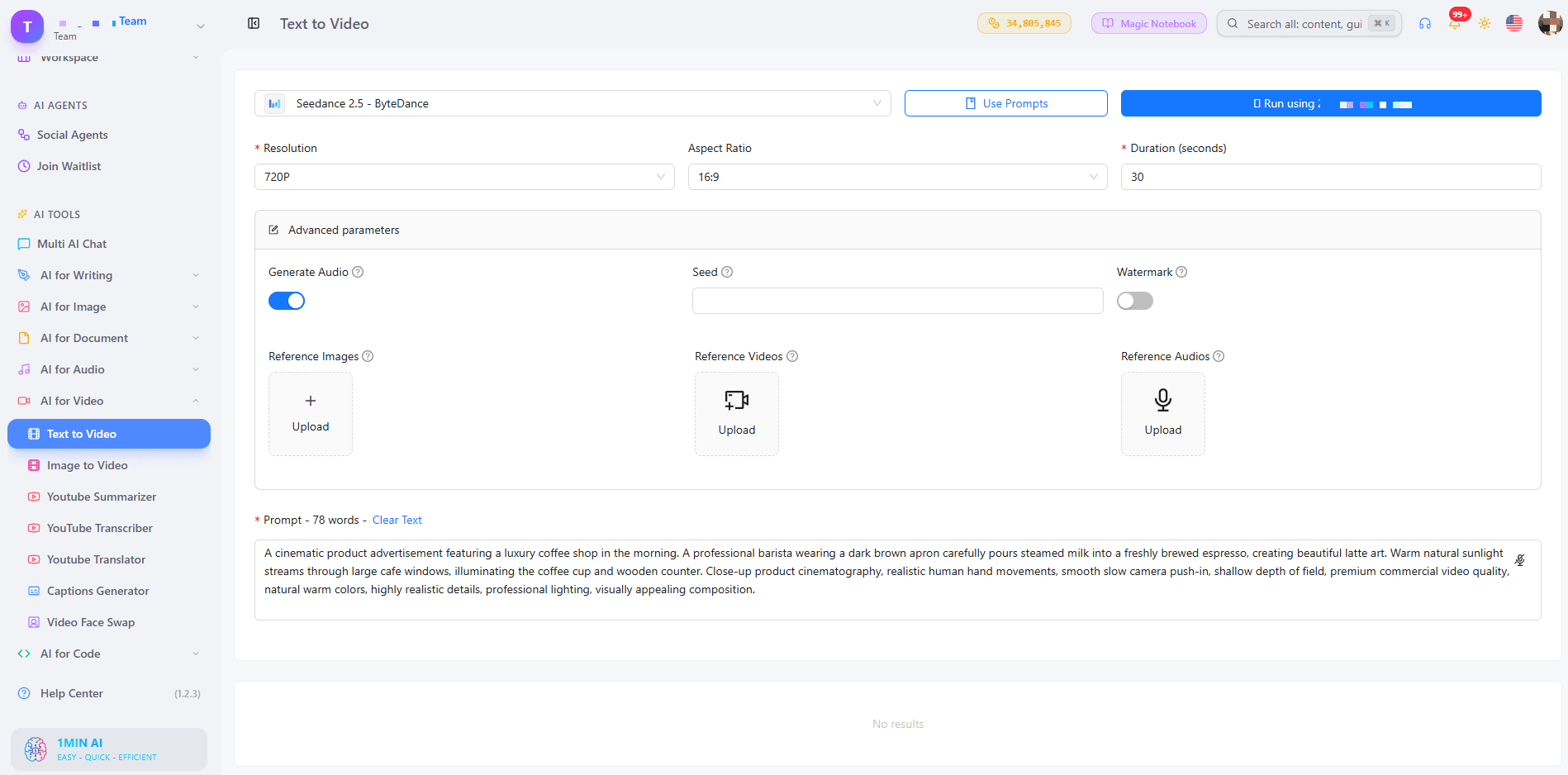
Seedance 2.5 accepts up to 30 reference images, 10 reference videos, and 10 reference audio clips, which helps keep characters and styles consistent. Wan 2.7 lets you upload your own audio (WAV or MP3), choose between 16:9, 9:16, 1:1, 4:3, and 3:4, and switch Enhance Prompt on for short prompts.
Step 3: Generate, Preview, and Download
Click generate, preview the clip, and download it with no watermark. If the result is close but not perfect, change one detail in the prompt and run it again. Small edits often improve a clip more than a full rewrite.
For a visual walkthrough, watch this tutorial:
Which Style and Length Do You Need?
Two questions decide the best setup for your video: what look do you want, and how long should it be?
Choose by Style
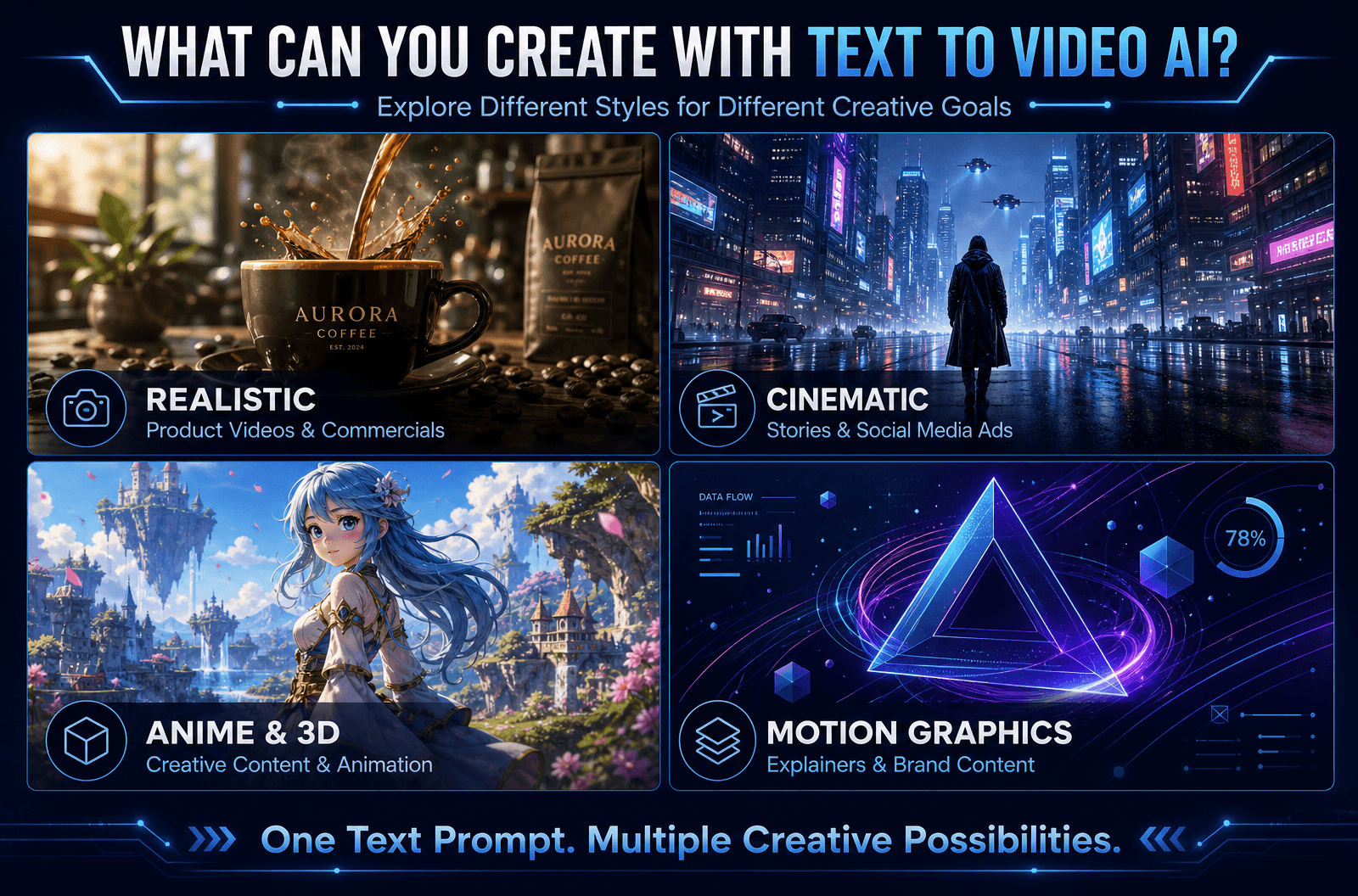
- Realistic: Veo 3.1 for natural lighting, motion, and sound
- Cinematic and story-driven: Kling 3.0 with multi-shot scenes
- Brand or character consistency: Seedance 2.5 with reference images
- Anime, 3D, or motion graphics: add the style in your prompt, then test Kling, Wan 2.7, or Pika
Choose by Length
- 2 to 8 seconds: hooks, product teasers, looping social clips (Wan 2.7, Veo, Pika)
- 10 to 15 seconds: short ads and story beats (Kling 3.0, Seedance 2.0)
- Up to 30 seconds: longer scenes (Seedance 2.5)
Want to compare model outputs side by side? This video shows several of them at work:
Prompt Tips for Cleaner, More Accurate Videos
- Be specific: “a red sports car on a coastal road at sunset” beats “a car”
- Keep it short: one or two clear sentences
- Name the camera move: “drone shot,” “slow pan,” “close-up”
- Use the negative field: exclude text overlays, blur, or extra people
- Test one change at a time: it shows you what each edit does
Who Uses Text to Video AI Without Watermarks?
- Marketers: turn a campaign idea into ad variations without a shoot
- Content creators: produce hooks and B-roll for TikTok, Reels, and Shorts
- Small business owners: show a product in motion, with no production budget
- Educators: animate concepts that are hard to film
- Real estate and e-commerce teams: start from a still photo with AI image to video when you already have pictures
If you are building TikTok hooks, this walkthrough helps:
Can You Use the Videos Commercially? What About Copyright?
Videos generated from your own prompts do not rely on stock footage, so there is nothing to license from a library. Commercial-use conditions can vary by model, so check the terms of the model you choose before publishing client or ad work. For a broader overview, read our AI text to video guide.
FAQ
How do I convert text to video for free using AI?
Open 1min.AI’s text to video tool, choose a model, type your prompt, set the length and ratio, and generate. Preview the clip, then download it with no watermark.
Is there a text to video AI free without watermark and login?
Yes. You can open 1min.AI and start generating without creating an account, and your downloads carry no watermark. Our page on text to video AI free with no sign up explains the details.
Which video tool is 100% free with no watermark?
Look for a tool that clearly states no watermark on exports, shows its limits upfront, and runs in the browser. 1min.AI offers free credits to try text to video and exports clean videos.
Can I generate unlimited videos?
You can test as many prompt variations as your credits allow, so start with short clips and refine one detail at a time.
Can an AI chatbot do text to video?
Chatbots focus on text and images. A dedicated text to video tool such as 1min.AI connects you to video models built for motion, audio, and camera control.
Do I need an app or APK?
No. 1min.AI works in your browser on any device.
Is there a script to video option?
Yes. Paste your script or scene description as the prompt. With Kling 3.0 you can split it into up to 6 shots.
Make Your First Watermark-Free Video
Pick a model, write one clear prompt, and see your idea move. Your first clip can be ready in minutes.
- #Transaction
አማራጮች
ለ1minAI ምርጥ አማራጮችን ያግኙ እና ባህሪያትን፣ ዋጋን እና የአጠቃቀም ሁኔታዎችን ያወዳድሩ።

1min.AI ከ OpenRouter ጋር
1min.AI ከ OpenRouter ጋር፡ ለአጠቃቀም ዝግጁ የሆነውን የAI ፈጠራ ምርት ከቴክኒካዊ API መሣሪያ ጋር ያነጻጽሩ። ዜሮ-ኮድ የፈጠራ ስቱዲዮ ወይም የኮዲንግ መሠረት ማዕከል እንደሚፈልጉ ይወቁ።
 Ngoc Hong

1min AI vs Buffer
Compare 1min.AI vs Buffer for Facebook content creation, AI writing, image generation, scheduling, pricing, and everyday marketing workflows.
Ngoc Hong
1min.AI vs. Hootsuite: Which Social Media Tool Fits Your Workflow?
Compare 1min.AI vs. Hootsuite to explore their AI content creation, social media publishing, analytics, pricing, and collaboration features. Find the right tool for your workflow.
AI መሳሪያዎች
ምርታማነትን፣ ፈጠራን እና የዕለት ተዕለት ስራን ለማሳደግ ምርጥ የኤአይ መሳሪያዎችን ያግኙ።

ለStartup መስራች ባለቤቶች የሚመጡ 4 ምርጥ ተመጣጣኝ AI መሳሪያዎች
ሀሳቦችን ለማረጋገጥ፣ ምርቶችን ለመገንባት፣ ይዘት ለመፍጠር እና ፈጥነው ለመጀመር የStartup መስራች ባለቤቶች ሊጠቀሙባቸው የሚችሉ 4 ምርጥ ተመጣጣኝ AI መሳሪያዎችን ያግኙ።
 Tram Ta

POV: በየቀኑ 10+ ፖስቶች ማዘጋጀት አለብህ
የአይ አይ ይዘት የስራ ፍሰት እንዴት እንደሚገነባ ተማር፣ ይህም የይዘት ፈጣሪዎች በ AI የሀሳብ ማብራሪያ፣ ምስል ማመንጨት እና የይዘት ፍጠር አማካኝነት በቀን 10+ ሶሻል ሚዲያ ፖስቶችን በፍጥነት እንዲያዘጋጁ ያግዛቸዋል።
 Lien Anh Vu

“ይበልጥ የተሻለ አድርገው” የሚለውን ወደ የተሻለ ይዘት በAI ይቀይሩ
AI በመጠቀም የደንበኛ አሻሚ አስተያየትን ወደ ግልጽ ማሻሻያዎች ቀይሩ፣ ያልተፈለጉ ማስተካከያዎችን ቀንሱ፣ እና የተሻለ ይዘት በፍጥነት ያቅርቡ።
Lien Anh VuየAI ባህሪያት
አጠቃላይ የAI ባህሪያት የስራ ሂደቶችን ይቀላልላሉ፣ ብቃትን ያሻሻላሉ እና ቡድኖችን ለተጨማሪ ስኬት ይገዛቸዋል።

1minAI: ነጻ AI የሰዋስው ማረሚያ
በ1minAI ነጻ AI የሰዋስው ማረሚያ ሰዋስው ያረጋግጡ። የሰዋስው፣ የአጻጻፍ እና የጽሁፍ ስህተቶችን ያግኙ፣ ግልጽነትን ያሻሽሉ፣ እና ይዘትዎን በሰከንዶች ውስጥ ያጣጥሙ።
Tram Ta
በ1min.AI ፖርትፎሊዮ ድህረገጽዎን በፍጥነት ይገንቡ
ፍሪላንስ ፈጠራ ሰሪዎች 1min.AI በመጠቀም የሙያ ፖርትፎሊዮ ድህረገጽን እንኳን ጠንካራ የኮዲንግ ክህሎት ሳይኖራቸው እንዴት በፍጥነት ማቀድ፣ መጻፍ፣ መንደፍ እና መፍጠር እንደሚችሉ ይማሩ።
Lien Anh Vu
ነጻ AI X አስተያየት
በእኛ በ AI የተጎላበተ የTwitter አስተያየት ጀነሬተር አማካኝነት ለTwitter አስቂኝ፣ ብልህ ወይም አሳቢ አስተያየቶችን ይፍጠሩ። ተሳትፎዎን ያሳድጉ እና ከብዙዎች ጎልተው ይታዩ!
 Trang Tran
የኤአይ አጠቃቀሞች
ለንግድ፣ ለውጤታማነትና ለተለያዩ ኢንዱስትሪዎች የተመረጡ የኤአይ አጠቃቀሞች።

በኢንስታግራም ለማስተላለፍ የሚሻለው ጊዜ፡ ለተሻለ ተሳትፎ የተግባራዊ መመሪያ
በኢንስታግራም ለማስተላለፍ የሚሻለውን ጊዜ ይወቁ፣ ለተለያዩ ታዳሚዎች የሚሻሉ ቀናትና ሰዓታትን ጨምሮ፣ እንዲሁም ለእርስዎ መለያ ተስማሚ የማተሚያ መርሐ ግብር ለማግኘት ምክሮችን።
Tram Taበ1min.AI ፖርትፎሊዮ ድህረገጽዎን በፍጥነት ይገንቡ
ፍሪላንስ ፈጠራ ሰሪዎች 1min.AI በመጠቀም የሙያ ፖርትፎሊዮ ድህረገጽን እንኳን ጠንካራ የኮዲንግ ክህሎት ሳይኖራቸው እንዴት በፍጥነት ማቀድ፣ መጻፍ፣ መንደፍ እና መፍጠር እንደሚችሉ ይማሩ።
Lien Anh Vu“ይበልጥ የተሻለ አድርገው” የሚለውን ወደ የተሻለ ይዘት በAI ይቀይሩ
AI በመጠቀም የደንበኛ አሻሚ አስተያየትን ወደ ግልጽ ማሻሻያዎች ቀይሩ፣ ያልተፈለጉ ማስተካከያዎችን ቀንሱ፣ እና የተሻለ ይዘት በፍጥነት ያቅርቡ።
Lien Anh Vuየኤ አይ ትምህርቶች
AI ን በተግባራዊ፣ ደረጃ በደረጃ ትምህርቶች እንዴት መጠቀም እንደሚቻል ይማሩ።

2026 ብላክ ፍራይዴይ የAI መሳሪያ ቅናሾች
2026 ብላክ ፍራይዴይ የAI መሳሪያ ቅናሾች ምን እንደሚያቀርቡ ይወቁ። የ1min.AI ሕይወት ዘመን ቅናሽን በAppSumo, Dealify, Stack Social እንዴት ማግኘት እንደሚቻል ይወቁ፣ እና በTrustpilot, Slashdot, Software Advice ላይ ያረጋግጡ።
 Hang Nguyen

1minAI ፊስ ስዋፕ ጋር የፋሽን ሳምንትን በ$0 ይለማመዱ
1minAI ፊስ ስዋፕ ጋር የፋሽን ሳምንትን በ$0 ይለማመዱ። ፎቶዎን ያስገቡ፣ የፋሽን ሳምንት ቪዲዮ ይምረጡ፣ እና የራስዎን ኤአይ የፋሽን ጊዜ ይፍጠሩ።
Ngoc Hong
በደቂቃዎች ውስጥ Viral Reels: ለሳታዊ ቮይስኦቨሮች የ1minAI Text-to-Speech እንዴት እንደሚጠቀሙ
የሳታዊ ገጽ አስተዳዳሪዎች የ1minAI Text-to-Speech ባህሪን ተጠቅመው ለTikToks, Shorts, እና Instagram Reels ፈጣን የዜና አንከር እና ድራማዊ ቮይስኦቨሮችን እንዴት እንደሚፈጥሩ ይማሩ።
የ AI መመሪያዎች
ተግባራዊ መመሪያዎችን፣ የእውነተኛ ዓለም ምሳሌዎችን እና ተግባራዊ ሊሆኑ የሚችሉ ምርጥ ልምዶችን በመጠቀም AIን በፍጥነት ይማሩ።

AI መሳሪያዎችን በደህንነት በመስመር ላይ ይግዙ፡ የ2026 ጥቁር ዓርብ መመሪያ
ምርጥ የጥቁር ዓርብ AI ቅናሾችን በመስመር ላይ እንዴት እንደሚፈልጉና እንደሚያጠብቁ ይወቁ። ማታለያዎችን ለማስወገድ፣ የምዝገባ ድካምን ለመከላከል እና ሶፍትዌርን ለማረጋገጥ የባለሙያ ስትራቴጂዎችን ይማሩ።
Hang Nguyen
AI ቢዝነስን ከባዶ ሳትገነቡ እንዴት እንደሚጀምሩ
AI ቢዝነስ እንዴት እንደሚጀምሩ፣ ሀሳብዎን እንዴት እንደሚያረጋግጡ፣ እና ውድ የAI መሠረተ-ልማት ከባዶ ሳትገነቡ እንዴት በፍጥነት እንደሚጀምሩ ይማሩ።
Ngoc Hong
AI Fashion Video Generator With Seedance 2.5 and HeyGen
Learn how to create AI fashion videos with Seedance 2.5 and HeyGen. Turn outfit photos into cinematic videos featuring your own face with 1min.AI.
Lien Anh Vuየ AI መፍትሄዎች
ለራስ-ሰር ስራዎች፣ ለኮዲንግ፣ ለምርምር፣ ለምርታማነት፣ ለደንበኛ ድጋፍ፣ ለግብይት እና ለንግድ ስራ ፍሰቶች ምርጥ የ AI መፍትሄዎችን ያስሱ።

ነፃ AI የታቱ ጀነሬተር፡ ብጁ ዲዛይኖች
ማንኛውንም ሀሳብ በ1min.AI ነፃ AI የታቱ ጀነሬተር ወደ ብጁ የታቱ ዲዛይን ያስቀይሩ። ሀሳብዎን ይግለጹ፣ ስታይል ይምረጡ፣ በሰከንዶች ያውርዱ።
Trang TranAI መሳሪያዎችን በደህንነት በመስመር ላይ ይግዙ፡ የ2026 ጥቁር ዓርብ መመሪያ
ምርጥ የጥቁር ዓርብ AI ቅናሾችን በመስመር ላይ እንዴት እንደሚፈልጉና እንደሚያጠብቁ ይወቁ። ማታለያዎችን ለማስወገድ፣ የምዝገባ ድካምን ለመከላከል እና ሶፍትዌርን ለማረጋገጥ የባለሙያ ስትራቴጂዎችን ይማሩ።
Hang Nguyen1minAI ፊስ ስዋፕ ጋር የፋሽን ሳምንትን በ$0 ይለማመዱ
1minAI ፊስ ስዋፕ ጋር የፋሽን ሳምንትን በ$0 ይለማመዱ። ፎቶዎን ያስገቡ፣ የፋሽን ሳምንት ቪዲዮ ይምረጡ፣ እና የራስዎን ኤአይ የፋሽን ጊዜ ይፍጠሩ።
Ngoc HongAI ሞዴሎች
በዓለም ግንባር ቀደም የሆኑ የAI ሞዴሎችን በአንድ ቦታ ያስሱ።

Free AI Chat With Claude Fable 5.2 On 1min.AI
Free AI chat with Claude Fable 5.2 on 1min.AI. Compare Fable 5.2 vs Opus 5.5, see Fable 5.2 benchmarks, and start chatting in minutes.
Trang Tran
GPT-6.2 Sol: Specs, Pricing & Free Access
Explore GPT-6.2 Sol specs, pricing, and how it compares with GPT-6.1 Sol and Claude Opus 5.5, then try it free in 1min.AI Multi AI Chat.
Trang Tran
GPT 6.2 Astra: Pricing, Benchmarks & Free Access
GPT 6.2 Astra release date, pricing, Reddit feedback and Opus 5.5 comparison. See what it does best and chat with it on 1min.AI for free.
Trang TranየAI ንጽጽሮች
ለፍላጎቶችዎ ተስማሚ የሆኑትን የAI መሳሪያዎች፣ ሞዴሎች እና መድረኮች ለማግኘት ያወዳድሩ።

Gemini 4 Neon vs Hydrogen: Specs, Price & Picks
Gemini 4 Neon vs Hydrogen, Carbon and Argon: compare price, benchmarks and use cases to pick the right model, then test them side by side on 1min.AI.
Trang Tran
Kling AI Vs Veo 3: Which Model Wins?
Kling AI vs Veo 3: እንቅስቃሴ፣ ነባሪ ድምፅ፣ ዋጋ እና ነጻ ዕቅዶችን አነጻጽር እና ለፕሮጀክትዎ የትኛው AI ቪዲዮ ጀነሬተር እንደሚያሸንፍ ይመልከቱ - ሁለቱንም በ1min.AI ይሞክሩ።
Trang Tran
DeepSeek V4 Pro ከ Flash ጋር ንጽጽር
DeepSeek V4 Pro እና DeepSeek V4 Flash መለኪያዎችን ያወዳድሩ። የኤጀንቲክ መተግበሪያዎችዎን ያሻሽሉ እና የAI እውነታ ማረጋገጫዎን ዛሬ በ1min.ai ላይ ያሻሽሉ።
Ngoc HongየAI ግንኙነቶች
AIን በቀላሉ ከእርስዎ የሚጠቀሙት መሣሪያዎች ጋር ያገናኙ፤ ሥራዎችን አውቶማቲክ ያደርጉና የስራ ውጤታማነትን ያሳድጉ።
POV: በየቀኑ 10+ ፖስቶች ማዘጋጀት አለብህ
የአይ አይ ይዘት የስራ ፍሰት እንዴት እንደሚገነባ ተማር፣ ይህም የይዘት ፈጣሪዎች በ AI የሀሳብ ማብራሪያ፣ ምስል ማመንጨት እና የይዘት ፍጠር አማካኝነት በቀን 10+ ሶሻል ሚዲያ ፖስቶችን በፍጥነት እንዲያዘጋጁ ያግዛቸዋል።
Lien Anh Vu
AI አፕሎች መቀያየርን ያቁሙ፡ AI ውህደት የአሰሪ ብራንዲንግን እንዴት ይለውጣል
AI ውህደት የHR ቡድኖችን የአሰሪ ብራንዲንግ ስራ በAI መጻፊያ፣ ሰነዶች፣ ምስሎች፣ ቪዲዮ እና ብዙ AI ሞዴሎችን በአንድ የስራ ቦታ በማዋሃድ እንዴት እንደሚያቀላጥፍ ያግኙ።
Tram Ta
ለዴቨሎፐሮች የAI API አግሪጌተር ማብራሪያ
የAI API አግሪጌተር ለዴቨሎፐሮች ብዙ የAI ሞዴሎችን ለመጠራት አንድ ዩኒፋይድ API ይሰጣል፣ ይህም የኢንተግሬሽን ጊዜን እና የቬንደር ማሰሪያን ይቀንሳል።
Trang TranAI ለኢንዱስትሪዎች
ለጤና ጥበቃ፣ ፋይናንስ፣ ትምህርት፣ ህግ፣ ማምረቻ፣ የችርቻሮ ንግድ፣ የሪል እስቴት እና ሌሎችም ምርጥ የ AI መሳሪያዎችን እና የስራ ሂደቶችን ያግኙ።

Voice Cloning AI Free: How to Clone Any Voice Online in Minutes
Try voice cloning AI free with 1min.AI. Upload a 5-second clip, pick an ElevenLabs model, choose from 32 languages, and turn text to speech in your own voice.
Trang Tran
Claude Personal Finance Setup and Safety Guide
Claude personal finance explained: how Personal Finance in Claude works and what Claude finance can see. Plus a safe CSV method for non-US users.
Trang Tran
Free AI Image Editor With Prompt No Restrictions
Looking for a free AI image editor with prompt no restrictions? Edit backgrounds, objects and text by typing, no watermark. Try 1min.AI’s flexible editor now.
Trang TranAI ወኪሎች
በስራዎ እና በዕለት ተዕለት ኑሮዎ ውስጥ ተግባሮችን በራስ-ሰር ለማድረግ AI ወኪሎችን ያግኙ እና ያሂዱ።
1minAI: ነጻ AI የሰዋስው ማረሚያ
በ1minAI ነጻ AI የሰዋስው ማረሚያ ሰዋስው ያረጋግጡ። የሰዋስው፣ የአጻጻፍ እና የጽሁፍ ስህተቶችን ያግኙ፣ ግልጽነትን ያሻሽሉ፣ እና ይዘትዎን በሰከንዶች ውስጥ ያጣጥሙ።
Tram Ta
ለFacebook የAI ኤጀንቶች
ለFacebook የAI ኤጀንት በመጠቀም ይዘት ይፍጠሩ፣ ምስሎች ያመነጩ፣ ፖስቶችን ያቅዱ፣ እና ከሰነዶችዎ እና ከውይይቶችዎ ይለጥፉ።
Ngoc Hong
AI ኤጀንት vs AI አስስታንት: ለዲዛይነሮች በእውነት የበለጠ ጊዜ የሚቆጥብ የቱ ነው?
በAI Agent vs AI Assistant መካከል ያለውን ልዩነት ይወቁ እና የትኛው መፍትሔ ተደጋጋሚ ስራዎችን ለማስኬድ፣ እርማቶችን ለመቀነስ እና የበለጠ ጊዜ ለመቆጠብ እንደሚረዳ ይወቁ።
Lien Anh VuAI የስራ ፍሰቶች
ለአምራችነት፣ ለገበያ፣ ለሽያጭ፣ ድጋፍ እና ለሌሎችም ዝግጁ የሆኑ የAI የስራ ፍሰቶችን ያስሱ።
POV: በየቀኑ 10+ ፖስቶች ማዘጋጀት አለብህ
የአይ አይ ይዘት የስራ ፍሰት እንዴት እንደሚገነባ ተማር፣ ይህም የይዘት ፈጣሪዎች በ AI የሀሳብ ማብራሪያ፣ ምስል ማመንጨት እና የይዘት ፍጠር አማካኝነት በቀን 10+ ሶሻል ሚዲያ ፖስቶችን በፍጥነት እንዲያዘጋጁ ያግዛቸዋል።
Lien Anh VuAI Fashion Video Generator With Seedance 2.5 and HeyGen
Learn how to create AI fashion videos with Seedance 2.5 and HeyGen. Turn outfit photos into cinematic videos featuring your own face with 1min.AI.
Lien Anh Vu
Is Seedance 2.5 the Best AI Video Generator of 2026?
Is Seedance 2.5 the best AI video generator in 2026? Explore its features, compare it with Kling and Veo, and learn how to create AI videos on 1min.AI.
Lien Anh Vuየዜና ዝርዝር
ከ1minAI ጋር ሳምንታዊ የAI አዳዲስ ልማቶች

🔮 Weekly AI Innovations #145: X Content Agent & GPT 6.1 Terra on 1min.ai
Scale viral reach with the X Content Agent on 1min.ai. Discover an end-to-end 4-stage pipeline with zero token burn, plus the launch of GPT 6.1 Terra.
Hang Nguyen
🔮 Weekly AI Innovations #144: LinkedIn Content Agent: Complete B2B Publishing Pipeline
Scale B2B influence with the LinkedIn Content Agent on 1min.ai. Discover an end-to-end 4-stage pipeline with zero redundant token burn and 1-click publishing.
Hang Nguyen
🔮 Weekly AI Innovations #146: Mistral 3.5, Qwen Image & Cohere A+ are ready on 1min.ai
Deploy Mistral Large 3, Qwen Image 3.0, and Cohere Command A+ on 1min.ai. Boost RAG accuracy and cut visual generation latency in one unified AI workspace.
Hang Nguyen