
How to Build a Portfolio Website With Claude Fable 5.1

Lien Anh Vu
20 ኖቬምበር 2026
Learn how to build a portfolio website with Claude Fable 5.1 on 1min.AI. Generate HTML code, preview your design, and refine your portfolio.
Want to create a portfolio website but don't know how to code?
If you're a graphic designer, freelancer, or creative professional, having your own website is a great way to show your work and attract potential clients. But building one from scratch can take time, especially when you're not familiar with HTML or CSS.
The good news? AI can make the process easier.
In this guide, we'll show you how to build a portfolio website with Claude Fable 5.1 using 1min.AI. You'll learn how to turn a simple idea into a website, preview the design, and make changes using everyday language.
We'll use a real example from our video: Morrow Coffee — First Light, a coffee branding project turned into an interactive portfolio page.
Can You Build a Portfolio Website With AI?
Yes! An AI portfolio website builder can help you create a website by describing what you want.
Instead of writing code yourself, you can tell AI about your preferred colors, layout, images, and website sections. AI then generates the code based on your instructions.
With the 1min.AI Code Generator, you can use Claude to help create and improve your portfolio website.
Here's what you'll do:
- Open the 1min.AI Code Generator.
- Choose Claude Fable 5.1.
- Describe your portfolio website.
- Generate and preview the website.
- Make changes until you're happy with the result.
You don't need advanced coding skills to get started.
Step 1: Open the 1min.AI Code Generator
First, go to 1min.AI Code Generator.
Open AI for Code → Code Generator and select Claude Fable 5.1 if it's available in your model list.
This is where you'll enter your website idea and ask AI to turn it into code.
Before getting started, think about what you want to show on your portfolio. It could be your graphic design projects, branding work, illustrations, or photography.
For this tutorial, we're using the Morrow Coffee branding project.
Step 2: Describe Your Portfolio Website
You don't need to know complicated coding terms to create your website.
Start by telling Claude what kind of portfolio you want.
For example, imagine you're a graphic designer who has just finished a branding project for a coffee shop. You want a website that shows the brand's colors, logo, and creative concept.
You can use this prompt:
Copy this prompt:
Create a modern portfolio website for a coffee branding project called "Morrow Coffee — First Light."
Use a warm and minimal design with cream, brown, and soft orange colors.
Include a homepage, project introduction, brand colors, logo showcase, and contact section.
Add a simple coffee cup animation to make the website more interesting.
Make the website look good on both desktop and mobile.
Generate the complete HTML, CSS, and JavaScript in one file so I can open it in Chrome.
The more clearly you describe your idea, the easier it is for AI to understand what you're looking for.
You can also change the prompt to match your own creative style.
Step 3: Generate Your Portfolio Website
Once your prompt is ready, submit it to the Code Generator.
Claude will generate website code based on your instructions.
You may see HTML, CSS, and JavaScript in the result. These are the basic building blocks of a website:
- HTML organizes your website content.
- CSS controls the colors, fonts, and layout.
- JavaScript adds interactive features and animations.
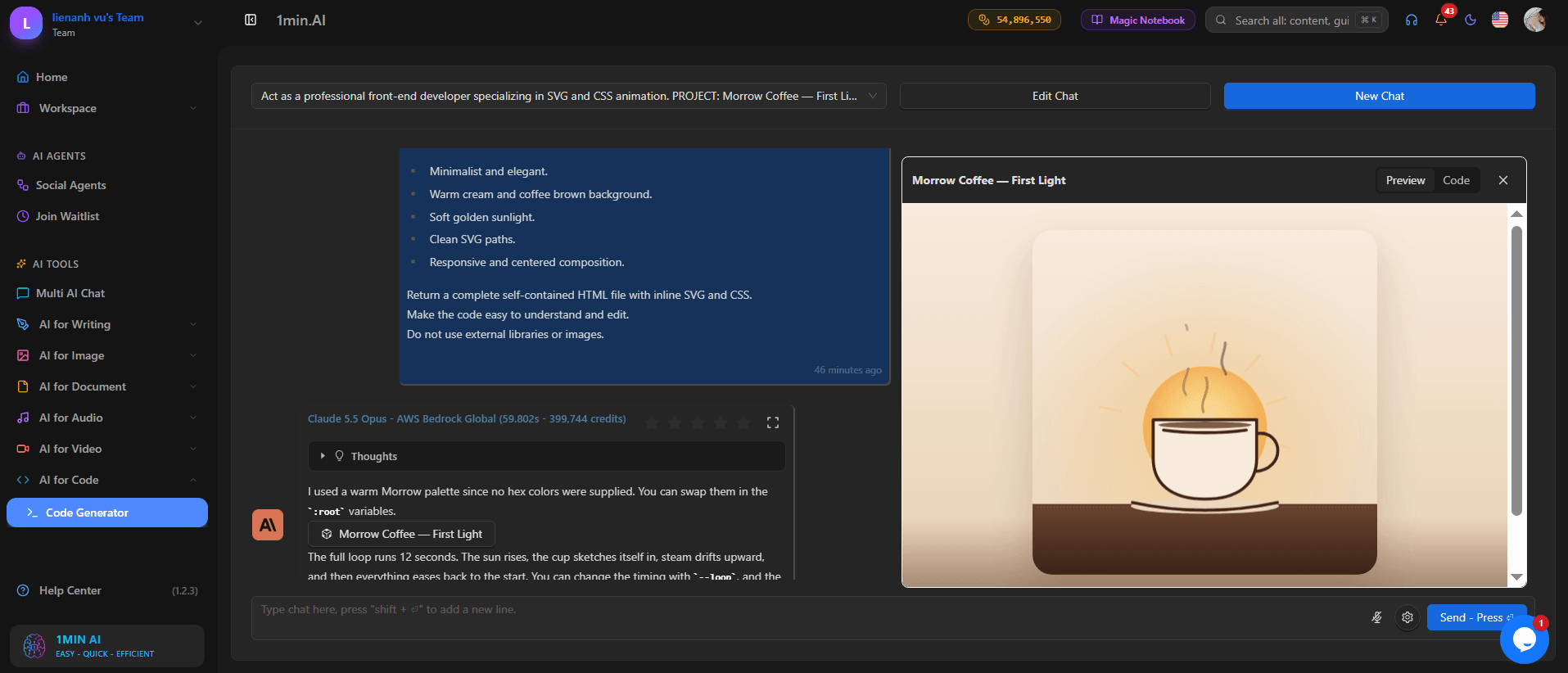
Don't worry if you're unfamiliar with these terms. You can start by checking the website preview to see how everything looks.
In our Morrow Coffee example, the generated design uses soft colors, clean typography, and a coffee-inspired visual style.
Step 4: Preview Your Website
After generating the code, it's time to see your website.
If the Code Generator provides a preview, open it to check the design.
Look at the layout, text, colors, and animations. Make sure the website matches the style you had in mind.
In the Morrow Coffee example, the website features a simple coffee cup illustration and warm background colors that fit the brand's identity.
Caption: An animated coffee cup adds a creative touch to the Morrow Coffee portfolio.
You can also save the complete generated code as an index.html file and open it in Chrome.
To do this:
- Copy the complete HTML code.
- Open Notepad on your computer.
- Paste the code into the file.
- Save it as
index.html. - Open the file with Google Chrome.
Now you can see your portfolio as a webpage on your computer.
Step 5: Customize Your Portfolio With AI
Your first website doesn't have to be perfect.
One useful thing about building a portfolio with Claude is that you can ask for changes without rewriting the entire website yourself.
For example, you can ask:
Make the background lighter and increase the headline size.
Or:
Add a section to showcase three of my best design projects.
You can even request small interactive details:
Add a smooth animation to the coffee cup illustration.
In our video, the Morrow Coffee website includes an interactive color palette and animated elements.
These details help make the portfolio more engaging than a simple collection of static images.
[INSERT VIDEO SCREENSHOT: Interactive color palette]
Caption: The Morrow Coffee website includes an interactive brand color section.
Try making one change at a time. This makes it easier to see what works and what needs improvement.
Step 6: Make Your Portfolio Ready to Share
Once you're happy with the design, it's time to prepare your website for visitors.
Before publishing, make sure you:
- Replace sample content with your own projects.
- Add your name and contact information.
- Check that all buttons and links work.
- Test the website on desktop and mobile.
- Make sure your images display correctly.
You can then upload your website files to a hosting service such as GitHub Pages or Netlify to make your portfolio accessible online.
Remember that generating a website and publishing it online are two separate steps.
Watch How We Created the Morrow Coffee Website
Want to see the process in action?
Our video shows how Claude is used in a creative branding workflow, from the Morrow Coffee concept to the website preview.
You'll also see how AI-generated code can turn a design idea into an interactive page.
[EMBED VIDEO: Claude Fable 5.1 vs Opus 5.5 — Morrow Coffee demonstration]
Why Use Claude to Build a Portfolio Website?
There are many ways to build a portfolio website, including traditional website builders and ready-made templates.
Using Claude offers a different approach: you can describe your ideas in plain English and let AI help with the coding.
This can be useful for creative professionals who want to:
- Build a portfolio without starting from scratch.
- Experiment with different website designs.
- Create custom layouts for their projects.
- Add simple animations and interactive elements.
- Save time on basic coding tasks.
You still need to review the results, but AI can help you get from an idea to a working website more quickly.
Frequently Asked Questions
Can I build a portfolio website without coding?
Yes. AI tools like Claude can generate website code from your instructions. You may still need to make small adjustments and test the final result.
Is Claude good for building portfolio websites?
Claude can help generate HTML, CSS, and JavaScript for portfolio websites. It's useful for creating layouts, styling pages, and adding simple interactions.
Can I use AI to build a graphic design portfolio website?
Yes. You can create a website to showcase branding projects, illustrations, packaging designs, and other creative work.
Can I customize my AI-generated portfolio?
Yes. You can ask Claude to change colors, fonts, layouts, animations, and website sections based on your preferences.
Can I publish my portfolio website online?
Yes. Once your website is ready, you can use a hosting service to publish it and share the link with potential clients.
Final Thoughts
Building a portfolio website doesn't have to be complicated.
With Claude and 1min.AI Code Generator, you can start with a simple idea, generate website code, and improve the design step by step.
As the Morrow Coffee example shows, AI can help turn a creative branding project into an interactive website without requiring you to write everything from scratch.
Whether you're a graphic designer, freelancer, or content creator, it's a practical way to start building your online portfolio.
Ready to create your own portfolio website?
Try the 1min.AI Code Generator and bring your creative ideas to life.
- #Commercial
አማራጮች
ለ1minAI ምርጥ አማራጮችን ያግኙ እና ባህሪያትን፣ ዋጋን እና የአጠቃቀም ሁኔታዎችን ያወዳድሩ።

1min.AI ከ OpenRouter ጋር
1min.AI ከ OpenRouter ጋር፡ ለአጠቃቀም ዝግጁ የሆነውን የAI ፈጠራ ምርት ከቴክኒካዊ API መሣሪያ ጋር ያነጻጽሩ። ዜሮ-ኮድ የፈጠራ ስቱዲዮ ወይም የኮዲንግ መሠረት ማዕከል እንደሚፈልጉ ይወቁ።
 Ngoc Hong

1min. AI vs Dola AI
Dola AI አማራጭ እየፈለጉ ነው? 1min.AI እና Dola AI በቪዲዮ መፍጠር፣ ነፃ እቅዶች፣ ዋጋ እና ግላዊነት ላይ ያነፃፅሩ እና ትክክለኛውን AI መተግበሪያ ይምረጡ።
Ngoc Hong
1minAI vs Hix AI
AI chat, research, ስነጽሁፍ, ምስሎች, ቪዲዮ, ዋጋ እና ተለዋዋጭ የAI ስራ ፍሰቶችን ለማነጻጸር 5 የHIX AI አማራጮችን ያነጻጽሩ።
Ngoc HongAI መሳሪያዎች
ምርታማነትን፣ ፈጠራን እና የዕለት ተዕለት ስራን ለማሳደግ ምርጥ የኤአይ መሳሪያዎችን ያግኙ።

አንድ ምርት፣ 10 UGC ፈጠራዎች፦ AI የይዘት ሙከራን እንዴት ያቀላል
በ AI UGC ቪዲዮ ጄነሬተር የበለጠ ተፈጥሯዊ UGC ይፍጠሩ፣ የበለጠ የፈጠራ አቅጣጫዎችን ይሞክሩ እና ሁሉንም እትሞች ሳይቀር በመቅረጽ የአፊሊየት ይዘትን ያሳድጉ።
 Lien Anh Vu

በጥቂት ደረጃዎች ብቻ ተመጣጣኝ የካርቱን ይዘት ይፍጠሩ
በ1min.AI ለTikTok እና Reels ካርቱን ቪዲዮዎችን በ3 ቀላል ደረጃዎች ይፍጠሩ፣ ከሀሳብ ምርምር እስከ ባህሪያት እና የተንቀሳቃሽ ቪዲዮዎች ድረስ።
Lien Anh Vu
ለStartup መስራች ባለቤቶች የሚመጡ 4 ምርጥ ተመጣጣኝ AI መሳሪያዎች
ሀሳቦችን ለማረጋገጥ፣ ምርቶችን ለመገንባት፣ ይዘት ለመፍጠር እና ፈጥነው ለመጀመር የStartup መስራች ባለቤቶች ሊጠቀሙባቸው የሚችሉ 4 ምርጥ ተመጣጣኝ AI መሳሪያዎችን ያግኙ።
 Tram Ta
የAI ባህሪያት
አጠቃላይ የAI ባህሪያት የስራ ሂደቶችን ይቀላልላሉ፣ ብቃትን ያሻሻላሉ እና ቡድኖችን ለተጨማሪ ስኬት ይገዛቸዋል።
አንድ ምርት፣ 10 UGC ፈጠራዎች፦ AI የይዘት ሙከራን እንዴት ያቀላል
በ AI UGC ቪዲዮ ጄነሬተር የበለጠ ተፈጥሯዊ UGC ይፍጠሩ፣ የበለጠ የፈጠራ አቅጣጫዎችን ይሞክሩ እና ሁሉንም እትሞች ሳይቀር በመቅረጽ የአፊሊየት ይዘትን ያሳድጉ።
Lien Anh Vuበጥቂት ደረጃዎች ብቻ ተመጣጣኝ የካርቱን ይዘት ይፍጠሩ
በ1min.AI ለTikTok እና Reels ካርቱን ቪዲዮዎችን በ3 ቀላል ደረጃዎች ይፍጠሩ፣ ከሀሳብ ምርምር እስከ ባህሪያት እና የተንቀሳቃሽ ቪዲዮዎች ድረስ።
Lien Anh Vu
1minAI: ነጻ AI የሰዋስው ማረሚያ
በ1minAI ነጻ AI የሰዋስው ማረሚያ ሰዋስው ያረጋግጡ። የሰዋስው፣ የአጻጻፍ እና የጽሁፍ ስህተቶችን ያግኙ፣ ግልጽነትን ያሻሽሉ፣ እና ይዘትዎን በሰከንዶች ውስጥ ያጣጥሙ።
Tram Taየኤአይ አጠቃቀሞች
ለንግድ፣ ለውጤታማነትና ለተለያዩ ኢንዱስትሪዎች የተመረጡ የኤአይ አጠቃቀሞች።
አንድ ምርት፣ 10 UGC ፈጠራዎች፦ AI የይዘት ሙከራን እንዴት ያቀላል
በ AI UGC ቪዲዮ ጄነሬተር የበለጠ ተፈጥሯዊ UGC ይፍጠሩ፣ የበለጠ የፈጠራ አቅጣጫዎችን ይሞክሩ እና ሁሉንም እትሞች ሳይቀር በመቅረጽ የአፊሊየት ይዘትን ያሳድጉ።
Lien Anh Vuበጥቂት ደረጃዎች ብቻ ተመጣጣኝ የካርቱን ይዘት ይፍጠሩ
በ1min.AI ለTikTok እና Reels ካርቱን ቪዲዮዎችን በ3 ቀላል ደረጃዎች ይፍጠሩ፣ ከሀሳብ ምርምር እስከ ባህሪያት እና የተንቀሳቃሽ ቪዲዮዎች ድረስ።
Lien Anh Vu
በኢንስታግራም ለማስተላለፍ የሚሻለው ጊዜ፡ ለተሻለ ተሳትፎ የተግባራዊ መመሪያ
በኢንስታግራም ለማስተላለፍ የሚሻለውን ጊዜ ይወቁ፣ ለተለያዩ ታዳሚዎች የሚሻሉ ቀናትና ሰዓታትን ጨምሮ፣ እንዲሁም ለእርስዎ መለያ ተስማሚ የማተሚያ መርሐ ግብር ለማግኘት ምክሮችን።
Tram Taየኤ አይ ትምህርቶች
AI ን በተግባራዊ፣ ደረጃ በደረጃ ትምህርቶች እንዴት መጠቀም እንደሚቻል ይማሩ።
በጥቂት ደረጃዎች ብቻ ተመጣጣኝ የካርቱን ይዘት ይፍጠሩ
በ1min.AI ለTikTok እና Reels ካርቱን ቪዲዮዎችን በ3 ቀላል ደረጃዎች ይፍጠሩ፣ ከሀሳብ ምርምር እስከ ባህሪያት እና የተንቀሳቃሽ ቪዲዮዎች ድረስ።
Lien Anh Vu
2026 ብላክ ፍራይዴይ የAI መሳሪያ ቅናሾች
2026 ብላክ ፍራይዴይ የAI መሳሪያ ቅናሾች ምን እንደሚያቀርቡ ይወቁ። የ1min.AI ሕይወት ዘመን ቅናሽን በAppSumo, Dealify, Stack Social እንዴት ማግኘት እንደሚቻል ይወቁ፣ እና በTrustpilot, Slashdot, Software Advice ላይ ያረጋግጡ።
 Hang Nguyen

AI ምስል ወደ ቪዲዮ የምርት ወጥነት ከSeedance ጋር ጠማማነትን ለማቆም እና የምርት ግምገማዎችን ለማስፋት
የAI ምስል ወደ ቪዲዮ የምርት ወጥነት በመጠቀም የሎጎዎችን ጠማማነት ያቁሙ እና በ1min.AI ላይ የስቱዲዮ ደረጃ ያላቸው የግምገማ ቪዲዮዎችን ዛሬ ይፍጠሩ።
Lien Anh Vuየ AI መመሪያዎች
ተግባራዊ መመሪያዎችን፣ የእውነተኛ ዓለም ምሳሌዎችን እና ተግባራዊ ሊሆኑ የሚችሉ ምርጥ ልምዶችን በመጠቀም AIን በፍጥነት ይማሩ።
በጥቂት ደረጃዎች ብቻ ተመጣጣኝ የካርቱን ይዘት ይፍጠሩ
በ1min.AI ለTikTok እና Reels ካርቱን ቪዲዮዎችን በ3 ቀላል ደረጃዎች ይፍጠሩ፣ ከሀሳብ ምርምር እስከ ባህሪያት እና የተንቀሳቃሽ ቪዲዮዎች ድረስ።
Lien Anh Vu
AI መሳሪያዎችን በደህንነት በመስመር ላይ ይግዙ፡ የ2026 ጥቁር ዓርብ መመሪያ
ምርጥ የጥቁር ዓርብ AI ቅናሾችን በመስመር ላይ እንዴት እንደሚፈልጉና እንደሚያጠብቁ ይወቁ። ማታለያዎችን ለማስወገድ፣ የምዝገባ ድካምን ለመከላከል እና ሶፍትዌርን ለማረጋገጥ የባለሙያ ስትራቴጂዎችን ይማሩ።
Hang NguyenAI ምስል ወደ ቪዲዮ የምርት ወጥነት ከSeedance ጋር ጠማማነትን ለማቆም እና የምርት ግምገማዎችን ለማስፋት
የAI ምስል ወደ ቪዲዮ የምርት ወጥነት በመጠቀም የሎጎዎችን ጠማማነት ያቁሙ እና በ1min.AI ላይ የስቱዲዮ ደረጃ ያላቸው የግምገማ ቪዲዮዎችን ዛሬ ይፍጠሩ።
Lien Anh Vuየ AI መፍትሄዎች
ለራስ-ሰር ስራዎች፣ ለኮዲንግ፣ ለምርምር፣ ለምርታማነት፣ ለደንበኛ ድጋፍ፣ ለግብይት እና ለንግድ ስራ ፍሰቶች ምርጥ የ AI መፍትሄዎችን ያስሱ።
አንድ ምርት፣ 10 UGC ፈጠራዎች፦ AI የይዘት ሙከራን እንዴት ያቀላል
በ AI UGC ቪዲዮ ጄነሬተር የበለጠ ተፈጥሯዊ UGC ይፍጠሩ፣ የበለጠ የፈጠራ አቅጣጫዎችን ይሞክሩ እና ሁሉንም እትሞች ሳይቀር በመቅረጽ የአፊሊየት ይዘትን ያሳድጉ።
Lien Anh Vuበጥቂት ደረጃዎች ብቻ ተመጣጣኝ የካርቱን ይዘት ይፍጠሩ
በ1min.AI ለTikTok እና Reels ካርቱን ቪዲዮዎችን በ3 ቀላል ደረጃዎች ይፍጠሩ፣ ከሀሳብ ምርምር እስከ ባህሪያት እና የተንቀሳቃሽ ቪዲዮዎች ድረስ።
Lien Anh Vu
ነፃ AI የታቱ ጀነሬተር፡ ብጁ ዲዛይኖች
ማንኛውንም ሀሳብ በ1min.AI ነፃ AI የታቱ ጀነሬተር ወደ ብጁ የታቱ ዲዛይን ያስቀይሩ። ሀሳብዎን ይግለጹ፣ ስታይል ይምረጡ፣ በሰከንዶች ያውርዱ።
 Trang Tran
AI ሞዴሎች
በዓለም ግንባር ቀደም የሆኑ የAI ሞዴሎችን በአንድ ቦታ ያስሱ።
አንድ ምርት፣ 10 UGC ፈጠራዎች፦ AI የይዘት ሙከራን እንዴት ያቀላል
በ AI UGC ቪዲዮ ጄነሬተር የበለጠ ተፈጥሯዊ UGC ይፍጠሩ፣ የበለጠ የፈጠራ አቅጣጫዎችን ይሞክሩ እና ሁሉንም እትሞች ሳይቀር በመቅረጽ የአፊሊየት ይዘትን ያሳድጉ።
Lien Anh Vuበጥቂት ደረጃዎች ብቻ ተመጣጣኝ የካርቱን ይዘት ይፍጠሩ
በ1min.AI ለTikTok እና Reels ካርቱን ቪዲዮዎችን በ3 ቀላል ደረጃዎች ይፍጠሩ፣ ከሀሳብ ምርምር እስከ ባህሪያት እና የተንቀሳቃሽ ቪዲዮዎች ድረስ።
Lien Anh VuAI ምስል ወደ ቪዲዮ የምርት ወጥነት ከSeedance ጋር ጠማማነትን ለማቆም እና የምርት ግምገማዎችን ለማስፋት
የAI ምስል ወደ ቪዲዮ የምርት ወጥነት በመጠቀም የሎጎዎችን ጠማማነት ያቁሙ እና በ1min.AI ላይ የስቱዲዮ ደረጃ ያላቸው የግምገማ ቪዲዮዎችን ዛሬ ይፍጠሩ።
Lien Anh VuየAI ንጽጽሮች
ለፍላጎቶችዎ ተስማሚ የሆኑትን የAI መሳሪያዎች፣ ሞዴሎች እና መድረኮች ለማግኘት ያወዳድሩ።

Kling AI Vs Veo 3: Which Model Wins?
Kling AI vs Veo 3: እንቅስቃሴ፣ ነባሪ ድምፅ፣ ዋጋ እና ነጻ ዕቅዶችን አነጻጽር እና ለፕሮጀክትዎ የትኛው AI ቪዲዮ ጀነሬተር እንደሚያሸንፍ ይመልከቱ - ሁለቱንም በ1min.AI ይሞክሩ።
Trang TranAI ምስል ወደ ቪዲዮ የምርት ወጥነት ከSeedance ጋር ጠማማነትን ለማቆም እና የምርት ግምገማዎችን ለማስፋት
የAI ምስል ወደ ቪዲዮ የምርት ወጥነት በመጠቀም የሎጎዎችን ጠማማነት ያቁሙ እና በ1min.AI ላይ የስቱዲዮ ደረጃ ያላቸው የግምገማ ቪዲዮዎችን ዛሬ ይፍጠሩ።
Lien Anh Vu
DeepSeek V4 Pro ከ Flash ጋር ንጽጽር
DeepSeek V4 Pro እና DeepSeek V4 Flash መለኪያዎችን ያወዳድሩ። የኤጀንቲክ መተግበሪያዎችዎን ያሻሽሉ እና የAI እውነታ ማረጋገጫዎን ዛሬ በ1min.ai ላይ ያሻሽሉ።
Ngoc HongየAI ግንኙነቶች
AIን በቀላሉ ከእርስዎ የሚጠቀሙት መሣሪያዎች ጋር ያገናኙ፤ ሥራዎችን አውቶማቲክ ያደርጉና የስራ ውጤታማነትን ያሳድጉ።

AI Fashion Video Generator ለFashion Week 2026 እንዴት እንደሚጠቀሙ
የFashion Week 2026 ሀሳቦችን በAI ወደ ድንቅ የፋሽን ቪዲዮዎች ቀይሩ። በአንድ ቀላል የስራ ፍሰት እንዴት ሀሳብ ማፍራት፣ ቪዥዋል መፍጠር እና ምስሎችን ወደ ቪዲዮ መቀየር እንደሚችሉ ይማሩ።
Lien Anh Vu
POV: በየቀኑ 10+ ፖስቶች ማዘጋጀት አለብህ
የአይ አይ ይዘት የስራ ፍሰት እንዴት እንደሚገነባ ተማር፣ ይህም የይዘት ፈጣሪዎች በ AI የሀሳብ ማብራሪያ፣ ምስል ማመንጨት እና የይዘት ፍጠር አማካኝነት በቀን 10+ ሶሻል ሚዲያ ፖስቶችን በፍጥነት እንዲያዘጋጁ ያግዛቸዋል።
Lien Anh Vu
AI አፕሎች መቀያየርን ያቁሙ፡ AI ውህደት የአሰሪ ብራንዲንግን እንዴት ይለውጣል
AI ውህደት የHR ቡድኖችን የአሰሪ ብራንዲንግ ስራ በAI መጻፊያ፣ ሰነዶች፣ ምስሎች፣ ቪዲዮ እና ብዙ AI ሞዴሎችን በአንድ የስራ ቦታ በማዋሃድ እንዴት እንደሚያቀላጥፍ ያግኙ።
Tram TaAI ለኢንዱስትሪዎች
ለጤና ጥበቃ፣ ፋይናንስ፣ ትምህርት፣ ህግ፣ ማምረቻ፣ የችርቻሮ ንግድ፣ የሪል እስቴት እና ሌሎችም ምርጥ የ AI መሳሪያዎችን እና የስራ ሂደቶችን ያግኙ።

ነፃ AI የምርት መግለጫ አመንጪ
በደቂቃዎች ውስጥ የሚሸጡ የምርት መግለጫዎችን ይጻፉ። ይህን ነፃ AI የምርት መግለጫ አመንጪ ተጠቅመው ዝርዝሮችን ወይም ፎቶ ወደ ከብራንድዎ ጋር የሚስማማ ጽሑፍ ይቀይሩ። 1min.AI ይሞክሩ።
Trang Tran
ለትርፍ ከፍ ለማድረግ ለStartup ምርጥ የንግድ ምርታማነት መሣሪያዎች | 1minAI
ጊዜ ለመቆጠብ፣ የሥራ ፍሰቶችን ለማቀላጠፍ፣ ተደጋጋሚ ተግባራትን ለመቀነስ እና በAI የተደገፈ ትርፋማ እድገትን ለመደገፍ ለstartup የሚሆኑ ምርጥ የንግድ ምርታማነት መሣሪያዎችን ያግኙ።
Tram Ta
ለይዘት ግብይት ምርጥ የAI መሣሪያ |1minAI
ለይዘት ግብይት ምርጥ የAI መሣሪያ እየፈለጉ ነው? 1minAI ገበያተኞች ከአንድ AI የስራ ቦታ ጀምሮ ምርምር ማድረግ፣ መጻፍ፣ እንደገና መጠቀም፣ ምስሎች መፍጠር እና ይዘት ማስፋት እንዴት እንደሚረዳ ይመልከቱ።
Tram TaAI ወኪሎች
በስራዎ እና በዕለት ተዕለት ኑሮዎ ውስጥ ተግባሮችን በራስ-ሰር ለማድረግ AI ወኪሎችን ያግኙ እና ያሂዱ።
1minAI: ነጻ AI የሰዋስው ማረሚያ
በ1minAI ነጻ AI የሰዋስው ማረሚያ ሰዋስው ያረጋግጡ። የሰዋስው፣ የአጻጻፍ እና የጽሁፍ ስህተቶችን ያግኙ፣ ግልጽነትን ያሻሽሉ፣ እና ይዘትዎን በሰከንዶች ውስጥ ያጣጥሙ።
Tram Ta
ለFacebook የAI ኤጀንቶች
ለFacebook የAI ኤጀንት በመጠቀም ይዘት ይፍጠሩ፣ ምስሎች ያመነጩ፣ ፖስቶችን ያቅዱ፣ እና ከሰነዶችዎ እና ከውይይቶችዎ ይለጥፉ።
Ngoc Hong
AI ኤጀንት vs AI አስስታንት: ለዲዛይነሮች በእውነት የበለጠ ጊዜ የሚቆጥብ የቱ ነው?
በAI Agent vs AI Assistant መካከል ያለውን ልዩነት ይወቁ እና የትኛው መፍትሔ ተደጋጋሚ ስራዎችን ለማስኬድ፣ እርማቶችን ለመቀነስ እና የበለጠ ጊዜ ለመቆጠብ እንደሚረዳ ይወቁ።
Lien Anh VuAI የስራ ፍሰቶች
ለአምራችነት፣ ለገበያ፣ ለሽያጭ፣ ድጋፍ እና ለሌሎችም ዝግጁ የሆኑ የAI የስራ ፍሰቶችን ያስሱ።
አንድ ምርት፣ 10 UGC ፈጠራዎች፦ AI የይዘት ሙከራን እንዴት ያቀላል
በ AI UGC ቪዲዮ ጄነሬተር የበለጠ ተፈጥሯዊ UGC ይፍጠሩ፣ የበለጠ የፈጠራ አቅጣጫዎችን ይሞክሩ እና ሁሉንም እትሞች ሳይቀር በመቅረጽ የአፊሊየት ይዘትን ያሳድጉ።
Lien Anh Vuበጥቂት ደረጃዎች ብቻ ተመጣጣኝ የካርቱን ይዘት ይፍጠሩ
በ1min.AI ለTikTok እና Reels ካርቱን ቪዲዮዎችን በ3 ቀላል ደረጃዎች ይፍጠሩ፣ ከሀሳብ ምርምር እስከ ባህሪያት እና የተንቀሳቃሽ ቪዲዮዎች ድረስ።
Lien Anh VuAI Fashion Video Generator ለFashion Week 2026 እንዴት እንደሚጠቀሙ
የFashion Week 2026 ሀሳቦችን በAI ወደ ድንቅ የፋሽን ቪዲዮዎች ቀይሩ። በአንድ ቀላል የስራ ፍሰት እንዴት ሀሳብ ማፍራት፣ ቪዥዋል መፍጠር እና ምስሎችን ወደ ቪዲዮ መቀየር እንደሚችሉ ይማሩ።
Lien Anh Vuየዜና ዝርዝር
ከ1minAI ጋር ሳምንታዊ የAI አዳዲስ ልማቶች

🔮 የሳምንቱ የAI ፈጠራዎች #143: GPT-6, GPT-6.1 & Ideogram 4.0 & Ideogram 4.0 ማዘመን
GPT-6 Sol, Luna, GPT-6.1 Sol, እና Ideogram 4.0ን በ1min.ai ላይ ይጠቀሙ። የትይፕግራፊ ትክክለኛነትን እስከ 98.4% ያሳድጉ እና የምክንያታዊ መዘግየትን በአንድ መድረክ 45% ይቀንሱ።
Hang Nguyen
🔮 ሳምንታዊ የAI ፈጠራዎች #142: Grok 4.7, Opus 5.5 & Sonnet 5.5 በ 1min.ai
Grok 4.7, Claude Opus 5.5, እና Sonnet 5.5 በ 1min.ai ይድረሱ። የእቅድ ወጪዎችን እስከ 70% ድረስ ይቀንሱ እና በአንድ የተዋሃደ የሥራ ክልል ውስጥ ሚሊዮኖች ቶከኖችን ያስኬዱ።
Hang Nguyen
🔮 የሳምንቱ AI ፈጠራዎች #141: Seedance 2.5 እና Stable Audio 3: ቀጣዩ ትውልድ AI
Seedance 2.0, 2.5 እና StabilityAI የStable Audio 3 በ1min.ai ላይ ያስሱ። የስቱዲዮ ደረጃ ያለው ድምጽ እና የተመሳሰለ እንቅስቃሴን በቀጣዩ ትውልድ የፍጠራ AI ይፍጠሩ።
Hang Nguyen