
飯店大廳 AI 影片趨勢與最佳提示詞

Tram Ta
2026年10月9日
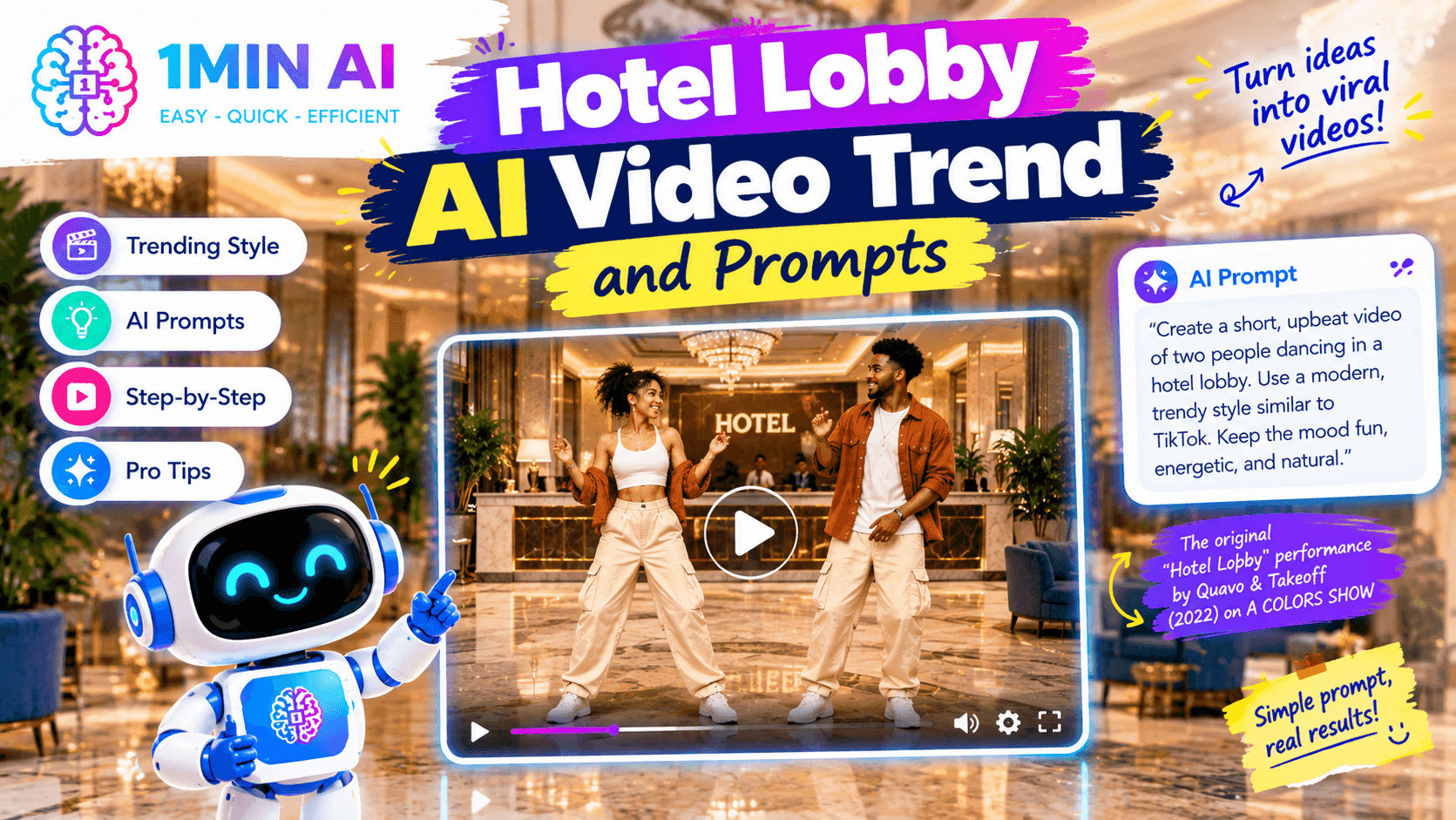
Hotel Lobby AI 在 2026 年正夯。了解這個爆紅影片趨勢是什麼、運作方式,以及可直接複製使用的 AI 提示詞,打造你自己的影片。
Hotel Lobby AI 是 2026 年爆紅的 AI 影片趨勢之一,畫面中兩個人在橘色工作室裡對著吊掛麥克風表演。了解這個趨勢是什麼、如何製作,以及可直接使用的 Hotel Lobby AI 提示詞
什麼是 Hotel Lobby AI 趨勢?
如果你最近一直在滑 TikTok、Instagram Reels 或其他社群平台,可能已經注意到同一種奇特的影片格式一再出現:兩個人站在明亮的橘色工作室中,共用一支吊掛麥克風,像饒舌雙人組一樣表演。
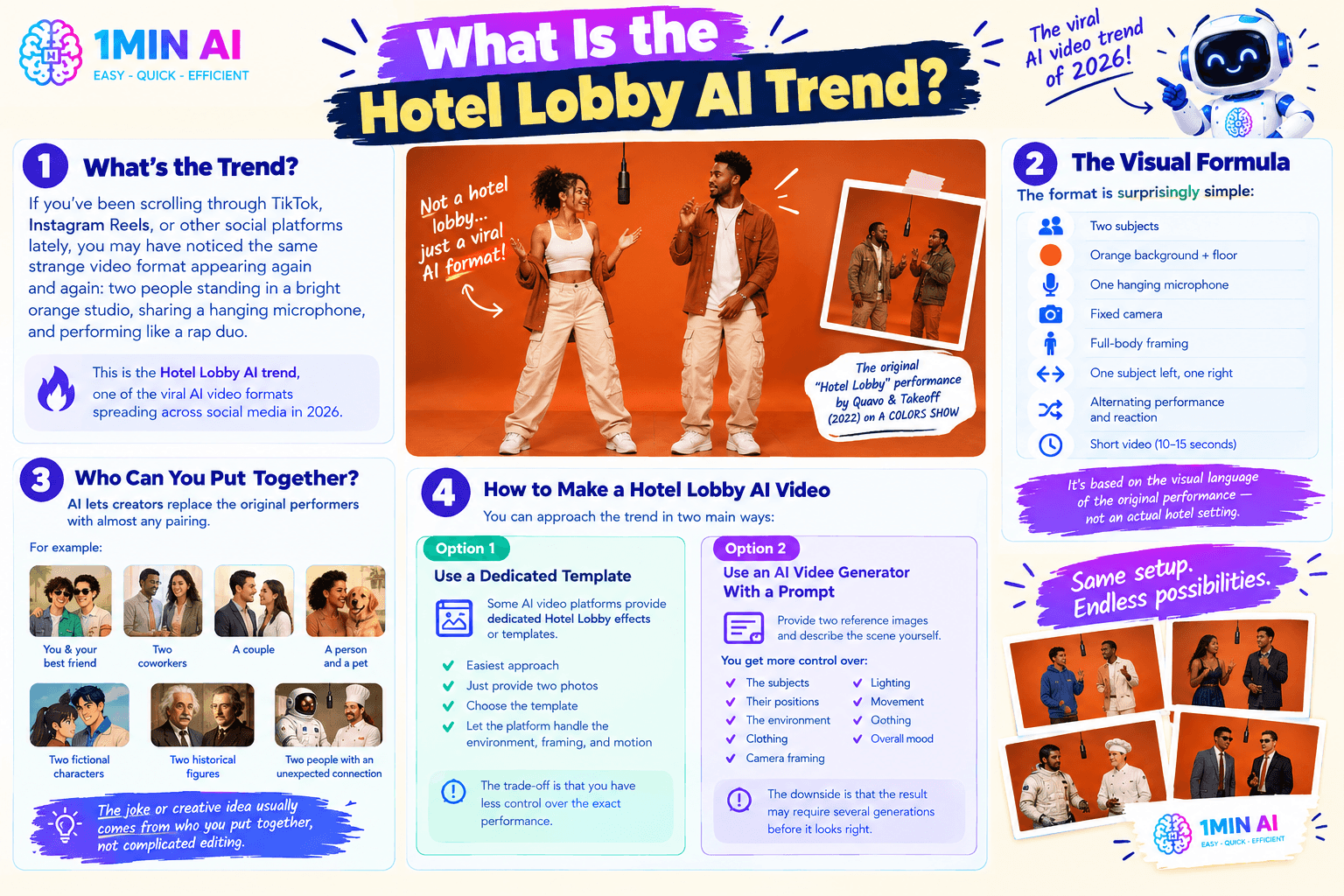
這就是 Hotel Lobby AI 趨勢,2026 年在社群媒體上擴散的爆紅 AI 影片格式之一。雖然名稱裡有 hotel lobby,但影片其實並不是真的在飯店大廳拍攝。這個趨勢源自 Quavo 和 Takeoff 在 2022 年以 Unc & Phew 身分於 A COLORS SHOW 演出的 〈Hotel Lobby〉。原始表演使用極簡橘色場景與懸掛麥克風,而 AI 創作者則把這個具辨識度的設定轉化成可重複使用的影片格式。
這套視覺公式其實出奇地簡單:
- 兩個主體
- 無縫橘色背景與地面
- 一支吊掛麥克風
- 固定攝影機
- 全身構圖
- 一人站左,一人站右
- 輪流表演與反應
- 短影片,通常約 10–15 秒
這種格式基於原版 〈Hotel Lobby〉 表演的視覺語言,而不是實際的飯店場景。
AI 讓這個趨勢更有趣,因為創作者可以把原本的表演者替換成幾乎任何組合。
例如,兩個主體可以是:
- 你和你最好的朋友
- 兩位同事
- 一對情侶
- 一個人和一隻寵物
- 兩個虛構角色
- 兩位歷史人物
- 兩個看似毫無關聯的人
笑點或創意通常來自 你把誰湊在一起,而不是複雜剪輯。
如何製作 Hotel Lobby AI 影片
你可以用兩種主要方式來操作這個趨勢。
選項 1:使用專用模板
有些 AI 影片平台提供專門的 Hotel Lobby 效果或模板。
如果你的目標只是跟上這個趨勢,這是最簡單的做法。
通常你只要提供兩張照片,選擇模板,接著讓平台處理環境、構圖與動作即可。
代價是你對具體表演的控制會比較少。
選項 2:使用帶提示詞的 AI 影片生成器
更靈活的做法是提供兩張參考圖,然後自己描述場景。
這能讓你更精準控制:
- 主體
- 位置
- 環境
- 服裝
- 攝影機構圖
- 手勢
- 燈光
- 動作
- 整體氛圍
缺點是,結果可能需要多次生成,臉部、手部、站位與動作才會看起來正確。
Hugging Face 的指南也同樣區分了 one-click 模板與提示詞驅動的 image-to-video 工具:模板更快,而提示詞能提供更多控制。
Hotel Lobby AI 提示詞:基礎版
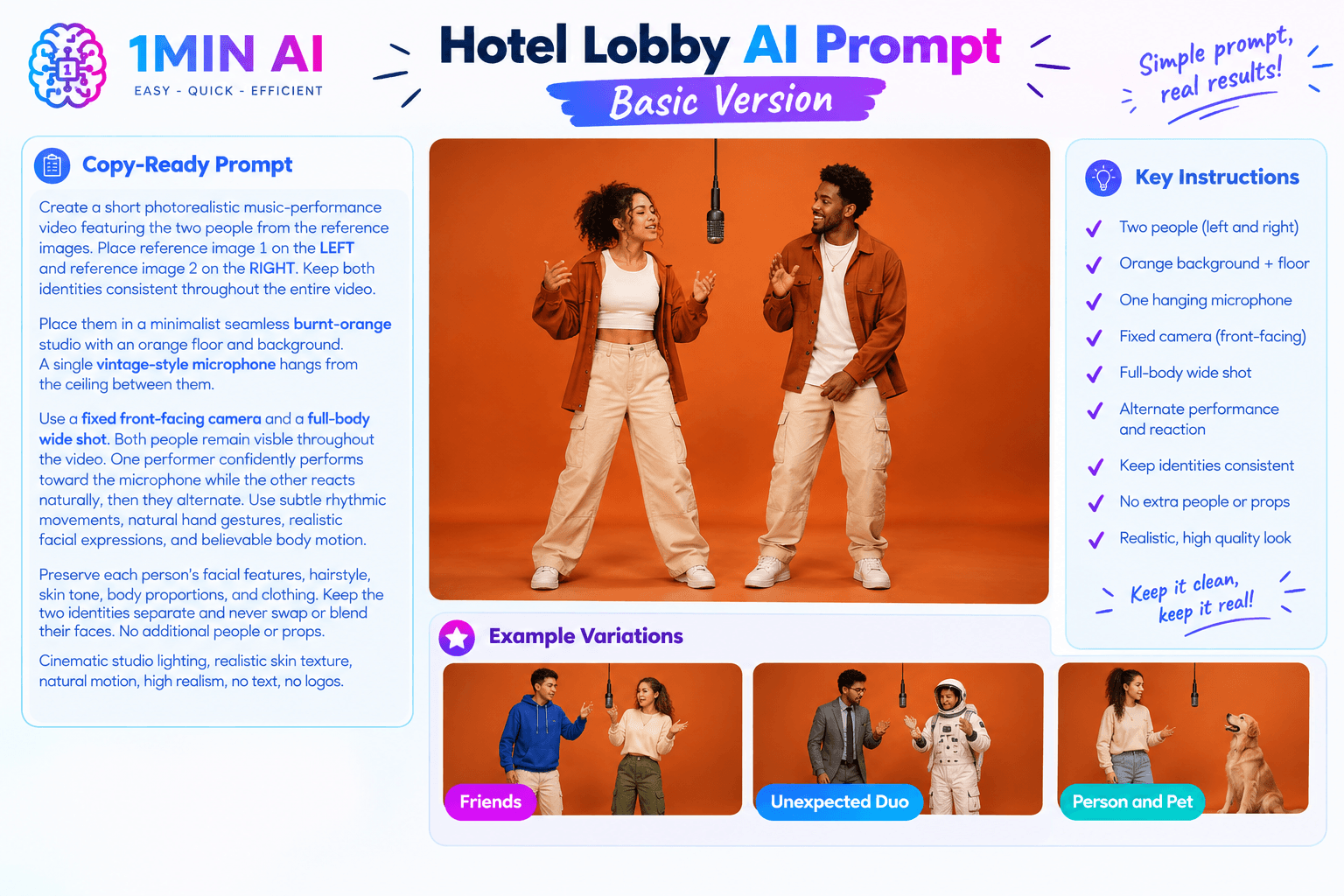
以下是一段可直接複製、可套用到支援參考圖的 AI 影片生成器上的提示詞:
Create a short photorealistic music-performance video featuring the two people from the reference images. Place reference image 1 on the LEFT and reference image 2 on the RIGHT. Keep both identities consistent throughout the entire video.
Place them in a minimalist seamless burnt-orange studio with an orange floor and background. A single vintage-style microphone hangs from the ceiling between them.
Use a fixed front-facing camera and a full-body wide shot. Both people remain visible throughout the video. One performer confidently performs toward the microphone while the other reacts naturally, then they alternate. Use subtle rhythmic movements, natural hand gestures, realistic facial expressions, and believable body motion.
Preserve each person's facial features, hairstyle, skin tone, body proportions, and clothing. Keep the two identities separate and never swap or blend their faces.
Cinematic studio lighting, realistic skin texture, natural motion, high realism, no text, no logos, no extra people.
這裡的重要指令不只是橘色背景。提示詞明確控制了 身份、左右位置、攝影機、麥克風、動作與人數。
給朋友版本的 Hotel Lobby AI 提示詞
想做一個和朋友一起的版本嗎?
試試:
Create a playful photorealistic short video of two friends performing together in a minimalist orange studio. Person 1 stays on the LEFT and person 2 stays on the RIGHT throughout the entire clip. A single microphone hangs between them.
Use a static full-body camera. Person 1 performs confidently toward the microphone while person 2 reacts with playful gestures. After a few seconds, they switch roles. Keep their faces, hairstyles, clothing, and identities consistent.
Warm cinematic lighting, realistic movement, subtle body gestures, natural facial expressions, seamless orange floor and background, clean studio environment, no additional people, no text, no logos.
出乎意料組合的 Hotel Lobby AI 提示詞
配對組合正是你可以發揮創意的地方。
例如,把一個看起來很嚴肅的專業人士,和一個完全出乎意料的角色放在一起。
Create a humorous photorealistic music-performance video featuring the two reference subjects as an unexpected rap duo. Reference image 1 remains on the LEFT and reference image 2 remains on the RIGHT.
Place both subjects in a minimalist saturated orange studio with one hanging microphone centered between them. Use a locked-off full-body camera.
The person on the LEFT performs confidently with subtle rhythmic gestures while the person on the RIGHT reacts with an exaggeratedly serious expression. They alternate naturally during the performance.
Preserve both identities accurately. Do not merge, swap, duplicate, or distort their faces. No additional characters or props. Realistic lighting and natural movement.
你選擇的兩個主體之間反差越明確,最後的概念通常就越有意思。
寵物版本的 Hotel Lobby AI 提示詞
你不一定要用兩個人。
這個格式也很適合做成輕鬆有趣的人與寵物版本。
Create a short photorealistic music-performance video featuring the person from reference image 1 and the pet from reference image 2.
Keep the person on the LEFT and the pet on the RIGHT. Place both in a minimalist orange studio with a single hanging microphone centered between them.
Use a static full-body camera. The person performs toward the microphone while the pet reacts naturally with subtle head and body movements. Keep the pet's appearance, markings, fur pattern, and proportions consistent throughout the video.
Realistic studio lighting, natural movement, humorous but believable performance, seamless orange background, no extra animals, no additional people, no text or logos.
如何獲得更好的 Hotel Lobby AI 結果
第一次生成不完美很正常。
這對 AI 影片來說很常見。
與其每次都重寫整段提示詞,不如一次只改一個變數。
如果臉部一直變化
加強身份指令:保持每個人的臉部身份在每一幀都鎖定。絕不交換、混合、平均或改變兩張臉。
如果主體換邊了
指定:Reference image 1 remains on the LEFT and reference image 2 remains on the RIGHT for the entire video.
如果攝影機移動太多
加上:Locked-off camera, fixed viewpoint, no zoom, no pan, no tilt, no camera movement.
如果人數太多
加上: Exactly two subjects only. No additional people, reflections, duplicates, or background characters.
如果影片看起來太靜態
加入可控動作: Subtle rhythmic body movement, natural hand gestures, realistic facial expressions, slight head movement, alternating performance and reaction.
重點是可控的動作,而不是要求「很多動作」,因為那樣更容易讓手、臉或身體失真。
用 1minAI 製作 Hotel Lobby AI 影片
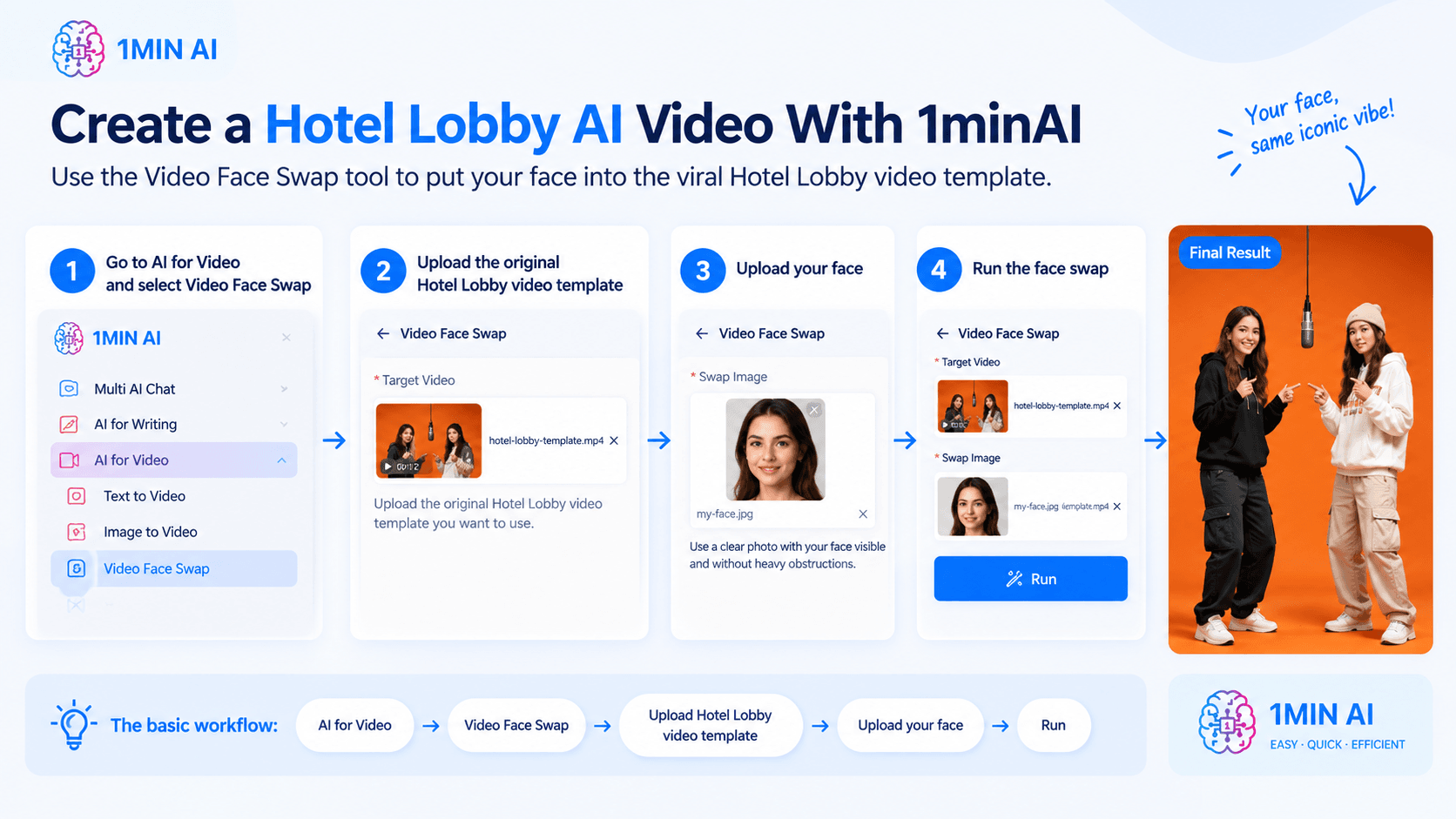
你可以透過 Video Face Swap 工具,在 1minAI 製作 Hotel Lobby AI 影片。與其直接用提示詞生成整個場景,不如先使用原始 Hotel Lobby 影片模板,再把表演者的臉換成你自己的。
Step 1: Open AI for Video → Video Face Swap
在 1minAI 中,前往 AI for Video 並選擇 Video Face Swap。
Step 2: Upload the original Hotel Lobby video template
在 Target Video 下,上傳你想使用的原始 Hotel Lobby 影片模板。
這支影片提供場景、動作、鏡頭角度與表演。你只是在更換臉部。
Step 3: Upload your face
在 Swap Image 下,上傳你想使用的清晰臉部照片。
為了更好的效果,請選擇光線良好、臉部清楚可見且沒有太多遮擋的圖片。
Step 4: Run the face swap
當 Target Video 和 Swap Image 都上傳完成後,先檢查素材,再執行工具。
1minAI 會處理影片,並把你的臉套用到目標畫面上。對於有多個人的影片,你也可以使用 Face Swap Pairs 來控制要替換哪一個臉部。 1minAI
基本流程如下:
AI for Video → Video Face Swap → Upload Hotel Lobby video template → Upload your face → Run
這個方式特別適合 Hotel Lobby 趨勢,因為你可以保留原始模板中辨識度很高的橘色工作室、吊掛麥克風與表演,同時個人化臉部。1minAI 也提供其他 AI 影片工具,包括 Image to Video、Text to Video 和 Captions Generator,讓你能在同一個工作區繼續編輯或再利用成果。
結論
先準備兩張清楚的參考照片,明確指定誰在左誰在右,描述橘色工作室與吊掛麥克風,保持攝影機固定,並採用可控動作。
接著生成幾個版本,選出最乾淨的一個。
透過 1minAI 的 AI Image to Video 和 Text to Video 功能,你也可以把這個趨勢當成起點,進一步嘗試 TikTok、Reels、Shorts 與社群內容的其他 AI 影片概念。
For further information, explore 1minAI AI Image to Video
Discover more AI features: https://1min.ai/features
Try 1minAI agent now: https://app.1min.ai/ai-agent-demo
替代方案
探索 1minAI 的最佳替代方案,並比較其功能、定價和使用案例。

1min.AI 與 OpenRouter 比較
1min.AI 與 OpenRouter:比較即開即用的 AI 創作產品與技術型 API 工具。看看你需要的是零程式碼創意工作室,還是程式開發基礎架構平台。
 Ngoc Hong
1min. AI vs Dola AI
在找 Dola AI 替代方案嗎?比較 1min.AI 與 Dola AI 在影片生成、免費方案、價格與隱私上的差異,選出最適合你的 AI 應用。
Ngoc Hong
1minAI 與 Hix AI 比較
比較 5 個 HIX AI 替代方案,涵蓋 AI 聊天、研究、寫作、圖片、影片、定價與彈性 AI 工作流程。
Ngoc HongAI 工具
探索最佳 AI 工具,提升生產力、創造力與日常工作效率。

一個產品,10 種 UGC 創意:AI 如何讓內容測試更輕鬆
使用 AI UGC 影片生成器,打造更真實的 UGC,測試更多創意切角,並在不必為每個版本都實拍的情況下擴大聯盟行銷內容。
 Lien Anh Vu
只需幾個步驟就能創作一致的卡通內容
使用 1min.AI,只要 3 個簡單步驟,就能從研究點子到角色與動畫影片,為 TikTok 和 Reels 製作卡通影片。
Lien Anh Vu
創業者必備的 4 大平價 AI 工具
探索創業者最值得入手的 4 款平價 AI 工具,協助你驗證想法、打造產品、創作內容並更快上線,同時避免超支。
 Tram Ta
AI 功能
完整的 AI 功能,可簡化工作流程、提升效率並讓團隊達成更多成果。
一個產品,10 種 UGC 創意:AI 如何讓內容測試更輕鬆
使用 AI UGC 影片生成器,打造更真實的 UGC,測試更多創意切角,並在不必為每個版本都實拍的情況下擴大聯盟行銷內容。
Lien Anh Vu只需幾個步驟就能創作一致的卡通內容
使用 1min.AI,只要 3 個簡單步驟,就能從研究點子到角色與動畫影片,為 TikTok 和 Reels 製作卡通影片。
Lien Anh Vu
1minAI:免費 AI 文法檢查器
使用 1minAI 的 AI 文法檢查器免費檢查文法。找出文法、拼字與寫作錯誤,提升清晰度,並在幾秒內潤飾你的內容。
Tram TaAI 應用案例
精選 AI 應用案例,適用於商業、生產力與各產業專屬應用。
一個產品,10 種 UGC 創意:AI 如何讓內容測試更輕鬆
使用 AI UGC 影片生成器,打造更真實的 UGC,測試更多創意切角,並在不必為每個版本都實拍的情況下擴大聯盟行銷內容。
Lien Anh Vu只需幾個步驟就能創作一致的卡通內容
使用 1min.AI,只要 3 個簡單步驟,就能從研究點子到角色與動畫影片,為 TikTok 和 Reels 製作卡通影片。
Lien Anh Vu
Instagram 最佳發文時間:提升互動的實用指南
了解 Instagram 最佳發文時間,包括不同受眾的最佳日期與時段,以及如何為你的帳號找出理想排程的技巧。
Tram TaAI 教學課程
透過實用的逐步教學課程,學習如何使用人工智慧。
只需幾個步驟就能創作一致的卡通內容
使用 1min.AI,只要 3 個簡單步驟,就能從研究點子到角色與動畫影片,為 TikTok 和 Reels 製作卡通影片。
Lien Anh Vu
2026 黑色星期五 AI 工具優惠
探索 2026 黑色星期五 AI 工具優惠能帶來什麼。了解如何透過 AppSumo、Dealify、Stack Social 取得 1min.AI 終身方案,並在 Trustpilot、Slashdot 和 Software Advice 上查證。
 Hang Nguyen
使用 Seedance 的 AI 圖像轉影片產品一致性,避免變形並擴大產品評測規模
用 AI 圖像轉影片產品一致性停止 Logo 變形,今天就到 1min.AI 生成工作室級評測影片。
Lien Anh VuAI 指南
透過實用指南、真實案例和可操作的最佳實踐,更快地學習 AI。
只需幾個步驟就能創作一致的卡通內容
使用 1min.AI,只要 3 個簡單步驟,就能從研究點子到角色與動畫影片,為 TikTok 和 Reels 製作卡通影片。
Lien Anh Vu
安全線上購買 AI 工具:2026 黑色星期五指南
了解如何在線上找到並鎖定最佳黑色星期五 AI 優惠。學習專家策略,避開詐騙、對抗訂閱疲勞,並驗證軟體。
Hang Nguyen使用 Seedance 的 AI 圖像轉影片產品一致性,避免變形並擴大產品評測規模
用 AI 圖像轉影片產品一致性停止 Logo 變形,今天就到 1min.AI 生成工作室級評測影片。
Lien Anh VuAI 解決方案
瀏覽適用於自動化、程式設計、研究、生產力、客戶支援、行銷和業務工作流程的最佳AI解決方案。
一個產品,10 種 UGC 創意:AI 如何讓內容測試更輕鬆
使用 AI UGC 影片生成器,打造更真實的 UGC,測試更多創意切角,並在不必為每個版本都實拍的情況下擴大聯盟行銷內容。
Lien Anh Vu只需幾個步驟就能創作一致的卡通內容
使用 1min.AI,只要 3 個簡單步驟,就能從研究點子到角色與動畫影片,為 TikTok 和 Reels 製作卡通影片。
Lien Anh Vu
免費 AI 紋身生成器:客製化設計
用 1min.AI 的免費 AI 紋身生成器,將任何靈感轉化為客製化紋身設計。描述你的想法、選擇風格,幾秒內即可下載。
 Trang Tran
AI 模型
在一處探索全球領先的 AI 模型。
一個產品,10 種 UGC 創意:AI 如何讓內容測試更輕鬆
使用 AI UGC 影片生成器,打造更真實的 UGC,測試更多創意切角,並在不必為每個版本都實拍的情況下擴大聯盟行銷內容。
Lien Anh Vu只需幾個步驟就能創作一致的卡通內容
使用 1min.AI,只要 3 個簡單步驟,就能從研究點子到角色與動畫影片,為 TikTok 和 Reels 製作卡通影片。
Lien Anh Vu使用 Seedance 的 AI 圖像轉影片產品一致性,避免變形並擴大產品評測規模
用 AI 圖像轉影片產品一致性停止 Logo 變形,今天就到 1min.AI 生成工作室級評測影片。
Lien Anh VuAI 比較
比較AI工具、模型和平台,找到最適合您需求的選擇。

Kling AI 對 Veo 3:哪個模型勝出?
Kling AI 對 Veo 3:比較動態、原生音訊、價格與免費方案,看看哪個 AI 影片生成器最適合你的專案——在 1min.AI 上兩個都試試。
Trang Tran使用 Seedance 的 AI 圖像轉影片產品一致性,避免變形並擴大產品評測規模
用 AI 圖像轉影片產品一致性停止 Logo 變形,今天就到 1min.AI 生成工作室級評測影片。
Lien Anh Vu
DeepSeek V4 Pro 與 Flash 比較
比較 DeepSeek V4 Pro 與 DeepSeek V4 Flash 的指標。立即在 1min.ai 優化您的 agentic 應用並提升 AI 事實查核。
Ngoc HongAI 整合
將 AI 與你現有的工具無縫整合,自動化工作並提升生產力。

如何使用 AI 時尚影片產生器打造 Fashion Week 2026 內容
將 Fashion Week 2026 靈感轉化為驚豔的時尚影片,靠 AI 就能完成。學會如何發想點子、製作視覺,並用一個簡單流程把圖片變成影片。
Lien Anh Vu
情境:你每天要做 10 篇以上貼文
了解如何打造 AI 內容工作流程,幫助內容創作者透過 AI 發想、圖片生成與內容製作,更快產出每天 10 篇以上的社群貼文。
Lien Anh Vu
停止在 AI 應用間切換:AI 整合如何改變雇主品牌經營
了解 AI 整合如何協助 HR 團隊透過將 AI 寫作、文件、圖片、影片與多個 AI 模型整合到同一工作空間中,簡化雇主品牌經營流程。
Tram Ta產業AI
為醫療保健、金融、教育、法律、製造、零售、房地產等產業尋找最佳AI工具和工作流程。



AI 代理
探索並執行 AI 代理,自動化您的工作和日常生活中的任務。
1minAI:免費 AI 文法檢查器
使用 1minAI 的 AI 文法檢查器免費檢查文法。找出文法、拼字與寫作錯誤,提升清晰度,並在幾秒內潤飾你的內容。
Tram Ta
Facebook 的 AI 代理
使用 Facebook 的 AI 代理來建立內容、生成圖片、排程貼文,並從你的文件與對話中發佈內容。
Ngoc Hong
AI Agent 與 AI Assistant:哪一個真的能幫設計師省更多時間?
了解 AI Agent 與 AI Assistant 的差異,找出最能幫助設計師自動化重複工作、減少修改並節省更多時間的解決方案。
Lien Anh VuAI 工作流程
探索適用於生產力、行銷、銷售、支援等領域的即用型 AI 工作流程。
一個產品,10 種 UGC 創意:AI 如何讓內容測試更輕鬆
使用 AI UGC 影片生成器,打造更真實的 UGC,測試更多創意切角,並在不必為每個版本都實拍的情況下擴大聯盟行銷內容。
Lien Anh Vu只需幾個步驟就能創作一致的卡通內容
使用 1min.AI,只要 3 個簡單步驟,就能從研究點子到角色與動畫影片,為 TikTok 和 Reels 製作卡通影片。
Lien Anh Vu如何使用 AI 時尚影片產生器打造 Fashion Week 2026 內容
將 Fashion Week 2026 靈感轉化為驚豔的時尚影片,靠 AI 就能完成。學會如何發想點子、製作視覺,並用一個簡單流程把圖片變成影片。
Lien Anh Vu電子報
1minAI 每週 AI 創新快訊

🔮 每週 AI 創新 #121:Ideogram 3.0 和 Claude Opus 4.7 現已在 1min.ai 上線
Ideogram 3.0 和 Claude Opus 4.7 現已在 1min.ai 上線。於同一平台生成零瑕疵的圖片排版與進階文案。
 Uyen Hoang
🔮 每週 AI 創新 #134:在 AI 聊天中免費體驗 Qwen;3.7 與 3.6 系列更新
想找一個強大、免費的 AI 助理?探索 1min.ai 最新的 Qwen 3.7 與 3.6 系列。立即享受高速、準確的 AI 聊天,完全免費!
Hang Nguyen
🔮 每週 AI 創新 #140:Deepseek 4.1 Flash 與 Gemini 升級
探索 1min.ai 上的 Deepseek 4.1 Flash 和全新 Gemini 模型。此外,請查看我們對你的「Billing - Usage」頁面的更新,讓資訊更清楚。
Hang Nguyen