
Free AI Video Generator From Text Without Watermark You Must Try

Tram Ta
2026年10月13日
Looking for an AI video generator without a watermark? Discover how to turn text into videos, explore AI models, and create content with 1minAI.
An AI video generator turns text prompts, images, or other visual inputs into video clips. Instead of filming every scene or manually animating each element, you describe what you want to see and let an AI model generate the video.
For example, you can describe a skincare product on a studio table, a cinematic city at night, or a character walking through a fantasy landscape. Depending on the model, you may be able to control camera movement, lighting, visual style, and audio.
AI video generators are useful for:
- Content creators: Make short videos for TikTok, Instagram Reels, and YouTube Shorts.
- Marketers: Explore advertising concepts and promotional videos.
- Ecommerce sellers: Turn product images into dynamic visual content.
- Small businesses: Create video concepts without organizing a full production shoot.
- Educators: Visualize topics and create supporting learning materials.
- Developers: Integrate video generation into applications and automated workflows.
If you're looking for an AI video generator from text without a watermark, the key is to check both the output policy and the pricing or credit requirements. A tool may produce watermark-free videos while still charging credits for generation.
What to Look for in a Free AI Video Generator
Not every AI video tool offers the same features. Before choosing one, consider the following criteria.
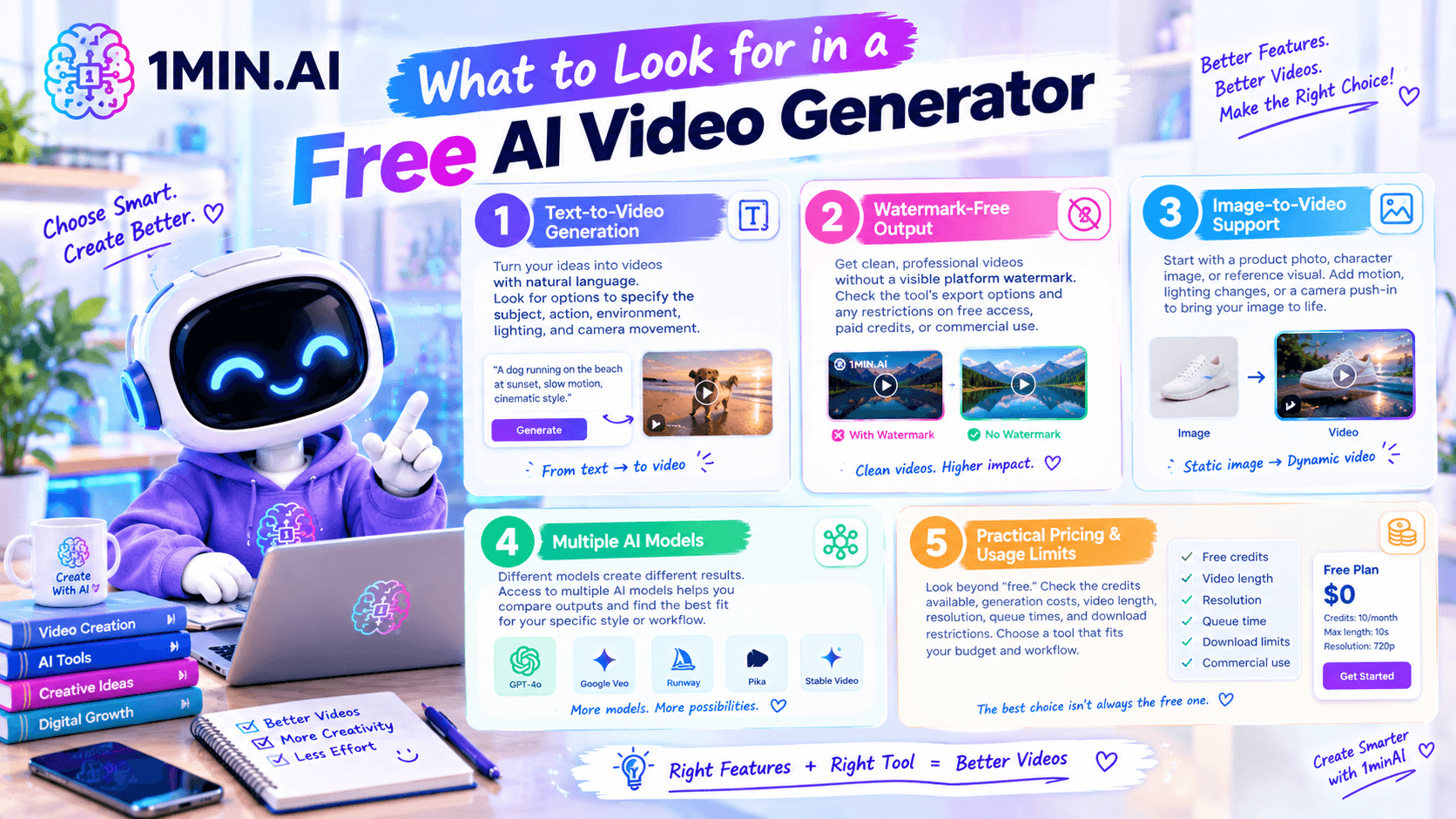
1. Text-to-Video Generation
A text-to-video tool should let you describe a scene in natural language and generate a video from your instructions.
Look for options to specify the subject, action, environment, lighting, and camera movement. More detailed instructions can help you communicate your creative intent.
2. Watermark-Free Output
A watermark can affect how professional a video looks, especially in marketing materials or client presentations.
Check whether the tool exports videos without a visible platform watermark, and confirm any restrictions that apply to free access, paid credits, or commercial use. Watermark-free output does not automatically mean that every feature is free.
3. Image-to-Video Support
Text-to-video is useful when you're starting from an idea. Image-to-video is helpful when you already have a product photo, character image, or reference visual.
For example, an ecommerce seller can start with a product photo and prompt the AI to add a slow camera push-in, natural lighting changes, or subtle movement.
4. Multiple AI Models
Different models can produce different results from the same prompt. One may suit cinematic scenes, while another may better fit a specific image-to-video workflow.
A platform that provides access to multiple models can help you compare outputs without rebuilding your workflow across several separate tools.
5. Practical Pricing and Usage Limits
Look beyond the word “free.” Check the credits available, generation costs, video length, resolution, queue times, and download restrictions.
For frequent production, the most useful tool is one that fits your budget and workflow—not necessarily the one with the most generous-sounding free offer.
How to Generate Videos From Text With 1minAI
1minAI brings AI video generation together with other creative tools in one workspace. Its available features include Text to Video and Image to Video, alongside tools such as video face swapping and caption generation. You can explore the 1minAI AI video features to see the available options.
Here's a simple workflow to get started.
Step 1: Open the Text-to-Video Tool
Visit 1minAI and navigate to AI for Video → Text to Video.
Start with a clear idea of what you want to create, such as a product advertisement, a cinematic scene, or a short social media clip.
Step 2: Choose an Available Video Model
Select an available model in the interface. Depending on your project, you can explore options such as Veo 3.1 or Luma.
For model-specific workflows, see:
Check the current model options and credit requirements before generating.
Step 3: Write a Detailed Prompt
A useful video prompt describes the subject, action, setting, camera movement, lighting, and style.
Instead of writing “make a product video,” describe how the product should appear, how the camera should move, and what atmosphere you want to create.
Step 4: Configure Your Video
Choose the available settings that fit your intended platform, such as a horizontal video for YouTube or a vertical clip for short-form social content.
Available controls vary by model.
Step 5: Generate and Review
Run the generation process and inspect the result. Check whether the movement looks natural, the subject remains consistent, and the video matches your prompt.
If the result isn't quite right, simplify the prompt or change one instruction at a time.
Step 6: Download and Prepare for Publishing
Once you're satisfied, export the video using the available options. Confirm the watermark policy, usage rights, and any commercial-use conditions that apply to your chosen model and account.
7 AI Video Generator Prompts You Can Copy
You don't need to write complicated instructions to start. Try these prompts and adapt them to your project.
1. Cinematic Product Advertisement
Prompt:
Create a cinematic product advertisement featuring a premium glass perfume bottle on a minimalist studio table. The camera slowly pushes toward the bottle as soft golden light moves across the glass. Use realistic reflections, elegant shadows, a clean background, premium commercial photography, and smooth camera motion. Keep the bottle shape and label consistent. No added text or extra objects.
2. Ecommerce Product Showcase
Prompt:
Create a clean promotional video of a modern reusable water bottle against a bright minimalist background. Use a slow rotating camera movement to showcase the product from multiple angles. Add soft studio lighting, realistic shadows, crisp details, and a polished ecommerce advertising style. Keep the product proportions and colors consistent throughout the clip.
3. Cinematic City at Night
Prompt:
Generate a cinematic nighttime city scene with glowing storefronts, wet streets, and colorful reflections. The camera moves smoothly along the sidewalk as cars pass in the distance. Use realistic lighting, subtle motion blur, atmospheric depth, and a modern film aesthetic. Avoid flickering signs, distorted buildings, and sudden camera cuts.
4. Travel Video at Golden Hour
Prompt:
Create a cinematic travel video of a coastal village at golden hour. Show the ocean, colorful buildings, and narrow streets as the camera slowly moves forward. Use warm sunlight, natural shadows, gentle environmental movement, and realistic textures. Make the scene feel inviting and documentary-inspired.
5. Social Media Fashion Clip
Prompt:
Create a stylish fashion video featuring a model walking confidently through a modern urban setting. Use a smooth tracking shot, natural walking motion, soft daylight, and editorial fashion-film styling. Keep the outfit consistent, preserve realistic body proportions, and use a clean composition suitable for vertical social media content.
6. Educational Science Visualization
Prompt:
Create a clear educational animation showing how water moves through a simple filtration system. Show water entering the container, passing through visible filter layers, and emerging into a clean collection chamber. Use smooth movement, a bright background, accurate visual relationships, and a simple educational-video style. Keep the sequence easy to follow.
7. Fantasy World Reveal
Prompt:
Create a cinematic fantasy scene showing an ancient castle on a mountain surrounded by drifting clouds. The camera slowly rises to reveal the castle, distant peaks, and a glowing sunrise. Use atmospheric lighting, detailed stone architecture, gentle cloud movement, and an epic fantasy-film aesthetic. Maintain consistent castle geometry and smooth camera motion.
Prompt-writing tip: Start with one main action and one camera movement. Once the basic result looks right, add more details about lighting, atmosphere, or visual style.
AI Video Generator for Business: Practical Use Cases
AI video generation isn't just for entertainment. Businesses can use it to explore creative concepts, test messaging, and produce supporting visuals.
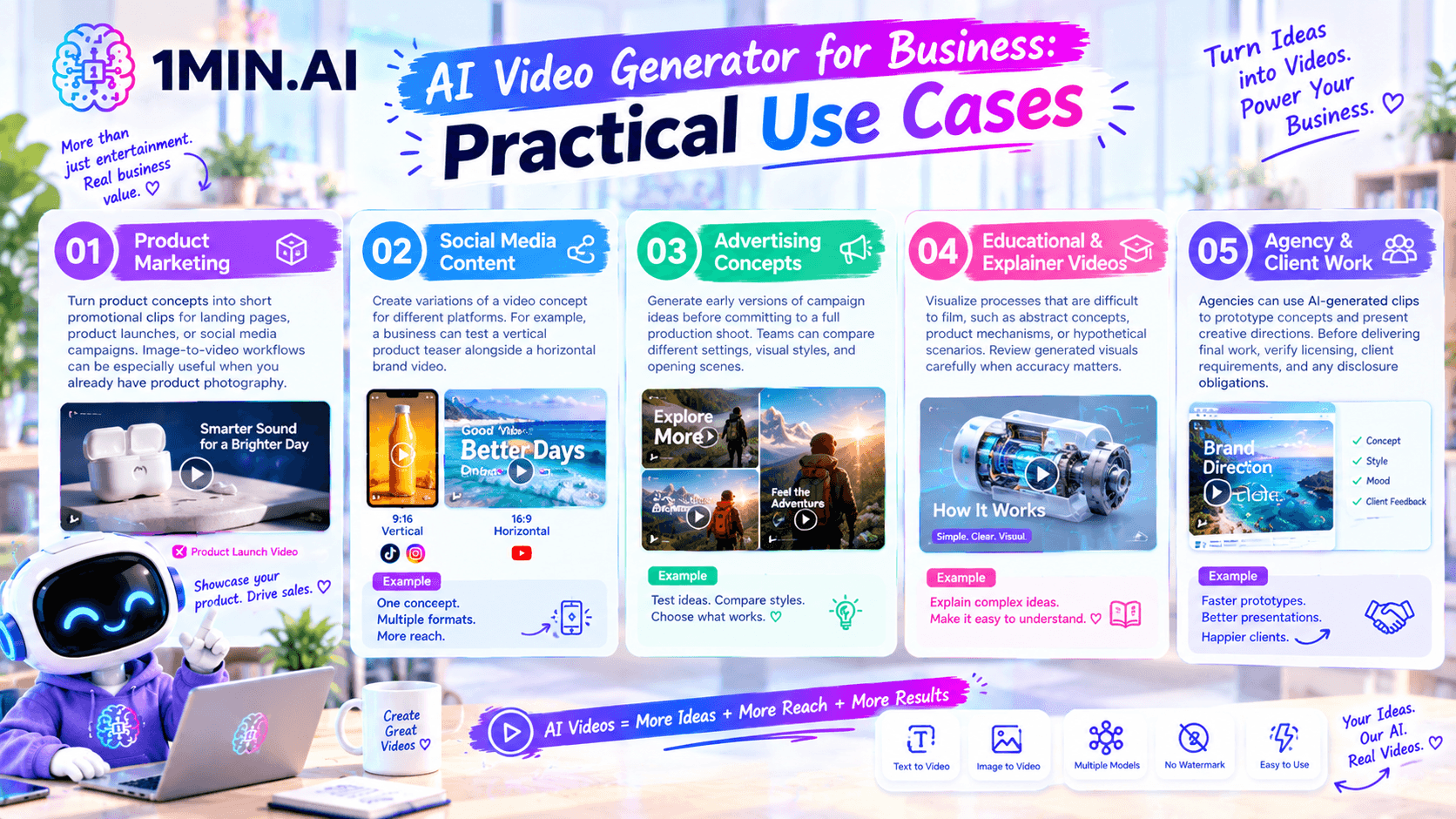
Product Marketing
Turn product concepts into short promotional clips for landing pages, product launches, or social media campaigns. Image-to-video workflows can be especially useful when you already have product photography.
Social Media Content
Create variations of a video concept for different platforms. For example, a business can test a vertical product teaser alongside a horizontal brand video.
Advertising Concepts
Generate early versions of campaign ideas before committing to a full production shoot. Teams can compare different settings, visual styles, and opening scenes.
Educational and Explainer Videos
Visualize processes that are difficult to film, such as abstract concepts, product mechanisms, or hypothetical scenarios. Review generated visuals carefully when accuracy matters.
Agency and Client Work
Agencies can use AI-generated clips to prototype concepts and present creative directions. Before delivering final work, verify licensing, client requirements, and any disclosure obligations.
For a business-focused overview, explore AI Video Generator for Business on 1minAI.
Text-to-Video vs. Image-to-Video: Which Should You Use?
Both workflows can create video, but they serve different starting points.
| Feature | Text-to-Video | Image-to-Video |
|---|---|---|
| Starting point | A written prompt | An existing image |
| Best for | Creating a new scene from an idea | Animating a product photo or reference image |
| Creative control | Describe the subject, setting, and motion | Use the image as a visual starting point |
| Example | Generate a cinematic city scene | Animate a product image with camera movement |
| Main consideration | The model interprets the scene from text | The output depends partly on the reference image |
If you want to create an entirely new scene, start with text-to-video. If you already have a visual that needs movement, image-to-video may be the more suitable option.
For developers who want to integrate image-to-video generation into an application, the 1minAI Kling AI Image to Video API documentation is a useful technical starting point.
Frequently Asked Questions
Is there a free AI video generator without a watermark?
Some tools offer watermark-free output, but free access and generation costs vary. With 1minAI, check the current video-generation credit requirements and model-specific conditions before starting a project.
Can I generate videos from text with 1minAI?
Yes. 1minAI provides a Text to Video workflow that lets you describe a scene and generate a video using an available model. The result depends on the model, prompt, and selected settings.
What is the difference between text-to-video and image-to-video?
Text-to-video creates a scene from written instructions. Image-to-video uses an existing image as the visual starting point and adds movement.
Can businesses use AI-generated videos commercially?
Potentially, but commercial use depends on the terms of the platform, model, and assets used. Review the applicable licensing terms before using generated clips in advertisements or client deliverables.
Which AI video generator should beginners try?
Start with a tool that has a clear interface, accessible prompt controls, and a workflow suited to your project. Testing the same prompt across available models can help you identify which output best fits your needs.
Conclusion
An AI video generator can help you turn written ideas into promotional clips, cinematic scenes, educational visuals, and social media content without filming every shot yourself.
For better results, start with a clear prompt, choose text-to-video or image-to-video based on your starting asset, and review each generation before publishing. If watermark-free output is important, verify the export conditions and credit requirements rather than assuming every free option is unlimited.
Explore 1minAI's AI Video Generator for Business to discover how AI video workflows can support content creation and marketing projects.
For further information, explore AI Video Generation With Veo 3.1.
Discover more AI features: https://1min.ai/features
Try 1minAI agent now: https://app.1min.ai/ai-agent-demo
- #Commerce
替代方案
探索 1minAI 的最佳替代方案,並比較其功能、定價和使用案例。

1min.AI 與 OpenRouter 比較
1min.AI 與 OpenRouter:比較即開即用的 AI 創作產品與技術型 API 工具。看看你需要的是零程式碼創意工作室,還是程式開發基礎架構平台。
 Ngoc Hong
1min. AI vs Dola AI
在找 Dola AI 替代方案嗎?比較 1min.AI 與 Dola AI 在影片生成、免費方案、價格與隱私上的差異,選出最適合你的 AI 應用。
Ngoc Hong
1minAI 與 Hix AI 比較
比較 5 個 HIX AI 替代方案,涵蓋 AI 聊天、研究、寫作、圖片、影片、定價與彈性 AI 工作流程。
Ngoc HongAI 工具
探索最佳 AI 工具,提升生產力、創造力與日常工作效率。

一個產品,10 種 UGC 創意:AI 如何讓內容測試更輕鬆
使用 AI UGC 影片生成器,打造更真實的 UGC,測試更多創意切角,並在不必為每個版本都實拍的情況下擴大聯盟行銷內容。
 Lien Anh Vu
只需幾個步驟就能創作一致的卡通內容
使用 1min.AI,只要 3 個簡單步驟,就能從研究點子到角色與動畫影片,為 TikTok 和 Reels 製作卡通影片。
Lien Anh Vu
創業者必備的 4 大平價 AI 工具
探索創業者最值得入手的 4 款平價 AI 工具,協助你驗證想法、打造產品、創作內容並更快上線,同時避免超支。
 Tram Ta
AI 功能
完整的 AI 功能,可簡化工作流程、提升效率並讓團隊達成更多成果。
一個產品,10 種 UGC 創意:AI 如何讓內容測試更輕鬆
使用 AI UGC 影片生成器,打造更真實的 UGC,測試更多創意切角,並在不必為每個版本都實拍的情況下擴大聯盟行銷內容。
Lien Anh Vu只需幾個步驟就能創作一致的卡通內容
使用 1min.AI,只要 3 個簡單步驟,就能從研究點子到角色與動畫影片,為 TikTok 和 Reels 製作卡通影片。
Lien Anh Vu
1minAI:免費 AI 文法檢查器
使用 1minAI 的 AI 文法檢查器免費檢查文法。找出文法、拼字與寫作錯誤,提升清晰度,並在幾秒內潤飾你的內容。
Tram TaAI 應用案例
精選 AI 應用案例,適用於商業、生產力與各產業專屬應用。
一個產品,10 種 UGC 創意:AI 如何讓內容測試更輕鬆
使用 AI UGC 影片生成器,打造更真實的 UGC,測試更多創意切角,並在不必為每個版本都實拍的情況下擴大聯盟行銷內容。
Lien Anh Vu只需幾個步驟就能創作一致的卡通內容
使用 1min.AI,只要 3 個簡單步驟,就能從研究點子到角色與動畫影片,為 TikTok 和 Reels 製作卡通影片。
Lien Anh Vu
Instagram 最佳發文時間:提升互動的實用指南
了解 Instagram 最佳發文時間,包括不同受眾的最佳日期與時段,以及如何為你的帳號找出理想排程的技巧。
Tram TaAI 教學課程
透過實用的逐步教學課程,學習如何使用人工智慧。
只需幾個步驟就能創作一致的卡通內容
使用 1min.AI,只要 3 個簡單步驟,就能從研究點子到角色與動畫影片,為 TikTok 和 Reels 製作卡通影片。
Lien Anh Vu
2026 黑色星期五 AI 工具優惠
探索 2026 黑色星期五 AI 工具優惠能帶來什麼。了解如何透過 AppSumo、Dealify、Stack Social 取得 1min.AI 終身方案,並在 Trustpilot、Slashdot 和 Software Advice 上查證。
 Hang Nguyen
使用 Seedance 的 AI 圖像轉影片產品一致性,避免變形並擴大產品評測規模
用 AI 圖像轉影片產品一致性停止 Logo 變形,今天就到 1min.AI 生成工作室級評測影片。
Lien Anh VuAI 指南
透過實用指南、真實案例和可操作的最佳實踐,更快地學習 AI。
只需幾個步驟就能創作一致的卡通內容
使用 1min.AI,只要 3 個簡單步驟,就能從研究點子到角色與動畫影片,為 TikTok 和 Reels 製作卡通影片。
Lien Anh Vu
安全線上購買 AI 工具:2026 黑色星期五指南
了解如何在線上找到並鎖定最佳黑色星期五 AI 優惠。學習專家策略,避開詐騙、對抗訂閱疲勞,並驗證軟體。
Hang Nguyen使用 Seedance 的 AI 圖像轉影片產品一致性,避免變形並擴大產品評測規模
用 AI 圖像轉影片產品一致性停止 Logo 變形,今天就到 1min.AI 生成工作室級評測影片。
Lien Anh VuAI 解決方案
瀏覽適用於自動化、程式設計、研究、生產力、客戶支援、行銷和業務工作流程的最佳AI解決方案。
一個產品,10 種 UGC 創意:AI 如何讓內容測試更輕鬆
使用 AI UGC 影片生成器,打造更真實的 UGC,測試更多創意切角,並在不必為每個版本都實拍的情況下擴大聯盟行銷內容。
Lien Anh Vu只需幾個步驟就能創作一致的卡通內容
使用 1min.AI,只要 3 個簡單步驟,就能從研究點子到角色與動畫影片,為 TikTok 和 Reels 製作卡通影片。
Lien Anh Vu
免費 AI 紋身生成器:客製化設計
用 1min.AI 的免費 AI 紋身生成器,將任何靈感轉化為客製化紋身設計。描述你的想法、選擇風格,幾秒內即可下載。
 Trang Tran
AI 模型
在一處探索全球領先的 AI 模型。
一個產品,10 種 UGC 創意:AI 如何讓內容測試更輕鬆
使用 AI UGC 影片生成器,打造更真實的 UGC,測試更多創意切角,並在不必為每個版本都實拍的情況下擴大聯盟行銷內容。
Lien Anh Vu只需幾個步驟就能創作一致的卡通內容
使用 1min.AI,只要 3 個簡單步驟,就能從研究點子到角色與動畫影片,為 TikTok 和 Reels 製作卡通影片。
Lien Anh Vu使用 Seedance 的 AI 圖像轉影片產品一致性,避免變形並擴大產品評測規模
用 AI 圖像轉影片產品一致性停止 Logo 變形,今天就到 1min.AI 生成工作室級評測影片。
Lien Anh VuAI 比較
比較AI工具、模型和平台,找到最適合您需求的選擇。

Kling AI 對 Veo 3:哪個模型勝出?
Kling AI 對 Veo 3:比較動態、原生音訊、價格與免費方案,看看哪個 AI 影片生成器最適合你的專案——在 1min.AI 上兩個都試試。
Trang Tran使用 Seedance 的 AI 圖像轉影片產品一致性,避免變形並擴大產品評測規模
用 AI 圖像轉影片產品一致性停止 Logo 變形,今天就到 1min.AI 生成工作室級評測影片。
Lien Anh Vu
DeepSeek V4 Pro 與 Flash 比較
比較 DeepSeek V4 Pro 與 DeepSeek V4 Flash 的指標。立即在 1min.ai 優化您的 agentic 應用並提升 AI 事實查核。
Ngoc HongAI 整合
將 AI 與你現有的工具無縫整合,自動化工作並提升生產力。

如何使用 AI 時尚影片產生器打造 Fashion Week 2026 內容
將 Fashion Week 2026 靈感轉化為驚豔的時尚影片,靠 AI 就能完成。學會如何發想點子、製作視覺,並用一個簡單流程把圖片變成影片。
Lien Anh Vu
情境:你每天要做 10 篇以上貼文
了解如何打造 AI 內容工作流程,幫助內容創作者透過 AI 發想、圖片生成與內容製作,更快產出每天 10 篇以上的社群貼文。
Lien Anh Vu
停止在 AI 應用間切換:AI 整合如何改變雇主品牌經營
了解 AI 整合如何協助 HR 團隊透過將 AI 寫作、文件、圖片、影片與多個 AI 模型整合到同一工作空間中,簡化雇主品牌經營流程。
Tram Ta產業AI
為醫療保健、金融、教育、法律、製造、零售、房地產等產業尋找最佳AI工具和工作流程。



AI 代理
探索並執行 AI 代理,自動化您的工作和日常生活中的任務。
1minAI:免費 AI 文法檢查器
使用 1minAI 的 AI 文法檢查器免費檢查文法。找出文法、拼字與寫作錯誤,提升清晰度,並在幾秒內潤飾你的內容。
Tram Ta
Facebook 的 AI 代理
使用 Facebook 的 AI 代理來建立內容、生成圖片、排程貼文,並從你的文件與對話中發佈內容。
Ngoc Hong
AI Agent 與 AI Assistant:哪一個真的能幫設計師省更多時間?
了解 AI Agent 與 AI Assistant 的差異,找出最能幫助設計師自動化重複工作、減少修改並節省更多時間的解決方案。
Lien Anh VuAI 工作流程
探索適用於生產力、行銷、銷售、支援等領域的即用型 AI 工作流程。
一個產品,10 種 UGC 創意:AI 如何讓內容測試更輕鬆
使用 AI UGC 影片生成器,打造更真實的 UGC,測試更多創意切角,並在不必為每個版本都實拍的情況下擴大聯盟行銷內容。
Lien Anh Vu只需幾個步驟就能創作一致的卡通內容
使用 1min.AI,只要 3 個簡單步驟,就能從研究點子到角色與動畫影片,為 TikTok 和 Reels 製作卡通影片。
Lien Anh Vu如何使用 AI 時尚影片產生器打造 Fashion Week 2026 內容
將 Fashion Week 2026 靈感轉化為驚豔的時尚影片,靠 AI 就能完成。學會如何發想點子、製作視覺,並用一個簡單流程把圖片變成影片。
Lien Anh Vu電子報
1minAI 每週 AI 創新快訊

🔮 每週 AI 創新 #121:Ideogram 3.0 和 Claude Opus 4.7 現已在 1min.ai 上線
Ideogram 3.0 和 Claude Opus 4.7 現已在 1min.ai 上線。於同一平台生成零瑕疵的圖片排版與進階文案。
 Uyen Hoang
🔮 每週 AI 創新 #134:在 AI 聊天中免費體驗 Qwen;3.7 與 3.6 系列更新
想找一個強大、免費的 AI 助理?探索 1min.ai 最新的 Qwen 3.7 與 3.6 系列。立即享受高速、準確的 AI 聊天,完全免費!
Hang Nguyen
🔮 每週 AI 創新 #140:Deepseek 4.1 Flash 與 Gemini 升級
探索 1min.ai 上的 Deepseek 4.1 Flash 和全新 Gemini 模型。此外,請查看我們對你的「Billing - Usage」頁面的更新,讓資訊更清楚。
Hang Nguyen