
TikTok Studio Analytics Tips for Better Content Performance

Lien Anh Vu
2026年11月20日
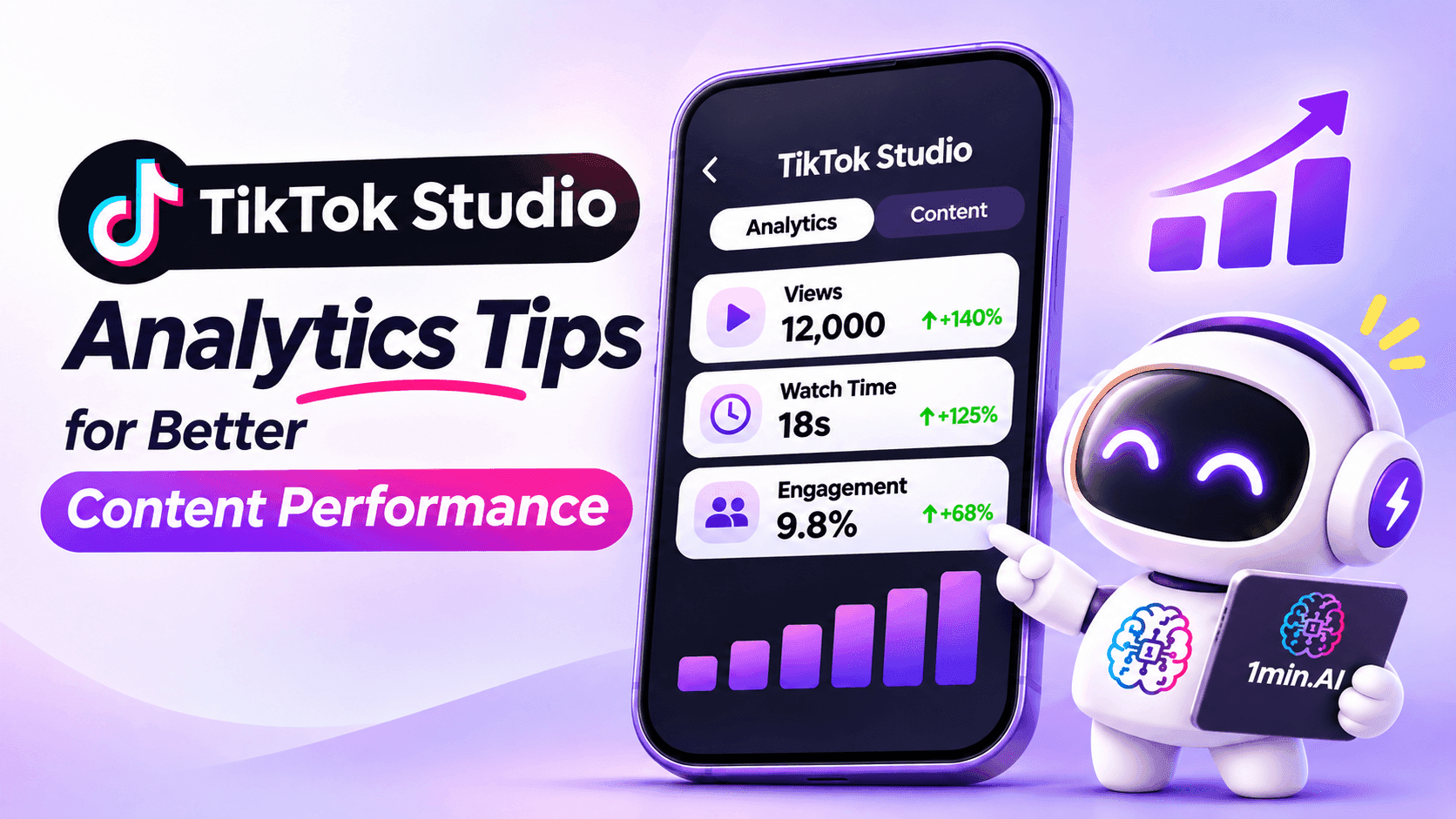
Learn how to use TikTok Studio Analytics to track views, watch time, and engagement. Turn your insights into better TikTok content with practical tips.
Ever wondered why one TikTok video gets thousands of views while another barely gets noticed?
Instead of guessing, you can use TikTok Studio to see what's working and what needs improvement.
The good news? You don't need to understand complicated analytics. A few simple numbers can help you create better videos.
Here's how to get started.
1. How to Check Your TikTok Studio Analytics
TikTok Studio is TikTok's free tool for managing content and tracking video performance.
To find your analytics:
- Open TikTok and go to your profile.
- Tap the menu (☰) and select TikTok Studio.
- Open Analytics.
- Check your video views, watch time, and audience activity.
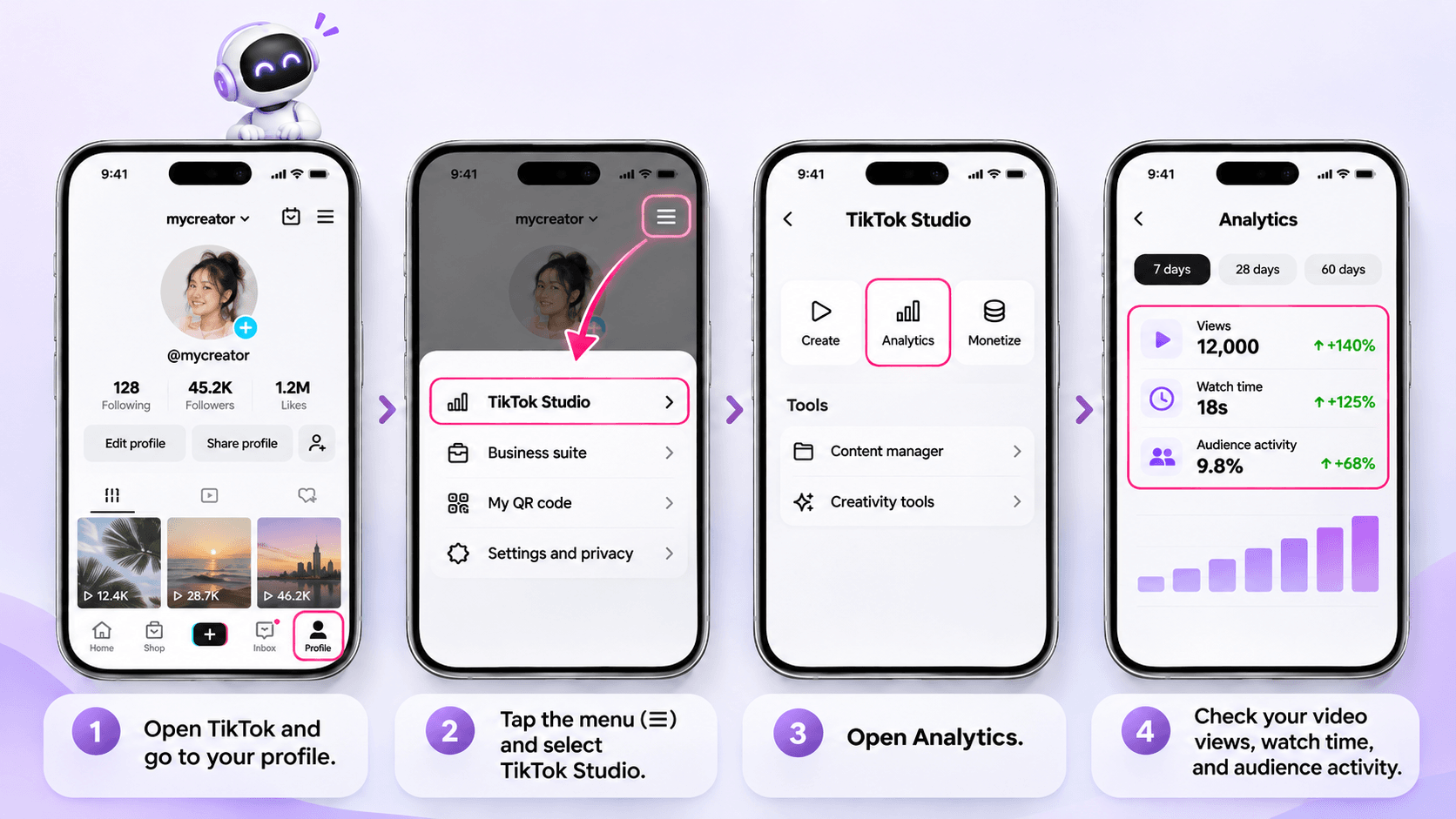
You can also use TikTok Studio on desktop.
Not sure which numbers matter? Start with these four.
| Metric | What It Tells You | What You Can Do |
|---|---|---|
| Views | Which videos attract attention | Explore similar topics |
| Watch Time | How long people keep watching | Make your opening more interesting |
| Retention | Where viewers stop watching | Remove slow or unnecessary parts |
| Comments & Shares | What people enjoy or find useful | Create more content around those interests |
For a closer look at these metrics, check Buffer's TikTok Analytics Guide.
2. Turn Your Analytics Into Better Video Ideas
Let's say you're a fashion influencer.
You posted two 30-second videos:
| Video A | Video B | |
|---|---|---|
| Content | Daily outfit vlog | Outfit transformation |
| Views | 5,000 | 12,000 |
| Average Watch Time | 8 seconds | 18 seconds |
These are example numbers for illustration.
Video B received more views, and people watched it for longer.
What's different?
Maybe Video B showed the outfit transformation immediately, while Video A started with a long introduction.
What should you try next?
Create another outfit transformation, but test a stronger opening.
For example:
Instead of:
"Hey everyone! Today I'm going to show you my outfit..."
Try:
"One jacket, three completely different looks!"
The second hook gets to the point faster.
You can use this simple approach for almost any niche:
- Beauty: Viewers leave early? Show the makeup result first.
- Fitness: Workout tutorials get more saves? Try another beginner routine.
- Lifestyle: Followers keep asking questions? Turn those questions into videos.
Don't change everything at once. Try one improvement, then compare the results.
For more examples of using performance data, explore Later's TikTok Analytics Guide.
3. Create Better TikTok Videos With 1min.AI
Once you know what needs improvement, the next challenge is coming up with a better idea.
This is where 1min.AI Multi AI Chat can help.
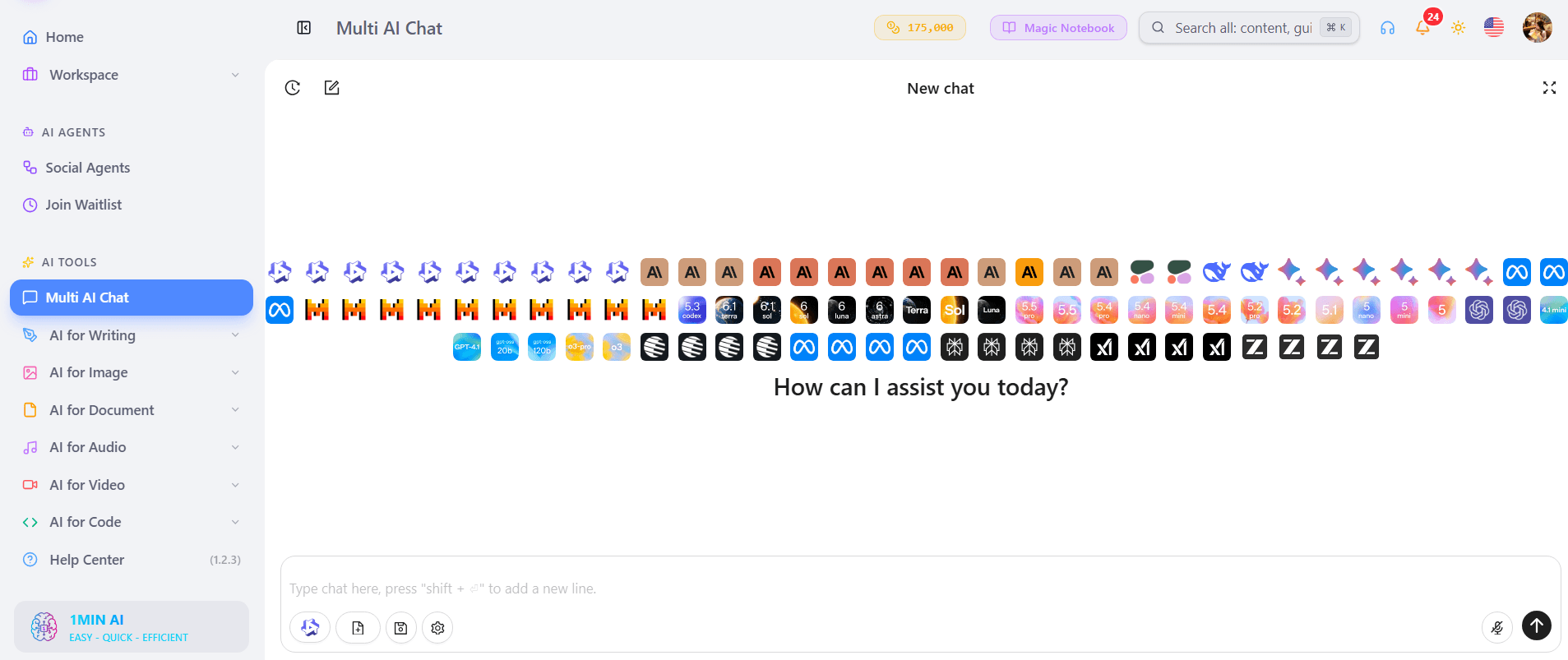
You can share what you've learned from your analytics and ask AI to suggest new hooks or video concepts.
Step 1 Share What You've Learned
Let's continue with the fashion example:
- Niche: Everyday fashion
- What worked: Outfit transformation videos
- What needs improvement: Slow introductions
- Audience: Young adults looking for simple outfit ideas
- Goal: Create a more engaging 30-second TikTok
Step 2 Brainstorm With Multi AI Chat
Open 1min.AI and use Multi AI Chat.
Copy this prompt:
Role: Act as a TikTok content strategist for influencers.
My niche: Everyday fashion.
My audience: Young adults who enjoy simple outfits.
What I learned: My outfit transformation videos had better watch time than my daily vlogs. I want to improve my opening hooks.
Task: Suggest 3 TikTok video ideas with attention-grabbing opening hooks and simple 30-second outlines.
Output: Create a table with Video Idea, Opening Hook, and Video Outline.
Requirements: Keep everything natural, easy to film, and relevant to my personal style. Don't promise viral results.
You can choose an available AI model or compare ideas from different models.
Want to see how the tool works? Read How Multiple AI Chat Helps Content Creators Create Better Content.
Step 3 Pick One Idea and Test It
Here are a few example ideas:
| Video Idea | Opening Hook |
|---|---|
| One Jacket Three Outfits | "Can one jacket work for three occasions?" |
| Casual to Work Look | "Watch how I transform this casual outfit!" |
| Simple Outfit Upgrade | "One small change makes a big difference!" |
Choose one that fits your style, film it, and check its performance afterward.
Remember, 1min.AI helps you brainstorm using the information you provide. It doesn't automatically collect data from TikTok Studio.
For more content creation ideas, check 5 AI Tools Every TikTok Creator Should Use Daily.
4. Your 5-Minute Weekly TikTok Analytics Routine
You don't need to check your analytics every hour.
Once a week, try this quick routine:
- Find your three best-performing videos.
- Check their watch time and engagement.
- Notice what they have in common.
- Read comments for new content ideas.
- Choose one thing to improve next week.
That's it!
Over time, this simple habit can help you understand what your audience responds to.
Frequently Asked Questions
Is TikTok Studio Free?
Yes. TikTok Studio offers free content management and analytics tools for eligible creators.
What Should I Check First in TikTok Analytics?
Start with views, average watch time, and engagement. Then compare similar videos to understand what might be working.
Can 1min.AI Improve My TikTok Videos?
1min.AI can help you brainstorm ideas, write hooks, and develop scripts based on your observations. It doesn't guarantee higher views or automatically analyze your TikTok account.
Final Thoughts
You don't need to become a data expert to improve your TikTok content.
Start small:
Check Your Analytics → Find What Works → Improve One Thing → Try Again.
Use TikTok Studio to understand your audience, and let AI help when you need fresh ideas.
🚀 Turn Your TikTok Insights Into Better Video Ideas With 1min.AI
- #Navigational
替代方案
探索 1minAI 的最佳替代方案,並比較其功能、定價和使用案例。

1min.AI 對比 OpenRouter
1min.AI 對比 OpenRouter:比較即用型 AI 創作產品同技術 API 工具。睇下你需要零程式碼創意工作室,定係編碼基礎設施中樞。
 Ngoc Hong

1min. AI vs Dola AI
想搵 Dola AI 替代方案?比較 1min.AI vs Dola AI 嘅影片生成、免費方案、收費同私隱,揀啱適合你嘅 AI 應用。
Ngoc Hong
1minAI vs Hix AI
比較 5 個 HIX AI 替代方案,涵蓋 AI 聊天、研究、寫作、圖片、影片、定價同靈活 AI 工作流程。
Ngoc HongAI 工具
探索最佳 AI 工具,提升生產力、創造力及日常工作效率。

一個產品,10 個 UGC 創意:AI 點樣令內容測試更輕鬆
用 AI UGC 影片生成器製作更真實嘅 UGC,測試更多創意角度,並喺唔使逐條拍攝嘅情況下擴大聯盟內容規模。
 Lien Anh Vu

只需幾個步驟,即可製作一致的卡通內容
用 1min.AI 透過 3 個簡單步驟製作 TikTok 同 Reels 卡通影片,由研究點子到角色再到動畫影片,一次完成。
Lien Anh Vu
為初創創辦人而設的 4 款最抵用 AI 工具
發掘 4 款最抵用嘅 AI 工具,幫初創創辦人驗證概念、建立產品、製作內容,同埋更快推出市場,而唔使超支。
 Tram Ta
AI 功能
全面的 AI 功能,可簡化工作流程、提升效率,讓團隊達成更多目標。

AI 應用案例
精選 AI 應用案例,涵蓋商業、生產力及各行業專用應用。
一個產品,10 個 UGC 創意:AI 點樣令內容測試更輕鬆
用 AI UGC 影片生成器製作更真實嘅 UGC,測試更多創意角度,並喺唔使逐條拍攝嘅情況下擴大聯盟內容規模。
Lien Anh Vu只需幾個步驟,即可製作一致的卡通內容
用 1min.AI 透過 3 個簡單步驟製作 TikTok 同 Reels 卡通影片,由研究點子到角色再到動畫影片,一次完成。
Lien Anh Vu
Instagram 最佳發帖時間:提升互動的實用指南
了解 Instagram 最佳發帖時間,包括不同受眾的最佳日子和時段,以及如何為你的帳戶找出理想的發帖時間表。
Tram TaAI 教學
透過實用的逐步教學,學習如何使用人工智能。
只需幾個步驟,即可製作一致的卡通內容
用 1min.AI 透過 3 個簡單步驟製作 TikTok 同 Reels 卡通影片,由研究點子到角色再到動畫影片,一次完成。
Lien Anh Vu
2026 黑色星期五 AI 工具優惠
探索 2026 黑色星期五 AI 工具優惠有咩選擇。了解點樣透過 AppSumo、Dealify、Stack Social 搶到 1min.AI 終身方案,並可喺 Trustpilot、Slashdot 同 Software Advice 核實。
 Hang Nguyen

使用 Seedance 的 AI 圖像轉影片產品一致性,停止變形並 масштаб化產品評測
以 AI 圖像轉影片產品一致性停止 logo 變形,立即在 1min.AI 製作 studio 級評測影片。
Lien Anh VuAI 指南
透過實用指南、真實案例和可操作嘅最佳實踐,更快咁學習 AI。
只需幾個步驟,即可製作一致的卡通內容
用 1min.AI 透過 3 個簡單步驟製作 TikTok 同 Reels 卡通影片,由研究點子到角色再到動畫影片,一次完成。
Lien Anh Vu
安全網上購買 AI 工具:2026 黑色星期五指南
了解如何在網上搵到同鎖定最佳黑色星期五 AI 優惠。學習專家策略,避開騙局、應對訂閱疲勞,並驗證軟件。
Hang Nguyen使用 Seedance 的 AI 圖像轉影片產品一致性,停止變形並 масштаб化產品評測
以 AI 圖像轉影片產品一致性停止 logo 變形,立即在 1min.AI 製作 studio 級評測影片。
Lien Anh VuAI 解決方案
瀏覽適用於自動化、編碼、研究、生產力、客戶支援、市場推廣及業務流程的最佳AI解決方案。
一個產品,10 個 UGC 創意:AI 點樣令內容測試更輕鬆
用 AI UGC 影片生成器製作更真實嘅 UGC,測試更多創意角度,並喺唔使逐條拍攝嘅情況下擴大聯盟內容規模。
Lien Anh Vu只需幾個步驟,即可製作一致的卡通內容
用 1min.AI 透過 3 個簡單步驟製作 TikTok 同 Reels 卡通影片,由研究點子到角色再到動畫影片,一次完成。
Lien Anh Vu
免費 AI 紋身生成器:自訂設計
用 1min.AI 的免費 AI 紋身生成器,將任何靈感變成自訂紋身設計。描述你的想法、選擇風格,幾秒內即可下載。
 Trang Tran
AI 模型
於一處探索全球頂尖嘅 AI 模型。
一個產品,10 個 UGC 創意:AI 點樣令內容測試更輕鬆
用 AI UGC 影片生成器製作更真實嘅 UGC,測試更多創意角度,並喺唔使逐條拍攝嘅情況下擴大聯盟內容規模。
Lien Anh Vu只需幾個步驟,即可製作一致的卡通內容
用 1min.AI 透過 3 個簡單步驟製作 TikTok 同 Reels 卡通影片,由研究點子到角色再到動畫影片,一次完成。
Lien Anh Vu使用 Seedance 的 AI 圖像轉影片產品一致性,停止變形並 масштаб化產品評測
以 AI 圖像轉影片產品一致性停止 logo 變形,立即在 1min.AI 製作 studio 級評測影片。
Lien Anh VuAI 比較
比較AI工具、模型及平台,尋找最適合您需求的選擇。

Kling AI 對 Veo 3:邊個模型勝出?
Kling AI 對 Veo 3:比較動態、原生音訊、定價同免費方案,睇下邊個 AI 影片生成器更適合你嘅項目——即刻喺 1min.AI 試晒兩個。
Trang Tran使用 Seedance 的 AI 圖像轉影片產品一致性,停止變形並 масштаб化產品評測
以 AI 圖像轉影片產品一致性停止 logo 變形,立即在 1min.AI 製作 studio 級評測影片。
Lien Anh Vu
DeepSeek V4 Pro 與 Flash 比較
比較 DeepSeek V4 Pro 與 DeepSeek V4 Flash 的指標。立即喺 1min.ai 優化你嘅 agentic apps,同提升 AI fact checking。
Ngoc HongAI 整合
將 AI 無縫整合到你現有的工具中,自動化工作並提升生產力。

如何使用 AI 時尚影片生成器製作 2026 時裝週內容
用 AI 將 2026 時裝週靈感變成驚艷時尚影片。學習如何發想、創作視覺,並以一個簡單流程將圖片轉成影片。
Lien Anh Vu
POV:你每日要製作 10+ 篇貼文
了解如何建立 AI 內容工作流程,幫助內容創作者透過 AI 發想、圖片生成同內容製作,更快每日產出 10+ 則社交媒體貼文。
Lien Anh Vu
停止在 AI 應用程式之間切換:AI 整合如何重塑僱主品牌
了解 AI 整合如何透過將 AI 寫作、文件、圖像、影片及多個 AI 模型整合到同一工作空間,幫助 HR 團隊簡化僱主品牌工作。
Tram Ta行業AI
為醫療保健、金融、教育、法律、製造、零售、房地產等行業尋找最佳AI工具和工作流程。

免費 AI 產品描述生成器
幾分鐘內寫出能帶來銷售的產品描述。使用這個免費 AI 產品描述生成器,將產品資料或相片轉成符合品牌的文案。試用 1min.AI。
Trang Tran
助初創企業提升利潤的最佳商業生產力工具 | 1minAI
探索最適合初創企業的商業生產力工具,節省時間、簡化工作流程、減少重複工作,並透過 AI 支援有利可圖的增長。
Tram Ta
最佳內容行銷 AI 工具|1minAI
搵緊最佳內容行銷 AI 工具?睇吓 1minAI 點樣幫市場人員喺同一個 AI 工作空間內做資料研究、寫作、重製內容、製作視覺素材同擴大產出。
Tram TaAI 代理
探索並運行 AI 代理,自動化您的工作和日常生活中的任務。


AI 工作流程
探索現成可用的 AI 工作流程,適用於生產力、營銷、銷售、支援等。
一個產品,10 個 UGC 創意:AI 點樣令內容測試更輕鬆
用 AI UGC 影片生成器製作更真實嘅 UGC,測試更多創意角度,並喺唔使逐條拍攝嘅情況下擴大聯盟內容規模。
Lien Anh Vu只需幾個步驟,即可製作一致的卡通內容
用 1min.AI 透過 3 個簡單步驟製作 TikTok 同 Reels 卡通影片,由研究點子到角色再到動畫影片,一次完成。
Lien Anh Vu如何使用 AI 時尚影片生成器製作 2026 時裝週內容
用 AI 將 2026 時裝週靈感變成驚艷時尚影片。學習如何發想、創作視覺,並以一個簡單流程將圖片轉成影片。
Lien Anh Vu電子報
1minAI 每週 AI 創新

🔮 每週 AI 創新 #143:更新 更新 GPT-6、GPT-6.1 與 Ideogram 4.0 與 Ideogram 4.0
在 1min.ai 取得 GPT-6 Sol、Luna、GPT-6.1 Sol 及 Ideogram 4.0。於同一平台將排版準確度提升至 98.4%,並把推理延遲降低 45%。
Hang Nguyen
🔮 每週 AI 創新 #142:Grok 4.7、Opus 5.5 與 Sonnet 5.5 登陸 1min.ai
在 1min.ai 存取 Grok 4.7、Claude Opus 5.5 及 Sonnet 5.5。透過單一整合工作區,最多可節省 70% 訂閱成本,並處理數以百萬計的 token。
Hang Nguyen
🔮 每週 AI 創新 #141:Seedance 2.5 與 Stable Audio 3:新一代 AI
在 1min.ai 探索 Seedance 2.0、2.5 以及 StabilityAI 的 Stable Audio 3。運用新一代生成式 AI 生成錄音室級音訊與同步動作。
Hang Nguyen