
TikTok Creative Center Trends for Better Video Ideas
2026年11月20日
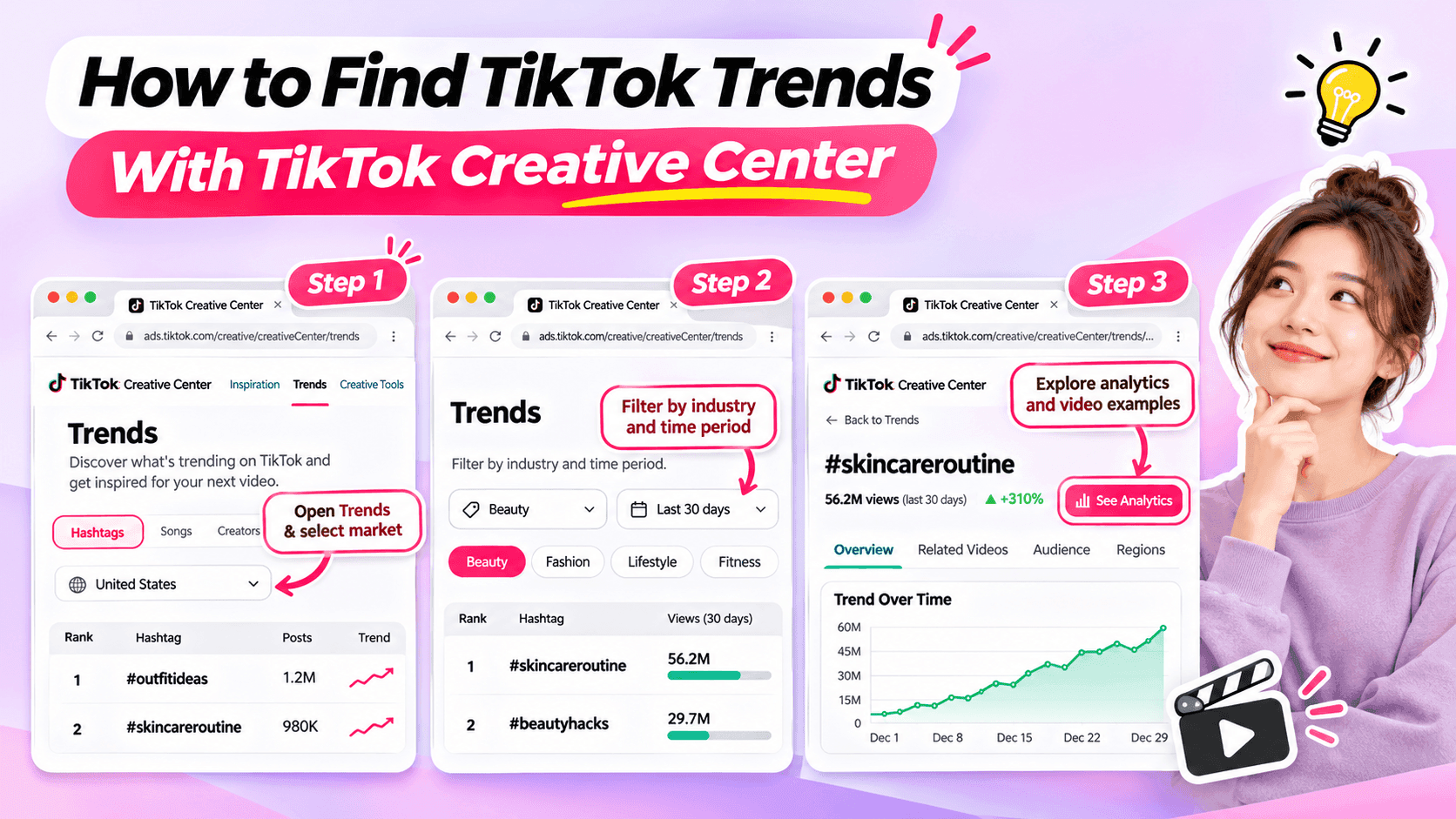
Learn how to use TikTok Creative Center to find trending hashtags and videos. Discover relevant trends and turn them into original ideas for your niche.
Looking for fresh TikTok video ideas but don't know where to start? TikTok Creative Center can help you discover trending hashtags, explore popular video formats, and find inspiration for your next post.
For influencers, the challenge isn't simply finding what's trending. It's choosing trends that match your niche, audience, and personal style.
In this beginner-friendly guide, you'll learn how to use TikTok Creative Center to find trends, understand what makes them interesting, and turn them into original video ideas. You'll also see how AI can help when you need extra inspiration.
What Is TikTok Creative Center?
TikTok Creative Center is a free creative research platform provided by TikTok for Business.
It helps users discover trends, explore creative examples, and learn about content formats on TikTok.
Although the platform includes advertising resources, influencers can also use its trend research features to find inspiration for organic content.
Here are the most useful features for beginners.
| Feature | What It Does | Why Influencers Might Use It |
|---|---|---|
| Trending Hashtags | Shows hashtags and trend information | Discover topics worth exploring |
| Hashtag Analytics | Provides available trend data and related content | Understand how a hashtag is being used |
| Trending Videos | Shows examples of popular TikTok videos where available | Explore creative approaches and formats |
| Top Ads | Provides examples of advertising creatives | Study creative techniques while recognizing that ad results differ from organic performance |
For example, a fashion influencer might use TikTok Creative Center to identify a popular styling theme and explore how people are presenting their outfits.
A fitness influencer might use it to find relevant workout-related discussions or formats.
The key is to use TikTok Creative Center as a source of inspiration, not a list of videos to copy.
How to Find TikTok Trends With Creative Center
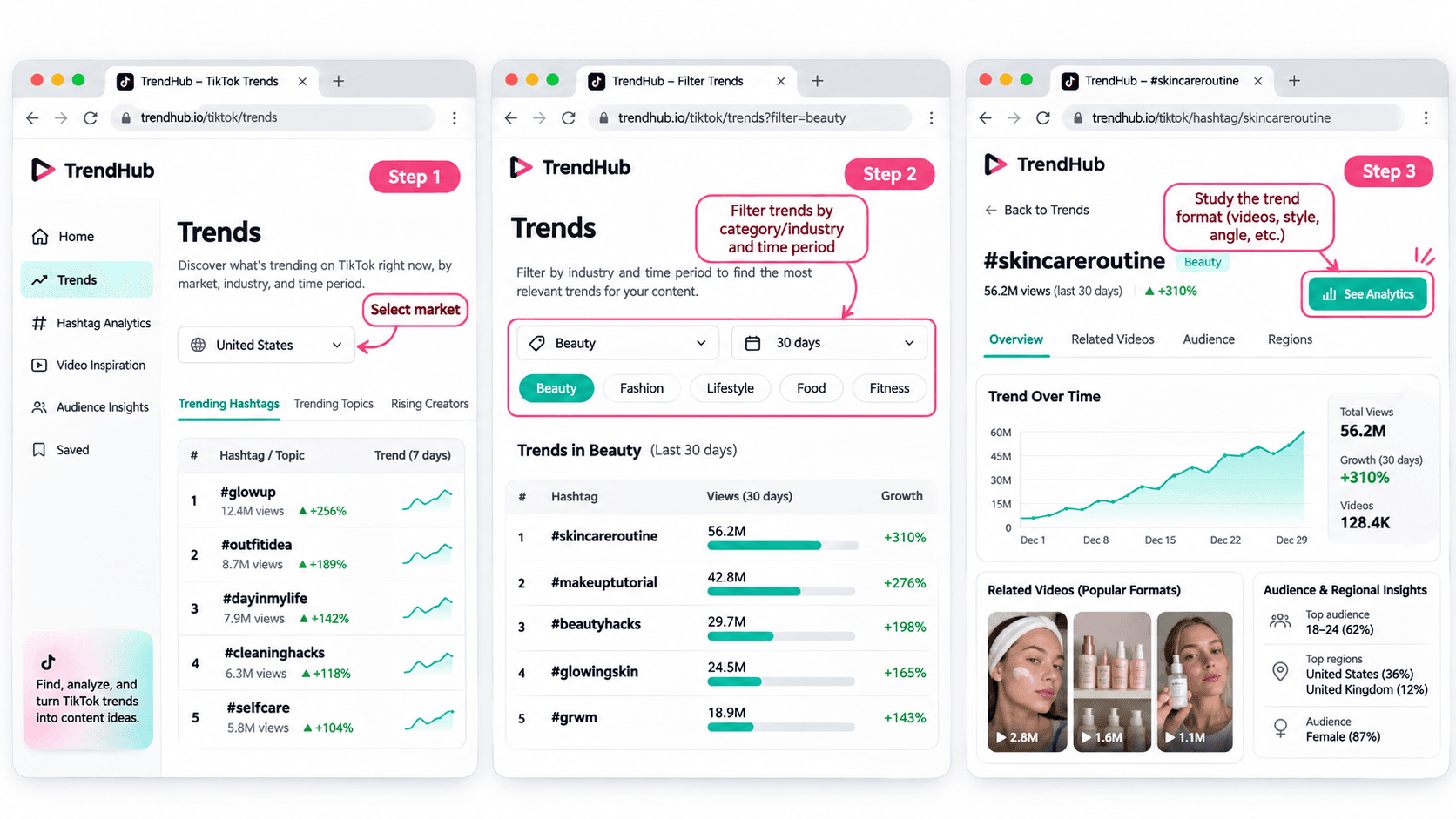
You don't need advanced marketing experience to get started.
Follow these five steps to discover and evaluate trends for your next TikTok video.
Step 1 Open TikTok Creative Center
Tool: TikTok Creative Center
Input: Your target market and influencer niche
Output: A list of trends to explore
Start by visiting the TikTok Creative Center Trends page.
On the platform:
- Open the Trends section.
- Select the Hashtag view if needed.
- Choose your target country or region when the option is available.
- Review the trending hashtags displayed.
You may be asked to log in to access additional rankings or analytics.
For example, if you're a beauty influencer targeting viewers in the United States, choose the United States when researching local trends.
This helps you explore content that may be more relevant to the audience you want to reach.
Beginner tip: Start with one market and one niche. You don't need to research every trend on TikTok.
Step 2 Filter Trends by Industry and Time Period
Input: Your niche and preferred research period
Output: A more focused selection of trends
TikTok Creative Center supports searching or filtering trending hashtags by industry and time frame.
Depending on the available interface, you can narrow your research using relevant categories.
For example:
| Influencer Niche | Research Direction |
|---|---|
| Beauty | Makeup techniques, beauty routines, skincare discussions |
| Fashion | Outfit styling, wardrobe inspiration, personal style |
| Fitness | Workout routines, training experiences, exercise discussions |
| Lifestyle | Everyday routines, organization, personal experiences |
| Technology | Device features, useful tools, technology discussions |
These are example research directions, not verified currently trending hashtags.
Once you have filtered the results, look for hashtags and topics that could make sense for your audience.
Avoid selecting a trend simply because it has the highest number of views.
A smaller, relevant trend may be more useful to your personal brand than a popular topic unrelated to your niche.
Step 3 Explore Hashtag Analytics
Input: A relevant hashtag
Output: More information about the trend and its related videos
When a hashtag catches your attention, select See Analytics if available.
TikTok's official Trends documentation describes several types of information that may appear, including:
- Trendlines showing how interest has changed.
- Related videos.
- Audience insights.
- Regional popularity.
- Related hashtags.
You don't have to analyze every metric.
For beginners, focus on three questions:
Is the topic relevant to my audience?
A popular hashtag is not automatically useful to your followers.
How are people using the hashtag?
Look at the related videos to understand the stories, formats, and approaches people are sharing.
Can I contribute something different?
Consider what personal experience, expertise, or perspective you could add.
For example, if you find a styling-related hashtag, review the videos to identify common approaches.
Some may show outfit combinations. Others may focus on accessories or personal styling tips.
Instead of copying those videos, use them to understand the topic and think about your own angle.
Step 4 Study the Video Format
Input: Related videos from your selected trend
Output: A creative structure you can adapt
Once you've found a relevant trend, watch a few videos and identify what makes the format recognizable.
Pay attention to:
- The opening scene.
- The main idea.
- The order of the shots.
- The visual changes.
- The ending.
For example, consider a before-and-after transformation format.
The structure is simple:
Before → Transformation → After
Different influencers could use that structure in different ways.
| Influencer Niche | Possible Video Idea |
|---|---|
| Fashion | Turn a casual outfit into an evening look |
| Beauty | Show a personal everyday makeup transformation |
| Fitness | Show a genuine change in a workout routine |
| Lifestyle | Transform a messy desk into an organized workspace |
These examples illustrate how a format can be adapted. They are not presented as verified current TikTok trends.
The format can stay similar while the content reflects each influencer's own experiences.
That's how you move from discovering a trend to developing an original idea.
Step 5 Save Your Trend Research
Input: Your selected trend and observations
Output: A short creative brief for your next video
Before leaving Creative Center, save the most useful information.
You can use this simple worksheet.
| Research Field | Example |
|---|---|
| Influencer niche | Everyday fashion |
| Target audience | Young adults who enjoy simple outfit inspiration |
| Trend format | Before-and-after transformation |
| What makes it interesting | A visible change between two looks |
| Personal angle | One jacket styled for different occasions |
| Possible video idea | Three ways to style one jacket |
| Next action | Write a short video concept |
This short brief helps you remember why the format interested you.
It also gives you useful information if you want to brainstorm additional ideas with AI.
How to Choose TikTok Trends That Fit Your Niche
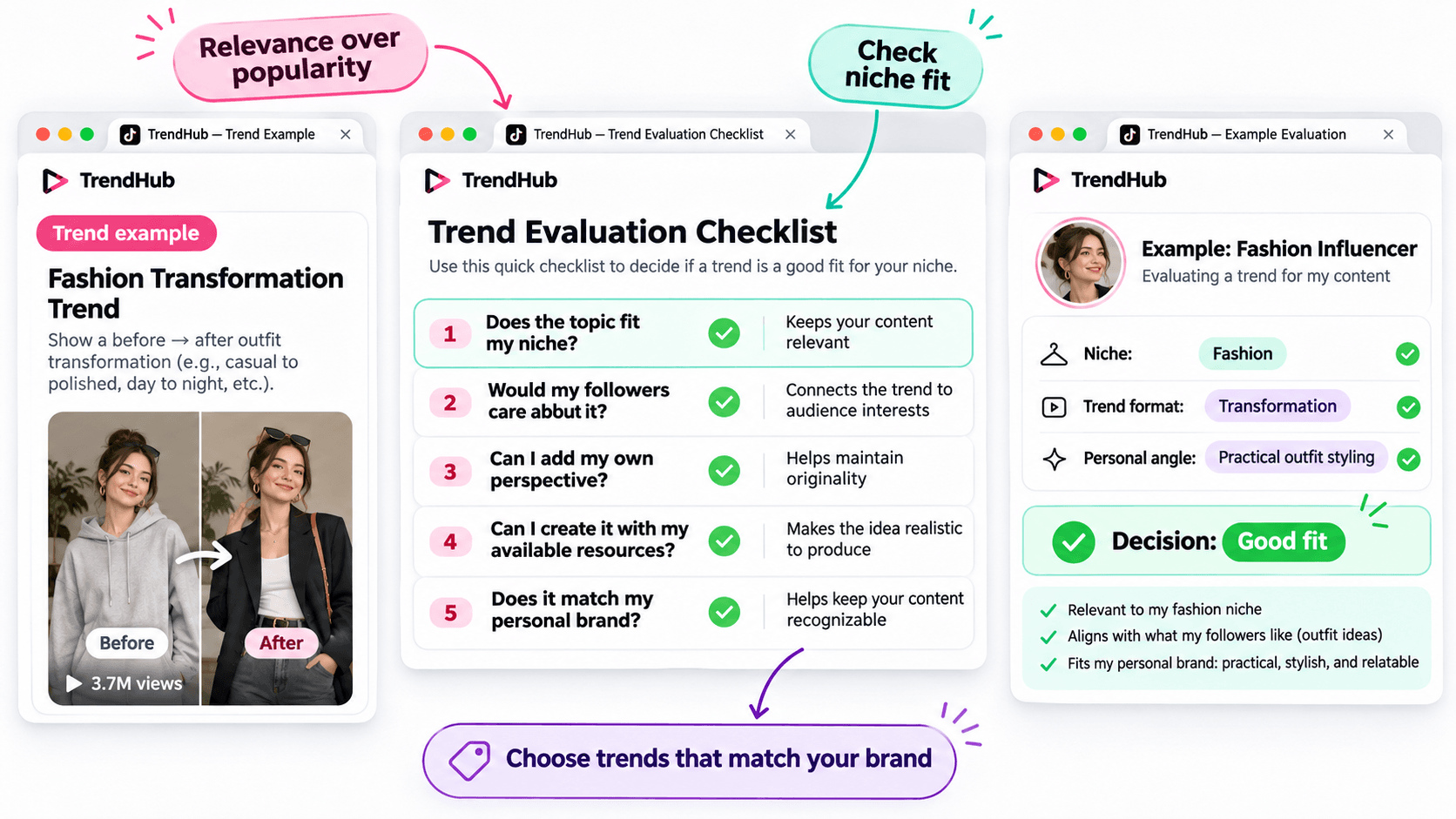
Not every popular trend deserves a place in your content plan.
Before adapting a trend, make sure it matches the kind of content your followers expect from you.
Use this simple checklist.
| Question | Why It Matters |
|---|---|
| Does the topic fit my niche? | Keeps your content relevant |
| Would my followers care about it? | Connects the trend to audience interests |
| Can I add my own perspective? | Helps maintain originality |
| Can I create it with my available resources? | Makes the idea realistic to produce |
| Does it match my personal brand? | Helps keep your content recognizable |
You don't need to answer yes to every question perfectly, but a trend should have a clear reason to belong in your content plan.
For example, imagine you're a fashion influencer who usually shares practical outfit ideas.
A transformation format could be useful if it allows you to demonstrate real styling advice.
However, an unrelated trend may not provide the same value to your audience.
Choose trends based on relevance and creative fit rather than popularity alone.
How to Turn a TikTok Trend Into an Original Video Idea
Finding a trend is only the beginning.
The next challenge is turning it into a video that feels like your own.
You can do this using three simple steps.
Step 1 Identify the Basic Creative Format
Look beyond the hashtag and focus on the structure.
For example:
Format: Before-and-after transformation.
Core idea: Show a visible change.
Possible applications: Outfit styling, makeup, workspace organization, or a genuine personal routine change.
This gives you a flexible creative direction.
Step 2 Add Your Personal Perspective
Ask yourself what you can contribute that another influencer hasn't already shown.
For example, a fashion influencer could use the transformation format to demonstrate how one favorite jacket works with different outfits.
The video could follow this structure:
Opening: Show the jacket and introduce the challenge.
Middle: Demonstrate three outfit combinations.
Ending: Ask followers which look they prefer.
This is a more personal concept than simply recreating a trending video.
Step 3 Develop a Simple Video Concept
Write down your idea before filming.
Example Video Concept
| Element | Example |
|---|---|
| Topic | Styling one jacket |
| Audience | Everyday fashion followers |
| Hook | "Can I style this jacket for three different occasions?" |
| Main Content | Show three outfit combinations |
| Ending | "Which look would you wear?" |
You now have a practical starting point for your next TikTok video.
You can develop the script yourself or use an AI assistant if you'd like to explore more creative approaches.
How to Brainstorm More TikTok Video Ideas With 1min.AI
Sometimes, you find an interesting trend but can't decide how to adapt it.
This is where 1min.AI Multi AI Chat can help.
You can use it to explore different content angles, develop hooks, and organize your ideas.
You don't need to use AI for every trend. It's an optional step when you want additional inspiration.
Step 1 Prepare Your Trend Information
Input: Your niche, audience, trend format, and personal style.
Let's continue with the fashion example.
| Input | Example |
|---|---|
| Niche | Everyday fashion |
| Audience | Young adults interested in practical outfits |
| Personal style | Friendly, natural, and relatable |
| Trend format | Before-and-after transformation |
| Content goal | Generate original outfit video ideas |
This gives AI enough context to generate suggestions that are more relevant than a general list of random TikTok ideas.
Step 2 Use Multi AI Chat to Explore Creative Angles
1min.AI Tool: Multi AI Chat
Output: Several video concepts with hooks and creative approaches.
Open 1min.AI and choose Multi AI Chat.
You can use one available AI model or compare suggestions from multiple models.
Copy the prompt below and replace the example information with your own.
Copyable TikTok Trend Adaptation Prompt
ROLE
Act as a TikTok content strategist who helps influencers create original short-form video ideas.
AUDIENCE
My influencer niche is [your niche].
My followers are [describe your audience].
PERSONAL BRAND
My communication style is [your tone and personality].
TREND INPUT
The TikTok trend or video format I found is [describe the verified format].
The main creative structure is [describe how the format works].
TASK
Suggest 5 original TikTok video ideas inspired by this format.
OUTPUT FORMAT
Create a table with:
- Video Idea
- Creative Angle
- Opening Hook
- Three-Part Video Outline
- Why It Fits My Audience
REQUIREMENTS
Keep the ideas easy to produce, authentic, and relevant to my niche. Do not copy another influencer's content, invent personal experiences, or claim that a trend guarantees viral results.
This format works for different influencer niches because you control the inputs.
For example, a beauty influencer can use the same prompt with a makeup-related trend, while a lifestyle influencer can use it with a home organization format.
Step 3 Review and Personalize the Suggestions
AI can help you explore options, but you should select the concept that genuinely fits your audience.
Here are three illustrative ideas for the fashion example.
| Video Idea | Creative Angle | Opening Hook |
|---|---|---|
| One Jacket Three Occasions | Show styling versatility | "Can one jacket work for three different plans?" |
| Casual to Evening Look | Show a simple outfit transformation | "Here's how I'd change this outfit for the evening." |
| Three Accessories One Outfit | Show how details change a look | "Watch how these accessories change the same outfit." |
These are examples of possible ideas, not documented outputs from a live 1min.AI session.
Choose one and adjust the details based on your own wardrobe and experience.
If you want a more detailed walkthrough of Multi AI Chat, read How Multiple AI Chat Helps Content Creators Create Better Content.
You can also watch the tutorial embedded in that guide to see how different AI models can help you compare content ideas.
For more ways to use AI throughout your creative process, explore Free AI Tools for Influencers to Create More Content.
Common Mistakes When Using TikTok Creative Center
Choosing Trends Only Because They Have High Views
A popular hashtag does not guarantee that your video will perform well.
Consider whether the trend fits your audience and whether you can contribute something useful or entertaining.
Copying Another Influencer's Video
Watching examples is useful for understanding a format.
However, repeating another person's creative work without adding your own contribution will not help you build a distinctive personal brand.
Use trends as inspiration, not finished scripts.
Ignoring Your Target Market
Trends can differ by location and audience.
When possible, choose the market that matches the people you're trying to reach.
Confusing Ad Performance With Organic Video Results
TikTok Creative Center includes advertising resources such as Top Ads.
These examples can provide creative inspiration, but advertising performance should not be treated as proof that a similar organic TikTok video will achieve the same results.
Assuming AI Knows Which Trends Are Currently Popular
AI can generate creative ideas based on the information you provide, but you should not assume it has verified the latest TikTok trends.
Research trends in TikTok Creative Center first, then provide those findings to AI.
Frequently Asked Questions
Is TikTok Creative Center Free?
Yes. TikTok describes Creative Center as a free public resource.
However, some detailed views or features may require logging in, and availability can vary.
How Do I Find Trending Hashtags on TikTok Creative Center?
Open the Trends section, select the available hashtag view, and use the search or filtering options.
When available, select See Analytics to explore more information about a hashtag.
Can Influencers Use TikTok Creative Center?
Yes. Although Creative Center is part of TikTok for Business, influencers can use its publicly available trend information to research topics, formats, and creative inspiration.
Does Using a Trending Hashtag Guarantee More Views?
No. A hashtag's popularity does not guarantee that your video will receive more views or engagement.
The relevance of the topic, the quality of your content, and your audience's response still matter.
What If I Cannot Access Some Creative Center Features?
Check whether you need to log in or whether the feature is available for your region or account.
TikTok's interface and feature availability can change. You can still research relevant videos directly on TikTok when a Creative Center feature is unavailable.
Can 1min.AI Find TikTok Trends Automatically?
This guide uses TikTok Creative Center to find and verify trends.
You can then enter the trend information into 1min.AI Multi AI Chat to brainstorm creative ideas. This workflow does not require automatic importing of TikTok trend data.
Final Thoughts
TikTok Creative Center is a useful starting point when you need fresh video inspiration.
Instead of scrolling through random videos, you can explore trending hashtags, study relevant formats, and evaluate whether an idea fits your personal brand.
Remember the simple workflow:
Find a Trend → Check Its Relevance → Study the Format → Add Your Perspective → Develop Your Video Idea.
You don't need to follow every trend or use complicated tools to get started.
Choose one relevant format, make it your own, and create something your audience can recognize as part of your personal brand.
When you want to explore more creative angles, AI can help you brainstorm without replacing your own ideas.
🚀 Turn TikTok Trends Into Original Video Ideas With 1min.AI Multi AI Chat
- #Navigational
替代方案
探索 1minAI 的最佳替代方案,並比較其功能、定價和使用案例。

1min.AI 對比 OpenRouter
1min.AI 對比 OpenRouter:比較即用型 AI 創作產品同技術 API 工具。睇下你需要零程式碼創意工作室,定係編碼基礎設施中樞。
 Ngoc Hong

1min. AI vs Dola AI
想搵 Dola AI 替代方案?比較 1min.AI vs Dola AI 嘅影片生成、免費方案、收費同私隱,揀啱適合你嘅 AI 應用。
Ngoc Hong
1minAI vs Hix AI
比較 5 個 HIX AI 替代方案,涵蓋 AI 聊天、研究、寫作、圖片、影片、定價同靈活 AI 工作流程。
Ngoc HongAI 工具
探索最佳 AI 工具,提升生產力、創造力及日常工作效率。

一個產品,10 個 UGC 創意:AI 點樣令內容測試更輕鬆
用 AI UGC 影片生成器製作更真實嘅 UGC,測試更多創意角度,並喺唔使逐條拍攝嘅情況下擴大聯盟內容規模。
 Lien Anh Vu

只需幾個步驟,即可製作一致的卡通內容
用 1min.AI 透過 3 個簡單步驟製作 TikTok 同 Reels 卡通影片,由研究點子到角色再到動畫影片,一次完成。
Lien Anh Vu
為初創創辦人而設的 4 款最抵用 AI 工具
發掘 4 款最抵用嘅 AI 工具,幫初創創辦人驗證概念、建立產品、製作內容,同埋更快推出市場,而唔使超支。
 Tram Ta
AI 功能
全面的 AI 功能,可簡化工作流程、提升效率,讓團隊達成更多目標。

AI 應用案例
精選 AI 應用案例,涵蓋商業、生產力及各行業專用應用。
一個產品,10 個 UGC 創意:AI 點樣令內容測試更輕鬆
用 AI UGC 影片生成器製作更真實嘅 UGC,測試更多創意角度,並喺唔使逐條拍攝嘅情況下擴大聯盟內容規模。
Lien Anh Vu只需幾個步驟,即可製作一致的卡通內容
用 1min.AI 透過 3 個簡單步驟製作 TikTok 同 Reels 卡通影片,由研究點子到角色再到動畫影片,一次完成。
Lien Anh Vu
Instagram 最佳發帖時間:提升互動的實用指南
了解 Instagram 最佳發帖時間,包括不同受眾的最佳日子和時段,以及如何為你的帳戶找出理想的發帖時間表。
Tram TaAI 教學
透過實用的逐步教學,學習如何使用人工智能。
只需幾個步驟,即可製作一致的卡通內容
用 1min.AI 透過 3 個簡單步驟製作 TikTok 同 Reels 卡通影片,由研究點子到角色再到動畫影片,一次完成。
Lien Anh Vu
2026 黑色星期五 AI 工具優惠
探索 2026 黑色星期五 AI 工具優惠有咩選擇。了解點樣透過 AppSumo、Dealify、Stack Social 搶到 1min.AI 終身方案,並可喺 Trustpilot、Slashdot 同 Software Advice 核實。
 Hang Nguyen

使用 Seedance 的 AI 圖像轉影片產品一致性,停止變形並 масштаб化產品評測
以 AI 圖像轉影片產品一致性停止 logo 變形,立即在 1min.AI 製作 studio 級評測影片。
Lien Anh VuAI 指南
透過實用指南、真實案例和可操作嘅最佳實踐,更快咁學習 AI。
只需幾個步驟,即可製作一致的卡通內容
用 1min.AI 透過 3 個簡單步驟製作 TikTok 同 Reels 卡通影片,由研究點子到角色再到動畫影片,一次完成。
Lien Anh Vu
安全網上購買 AI 工具:2026 黑色星期五指南
了解如何在網上搵到同鎖定最佳黑色星期五 AI 優惠。學習專家策略,避開騙局、應對訂閱疲勞,並驗證軟件。
Hang Nguyen使用 Seedance 的 AI 圖像轉影片產品一致性,停止變形並 масштаб化產品評測
以 AI 圖像轉影片產品一致性停止 logo 變形,立即在 1min.AI 製作 studio 級評測影片。
Lien Anh VuAI 解決方案
瀏覽適用於自動化、編碼、研究、生產力、客戶支援、市場推廣及業務流程的最佳AI解決方案。
一個產品,10 個 UGC 創意:AI 點樣令內容測試更輕鬆
用 AI UGC 影片生成器製作更真實嘅 UGC,測試更多創意角度,並喺唔使逐條拍攝嘅情況下擴大聯盟內容規模。
Lien Anh Vu只需幾個步驟,即可製作一致的卡通內容
用 1min.AI 透過 3 個簡單步驟製作 TikTok 同 Reels 卡通影片,由研究點子到角色再到動畫影片,一次完成。
Lien Anh Vu
免費 AI 紋身生成器:自訂設計
用 1min.AI 的免費 AI 紋身生成器,將任何靈感變成自訂紋身設計。描述你的想法、選擇風格,幾秒內即可下載。
 Trang Tran
AI 模型
於一處探索全球頂尖嘅 AI 模型。
一個產品,10 個 UGC 創意:AI 點樣令內容測試更輕鬆
用 AI UGC 影片生成器製作更真實嘅 UGC,測試更多創意角度,並喺唔使逐條拍攝嘅情況下擴大聯盟內容規模。
Lien Anh Vu只需幾個步驟,即可製作一致的卡通內容
用 1min.AI 透過 3 個簡單步驟製作 TikTok 同 Reels 卡通影片,由研究點子到角色再到動畫影片,一次完成。
Lien Anh Vu使用 Seedance 的 AI 圖像轉影片產品一致性,停止變形並 масштаб化產品評測
以 AI 圖像轉影片產品一致性停止 logo 變形,立即在 1min.AI 製作 studio 級評測影片。
Lien Anh VuAI 比較
比較AI工具、模型及平台,尋找最適合您需求的選擇。

Kling AI 對 Veo 3:邊個模型勝出?
Kling AI 對 Veo 3:比較動態、原生音訊、定價同免費方案,睇下邊個 AI 影片生成器更適合你嘅項目——即刻喺 1min.AI 試晒兩個。
Trang Tran使用 Seedance 的 AI 圖像轉影片產品一致性,停止變形並 масштаб化產品評測
以 AI 圖像轉影片產品一致性停止 logo 變形,立即在 1min.AI 製作 studio 級評測影片。
Lien Anh Vu
DeepSeek V4 Pro 與 Flash 比較
比較 DeepSeek V4 Pro 與 DeepSeek V4 Flash 的指標。立即喺 1min.ai 優化你嘅 agentic apps,同提升 AI fact checking。
Ngoc HongAI 整合
將 AI 無縫整合到你現有的工具中,自動化工作並提升生產力。

如何使用 AI 時尚影片生成器製作 2026 時裝週內容
用 AI 將 2026 時裝週靈感變成驚艷時尚影片。學習如何發想、創作視覺,並以一個簡單流程將圖片轉成影片。
Lien Anh Vu
POV:你每日要製作 10+ 篇貼文
了解如何建立 AI 內容工作流程,幫助內容創作者透過 AI 發想、圖片生成同內容製作,更快每日產出 10+ 則社交媒體貼文。
Lien Anh Vu
停止在 AI 應用程式之間切換:AI 整合如何重塑僱主品牌
了解 AI 整合如何透過將 AI 寫作、文件、圖像、影片及多個 AI 模型整合到同一工作空間,幫助 HR 團隊簡化僱主品牌工作。
Tram Ta行業AI
為醫療保健、金融、教育、法律、製造、零售、房地產等行業尋找最佳AI工具和工作流程。

免費 AI 產品描述生成器
幾分鐘內寫出能帶來銷售的產品描述。使用這個免費 AI 產品描述生成器,將產品資料或相片轉成符合品牌的文案。試用 1min.AI。
Trang Tran
助初創企業提升利潤的最佳商業生產力工具 | 1minAI
探索最適合初創企業的商業生產力工具,節省時間、簡化工作流程、減少重複工作,並透過 AI 支援有利可圖的增長。
Tram Ta
最佳內容行銷 AI 工具|1minAI
搵緊最佳內容行銷 AI 工具?睇吓 1minAI 點樣幫市場人員喺同一個 AI 工作空間內做資料研究、寫作、重製內容、製作視覺素材同擴大產出。
Tram TaAI 代理
探索並運行 AI 代理,自動化您的工作和日常生活中的任務。


AI 工作流程
探索現成可用的 AI 工作流程,適用於生產力、營銷、銷售、支援等。
一個產品,10 個 UGC 創意:AI 點樣令內容測試更輕鬆
用 AI UGC 影片生成器製作更真實嘅 UGC,測試更多創意角度,並喺唔使逐條拍攝嘅情況下擴大聯盟內容規模。
Lien Anh Vu只需幾個步驟,即可製作一致的卡通內容
用 1min.AI 透過 3 個簡單步驟製作 TikTok 同 Reels 卡通影片,由研究點子到角色再到動畫影片,一次完成。
Lien Anh Vu如何使用 AI 時尚影片生成器製作 2026 時裝週內容
用 AI 將 2026 時裝週靈感變成驚艷時尚影片。學習如何發想、創作視覺,並以一個簡單流程將圖片轉成影片。
Lien Anh Vu電子報
1minAI 每週 AI 創新

🔮 每週 AI 創新 #143:更新 更新 GPT-6、GPT-6.1 與 Ideogram 4.0 與 Ideogram 4.0
在 1min.ai 取得 GPT-6 Sol、Luna、GPT-6.1 Sol 及 Ideogram 4.0。於同一平台將排版準確度提升至 98.4%,並把推理延遲降低 45%。
Hang Nguyen
🔮 每週 AI 創新 #142:Grok 4.7、Opus 5.5 與 Sonnet 5.5 登陸 1min.ai
在 1min.ai 存取 Grok 4.7、Claude Opus 5.5 及 Sonnet 5.5。透過單一整合工作區,最多可節省 70% 訂閱成本,並處理數以百萬計的 token。
Hang Nguyen
🔮 每週 AI 創新 #141:Seedance 2.5 與 Stable Audio 3:新一代 AI
在 1min.ai 探索 Seedance 2.0、2.5 以及 StabilityAI 的 Stable Audio 3。運用新一代生成式 AI 生成錄音室級音訊與同步動作。
Hang Nguyen