
1minAI vs SocialPilot: Which Is the Best AI Social Media Agent?

Tram Ta
2026年11月20日
Looking for a SocialPilot alternative? Compare 1minAI vs SocialPilot for AI content creation, LinkedIn automation, scheduling, and social media management.
Platforms such as SocialPilot help businesses and agencies organize these activities across multiple social networks. But what if your biggest challenge isn't managing accounts? What if you spend too much time researching topics, writing posts, and creating content every week?
That's where an AI-powered content workflow can make a difference.
1minAI and SocialPilot solve different parts of the social media workload. SocialPilot focuses on social media management, publishing, analytics, and agency collaboration. 1minAI focuses on connecting AI-powered research, content writing, visual creation, and publishing through its Social Agents.
In this guide, we'll compare 1minAI vs SocialPilot, explore their strengths and limitations, and help you decide which platform fits your social media workflow.
What Is SocialPilot?
SocialPilot is a social media management platform designed for businesses, marketing teams, and agencies. It helps users manage multiple social accounts, plan content, schedule posts, monitor engagement, and analyze performance from one dashboard.
The platform supports major social networks, including LinkedIn, Facebook, Instagram, TikTok, YouTube, Pinterest, Threads, and X.
Its main value is centralized social media management. Instead of logging into multiple platforms to publish content and review performance, teams can coordinate much of their work through one interface.
SocialPilot's Key Features
1. Social Media Scheduling and Bulk Publishing
SocialPilot provides a social media calendar where users can plan and schedule posts across connected accounts.
Its bulk scheduling and CSV upload features help teams prepare multiple posts in advance rather than publishing each one manually.
2. AI-Powered Content Creation
SocialPilot includes AI-assisted content generation to help users create captions, post variations, and other social media copy.
This can reduce the time spent drafting content, especially when managing several accounts or campaigns.
3. Multi-Account Management
One of SocialPilot's major strengths is its ability to manage multiple social media accounts from a centralized dashboard.
This is particularly useful for agencies that handle several clients or businesses with multiple brands and locations.
4. Analytics and Reporting
SocialPilot provides social media analytics and reporting features to help users understand post performance and review account activity.
Higher-tier plans include advanced analytics, competitor reports, scheduled reports, and white-label reporting.
5. Team and Client Collaboration
SocialPilot supports team management, content approval workflows, and client collaboration.
These features help agencies coordinate publishing with clients and internal team members without relying entirely on email or separate approval processes.
6. Media and Carousel Publishing
The platform supports multiple-image and carousel posts, video publishing, LinkedIn document publishing, and first-comment scheduling.
These features are useful for teams that publish different content formats and need more control over their publishing process.
SocialPilot's Pricing
SocialPilot offers multiple subscription plans. Its pricing page displays the following annual-billing rates at the time of research:
| Plan | Starting price (annual billing) | Main audience |
|---|---|---|
| Essentials | $25.50/month | Individual professionals |
| Standard | $42.50/month | Small businesses and teams |
| Premium | $85/month | Growing agencies |
| Ultimate | $170/month | Established agencies and multi-location brands |
The plans differ in supported social accounts, team members, analytics, bulk scheduling, client approvals, and white-label capabilities.
For example, the Premium plan includes 25 social media accounts, six users, bulk scheduling, advanced analytics, client approvals, and white-label reports. The Ultimate plan supports 50 social accounts and unlimited users.
Pricing and plan limits can change. Check the official SocialPilot pricing page before making a purchase decision.
SocialPilot's Strengths
SocialPilot is a strong option for organizations that need structured social media management.
Its main advantages include:
- Multi-account management: Manage multiple social profiles from one dashboard.
- Bulk scheduling: Prepare and schedule many posts in advance.
- Agency collaboration: Coordinate team members, clients, and approval workflows.
- Advanced reporting: Review social media performance and create branded reports.
- Flexible publishing: Support multiple images, carousels, videos, LinkedIn documents, and first comments.
- Multi-platform support: Manage social media activities across several networks.
For agencies managing many client accounts, these capabilities can be particularly valuable.
Where SocialPilot May Not Be the Best Fit
SocialPilot offers a broad set of management features, but not every user needs an agency-oriented social media management platform.
Consider these points when evaluating it:
- Its main strength is managing, scheduling, and analyzing social media activity rather than connecting every stage of AI content production.
- Users who spend most of their time researching topics and developing original LinkedIn posts may want a more content-focused AI workflow.
- Advanced agency features, such as white-label reports and client management, are available in higher-tier plans.
- A scheduling platform does not automatically eliminate the work involved in finding relevant topics, developing ideas, and creating original content.
These are differences in product focus rather than evidence that SocialPilot performs poorly. The right choice depends on where your team spends the most time.
What Is 1minAI Social Agents?
1minAI is an AI workspace that brings together AI chat, writing, image generation, document tools, and AI agents.
Its Social Agents help users connect content-related tasks into more structured workflows.
For LinkedIn content, the 1minAI LinkedIn Content Agent follows a sequence:
Gather Information → Write Content → Design Image → Post to Social
Instead of treating research, writing, visual creation, and publishing as completely separate tasks, the agent connects them in one workflow.
You can explore the feature directly through 1minAI Social Agents.
Key Capabilities of 1minAI Social Agents
1. Gather Information Before Creating Content
Start with relevant information about your company, product, service, or topic.
The LinkedIn workflow can use saved assets and supplied information as context for content generation. This helps the AI work from your business information rather than producing generic posts from a vague prompt.
2. Generate LinkedIn Content
After gathering information, the agent moves to content creation.
You can configure writing settings and available AI model options to generate LinkedIn-ready drafts. This supports a workflow that begins with your business knowledge and turns it into content for your target audience.
3. Generate Supporting Images
The workflow also includes an image-generation stage.
You can create visuals that complement the post rather than searching for unrelated stock images or preparing every graphic manually.
4. Schedule and Publish Content
Once the content is ready, the workflow can move to the social publishing stage.
The LinkedIn Agent supports connecting a LinkedIn destination and configuring publishing schedules, including recurring scheduling options where available.
5. Customize the Workflow
The agent provides settings for content generation, including writing and image model options. Where available, saved Brand Voice settings can help guide the tone and wording.
This makes it easier to establish a repeatable process for producing content around your business, products, or services.
1minAI vs SocialPilot: Feature Comparison
Both platforms can support social media workflows, but their primary focus is different.
| Feature | SocialPilot | 1minAI Social Agents |
|---|---|---|
| Main focus | Social media management | AI-powered content production and publishing |
| AI content generation | AI captions and content assistance | AI-assisted research and LinkedIn post creation |
| Topic and source research | Content planning and discovery tools | Gather information from topics and supplied assets |
| LinkedIn content creation | Supported | Core workflow capability |
| AI image generation | Image and media publishing tools | AI-generated visuals connected to content |
| Scheduling | Multi-platform scheduling and bulk publishing | Scheduling through the Social Agent workflow |
| Multi-account management | Strong agency-oriented account management | Check current Social Agent account and destination options |
| Analytics and reporting | Detailed analytics and advanced reports | Not positioned as a replacement for SocialPilot's advanced reporting suite |
| Client approvals | Available in eligible plans | Check current collaboration options |
| White-label reports | Available in higher-tier plans | Not a direct equivalent to SocialPilot's white-label reporting |
| Broader AI workspace | Primarily social media management | Writing, images, documents, AI chat, and agents |
The comparison highlights an important distinction: SocialPilot is built for managing social media operations at scale, while 1minAI focuses on using AI to reduce the work involved in creating content.
Why Consider 1minAI as a SocialPilot Alternative?
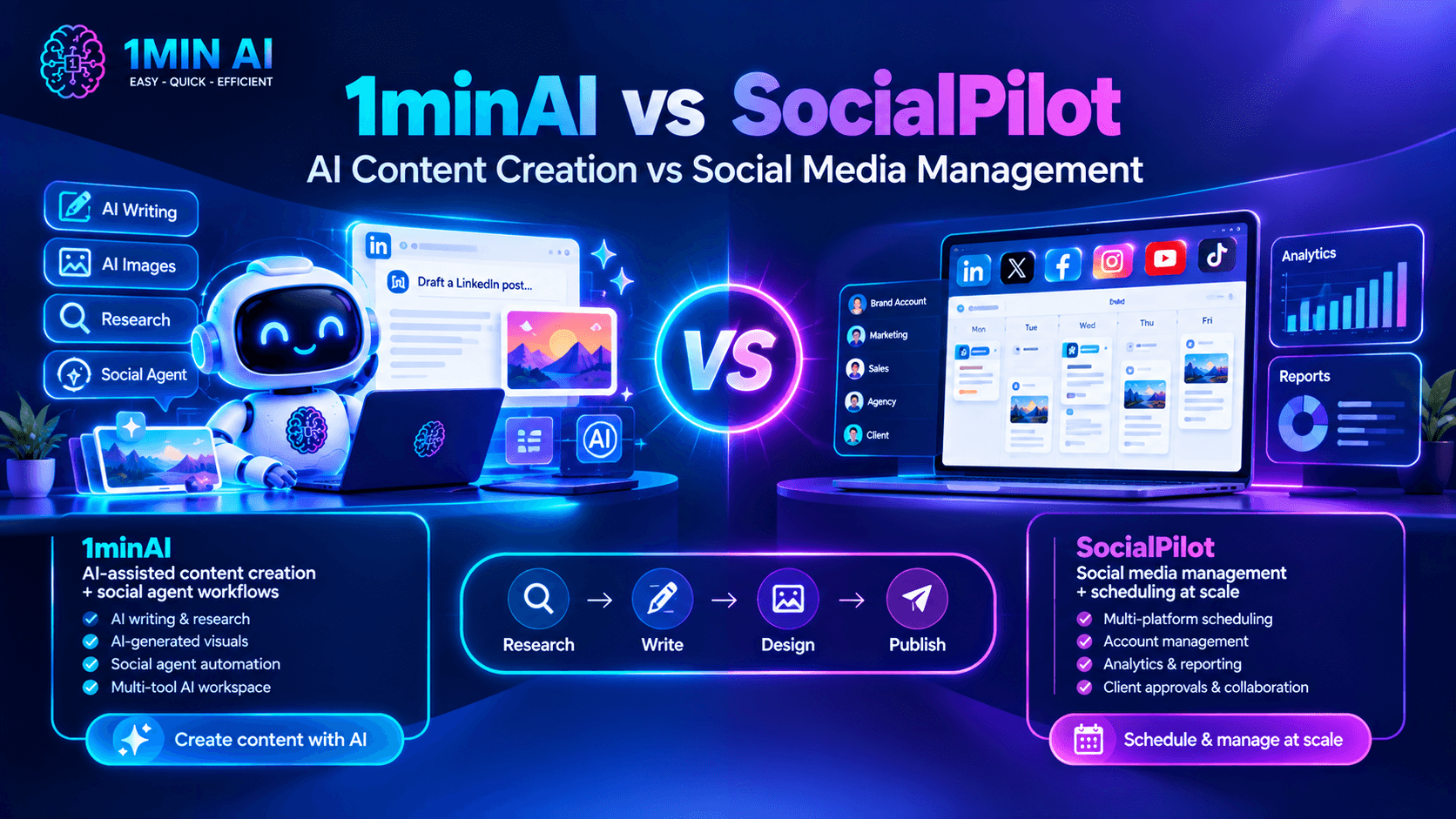
If you're searching for a SocialPilot alternative, first identify which part of your social media workflow takes the most time.
If your team already has content ready and mainly needs account management, reporting, and bulk scheduling, SocialPilot may be the better fit.
But if creating content is the biggest bottleneck, 1minAI offers a different approach.
1. Move Beyond Scheduling to AI-Assisted Content Creation
Scheduling solves one part of social media management: deciding when a post should go live.
It doesn't necessarily solve the work required to create that post.
Before publishing, someone still needs to:
- Find a relevant topic.
- Research the subject.
- Identify an interesting angle.
- Write the post.
- Edit the wording.
- Prepare a supporting image.
- Review the final content.
1minAI's Social Agent connects several of these steps into one workflow.
For example, a founder can provide company information, select a topic, generate a LinkedIn post, create a supporting image, and move the result toward publishing.
This is useful when you want to spend less time on repetitive content tasks and more time developing ideas that matter to your audience.
2. Turn Business Information into Personalized Content
Generic AI-generated posts often lack the details that make business content interesting.
A more useful approach is to start with information about your actual products, services, customers, and expertise.
With 1minAI, you can use saved assets and relevant business information as context for the content-generation process.
For example, a SaaS founder could provide:
- Product descriptions.
- Target audience information.
- Customer pain points.
- Product updates.
- Key differentiators.
- Relevant industry insights.
The agent can then use this information as a starting point for LinkedIn content.
You should still review the generated copy and add personal experience or opinions. AI can help maintain a consistent starting point, but authentic thought leadership requires your perspective.
3. Connect Post Writing with AI Image Generation
Creating a LinkedIn post often involves more than writing text.
A visual can make a complex idea easier to understand, highlight an important statistic, or give a post a more recognizable format.
1minAI connects writing and image generation within its Social Agent workflow.
For example, if you're creating a post about a new product feature, you can generate the copy and then create a supporting visual that illustrates the feature.
This reduces the need to move between separate writing and image-generation tools for every post.
4. Build a More Consistent LinkedIn Publishing Workflow
Consistency is difficult when every post requires starting from scratch.
A repeatable workflow makes content production more manageable.
With 1minAI, you can establish a sequence for gathering information, writing content, designing images, and scheduling posts.
This is particularly useful for:
- Solo founders building a personal brand.
- B2B marketers sharing industry insights.
- Consultants publishing educational content.
- Small teams promoting products and services.
- Content creators who want a more structured production process.
The objective isn't to publish as frequently as possible. It's to make it easier to publish useful content consistently.
5. Access More AI Capabilities in One Workspace
Social media content is often connected to other marketing activities.
A LinkedIn post may originate from a blog article, a customer case study, a product document, or a research report.
1minAI provides a broader AI workspace that can support these related tasks.
You can explore its AI writing, image, document, and chat tools alongside Social Agents.
This is useful if your team wants to use AI for more than social media scheduling.
How to Automate Your LinkedIn Content Workflow with 1minAI
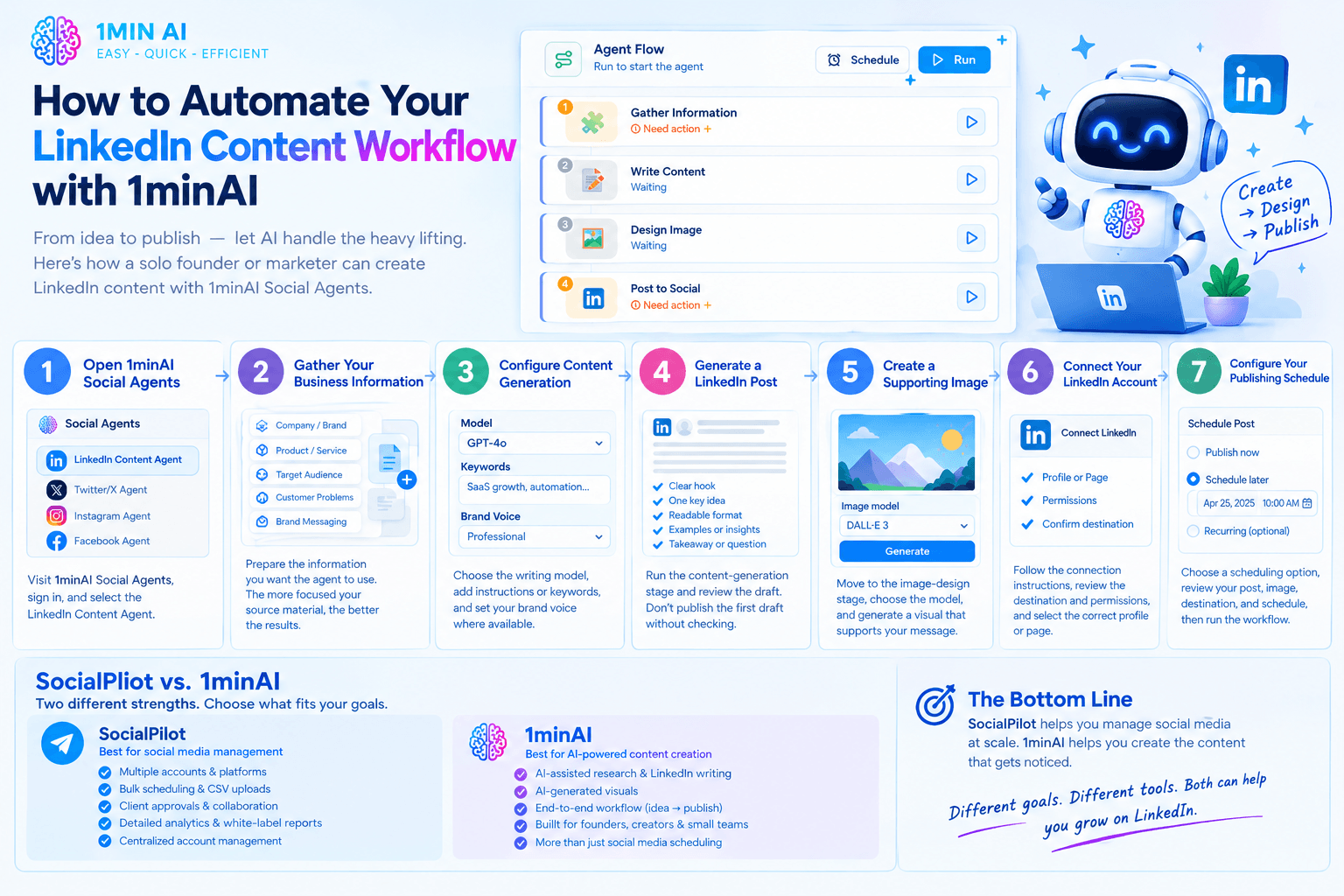
Let's look at a practical example of how a solo founder or marketer can use 1minAI Social Agents to create LinkedIn content.
Step 1: Open 1minAI Social Agents
Visit 1minAI Social Agents and sign in to your account.
Open the available Social Agent options and select the LinkedIn Content Agent.
Step 2: Gather Your Business Information
Prepare the information you want the agent to use.
This could include:
- Company or personal brand details.
- Product or service descriptions.
- Target audience.
- Customer problems.
- Brand messaging.
- Relevant source material.
Select the appropriate saved asset or provide the relevant information through the available input options.
The more focused your source material is, the easier it is to create content that matches your actual business.
Step 3: Configure Content Generation
Open the content-writing stage and review the available settings.
Choose the writing model and provide relevant instructions, keywords, or content preferences where supported.
For example, a B2B founder might focus on topics such as:
- SaaS growth.
- Customer acquisition.
- Business automation.
- Startup challenges.
- Product development.
- Industry trends.
You can also use Brand Voice settings where available to guide the generated content.
Step 4: Generate a LinkedIn Post
Run the content-generation stage and review the draft.
A useful LinkedIn post generally needs:
- A clear opening hook.
- One central idea.
- Readable formatting.
- Relevant examples or supporting information.
- A useful takeaway or discussion question.
Don't publish the first draft automatically without reviewing it. Check whether the post sounds natural and accurately reflects your business.
Step 5: Create a Supporting Image
Move to the image-design stage.
Choose the available image model and review the visual settings. Generate an image that supports the message of your post.
For example, a post about workflow automation could use a simple process illustration rather than a generic technology-themed image.
Step 6: Connect Your LinkedIn Account
Open the publishing stage and follow the available connection instructions.
Review the destination and permissions carefully before authorizing publishing.
Make sure you select the correct LinkedIn profile or page for your content.
Step 7: Configure Your Publishing Schedule
Choose the scheduling option that matches your content plan.
Depending on the available settings, you can generate content on demand, schedule a one-time post, or configure a recurring workflow.
Review the generated post, image, destination, and schedule before running the workflow.
Explore the feature here: 1minAI Social Agents.
Who Should Choose SocialPilot vs 1minAI?
The best platform depends on your team's priorities, not simply the number of features.
Choose SocialPilot If:
- You manage multiple social media accounts across several platforms.
- You work at an agency with many client profiles.
- You need bulk scheduling and CSV uploads.
- Your team relies on client approvals and collaboration.
- You need detailed analytics and white-label reports.
- Your main priority is centralized social media management.
SocialPilot is particularly suitable for agencies and marketing teams that need structured account management and reporting.
Consider 1minAI If:
- Your biggest challenge is creating content consistently.
- You want AI assistance with research and LinkedIn post writing.
- You want to connect content creation with AI-generated visuals.
- You want a repeatable workflow from business information to publishing.
- You are a founder, creator, consultant, or small marketing team.
- You already use AI for other content and productivity tasks.
1minAI is worth exploring if you want an AI-powered content workflow rather than primarily a social media management dashboard.
Frequently Asked Questions
Is 1minAI a good SocialPilot alternative?
It depends on what you need. SocialPilot offers extensive social media management features, including multi-account scheduling, analytics, client approvals, and white-label reporting. 1minAI is more focused on AI-assisted content production, connecting research, writing, image generation, and publishing. It is worth considering if content creation is your main bottleneck.
Does 1minAI support LinkedIn content automation?
Yes. 1minAI's LinkedIn Content Agent connects information gathering, content writing, image generation, and social publishing. It also supports scheduling options through the available workflow settings.
Can I use 1minAI to generate LinkedIn posts?
Yes. The LinkedIn Content Agent helps turn business information and topics into LinkedIn-ready content. You can review the generated draft and adjust it before publishing.
Can 1minAI create images for LinkedIn posts?
Yes. The Social Agent workflow includes an image-design stage that can generate visuals to accompany your content. Review the generated image to ensure it matches your brand and message.
Does SocialPilot support LinkedIn scheduling?
Yes. SocialPilot supports LinkedIn publishing and scheduling, including features such as bulk scheduling, multiple-image posts, LinkedIn document publishing, and first comments. Exact feature availability depends on the subscription plan.
Is SocialPilot better for agencies?
SocialPilot has strong agency-oriented capabilities, including multi-account management, team collaboration, client approvals, advanced analytics, and white-label reports. If these are essential to your agency, it may be the more suitable platform.
Can I use 1minAI for social media platforms beyond LinkedIn?
1minAI provides a broader Social Agents offering. Available agents and publishing destinations may differ, so check the current Social Agents workspace for the options available to your account.
Conclusion: 1minAI vs SocialPilot
SocialPilot and 1minAI address different challenges in social media marketing.
SocialPilot is a strong choice for managing social media operations. Its multi-account scheduling, analytics, client approvals, and white-label reporting make it particularly useful for agencies and teams managing multiple brands.
1minAI is worth considering when AI-powered content creation is the priority. Its Social Agents connect information gathering, LinkedIn post writing, visual generation, and publishing into a more structured workflow.
If your main challenge is managing dozens of social accounts and delivering client reports, SocialPilot may be the better fit.
But if you spend too much time researching topics, drafting posts, creating visuals, and coordinating content production, 1minAI offers a workflow worth exploring.
Ready to make LinkedIn content creation more efficient?
- #Commerce
- #Information
替代方案
探索 1minAI 的最佳替代方案,並比較其功能、定價和使用案例。

1min.AI 對比 OpenRouter
1min.AI 對比 OpenRouter:比較即用型 AI 創作產品同技術 API 工具。睇下你需要零程式碼創意工作室,定係編碼基礎設施中樞。
 Ngoc Hong

1min. AI vs Dola AI
想搵 Dola AI 替代方案?比較 1min.AI vs Dola AI 嘅影片生成、免費方案、收費同私隱,揀啱適合你嘅 AI 應用。
Ngoc Hong
1minAI vs Hix AI
比較 5 個 HIX AI 替代方案,涵蓋 AI 聊天、研究、寫作、圖片、影片、定價同靈活 AI 工作流程。
Ngoc HongAI 工具
探索最佳 AI 工具,提升生產力、創造力及日常工作效率。

一個產品,10 個 UGC 創意:AI 點樣令內容測試更輕鬆
用 AI UGC 影片生成器製作更真實嘅 UGC,測試更多創意角度,並喺唔使逐條拍攝嘅情況下擴大聯盟內容規模。
 Lien Anh Vu

只需幾個步驟,即可製作一致的卡通內容
用 1min.AI 透過 3 個簡單步驟製作 TikTok 同 Reels 卡通影片,由研究點子到角色再到動畫影片,一次完成。
Lien Anh Vu
為初創創辦人而設的 4 款最抵用 AI 工具
發掘 4 款最抵用嘅 AI 工具,幫初創創辦人驗證概念、建立產品、製作內容,同埋更快推出市場,而唔使超支。
 Tram Ta
AI 功能
全面的 AI 功能,可簡化工作流程、提升效率,讓團隊達成更多目標。

AI 應用案例
精選 AI 應用案例,涵蓋商業、生產力及各行業專用應用。
一個產品,10 個 UGC 創意:AI 點樣令內容測試更輕鬆
用 AI UGC 影片生成器製作更真實嘅 UGC,測試更多創意角度,並喺唔使逐條拍攝嘅情況下擴大聯盟內容規模。
Lien Anh Vu只需幾個步驟,即可製作一致的卡通內容
用 1min.AI 透過 3 個簡單步驟製作 TikTok 同 Reels 卡通影片,由研究點子到角色再到動畫影片,一次完成。
Lien Anh Vu
Instagram 最佳發帖時間:提升互動的實用指南
了解 Instagram 最佳發帖時間,包括不同受眾的最佳日子和時段,以及如何為你的帳戶找出理想的發帖時間表。
Tram TaAI 教學
透過實用的逐步教學,學習如何使用人工智能。
只需幾個步驟,即可製作一致的卡通內容
用 1min.AI 透過 3 個簡單步驟製作 TikTok 同 Reels 卡通影片,由研究點子到角色再到動畫影片,一次完成。
Lien Anh Vu
2026 黑色星期五 AI 工具優惠
探索 2026 黑色星期五 AI 工具優惠有咩選擇。了解點樣透過 AppSumo、Dealify、Stack Social 搶到 1min.AI 終身方案,並可喺 Trustpilot、Slashdot 同 Software Advice 核實。
 Hang Nguyen

使用 Seedance 的 AI 圖像轉影片產品一致性,停止變形並 масштаб化產品評測
以 AI 圖像轉影片產品一致性停止 logo 變形,立即在 1min.AI 製作 studio 級評測影片。
Lien Anh VuAI 指南
透過實用指南、真實案例和可操作嘅最佳實踐,更快咁學習 AI。
只需幾個步驟,即可製作一致的卡通內容
用 1min.AI 透過 3 個簡單步驟製作 TikTok 同 Reels 卡通影片,由研究點子到角色再到動畫影片,一次完成。
Lien Anh Vu
安全網上購買 AI 工具:2026 黑色星期五指南
了解如何在網上搵到同鎖定最佳黑色星期五 AI 優惠。學習專家策略,避開騙局、應對訂閱疲勞,並驗證軟件。
Hang Nguyen使用 Seedance 的 AI 圖像轉影片產品一致性,停止變形並 масштаб化產品評測
以 AI 圖像轉影片產品一致性停止 logo 變形,立即在 1min.AI 製作 studio 級評測影片。
Lien Anh VuAI 解決方案
瀏覽適用於自動化、編碼、研究、生產力、客戶支援、市場推廣及業務流程的最佳AI解決方案。
一個產品,10 個 UGC 創意:AI 點樣令內容測試更輕鬆
用 AI UGC 影片生成器製作更真實嘅 UGC,測試更多創意角度,並喺唔使逐條拍攝嘅情況下擴大聯盟內容規模。
Lien Anh Vu只需幾個步驟,即可製作一致的卡通內容
用 1min.AI 透過 3 個簡單步驟製作 TikTok 同 Reels 卡通影片,由研究點子到角色再到動畫影片,一次完成。
Lien Anh Vu
免費 AI 紋身生成器:自訂設計
用 1min.AI 的免費 AI 紋身生成器,將任何靈感變成自訂紋身設計。描述你的想法、選擇風格,幾秒內即可下載。
 Trang Tran
AI 模型
於一處探索全球頂尖嘅 AI 模型。
一個產品,10 個 UGC 創意:AI 點樣令內容測試更輕鬆
用 AI UGC 影片生成器製作更真實嘅 UGC,測試更多創意角度,並喺唔使逐條拍攝嘅情況下擴大聯盟內容規模。
Lien Anh Vu只需幾個步驟,即可製作一致的卡通內容
用 1min.AI 透過 3 個簡單步驟製作 TikTok 同 Reels 卡通影片,由研究點子到角色再到動畫影片,一次完成。
Lien Anh Vu使用 Seedance 的 AI 圖像轉影片產品一致性,停止變形並 масштаб化產品評測
以 AI 圖像轉影片產品一致性停止 logo 變形,立即在 1min.AI 製作 studio 級評測影片。
Lien Anh VuAI 比較
比較AI工具、模型及平台,尋找最適合您需求的選擇。

Kling AI 對 Veo 3:邊個模型勝出?
Kling AI 對 Veo 3:比較動態、原生音訊、定價同免費方案,睇下邊個 AI 影片生成器更適合你嘅項目——即刻喺 1min.AI 試晒兩個。
Trang Tran使用 Seedance 的 AI 圖像轉影片產品一致性,停止變形並 масштаб化產品評測
以 AI 圖像轉影片產品一致性停止 logo 變形,立即在 1min.AI 製作 studio 級評測影片。
Lien Anh Vu
DeepSeek V4 Pro 與 Flash 比較
比較 DeepSeek V4 Pro 與 DeepSeek V4 Flash 的指標。立即喺 1min.ai 優化你嘅 agentic apps,同提升 AI fact checking。
Ngoc HongAI 整合
將 AI 無縫整合到你現有的工具中,自動化工作並提升生產力。

如何使用 AI 時尚影片生成器製作 2026 時裝週內容
用 AI 將 2026 時裝週靈感變成驚艷時尚影片。學習如何發想、創作視覺,並以一個簡單流程將圖片轉成影片。
Lien Anh Vu
POV:你每日要製作 10+ 篇貼文
了解如何建立 AI 內容工作流程,幫助內容創作者透過 AI 發想、圖片生成同內容製作,更快每日產出 10+ 則社交媒體貼文。
Lien Anh Vu
停止在 AI 應用程式之間切換:AI 整合如何重塑僱主品牌
了解 AI 整合如何透過將 AI 寫作、文件、圖像、影片及多個 AI 模型整合到同一工作空間,幫助 HR 團隊簡化僱主品牌工作。
Tram Ta行業AI
為醫療保健、金融、教育、法律、製造、零售、房地產等行業尋找最佳AI工具和工作流程。

免費 AI 產品描述生成器
幾分鐘內寫出能帶來銷售的產品描述。使用這個免費 AI 產品描述生成器,將產品資料或相片轉成符合品牌的文案。試用 1min.AI。
Trang Tran
助初創企業提升利潤的最佳商業生產力工具 | 1minAI
探索最適合初創企業的商業生產力工具,節省時間、簡化工作流程、減少重複工作,並透過 AI 支援有利可圖的增長。
Tram Ta
最佳內容行銷 AI 工具|1minAI
搵緊最佳內容行銷 AI 工具?睇吓 1minAI 點樣幫市場人員喺同一個 AI 工作空間內做資料研究、寫作、重製內容、製作視覺素材同擴大產出。
Tram TaAI 代理
探索並運行 AI 代理,自動化您的工作和日常生活中的任務。


AI 工作流程
探索現成可用的 AI 工作流程,適用於生產力、營銷、銷售、支援等。
一個產品,10 個 UGC 創意:AI 點樣令內容測試更輕鬆
用 AI UGC 影片生成器製作更真實嘅 UGC,測試更多創意角度,並喺唔使逐條拍攝嘅情況下擴大聯盟內容規模。
Lien Anh Vu只需幾個步驟,即可製作一致的卡通內容
用 1min.AI 透過 3 個簡單步驟製作 TikTok 同 Reels 卡通影片,由研究點子到角色再到動畫影片,一次完成。
Lien Anh Vu如何使用 AI 時尚影片生成器製作 2026 時裝週內容
用 AI 將 2026 時裝週靈感變成驚艷時尚影片。學習如何發想、創作視覺,並以一個簡單流程將圖片轉成影片。
Lien Anh Vu電子報
1minAI 每週 AI 創新

🔮 每週 AI 創新 #143:更新 更新 GPT-6、GPT-6.1 與 Ideogram 4.0 與 Ideogram 4.0
在 1min.ai 取得 GPT-6 Sol、Luna、GPT-6.1 Sol 及 Ideogram 4.0。於同一平台將排版準確度提升至 98.4%,並把推理延遲降低 45%。
Hang Nguyen
🔮 每週 AI 創新 #142:Grok 4.7、Opus 5.5 與 Sonnet 5.5 登陸 1min.ai
在 1min.ai 存取 Grok 4.7、Claude Opus 5.5 及 Sonnet 5.5。透過單一整合工作區,最多可節省 70% 訂閱成本,並處理數以百萬計的 token。
Hang Nguyen
🔮 每週 AI 創新 #141:Seedance 2.5 與 Stable Audio 3:新一代 AI
在 1min.ai 探索 Seedance 2.0、2.5 以及 StabilityAI 的 Stable Audio 3。運用新一代生成式 AI 生成錄音室級音訊與同步動作。
Hang Nguyen