
用 1minAI 移除圖片中不想要的物件

Tram Ta
2026年9月4日
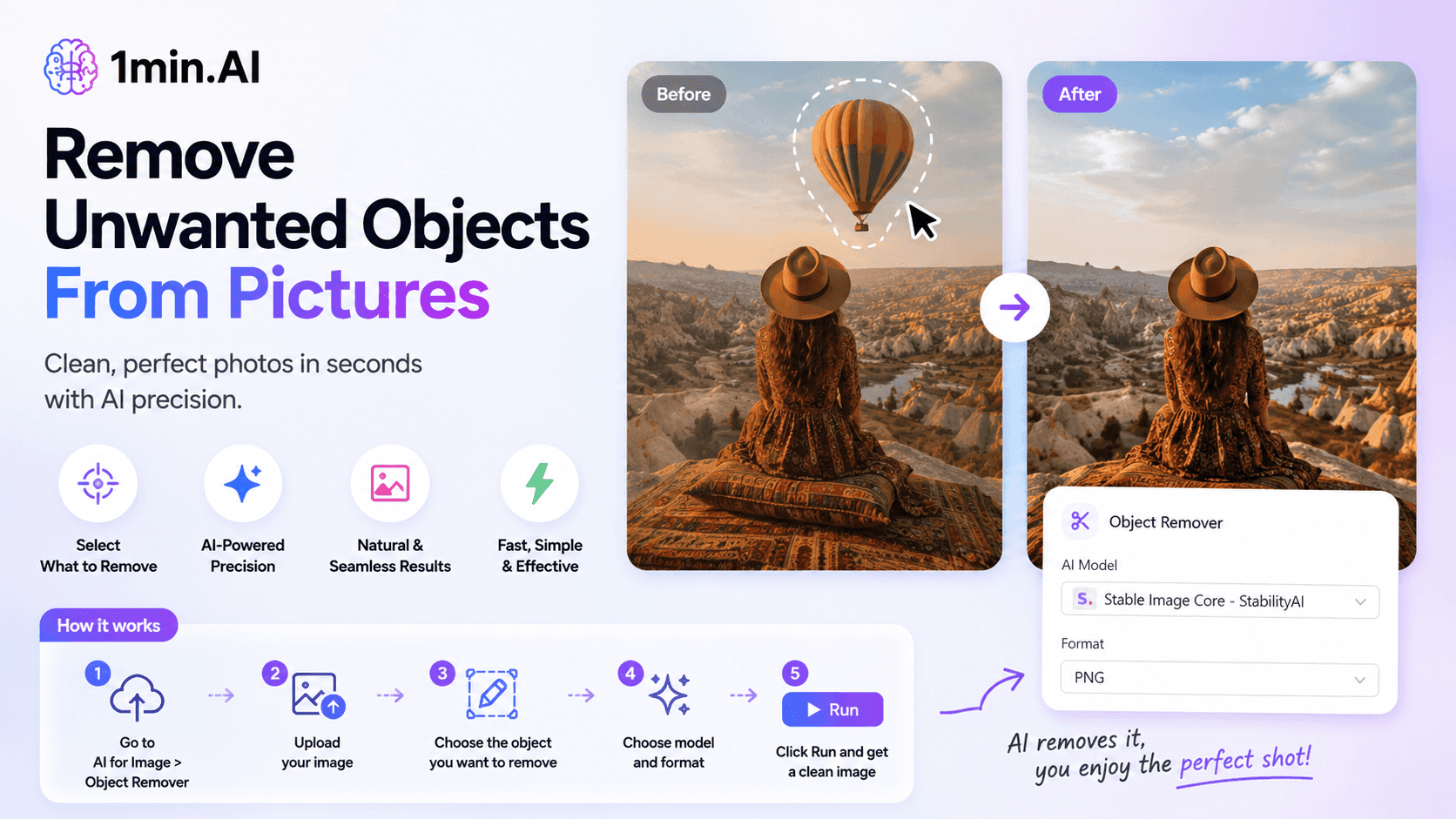
用 1minAI 的 AI 物件移除工具,移除圖片中的不想要物件、人物或浮水印。上載、選取,幾下點擊即可清理圖片。
Have you ever taken a great photo only to notice an unwanted object distracting from the main subject? It could be a person in the background, a sign, piece of text, watermark, or another object that you simply don't want in the final image.
Instead of opening complicated photo-editing software and manually removing it, you can use 1minAI Object Remover to clean up your picture with AI.
The tool lets you upload an image, select the object you want to remove, choose an AI model and output format, and generate an edited version in just a few steps.
Why Use an AI Object Remover?
Removing objects from a picture manually can take time, especially when the unwanted object overlaps with the background or other important elements.
An AI object remover can simplify this process by identifying the selected area and generating a replacement that blends with the surrounding image.
With 1minAI, you can use Object Remover to help:
- 移除相片中不想要嘅人物
- 清理分散注意力嘅物件
- 移除文字或告示牌
- 移除你擁有或有權編輯嘅圖片中的浮水印
- 提升產品及市場推廣圖片質素
- 整理背景
- 為社交媒體同網站準備圖片
How to Remove an Object From a Picture With 1minAI
Using the 1minAI Object Remover is straightforward.
Step 1: Go to AI for Image → Object Remover
Open 1minAI and select AI for Image from the menu.
Then choose Object Remover.
This opens the tool where you can upload your image and select the unwanted area.
Step 2: Upload Your Image
Upload the picture you want to edit.
1minAI supports common image formats, making it easy to work with photos and other visual assets.
Once the image is uploaded, it will appear in the Object Remover workspace.
Step 3: Select the Object You Want to Remove
Use the selection tool to mark the object you want to remove.
You can select the specific area that needs to be cleaned up rather than changing the entire image.
For example, you could select:
- 背景中的一個人
- 不想要嘅物件
- 文字
- 分散注意力嘅元素
- 背景嘅一部分
The more accurately you select the unwanted area, the easier it is for the AI to understand what should be removed.
Step 4: Choose the AI Model and Format
After selecting the object, choose the available AI model for the image editing task.
You can also select your preferred output format, such as PNG.
These options let you control how the processed image is generated and exported.
Step 5: Click Run
Once everything is ready, click Run.
1minAI processes the image and generates the edited version with the selected object removed.
You can then review the result and use the cleaned-up image for your project.
Use Cases for 1minAI Object Remover
An AI object remover can be useful for more than simply cleaning up personal photos.
Social Media Content
Social media images often need to look clean and focused. Removing distracting people, objects, or background elements can make an image more suitable for posts, ads, and campaigns.
Product Images
Ecommerce and marketing teams can use object removal to clean up product photos or remove unwanted elements from a product scene.
This can help create more polished visuals without extensive manual editing.
Marketing Materials
Marketers can quickly clean images before using them in:
- Social media campaigns
- Blog posts
- Advertisements
- Landing pages
- Presentations
- Promotional materials
Personal Photos
For everyday photography, Object Remover can help remove photobombers, distracting objects, or other elements that take attention away from the main subject.
Make Image Cleanup Faster With 1minAI
Traditional photo editing can require multiple tools and detailed editing skills. 1minAI Object Remover provides a simpler AI-powered workflow: upload your picture, select what you want to remove, choose the model and format, and run the tool.
Whether you're a marketer, content creator, ecommerce seller, or simply want to clean up a personal photo, it can help turn an imperfect image into a cleaner visual with less manual editing.
Try 1minAI Object Remover and clean up your images in just a few clicks.
替代方案
探索 1minAI 的最佳替代方案,並比較其功能、定價和使用案例。

1min.AI 對比 OpenRouter
1min.AI 對比 OpenRouter:比較即用型 AI 創作產品同技術 API 工具。睇下你需要零程式碼創意工作室,定係編碼基礎設施中樞。
 Ngoc Hong
1min.AI 與 ChatPlayground AI 比較
比較 1min.AI(語音克隆、移除物件、團隊方案)與 ChatPlayground AI(14+ 模型、Teams/O365 整合)。找出在可預測定價與長期內容生產成長上更優的平臺。
Ngoc Hong
1min.AI 與 MerlinAI 比較
比較 1min.AI 與 Merlin AI 在 AI 模型、價格、圖像生成、影片、音訊、瀏覽器整合與生產力工具的差異。找出哪個平台對創作者、專業人士與企業最具價值。
Ngoc HongAI 工具
探索最佳 AI 工具,提升生產力、創造力及日常工作效率。

為初創創辦人而設的 4 款最抵用 AI 工具
發掘 4 款最抵用嘅 AI 工具,幫初創創辦人驗證概念、建立產品、製作內容,同埋更快推出市場,而唔使超支。
 Tram Ta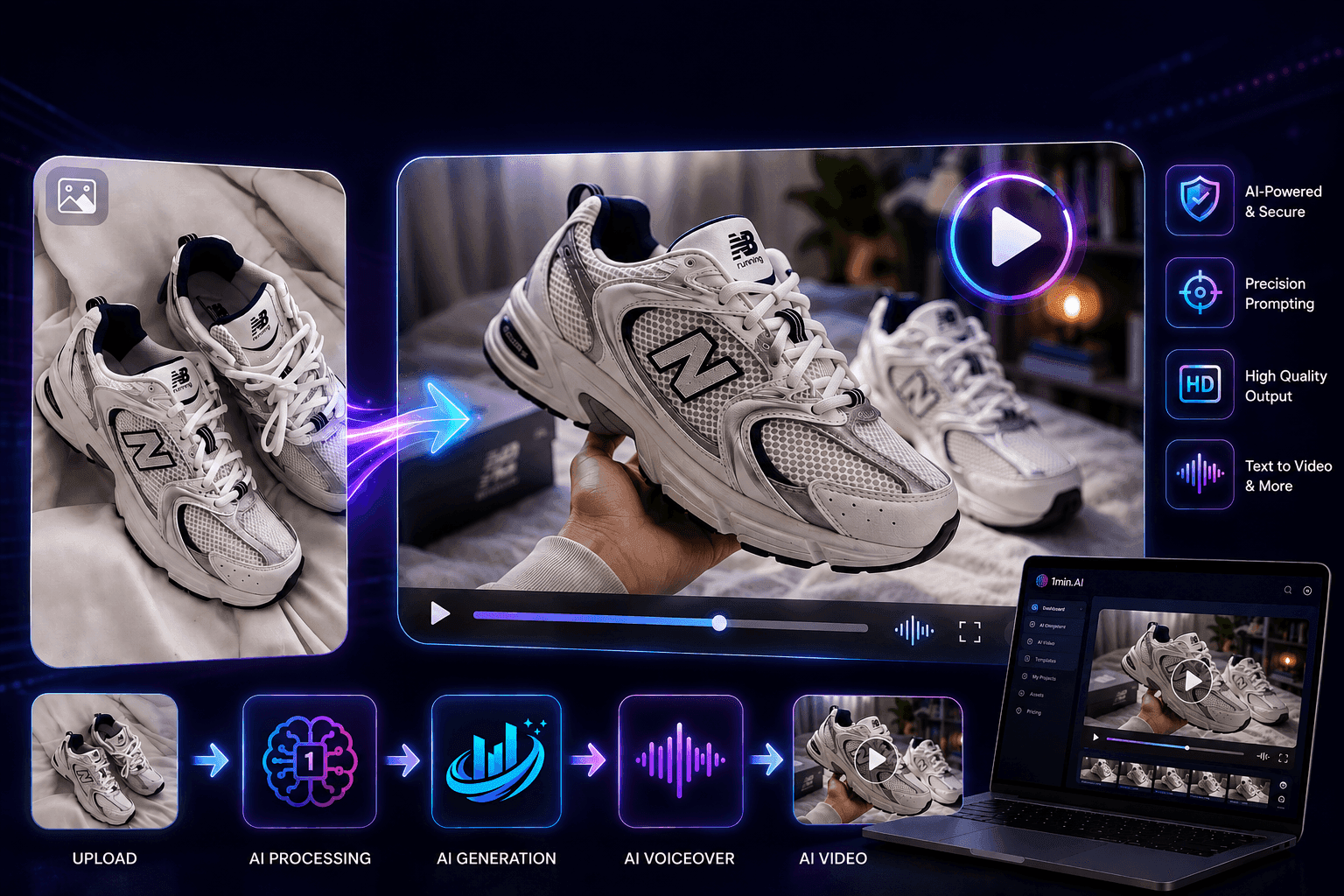
使用 Seedance 的 AI 圖像轉影片產品一致性,停止變形並 масштаб化產品評測
以 AI 圖像轉影片產品一致性停止 logo 變形,立即在 1min.AI 製作 studio 級評測影片。
 Lien Anh Vu
如何使用 AI 時尚影片生成器製作 2026 時裝週內容
用 AI 將 2026 時裝週靈感變成驚艷時尚影片。學習如何發想、創作視覺,並以一個簡單流程將圖片轉成影片。
Lien Anh VuAI 功能
全面的 AI 功能,可簡化工作流程、提升效率,讓團隊達成更多目標。

AI 應用案例
精選 AI 應用案例,涵蓋商業、生產力及各行業專用應用。

一個產品,10 個 UGC 創意:AI 點樣令內容測試更輕鬆
用 AI UGC 影片生成器製作更真實嘅 UGC,測試更多創意角度,並喺唔使逐條拍攝嘅情況下擴大聯盟內容規模。
Lien Anh Vu
Instagram 最佳發帖時間:提升互動的實用指南
了解 Instagram 最佳發帖時間,包括不同受眾的最佳日子和時段,以及如何為你的帳戶找出理想的發帖時間表。
Tram Ta
用 1min.AI 更快建立作品集網站
了解自由工作創意人如何用 1min.AI 規劃、撰寫、設計並產生專業作品集網站,即使沒有強勁程式編寫能力,也能更快完成。
Lien Anh VuAI 教學
透過實用的逐步教學,學習如何使用人工智能。

只需幾個步驟,即可製作一致的卡通內容
用 1min.AI 透過 3 個簡單步驟製作 TikTok 同 Reels 卡通影片,由研究點子到角色再到動畫影片,一次完成。
Lien Anh Vu
2026 黑色星期五 AI 工具優惠
探索 2026 黑色星期五 AI 工具優惠有咩選擇。了解點樣透過 AppSumo、Dealify、Stack Social 搶到 1min.AI 終身方案,並可喺 Trustpilot、Slashdot 同 Software Advice 核實。
 Hang Nguyen
使用 Seedance 的 AI 圖像轉影片產品一致性,停止變形並 масштаб化產品評測
以 AI 圖像轉影片產品一致性停止 logo 變形,立即在 1min.AI 製作 studio 級評測影片。
Lien Anh VuAI 指南
透過實用指南、真實案例和可操作嘅最佳實踐,更快咁學習 AI。
只需幾個步驟,即可製作一致的卡通內容
用 1min.AI 透過 3 個簡單步驟製作 TikTok 同 Reels 卡通影片,由研究點子到角色再到動畫影片,一次完成。
Lien Anh Vu
安全網上購買 AI 工具:2026 黑色星期五指南
了解如何在網上搵到同鎖定最佳黑色星期五 AI 優惠。學習專家策略,避開騙局、應對訂閱疲勞,並驗證軟件。
Hang Nguyen使用 Seedance 的 AI 圖像轉影片產品一致性,停止變形並 масштаб化產品評測
以 AI 圖像轉影片產品一致性停止 logo 變形,立即在 1min.AI 製作 studio 級評測影片。
Lien Anh VuAI 解決方案
瀏覽適用於自動化、編碼、研究、生產力、客戶支援、市場推廣及業務流程的最佳AI解決方案。

免費 AI 紋身生成器:自訂設計
用 1min.AI 的免費 AI 紋身生成器,將任何靈感變成自訂紋身設計。描述你的想法、選擇風格,幾秒內即可下載。
 Trang Tran
安全網上購買 AI 工具:2026 黑色星期五指南
了解如何在網上搵到同鎖定最佳黑色星期五 AI 優惠。學習專家策略,避開騙局、應對訂閱疲勞,並驗證軟件。
Hang Nguyen使用 Seedance 的 AI 圖像轉影片產品一致性,停止變形並 масштаб化產品評測
以 AI 圖像轉影片產品一致性停止 logo 變形,立即在 1min.AI 製作 studio 級評測影片。
Lien Anh VuAI 模型
於一處探索全球頂尖嘅 AI 模型。
只需幾個步驟,即可製作一致的卡通內容
用 1min.AI 透過 3 個簡單步驟製作 TikTok 同 Reels 卡通影片,由研究點子到角色再到動畫影片,一次完成。
Lien Anh Vu一個產品,10 個 UGC 創意:AI 點樣令內容測試更輕鬆
用 AI UGC 影片生成器製作更真實嘅 UGC,測試更多創意角度,並喺唔使逐條拍攝嘅情況下擴大聯盟內容規模。
Lien Anh Vu使用 Seedance 的 AI 圖像轉影片產品一致性,停止變形並 масштаб化產品評測
以 AI 圖像轉影片產品一致性停止 logo 變形,立即在 1min.AI 製作 studio 級評測影片。
Lien Anh VuAI 比較
比較AI工具、模型及平台,尋找最適合您需求的選擇。

Kling AI 對 Veo 3:邊個模型勝出?
Kling AI 對 Veo 3:比較動態、原生音訊、定價同免費方案,睇下邊個 AI 影片生成器更適合你嘅項目——即刻喺 1min.AI 試晒兩個。
Trang Tran使用 Seedance 的 AI 圖像轉影片產品一致性,停止變形並 масштаб化產品評測
以 AI 圖像轉影片產品一致性停止 logo 變形,立即在 1min.AI 製作 studio 級評測影片。
Lien Anh Vu
DeepSeek V4 Pro 與 Flash 比較
比較 DeepSeek V4 Pro 與 DeepSeek V4 Flash 的指標。立即喺 1min.ai 優化你嘅 agentic apps,同提升 AI fact checking。
Ngoc HongAI 整合
將 AI 無縫整合到你現有的工具中,自動化工作並提升生產力。
如何使用 AI 時尚影片生成器製作 2026 時裝週內容
用 AI 將 2026 時裝週靈感變成驚艷時尚影片。學習如何發想、創作視覺,並以一個簡單流程將圖片轉成影片。
Lien Anh Vu
POV:你每日要製作 10+ 篇貼文
了解如何建立 AI 內容工作流程,幫助內容創作者透過 AI 發想、圖片生成同內容製作,更快每日產出 10+ 則社交媒體貼文。
Lien Anh Vu
停止在 AI 應用程式之間切換:AI 整合如何重塑僱主品牌
了解 AI 整合如何透過將 AI 寫作、文件、圖像、影片及多個 AI 模型整合到同一工作空間,幫助 HR 團隊簡化僱主品牌工作。
Tram Ta行業AI
為醫療保健、金融、教育、法律、製造、零售、房地產等行業尋找最佳AI工具和工作流程。

AI 設計有咩問題?睇落太似 AI
AI 生成嘅設計可以好精緻,但仍然會俾人一種好人工嘅感覺。以下係 5 個提示技巧,設計師可以用嚟創造更真實、更有意圖嘅視覺效果。
Lien Anh Vu
免費 AI 房地產影片生成器
將放盤相片轉成配音物業影片,利用 AI 房地產影片工具,睇吓 1min.AI 點樣幾分鐘內製作走訪影片、配音同字幕。
Trang Tran
如何在唔需要由零開始建立 AI 模型下推出 AI SaaS
了解如何在唔需要由零開始建立 AI 模型下推出 AI SaaS。探索 white-label AI、產品策略、品牌、定價,以及 1minAI 點樣幫到你。
Tram TaAI 代理
探索並運行 AI 代理,自動化您的工作和日常生活中的任務。


AI 工作流程
探索現成可用的 AI 工作流程,適用於生產力、營銷、銷售、支援等。
只需幾個步驟,即可製作一致的卡通內容
用 1min.AI 透過 3 個簡單步驟製作 TikTok 同 Reels 卡通影片,由研究點子到角色再到動畫影片,一次完成。
Lien Anh Vu如何使用 AI 時尚影片生成器製作 2026 時裝週內容
用 AI 將 2026 時裝週靈感變成驚艷時尚影片。學習如何發想、創作視覺,並以一個簡單流程將圖片轉成影片。
Lien Anh VuPOV:你每日要製作 10+ 篇貼文
了解如何建立 AI 內容工作流程,幫助內容創作者透過 AI 發想、圖片生成同內容製作,更快每日產出 10+ 則社交媒體貼文。
Lien Anh Vu電子報
1minAI 每週 AI 創新

🔮 每週 AI 創新 #137:ElevenLabs 音樂與 AI 社交個人檔案控制
最新的 1min.ai 更新帶來專業級音樂生成及備受期待的私隱工具。立即體驗無縫工作流程!
Hang Nguyen
🔮 每週 AI 創新 #136:Grok 4.6 與智慧資料保留
探索最新的 1min.ai 更新!升級至 Grok 4.6,享受極速 AI;亦可查看我們全新的資料保留政策,立即保護你的檔案。
Hang Nguyen
🔮 每週 AI 創新 #135:Claude Opus 5 與全新 AI 社交功能
體驗強大的 Claude Opus 5 模型,並探索全新 AI 社交功能,例如用戶頁面和追蹤創作者。
Hang Nguyen