
PostEverywhere Alternative for AI Threads Content

Lien Anh Vu
2026年11月20日
Looking for a PostEverywhere alternative? Compare Threads AI content creation, research, scheduling, and pricing with 1min.AI. Try it for free.
PostEverywhere helps creators write, schedule, and publish Threads content using AI Studio and automated publishing tools. Its MCP server also allows AI assistants to create and schedule posts through natural-language instructions.
But creating consistent Threads content involves more than publishing. Creators still need to research topics, understand source materials, develop engaging ideas, write posts, and prepare visuals.
What if you could connect these steps in one AI workflow?
That's where 1min.AI Threads Content Agent offers a different approach. Instead of focusing mainly on social media publishing, it helps creators turn existing documents, URLs, videos, and research into Threads-ready content.
If you're searching for a PostEverywhere alternative, this guide compares both platforms and shows how 1min.AI can support a more complete content creation workflow.
Quick Answer: PostEverywhere is a strong choice for AI-powered Threads scheduling, publishing, and MCP automation. 1min.AI is worth exploring if you want to connect research, content writing, image generation, and supported publishing actions in one customizable AI workflow.
PostEverywhere vs 1min.AI at a Glance
Both platforms support AI-assisted Threads content creation, but their main priorities are different.
| Feature | PostEverywhere | 1min.AI |
|---|---|---|
| Main Focus | AI social media publishing and automation | Multi-model AI workspace and Social Media Agents |
| AI Writing | AI Studio | Multiple AI models and Threads Agent |
| Content Research | URL repurposing, connectors, external AI agents | URLs, PDFs, documents, videos, audio, and research topics |
| Threads Content | Posts and connected threads | Threads content generation |
| Image Generation | Built-in AI Studio | Integrated AI image workflow |
| Video Generation | Built-in AI Studio | Dedicated AI video tools |
| Scheduling | Visual calendar and automated queue | Agent scheduling options where supported |
| Auto-Publishing | Supported through Threads API | Supported for connected platforms and workflows |
| MCP | Hosted MCP server | Configurable Agent workflows |
| Analytics | Threads post analytics | Not a dedicated social analytics replacement |
| Free Plan | No permanent free plan | Available |
| Starting Price | $9/month | Pro from $6.50/month billed annually |
The biggest difference is how each platform approaches content production.
PostEverywhere combines creative tools with publishing infrastructure. 1min.AI focuses on connecting multiple AI capabilities to help creators develop content from their existing information.
What Does PostEverywhere Offer for Threads?
PostEverywhere is more than a traditional social media scheduler.
Its AI Studio supports captions, images, and short videos, while its hosted MCP server allows external AI assistants to create and schedule Threads posts.
AI Content Creation
Users can generate text posts, create connected Threads, repurpose URLs, and prepare visuals through AI Studio.
Threads Scheduling and Publishing
PostEverywhere supports direct publishing through Meta's official Threads API, including text posts, images, videos, and carousels.
Users can also add topic tags, configure link previews, and monitor post performance.
AI Agent Integration
PostEverywhere provides a hosted MCP server and REST API.
Compatible assistants such as ChatGPT and Claude can create posts, upload media, schedule content, and retrieve analytics.
This makes PostEverywhere particularly useful for creators who want an AI assistant connected directly to their publishing system.
Source: PostEverywhere Threads Features
What Makes 1min.AI Different From PostEverywhere?
1min.AI is an all-in-one AI workspace with multiple models, creative tools, and specialized Social Media Agents.
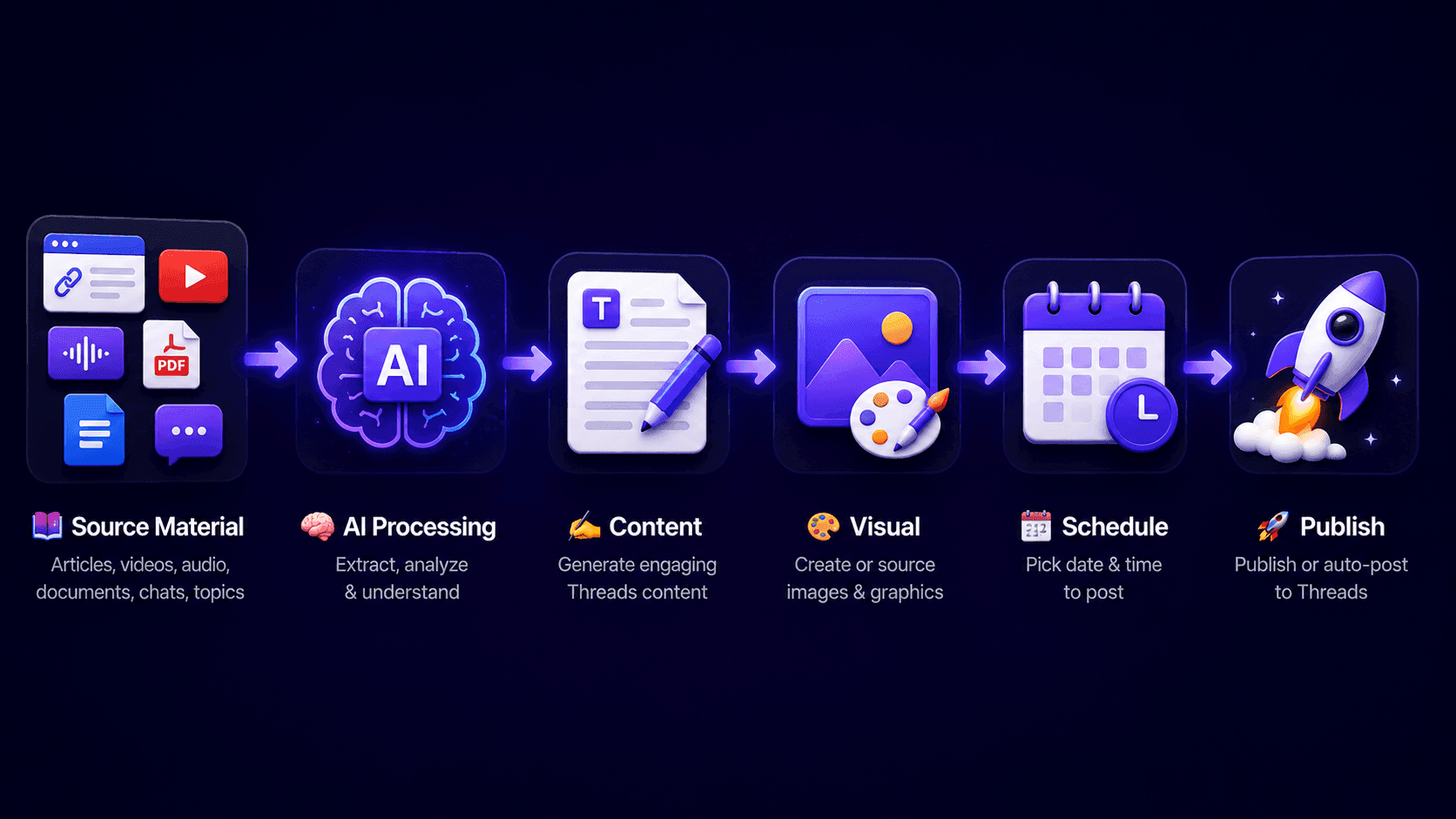
Its Threads Content Agent connects information gathering, content writing, visual generation, and publishing into a configurable workflow.
1. Start With Existing Content and Research
Not every Threads post needs to start with a blank prompt.
You might already have a blog article, PDF, product brief, YouTube video, or research document containing useful information.
1min.AI Threads Content Agent supports different input sources, including:
- Website URLs
- PDF and DOC files
- YouTube videos
- Audio
- Google Docs
- Previous conversations
- Research topics
The Agent can extract relevant information before generating content.
2. Generate Engaging Threads Content
After gathering information, the Agent processes the input and creates content based on your instructions.
You can customize available workflow parameters, including AI models and writing prompts.
For example, a long article about AI marketing could become several Threads content ideas with different hooks and discussion angles.
3. Create Supporting Visuals With AI
Threads posts can benefit from relevant images and supporting graphics.
1min.AI can connect image generation or stock-image discovery to the content workflow.
The broader workspace also offers dedicated AI image and video tools for additional creative production.
4. Schedule and Publish Through Supported Workflows
After generating content, review the text and visuals before moving to publishing.
1min.AI Agents support manual execution and scheduling options, including recurring workflows where available.
Publishing capabilities depend on the connected social account, selected Agent, and supported content format.
How to Create Threads Content With 1min.AI
Let's use a fictional specialty coffee brand called Morrow Coffee.
The goal is to turn one product article into an engaging Threads content sequence.
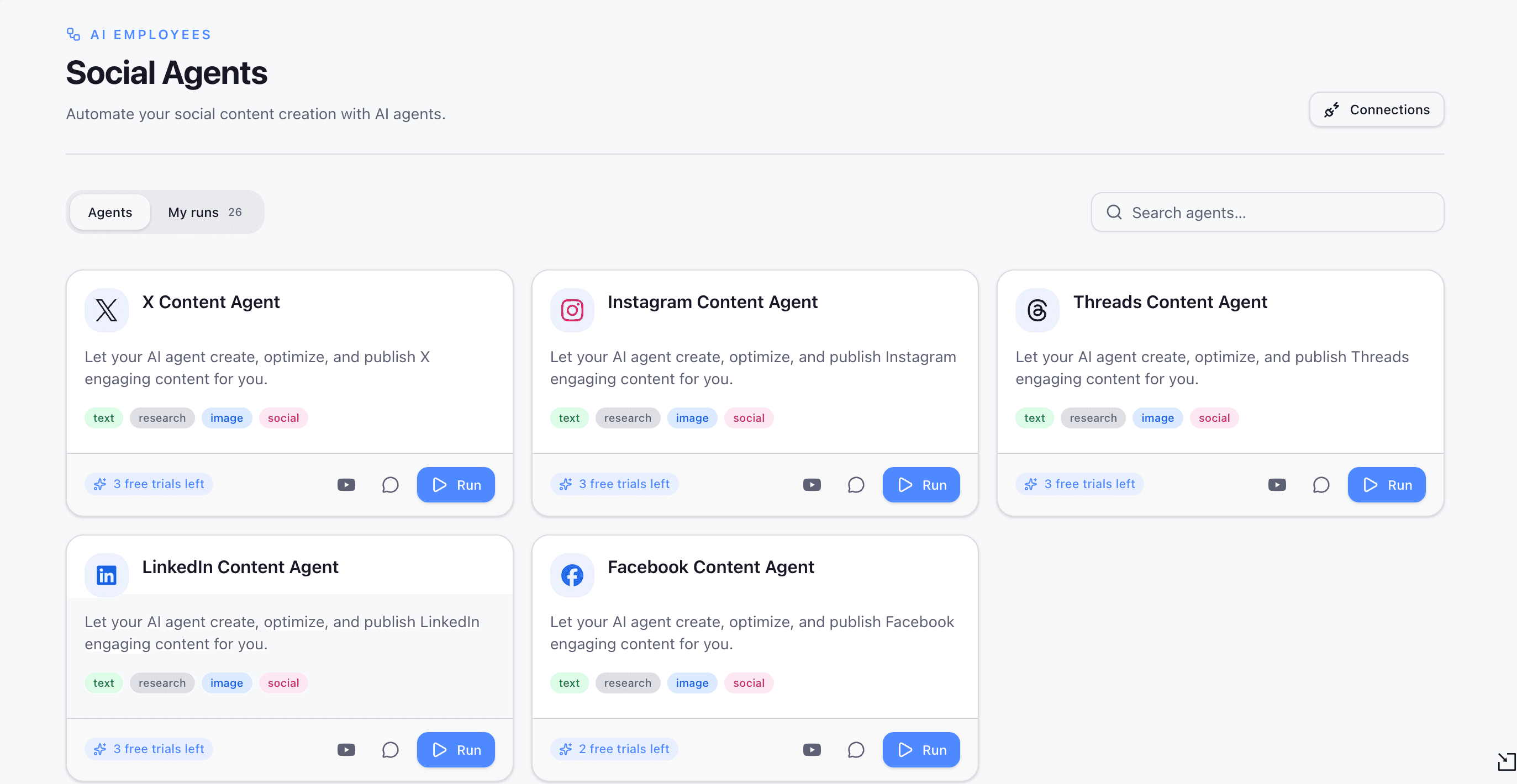
Step 1. Open Threads Content Agent
Visit 1min.AI Threads Content Agent and open the workflow.
Choose the Threads Agent and prepare your content source.
Step 2. Gather Information
Provide a blog article, product document, website URL, or research topic.
For Morrow Coffee, the source could be an article introducing its new specialty coffee collection.
The Agent extracts relevant information to use in content creation.
Step 3. Generate Threads Posts
Ask the Agent to create a short content sequence with:
- An engaging opening hook.
- Three educational or product-focused ideas.
- A conversational writing style.
- A clear closing question.
Review the generated content and verify product information before publishing.
Step 4. Create a Matching Visual
Generate a supporting image featuring an iced coffee on a café table, natural daylight, realistic condensation, and a warm lifestyle atmosphere.
Review the visual to ensure it matches the brand identity.
Step 5. Review and Schedule
Check the final content, visuals, links, and publishing settings.
Use the supported publishing action or schedule the content for the selected time.
Why Creators May Prefer 1min.AI Over PostEverywhere
Spend Less Time Switching Between Tools
Creators often use separate applications for research, writing, image generation, and content preparation.
1min.AI brings multiple AI capabilities into one workspace and connects supported tasks through its Agents.
Make Better Use of Existing Content
A PDF, article, product brief, or previous conversation can become the starting point for new Threads content.
This is particularly useful for creators who regularly repurpose educational materials or business information.
Create More Than Just Text
PostEverywhere already supports AI images and videos.
However, 1min.AI offers a broader collection of AI models and dedicated creative tools, making it useful for creators who need additional content assets beyond their Threads posts.
PostEverywhere vs 1min.AI Pricing
Both platforms offer different pricing and usage structures.
PostEverywhere Pricing
| Plan | Monthly Price | AI Credits |
|---|---|---|
| Lite | $9 | 10 |
| Starter | $19 | 25 |
| Growth | $29 | 100 |
| Scale | $39 | 500 |
PostEverywhere includes unlimited scheduled posts, API, and MCP access across paid plans.
It offers a seven-day trial requiring a credit card and does not provide a permanent free plan.
1min.AI Pricing
| Plan | Price | Included Features |
|---|---|---|
| Free | $0 | Limited AI features and free usage |
| Pro | From $6.50/month billed annually | All AI features and 1M monthly bonus credits |
| Business | From $10/month billed annually | Additional credits and team collaboration |
1min.AI uses one shared credit wallet across supported AI features. Unused subscription credits roll over to the next month.
Which Offers Better Value?
It depends on your workflow.
PostEverywhere may be a better fit if you prioritize publishing infrastructure, unlimited scheduled posts, and direct MCP-based account management.
1min.AI may offer more relevant value if you regularly need AI research, document processing, writing, and visual creation.
Compare the total cost of completing the same content campaign rather than looking only at subscription prices.
PostEverywhere vs 1min.AI Pros and Cons
PostEverywhere
Pros
- AI-powered Threads content creation.
- Direct Threads scheduling and publishing.
- Hosted MCP and REST API.
- Built-in image and video generation.
- Content calendar and analytics.
- Cross-platform publishing.
Cons
- Monthly AI credit limits.
- No permanent Free plan.
- Monthly subscription credits do not roll over.
- Advanced research may require external AI assistants.
1min.AI
Pros
- Threads Content Agent with multiple source inputs.
- Multiple AI models and creative tools.
- Integrated image-generation workflow.
- Customizable and repeatable Agent workflows.
- Free starting plan.
- Shared AI credit wallet with rollover.
Cons
- AI generation consumes credits.
- Social Agents support specific platforms and formats.
- Not a complete replacement for PostEverywhere's dedicated publishing analytics and MCP infrastructure.
- Generated content still requires human review.
Which Tool Should Threads Creators Choose?
Choose PostEverywhere if:
- You need a dedicated Threads scheduler.
- You want direct MCP publishing integration.
- You manage several social accounts.
- You prioritize a content calendar and publishing analytics.
Choose 1min.AI if:
- You frequently create content from documents and research.
- You need AI-assisted writing and image generation.
- You want to compare and use multiple AI models.
- You need customizable content-production workflows.
- You want to turn existing information into Threads content.
You can also use both tools together if you want 1min.AI for content production and PostEverywhere for dedicated publishing management.
Frequently Asked Questions
What is the best PostEverywhere alternative for Threads?
1min.AI is worth exploring if you want an AI workflow that starts with research or existing source materials and connects content writing, visual creation, and supported publishing.
PostEverywhere remains a strong option for dedicated scheduling and publishing.
Does PostEverywhere support Threads?
Yes. PostEverywhere supports Threads posts, connected threads, images, videos, carousels, scheduling, auto-publishing, and analytics through Meta's official Threads API.
Can 1min.AI create Threads content from PDFs?
Yes. Its Threads Content Agent supports PDF and document inputs, allowing users to extract information and transform it into social media content.
Can 1min.AI generate images for Threads?
Yes. The Threads Agent workflow can find stock images or generate supporting visuals using available AI tools.
Does PostEverywhere offer a free plan?
No permanent Free plan is advertised. It offers a seven-day free trial requiring a payment card.
Is 1min.AI free to try?
Yes. 1min.AI provides a Free plan with limited AI usage. Check the current account allowances before running larger workflows.
Can 1min.AI completely replace PostEverywhere?
Not necessarily. PostEverywhere offers dedicated publishing infrastructure, MCP connectivity, and Threads analytics that 1min.AI does not fully replicate in every workflow.
1min.AI is an alternative for creators who prioritize AI-powered content production.
Final Verdict
PostEverywhere is a strong platform for creators who need AI-assisted Threads creation, scheduling, publishing, and agent connectivity.
But creating consistent social content requires more than keeping a publishing calendar full.
Creators also need useful research, relevant ideas, engaging writing, and supporting visuals.
That's where 1min.AI Threads Content Agent offers a different approach.
By connecting source research, content generation, image creation, and supported publishing actions, 1min.AI helps creators organize more of their content-production workflow in one place.
If researching and preparing content takes more time than publishing it, exploring an AI Agent could be a useful next step.
🚀 Try 1min.AI Threads Content Agent and turn your existing content into Threads-ready posts.
- #Informational
替代方案
探索 1minAI 的最佳替代方案,並比較其功能、定價和使用案例。

1min.AI 對比 OpenRouter
1min.AI 對比 OpenRouter:比較即用型 AI 創作產品同技術 API 工具。睇下你需要零程式碼創意工作室,定係編碼基礎設施中樞。
 Ngoc Hong

1min. AI vs Dola AI
想搵 Dola AI 替代方案?比較 1min.AI vs Dola AI 嘅影片生成、免費方案、收費同私隱,揀啱適合你嘅 AI 應用。
Ngoc Hong
1minAI vs Hix AI
比較 5 個 HIX AI 替代方案,涵蓋 AI 聊天、研究、寫作、圖片、影片、定價同靈活 AI 工作流程。
Ngoc HongAI 工具
探索最佳 AI 工具,提升生產力、創造力及日常工作效率。

一個產品,10 個 UGC 創意:AI 點樣令內容測試更輕鬆
用 AI UGC 影片生成器製作更真實嘅 UGC,測試更多創意角度,並喺唔使逐條拍攝嘅情況下擴大聯盟內容規模。
 Lien Anh Vu

只需幾個步驟,即可製作一致的卡通內容
用 1min.AI 透過 3 個簡單步驟製作 TikTok 同 Reels 卡通影片,由研究點子到角色再到動畫影片,一次完成。
Lien Anh Vu
為初創創辦人而設的 4 款最抵用 AI 工具
發掘 4 款最抵用嘅 AI 工具,幫初創創辦人驗證概念、建立產品、製作內容,同埋更快推出市場,而唔使超支。
 Tram Ta
AI 功能
全面的 AI 功能,可簡化工作流程、提升效率,讓團隊達成更多目標。

AI 應用案例
精選 AI 應用案例,涵蓋商業、生產力及各行業專用應用。
一個產品,10 個 UGC 創意:AI 點樣令內容測試更輕鬆
用 AI UGC 影片生成器製作更真實嘅 UGC,測試更多創意角度,並喺唔使逐條拍攝嘅情況下擴大聯盟內容規模。
Lien Anh Vu只需幾個步驟,即可製作一致的卡通內容
用 1min.AI 透過 3 個簡單步驟製作 TikTok 同 Reels 卡通影片,由研究點子到角色再到動畫影片,一次完成。
Lien Anh Vu
Instagram 最佳發帖時間:提升互動的實用指南
了解 Instagram 最佳發帖時間,包括不同受眾的最佳日子和時段,以及如何為你的帳戶找出理想的發帖時間表。
Tram TaAI 教學
透過實用的逐步教學,學習如何使用人工智能。
只需幾個步驟,即可製作一致的卡通內容
用 1min.AI 透過 3 個簡單步驟製作 TikTok 同 Reels 卡通影片,由研究點子到角色再到動畫影片,一次完成。
Lien Anh Vu
2026 黑色星期五 AI 工具優惠
探索 2026 黑色星期五 AI 工具優惠有咩選擇。了解點樣透過 AppSumo、Dealify、Stack Social 搶到 1min.AI 終身方案,並可喺 Trustpilot、Slashdot 同 Software Advice 核實。
 Hang Nguyen

使用 Seedance 的 AI 圖像轉影片產品一致性,停止變形並 масштаб化產品評測
以 AI 圖像轉影片產品一致性停止 logo 變形,立即在 1min.AI 製作 studio 級評測影片。
Lien Anh VuAI 指南
透過實用指南、真實案例和可操作嘅最佳實踐,更快咁學習 AI。
只需幾個步驟,即可製作一致的卡通內容
用 1min.AI 透過 3 個簡單步驟製作 TikTok 同 Reels 卡通影片,由研究點子到角色再到動畫影片,一次完成。
Lien Anh Vu
安全網上購買 AI 工具:2026 黑色星期五指南
了解如何在網上搵到同鎖定最佳黑色星期五 AI 優惠。學習專家策略,避開騙局、應對訂閱疲勞,並驗證軟件。
Hang Nguyen使用 Seedance 的 AI 圖像轉影片產品一致性,停止變形並 масштаб化產品評測
以 AI 圖像轉影片產品一致性停止 logo 變形,立即在 1min.AI 製作 studio 級評測影片。
Lien Anh VuAI 解決方案
瀏覽適用於自動化、編碼、研究、生產力、客戶支援、市場推廣及業務流程的最佳AI解決方案。
一個產品,10 個 UGC 創意:AI 點樣令內容測試更輕鬆
用 AI UGC 影片生成器製作更真實嘅 UGC,測試更多創意角度,並喺唔使逐條拍攝嘅情況下擴大聯盟內容規模。
Lien Anh Vu只需幾個步驟,即可製作一致的卡通內容
用 1min.AI 透過 3 個簡單步驟製作 TikTok 同 Reels 卡通影片,由研究點子到角色再到動畫影片,一次完成。
Lien Anh Vu
免費 AI 紋身生成器:自訂設計
用 1min.AI 的免費 AI 紋身生成器,將任何靈感變成自訂紋身設計。描述你的想法、選擇風格,幾秒內即可下載。
 Trang Tran
AI 模型
於一處探索全球頂尖嘅 AI 模型。
一個產品,10 個 UGC 創意:AI 點樣令內容測試更輕鬆
用 AI UGC 影片生成器製作更真實嘅 UGC,測試更多創意角度,並喺唔使逐條拍攝嘅情況下擴大聯盟內容規模。
Lien Anh Vu只需幾個步驟,即可製作一致的卡通內容
用 1min.AI 透過 3 個簡單步驟製作 TikTok 同 Reels 卡通影片,由研究點子到角色再到動畫影片,一次完成。
Lien Anh Vu使用 Seedance 的 AI 圖像轉影片產品一致性,停止變形並 масштаб化產品評測
以 AI 圖像轉影片產品一致性停止 logo 變形,立即在 1min.AI 製作 studio 級評測影片。
Lien Anh VuAI 比較
比較AI工具、模型及平台,尋找最適合您需求的選擇。

Kling AI 對 Veo 3:邊個模型勝出?
Kling AI 對 Veo 3:比較動態、原生音訊、定價同免費方案,睇下邊個 AI 影片生成器更適合你嘅項目——即刻喺 1min.AI 試晒兩個。
Trang Tran使用 Seedance 的 AI 圖像轉影片產品一致性,停止變形並 масштаб化產品評測
以 AI 圖像轉影片產品一致性停止 logo 變形,立即在 1min.AI 製作 studio 級評測影片。
Lien Anh Vu
DeepSeek V4 Pro 與 Flash 比較
比較 DeepSeek V4 Pro 與 DeepSeek V4 Flash 的指標。立即喺 1min.ai 優化你嘅 agentic apps,同提升 AI fact checking。
Ngoc HongAI 整合
將 AI 無縫整合到你現有的工具中,自動化工作並提升生產力。

如何使用 AI 時尚影片生成器製作 2026 時裝週內容
用 AI 將 2026 時裝週靈感變成驚艷時尚影片。學習如何發想、創作視覺,並以一個簡單流程將圖片轉成影片。
Lien Anh Vu
POV:你每日要製作 10+ 篇貼文
了解如何建立 AI 內容工作流程,幫助內容創作者透過 AI 發想、圖片生成同內容製作,更快每日產出 10+ 則社交媒體貼文。
Lien Anh Vu
停止在 AI 應用程式之間切換:AI 整合如何重塑僱主品牌
了解 AI 整合如何透過將 AI 寫作、文件、圖像、影片及多個 AI 模型整合到同一工作空間,幫助 HR 團隊簡化僱主品牌工作。
Tram Ta行業AI
為醫療保健、金融、教育、法律、製造、零售、房地產等行業尋找最佳AI工具和工作流程。

免費 AI 產品描述生成器
幾分鐘內寫出能帶來銷售的產品描述。使用這個免費 AI 產品描述生成器,將產品資料或相片轉成符合品牌的文案。試用 1min.AI。
Trang Tran
助初創企業提升利潤的最佳商業生產力工具 | 1minAI
探索最適合初創企業的商業生產力工具,節省時間、簡化工作流程、減少重複工作,並透過 AI 支援有利可圖的增長。
Tram Ta
最佳內容行銷 AI 工具|1minAI
搵緊最佳內容行銷 AI 工具?睇吓 1minAI 點樣幫市場人員喺同一個 AI 工作空間內做資料研究、寫作、重製內容、製作視覺素材同擴大產出。
Tram TaAI 代理
探索並運行 AI 代理,自動化您的工作和日常生活中的任務。


AI 工作流程
探索現成可用的 AI 工作流程,適用於生產力、營銷、銷售、支援等。
一個產品,10 個 UGC 創意:AI 點樣令內容測試更輕鬆
用 AI UGC 影片生成器製作更真實嘅 UGC,測試更多創意角度,並喺唔使逐條拍攝嘅情況下擴大聯盟內容規模。
Lien Anh Vu只需幾個步驟,即可製作一致的卡通內容
用 1min.AI 透過 3 個簡單步驟製作 TikTok 同 Reels 卡通影片,由研究點子到角色再到動畫影片,一次完成。
Lien Anh Vu如何使用 AI 時尚影片生成器製作 2026 時裝週內容
用 AI 將 2026 時裝週靈感變成驚艷時尚影片。學習如何發想、創作視覺,並以一個簡單流程將圖片轉成影片。
Lien Anh Vu電子報
1minAI 每週 AI 創新

🔮 每週 AI 創新 #143:更新 更新 GPT-6、GPT-6.1 與 Ideogram 4.0 與 Ideogram 4.0
在 1min.ai 取得 GPT-6 Sol、Luna、GPT-6.1 Sol 及 Ideogram 4.0。於同一平台將排版準確度提升至 98.4%,並把推理延遲降低 45%。
Hang Nguyen
🔮 每週 AI 創新 #142:Grok 4.7、Opus 5.5 與 Sonnet 5.5 登陸 1min.ai
在 1min.ai 存取 Grok 4.7、Claude Opus 5.5 及 Sonnet 5.5。透過單一整合工作區,最多可節省 70% 訂閱成本,並處理數以百萬計的 token。
Hang Nguyen
🔮 每週 AI 創新 #141:Seedance 2.5 與 Stable Audio 3:新一代 AI
在 1min.ai 探索 Seedance 2.0、2.5 以及 StabilityAI 的 Stable Audio 3。運用新一代生成式 AI 生成錄音室級音訊與同步動作。
Hang Nguyen