
Free AI Video Generator From Image No Restrictions

Trang Tran
2026年11月20日
Try a free AI video generator from image with no watermark. Turn photos into videos with audio using Kling, Veo 3.1 and Seedance in 1min.AI. Start now.
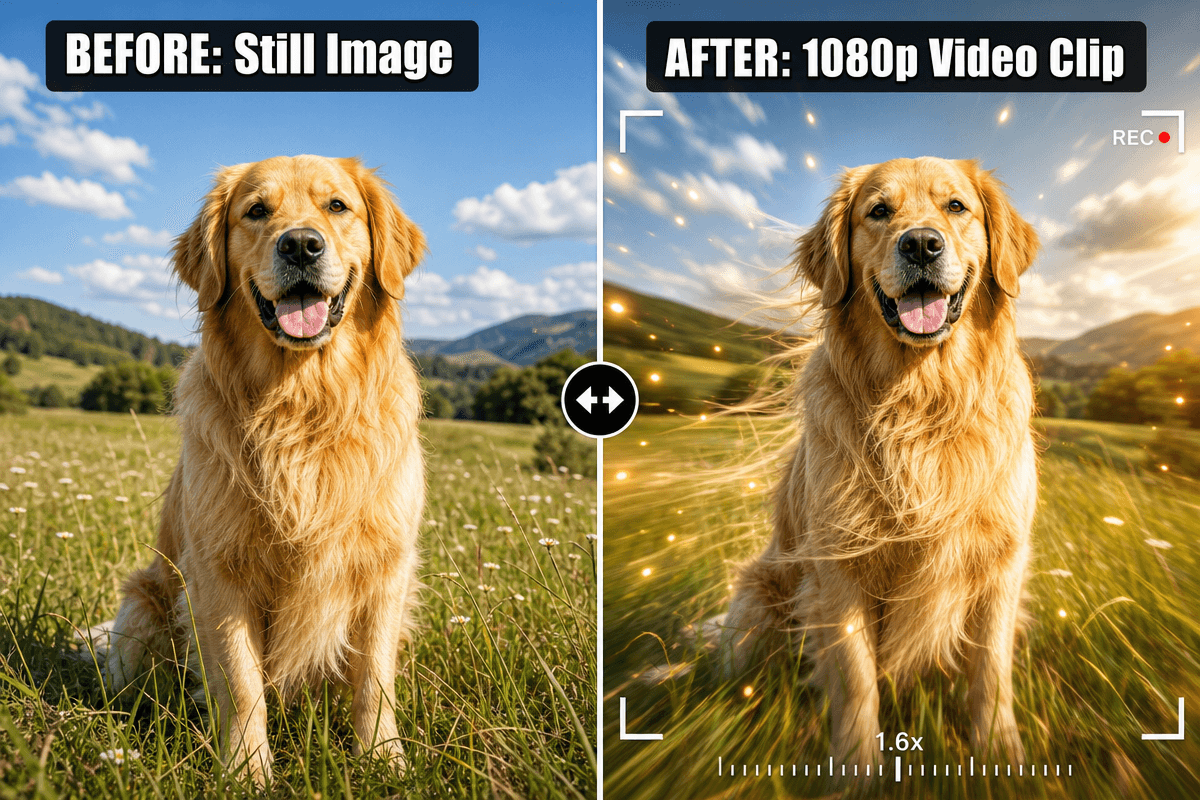
A free AI video generator from image turns a still photo into a short animated clip. You upload the image, describe the motion, and the AI builds the movement frame by frame. With 1min.AI, you can do this with leading video models such as Kling, Veo 3.1, Seedance and Wan, and your finished clip has no watermark.
Most people searching for the best free AI video generator hit the same walls: tiny 3-second clips, silent output, watermarks, and no idea which model suits their photo. This guide fixes that. You will find the exact settings, a prompt formula, and a model chooser, so your first video looks right.
Key takeaways
- Upload one image, or a start and end frame, then describe the motion.
- Pick the model by image type: portrait, product, or illustration.
- Choose audio on or off before you generate.
- Keep prompts short and specific: subject, action, camera, light.
What Is a Free AI Video Generator From Image?
How Image to Video AI Works
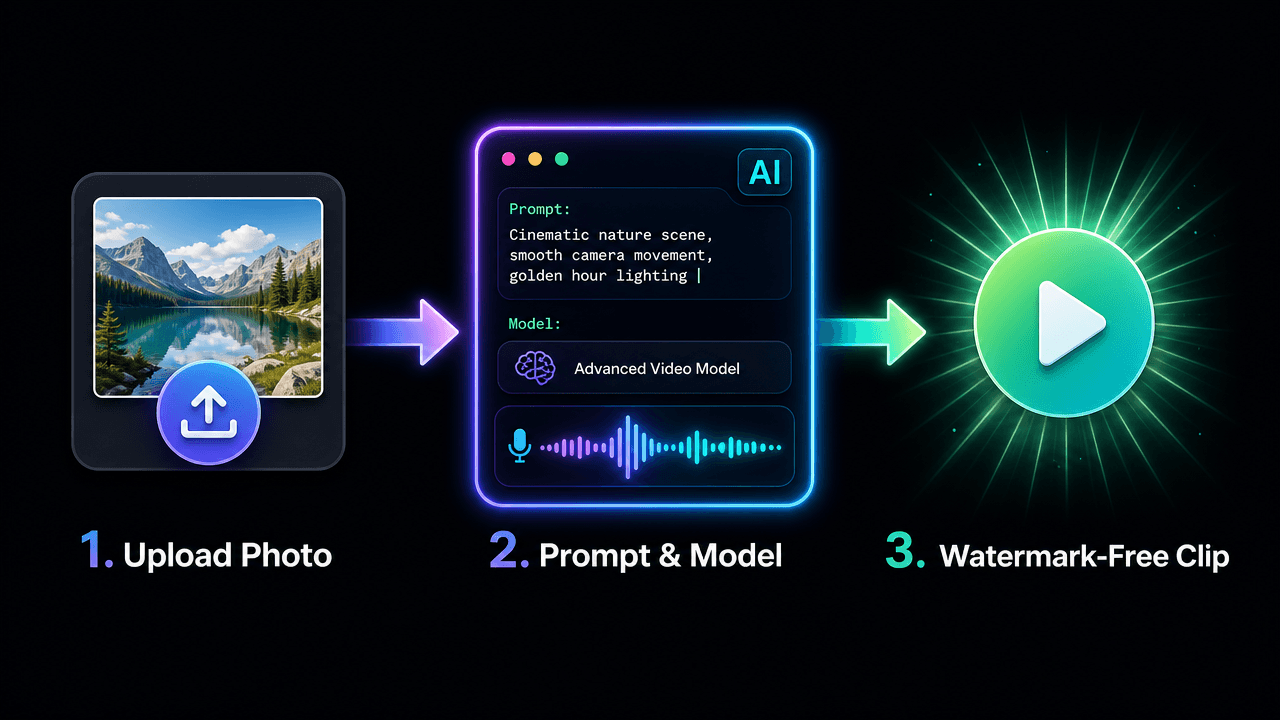
The model reads your photo’s subject, depth and lighting, then predicts how things would move. Your prompt steers the result: a slow zoom, drifting mist, hair in the wind. The better your prompt describes motion, the more natural the clip.
What “No Restrictions” Really Means Here
For creators, it means freedom to choose your own style, aspect ratio, models and start and end frames, without watermarks or rigid templates. It does not mean anything goes. Use images you own or have rights to, and keep content lawful and respectful.
Why Create Your Image Videos in 1min.AI
- Many models, one workspace: Switch between Kling, Veo, Seedance and Wan without juggling tools.
- Frame control: Several models accept a start and end image, so you decide how the shot begins and ends.
- Audio options: Generate sound with the video or add your own track.
- Clean exports: Your clip has no watermark, ready for social posts, ads and websites.
You can open AI Studio and start creating straight away, with no account setup. Create an account later only if you want History and Shared Zone. Our image to video generator is built for exactly this workflow.
Which Model Should You Choose?
Start with what you are animating and whether you need sound.
| Your goal | Best-fit model | Length | Audio |
|---|---|---|---|
| Portrait or character with natural motion | Kling 2.5 or Kling 3.0 | 5 or 10 sec (2.5), 3 to 15 sec (3.0) | Kling 3.0 |
| Cinematic shot with sound | Veo 3.1 | 8 sec fixed | Yes |
| Product video with rich detail | Seedance 2.0 / 2.5 | 4 to 15 sec (2.5 up to 30) | Yes |
| Illustration, cartoon, lip sync | Wan 2.7 | 2 to 15 sec | Yes, plus custom audio |
Portraits and Characters
Kling handles faces and body motion smoothly. Use Kling 2.5 when you want a start and end frame, or Kling 3.0 for longer clips and multi-shot storytelling.
Product Photos
Seedance suits clean product movement. See it in action:
Cartoons and Illustrations
Wan 2.7 supports first-frame, first-and-last-frame and video continuation modes, which is handy for stylized art.
How to Turn an Image Into a Video: Step by Step
Prefer to watch first? Here is a quick walkthrough:
Step 1: Prepare Your Image
Use a sharp image with a clear subject. No photo yet? Create one with the AI image generator and animate it right after.
Step 2: Open Image to Video and Select a Model
Go to Image to Video in 1min.AI, choose your model, and upload your image.
Step 3: Apply the Recommended Settings
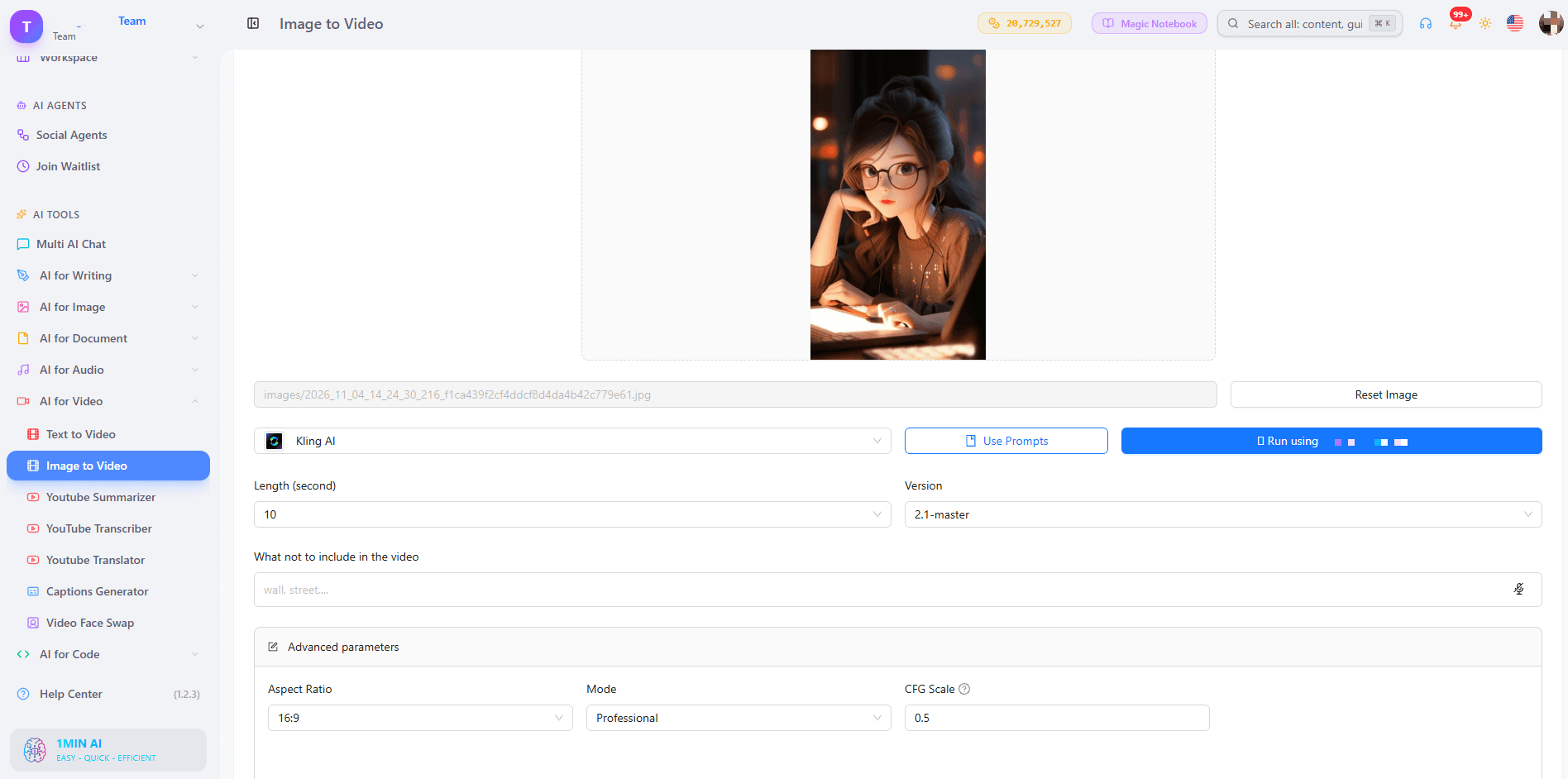
Kling 1.6 to 2.5
- Mode: Standard for quick drafts, Professional for your final version.
- CFG Scale: Keep 0.5. Raise it slightly only if the AI ignores your prompt.
- Length: 5 seconds for one simple motion, 10 seconds for a small story.
- Negative prompt: blurry, distorted face, extra fingers, warped hands, flickering, jitter, text, low resolution
- Frames: Versions before 2.5 take one image. Kling 2.5 takes a start and end frame. Use two photos of the same subject with different poses or camera positions.
Kling 3.0 and 3.0 Omni
- Length: 3 to 15 seconds.
- Generate audio: On when the scene has ambient sound or speech.
- Multi-shot: Up to 6 shots, each with its own prompt and 3 to 14 second duration. Total must stay within 15 seconds.
- Resolution (Omni): 720p to test, 1080p to finalize.
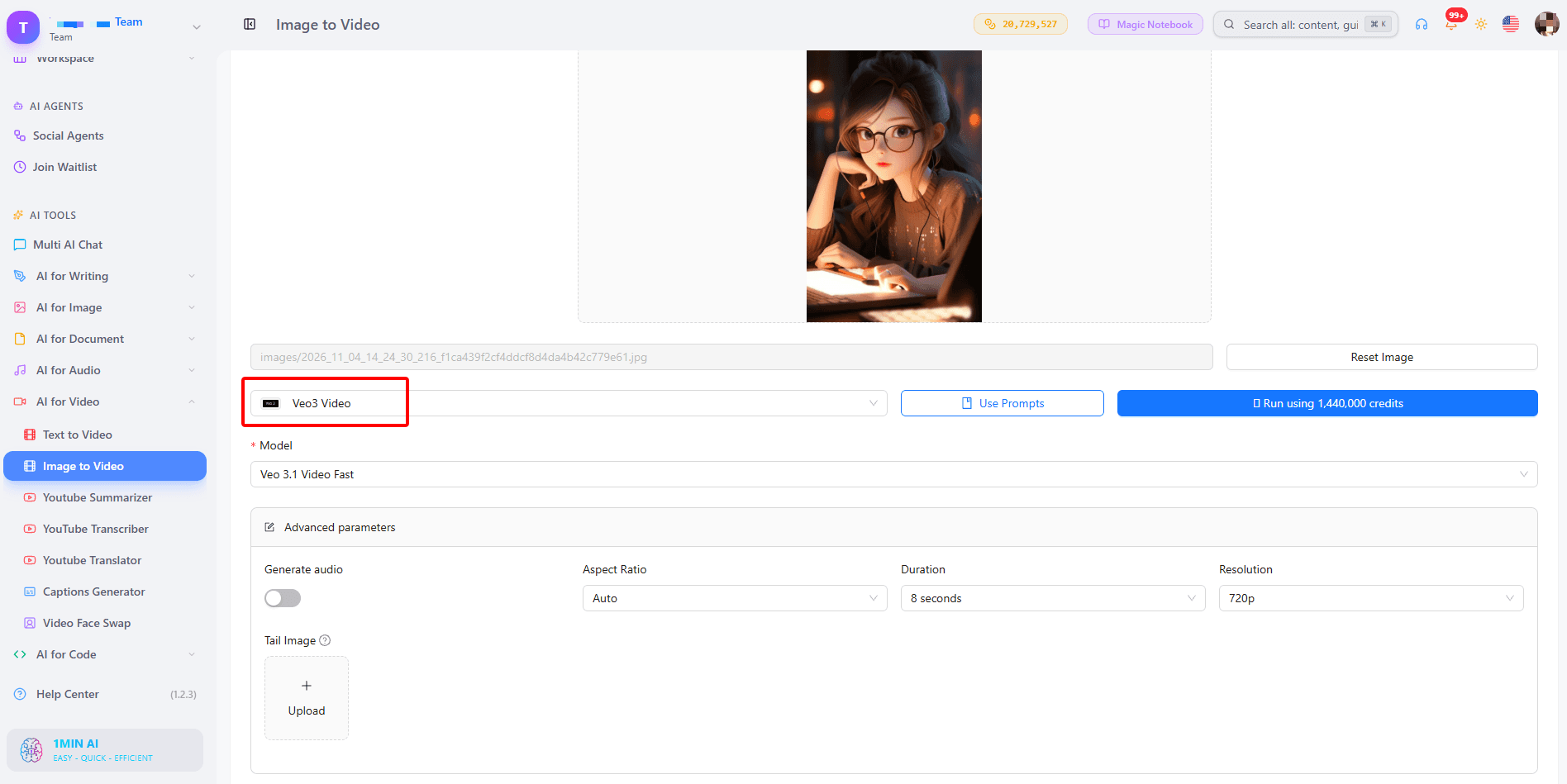
Veo 3.1 and Veo 3
- Duration: Fixed at 8 seconds.
- Resolution: 720p for tests, 1080p for the final clip.
- Aspect ratio: 9:16 for Reels and Shorts, 16:9 for YouTube, Auto to follow your image.
- Generate audio: Turn it on for scenes with sound such as waves, city noise or footsteps.
- Tail image (3.1 only): Upload the same subject and background in the pose you want at the end. Veo 3 has no tail image field. Learn more in our guide to Veo 3.1 video generation.
Seedance 2.0 and 2.5
- Frames: First frame only, or first and last frame.
- Duration: 4 to 15 seconds (up to 30 on 2.5).
- Seed: Leave empty for variety. Enter a number only when you want to reproduce a result you liked.
- Dialogue and sound effects: Turn on for videos that need voices or ambience.
Wan 2.7
- Mode: First-frame, first and last frame, or video continuation.
- Duration: 2 to 15 seconds.
- Custom audio: WAV or MP3, 2 to 30 seconds, up to 15MB. With audio, the model uses it for lip sync and timing. Without it, the model creates matching sound.
Step 4: Generate, Review and Download
Preview the result, adjust one thing at a time (prompt, mode or seed), and download your favorite version.
Do You Need Audio in Your Video?
Built-in Sound
Veo 3.1, Kling 3.0, Seedance and Wan 3.0 can generate sound together with the picture, so a stormy beach actually sounds stormy.
Your Own Audio
Wan 2.7 lets you upload a voice or music file to drive lip sync and timing. If your audio is shorter than the video, the rest stays silent, so match the lengths.
A Simple Prompt Formula That Works
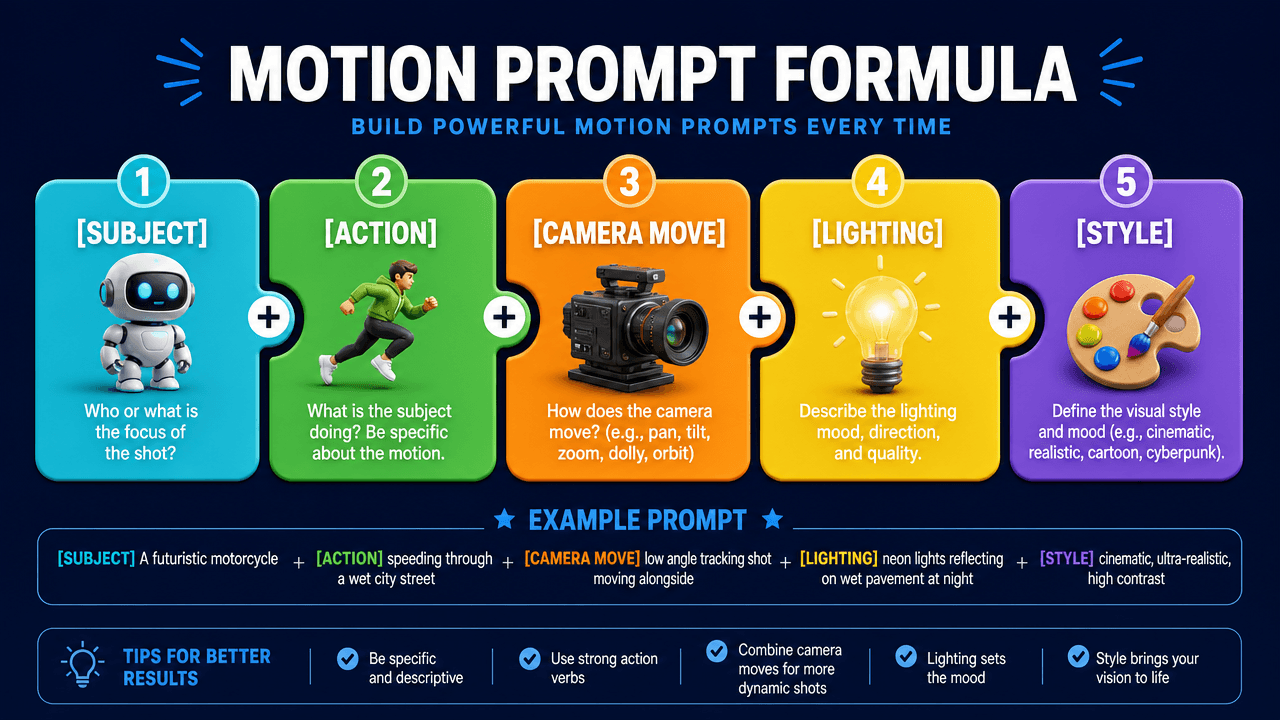
Use: Subject + action + camera move + lighting + style.
- Portrait: “A woman turns toward the camera and smiles, slow push-in, soft golden hour light, cinematic.”
- Product: “A perfume bottle rotates slowly on a marble table, light sweeps across the glass, macro shot.”
- Landscape: “Mist drifts across a calm lake at sunrise, camera stays still, gentle ripples.”
- Illustration: “The hero’s cape flutters as clouds roll past, slow pan right, painterly style.”
Avoid stacking many actions. One clear movement gives the cleanest result.
What Can You Make With It?
- Social media creators: Turn selfies and posts into Reels, Shorts and TikTok clips.
- Marketers and small businesses: Animate product photos for ads and landing pages.
- Storytellers: Bring characters and scenes to life. Create them first with the AI text to video tool when you have an idea but no image yet.
- Real estate agents: Convert listing photos into cinematic walk-through teasers.
Trusted by Creators Worldwide
1min.AI is recognized on SourceForge, Slashdot, Capterra, Software Advice and GetApp, and holds an Excellent rating on Trustpilot.
FAQs
Is there a free AI video generator from image with no watermark?
Yes. In 1min.AI you can try image to video free and download your clip without a watermark.
Can I use it without login or sign up?
You can open AI Studio and start creating without registering. History and Shared Zone need an account.
Can I generate unlimited videos?
Each model and duration uses a different amount of credits, so shorter 5 second tests let you try more ideas before you commit to a longer final clip.
Which model is best for image to video with audio?
Veo 3.1 is a strong all-round pick for cinematic scenes with sound. Kling 3.0 and Seedance also generate audio, and Wan 2.7 supports your own audio file.
How long can the video be?
It depends on the model: 5 or 10 seconds on Kling 2.5, 8 seconds on Veo 3.1, 4 to 15 seconds on Seedance 2.0, and up to 30 seconds on Seedance 2.5.
What is the best image type for good results?
Sharp, well-lit images with one clear subject animate best. Busy backgrounds and blurry faces can cause flicker.
Ready to Bring Your Image to Life?
Pick a photo, write one clear motion prompt, and let 1min.AI do the rest.
- #Transaction
替代方案
探索 1minAI 的最佳替代方案,並比較其功能、定價和使用案例。

1min.AI 對比 OpenRouter
1min.AI 對比 OpenRouter:比較即用型 AI 創作產品同技術 API 工具。睇下你需要零程式碼創意工作室,定係編碼基礎設施中樞。
 Ngoc Hong

1min. AI vs Dola AI
想搵 Dola AI 替代方案?比較 1min.AI vs Dola AI 嘅影片生成、免費方案、收費同私隱,揀啱適合你嘅 AI 應用。
Ngoc Hong
1minAI vs Hix AI
比較 5 個 HIX AI 替代方案,涵蓋 AI 聊天、研究、寫作、圖片、影片、定價同靈活 AI 工作流程。
Ngoc HongAI 工具
探索最佳 AI 工具,提升生產力、創造力及日常工作效率。

一個產品,10 個 UGC 創意:AI 點樣令內容測試更輕鬆
用 AI UGC 影片生成器製作更真實嘅 UGC,測試更多創意角度,並喺唔使逐條拍攝嘅情況下擴大聯盟內容規模。
 Lien Anh Vu

只需幾個步驟,即可製作一致的卡通內容
用 1min.AI 透過 3 個簡單步驟製作 TikTok 同 Reels 卡通影片,由研究點子到角色再到動畫影片,一次完成。
Lien Anh Vu
為初創創辦人而設的 4 款最抵用 AI 工具
發掘 4 款最抵用嘅 AI 工具,幫初創創辦人驗證概念、建立產品、製作內容,同埋更快推出市場,而唔使超支。
 Tram Ta
AI 功能
全面的 AI 功能,可簡化工作流程、提升效率,讓團隊達成更多目標。

AI 應用案例
精選 AI 應用案例,涵蓋商業、生產力及各行業專用應用。
一個產品,10 個 UGC 創意:AI 點樣令內容測試更輕鬆
用 AI UGC 影片生成器製作更真實嘅 UGC,測試更多創意角度,並喺唔使逐條拍攝嘅情況下擴大聯盟內容規模。
Lien Anh Vu只需幾個步驟,即可製作一致的卡通內容
用 1min.AI 透過 3 個簡單步驟製作 TikTok 同 Reels 卡通影片,由研究點子到角色再到動畫影片,一次完成。
Lien Anh Vu
Instagram 最佳發帖時間:提升互動的實用指南
了解 Instagram 最佳發帖時間,包括不同受眾的最佳日子和時段,以及如何為你的帳戶找出理想的發帖時間表。
Tram TaAI 教學
透過實用的逐步教學,學習如何使用人工智能。
只需幾個步驟,即可製作一致的卡通內容
用 1min.AI 透過 3 個簡單步驟製作 TikTok 同 Reels 卡通影片,由研究點子到角色再到動畫影片,一次完成。
Lien Anh Vu
2026 黑色星期五 AI 工具優惠
探索 2026 黑色星期五 AI 工具優惠有咩選擇。了解點樣透過 AppSumo、Dealify、Stack Social 搶到 1min.AI 終身方案,並可喺 Trustpilot、Slashdot 同 Software Advice 核實。
 Hang Nguyen

使用 Seedance 的 AI 圖像轉影片產品一致性,停止變形並 масштаб化產品評測
以 AI 圖像轉影片產品一致性停止 logo 變形,立即在 1min.AI 製作 studio 級評測影片。
Lien Anh VuAI 指南
透過實用指南、真實案例和可操作嘅最佳實踐,更快咁學習 AI。
只需幾個步驟,即可製作一致的卡通內容
用 1min.AI 透過 3 個簡單步驟製作 TikTok 同 Reels 卡通影片,由研究點子到角色再到動畫影片,一次完成。
Lien Anh Vu
安全網上購買 AI 工具:2026 黑色星期五指南
了解如何在網上搵到同鎖定最佳黑色星期五 AI 優惠。學習專家策略,避開騙局、應對訂閱疲勞,並驗證軟件。
Hang Nguyen使用 Seedance 的 AI 圖像轉影片產品一致性,停止變形並 масштаб化產品評測
以 AI 圖像轉影片產品一致性停止 logo 變形,立即在 1min.AI 製作 studio 級評測影片。
Lien Anh VuAI 解決方案
瀏覽適用於自動化、編碼、研究、生產力、客戶支援、市場推廣及業務流程的最佳AI解決方案。
一個產品,10 個 UGC 創意:AI 點樣令內容測試更輕鬆
用 AI UGC 影片生成器製作更真實嘅 UGC,測試更多創意角度,並喺唔使逐條拍攝嘅情況下擴大聯盟內容規模。
Lien Anh Vu只需幾個步驟,即可製作一致的卡通內容
用 1min.AI 透過 3 個簡單步驟製作 TikTok 同 Reels 卡通影片,由研究點子到角色再到動畫影片,一次完成。
Lien Anh Vu
免費 AI 紋身生成器:自訂設計
用 1min.AI 的免費 AI 紋身生成器,將任何靈感變成自訂紋身設計。描述你的想法、選擇風格,幾秒內即可下載。
 Trang Tran
AI 模型
於一處探索全球頂尖嘅 AI 模型。
一個產品,10 個 UGC 創意:AI 點樣令內容測試更輕鬆
用 AI UGC 影片生成器製作更真實嘅 UGC,測試更多創意角度,並喺唔使逐條拍攝嘅情況下擴大聯盟內容規模。
Lien Anh Vu只需幾個步驟,即可製作一致的卡通內容
用 1min.AI 透過 3 個簡單步驟製作 TikTok 同 Reels 卡通影片,由研究點子到角色再到動畫影片,一次完成。
Lien Anh Vu使用 Seedance 的 AI 圖像轉影片產品一致性,停止變形並 масштаб化產品評測
以 AI 圖像轉影片產品一致性停止 logo 變形,立即在 1min.AI 製作 studio 級評測影片。
Lien Anh VuAI 比較
比較AI工具、模型及平台,尋找最適合您需求的選擇。

Kling AI 對 Veo 3:邊個模型勝出?
Kling AI 對 Veo 3:比較動態、原生音訊、定價同免費方案,睇下邊個 AI 影片生成器更適合你嘅項目——即刻喺 1min.AI 試晒兩個。
Trang Tran使用 Seedance 的 AI 圖像轉影片產品一致性,停止變形並 масштаб化產品評測
以 AI 圖像轉影片產品一致性停止 logo 變形,立即在 1min.AI 製作 studio 級評測影片。
Lien Anh Vu
DeepSeek V4 Pro 與 Flash 比較
比較 DeepSeek V4 Pro 與 DeepSeek V4 Flash 的指標。立即喺 1min.ai 優化你嘅 agentic apps,同提升 AI fact checking。
Ngoc HongAI 整合
將 AI 無縫整合到你現有的工具中,自動化工作並提升生產力。

如何使用 AI 時尚影片生成器製作 2026 時裝週內容
用 AI 將 2026 時裝週靈感變成驚艷時尚影片。學習如何發想、創作視覺,並以一個簡單流程將圖片轉成影片。
Lien Anh Vu
POV:你每日要製作 10+ 篇貼文
了解如何建立 AI 內容工作流程,幫助內容創作者透過 AI 發想、圖片生成同內容製作,更快每日產出 10+ 則社交媒體貼文。
Lien Anh Vu
停止在 AI 應用程式之間切換:AI 整合如何重塑僱主品牌
了解 AI 整合如何透過將 AI 寫作、文件、圖像、影片及多個 AI 模型整合到同一工作空間,幫助 HR 團隊簡化僱主品牌工作。
Tram Ta行業AI
為醫療保健、金融、教育、法律、製造、零售、房地產等行業尋找最佳AI工具和工作流程。

免費 AI 產品描述生成器
幾分鐘內寫出能帶來銷售的產品描述。使用這個免費 AI 產品描述生成器,將產品資料或相片轉成符合品牌的文案。試用 1min.AI。
Trang Tran
助初創企業提升利潤的最佳商業生產力工具 | 1minAI
探索最適合初創企業的商業生產力工具,節省時間、簡化工作流程、減少重複工作,並透過 AI 支援有利可圖的增長。
Tram Ta
最佳內容行銷 AI 工具|1minAI
搵緊最佳內容行銷 AI 工具?睇吓 1minAI 點樣幫市場人員喺同一個 AI 工作空間內做資料研究、寫作、重製內容、製作視覺素材同擴大產出。
Tram TaAI 代理
探索並運行 AI 代理,自動化您的工作和日常生活中的任務。


AI 工作流程
探索現成可用的 AI 工作流程,適用於生產力、營銷、銷售、支援等。
一個產品,10 個 UGC 創意:AI 點樣令內容測試更輕鬆
用 AI UGC 影片生成器製作更真實嘅 UGC,測試更多創意角度,並喺唔使逐條拍攝嘅情況下擴大聯盟內容規模。
Lien Anh Vu只需幾個步驟,即可製作一致的卡通內容
用 1min.AI 透過 3 個簡單步驟製作 TikTok 同 Reels 卡通影片,由研究點子到角色再到動畫影片,一次完成。
Lien Anh Vu如何使用 AI 時尚影片生成器製作 2026 時裝週內容
用 AI 將 2026 時裝週靈感變成驚艷時尚影片。學習如何發想、創作視覺,並以一個簡單流程將圖片轉成影片。
Lien Anh Vu電子報
1minAI 每週 AI 創新

🔮 每週 AI 創新 #143:更新 更新 GPT-6、GPT-6.1 與 Ideogram 4.0 與 Ideogram 4.0
在 1min.ai 取得 GPT-6 Sol、Luna、GPT-6.1 Sol 及 Ideogram 4.0。於同一平台將排版準確度提升至 98.4%,並把推理延遲降低 45%。
Hang Nguyen
🔮 每週 AI 創新 #142:Grok 4.7、Opus 5.5 與 Sonnet 5.5 登陸 1min.ai
在 1min.ai 存取 Grok 4.7、Claude Opus 5.5 及 Sonnet 5.5。透過單一整合工作區,最多可節省 70% 訂閱成本,並處理數以百萬計的 token。
Hang Nguyen
🔮 每週 AI 創新 #141:Seedance 2.5 與 Stable Audio 3:新一代 AI
在 1min.ai 探索 Seedance 2.0、2.5 以及 StabilityAI 的 Stable Audio 3。運用新一代生成式 AI 生成錄音室級音訊與同步動作。
Hang Nguyen