
How to Create Facebook Content More Efficiently with 1minAI
Uyen Hoang
2026年11月20日
Discover how 1minAI Facebook Content Agent helps businesses research topics, create Facebook posts, design visuals, and streamline social media publishing.
Facebook remains an important platform for businesses to connect with customers, build brand awareness, share updates, and promote their products or services. According to DataReportal's Digital 2026 Mid-Year Update, 56.3% of internet users aged 16 and above worldwide said they had used Facebook in the past month. In Vietnam, Meta's advertising resources indicated a potential Facebook advertising audience of approximately 79 million in late 2025. Although advertising reach is not the same as the number of monthly active users, these figures demonstrate why Facebook continues to be a relevant channel for businesses looking to reach a broad audience.
However, having access to a large audience does not automatically translate into an effective Facebook presence. Businesses need to publish content consistently, understand what their audiences are interested in, and create posts that encourage meaningful interactions. From product updates and promotional campaigns to educational content and community discussions, maintaining an active Facebook Page requires ongoing planning and content production.
This process can become time-consuming when businesses rely on multiple tools to manage different activities. Marketers may use one AI tool to research content ideas, another to write Facebook captions, a separate design platform to create images, and yet another tool to manage social media publishing. Switching between these platforms adds unnecessary steps, makes content management more complicated, and can interrupt the creative workflow.
AI tools have made content creation faster, but speed alone does not solve every problem. According to a June 2026 Gartner survey, 49% of surveyed U.S. consumers said generative AI had made the quality of available content worse. Another Gartner survey found that 65% of consumers believed brands were producing too much AI-generated content in their marketing materials, while 57% said this made them less trusting of brand messaging. These findings highlight an important challenge for businesses: using AI to create more content is not enough if the results lack originality, relevance, or a recognizable brand voice.
A more connected workflow can help address this challenge. Instead of managing research, writing, image creation, and publishing separately, businesses can use an AI agent that brings these activities into one process. This allows marketers to spend less time coordinating different tools and more time reviewing whether their Facebook content is useful, engaging, and aligned with their brand.
Meet the Facebook Content Agent on 1minAI
1minAI brings AI tools and workflows together in one workspace. Within this environment, Social Agents offers a selection of AI agents designed to support social media content creation for different platforms.
The Facebook Content Agent is designed to help users create, optimize, and publish Facebook content through a structured workflow. It connects four essential stages: gathering information, writing content, designing an image, and posting to social media.
For businesses, this provides a more organized starting point for creating Facebook posts, promotional content, product announcements, educational posts, and brand updates. Rather than coordinating every task independently, users can follow a predefined Agent Flow and work through the content creation process step by step.
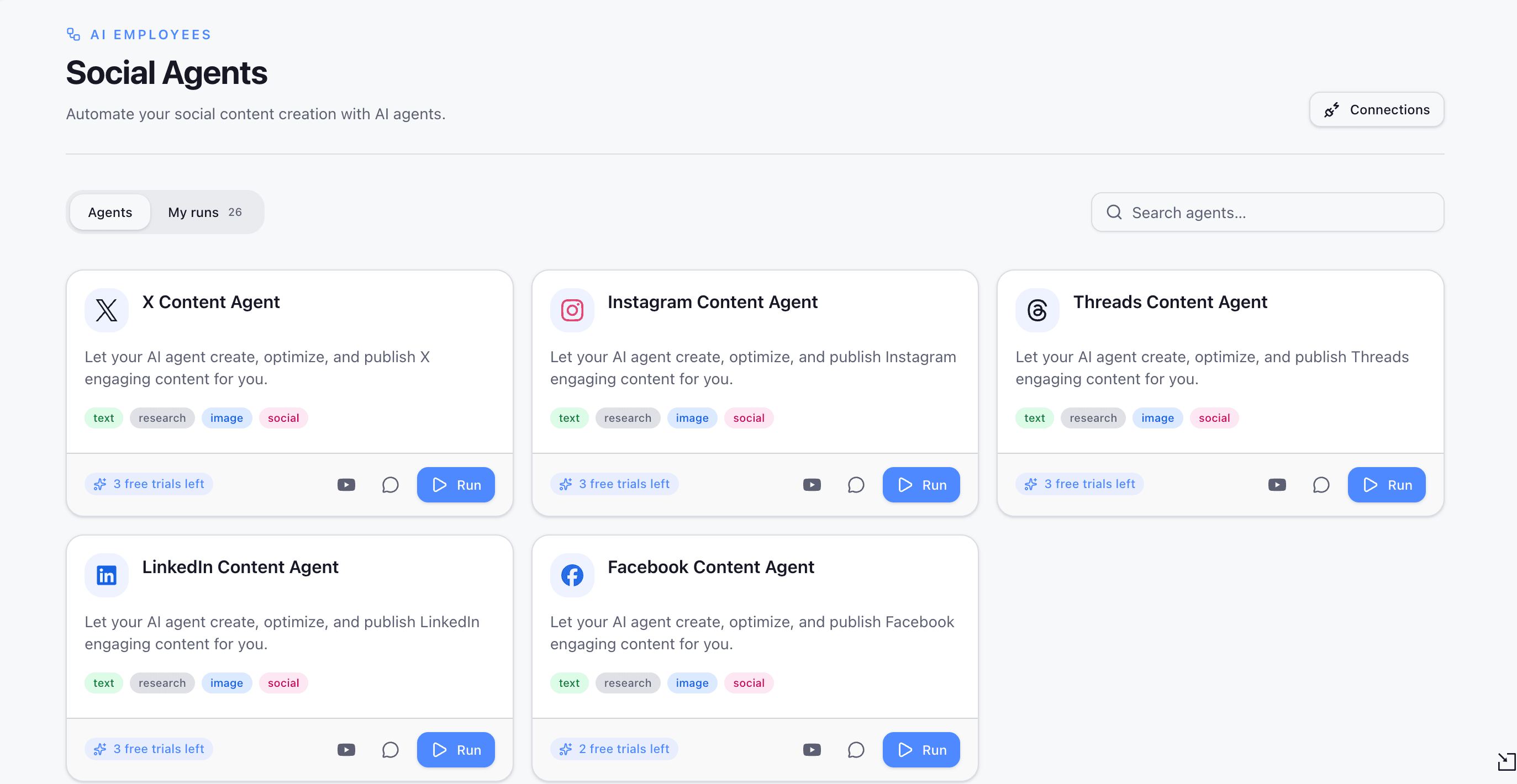
The Facebook Content Agent on 1minAI brings information gathering, content writing, image design, and social publishing together in one workflow.
What Businesses Can Gain from Using the Agent
The main advantage of the Facebook Content Agent is its connected workflow. Instead of treating research, writing, visual creation, and publishing as unrelated activities, the agent organizes them into sequential steps. This makes it easier for marketers and business owners to understand how each stage contributes to the final Facebook post.
| Facebook Content Challenge | How the Facebook Content Agent Helps |
|---|---|
| Finding relevant content ideas | The Gather Information step starts the process with information gathering. |
| Spending too much time writing captions | The Write Content step supports the development of Facebook posts. |
| Creating visuals separately | The Design Image step brings image creation into the workflow. |
| Managing publishing tasks | The Post to Social step connects content creation with social publishing. |
| Keeping content activities organized | Agent Flow organizes the process into four visible stages. |
| Revising content without repeating everything | Users can run a selected step or continue from that step to the end. |
For marketers, small business owners, and social media managers, this structured approach can reduce the effort involved in coordinating separate content creation tools. It also provides a practical way to incorporate AI into an existing Facebook marketing workflow without relying entirely on disconnected applications.
How to Use the Facebook Content Agent on 1minAI
The Facebook Content Agent follows a four-stage workflow. Each stage has a specific role, helping users understand how information moves through the content creation process. The following steps explain how to access the agent and work through its content creation stages.
Step 1. Select Facebook Content Agent from Social Agents
Log in to your 1minAI account and open Social Agents from the main sidebar. Browse the available agents and select Facebook Content Agent to access its overview.
The agent card displays its supported capabilities, including text, research, image, and social. These labels indicate the types of activities associated with the agent.
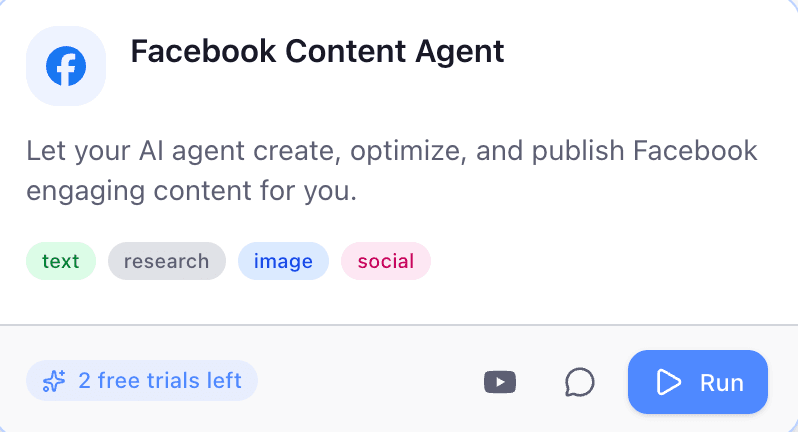
Open Social Agents, select Facebook Content Agent, and click Run to begin creating Facebook content.
Click Run to enter the Agent Flow interface. This opens the workflow where you can review the four stages and start working through the content creation process.
Step 2. Understand the Four-Stage Agent Flow
The Agent Flow interface organizes the workflow into four stages:
- Gather Information
- Write Content
- Design Image
- Post to Social
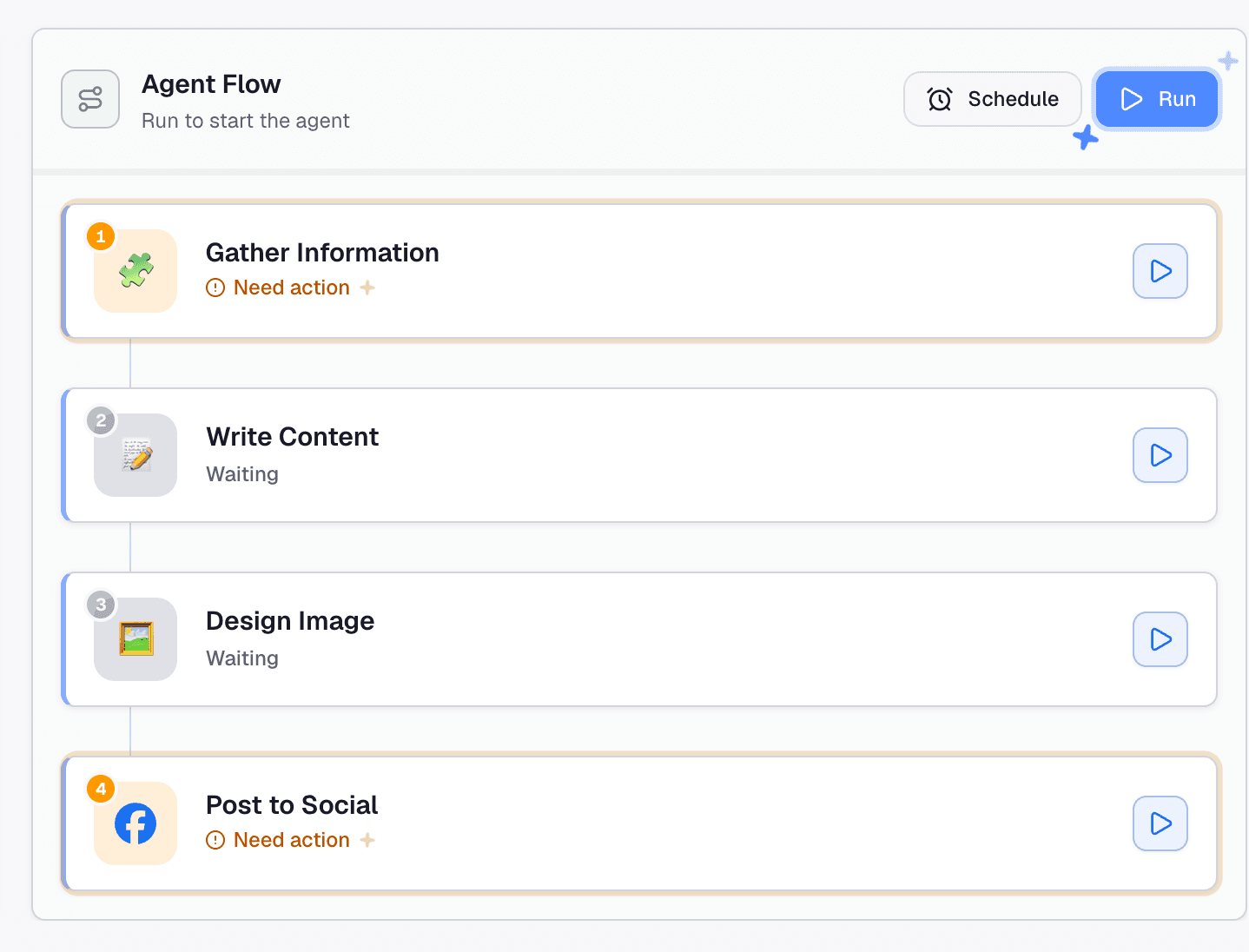
The Facebook Content Agent uses a four-stage workflow to move from information gathering to social publishing.
Each stage represents a different part of the process. This structure makes it easier to identify what needs to be completed, review individual stages, and understand how one stage leads into the next.
The workflow also provides individual run buttons for each stage. This means users can interact with a specific step rather than always treating the process as one single action. For example, if the written content is ready but the visual needs improvement, users can focus on the relevant stage instead of repeating the entire workflow.
Step 3. Gather Information for Your Facebook Post
The first stage, Gather Information, focuses on collecting information before the content is written. For businesses, this is an important starting point because effective Facebook content should reflect the audience's interests, the brand's communication goals, and the purpose of each post.
Possible content directions include:
- Product announcements and new launches.
- Promotional campaigns and special offers.
- Educational posts and industry insights.
- Customer stories and user-generated content ideas.
- Brand updates and behind-the-scenes content.
- Community discussions and audience engagement topics.
For example: a small business owner who wants to introduce a new product can begin by gathering relevant information about its features, benefits, and target audience. This provides a clearer direction for the next stage and helps the resulting Facebook post communicate the product's value more effectively.
If the step displays Need action, click it to open its configuration. Review the fields and instructions presented in the interface, provide the required information, and run the step to generate its output.
The available inputs depend on the agent's configuration. Review the generated information before continuing, especially when the post includes product specifications, promotional details, industry statistics, or claims that need reliable sources.
Step 4. Write Engaging Facebook Content
Once the information-gathering stage is complete, the workflow moves to Write Content. This stage supports the creation of written content for the Facebook post.
Writing for Facebook requires more than simply presenting information. Businesses need to communicate their message clearly, capture attention, and give readers a reason to interact with the post. A promotional post may focus on a product's key benefits and offer details, while an educational post may introduce a useful tip or answer a common customer question.
Businesses can use this stage as a starting point for different types of Facebook content:
- Product introductions and promotional announcements.
- Brand storytelling and company updates.
- Educational posts and practical tips.
- Customer testimonials and community stories.
- Seasonal campaigns and event announcements.
- Questions and discussion-based posts.
The content should match the brand's tone of voice and the expectations of its target audience. For example, a local business may prefer a friendly and conversational tone, while a professional service provider may need a more informative approach.
AI-generated text should still be reviewed before publication. Check product names, prices, promotional conditions, links, contact information, and factual claims to ensure the post accurately represents the business. This review also helps prevent generic AI-generated wording from weakening the brand's identity.
Step 5. Design an Image for Your Facebook Post
Visual content plays an important role in Facebook communication. A well-designed image can help explain a product, reinforce a campaign message, and make a post more recognizable as part of a brand's social media presence.
The third stage, Design Image, brings visual content into the same workflow. This helps connect the written message with an accompanying image without requiring users to treat visual creation as an entirely separate task.
For businesses, visuals can support different marketing objectives. Product promotions may need images that highlight key features or special offers, while educational posts may benefit from infographics or simple illustrations. Brand updates and community-focused content can use visuals that reflect the organization's identity and communication style.
For example: a Facebook post introducing a new product could use an image that highlights the product and its main selling points. A post sharing practical tips could use a visual that organizes the information into an easy-to-follow format.
Review the generated image before publication to make sure it supports the written content, follows the brand's visual guidelines, and does not introduce misleading information. Pay particular attention to text included in the image, such as product names, prices, and promotional details.
Step 6. Post Your Content to Social Media
The final stage, Post to Social, connects the content creation workflow with social publishing. This stage is designed to move the completed content toward publication rather than leaving users to manage the publishing task entirely outside the workflow.
Click the step to review its configuration and complete any required actions. If the interface displays Need action, follow the instructions shown and check the available social account or publishing settings.
Before confirming a publishing action, review the post text, accompanying image, destination account, and other details presented in the interface. For businesses running promotional campaigns or communicating important product information, a final review is especially important to ensure that customers receive accurate and consistent information.
Note: Not sure which option to choose? The Agent Flow offers two ways to run an individual stage, giving you more flexibility to manage the workflow:
| Option | How It Works | When to Use It |
|---|---|---|
| Run this step | Runs only the selected step and leaves the other steps unchanged. | Use it when you want to retry or update one stage without running the entire workflow. |
| Run from this step | Runs the selected step and continues through the remaining stages until the end, leaving earlier steps unchanged. | Use it when you want to continue the workflow from a particular point. |
For example, if you are satisfied with the research and written content but want to revise the visual, you can run the Design Image step independently. If you want to continue the workflow from a selected stage through the remaining steps, Run from this step allows you to do so.
This flexibility can be useful when refining content, correcting an output, or repeating part of the process without unnecessarily revisiting earlier stages.
Plan Your Facebook Content Workflow with Schedule
Consistency is an important part of maintaining an active Facebook Page. Businesses may need to prepare product announcements, promotional campaigns, educational posts, and brand updates around specific marketing activities. Planning these topics in advance can make social media management more organized and reduce the pressure of creating content at the last minute.
The Agent Flow interface also displays a Schedule option. Users can explore the available scheduling settings to determine how the workflow can be scheduled based on their needs.
For marketers and business owners managing recurring content activities, this option may help organize when an agent workflow runs. For example, a business could prepare content around an upcoming product launch or plan a series of posts for a seasonal campaign.
It is important to distinguish between scheduling an agent workflow and scheduling a finished Facebook post for publication. The Schedule option shown in the interface relates to the agent flow; users should check the available settings before relying on it for a specific publishing timetable.
A practical approach is to plan content topics in advance, provide the necessary information, review the generated text and visuals, and confirm the publishing arrangements before content goes live.
Create Better Facebook Content with 1minAI
Maintaining an effective Facebook presence involves more than publishing posts regularly. Businesses need to identify relevant topics, create useful content, prepare visuals, and manage publishing while keeping their brand voice consistent. When these activities are scattered across different platforms, even a simple Facebook post can require more time and coordination than expected.
The Facebook Content Agent on 1minAI brings these activities into a structured four-stage workflow. It helps users move from information gathering to content writing, image design, and social publishing within one connected process.
Whether you are a small business owner promoting products, a marketer managing Facebook campaigns, or a social media manager handling multiple content activities, the agent offers a practical way to organize Facebook content creation with AI.
Spend less time switching between tools and more time creating relevant content for your audience. Explore 1minAI Social Agents and try Facebook Content Agent for your next Facebook post.
替代方案
探索 1minAI 的最佳替代方案,並比較其功能、定價和使用案例。

1min.AI 對比 OpenRouter
1min.AI 對比 OpenRouter:比較即用型 AI 創作產品同技術 API 工具。睇下你需要零程式碼創意工作室,定係編碼基礎設施中樞。
 Ngoc Hong

1min. AI vs Dola AI
想搵 Dola AI 替代方案?比較 1min.AI vs Dola AI 嘅影片生成、免費方案、收費同私隱,揀啱適合你嘅 AI 應用。
Ngoc Hong
1minAI vs Hix AI
比較 5 個 HIX AI 替代方案,涵蓋 AI 聊天、研究、寫作、圖片、影片、定價同靈活 AI 工作流程。
Ngoc HongAI 工具
探索最佳 AI 工具,提升生產力、創造力及日常工作效率。

一個產品,10 個 UGC 創意:AI 點樣令內容測試更輕鬆
用 AI UGC 影片生成器製作更真實嘅 UGC,測試更多創意角度,並喺唔使逐條拍攝嘅情況下擴大聯盟內容規模。
 Lien Anh Vu

只需幾個步驟,即可製作一致的卡通內容
用 1min.AI 透過 3 個簡單步驟製作 TikTok 同 Reels 卡通影片,由研究點子到角色再到動畫影片,一次完成。
Lien Anh Vu
為初創創辦人而設的 4 款最抵用 AI 工具
發掘 4 款最抵用嘅 AI 工具,幫初創創辦人驗證概念、建立產品、製作內容,同埋更快推出市場,而唔使超支。
 Tram Ta
AI 功能
全面的 AI 功能,可簡化工作流程、提升效率,讓團隊達成更多目標。

AI 應用案例
精選 AI 應用案例,涵蓋商業、生產力及各行業專用應用。
一個產品,10 個 UGC 創意:AI 點樣令內容測試更輕鬆
用 AI UGC 影片生成器製作更真實嘅 UGC,測試更多創意角度,並喺唔使逐條拍攝嘅情況下擴大聯盟內容規模。
Lien Anh Vu只需幾個步驟,即可製作一致的卡通內容
用 1min.AI 透過 3 個簡單步驟製作 TikTok 同 Reels 卡通影片,由研究點子到角色再到動畫影片,一次完成。
Lien Anh Vu
Instagram 最佳發帖時間:提升互動的實用指南
了解 Instagram 最佳發帖時間,包括不同受眾的最佳日子和時段,以及如何為你的帳戶找出理想的發帖時間表。
Tram TaAI 教學
透過實用的逐步教學,學習如何使用人工智能。
只需幾個步驟,即可製作一致的卡通內容
用 1min.AI 透過 3 個簡單步驟製作 TikTok 同 Reels 卡通影片,由研究點子到角色再到動畫影片,一次完成。
Lien Anh Vu
2026 黑色星期五 AI 工具優惠
探索 2026 黑色星期五 AI 工具優惠有咩選擇。了解點樣透過 AppSumo、Dealify、Stack Social 搶到 1min.AI 終身方案,並可喺 Trustpilot、Slashdot 同 Software Advice 核實。
 Hang Nguyen

使用 Seedance 的 AI 圖像轉影片產品一致性,停止變形並 масштаб化產品評測
以 AI 圖像轉影片產品一致性停止 logo 變形,立即在 1min.AI 製作 studio 級評測影片。
Lien Anh VuAI 指南
透過實用指南、真實案例和可操作嘅最佳實踐,更快咁學習 AI。
只需幾個步驟,即可製作一致的卡通內容
用 1min.AI 透過 3 個簡單步驟製作 TikTok 同 Reels 卡通影片,由研究點子到角色再到動畫影片,一次完成。
Lien Anh Vu
安全網上購買 AI 工具:2026 黑色星期五指南
了解如何在網上搵到同鎖定最佳黑色星期五 AI 優惠。學習專家策略,避開騙局、應對訂閱疲勞,並驗證軟件。
Hang Nguyen使用 Seedance 的 AI 圖像轉影片產品一致性,停止變形並 масштаб化產品評測
以 AI 圖像轉影片產品一致性停止 logo 變形,立即在 1min.AI 製作 studio 級評測影片。
Lien Anh VuAI 解決方案
瀏覽適用於自動化、編碼、研究、生產力、客戶支援、市場推廣及業務流程的最佳AI解決方案。
一個產品,10 個 UGC 創意:AI 點樣令內容測試更輕鬆
用 AI UGC 影片生成器製作更真實嘅 UGC,測試更多創意角度,並喺唔使逐條拍攝嘅情況下擴大聯盟內容規模。
Lien Anh Vu只需幾個步驟,即可製作一致的卡通內容
用 1min.AI 透過 3 個簡單步驟製作 TikTok 同 Reels 卡通影片,由研究點子到角色再到動畫影片,一次完成。
Lien Anh Vu
免費 AI 紋身生成器:自訂設計
用 1min.AI 的免費 AI 紋身生成器,將任何靈感變成自訂紋身設計。描述你的想法、選擇風格,幾秒內即可下載。
 Trang Tran
AI 模型
於一處探索全球頂尖嘅 AI 模型。
一個產品,10 個 UGC 創意:AI 點樣令內容測試更輕鬆
用 AI UGC 影片生成器製作更真實嘅 UGC,測試更多創意角度,並喺唔使逐條拍攝嘅情況下擴大聯盟內容規模。
Lien Anh Vu只需幾個步驟,即可製作一致的卡通內容
用 1min.AI 透過 3 個簡單步驟製作 TikTok 同 Reels 卡通影片,由研究點子到角色再到動畫影片,一次完成。
Lien Anh Vu使用 Seedance 的 AI 圖像轉影片產品一致性,停止變形並 масштаб化產品評測
以 AI 圖像轉影片產品一致性停止 logo 變形,立即在 1min.AI 製作 studio 級評測影片。
Lien Anh VuAI 比較
比較AI工具、模型及平台,尋找最適合您需求的選擇。

Kling AI 對 Veo 3:邊個模型勝出?
Kling AI 對 Veo 3:比較動態、原生音訊、定價同免費方案,睇下邊個 AI 影片生成器更適合你嘅項目——即刻喺 1min.AI 試晒兩個。
Trang Tran使用 Seedance 的 AI 圖像轉影片產品一致性,停止變形並 масштаб化產品評測
以 AI 圖像轉影片產品一致性停止 logo 變形,立即在 1min.AI 製作 studio 級評測影片。
Lien Anh Vu
DeepSeek V4 Pro 與 Flash 比較
比較 DeepSeek V4 Pro 與 DeepSeek V4 Flash 的指標。立即喺 1min.ai 優化你嘅 agentic apps,同提升 AI fact checking。
Ngoc HongAI 整合
將 AI 無縫整合到你現有的工具中,自動化工作並提升生產力。

如何使用 AI 時尚影片生成器製作 2026 時裝週內容
用 AI 將 2026 時裝週靈感變成驚艷時尚影片。學習如何發想、創作視覺,並以一個簡單流程將圖片轉成影片。
Lien Anh Vu
POV:你每日要製作 10+ 篇貼文
了解如何建立 AI 內容工作流程,幫助內容創作者透過 AI 發想、圖片生成同內容製作,更快每日產出 10+ 則社交媒體貼文。
Lien Anh Vu
停止在 AI 應用程式之間切換:AI 整合如何重塑僱主品牌
了解 AI 整合如何透過將 AI 寫作、文件、圖像、影片及多個 AI 模型整合到同一工作空間,幫助 HR 團隊簡化僱主品牌工作。
Tram Ta行業AI
為醫療保健、金融、教育、法律、製造、零售、房地產等行業尋找最佳AI工具和工作流程。

免費 AI 產品描述生成器
幾分鐘內寫出能帶來銷售的產品描述。使用這個免費 AI 產品描述生成器,將產品資料或相片轉成符合品牌的文案。試用 1min.AI。
Trang Tran
助初創企業提升利潤的最佳商業生產力工具 | 1minAI
探索最適合初創企業的商業生產力工具,節省時間、簡化工作流程、減少重複工作,並透過 AI 支援有利可圖的增長。
Tram Ta
最佳內容行銷 AI 工具|1minAI
搵緊最佳內容行銷 AI 工具?睇吓 1minAI 點樣幫市場人員喺同一個 AI 工作空間內做資料研究、寫作、重製內容、製作視覺素材同擴大產出。
Tram TaAI 代理
探索並運行 AI 代理,自動化您的工作和日常生活中的任務。


AI 工作流程
探索現成可用的 AI 工作流程,適用於生產力、營銷、銷售、支援等。
一個產品,10 個 UGC 創意:AI 點樣令內容測試更輕鬆
用 AI UGC 影片生成器製作更真實嘅 UGC,測試更多創意角度,並喺唔使逐條拍攝嘅情況下擴大聯盟內容規模。
Lien Anh Vu只需幾個步驟,即可製作一致的卡通內容
用 1min.AI 透過 3 個簡單步驟製作 TikTok 同 Reels 卡通影片,由研究點子到角色再到動畫影片,一次完成。
Lien Anh Vu如何使用 AI 時尚影片生成器製作 2026 時裝週內容
用 AI 將 2026 時裝週靈感變成驚艷時尚影片。學習如何發想、創作視覺,並以一個簡單流程將圖片轉成影片。
Lien Anh Vu電子報
1minAI 每週 AI 創新

🔮 每週 AI 創新 #143:更新 更新 GPT-6、GPT-6.1 與 Ideogram 4.0 與 Ideogram 4.0
在 1min.ai 取得 GPT-6 Sol、Luna、GPT-6.1 Sol 及 Ideogram 4.0。於同一平台將排版準確度提升至 98.4%,並把推理延遲降低 45%。
Hang Nguyen
🔮 每週 AI 創新 #142:Grok 4.7、Opus 5.5 與 Sonnet 5.5 登陸 1min.ai
在 1min.ai 存取 Grok 4.7、Claude Opus 5.5 及 Sonnet 5.5。透過單一整合工作區,最多可節省 70% 訂閱成本,並處理數以百萬計的 token。
Hang Nguyen
🔮 每週 AI 創新 #141:Seedance 2.5 與 Stable Audio 3:新一代 AI
在 1min.ai 探索 Seedance 2.0、2.5 以及 StabilityAI 的 Stable Audio 3。運用新一代生成式 AI 生成錄音室級音訊與同步動作。
Hang Nguyen