
Free AI Image Editor With Prompt No Restrictions

Trang Tran
2026年11月20日

Looking for a free AI image editor with prompt no restrictions? Edit backgrounds, objects and text by typing, no watermark. Try 1min.AI’s flexible editor now.
You have a photo and a clear idea of how it should look. What you do not have is time for layers, masks and menus that only accept five preset commands. A free AI image editor with prompt no restrictions solves that. You type the change in plain English and the edit appears in seconds: a new background, a different jacket color, a stray object gone, sale text rewritten.
1min.AI puts these prompt-based tools in one workspace. Open an image, describe the edit and download the result with no watermark.
Quick answer: An AI image editor with prompt no restrictions lets you describe any edit in your own words instead of choosing from a locked list of actions. With 1min.AI you can replace backgrounds, swap objects, edit text inside images, repaint masked areas, expand and upscale, all from one place. Legal rules and each AI model’s safety policies still apply.
What Does “No Restrictions” Mean in an AI Image Editor?
Most people searching for an unrestricted AI image editor are not trying to break rules. They are tired of tools that get in the way. In practice, “no restrictions” usually means four things:
| What you run into | What “no restrictions” should mean |
|---|---|
| A short list of approved commands | Full-sentence prompts: object, position, result |
| One action available, the rest locked | Many edit types on the same image |
| Watermarked downloads | Clean results you can use right away |
| Registration before you can test anything | Open the tool and start editing |
A modern AI image editor reads your picture and your sentence together, works out which pixels need to change and leaves the rest alone. That is why one plain-language prompt can replace hours of manual selection.
Where the Limits Still Are
“No restrictions” describes freedom of workflow, not freedom from the law. Illegal content, content involving minors, and non-consensual or deceptive images of real people are off limits with any responsible provider. 1min.AI follows the usage policies of the AI models it offers. Inside those boundaries, you decide what to change and how to say it.
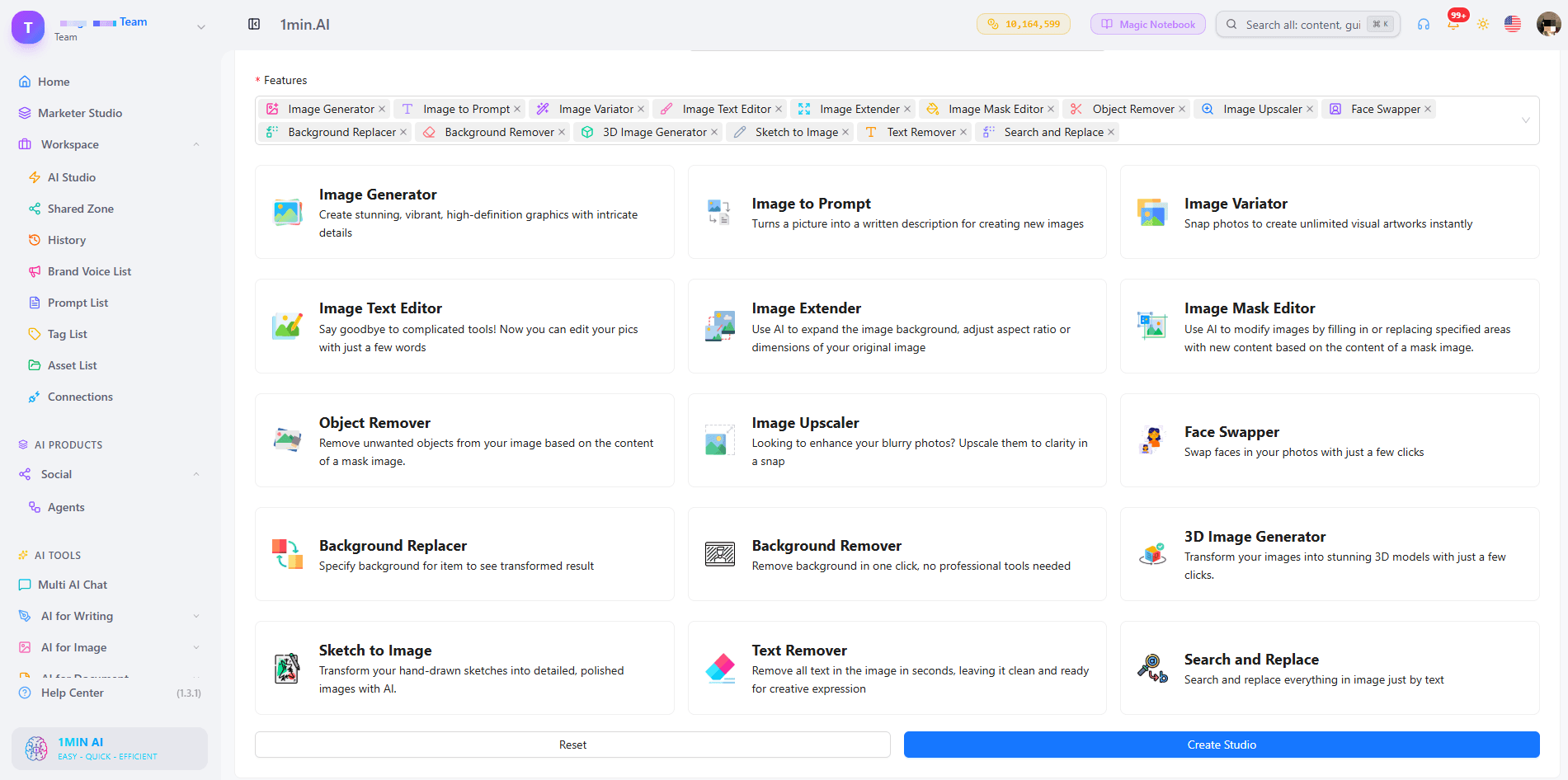
What Can You Edit With a Prompt in 1min.AI?
| Edit goal | Example prompt | 1min.AI tool |
|---|---|---|
| Swap an object or outfit | “Replace the blue jacket with a red leather jacket” | Search and Replace |
| Build a new scene | “Place the sneaker on a wet city street at dusk” | Background Replacer |
| Fix one precise area | Paint the area, then “Add a small window with a plant” | Image Mask Editor |
| Change wording in a design | “Change 20% OFF to 30% OFF” | Image Text Editor |
| Clean up clutter | “Remove the person behind the table” | Object Remover |
| Resize or sharpen | Widen the canvas, then upscale | Image Extender, Image Upscaler |
Replace Objects and Outfits With Search and Replace
Name what you want to find and what should replace it. The tool handles the selection, so you can run object search and replace edits, such as changing a sofa’s fabric or a product’s packaging color, without drawing an outline. Add “keep everything else unchanged” to protect the rest of the scene. For a deeper walkthrough, see this guide to object search and replace.
Swap Backgrounds Without Cutting Anything Out
Background Replacer removes the old scene and builds a new one from your description. Mention the place, time of day and mood, for example “sunlit studio with a soft white backdrop”. Here is a quick walkthrough:
Repaint Only the Area You Choose
The Image Mask Editor is for edits that need precision. Paint over a region, then describe what belongs there. This kind of mask-based editing keeps faces, logos and everything outside the mask untouched.
Edit Text Inside an Image
Image Text Editor lets you rewrite text that already sits inside a banner, label or screenshot. Type the new wording and the tool works to match the surrounding style. It is a fast way to update prices, dates and captions without rebuilding the design.
Start From Scratch, Then Edit
No source photo yet? Generate a base image first, then refine it with the editing tools. Creating and editing in one workspace means you never export, re-upload and start over.
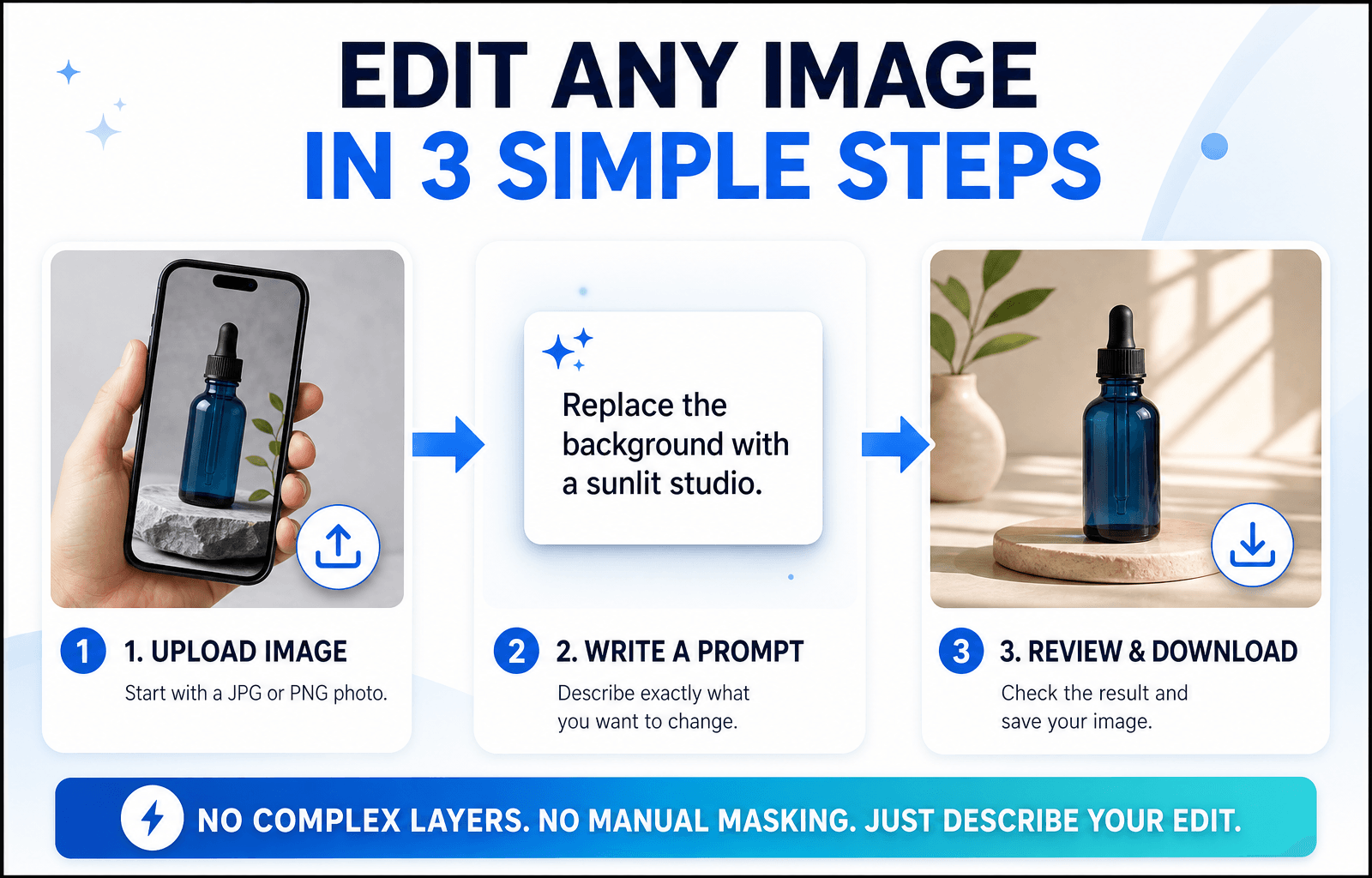
How to Edit an Image With a Prompt in 3 Steps
Step 1: Open the Editor and Upload Your Image
Choose the tool that matches your goal and upload a JPG or PNG. A sharp, well-lit photo with a clear subject gives the AI more to work with, so your edit looks more accurate.
Step 2: Write a Specific Prompt
Specific beats clever. Say what should change and what should stay the same.
The Prompt Formula
Object + Action + Style or Lighting + What stays unchanged
Three Prompts You Can Copy
- “Change the red jacket on the left to dark green denim. Keep the face and background unchanged.”
- “Replace the background with a sunlit studio and a soft white backdrop. Keep natural shadows under the product.”
- “Remove the cables on the desk and fill the area with the same wood texture.”
Edits usually miss because the prompt is too broad. This short video covers the most common mistakes:
Step 3: Review, Refine and Download
Zoom in and check edges, hands, text and shadows. If one detail is off, run a second prompt on that detail instead of stacking several requests in one line. Then download your image, which has no watermark. Save prompts that worked to your Prompt List so you can reuse them.
Editing People, Products or Landscapes: Which Setup Fits?
Photos of People
Describe clothing, hair color or background changes and add “keep the face unchanged”. For small fixes, use the mask tool so only the chosen area changes.
Product Photos
Swap backgrounds, remove reflections and recolor packaging while keeping labels sharp. Consistent backgrounds help a whole catalog look uniform.
Landscapes and Travel Shots
Remove crowds, adjust the sky or extend the frame to a wider format. Mention light and weather (“golden hour, clear sky”) so the edit blends naturally.
Browser Editor or Local Open-Source Model?
Open-source models run on your own computer. They offer deep control, but you manage installation, hardware and updates. A browser-based editor like 1min.AI needs none of that: open a tab, choose a tool and edit. If you want to start quickly or work across devices, the browser route is simpler. If you enjoy tuning models yourself, a local setup may suit you better.
What to Look for in the Best Free AI Image Editor With No Restrictions Online
Use this checklist for any tool you test:
- Full-sentence prompts rather than a fixed command menu
- Several edit types on the same image
- Precise control, such as masks for local changes
- Clean exports without a watermark
- Reusable prompts and assets so repeat work gets faster
- Clear policies about what the models can and cannot do
1min.AI covers each point in one workspace, with tools for text editing, object swapping, backgrounds, masks, extending and upscaling. AI Studio, Prompt List and Asset List are ready to use, and you can add a Shared Zone and History when you create an account.
You can also check how others rate the platform. 1min.AI holds SourceForge and Slashdot Top Business Software badges, is rated Excellent on Trustpilot and is listed on Capterra, Software Advice and GetApp.


FAQ
What is an AI image editor with prompt no restrictions?
It is an editor where you describe any change in your own words instead of picking from a locked list of actions. It still follows legal and model safety rules.
Is there a free AI image editor with prompt no restrictions?
Yes. You can try 1min.AI’s image editing tools free and download results without a watermark.
Does “no restrictions” mean anything goes?
No. Illegal content, content involving minors and deceptive or non-consensual images of real people are not allowed. Everything else is up to your creativity.
Which 1min.AI tool should I use to change text in an image?
Use Image Text Editor. Type the new wording and it updates the text inside the picture.
Do I need design skills?
No. If you can describe the change the way you would to a designer, you can edit with a prompt.
How do I write better edit prompts?
Name the object, state the action and add what should stay unchanged. Make one change per pass for the cleanest result.
Ready to Edit Your First Image?
Your next edit is one sentence away. Upload an image, type what you want to change and see the result in seconds.
- #Transaction
替代方案
探索 1minAI 的最佳替代方案,並比較其功能、定價和使用案例。

1min.AI 對比 OpenRouter
1min.AI 對比 OpenRouter:比較即用型 AI 創作產品同技術 API 工具。睇下你需要零程式碼創意工作室,定係編碼基礎設施中樞。
 Ngoc Hong

1min. AI vs Dola AI
想搵 Dola AI 替代方案?比較 1min.AI vs Dola AI 嘅影片生成、免費方案、收費同私隱,揀啱適合你嘅 AI 應用。
Ngoc Hong
1minAI vs Hix AI
比較 5 個 HIX AI 替代方案,涵蓋 AI 聊天、研究、寫作、圖片、影片、定價同靈活 AI 工作流程。
Ngoc HongAI 工具
探索最佳 AI 工具,提升生產力、創造力及日常工作效率。

一個產品,10 個 UGC 創意:AI 點樣令內容測試更輕鬆
用 AI UGC 影片生成器製作更真實嘅 UGC,測試更多創意角度,並喺唔使逐條拍攝嘅情況下擴大聯盟內容規模。
 Lien Anh Vu

只需幾個步驟,即可製作一致的卡通內容
用 1min.AI 透過 3 個簡單步驟製作 TikTok 同 Reels 卡通影片,由研究點子到角色再到動畫影片,一次完成。
Lien Anh Vu
為初創創辦人而設的 4 款最抵用 AI 工具
發掘 4 款最抵用嘅 AI 工具,幫初創創辦人驗證概念、建立產品、製作內容,同埋更快推出市場,而唔使超支。
 Tram Ta
AI 功能
全面的 AI 功能,可簡化工作流程、提升效率,讓團隊達成更多目標。

AI 應用案例
精選 AI 應用案例,涵蓋商業、生產力及各行業專用應用。
一個產品,10 個 UGC 創意:AI 點樣令內容測試更輕鬆
用 AI UGC 影片生成器製作更真實嘅 UGC,測試更多創意角度,並喺唔使逐條拍攝嘅情況下擴大聯盟內容規模。
Lien Anh Vu只需幾個步驟,即可製作一致的卡通內容
用 1min.AI 透過 3 個簡單步驟製作 TikTok 同 Reels 卡通影片,由研究點子到角色再到動畫影片,一次完成。
Lien Anh Vu
Instagram 最佳發帖時間:提升互動的實用指南
了解 Instagram 最佳發帖時間,包括不同受眾的最佳日子和時段,以及如何為你的帳戶找出理想的發帖時間表。
Tram TaAI 教學
透過實用的逐步教學,學習如何使用人工智能。
只需幾個步驟,即可製作一致的卡通內容
用 1min.AI 透過 3 個簡單步驟製作 TikTok 同 Reels 卡通影片,由研究點子到角色再到動畫影片,一次完成。
Lien Anh Vu
2026 黑色星期五 AI 工具優惠
探索 2026 黑色星期五 AI 工具優惠有咩選擇。了解點樣透過 AppSumo、Dealify、Stack Social 搶到 1min.AI 終身方案,並可喺 Trustpilot、Slashdot 同 Software Advice 核實。
 Hang Nguyen

使用 Seedance 的 AI 圖像轉影片產品一致性,停止變形並 масштаб化產品評測
以 AI 圖像轉影片產品一致性停止 logo 變形,立即在 1min.AI 製作 studio 級評測影片。
Lien Anh VuAI 指南
透過實用指南、真實案例和可操作嘅最佳實踐,更快咁學習 AI。
只需幾個步驟,即可製作一致的卡通內容
用 1min.AI 透過 3 個簡單步驟製作 TikTok 同 Reels 卡通影片,由研究點子到角色再到動畫影片,一次完成。
Lien Anh Vu
安全網上購買 AI 工具:2026 黑色星期五指南
了解如何在網上搵到同鎖定最佳黑色星期五 AI 優惠。學習專家策略,避開騙局、應對訂閱疲勞,並驗證軟件。
Hang Nguyen使用 Seedance 的 AI 圖像轉影片產品一致性,停止變形並 масштаб化產品評測
以 AI 圖像轉影片產品一致性停止 logo 變形,立即在 1min.AI 製作 studio 級評測影片。
Lien Anh VuAI 解決方案
瀏覽適用於自動化、編碼、研究、生產力、客戶支援、市場推廣及業務流程的最佳AI解決方案。
一個產品,10 個 UGC 創意:AI 點樣令內容測試更輕鬆
用 AI UGC 影片生成器製作更真實嘅 UGC,測試更多創意角度,並喺唔使逐條拍攝嘅情況下擴大聯盟內容規模。
Lien Anh Vu只需幾個步驟,即可製作一致的卡通內容
用 1min.AI 透過 3 個簡單步驟製作 TikTok 同 Reels 卡通影片,由研究點子到角色再到動畫影片,一次完成。
Lien Anh Vu
免費 AI 紋身生成器:自訂設計
用 1min.AI 的免費 AI 紋身生成器,將任何靈感變成自訂紋身設計。描述你的想法、選擇風格,幾秒內即可下載。
 Trang Tran
AI 模型
於一處探索全球頂尖嘅 AI 模型。
一個產品,10 個 UGC 創意:AI 點樣令內容測試更輕鬆
用 AI UGC 影片生成器製作更真實嘅 UGC,測試更多創意角度,並喺唔使逐條拍攝嘅情況下擴大聯盟內容規模。
Lien Anh Vu只需幾個步驟,即可製作一致的卡通內容
用 1min.AI 透過 3 個簡單步驟製作 TikTok 同 Reels 卡通影片,由研究點子到角色再到動畫影片,一次完成。
Lien Anh Vu使用 Seedance 的 AI 圖像轉影片產品一致性,停止變形並 масштаб化產品評測
以 AI 圖像轉影片產品一致性停止 logo 變形,立即在 1min.AI 製作 studio 級評測影片。
Lien Anh VuAI 比較
比較AI工具、模型及平台,尋找最適合您需求的選擇。

Kling AI 對 Veo 3:邊個模型勝出?
Kling AI 對 Veo 3:比較動態、原生音訊、定價同免費方案,睇下邊個 AI 影片生成器更適合你嘅項目——即刻喺 1min.AI 試晒兩個。
Trang Tran使用 Seedance 的 AI 圖像轉影片產品一致性,停止變形並 масштаб化產品評測
以 AI 圖像轉影片產品一致性停止 logo 變形,立即在 1min.AI 製作 studio 級評測影片。
Lien Anh Vu
DeepSeek V4 Pro 與 Flash 比較
比較 DeepSeek V4 Pro 與 DeepSeek V4 Flash 的指標。立即喺 1min.ai 優化你嘅 agentic apps,同提升 AI fact checking。
Ngoc HongAI 整合
將 AI 無縫整合到你現有的工具中,自動化工作並提升生產力。

如何使用 AI 時尚影片生成器製作 2026 時裝週內容
用 AI 將 2026 時裝週靈感變成驚艷時尚影片。學習如何發想、創作視覺,並以一個簡單流程將圖片轉成影片。
Lien Anh Vu
POV:你每日要製作 10+ 篇貼文
了解如何建立 AI 內容工作流程,幫助內容創作者透過 AI 發想、圖片生成同內容製作,更快每日產出 10+ 則社交媒體貼文。
Lien Anh Vu
停止在 AI 應用程式之間切換:AI 整合如何重塑僱主品牌
了解 AI 整合如何透過將 AI 寫作、文件、圖像、影片及多個 AI 模型整合到同一工作空間,幫助 HR 團隊簡化僱主品牌工作。
Tram Ta行業AI
為醫療保健、金融、教育、法律、製造、零售、房地產等行業尋找最佳AI工具和工作流程。

免費 AI 產品描述生成器
幾分鐘內寫出能帶來銷售的產品描述。使用這個免費 AI 產品描述生成器,將產品資料或相片轉成符合品牌的文案。試用 1min.AI。
Trang Tran
助初創企業提升利潤的最佳商業生產力工具 | 1minAI
探索最適合初創企業的商業生產力工具,節省時間、簡化工作流程、減少重複工作,並透過 AI 支援有利可圖的增長。
Tram Ta
最佳內容行銷 AI 工具|1minAI
搵緊最佳內容行銷 AI 工具?睇吓 1minAI 點樣幫市場人員喺同一個 AI 工作空間內做資料研究、寫作、重製內容、製作視覺素材同擴大產出。
Tram TaAI 代理
探索並運行 AI 代理,自動化您的工作和日常生活中的任務。


AI 工作流程
探索現成可用的 AI 工作流程,適用於生產力、營銷、銷售、支援等。
一個產品,10 個 UGC 創意:AI 點樣令內容測試更輕鬆
用 AI UGC 影片生成器製作更真實嘅 UGC,測試更多創意角度,並喺唔使逐條拍攝嘅情況下擴大聯盟內容規模。
Lien Anh Vu只需幾個步驟,即可製作一致的卡通內容
用 1min.AI 透過 3 個簡單步驟製作 TikTok 同 Reels 卡通影片,由研究點子到角色再到動畫影片,一次完成。
Lien Anh Vu如何使用 AI 時尚影片生成器製作 2026 時裝週內容
用 AI 將 2026 時裝週靈感變成驚艷時尚影片。學習如何發想、創作視覺,並以一個簡單流程將圖片轉成影片。
Lien Anh Vu電子報
1minAI 每週 AI 創新

🔮 每週 AI 創新 #143:更新 更新 GPT-6、GPT-6.1 與 Ideogram 4.0 與 Ideogram 4.0
在 1min.ai 取得 GPT-6 Sol、Luna、GPT-6.1 Sol 及 Ideogram 4.0。於同一平台將排版準確度提升至 98.4%,並把推理延遲降低 45%。
Hang Nguyen
🔮 每週 AI 創新 #142:Grok 4.7、Opus 5.5 與 Sonnet 5.5 登陸 1min.ai
在 1min.ai 存取 Grok 4.7、Claude Opus 5.5 及 Sonnet 5.5。透過單一整合工作區,最多可節省 70% 訂閱成本,並處理數以百萬計的 token。
Hang Nguyen
🔮 每週 AI 創新 #141:Seedance 2.5 與 Stable Audio 3:新一代 AI
在 1min.ai 探索 Seedance 2.0、2.5 以及 StabilityAI 的 Stable Audio 3。運用新一代生成式 AI 生成錄音室級音訊與同步動作。
Hang Nguyen