
Voice Cloning AI Free: How to Clone Any Voice Online in Minutes

Trang Tran
20 tháng 11, 2026

Try voice cloning AI free with 1min.AI. Upload a 5-second clip, pick an ElevenLabs model, choose from 32 languages, and turn text to speech in your own voice.
You have a script, a deadline, and a voice you wish you could reuse without booking another recording session. Voice cloning AI free options exist, and you can go from a short audio clip to a finished voiceover in a few minutes.
This guide compares the two main free routes (online tools and local apps), then walks you through the exact workflow in 1min.AI Voice Cloning, which runs on ElevenLabs models.
Quick answer: To clone a voice with AI for free, upload a clean audio sample of at least 5 seconds, type your script, and generate speech in the cloned voice. Online tools are fastest for one-off projects. Local open-source apps suit people who want offline use and don’t mind installing software. On 1min.AI, you can try Voice Cloning free in your browser. You don’t need to register.
Key takeaways
- Online tools need only a short sample and a browser. Local apps need installation and a capable computer.
- 1min.AI Voice Cloning uses ElevenLabs models (Eleven Flash v2.5 and Eleven Turbo v2.5) and supports 32 languages.
- Audio quality matters more than length. A clean 5-second clip beats a noisy 30-second one.
Voice Cloning AI Free: Online Tools vs Local Apps
Most people searching for free voice cloning want one of two things: a quick result in the browser, or a setup they can run on their own computer. Here is how the routes compare.
| Online voice cloning | Local open-source apps | |
|---|---|---|
| Best for | Quick projects, creators, marketers | Offline use, technical users |
| Setup | Open a browser, upload a clip | Download app and AI models |
| Hardware | Any device with a browser | A capable computer |
| Typical sample | 3 to 15 seconds | Varies by model |
| Languages | Often many, depending on the model | Depends on the model you install |
Online Voice Cloning for Quick Results
Online tools handle processing in the cloud. You upload a sample, type your text, and download the audio. That makes them the practical choice for social videos, podcasts, ads, and course narration.
Local Open-Source Apps for Offline Use
Local apps keep everything on your machine and can run offline after the models download. The trade-off is setup time and hardware requirements. If you want results this afternoon, online is simpler.
Where 1min.AI Fits
1min.AI is the online route. You open Voice Cloning, upload a clip, and run it. You don’t need to register for this tool. Voice Cloning also sits alongside the rest of the AI for Audio suite, including Text to Speech, Speech to Text, and Voice Changer.
How to Clone a Voice Free with 1min.AI
Here is the full workflow. It takes a few minutes the first time.
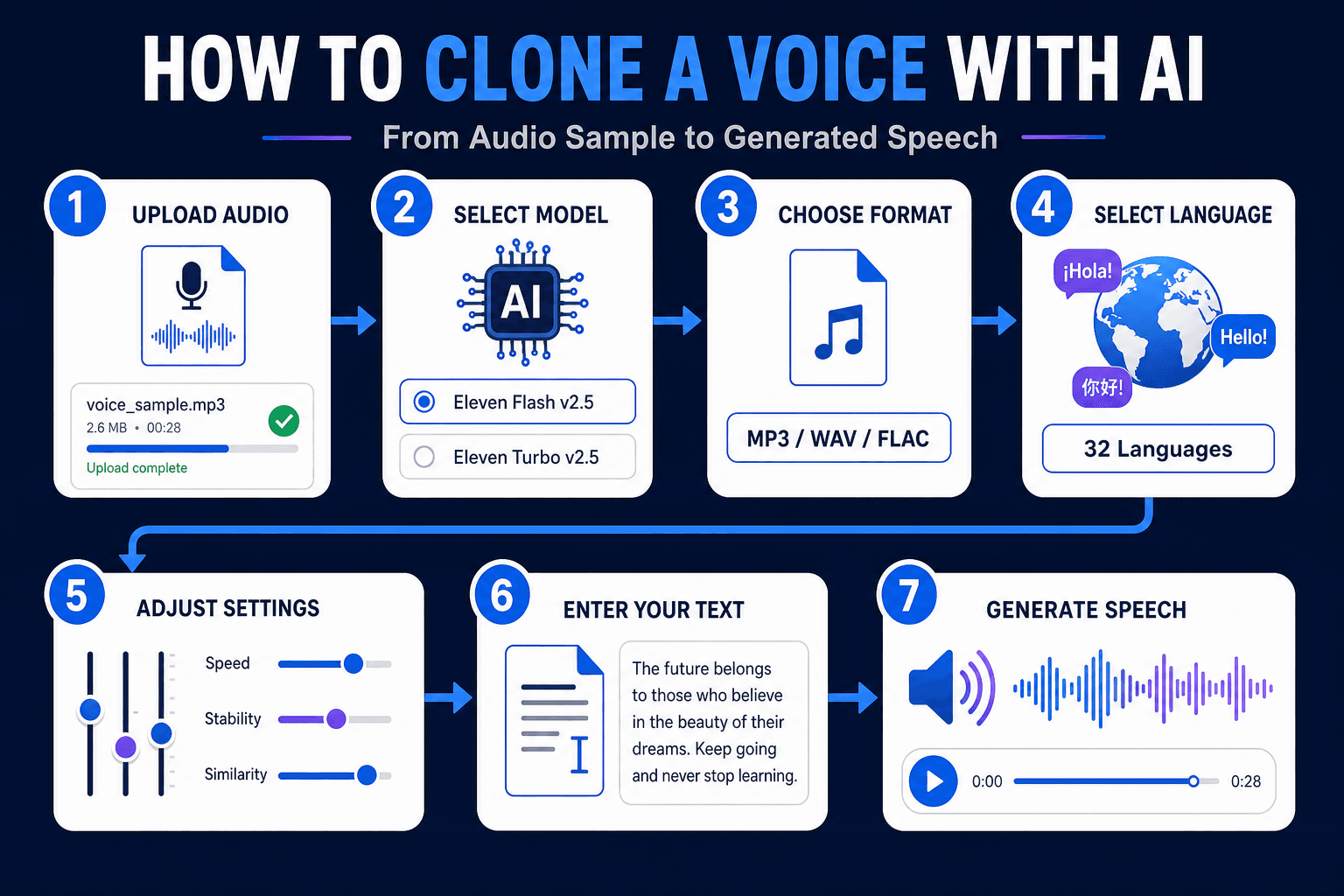
- Upload your audio: Drag and drop a single MP3, M4A, OGG, WAV, or FLAC file.
- Select Voice Cloning - ElevenLabs: This is the engine for the tool.
- Choose an output format: The default is mp3_44100_128. Options run from mp3_22050_32 (smallest file) to mp3_44100_192 (highest quality).
- Pick a model: Choose Eleven Flash v2.5 or Eleven Turbo v2.5.
- Select a language from 32 options.
- Adjust the voice settings (explained below).
- Type your text and click Run.
Want to see it in action first? Watch the walkthrough:
Clone Voice From an Audio File Free: Requirements
- Formats: MP3, M4A, OGG, WAV, FLAC
- File size: up to 11MB, one file at a time
- Minimum length: 5 seconds
What Each Voice Setting Does
| Setting | Range | What it changes |
|---|---|---|
| Remove Background Noise | Enable / Disable | Cleans the sample before cloning |
| Speed | 0.7 to 1.2 | Slows down or speeds up delivery |
| Stability | 0 to 1 | Lower is more expressive. Higher is more consistent |
| Similarity Boost | 0 to 1 | Higher stays closer to the original voice |
| Style | 0 to 1 | Increases or reduces the speaker’s stylistic exaggeration |
| Speaker Boost | Enable / Disable | Strengthens resemblance to the original speaker |
A good starting point is Remove Background Noise enabled, moderate Stability, and high Similarity Boost. Then generate a short test line and adjust one slider at a time.
ElevenLabs Voice Cloning Inside 1min.AI
Many people search for “elevenlabs voice cloning” because the technology has become a reference point for realistic synthetic speech. 1min.AI brings those models into one workspace, so you can use them without setting up separate tools. You can also explore the wider ElevenLabs voice changer, cloner, and text to speech tools on 1min.AI.
ElevenLabs Instant Voice Cloning Explained
Instant voice cloning means the system builds a voice from a short sample without a long training process. You upload a few seconds of speech, and the model captures timbre, pitch, and speaking rhythm. Then it applies them to new text. This is the approach behind the 5-second minimum in 1min.AI.
Eleven Flash v2.5 vs. Eleven Turbo v2.5
Both models are available in the tool, so you can match the model to the job.
- Eleven Flash v2.5: Built for speed. A good fit for quick drafts and short social clips.
- Eleven Turbo v2.5: A strong fit when you want to compare delivery quality across takes.
If you’re unsure, generate the same sentence with both and keep the one that sounds closer to your goal.
ElevenLabs Voice Cloning Text to Speech
Once your sample is uploaded, the text box works like a text to speech field. Type or paste your script, press Run, and the cloned voice reads it. Punctuation guides the rhythm, so use commas and full stops deliberately.
ElevenLabs Voice Cloning Review: What Stands Out
Users generally value three things in ElevenLabs-based cloning: natural intonation, short sample requirements, and fine-grained controls like Stability and Similarity Boost. Those are the same controls you get in 1min.AI.
ElevenLabs Voice Cloning API, Price, and Reddit Questions
- API: Developers who need to build voice cloning into their own app can review ElevenLabs’ official API documentation. 1min.AI is designed for no-code use in the browser.
- Price: Plan details change over time, so check the official pages for current figures. To see how the output sounds, you can try 1min.AI Voice Cloning first.
- Reddit: Discussion threads commonly focus on sample quality, consistency across long scripts, and consent. The tips below address the first two, and the responsible use section covers the third.
Tips for a Better Voice Clone
Start With a Clean Sample
Record in a quiet room, keep the microphone at a steady distance, and speak at a natural pace. Avoid music and other voices. If your recording has noise, run it through the AI Voice Isolator first, then upload the cleaned file.
Match the Sample to Your Goal
If you want a warm podcast tone, read your sample in that tone. The clone follows the energy of the source.
Test Short, Then Go Long
Generate one or two sentences, tune the sliders, and only then run your full script.
Languages and Use Cases
Hindi and 31 Other Languages
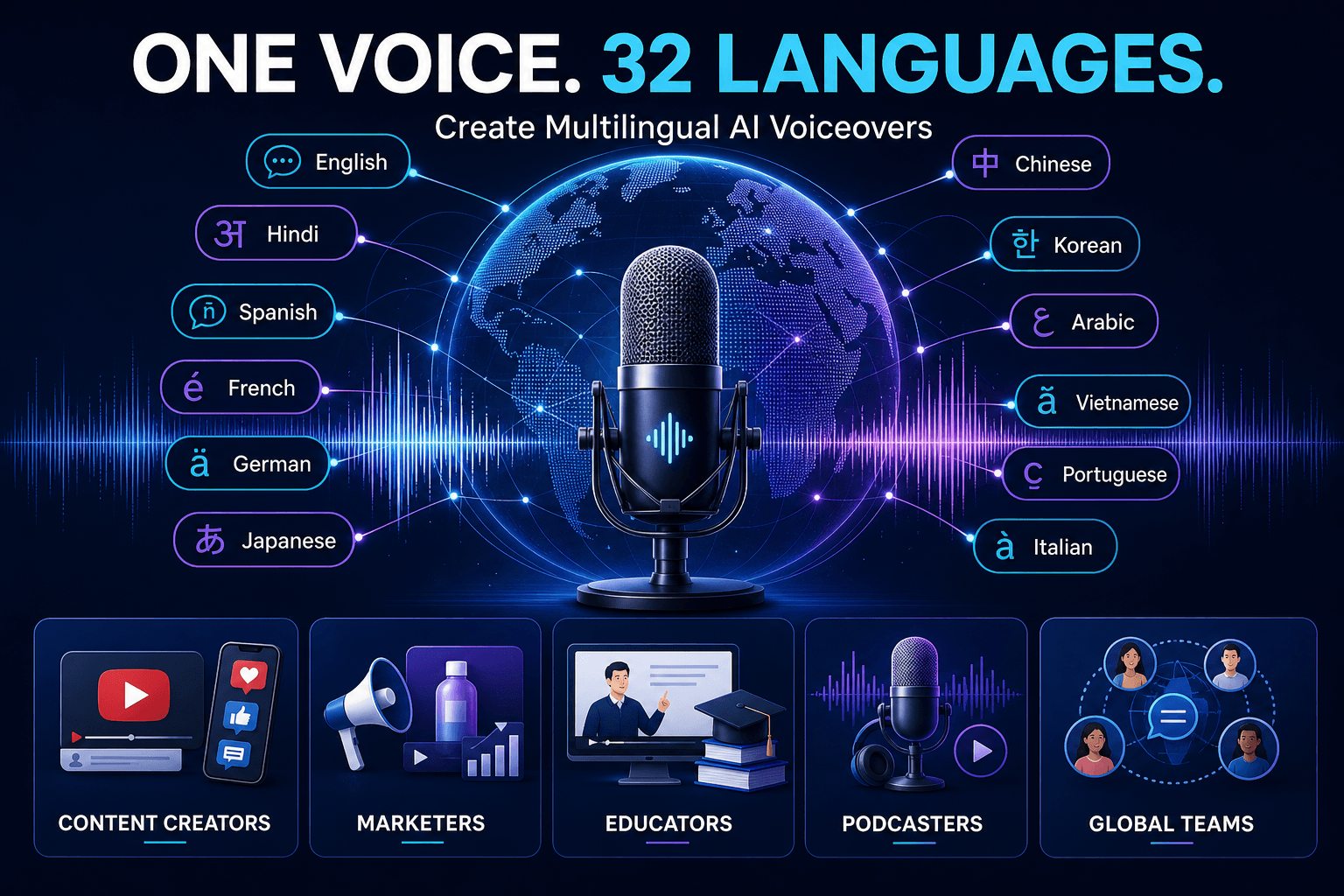
The tool supports English, Hindi, Spanish, French, German, Japanese, Chinese, Korean, Arabic, Vietnamese, Portuguese, Italian, Russian, Indonesian, Turkish, and many more, 32 in total. One voice sample can narrate in multiple languages, which helps with localization.
Who Uses Voice Cloning
- Content creators: Consistent voiceovers for YouTube, Shorts, and Reels
- Marketers: Ad narration and product explainers without studio time
- Educators: Course lessons in the instructor’s own voice
- Podcasters: Fix a line or add an intro without re-recording
- Global teams: Multilingual updates in one recognizable voice
Need a voice that doesn’t belong to anyone? Create one from a text description with AI Voice Design. If your goal is transforming an existing recording rather than generating new speech, a voice changer is the better fit. This comparison explains the difference:
Responsible Use of Voice Cloning
Only clone your own voice or a voice you have clear permission to use. Don’t impersonate real people, mislead listeners, or bypass identity checks. For commercial projects, keep a record of consent and the source of your audio.
FAQ: Voice Cloning AI Free
Can I clone a voice with AI for free?
Yes. You can try 1min.AI Voice Cloning free in your browser. Upload a clip of at least 5 seconds, enter your text, and click Run.
How long should the audio sample be?
At least 5 seconds. Clean, clear speech matters more than extra length.
Can I clone a voice from an audio file?
Yes. Upload one MP3, M4A, OGG, WAV, or FLAC file up to 11MB.
Does it support text to speech in other languages?
Yes. You can choose from 32 languages, including Hindi, Spanish, Arabic, Japanese, and Vietnamese.
Is it the same as a voice changer?
No. Voice cloning generates new speech from text in a target voice. A voice changer transforms an existing recording.
Can I clone singing voices?
1min.AI Voice Cloning is built for speech from text. For music, explore the Music Generator in the AI for Audio suite.
Is my voice data handled responsibly?
Use only audio you have the rights to. Review the 1min.AI Terms of Service and Privacy Policy for details on data handling.
Start Cloning Your Voice
A short clip, a few settings, and one click are all it takes to hear your script in a cloned voice. Open the tool, upload a sample, and try it yourself.
- #Commerce
Các lựa chọn thay thế
Khám phá các lựa chọn thay thế tốt nhất cho 1minAI và so sánh các tính năng, giá cả và trường hợp sử dụng.

1min.AI và OpenRouter
1min.AI và OpenRouter: So sánh sản phẩm tạo AI sẵn dùng với công cụ API kỹ thuật. Tìm hiểu xem bạn cần một studio sáng tạo không cần mã hóa hay một trung tâm hạ tầng lập trình.
 Ngoc Hong

1min. AI vs Dola AI
Đang tìm một lựa chọn thay thế Dola AI? So sánh 1min.AI vs Dola AI về tạo video, gói miễn phí, giá cả và quyền riêng tư để chọn ứng dụng AI phù hợp.
Ngoc Hong
1minAI vs Hix AI
So sánh 5 lựa chọn thay thế HIX AI cho AI chat, nghiên cứu, viết nội dung, hình ảnh, video, giá cả và quy trình AI linh hoạt.
Ngoc HongCông cụ AI
Khám phá các công cụ AI tốt nhất để tăng cường năng suất, sự sáng tạo và công việc hàng ngày.

Một Sản Phẩm, 10 Creative UGC: AI Giúp Việc Test Nội Dung Dễ Hơn Như Thế Nào
Tạo UGC chân thực hơn với AI UGC video generator, thử nhiều góc sáng tạo hơn và mở rộng nội dung affiliate mà không cần quay từng phiên bản.
 Lien Anh Vu

Tạo nội dung hoạt hình nhất quán chỉ trong vài bước
Tạo video hoạt hình cho TikTok và Reels chỉ với 3 bước đơn giản bằng 1min.AI, từ nghiên cứu ý tưởng đến nhân vật và video hoạt ảnh.
Lien Anh Vu
Top 4 Công cụ AI Giá cả phải chăng cho Nhà sáng lập Startup
Khám phá top 4 công cụ AI giá cả phải chăng dành cho các nhà sáng lập startup để xác thực ý tưởng, xây dựng sản phẩm, tạo nội dung và ra mắt nhanh hơn mà không tốn quá nhiều chi phí.
 Tram Ta
Tính năng AI
Các tính năng AI toàn diện giúp tinh gọn quy trình làm việc, nâng cao hiệu quả và trao quyền cho các nhóm đạt được nhiều hơn.
Một Sản Phẩm, 10 Creative UGC: AI Giúp Việc Test Nội Dung Dễ Hơn Như Thế Nào
Tạo UGC chân thực hơn với AI UGC video generator, thử nhiều góc sáng tạo hơn và mở rộng nội dung affiliate mà không cần quay từng phiên bản.
Lien Anh VuTạo nội dung hoạt hình nhất quán chỉ trong vài bước
Tạo video hoạt hình cho TikTok và Reels chỉ với 3 bước đơn giản bằng 1min.AI, từ nghiên cứu ý tưởng đến nhân vật và video hoạt ảnh.
Lien Anh Vu
1minAI: Công cụ kiểm tra ngữ pháp AI miễn phí
Kiểm tra ngữ pháp miễn phí với công cụ kiểm tra ngữ pháp AI của 1minAI. Phát hiện lỗi ngữ pháp, chính tả và viết, cải thiện độ rõ ràng và trau chuốt nội dung chỉ trong vài giây.
Tram TaCác Trường hợp Sử dụng AI
Một bộ sưu tập các trường hợp sử dụng AI được tuyển chọn cho doanh nghiệp, năng suất và các ứng dụng cụ thể trong ngành.
Một Sản Phẩm, 10 Creative UGC: AI Giúp Việc Test Nội Dung Dễ Hơn Như Thế Nào
Tạo UGC chân thực hơn với AI UGC video generator, thử nhiều góc sáng tạo hơn và mở rộng nội dung affiliate mà không cần quay từng phiên bản.
Lien Anh VuTạo nội dung hoạt hình nhất quán chỉ trong vài bước
Tạo video hoạt hình cho TikTok và Reels chỉ với 3 bước đơn giản bằng 1min.AI, từ nghiên cứu ý tưởng đến nhân vật và video hoạt ảnh.
Lien Anh Vu
Thời Điểm Tốt Nhất Để Đăng Bài Trên Instagram: Hướng Dẫn Thực Tế Để Tăng Tương Tác
Khám phá thời điểm tốt nhất để đăng bài trên Instagram, bao gồm những ngày và giờ tốt nhất cho từng nhóm đối tượng, cùng mẹo để tìm lịch đăng phù hợp nhất cho tài khoản của bạn.
Tram TaHướng dẫn AI
Học cách sử dụng AI với các hướng dẫn thực tế, từng bước.
Tạo nội dung hoạt hình nhất quán chỉ trong vài bước
Tạo video hoạt hình cho TikTok và Reels chỉ với 3 bước đơn giản bằng 1min.AI, từ nghiên cứu ý tưởng đến nhân vật và video hoạt ảnh.
Lien Anh Vu
Ưu đãi công cụ AI Black Friday năm 2026
Khám phá những ưu đãi công cụ AI Black Friday 2026 mang lại. Tìm hiểu cách săn deal trọn đời 1min.AI qua AppSumo, Dealify, Stack Social, và kiểm chứng trên Trustpilot, Slashdot, Software Advice.
 Hang Nguyen

Tính nhất quán sản phẩm từ ảnh sang video bằng AI với Seedance để ngăn méo hình và mở rộng đánh giá sản phẩm
Ngăn logo bị méo với tính nhất quán sản phẩm từ ảnh sang video bằng AI và tạo video đánh giá chuẩn studio trên 1min.AI ngay hôm nay.
Lien Anh VuHướng dẫn về AI
Học AI nhanh hơn với các hướng dẫn thực tế, ví dụ đời thực và các phương pháp hay nhất có thể áp dụng.
Tạo nội dung hoạt hình nhất quán chỉ trong vài bước
Tạo video hoạt hình cho TikTok và Reels chỉ với 3 bước đơn giản bằng 1min.AI, từ nghiên cứu ý tưởng đến nhân vật và video hoạt ảnh.
Lien Anh Vu
Mua an toàn các công cụ AI trực tuyến: Hướng dẫn Black Friday 2026
Khám phá cách tìm và săn các ưu đãi AI Black Friday tốt nhất online. Học chiến lược chuyên gia để tránh lừa đảo, chống mệt mỏi vì đăng ký và xác minh phần mềm.
Hang NguyenTính nhất quán sản phẩm từ ảnh sang video bằng AI với Seedance để ngăn méo hình và mở rộng đánh giá sản phẩm
Ngăn logo bị méo với tính nhất quán sản phẩm từ ảnh sang video bằng AI và tạo video đánh giá chuẩn studio trên 1min.AI ngay hôm nay.
Lien Anh VuGiải pháp AI
Duyệt qua các giải pháp AI tốt nhất cho tự động hóa, viết mã, nghiên cứu, năng suất, hỗ trợ khách hàng, tiếp thị và quy trình làm việc kinh doanh.
Một Sản Phẩm, 10 Creative UGC: AI Giúp Việc Test Nội Dung Dễ Hơn Như Thế Nào
Tạo UGC chân thực hơn với AI UGC video generator, thử nhiều góc sáng tạo hơn và mở rộng nội dung affiliate mà không cần quay từng phiên bản.
Lien Anh VuTạo nội dung hoạt hình nhất quán chỉ trong vài bước
Tạo video hoạt hình cho TikTok và Reels chỉ với 3 bước đơn giản bằng 1min.AI, từ nghiên cứu ý tưởng đến nhân vật và video hoạt ảnh.
Lien Anh Vu
Trình Tạo Hình Xăm AI Miễn Phí: Thiết Kế Tùy Chỉnh
Biến mọi ý tưởng thành mẫu hình xăm tùy chỉnh với trình tạo hình xăm AI miễn phí của 1min.AI. Mô tả ý tưởng, chọn phong cách và tải xuống trong vài giây.
 Trang Tran
Mô hình AI
Khám phá các mô hình AI hàng đầu thế giới tại một nơi.
Một Sản Phẩm, 10 Creative UGC: AI Giúp Việc Test Nội Dung Dễ Hơn Như Thế Nào
Tạo UGC chân thực hơn với AI UGC video generator, thử nhiều góc sáng tạo hơn và mở rộng nội dung affiliate mà không cần quay từng phiên bản.
Lien Anh VuTạo nội dung hoạt hình nhất quán chỉ trong vài bước
Tạo video hoạt hình cho TikTok và Reels chỉ với 3 bước đơn giản bằng 1min.AI, từ nghiên cứu ý tưởng đến nhân vật và video hoạt ảnh.
Lien Anh VuTính nhất quán sản phẩm từ ảnh sang video bằng AI với Seedance để ngăn méo hình và mở rộng đánh giá sản phẩm
Ngăn logo bị méo với tính nhất quán sản phẩm từ ảnh sang video bằng AI và tạo video đánh giá chuẩn studio trên 1min.AI ngay hôm nay.
Lien Anh VuSo sánh AI
So sánh các công cụ, mô hình và nền tảng AI để tìm ra lựa chọn phù hợp nhất cho nhu cầu của bạn.

Kling AI Vs Veo 3: Mô hình nào thắng?
Kling AI vs Veo 3: so sánh chuyển động, âm thanh gốc, giá cả & gói miễn phí để xem trình tạo video AI nào thắng cho dự án của bạn - thử cả hai trên 1min.AI.
Trang TranTính nhất quán sản phẩm từ ảnh sang video bằng AI với Seedance để ngăn méo hình và mở rộng đánh giá sản phẩm
Ngăn logo bị méo với tính nhất quán sản phẩm từ ảnh sang video bằng AI và tạo video đánh giá chuẩn studio trên 1min.AI ngay hôm nay.
Lien Anh Vu
So sánh DeepSeek V4 Pro và Flash
So sánh các chỉ số của DeepSeek V4 Pro và DeepSeek V4 Flash. Tối ưu hóa các ứng dụng agentic của bạn và cải thiện kiểm tra xác thực AI trên 1min.ai ngay hôm nay.
Tích hợp AI
Tích hợp AI liền mạch với các công cụ bạn đã sử dụng để tự động hóa công việc và tăng năng suất.

Cách Sử Dụng Trình Tạo Video Thời Trang AI cho Fashion Week 2026
Biến ý tưởng Fashion Week 2026 thành những video thời trang ấn tượng với AI. Tìm hiểu cách lên ý tưởng, tạo hình ảnh và chuyển ảnh thành video chỉ với một quy trình đơn giản.
Lien Anh Vu
POV: Bạn có hơn 10 bài đăng phải làm mỗi ngày
Tìm hiểu cách xây dựng quy trình nội dung AI giúp người sáng tạo nội dung tạo hơn 10 bài đăng mạng xã hội mỗi ngày nhanh hơn với brainstorming, tạo hình ảnh và sáng tạo nội dung bằng AI.
Lien Anh Vu
Ngừng Chuyển Đổi Giữa Các Ứng Dụng AI: Cách Tích Hợp AI Chuyển Đổi Thương Hiệu Nhà Tuyển Dụng
Khám phá cách tích hợp AI giúp các đội ngũ HR tối ưu hóa thương hiệu nhà tuyển dụng bằng cách kết hợp viết AI, tài liệu, hình ảnh, video và nhiều mô hình AI vào một không gian làm việc duy nhất.
Tram TaAI cho các ngành công nghiệp
Tìm các công cụ và quy trình làm việc AI tốt nhất cho y tế, tài chính, giáo dục, pháp lý, sản xuất, bán lẻ, bất động sản và nhiều lĩnh vực khác.

Trình tạo mô tả sản phẩm AI miễn phí
Viết mô tả sản phẩm thuyết phục chỉ trong vài phút. Dùng trình tạo mô tả sản phẩm AI miễn phí này để biến chi tiết hoặc ảnh thành nội dung đúng giọng thương hiệu. Thử 1min.AI.
Trang Tran
Công Cụ Năng Suất Tốt Nhất Cho Startup Để Tối Đa Hóa Lợi Nhuận | 1minAI
Khám phá các công cụ năng suất kinh doanh tốt nhất cho startup để tiết kiệm thời gian, tối ưu quy trình làm việc, giảm tác vụ lặp lại và hỗ trợ tăng trưởng có lợi nhuận với AI.
Tram Ta
Công Cụ AI Tốt Nhất Cho Content Marketing |1minAI
Bạn đang tìm công cụ AI tốt nhất cho content marketing? Xem cách 1minAI giúp marketer nghiên cứu, viết, tái sử dụng, tạo hình ảnh và mở rộng nội dung từ một không gian làm việc AI duy nhất.
Tram TaTác nhân AI
Khám phá và vận hành các tác nhân AI để tự động hóa các tác vụ trong công việc và cuộc sống hàng ngày của bạn.
1minAI: Công cụ kiểm tra ngữ pháp AI miễn phí
Kiểm tra ngữ pháp miễn phí với công cụ kiểm tra ngữ pháp AI của 1minAI. Phát hiện lỗi ngữ pháp, chính tả và viết, cải thiện độ rõ ràng và trau chuốt nội dung chỉ trong vài giây.
Tram Ta
AI Agents cho Facebook
Sử dụng AI Agent cho Facebook để tạo nội dung, tạo hình ảnh, lên lịch bài đăng và xuất bản từ tài liệu và hội thoại của bạn.
Ngoc Hong
AI Agent vs AI Assistant: Cái nào thực sự giúp designer tiết kiệm thời gian hơn?
Tìm hiểu sự khác nhau giữa AI Agent và AI Assistant, và khám phá giải pháp nào giúp designer tự động hóa công việc lặp lại, giảm số lần chỉnh sửa và tiết kiệm nhiều thời gian hơn.
Lien Anh VuQuy trình AI
Khám phá các quy trình làm việc AI sẵn sàng sử dụng cho năng suất, tiếp thị, bán hàng, hỗ trợ và nhiều hơn nữa.
Một Sản Phẩm, 10 Creative UGC: AI Giúp Việc Test Nội Dung Dễ Hơn Như Thế Nào
Tạo UGC chân thực hơn với AI UGC video generator, thử nhiều góc sáng tạo hơn và mở rộng nội dung affiliate mà không cần quay từng phiên bản.
Lien Anh VuTạo nội dung hoạt hình nhất quán chỉ trong vài bước
Tạo video hoạt hình cho TikTok và Reels chỉ với 3 bước đơn giản bằng 1min.AI, từ nghiên cứu ý tưởng đến nhân vật và video hoạt ảnh.
Lien Anh VuCách Sử Dụng Trình Tạo Video Thời Trang AI cho Fashion Week 2026
Biến ý tưởng Fashion Week 2026 thành những video thời trang ấn tượng với AI. Tìm hiểu cách lên ý tưởng, tạo hình ảnh và chuyển ảnh thành video chỉ với một quy trình đơn giản.
Lien Anh VuBản tin
Đổi mới AI hàng tuần với 1minAI

🔮 Đổi mới AI hàng tuần #142: Grok 4.7, Opus 5.5 & Sonnet 5.5 trên 1min.ai
Truy cập Grok 4.7, Claude Opus 5.5 và Sonnet 5.5 trên 1min.ai. Giảm chi phí thuê bao tới 70% và xử lý hàng triệu token trong một không gian làm việc thống nhất.
Hang Nguyen
🔮 Cập nhật AI hàng tuần #143: Cập nhật GPT-6, GPT-6.1 & Ideogram 4.0 & Ideogram 4.0
Truy cập GPT-6 Sol, Luna, GPT-6.1 Sol và Ideogram 4.0 trên 1min.ai. Nâng độ chính xác kiểu chữ lên 98,4% và giảm độ trễ suy luận 45% trong một nền tảng.
Hang Nguyen
🔮 Cập nhật AI hàng tuần #141: Seedance 2.5 & Stable Audio 3: AI thế hệ mới
Khám phá Seedance 2.0, 2.5 và Stable Audio 3 của StabilityAI trên 1min.ai. Tạo âm thanh chuẩn phòng thu và chuyển động đồng bộ với AI tạo sinh thế hệ mới.
Hang Nguyen