
1minAI vs EasyGen: Which Is the Best LinkedIn Content Agent?

Tram Ta
20 tháng 11, 2026
Looking for an EasyGen alternative? Compare 1minAI vs EasyGen for LinkedIn research, AI writing, personalization, visuals, and content publishing.
Creating LinkedIn content consistently takes more than writing a few paragraphs. You need to find relevant topics, understand your audience, develop ideas, write in your own voice, and keep your publishing schedule organized.
EasyGen was built to make LinkedIn post creation faster, using creator insights, trending topics, and AI writing to help users develop content. But if you're looking for an EasyGen alternative, you may want a workflow that goes beyond drafting posts.
1minAI and EasyGen approach LinkedIn content differently. EasyGen focuses on LinkedIn content creation and creator-inspired writing. 1minAI's LinkedIn Agent is designed to connect research, writing, visual content, and publishing within a broader AI workspace.
There's also an important update for new users: EasyGen's official website now says the product has been acquired and is no longer accepting new signups, while existing customers can continue to log in. In this guide, we'll compare 1minAI vs EasyGen, examine their key differences, and help you decide which LinkedIn content workflow fits your needs.
What Is EasyGen?
EasyGen is an AI-powered LinkedIn content tool created by Ruben Hassid. It was designed to help creators and professionals generate LinkedIn posts using creator research, trending topics, and personalized writing settings.
Rather than functioning as a general-purpose AI chatbot, EasyGen focuses on helping users create LinkedIn content more efficiently.
Its workflow is built around finding ideas, generating posts, refining the writing, and managing content.
EasyGen's Key Features
Based on EasyGen's publicly described product capabilities, its main features include:
Creator research and content analysis
EasyGen helps users explore successful LinkedIn creators and posts. This provides inspiration for understanding content formats and identifying ideas relevant to their niche.
Trending topic discovery
The platform has offered topic discovery across sources such as Reddit, X, and Google, helping users find subjects to discuss on LinkedIn.
AI LinkedIn post generation
Users can generate posts from their own topics, content ideas, or research. The tool focuses on creating LinkedIn-oriented drafts rather than general-purpose writing.
Writing style customization
EasyGen provides style settings intended to make generated posts sound more like the user's preferred tone. Its official site describes customization around tone, intensity, and examples.
Voice-note dictation
Users can provide ideas through voice notes and turn them into LinkedIn-ready drafts.
Content calendar and draft management
EasyGen has described a content calendar and a unified view for managing drafts and published posts. Check the current account interface for the exact scheduling and publishing capabilities available to existing customers.
EasyGen's Strengths
EasyGen's core value is its focus on LinkedIn content.
- It helps users find content inspiration from creators and trending topics.
- It is designed specifically for LinkedIn post creation.
- It offers writing-style customization.
- It can turn raw ideas or voice notes into drafts.
- It provides content organization features for managing the writing workflow.
For creators who primarily want help writing LinkedIn posts, these capabilities address a real problem: turning ideas into publishable content without starting from a blank page.
EasyGen's Limitations for New Users
The most important current limitation is product availability.
EasyGen's official website states that it has been acquired and is not accepting new signups. Existing customers can still log in.
For someone who has never used EasyGen, this means the product may not be an available starting point.
There are also broader workflow considerations:
- EasyGen is focused on LinkedIn rather than a wider range of AI tasks.
- Its main positioning centers on content generation, creator research, and writing.
- Users looking for an integrated research-to-publishing workflow should check whether the current product supports every step they need.
- Pricing and feature access should be confirmed directly, especially given the acquisition and signup status.
If you're evaluating a replacement, the key question is no longer just which tool writes a better post. It's which workflow can help you consistently research, create, review, and publish content.
What Is 1minAI's LinkedIn Content Agent?
1minAI is an AI workspace with tools for writing, research, images, documents, and other content workflows.
Its LinkedIn Agent is designed to help users move from a raw idea or source material to LinkedIn-ready content, with research, writing, visuals, and publishing connected in one workflow.
You can explore the official 1minAI LinkedIn Agent page to review its current capabilities.
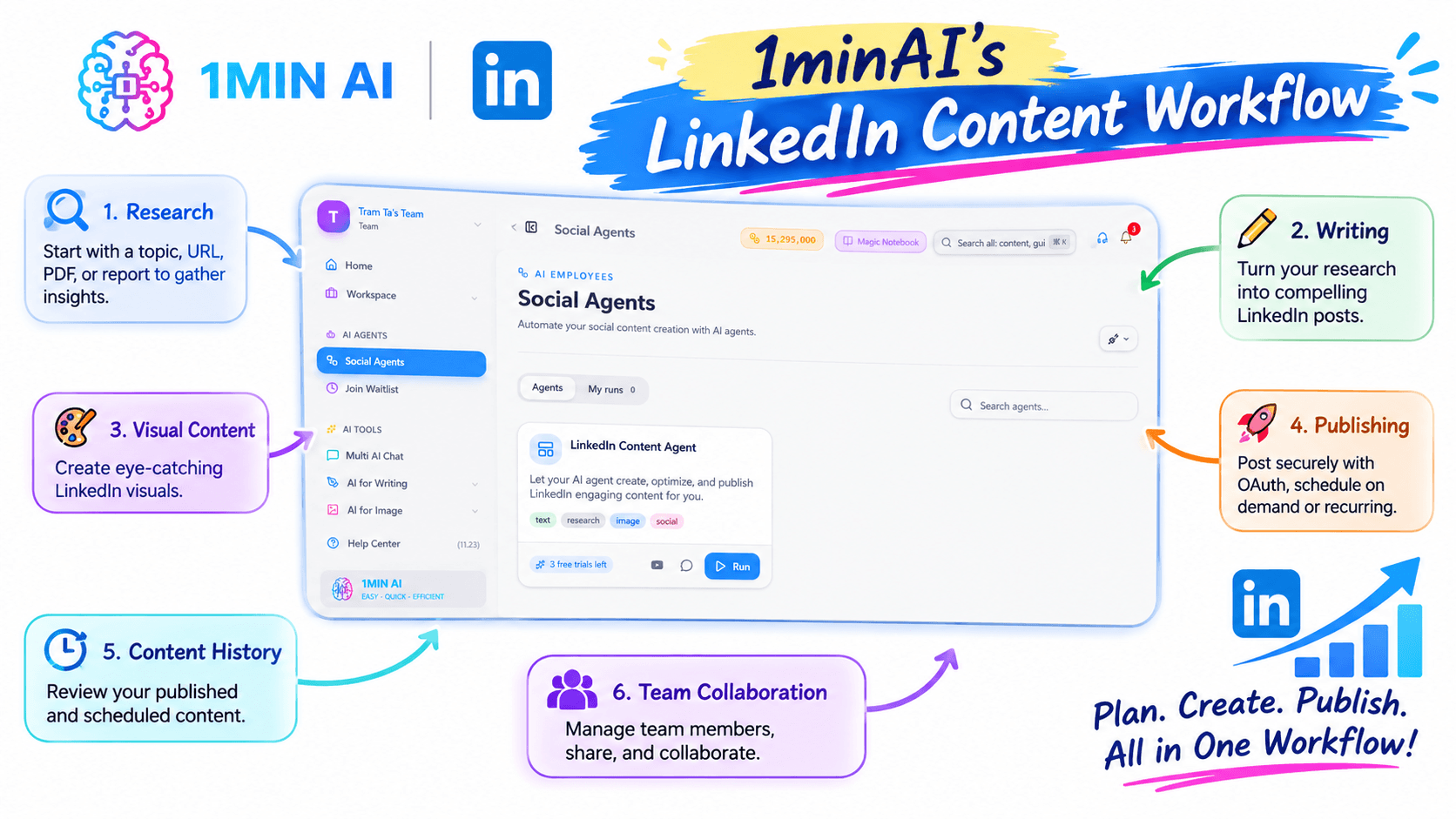
1minAI's LinkedIn Content Workflow
The LinkedIn Agent is positioned around several connected tasks:
Research
Start with a topic, URL, PDF, report, or other source material. The workflow can use research to develop more informed LinkedIn content rather than relying only on a generic prompt.
Writing
Turn the research or idea into a LinkedIn post. The workflow supports post structures, hooks, and content frameworks designed for LinkedIn.
Visual content
Create visuals that support the message of the post, including LinkedIn-sized graphics and other AI-generated image content.
Publishing
The official comparison page describes publishing through a secure OAuth connection, with on-demand and recurring scheduling options. Users should review the current connection and publishing settings before enabling automation.
Content history
The workflow includes a history of published and scheduled content, helping users review their content activity.
Team collaboration
1minAI also describes member management, sharing, and collaboration capabilities for teams. Availability and current limitations should be checked on the official product page.
The key distinction is that 1minAI's LinkedIn Agent is designed as a connected workflow, rather than only a post-generation experience.
1minAI vs EasyGen: Feature Comparison
Here's a high-level comparison based on publicly described product capabilities.
| Feature | EasyGen | 1minAI LinkedIn Agent |
|---|---|---|
| Primary focus | LinkedIn post generation and creator-inspired content | Research-to-publishing LinkedIn workflow |
| Content research | Creator search, post analysis, and trending-topic discovery | Research from links, PDFs, reports, and topics |
| AI post generation | LinkedIn-focused post drafts | LinkedIn hooks, frameworks, and post creation |
| Writing personalization | Tone, intensity, and writing-style customization | Context-driven writing from supplied research and instructions |
| Visual content | Check current product access and features | AI-generated visuals connected to the post workflow |
| Publishing | Existing customers should verify current access and publishing options | Official page describes OAuth publishing and scheduling |
| Content history | Content calendar and draft management have been described | History of published and scheduled posts |
| Team workflow | Check current product availability | Member management, sharing, and collaboration |
| Signup availability | Official site says no new signups | Explore current 1minAI access and plan options |
| Broader AI tools | LinkedIn-focused | Broader AI workspace with writing, image, document, and other tools |
The comparison is based on publicly described features, not a live hands-on test of every feature. EasyGen's acquisition and signup status make current access especially important to verify.
Why Consider 1minAI as an EasyGen Alternative?
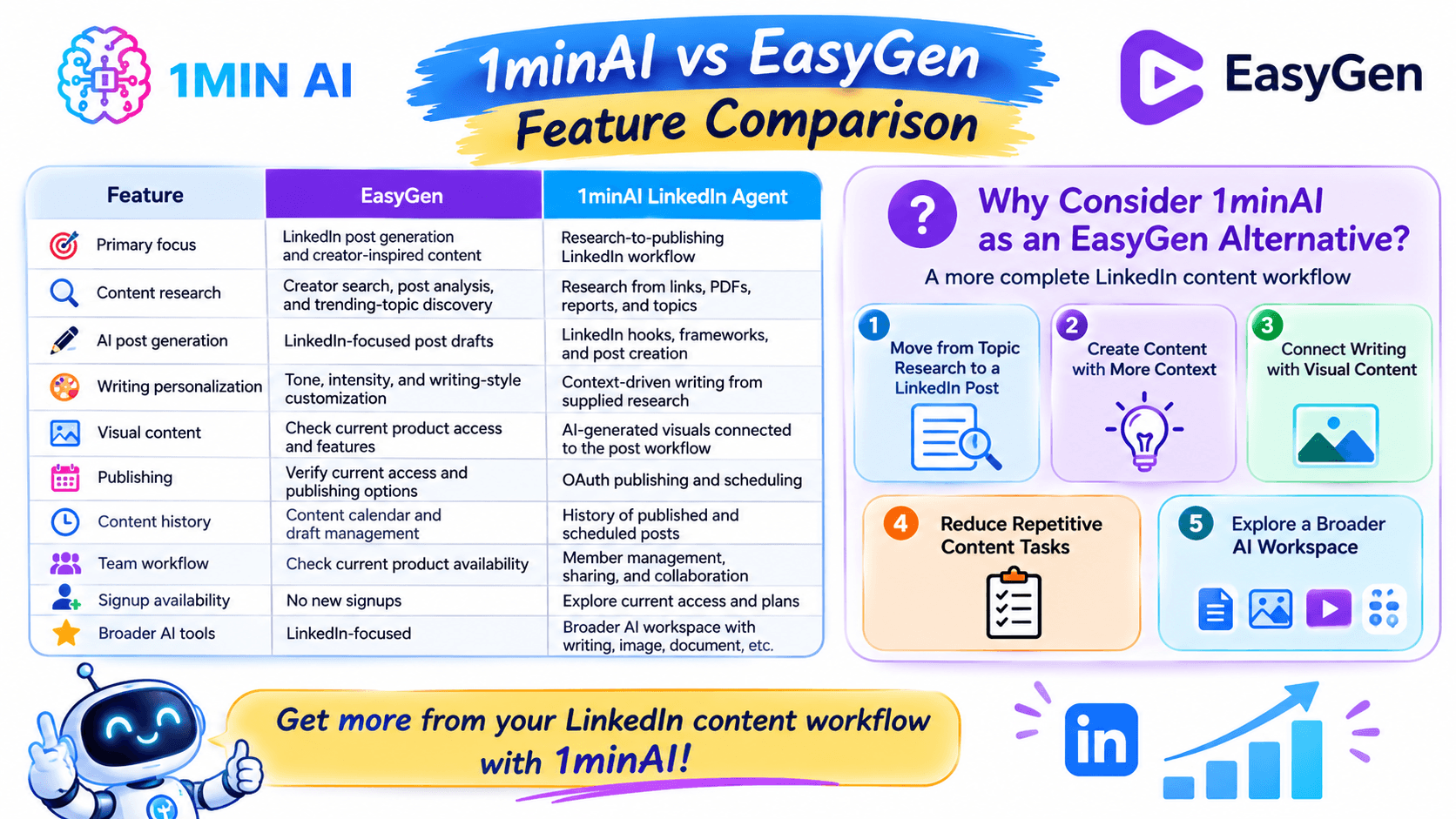
If you are searching for an EasyGen alternative, you may already know what you want from an AI LinkedIn tool: relevant ideas, writing that sounds natural, and a process that doesn't take hours every week.
1minAI is worth considering if you want to connect those needs with a broader content workflow.
1. Move from Topic Research to a LinkedIn Post
One challenge with LinkedIn content is that finding an idea and writing a useful post are two different tasks.
You might have a report, an article, a product update, or a business insight. The challenge is turning that source into a post that communicates one clear message.
With 1minAI's research-oriented workflow, you can start from source material and develop a post around its relevant findings.
For example:
- Start with a report or article.
- Identify the main insight.
- Choose the audience and content angle.
- Develop a LinkedIn hook.
- Turn the insight into a structured post.
- Review the final draft before publishing.
This approach is especially useful for founders, consultants, and marketers who want to share informed perspectives rather than generic motivational content.
2. Create Content with More Context
A good LinkedIn post should reflect the author's knowledge, audience, and purpose.
Instead of asking AI to write about a broad topic, provide relevant source material and explain what you want to communicate.
For example, a founder might provide a product update and ask the AI to turn it into a post explaining a customer problem, the solution, and the lesson learned.
The more relevant context you provide, the easier it is to create a post that reflects your actual work.
1minAI can support this research-and-writing process, while the final review remains important for checking facts, voice, and positioning.
3. Connect Writing with Visual Content
LinkedIn content doesn't always need to be text-only.
A visual can help explain a concept, highlight a key insight, or make a post easier to scan.
1minAI's LinkedIn Agent is designed to connect post creation with AI-generated visuals, so users can explore a more complete content workflow.
For example, you could create:
- A simple graphic explaining a business insight.
- A quote card highlighting a key point.
- A visual summary of a report.
- An illustration supporting a product announcement.
The goal isn't to add an image to every post. It's to create visual content when it helps communicate the message.
4. Reduce Repetitive Content Tasks
LinkedIn content creation often involves repeating the same steps:
- Find a topic.
- Research the subject.
- Draft the post.
- Edit the writing.
- Prepare a visual.
- Schedule or publish.
- Review the content history.
A connected workflow can reduce the need to manage these tasks across multiple disconnected tools.
1minAI's LinkedIn Agent is designed to bring research, writing, visuals, and publishing together. This can be useful for people who want to spend less time coordinating tools and more time developing useful content.
5. Explore a Broader AI Workspace
EasyGen is built specifically for LinkedIn content.
1minAI provides a broader set of AI capabilities, including writing, image, document, and other tools.
That distinction matters if your content workflow extends beyond LinkedIn.
For example, you might use AI to:
- Research a topic for a LinkedIn post.
- Draft the post.
- Create a supporting visual.
- Repurpose the research into a blog outline.
- Prepare a newsletter draft.
- Review or summarize source documents.
You can explore the broader 1minAI Features page to see which tools fit your workflow.
How to Automate Your LinkedIn Content Workflow with 1minAI
If your goal is to create consistent LinkedIn content without the daily scramble, start with a simple workflow.
The following example shows how a founder or marketer could turn one source into a LinkedIn post.
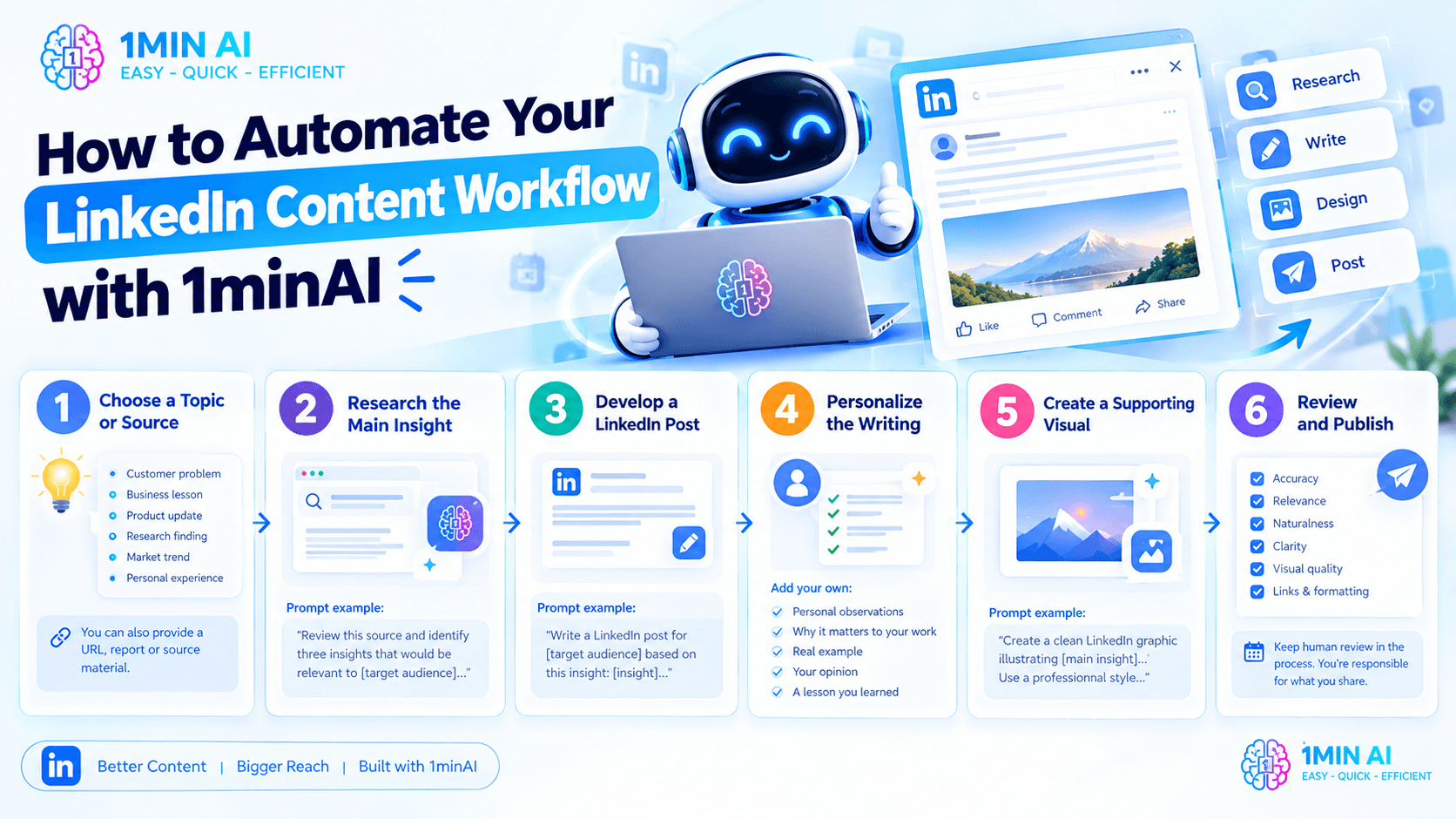
Step 1: Choose a Topic or Source
Start with a subject that matters to your audience.
It could be:
- A customer problem.
- A business lesson.
- A product update.
- A research finding.
- A market trend.
- A personal experience.
You can also provide a URL, report, or other relevant source material when your post needs factual support.
Step 2: Research the Main Insight
Ask AI to identify the most useful information from the source.
Prompt example:
"Review this source and identify three insights that would be relevant to [target audience]. For each insight, explain why it matters, what evidence supports it, and how it could become a LinkedIn post. Do not invent statistics or claims."
Choose the insight that best matches your audience and content goal.
Step 3: Develop a LinkedIn Post
Once you have an angle, turn it into a draft.
Prompt example:
"Write a LinkedIn post for [target audience] based on this insight: [insight]. Start with a clear hook, explain the problem, share the key lesson, and end with a useful takeaway. Use a natural professional tone. Avoid exaggerated claims and generic motivational language."
Review the result and make sure the post reflects your perspective.
Step 4: Personalize the Writing
AI-generated content should not replace your own experience.
Add details such as:
- What you personally observed.
- Why the topic matters to your work.
- A real example.
- Your own opinion.
- A lesson you learned.
This helps make the post more distinctive and credible.
Step 5: Create a Supporting Visual
If the post benefits from an image, use the available AI image tools to develop a visual concept.
Prompt example:
"Create a clean LinkedIn graphic illustrating [main insight]. Use a professional visual style, a simple composition, and enough whitespace for readability. Avoid adding unsupported statistics or unnecessary text."
Check that the visual communicates the same message as the post.
Step 6: Review and Publish
Before publishing, review:
- Accuracy of the information.
- Relevance to the intended audience.
- Naturalness of the writing.
- Clarity of the main takeaway.
- Visual quality.
- Links and formatting.
Then use the available publishing workflow to schedule or publish the post, if your account and connection support it.
The important principle is to keep human review in the process. AI can help research and create content, but you should remain responsible for what appears on your LinkedIn profile.
Which Tool Should You Choose?
The best choice depends on your current situation.
Choose EasyGen if:
- You are an existing customer and can still access the product.
- You primarily want LinkedIn post generation.
- Creator research and trending-topic inspiration are important to your workflow.
- You value its writing-style customization.
- Its current features meet your content needs.
However, EasyGen's official website says it is no longer accepting new signups. If you are a new user, you should consider whether another tool is a more practical starting point.
Consider 1minAI if:
- You want to explore an AI-assisted LinkedIn content workflow.
- You need research from source materials before writing.
- You want to connect post creation with visual content.
- You want to explore publishing and scheduling in the same workflow.
- You also use AI for writing, images, documents, and other business tasks.
- You want to reduce repetitive work across the content process.
For users looking for a new LinkedIn content solution, 1minAI is worth evaluating because it connects more stages of the content workflow.
Frequently Asked Questions
Is EasyGen still available?
EasyGen's official website currently says it has been acquired and is not accepting new signups. Existing customers can still log in. If you already have an account, check the official site for current access and product information.
What is the best EasyGen alternative?
The best alternative depends on your workflow.
If you want a tool focused on LinkedIn writing and creator inspiration, look for those specific features. If you want research, writing, visual content, and publishing connected in one workflow, consider evaluating 1minAI's LinkedIn Agent.
Is 1minAI an AI LinkedIn post generator?
1minAI's LinkedIn Agent includes AI-assisted LinkedIn content creation as part of a broader workflow. Its official page describes research, writing, visuals, and publishing capabilities.
Can 1minAI help me create LinkedIn content from research?
The LinkedIn Agent is designed to support research from links, PDFs, reports, and topics, then use that research in the content workflow. Review the generated post and verify any facts before publishing.
Can I schedule LinkedIn posts with 1minAI?
The official LinkedIn Agent page describes publishing through a secure OAuth connection, including on-demand and recurring schedules. Confirm the current publishing options, account requirements, and permissions in the product before using them.
Does 1minAI support more than LinkedIn?
Yes. 1minAI is a broader AI workspace with tools for writing, images, documents, and other tasks. Explore the 1minAI Features page for the current product offering.
Conclusion: 1minAI vs EasyGen
EasyGen built its value around helping creators write LinkedIn posts using creator research, trending topics, and personalized writing settings. For existing users who can still access it, those features may remain useful.
But for new users, EasyGen's current signup status is an important consideration: its official website says it is no longer accepting new registrations.
1minAI is worth considering if you want a broader LinkedIn content workflow. Its LinkedIn Agent is designed to connect research, writing, visual creation, and publishing, while the wider 1minAI workspace supports other AI-powered tasks.
Rather than spending time coordinating separate tools, you can explore a workflow that starts with an idea or source and moves toward a reviewed LinkedIn post.
Ready to explore?
- #Commerce
- #Information
Các lựa chọn thay thế
Khám phá các lựa chọn thay thế tốt nhất cho 1minAI và so sánh các tính năng, giá cả và trường hợp sử dụng.

1min.AI và OpenRouter
1min.AI và OpenRouter: So sánh sản phẩm tạo AI sẵn dùng với công cụ API kỹ thuật. Tìm hiểu xem bạn cần một studio sáng tạo không cần mã hóa hay một trung tâm hạ tầng lập trình.
 Ngoc Hong

1min. AI vs Dola AI
Đang tìm một lựa chọn thay thế Dola AI? So sánh 1min.AI vs Dola AI về tạo video, gói miễn phí, giá cả và quyền riêng tư để chọn ứng dụng AI phù hợp.
Ngoc Hong
1minAI vs Hix AI
So sánh 5 lựa chọn thay thế HIX AI cho AI chat, nghiên cứu, viết nội dung, hình ảnh, video, giá cả và quy trình AI linh hoạt.
Ngoc HongCông cụ AI
Khám phá các công cụ AI tốt nhất để tăng cường năng suất, sự sáng tạo và công việc hàng ngày.

Một Sản Phẩm, 10 Creative UGC: AI Giúp Việc Test Nội Dung Dễ Hơn Như Thế Nào
Tạo UGC chân thực hơn với AI UGC video generator, thử nhiều góc sáng tạo hơn và mở rộng nội dung affiliate mà không cần quay từng phiên bản.
 Lien Anh Vu

Tạo nội dung hoạt hình nhất quán chỉ trong vài bước
Tạo video hoạt hình cho TikTok và Reels chỉ với 3 bước đơn giản bằng 1min.AI, từ nghiên cứu ý tưởng đến nhân vật và video hoạt ảnh.
Lien Anh Vu
Top 4 Công cụ AI Giá cả phải chăng cho Nhà sáng lập Startup
Khám phá top 4 công cụ AI giá cả phải chăng dành cho các nhà sáng lập startup để xác thực ý tưởng, xây dựng sản phẩm, tạo nội dung và ra mắt nhanh hơn mà không tốn quá nhiều chi phí.
 Tram Ta
Tính năng AI
Các tính năng AI toàn diện giúp tinh gọn quy trình làm việc, nâng cao hiệu quả và trao quyền cho các nhóm đạt được nhiều hơn.
Một Sản Phẩm, 10 Creative UGC: AI Giúp Việc Test Nội Dung Dễ Hơn Như Thế Nào
Tạo UGC chân thực hơn với AI UGC video generator, thử nhiều góc sáng tạo hơn và mở rộng nội dung affiliate mà không cần quay từng phiên bản.
Lien Anh VuTạo nội dung hoạt hình nhất quán chỉ trong vài bước
Tạo video hoạt hình cho TikTok và Reels chỉ với 3 bước đơn giản bằng 1min.AI, từ nghiên cứu ý tưởng đến nhân vật và video hoạt ảnh.
Lien Anh Vu
1minAI: Công cụ kiểm tra ngữ pháp AI miễn phí
Kiểm tra ngữ pháp miễn phí với công cụ kiểm tra ngữ pháp AI của 1minAI. Phát hiện lỗi ngữ pháp, chính tả và viết, cải thiện độ rõ ràng và trau chuốt nội dung chỉ trong vài giây.
Tram TaCác Trường hợp Sử dụng AI
Một bộ sưu tập các trường hợp sử dụng AI được tuyển chọn cho doanh nghiệp, năng suất và các ứng dụng cụ thể trong ngành.
Một Sản Phẩm, 10 Creative UGC: AI Giúp Việc Test Nội Dung Dễ Hơn Như Thế Nào
Tạo UGC chân thực hơn với AI UGC video generator, thử nhiều góc sáng tạo hơn và mở rộng nội dung affiliate mà không cần quay từng phiên bản.
Lien Anh VuTạo nội dung hoạt hình nhất quán chỉ trong vài bước
Tạo video hoạt hình cho TikTok và Reels chỉ với 3 bước đơn giản bằng 1min.AI, từ nghiên cứu ý tưởng đến nhân vật và video hoạt ảnh.
Lien Anh Vu
Thời Điểm Tốt Nhất Để Đăng Bài Trên Instagram: Hướng Dẫn Thực Tế Để Tăng Tương Tác
Khám phá thời điểm tốt nhất để đăng bài trên Instagram, bao gồm những ngày và giờ tốt nhất cho từng nhóm đối tượng, cùng mẹo để tìm lịch đăng phù hợp nhất cho tài khoản của bạn.
Tram TaHướng dẫn AI
Học cách sử dụng AI với các hướng dẫn thực tế, từng bước.
Tạo nội dung hoạt hình nhất quán chỉ trong vài bước
Tạo video hoạt hình cho TikTok và Reels chỉ với 3 bước đơn giản bằng 1min.AI, từ nghiên cứu ý tưởng đến nhân vật và video hoạt ảnh.
Lien Anh Vu
Ưu đãi công cụ AI Black Friday năm 2026
Khám phá những ưu đãi công cụ AI Black Friday 2026 mang lại. Tìm hiểu cách săn deal trọn đời 1min.AI qua AppSumo, Dealify, Stack Social, và kiểm chứng trên Trustpilot, Slashdot, Software Advice.
 Hang Nguyen

Tính nhất quán sản phẩm từ ảnh sang video bằng AI với Seedance để ngăn méo hình và mở rộng đánh giá sản phẩm
Ngăn logo bị méo với tính nhất quán sản phẩm từ ảnh sang video bằng AI và tạo video đánh giá chuẩn studio trên 1min.AI ngay hôm nay.
Lien Anh VuHướng dẫn về AI
Học AI nhanh hơn với các hướng dẫn thực tế, ví dụ đời thực và các phương pháp hay nhất có thể áp dụng.
Tạo nội dung hoạt hình nhất quán chỉ trong vài bước
Tạo video hoạt hình cho TikTok và Reels chỉ với 3 bước đơn giản bằng 1min.AI, từ nghiên cứu ý tưởng đến nhân vật và video hoạt ảnh.
Lien Anh Vu
Mua an toàn các công cụ AI trực tuyến: Hướng dẫn Black Friday 2026
Khám phá cách tìm và săn các ưu đãi AI Black Friday tốt nhất online. Học chiến lược chuyên gia để tránh lừa đảo, chống mệt mỏi vì đăng ký và xác minh phần mềm.
Hang NguyenTính nhất quán sản phẩm từ ảnh sang video bằng AI với Seedance để ngăn méo hình và mở rộng đánh giá sản phẩm
Ngăn logo bị méo với tính nhất quán sản phẩm từ ảnh sang video bằng AI và tạo video đánh giá chuẩn studio trên 1min.AI ngay hôm nay.
Lien Anh VuGiải pháp AI
Duyệt qua các giải pháp AI tốt nhất cho tự động hóa, viết mã, nghiên cứu, năng suất, hỗ trợ khách hàng, tiếp thị và quy trình làm việc kinh doanh.
Một Sản Phẩm, 10 Creative UGC: AI Giúp Việc Test Nội Dung Dễ Hơn Như Thế Nào
Tạo UGC chân thực hơn với AI UGC video generator, thử nhiều góc sáng tạo hơn và mở rộng nội dung affiliate mà không cần quay từng phiên bản.
Lien Anh VuTạo nội dung hoạt hình nhất quán chỉ trong vài bước
Tạo video hoạt hình cho TikTok và Reels chỉ với 3 bước đơn giản bằng 1min.AI, từ nghiên cứu ý tưởng đến nhân vật và video hoạt ảnh.
Lien Anh Vu
Trình Tạo Hình Xăm AI Miễn Phí: Thiết Kế Tùy Chỉnh
Biến mọi ý tưởng thành mẫu hình xăm tùy chỉnh với trình tạo hình xăm AI miễn phí của 1min.AI. Mô tả ý tưởng, chọn phong cách và tải xuống trong vài giây.
 Trang Tran
Mô hình AI
Khám phá các mô hình AI hàng đầu thế giới tại một nơi.
Một Sản Phẩm, 10 Creative UGC: AI Giúp Việc Test Nội Dung Dễ Hơn Như Thế Nào
Tạo UGC chân thực hơn với AI UGC video generator, thử nhiều góc sáng tạo hơn và mở rộng nội dung affiliate mà không cần quay từng phiên bản.
Lien Anh VuTạo nội dung hoạt hình nhất quán chỉ trong vài bước
Tạo video hoạt hình cho TikTok và Reels chỉ với 3 bước đơn giản bằng 1min.AI, từ nghiên cứu ý tưởng đến nhân vật và video hoạt ảnh.
Lien Anh VuTính nhất quán sản phẩm từ ảnh sang video bằng AI với Seedance để ngăn méo hình và mở rộng đánh giá sản phẩm
Ngăn logo bị méo với tính nhất quán sản phẩm từ ảnh sang video bằng AI và tạo video đánh giá chuẩn studio trên 1min.AI ngay hôm nay.
Lien Anh VuSo sánh AI
So sánh các công cụ, mô hình và nền tảng AI để tìm ra lựa chọn phù hợp nhất cho nhu cầu của bạn.

Kling AI Vs Veo 3: Mô hình nào thắng?
Kling AI vs Veo 3: so sánh chuyển động, âm thanh gốc, giá cả & gói miễn phí để xem trình tạo video AI nào thắng cho dự án của bạn - thử cả hai trên 1min.AI.
Trang TranTính nhất quán sản phẩm từ ảnh sang video bằng AI với Seedance để ngăn méo hình và mở rộng đánh giá sản phẩm
Ngăn logo bị méo với tính nhất quán sản phẩm từ ảnh sang video bằng AI và tạo video đánh giá chuẩn studio trên 1min.AI ngay hôm nay.
Lien Anh Vu
So sánh DeepSeek V4 Pro và Flash
So sánh các chỉ số của DeepSeek V4 Pro và DeepSeek V4 Flash. Tối ưu hóa các ứng dụng agentic của bạn và cải thiện kiểm tra xác thực AI trên 1min.ai ngay hôm nay.
Tích hợp AI
Tích hợp AI liền mạch với các công cụ bạn đã sử dụng để tự động hóa công việc và tăng năng suất.

Cách Sử Dụng Trình Tạo Video Thời Trang AI cho Fashion Week 2026
Biến ý tưởng Fashion Week 2026 thành những video thời trang ấn tượng với AI. Tìm hiểu cách lên ý tưởng, tạo hình ảnh và chuyển ảnh thành video chỉ với một quy trình đơn giản.
Lien Anh Vu
POV: Bạn có hơn 10 bài đăng phải làm mỗi ngày
Tìm hiểu cách xây dựng quy trình nội dung AI giúp người sáng tạo nội dung tạo hơn 10 bài đăng mạng xã hội mỗi ngày nhanh hơn với brainstorming, tạo hình ảnh và sáng tạo nội dung bằng AI.
Lien Anh Vu
Ngừng Chuyển Đổi Giữa Các Ứng Dụng AI: Cách Tích Hợp AI Chuyển Đổi Thương Hiệu Nhà Tuyển Dụng
Khám phá cách tích hợp AI giúp các đội ngũ HR tối ưu hóa thương hiệu nhà tuyển dụng bằng cách kết hợp viết AI, tài liệu, hình ảnh, video và nhiều mô hình AI vào một không gian làm việc duy nhất.
Tram TaAI cho các ngành công nghiệp
Tìm các công cụ và quy trình làm việc AI tốt nhất cho y tế, tài chính, giáo dục, pháp lý, sản xuất, bán lẻ, bất động sản và nhiều lĩnh vực khác.

Trình tạo mô tả sản phẩm AI miễn phí
Viết mô tả sản phẩm thuyết phục chỉ trong vài phút. Dùng trình tạo mô tả sản phẩm AI miễn phí này để biến chi tiết hoặc ảnh thành nội dung đúng giọng thương hiệu. Thử 1min.AI.
Trang Tran
Công Cụ Năng Suất Tốt Nhất Cho Startup Để Tối Đa Hóa Lợi Nhuận | 1minAI
Khám phá các công cụ năng suất kinh doanh tốt nhất cho startup để tiết kiệm thời gian, tối ưu quy trình làm việc, giảm tác vụ lặp lại và hỗ trợ tăng trưởng có lợi nhuận với AI.
Tram Ta
Công Cụ AI Tốt Nhất Cho Content Marketing |1minAI
Bạn đang tìm công cụ AI tốt nhất cho content marketing? Xem cách 1minAI giúp marketer nghiên cứu, viết, tái sử dụng, tạo hình ảnh và mở rộng nội dung từ một không gian làm việc AI duy nhất.
Tram TaTác nhân AI
Khám phá và vận hành các tác nhân AI để tự động hóa các tác vụ trong công việc và cuộc sống hàng ngày của bạn.
1minAI: Công cụ kiểm tra ngữ pháp AI miễn phí
Kiểm tra ngữ pháp miễn phí với công cụ kiểm tra ngữ pháp AI của 1minAI. Phát hiện lỗi ngữ pháp, chính tả và viết, cải thiện độ rõ ràng và trau chuốt nội dung chỉ trong vài giây.
Tram Ta
AI Agents cho Facebook
Sử dụng AI Agent cho Facebook để tạo nội dung, tạo hình ảnh, lên lịch bài đăng và xuất bản từ tài liệu và hội thoại của bạn.
Ngoc Hong
AI Agent vs AI Assistant: Cái nào thực sự giúp designer tiết kiệm thời gian hơn?
Tìm hiểu sự khác nhau giữa AI Agent và AI Assistant, và khám phá giải pháp nào giúp designer tự động hóa công việc lặp lại, giảm số lần chỉnh sửa và tiết kiệm nhiều thời gian hơn.
Lien Anh VuQuy trình AI
Khám phá các quy trình làm việc AI sẵn sàng sử dụng cho năng suất, tiếp thị, bán hàng, hỗ trợ và nhiều hơn nữa.
Một Sản Phẩm, 10 Creative UGC: AI Giúp Việc Test Nội Dung Dễ Hơn Như Thế Nào
Tạo UGC chân thực hơn với AI UGC video generator, thử nhiều góc sáng tạo hơn và mở rộng nội dung affiliate mà không cần quay từng phiên bản.
Lien Anh VuTạo nội dung hoạt hình nhất quán chỉ trong vài bước
Tạo video hoạt hình cho TikTok và Reels chỉ với 3 bước đơn giản bằng 1min.AI, từ nghiên cứu ý tưởng đến nhân vật và video hoạt ảnh.
Lien Anh VuCách Sử Dụng Trình Tạo Video Thời Trang AI cho Fashion Week 2026
Biến ý tưởng Fashion Week 2026 thành những video thời trang ấn tượng với AI. Tìm hiểu cách lên ý tưởng, tạo hình ảnh và chuyển ảnh thành video chỉ với một quy trình đơn giản.
Lien Anh VuBản tin
Đổi mới AI hàng tuần với 1minAI

🔮 Đổi mới AI hàng tuần #142: Grok 4.7, Opus 5.5 & Sonnet 5.5 trên 1min.ai
Truy cập Grok 4.7, Claude Opus 5.5 và Sonnet 5.5 trên 1min.ai. Giảm chi phí thuê bao tới 70% và xử lý hàng triệu token trong một không gian làm việc thống nhất.
Hang Nguyen
🔮 Cập nhật AI hàng tuần #143: Cập nhật GPT-6, GPT-6.1 & Ideogram 4.0 & Ideogram 4.0
Truy cập GPT-6 Sol, Luna, GPT-6.1 Sol và Ideogram 4.0 trên 1min.ai. Nâng độ chính xác kiểu chữ lên 98,4% và giảm độ trễ suy luận 45% trong một nền tảng.
Hang Nguyen
🔮 Cập nhật AI hàng tuần #141: Seedance 2.5 & Stable Audio 3: AI thế hệ mới
Khám phá Seedance 2.0, 2.5 và Stable Audio 3 của StabilityAI trên 1min.ai. Tạo âm thanh chuẩn phòng thu và chuyển động đồng bộ với AI tạo sinh thế hệ mới.
Hang Nguyen