
AI Fashion Video Generator With Seedance 2.5 and HeyGen

Lien Anh Vu
20 tháng 11, 2026

Learn how to create AI fashion videos with Seedance 2.5 and HeyGen. Turn outfit photos into cinematic videos featuring your own face with 1min.AI.
Want to create a cinematic fashion video featuring your own face without a photoshoot? With Seedance 2.5 and HeyGen on 1min.AI, you can transform outfit photos into AI fashion videos and personalize them using a face reference.
Here's how to create your own AI fashion video in three simple steps.
1. Why Use Seedance 2.5 and HeyGen for AI Fashion Videos?
An AI fashion video generator lets you create fashion content from images and text prompts without traditional filming.
Combining Seedance 2.5 and HeyGen gives you two complementary capabilities:
- Seedance 2.5: Generates cinematic fashion videos from outfit references, with realistic movements, lighting, and camera effects.
- HeyGen: Creates personalized AI videos using a reference image of your face.
This workflow is useful for fashion influencers, UGC creators, and marketers who want to explore new fashion concepts without organizing a full production.
2. How to Create AI Fashion Videos With Your Own Face
Step 1 Generate a Fashion Video With Seedance 2.5
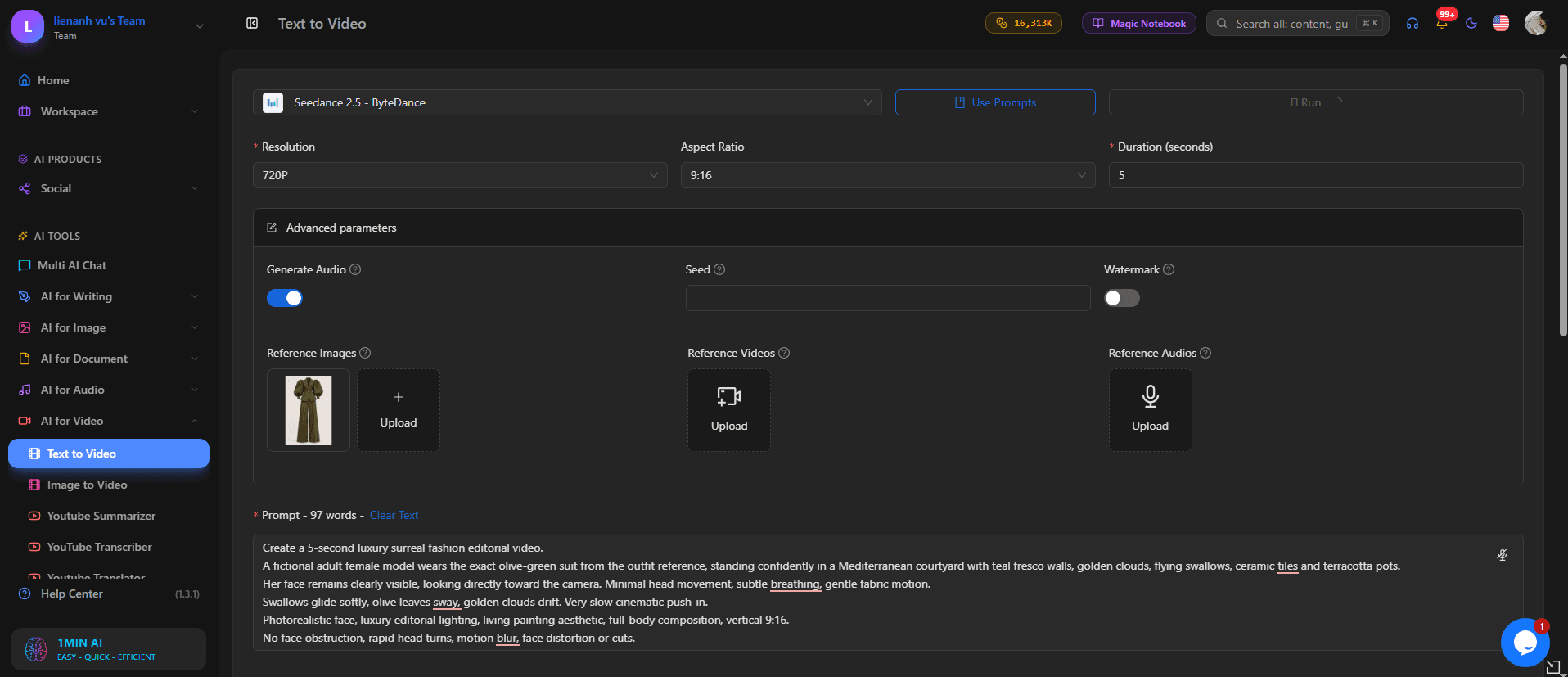
Visit 1min.AI and select Text to Video → Seedance 2.5.
- Select the 9:16 aspect ratio for vertical content.
- Upload your outfit reference image.
- Enter a prompt describing the fashion scene.
- Click Run to generate your video.
Example prompt:
Create a realistic cinematic fashion video featuring an adult female model wearing the exact outfit from the reference image. She walks confidently along a beautiful European street. Smooth camera tracking, natural fabric movement, soft golden-hour lighting, realistic skin texture, and professional fashion editorial style. Preserve the outfit's original colors and details.
Result: A cinematic AI fashion video based on your clothing reference.
Step 2 Personalize Your Fashion Video With HeyGen
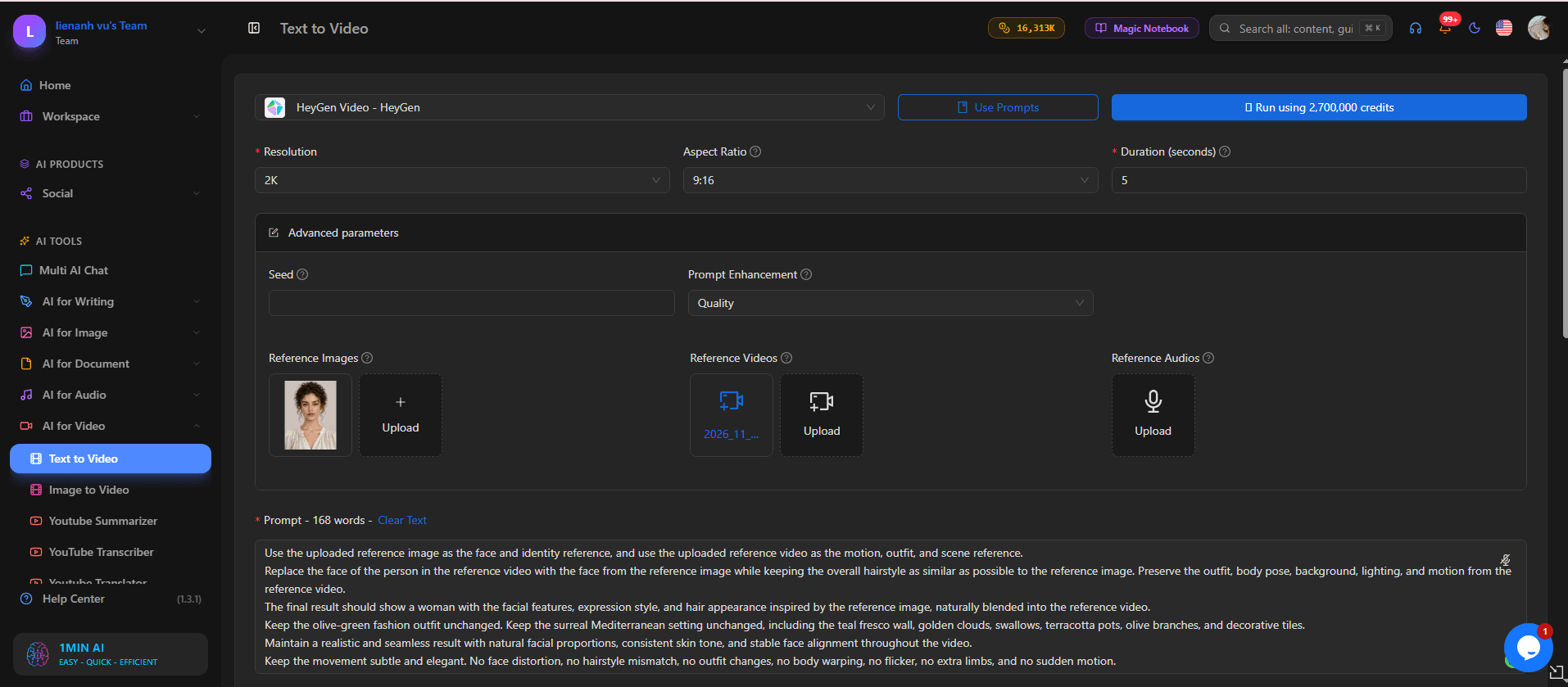
Next, choose HeyGen in 1min.AI.
- Upload a clear reference photo of your face.
- Select your preferred video settings.
- Enter a prompt describing your personalized fashion scene.
- Click Run to generate the video.
Example prompt:
Create a photorealistic fashion video featuring the woman from the uploaded face reference. Preserve her recognizable facial features, natural skin texture, and face shape. She walks confidently toward the camera wearing an elegant outfit, with cinematic lighting, realistic expressions, and smooth camera movements.
Result: A personalized fashion video featuring your likeness.
Note: Face-reference generation creates a new video. To replace a face directly in an existing clip, use a dedicated video face swap tool.
Step 3 Review and Download Your AI Fashion Video
Before exporting, check three details:
- Facial consistency: Does the face remain recognizable?
- Outfit accuracy: Are the clothing colors and details preserved?
- Natural movement: Do the walking motion and expressions look realistic?
If necessary, adjust your prompt and generate another version.
3. Tips for Creating Realistic AI Fashion Videos
To improve your results, focus on these four factors:
- Use clear references: Choose sharp outfit images and well-lit face photos.
- Write specific prompts: Describe the outfit, background, lighting, and camera movement.
- Keep movements simple: Natural walking and smooth tracking shots help maintain visual consistency.
- Review before publishing: Check for facial distortions, unnatural movements, and changing clothing details.
For more reference-based video techniques, read Better AI Product Videos With Seedance 2.5.
4. Create Your Own AI Fashion Videos With 1min.AI
With Seedance 2.5 and HeyGen, fashion creators can explore cinematic video concepts and personalized content without traditional filming.
Whether you're creating outfit inspiration, UGC content, or fashion campaign concepts, you can start with a reference image and a clear prompt.
Ready to try it? Create your first AI fashion video on 1min.AI today.
- #Informational
Các lựa chọn thay thế
Khám phá các lựa chọn thay thế tốt nhất cho 1minAI và so sánh các tính năng, giá cả và trường hợp sử dụng.

1min.AI và OpenRouter
1min.AI và OpenRouter: So sánh sản phẩm tạo AI sẵn dùng với công cụ API kỹ thuật. Tìm hiểu xem bạn cần một studio sáng tạo không cần mã hóa hay một trung tâm hạ tầng lập trình.
 Ngoc Hong

1min. AI vs Dola AI
Đang tìm một lựa chọn thay thế Dola AI? So sánh 1min.AI vs Dola AI về tạo video, gói miễn phí, giá cả và quyền riêng tư để chọn ứng dụng AI phù hợp.
Ngoc Hong
1minAI vs Hix AI
So sánh 5 lựa chọn thay thế HIX AI cho AI chat, nghiên cứu, viết nội dung, hình ảnh, video, giá cả và quy trình AI linh hoạt.
Ngoc HongCông cụ AI
Khám phá các công cụ AI tốt nhất để tăng cường năng suất, sự sáng tạo và công việc hàng ngày.

Một Sản Phẩm, 10 Creative UGC: AI Giúp Việc Test Nội Dung Dễ Hơn Như Thế Nào
Tạo UGC chân thực hơn với AI UGC video generator, thử nhiều góc sáng tạo hơn và mở rộng nội dung affiliate mà không cần quay từng phiên bản.
 Lien Anh Vu

Tạo nội dung hoạt hình nhất quán chỉ trong vài bước
Tạo video hoạt hình cho TikTok và Reels chỉ với 3 bước đơn giản bằng 1min.AI, từ nghiên cứu ý tưởng đến nhân vật và video hoạt ảnh.
Lien Anh Vu
Top 4 Công cụ AI Giá cả phải chăng cho Nhà sáng lập Startup
Khám phá top 4 công cụ AI giá cả phải chăng dành cho các nhà sáng lập startup để xác thực ý tưởng, xây dựng sản phẩm, tạo nội dung và ra mắt nhanh hơn mà không tốn quá nhiều chi phí.
 Tram Ta
Tính năng AI
Các tính năng AI toàn diện giúp tinh gọn quy trình làm việc, nâng cao hiệu quả và trao quyền cho các nhóm đạt được nhiều hơn.
Một Sản Phẩm, 10 Creative UGC: AI Giúp Việc Test Nội Dung Dễ Hơn Như Thế Nào
Tạo UGC chân thực hơn với AI UGC video generator, thử nhiều góc sáng tạo hơn và mở rộng nội dung affiliate mà không cần quay từng phiên bản.
Lien Anh VuTạo nội dung hoạt hình nhất quán chỉ trong vài bước
Tạo video hoạt hình cho TikTok và Reels chỉ với 3 bước đơn giản bằng 1min.AI, từ nghiên cứu ý tưởng đến nhân vật và video hoạt ảnh.
Lien Anh Vu
1minAI: Công cụ kiểm tra ngữ pháp AI miễn phí
Kiểm tra ngữ pháp miễn phí với công cụ kiểm tra ngữ pháp AI của 1minAI. Phát hiện lỗi ngữ pháp, chính tả và viết, cải thiện độ rõ ràng và trau chuốt nội dung chỉ trong vài giây.
Tram TaCác Trường hợp Sử dụng AI
Một bộ sưu tập các trường hợp sử dụng AI được tuyển chọn cho doanh nghiệp, năng suất và các ứng dụng cụ thể trong ngành.
Một Sản Phẩm, 10 Creative UGC: AI Giúp Việc Test Nội Dung Dễ Hơn Như Thế Nào
Tạo UGC chân thực hơn với AI UGC video generator, thử nhiều góc sáng tạo hơn và mở rộng nội dung affiliate mà không cần quay từng phiên bản.
Lien Anh VuTạo nội dung hoạt hình nhất quán chỉ trong vài bước
Tạo video hoạt hình cho TikTok và Reels chỉ với 3 bước đơn giản bằng 1min.AI, từ nghiên cứu ý tưởng đến nhân vật và video hoạt ảnh.
Lien Anh Vu
Thời Điểm Tốt Nhất Để Đăng Bài Trên Instagram: Hướng Dẫn Thực Tế Để Tăng Tương Tác
Khám phá thời điểm tốt nhất để đăng bài trên Instagram, bao gồm những ngày và giờ tốt nhất cho từng nhóm đối tượng, cùng mẹo để tìm lịch đăng phù hợp nhất cho tài khoản của bạn.
Tram TaHướng dẫn AI
Học cách sử dụng AI với các hướng dẫn thực tế, từng bước.
Tạo nội dung hoạt hình nhất quán chỉ trong vài bước
Tạo video hoạt hình cho TikTok và Reels chỉ với 3 bước đơn giản bằng 1min.AI, từ nghiên cứu ý tưởng đến nhân vật và video hoạt ảnh.
Lien Anh Vu
Ưu đãi công cụ AI Black Friday năm 2026
Khám phá những ưu đãi công cụ AI Black Friday 2026 mang lại. Tìm hiểu cách săn deal trọn đời 1min.AI qua AppSumo, Dealify, Stack Social, và kiểm chứng trên Trustpilot, Slashdot, Software Advice.
 Hang Nguyen

Tính nhất quán sản phẩm từ ảnh sang video bằng AI với Seedance để ngăn méo hình và mở rộng đánh giá sản phẩm
Ngăn logo bị méo với tính nhất quán sản phẩm từ ảnh sang video bằng AI và tạo video đánh giá chuẩn studio trên 1min.AI ngay hôm nay.
Lien Anh VuHướng dẫn về AI
Học AI nhanh hơn với các hướng dẫn thực tế, ví dụ đời thực và các phương pháp hay nhất có thể áp dụng.
Tạo nội dung hoạt hình nhất quán chỉ trong vài bước
Tạo video hoạt hình cho TikTok và Reels chỉ với 3 bước đơn giản bằng 1min.AI, từ nghiên cứu ý tưởng đến nhân vật và video hoạt ảnh.
Lien Anh Vu
Mua an toàn các công cụ AI trực tuyến: Hướng dẫn Black Friday 2026
Khám phá cách tìm và săn các ưu đãi AI Black Friday tốt nhất online. Học chiến lược chuyên gia để tránh lừa đảo, chống mệt mỏi vì đăng ký và xác minh phần mềm.
Hang NguyenTính nhất quán sản phẩm từ ảnh sang video bằng AI với Seedance để ngăn méo hình và mở rộng đánh giá sản phẩm
Ngăn logo bị méo với tính nhất quán sản phẩm từ ảnh sang video bằng AI và tạo video đánh giá chuẩn studio trên 1min.AI ngay hôm nay.
Lien Anh VuGiải pháp AI
Duyệt qua các giải pháp AI tốt nhất cho tự động hóa, viết mã, nghiên cứu, năng suất, hỗ trợ khách hàng, tiếp thị và quy trình làm việc kinh doanh.
Một Sản Phẩm, 10 Creative UGC: AI Giúp Việc Test Nội Dung Dễ Hơn Như Thế Nào
Tạo UGC chân thực hơn với AI UGC video generator, thử nhiều góc sáng tạo hơn và mở rộng nội dung affiliate mà không cần quay từng phiên bản.
Lien Anh VuTạo nội dung hoạt hình nhất quán chỉ trong vài bước
Tạo video hoạt hình cho TikTok và Reels chỉ với 3 bước đơn giản bằng 1min.AI, từ nghiên cứu ý tưởng đến nhân vật và video hoạt ảnh.
Lien Anh Vu
Trình Tạo Hình Xăm AI Miễn Phí: Thiết Kế Tùy Chỉnh
Biến mọi ý tưởng thành mẫu hình xăm tùy chỉnh với trình tạo hình xăm AI miễn phí của 1min.AI. Mô tả ý tưởng, chọn phong cách và tải xuống trong vài giây.
 Trang Tran
Mô hình AI
Khám phá các mô hình AI hàng đầu thế giới tại một nơi.
Một Sản Phẩm, 10 Creative UGC: AI Giúp Việc Test Nội Dung Dễ Hơn Như Thế Nào
Tạo UGC chân thực hơn với AI UGC video generator, thử nhiều góc sáng tạo hơn và mở rộng nội dung affiliate mà không cần quay từng phiên bản.
Lien Anh VuTạo nội dung hoạt hình nhất quán chỉ trong vài bước
Tạo video hoạt hình cho TikTok và Reels chỉ với 3 bước đơn giản bằng 1min.AI, từ nghiên cứu ý tưởng đến nhân vật và video hoạt ảnh.
Lien Anh VuTính nhất quán sản phẩm từ ảnh sang video bằng AI với Seedance để ngăn méo hình và mở rộng đánh giá sản phẩm
Ngăn logo bị méo với tính nhất quán sản phẩm từ ảnh sang video bằng AI và tạo video đánh giá chuẩn studio trên 1min.AI ngay hôm nay.
Lien Anh VuSo sánh AI
So sánh các công cụ, mô hình và nền tảng AI để tìm ra lựa chọn phù hợp nhất cho nhu cầu của bạn.

Kling AI Vs Veo 3: Mô hình nào thắng?
Kling AI vs Veo 3: so sánh chuyển động, âm thanh gốc, giá cả & gói miễn phí để xem trình tạo video AI nào thắng cho dự án của bạn - thử cả hai trên 1min.AI.
Trang TranTính nhất quán sản phẩm từ ảnh sang video bằng AI với Seedance để ngăn méo hình và mở rộng đánh giá sản phẩm
Ngăn logo bị méo với tính nhất quán sản phẩm từ ảnh sang video bằng AI và tạo video đánh giá chuẩn studio trên 1min.AI ngay hôm nay.
Lien Anh Vu
So sánh DeepSeek V4 Pro và Flash
So sánh các chỉ số của DeepSeek V4 Pro và DeepSeek V4 Flash. Tối ưu hóa các ứng dụng agentic của bạn và cải thiện kiểm tra xác thực AI trên 1min.ai ngay hôm nay.
Tích hợp AI
Tích hợp AI liền mạch với các công cụ bạn đã sử dụng để tự động hóa công việc và tăng năng suất.

Cách Sử Dụng Trình Tạo Video Thời Trang AI cho Fashion Week 2026
Biến ý tưởng Fashion Week 2026 thành những video thời trang ấn tượng với AI. Tìm hiểu cách lên ý tưởng, tạo hình ảnh và chuyển ảnh thành video chỉ với một quy trình đơn giản.
Lien Anh Vu
POV: Bạn có hơn 10 bài đăng phải làm mỗi ngày
Tìm hiểu cách xây dựng quy trình nội dung AI giúp người sáng tạo nội dung tạo hơn 10 bài đăng mạng xã hội mỗi ngày nhanh hơn với brainstorming, tạo hình ảnh và sáng tạo nội dung bằng AI.
Lien Anh Vu
Ngừng Chuyển Đổi Giữa Các Ứng Dụng AI: Cách Tích Hợp AI Chuyển Đổi Thương Hiệu Nhà Tuyển Dụng
Khám phá cách tích hợp AI giúp các đội ngũ HR tối ưu hóa thương hiệu nhà tuyển dụng bằng cách kết hợp viết AI, tài liệu, hình ảnh, video và nhiều mô hình AI vào một không gian làm việc duy nhất.
Tram TaAI cho các ngành công nghiệp
Tìm các công cụ và quy trình làm việc AI tốt nhất cho y tế, tài chính, giáo dục, pháp lý, sản xuất, bán lẻ, bất động sản và nhiều lĩnh vực khác.

Trình tạo mô tả sản phẩm AI miễn phí
Viết mô tả sản phẩm thuyết phục chỉ trong vài phút. Dùng trình tạo mô tả sản phẩm AI miễn phí này để biến chi tiết hoặc ảnh thành nội dung đúng giọng thương hiệu. Thử 1min.AI.
Trang Tran
Công Cụ Năng Suất Tốt Nhất Cho Startup Để Tối Đa Hóa Lợi Nhuận | 1minAI
Khám phá các công cụ năng suất kinh doanh tốt nhất cho startup để tiết kiệm thời gian, tối ưu quy trình làm việc, giảm tác vụ lặp lại và hỗ trợ tăng trưởng có lợi nhuận với AI.
Tram Ta
Công Cụ AI Tốt Nhất Cho Content Marketing |1minAI
Bạn đang tìm công cụ AI tốt nhất cho content marketing? Xem cách 1minAI giúp marketer nghiên cứu, viết, tái sử dụng, tạo hình ảnh và mở rộng nội dung từ một không gian làm việc AI duy nhất.
Tram TaTác nhân AI
Khám phá và vận hành các tác nhân AI để tự động hóa các tác vụ trong công việc và cuộc sống hàng ngày của bạn.
1minAI: Công cụ kiểm tra ngữ pháp AI miễn phí
Kiểm tra ngữ pháp miễn phí với công cụ kiểm tra ngữ pháp AI của 1minAI. Phát hiện lỗi ngữ pháp, chính tả và viết, cải thiện độ rõ ràng và trau chuốt nội dung chỉ trong vài giây.
Tram Ta
AI Agents cho Facebook
Sử dụng AI Agent cho Facebook để tạo nội dung, tạo hình ảnh, lên lịch bài đăng và xuất bản từ tài liệu và hội thoại của bạn.
Ngoc Hong
AI Agent vs AI Assistant: Cái nào thực sự giúp designer tiết kiệm thời gian hơn?
Tìm hiểu sự khác nhau giữa AI Agent và AI Assistant, và khám phá giải pháp nào giúp designer tự động hóa công việc lặp lại, giảm số lần chỉnh sửa và tiết kiệm nhiều thời gian hơn.
Lien Anh VuQuy trình AI
Khám phá các quy trình làm việc AI sẵn sàng sử dụng cho năng suất, tiếp thị, bán hàng, hỗ trợ và nhiều hơn nữa.
Một Sản Phẩm, 10 Creative UGC: AI Giúp Việc Test Nội Dung Dễ Hơn Như Thế Nào
Tạo UGC chân thực hơn với AI UGC video generator, thử nhiều góc sáng tạo hơn và mở rộng nội dung affiliate mà không cần quay từng phiên bản.
Lien Anh VuTạo nội dung hoạt hình nhất quán chỉ trong vài bước
Tạo video hoạt hình cho TikTok và Reels chỉ với 3 bước đơn giản bằng 1min.AI, từ nghiên cứu ý tưởng đến nhân vật và video hoạt ảnh.
Lien Anh VuCách Sử Dụng Trình Tạo Video Thời Trang AI cho Fashion Week 2026
Biến ý tưởng Fashion Week 2026 thành những video thời trang ấn tượng với AI. Tìm hiểu cách lên ý tưởng, tạo hình ảnh và chuyển ảnh thành video chỉ với một quy trình đơn giản.
Lien Anh VuBản tin
Đổi mới AI hàng tuần với 1minAI

🔮 Đổi mới AI hàng tuần #142: Grok 4.7, Opus 5.5 & Sonnet 5.5 trên 1min.ai
Truy cập Grok 4.7, Claude Opus 5.5 và Sonnet 5.5 trên 1min.ai. Giảm chi phí thuê bao tới 70% và xử lý hàng triệu token trong một không gian làm việc thống nhất.
Hang Nguyen
🔮 Cập nhật AI hàng tuần #143: Cập nhật GPT-6, GPT-6.1 & Ideogram 4.0 & Ideogram 4.0
Truy cập GPT-6 Sol, Luna, GPT-6.1 Sol và Ideogram 4.0 trên 1min.ai. Nâng độ chính xác kiểu chữ lên 98,4% và giảm độ trễ suy luận 45% trong một nền tảng.
Hang Nguyen
🔮 Cập nhật AI hàng tuần #141: Seedance 2.5 & Stable Audio 3: AI thế hệ mới
Khám phá Seedance 2.0, 2.5 và Stable Audio 3 của StabilityAI trên 1min.ai. Tạo âm thanh chuẩn phòng thu và chuyển động đồng bộ với AI tạo sinh thế hệ mới.
Hang Nguyen