
TikTok Creative Center Trends for Better Video Ideas
20. november 2026
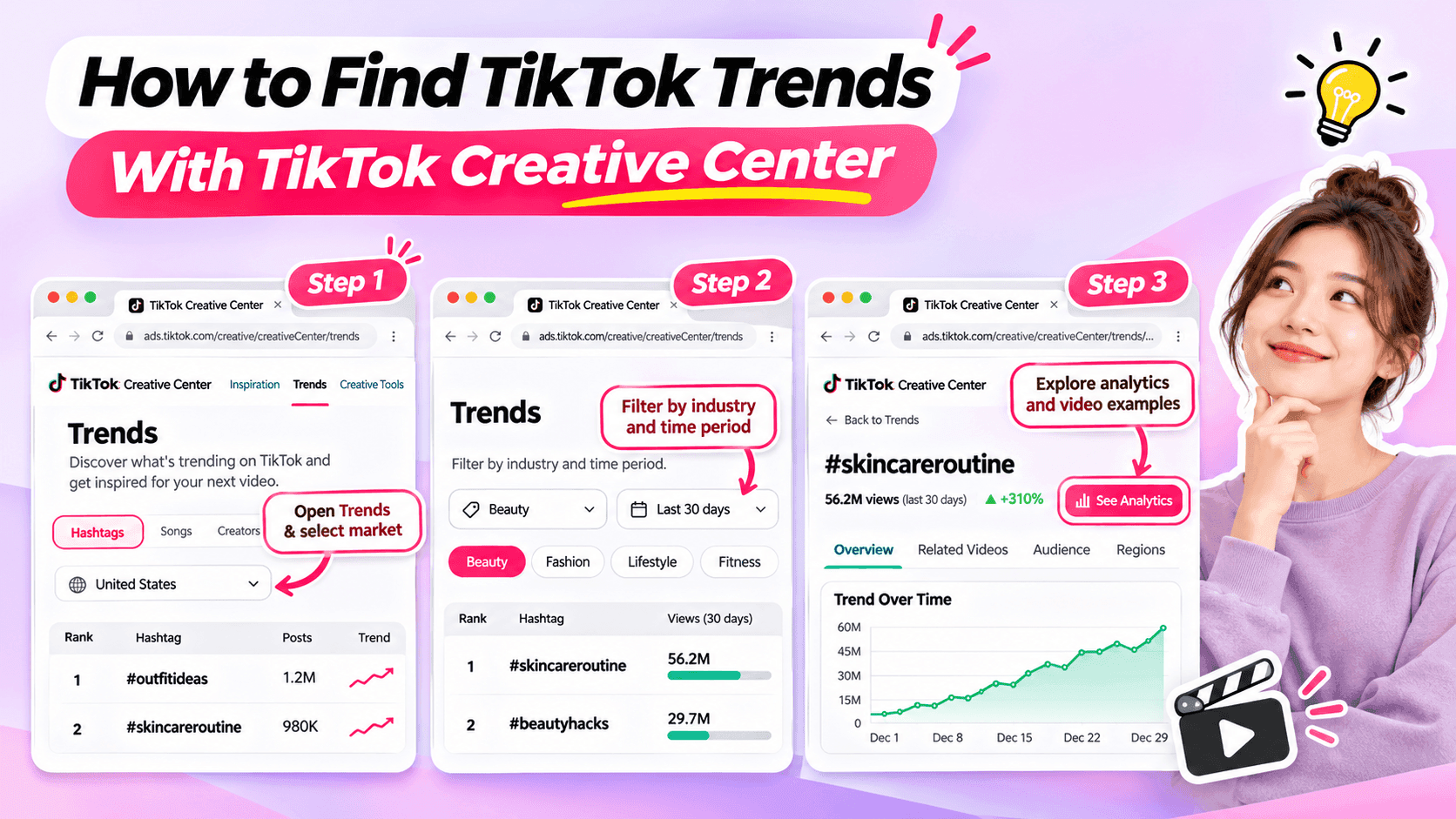
Learn how to use TikTok Creative Center to find trending hashtags and videos. Discover relevant trends and turn them into original ideas for your niche.
Looking for fresh TikTok video ideas but don't know where to start? TikTok Creative Center can help you discover trending hashtags, explore popular video formats, and find inspiration for your next post.
For influencers, the challenge isn't simply finding what's trending. It's choosing trends that match your niche, audience, and personal style.
In this beginner-friendly guide, you'll learn how to use TikTok Creative Center to find trends, understand what makes them interesting, and turn them into original video ideas. You'll also see how AI can help when you need extra inspiration.
What Is TikTok Creative Center?
TikTok Creative Center is a free creative research platform provided by TikTok for Business.
It helps users discover trends, explore creative examples, and learn about content formats on TikTok.
Although the platform includes advertising resources, influencers can also use its trend research features to find inspiration for organic content.
Here are the most useful features for beginners.
| Feature | What It Does | Why Influencers Might Use It |
|---|---|---|
| Trending Hashtags | Shows hashtags and trend information | Discover topics worth exploring |
| Hashtag Analytics | Provides available trend data and related content | Understand how a hashtag is being used |
| Trending Videos | Shows examples of popular TikTok videos where available | Explore creative approaches and formats |
| Top Ads | Provides examples of advertising creatives | Study creative techniques while recognizing that ad results differ from organic performance |
For example, a fashion influencer might use TikTok Creative Center to identify a popular styling theme and explore how people are presenting their outfits.
A fitness influencer might use it to find relevant workout-related discussions or formats.
The key is to use TikTok Creative Center as a source of inspiration, not a list of videos to copy.
How to Find TikTok Trends With Creative Center
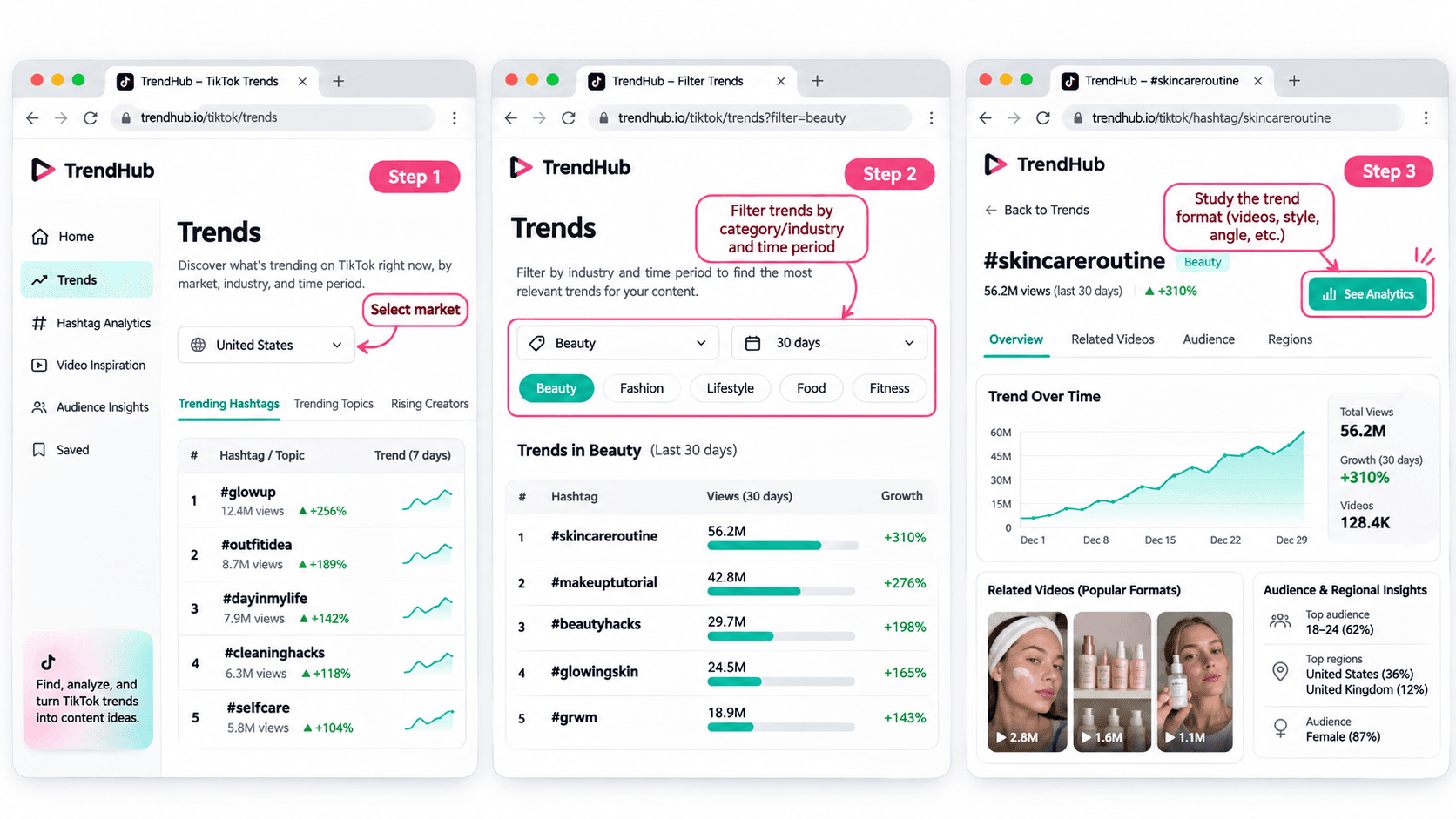
You don't need advanced marketing experience to get started.
Follow these five steps to discover and evaluate trends for your next TikTok video.
Step 1 Open TikTok Creative Center
Tool: TikTok Creative Center
Input: Your target market and influencer niche
Output: A list of trends to explore
Start by visiting the TikTok Creative Center Trends page.
On the platform:
- Open the Trends section.
- Select the Hashtag view if needed.
- Choose your target country or region when the option is available.
- Review the trending hashtags displayed.
You may be asked to log in to access additional rankings or analytics.
For example, if you're a beauty influencer targeting viewers in the United States, choose the United States when researching local trends.
This helps you explore content that may be more relevant to the audience you want to reach.
Beginner tip: Start with one market and one niche. You don't need to research every trend on TikTok.
Step 2 Filter Trends by Industry and Time Period
Input: Your niche and preferred research period
Output: A more focused selection of trends
TikTok Creative Center supports searching or filtering trending hashtags by industry and time frame.
Depending on the available interface, you can narrow your research using relevant categories.
For example:
| Influencer Niche | Research Direction |
|---|---|
| Beauty | Makeup techniques, beauty routines, skincare discussions |
| Fashion | Outfit styling, wardrobe inspiration, personal style |
| Fitness | Workout routines, training experiences, exercise discussions |
| Lifestyle | Everyday routines, organization, personal experiences |
| Technology | Device features, useful tools, technology discussions |
These are example research directions, not verified currently trending hashtags.
Once you have filtered the results, look for hashtags and topics that could make sense for your audience.
Avoid selecting a trend simply because it has the highest number of views.
A smaller, relevant trend may be more useful to your personal brand than a popular topic unrelated to your niche.
Step 3 Explore Hashtag Analytics
Input: A relevant hashtag
Output: More information about the trend and its related videos
When a hashtag catches your attention, select See Analytics if available.
TikTok's official Trends documentation describes several types of information that may appear, including:
- Trendlines showing how interest has changed.
- Related videos.
- Audience insights.
- Regional popularity.
- Related hashtags.
You don't have to analyze every metric.
For beginners, focus on three questions:
Is the topic relevant to my audience?
A popular hashtag is not automatically useful to your followers.
How are people using the hashtag?
Look at the related videos to understand the stories, formats, and approaches people are sharing.
Can I contribute something different?
Consider what personal experience, expertise, or perspective you could add.
For example, if you find a styling-related hashtag, review the videos to identify common approaches.
Some may show outfit combinations. Others may focus on accessories or personal styling tips.
Instead of copying those videos, use them to understand the topic and think about your own angle.
Step 4 Study the Video Format
Input: Related videos from your selected trend
Output: A creative structure you can adapt
Once you've found a relevant trend, watch a few videos and identify what makes the format recognizable.
Pay attention to:
- The opening scene.
- The main idea.
- The order of the shots.
- The visual changes.
- The ending.
For example, consider a before-and-after transformation format.
The structure is simple:
Before → Transformation → After
Different influencers could use that structure in different ways.
| Influencer Niche | Possible Video Idea |
|---|---|
| Fashion | Turn a casual outfit into an evening look |
| Beauty | Show a personal everyday makeup transformation |
| Fitness | Show a genuine change in a workout routine |
| Lifestyle | Transform a messy desk into an organized workspace |
These examples illustrate how a format can be adapted. They are not presented as verified current TikTok trends.
The format can stay similar while the content reflects each influencer's own experiences.
That's how you move from discovering a trend to developing an original idea.
Step 5 Save Your Trend Research
Input: Your selected trend and observations
Output: A short creative brief for your next video
Before leaving Creative Center, save the most useful information.
You can use this simple worksheet.
| Research Field | Example |
|---|---|
| Influencer niche | Everyday fashion |
| Target audience | Young adults who enjoy simple outfit inspiration |
| Trend format | Before-and-after transformation |
| What makes it interesting | A visible change between two looks |
| Personal angle | One jacket styled for different occasions |
| Possible video idea | Three ways to style one jacket |
| Next action | Write a short video concept |
This short brief helps you remember why the format interested you.
It also gives you useful information if you want to brainstorm additional ideas with AI.
How to Choose TikTok Trends That Fit Your Niche
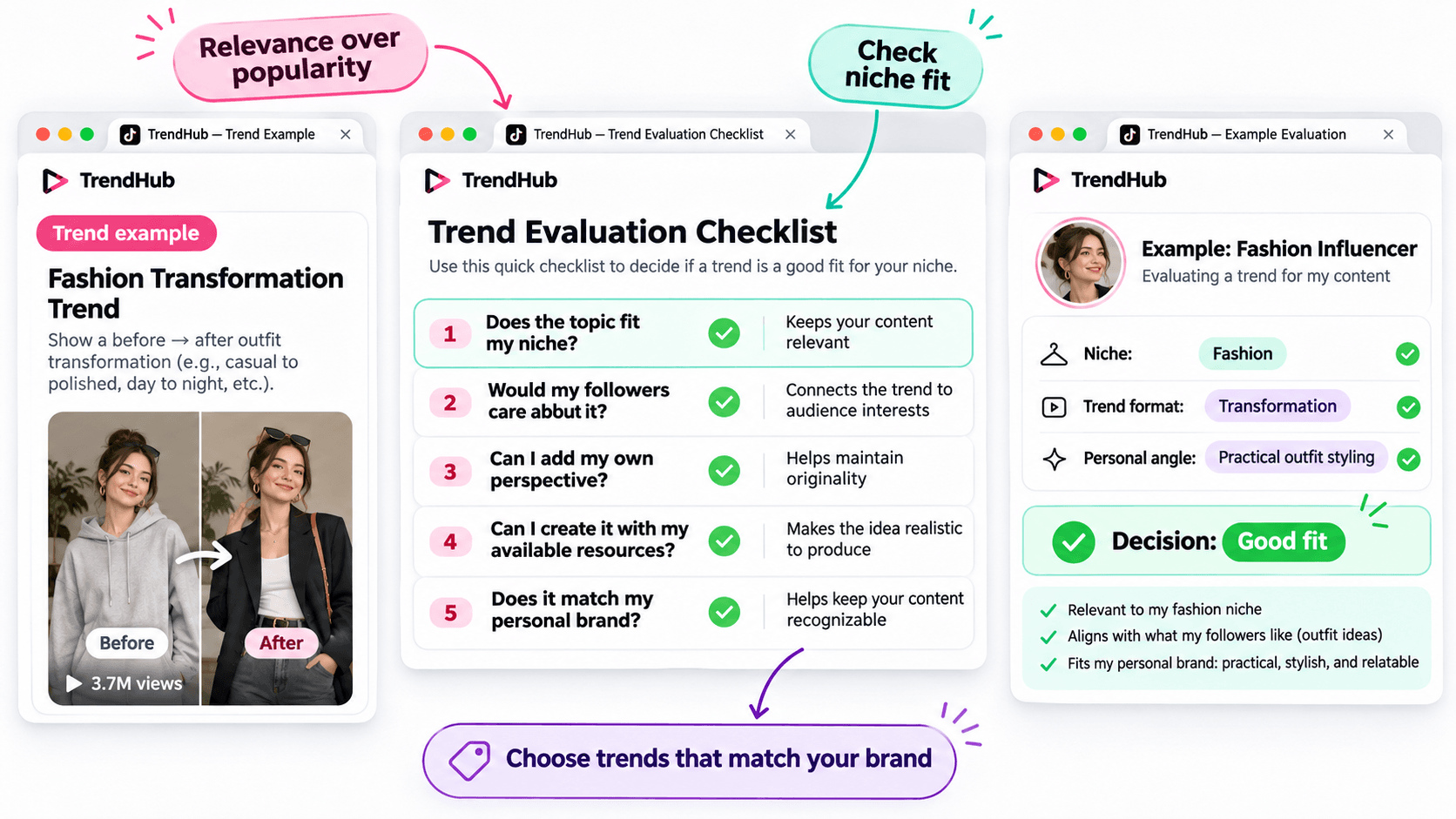
Not every popular trend deserves a place in your content plan.
Before adapting a trend, make sure it matches the kind of content your followers expect from you.
Use this simple checklist.
| Question | Why It Matters |
|---|---|
| Does the topic fit my niche? | Keeps your content relevant |
| Would my followers care about it? | Connects the trend to audience interests |
| Can I add my own perspective? | Helps maintain originality |
| Can I create it with my available resources? | Makes the idea realistic to produce |
| Does it match my personal brand? | Helps keep your content recognizable |
You don't need to answer yes to every question perfectly, but a trend should have a clear reason to belong in your content plan.
For example, imagine you're a fashion influencer who usually shares practical outfit ideas.
A transformation format could be useful if it allows you to demonstrate real styling advice.
However, an unrelated trend may not provide the same value to your audience.
Choose trends based on relevance and creative fit rather than popularity alone.
How to Turn a TikTok Trend Into an Original Video Idea
Finding a trend is only the beginning.
The next challenge is turning it into a video that feels like your own.
You can do this using three simple steps.
Step 1 Identify the Basic Creative Format
Look beyond the hashtag and focus on the structure.
For example:
Format: Before-and-after transformation.
Core idea: Show a visible change.
Possible applications: Outfit styling, makeup, workspace organization, or a genuine personal routine change.
This gives you a flexible creative direction.
Step 2 Add Your Personal Perspective
Ask yourself what you can contribute that another influencer hasn't already shown.
For example, a fashion influencer could use the transformation format to demonstrate how one favorite jacket works with different outfits.
The video could follow this structure:
Opening: Show the jacket and introduce the challenge.
Middle: Demonstrate three outfit combinations.
Ending: Ask followers which look they prefer.
This is a more personal concept than simply recreating a trending video.
Step 3 Develop a Simple Video Concept
Write down your idea before filming.
Example Video Concept
| Element | Example |
|---|---|
| Topic | Styling one jacket |
| Audience | Everyday fashion followers |
| Hook | "Can I style this jacket for three different occasions?" |
| Main Content | Show three outfit combinations |
| Ending | "Which look would you wear?" |
You now have a practical starting point for your next TikTok video.
You can develop the script yourself or use an AI assistant if you'd like to explore more creative approaches.
How to Brainstorm More TikTok Video Ideas With 1min.AI
Sometimes, you find an interesting trend but can't decide how to adapt it.
This is where 1min.AI Multi AI Chat can help.
You can use it to explore different content angles, develop hooks, and organize your ideas.
You don't need to use AI for every trend. It's an optional step when you want additional inspiration.
Step 1 Prepare Your Trend Information
Input: Your niche, audience, trend format, and personal style.
Let's continue with the fashion example.
| Input | Example |
|---|---|
| Niche | Everyday fashion |
| Audience | Young adults interested in practical outfits |
| Personal style | Friendly, natural, and relatable |
| Trend format | Before-and-after transformation |
| Content goal | Generate original outfit video ideas |
This gives AI enough context to generate suggestions that are more relevant than a general list of random TikTok ideas.
Step 2 Use Multi AI Chat to Explore Creative Angles
1min.AI Tool: Multi AI Chat
Output: Several video concepts with hooks and creative approaches.
Open 1min.AI and choose Multi AI Chat.
You can use one available AI model or compare suggestions from multiple models.
Copy the prompt below and replace the example information with your own.
Copyable TikTok Trend Adaptation Prompt
ROLE
Act as a TikTok content strategist who helps influencers create original short-form video ideas.
AUDIENCE
My influencer niche is [your niche].
My followers are [describe your audience].
PERSONAL BRAND
My communication style is [your tone and personality].
TREND INPUT
The TikTok trend or video format I found is [describe the verified format].
The main creative structure is [describe how the format works].
TASK
Suggest 5 original TikTok video ideas inspired by this format.
OUTPUT FORMAT
Create a table with:
- Video Idea
- Creative Angle
- Opening Hook
- Three-Part Video Outline
- Why It Fits My Audience
REQUIREMENTS
Keep the ideas easy to produce, authentic, and relevant to my niche. Do not copy another influencer's content, invent personal experiences, or claim that a trend guarantees viral results.
This format works for different influencer niches because you control the inputs.
For example, a beauty influencer can use the same prompt with a makeup-related trend, while a lifestyle influencer can use it with a home organization format.
Step 3 Review and Personalize the Suggestions
AI can help you explore options, but you should select the concept that genuinely fits your audience.
Here are three illustrative ideas for the fashion example.
| Video Idea | Creative Angle | Opening Hook |
|---|---|---|
| One Jacket Three Occasions | Show styling versatility | "Can one jacket work for three different plans?" |
| Casual to Evening Look | Show a simple outfit transformation | "Here's how I'd change this outfit for the evening." |
| Three Accessories One Outfit | Show how details change a look | "Watch how these accessories change the same outfit." |
These are examples of possible ideas, not documented outputs from a live 1min.AI session.
Choose one and adjust the details based on your own wardrobe and experience.
If you want a more detailed walkthrough of Multi AI Chat, read How Multiple AI Chat Helps Content Creators Create Better Content.
You can also watch the tutorial embedded in that guide to see how different AI models can help you compare content ideas.
For more ways to use AI throughout your creative process, explore Free AI Tools for Influencers to Create More Content.
Common Mistakes When Using TikTok Creative Center
Choosing Trends Only Because They Have High Views
A popular hashtag does not guarantee that your video will perform well.
Consider whether the trend fits your audience and whether you can contribute something useful or entertaining.
Copying Another Influencer's Video
Watching examples is useful for understanding a format.
However, repeating another person's creative work without adding your own contribution will not help you build a distinctive personal brand.
Use trends as inspiration, not finished scripts.
Ignoring Your Target Market
Trends can differ by location and audience.
When possible, choose the market that matches the people you're trying to reach.
Confusing Ad Performance With Organic Video Results
TikTok Creative Center includes advertising resources such as Top Ads.
These examples can provide creative inspiration, but advertising performance should not be treated as proof that a similar organic TikTok video will achieve the same results.
Assuming AI Knows Which Trends Are Currently Popular
AI can generate creative ideas based on the information you provide, but you should not assume it has verified the latest TikTok trends.
Research trends in TikTok Creative Center first, then provide those findings to AI.
Frequently Asked Questions
Is TikTok Creative Center Free?
Yes. TikTok describes Creative Center as a free public resource.
However, some detailed views or features may require logging in, and availability can vary.
How Do I Find Trending Hashtags on TikTok Creative Center?
Open the Trends section, select the available hashtag view, and use the search or filtering options.
When available, select See Analytics to explore more information about a hashtag.
Can Influencers Use TikTok Creative Center?
Yes. Although Creative Center is part of TikTok for Business, influencers can use its publicly available trend information to research topics, formats, and creative inspiration.
Does Using a Trending Hashtag Guarantee More Views?
No. A hashtag's popularity does not guarantee that your video will receive more views or engagement.
The relevance of the topic, the quality of your content, and your audience's response still matter.
What If I Cannot Access Some Creative Center Features?
Check whether you need to log in or whether the feature is available for your region or account.
TikTok's interface and feature availability can change. You can still research relevant videos directly on TikTok when a Creative Center feature is unavailable.
Can 1min.AI Find TikTok Trends Automatically?
This guide uses TikTok Creative Center to find and verify trends.
You can then enter the trend information into 1min.AI Multi AI Chat to brainstorm creative ideas. This workflow does not require automatic importing of TikTok trend data.
Final Thoughts
TikTok Creative Center is a useful starting point when you need fresh video inspiration.
Instead of scrolling through random videos, you can explore trending hashtags, study relevant formats, and evaluate whether an idea fits your personal brand.
Remember the simple workflow:
Find a Trend → Check Its Relevance → Study the Format → Add Your Perspective → Develop Your Video Idea.
You don't need to follow every trend or use complicated tools to get started.
Choose one relevant format, make it your own, and create something your audience can recognize as part of your personal brand.
When you want to explore more creative angles, AI can help you brainstorm without replacing your own ideas.
🚀 Turn TikTok Trends Into Original Video Ideas With 1min.AI Multi AI Chat
- #Navigational
Alternative
Odkrijte najboljše alternative za 1minAI in primerjajte funkcije, cene in primere uporabe.

1min.AI proti OpenRouterju
1min.AI proti OpenRouterju: Primerjajte pripravljeno AI orodje za ustvarjanje z tehničnim API orodjem. Ugotovite, ali potrebujete ustvarjalni studio brez kode ali infrastrukturo za razvijalce.
 Ngoc Hong

1min. AI proti Dola AI
Iščete alternativo za Dola AI? Primerjajte 1min.AI in Dola AI glede ustvarjanja videov, brezplačnih paketov, cen in zasebnosti ter izberite pravo AI aplikacijo.
Ngoc Hong
1minAI proti Hix AI
Primerjajte 5 alternativ HIX AI za klepet z AI, raziskovanje, pisanje, slike, video, cene in prilagodljive delovne tokove z AI.
Ngoc HongAI Orodja
Odkrijte najboljša AI orodja za povečanje produktivnosti, ustvarjalnosti in vsakodnevnega dela.

En izdelek, 10 UGC kreativ: Kako umetna inteligenca olajša testiranje vsebine
Ustvarite bolj pristno UGC z AI generatorjem UGC videov, testirajte več ustvarjalnih kotov in skalirajte partnersko vsebino brez snemanja vsake različice.
 Lien Anh Vu

Ustvarite dosledno risano vsebino v le nekaj korakih
Ustvarite risane videe za TikTok in Reels v 3 preprostih korakih z 1min.AI, od raziskovanja idej do likov in animiranih videov.
Lien Anh Vu
Top 4 cenovno dostopna orodja za umetno inteligenco za ustanovitelje startupov
Odkrijte top 4 cenovno dostopna orodja za umetno inteligenco za ustanovitelje startupov, s katerimi lahko preverjate ideje, razvijate produkte, ustvarjate vsebine in hitreje lansirate brez prevelikih stroškov.
 Tram Ta
Funkcije AI
Celovite funkcije AI, ki poenostavljajo delovne procese, izboljšujejo učinkovitost in ekipam omogočajo več.
En izdelek, 10 UGC kreativ: Kako umetna inteligenca olajša testiranje vsebine
Ustvarite bolj pristno UGC z AI generatorjem UGC videov, testirajte več ustvarjalnih kotov in skalirajte partnersko vsebino brez snemanja vsake različice.
Lien Anh VuUstvarite dosledno risano vsebino v le nekaj korakih
Ustvarite risane videe za TikTok in Reels v 3 preprostih korakih z 1min.AI, od raziskovanja idej do likov in animiranih videov.
Lien Anh Vu
1minAI: Brezplačni AI preverjevalnik slovnice
Preverite slovnico brezplačno z AI preverjevalnikom slovnice 1minAI. Poiščite slovnične, pravopisne in pisne napake, izboljšajte jasnost in izpilite vsebino v nekaj sekundah.
Tram TaPrimeri uporabe umetne inteligence
Izbrana zbirka primerov uporabe umetne inteligence za podjetja, povečanje produktivnosti in panogno-specifične rešitve.
En izdelek, 10 UGC kreativ: Kako umetna inteligenca olajša testiranje vsebine
Ustvarite bolj pristno UGC z AI generatorjem UGC videov, testirajte več ustvarjalnih kotov in skalirajte partnersko vsebino brez snemanja vsake različice.
Lien Anh VuUstvarite dosledno risano vsebino v le nekaj korakih
Ustvarite risane videe za TikTok in Reels v 3 preprostih korakih z 1min.AI, od raziskovanja idej do likov in animiranih videov.
Lien Anh Vu
Najboljši čas za objavo na Instagramu: praktični vodnik za večjo vključenost
Odkrijte najboljši čas za objavo na Instagramu, vključno z najboljšimi dnevi in urami za različne skupine občinstva, ter nasvete za iskanje idealnega urnika objav za vaš račun.
Tram TaVadnice za AI
Naučite se uporabljati umetno inteligenco s praktičnimi vadnicami po korakih.
Ustvarite dosledno risano vsebino v le nekaj korakih
Ustvarite risane videe za TikTok in Reels v 3 preprostih korakih z 1min.AI, od raziskovanja idej do likov in animiranih videov.
Lien Anh Vu
Black Friday AI orodna ponudba v letu 2026
Odkrijte, kaj prinašajo Black Friday AI orodne ponudbe 2026. Izvedite, kako si zagotoviti dosmrtno ponudbo 1min.AI prek AppSumo, Dealify in Stack Social ter preveriti na Trustpilot, Slashdot in Software Advice.
 Hang Nguyen

Doslednost izdelkov v video iz slike z umetno inteligenco s Seedance za ustavitev popačenj in povečanje pregledov izdelkov
Ustavite popačenje logotipov z doslednostjo izdelkov v video iz slike z umetno inteligenco in že danes na 1min.AI ustvarjajte pregledne videe studijske kakovosti.
Lien Anh VuVodiči za AI
Hitreje se učite AI s praktičnimi vodiči, primeri iz resničnega sveta in uporabnimi najboljšimi praksami.
Ustvarite dosledno risano vsebino v le nekaj korakih
Ustvarite risane videe za TikTok in Reels v 3 preprostih korakih z 1min.AI, od raziskovanja idej do likov in animiranih videov.
Lien Anh Vu
Varno kupujte AI orodja prek spleta: vodnik za Črni petek 2026
Odkrijte, kako poiskati in zagotoviti najboljše ponudbe AI za Črni petek na spletu. Spoznajte strokovne strategije za izogibanje prevaram, premagovanje utrujenosti od naročnin in preverjanje programske opreme.
Hang NguyenDoslednost izdelkov v video iz slike z umetno inteligenco s Seedance za ustavitev popačenj in povečanje pregledov izdelkov
Ustavite popačenje logotipov z doslednostjo izdelkov v video iz slike z umetno inteligenco in že danes na 1min.AI ustvarjajte pregledne videe studijske kakovosti.
Lien Anh VuAI Rešitve
Prebrskajte najboljše rešitve umetne inteligence za avtomatizacijo, kodiranje, raziskave, produktivnost, podporo strankam, trženje in poslovne delovne procese.
En izdelek, 10 UGC kreativ: Kako umetna inteligenca olajša testiranje vsebine
Ustvarite bolj pristno UGC z AI generatorjem UGC videov, testirajte več ustvarjalnih kotov in skalirajte partnersko vsebino brez snemanja vsake različice.
Lien Anh VuUstvarite dosledno risano vsebino v le nekaj korakih
Ustvarite risane videe za TikTok in Reels v 3 preprostih korakih z 1min.AI, od raziskovanja idej do likov in animiranih videov.
Lien Anh Vu
Brezplačen AI generator tetovaž: dizajni po meri
Spremenite katerokoli idejo v dizajn tetovaže z brezplačnim AI generatorjem tetovaž 1min.AI. Opišite svojo idejo, izberite slog in prenesite v nekaj sekundah.
 Trang Tran
AI modeli
Raziščite vodilne modele AI na svetu na enem mestu.
En izdelek, 10 UGC kreativ: Kako umetna inteligenca olajša testiranje vsebine
Ustvarite bolj pristno UGC z AI generatorjem UGC videov, testirajte več ustvarjalnih kotov in skalirajte partnersko vsebino brez snemanja vsake različice.
Lien Anh VuUstvarite dosledno risano vsebino v le nekaj korakih
Ustvarite risane videe za TikTok in Reels v 3 preprostih korakih z 1min.AI, od raziskovanja idej do likov in animiranih videov.
Lien Anh VuDoslednost izdelkov v video iz slike z umetno inteligenco s Seedance za ustavitev popačenj in povečanje pregledov izdelkov
Ustavite popačenje logotipov z doslednostjo izdelkov v video iz slike z umetno inteligenco in že danes na 1min.AI ustvarjajte pregledne videe studijske kakovosti.
Lien Anh VuPrimerjave AI
Primerjajte orodja, modele in platforme AI, da najdete najboljše za vaše potrebe.

Kling AI proti Veo 3: kateri model zmaga?
Kling AI proti Veo 3: primerjajte gibanje, izvorni zvok, cene in brezplačne pakete ter ugotovite, kateri generator videa z UI zmaga za vaš projekt - preizkusite oba na 1min.AI.
Trang TranDoslednost izdelkov v video iz slike z umetno inteligenco s Seedance za ustavitev popačenj in povečanje pregledov izdelkov
Ustavite popačenje logotipov z doslednostjo izdelkov v video iz slike z umetno inteligenco in že danes na 1min.AI ustvarjajte pregledne videe studijske kakovosti.
Lien Anh Vu
Primerjava DeepSeek V4 Pro vs Flash
Primerjajte metrike DeepSeek V4 Pro in DeepSeek V4 Flash. Danes na 1min.ai optimizirajte svoje agentne aplikacije in izboljšajte preverjanje dejstev z umetno inteligenco.
Ngoc HongIntegracije z AI
Brezhibno integrirajte AI z orodji, ki jih že uporabljate, da avtomatizirate delo in povečate produktivnost.

Kako uporabiti generator modnih videov z umetno inteligenco za Teden mode 2026
Spremenite ideje za Teden mode 2026 v osupljive modne videe z umetno inteligenco. Naučite se, kako razmišljati o idejah, ustvarjati vizualne podobe in pretvarjati slike v videe z enim preprostim delovnim tokom.
Lien Anh Vu
POV: Imaš več kot 10 objav za vsak dan
Naučite se, kako zgraditi delovni tok vsebin z AI, ki ustvarjalcem vsebin pomaga hitreje ustvarjati več kot 10 objav na družbenih omrežjih na dan z možgansko nevihto z AI, generiranjem slik in ustvarjanjem vsebin.
Lien Anh Vu
Ne preklapljajte več med aplikacijami z umetno inteligenco: kako integracija AI preoblikuje employer branding
Odkrijte, kako integracija AI kadrovskim ekipam pomaga poenostaviti employer branding z združevanjem pisanja z AI, dokumentov, slik, videa in več modelov AI v en delovni prostor.
Tram TaAI za industrije
Poiščite najboljša orodja in delovne tokove AI za zdravstvo, finance, izobraževanje, pravo, proizvodnjo, maloprodajo, nepremičnine in več.

Brezplačen generator opisov izdelkov z umetno inteligenco
V nekaj minutah napišite prodajne opise izdelkov. Uporabite ta brezplačni generator opisov izdelkov z umetno inteligenco in spremenite podatke ali fotografijo v besedilo, skladno z vašo blagovno znamko. Preizkusite 1min.AI.
Trang Tran
Najboljša orodja za poslovno produktivnost za startupe za maksimiranje dobička | 1minAI
Odkrijte najboljša orodja za poslovno produktivnost za startupe, s katerimi boste prihranili čas, poenostavili delovne procese, zmanjšali ponavljajoča se opravila in z umetno inteligenco podprli dobičkonosno rast.
Tram Ta
Najboljše orodje z umetno inteligenco za content marketing |1minAI
Iščete najboljše orodje z umetno inteligenco za content marketing? Oglejte si, kako 1minAI pomaga marketerjem raziskovati, pisati, preoblikovati, ustvarjati vizualije in širiti vsebine iz enega AI delovnega prostora.
Tram TaAI Agenti
Odkrijte in uporabite AI agente za avtomatizacijo opravil pri vašem delu in v vsakdanjem življenju.
1minAI: Brezplačni AI preverjevalnik slovnice
Preverite slovnico brezplačno z AI preverjevalnikom slovnice 1minAI. Poiščite slovnične, pravopisne in pisne napake, izboljšajte jasnost in izpilite vsebino v nekaj sekundah.
Tram Ta
AI agenti za Facebook
Uporabite AI agenta za Facebook za ustvarjanje vsebin, generiranje slik, načrtovanje objav in objavljanje iz vaših dokumentov in pogovorov.
Ngoc Hong
AI Agent proti AI Asistentu: kaj res prihrani oblikovalcem več časa?
Spoznajte razliko med AI Agentom in AI Asistentom ter odkrijte, katera rešitev pomaga oblikovalcem avtomatizirati ponavljajoče se delo, zmanjšati popravke in prihraniti več časa.
Lien Anh VuAI delovni tokovi
Raziščite gotove AI delovne tokove za produktivnost, trženje, prodajo, podporo in še več.
En izdelek, 10 UGC kreativ: Kako umetna inteligenca olajša testiranje vsebine
Ustvarite bolj pristno UGC z AI generatorjem UGC videov, testirajte več ustvarjalnih kotov in skalirajte partnersko vsebino brez snemanja vsake različice.
Lien Anh VuUstvarite dosledno risano vsebino v le nekaj korakih
Ustvarite risane videe za TikTok in Reels v 3 preprostih korakih z 1min.AI, od raziskovanja idej do likov in animiranih videov.
Lien Anh VuKako uporabiti generator modnih videov z umetno inteligenco za Teden mode 2026
Spremenite ideje za Teden mode 2026 v osupljive modne videe z umetno inteligenco. Naučite se, kako razmišljati o idejah, ustvarjati vizualne podobe in pretvarjati slike v videe z enim preprostim delovnim tokom.
Lien Anh VuNovičnik
Tedenske AI inovacije z 1minAI

🔮 Tedenske novosti o umetni inteligenci #142: Grok 4.7, Opus 5.5 in Sonnet 5.5 na 1min.ai
Dostopajte do Grok 4.7, Claude Opus 5.5 in Sonnet 5.5 na 1min.ai. Zmanjšajte stroške naročnin za do 70 % in obdelujte milijone žetonov v enotnem delovnem okolju.
Hang Nguyen
🔮 Tedenske inovacije na področju UI #143: Posodobitev Posodobitev GPT-6, GPT-6.1 & Ideogram 4.0 & Ideogram 4.0
Dostopajte do GPT-6 Sol, Luna, GPT-6.1 Sol in Ideogram 4.0 na 1min.ai. Povečajte natančnost tipografije na 98,4 % in zmanjšajte zakasnitev sklepanja za 45 % v eni platformi.
Hang Nguyen
🔮 Tedenske novosti o AI #141: Seedance 2.5 in Stable Audio 3: AI naslednje generacije
Raziščite Seedance 2.0, 2.5 in StabilityAI-jev Stable Audio 3 na 1min.ai. Ustvarjajte studijsko kakovosten zvok in usklajeno gibanje z generativno AI naslednje generacije.
Hang Nguyen