
1minAI vs SocialPilot: Which Is the Best AI Social Media Agent?

Tram Ta
20 listopada 2026
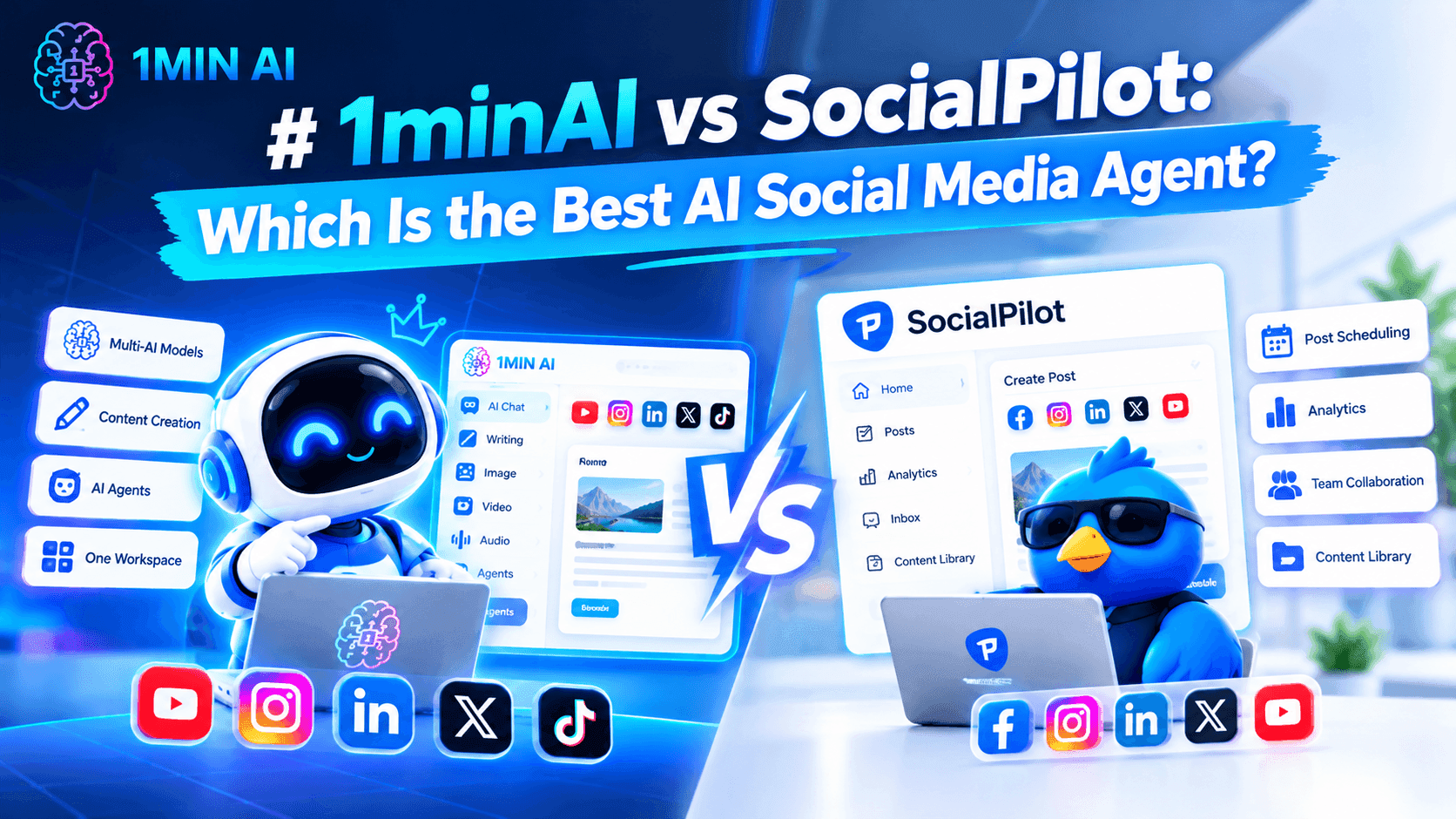
Looking for a SocialPilot alternative? Compare 1minAI vs SocialPilot for AI content creation, LinkedIn automation, scheduling, and social media management.
Platforms such as SocialPilot help businesses and agencies organize these activities across multiple social networks. But what if your biggest challenge isn't managing accounts? What if you spend too much time researching topics, writing posts, and creating content every week?
That's where an AI-powered content workflow can make a difference.
1minAI and SocialPilot solve different parts of the social media workload. SocialPilot focuses on social media management, publishing, analytics, and agency collaboration. 1minAI focuses on connecting AI-powered research, content writing, visual creation, and publishing through its Social Agents.
In this guide, we'll compare 1minAI vs SocialPilot, explore their strengths and limitations, and help you decide which platform fits your social media workflow.
What Is SocialPilot?
SocialPilot is a social media management platform designed for businesses, marketing teams, and agencies. It helps users manage multiple social accounts, plan content, schedule posts, monitor engagement, and analyze performance from one dashboard.
The platform supports major social networks, including LinkedIn, Facebook, Instagram, TikTok, YouTube, Pinterest, Threads, and X.
Its main value is centralized social media management. Instead of logging into multiple platforms to publish content and review performance, teams can coordinate much of their work through one interface.
SocialPilot's Key Features
1. Social Media Scheduling and Bulk Publishing
SocialPilot provides a social media calendar where users can plan and schedule posts across connected accounts.
Its bulk scheduling and CSV upload features help teams prepare multiple posts in advance rather than publishing each one manually.
2. AI-Powered Content Creation
SocialPilot includes AI-assisted content generation to help users create captions, post variations, and other social media copy.
This can reduce the time spent drafting content, especially when managing several accounts or campaigns.
3. Multi-Account Management
One of SocialPilot's major strengths is its ability to manage multiple social media accounts from a centralized dashboard.
This is particularly useful for agencies that handle several clients or businesses with multiple brands and locations.
4. Analytics and Reporting
SocialPilot provides social media analytics and reporting features to help users understand post performance and review account activity.
Higher-tier plans include advanced analytics, competitor reports, scheduled reports, and white-label reporting.
5. Team and Client Collaboration
SocialPilot supports team management, content approval workflows, and client collaboration.
These features help agencies coordinate publishing with clients and internal team members without relying entirely on email or separate approval processes.
6. Media and Carousel Publishing
The platform supports multiple-image and carousel posts, video publishing, LinkedIn document publishing, and first-comment scheduling.
These features are useful for teams that publish different content formats and need more control over their publishing process.
SocialPilot's Pricing
SocialPilot offers multiple subscription plans. Its pricing page displays the following annual-billing rates at the time of research:
| Plan | Starting price (annual billing) | Main audience |
|---|---|---|
| Essentials | $25.50/month | Individual professionals |
| Standard | $42.50/month | Small businesses and teams |
| Premium | $85/month | Growing agencies |
| Ultimate | $170/month | Established agencies and multi-location brands |
The plans differ in supported social accounts, team members, analytics, bulk scheduling, client approvals, and white-label capabilities.
For example, the Premium plan includes 25 social media accounts, six users, bulk scheduling, advanced analytics, client approvals, and white-label reports. The Ultimate plan supports 50 social accounts and unlimited users.
Pricing and plan limits can change. Check the official SocialPilot pricing page before making a purchase decision.
SocialPilot's Strengths
SocialPilot is a strong option for organizations that need structured social media management.
Its main advantages include:
- Multi-account management: Manage multiple social profiles from one dashboard.
- Bulk scheduling: Prepare and schedule many posts in advance.
- Agency collaboration: Coordinate team members, clients, and approval workflows.
- Advanced reporting: Review social media performance and create branded reports.
- Flexible publishing: Support multiple images, carousels, videos, LinkedIn documents, and first comments.
- Multi-platform support: Manage social media activities across several networks.
For agencies managing many client accounts, these capabilities can be particularly valuable.
Where SocialPilot May Not Be the Best Fit
SocialPilot offers a broad set of management features, but not every user needs an agency-oriented social media management platform.
Consider these points when evaluating it:
- Its main strength is managing, scheduling, and analyzing social media activity rather than connecting every stage of AI content production.
- Users who spend most of their time researching topics and developing original LinkedIn posts may want a more content-focused AI workflow.
- Advanced agency features, such as white-label reports and client management, are available in higher-tier plans.
- A scheduling platform does not automatically eliminate the work involved in finding relevant topics, developing ideas, and creating original content.
These are differences in product focus rather than evidence that SocialPilot performs poorly. The right choice depends on where your team spends the most time.
What Is 1minAI Social Agents?
1minAI is an AI workspace that brings together AI chat, writing, image generation, document tools, and AI agents.
Its Social Agents help users connect content-related tasks into more structured workflows.
For LinkedIn content, the 1minAI LinkedIn Content Agent follows a sequence:
Gather Information → Write Content → Design Image → Post to Social
Instead of treating research, writing, visual creation, and publishing as completely separate tasks, the agent connects them in one workflow.
You can explore the feature directly through 1minAI Social Agents.
Key Capabilities of 1minAI Social Agents
1. Gather Information Before Creating Content
Start with relevant information about your company, product, service, or topic.
The LinkedIn workflow can use saved assets and supplied information as context for content generation. This helps the AI work from your business information rather than producing generic posts from a vague prompt.
2. Generate LinkedIn Content
After gathering information, the agent moves to content creation.
You can configure writing settings and available AI model options to generate LinkedIn-ready drafts. This supports a workflow that begins with your business knowledge and turns it into content for your target audience.
3. Generate Supporting Images
The workflow also includes an image-generation stage.
You can create visuals that complement the post rather than searching for unrelated stock images or preparing every graphic manually.
4. Schedule and Publish Content
Once the content is ready, the workflow can move to the social publishing stage.
The LinkedIn Agent supports connecting a LinkedIn destination and configuring publishing schedules, including recurring scheduling options where available.
5. Customize the Workflow
The agent provides settings for content generation, including writing and image model options. Where available, saved Brand Voice settings can help guide the tone and wording.
This makes it easier to establish a repeatable process for producing content around your business, products, or services.
1minAI vs SocialPilot: Feature Comparison
Both platforms can support social media workflows, but their primary focus is different.
| Feature | SocialPilot | 1minAI Social Agents |
|---|---|---|
| Main focus | Social media management | AI-powered content production and publishing |
| AI content generation | AI captions and content assistance | AI-assisted research and LinkedIn post creation |
| Topic and source research | Content planning and discovery tools | Gather information from topics and supplied assets |
| LinkedIn content creation | Supported | Core workflow capability |
| AI image generation | Image and media publishing tools | AI-generated visuals connected to content |
| Scheduling | Multi-platform scheduling and bulk publishing | Scheduling through the Social Agent workflow |
| Multi-account management | Strong agency-oriented account management | Check current Social Agent account and destination options |
| Analytics and reporting | Detailed analytics and advanced reports | Not positioned as a replacement for SocialPilot's advanced reporting suite |
| Client approvals | Available in eligible plans | Check current collaboration options |
| White-label reports | Available in higher-tier plans | Not a direct equivalent to SocialPilot's white-label reporting |
| Broader AI workspace | Primarily social media management | Writing, images, documents, AI chat, and agents |
The comparison highlights an important distinction: SocialPilot is built for managing social media operations at scale, while 1minAI focuses on using AI to reduce the work involved in creating content.
Why Consider 1minAI as a SocialPilot Alternative?
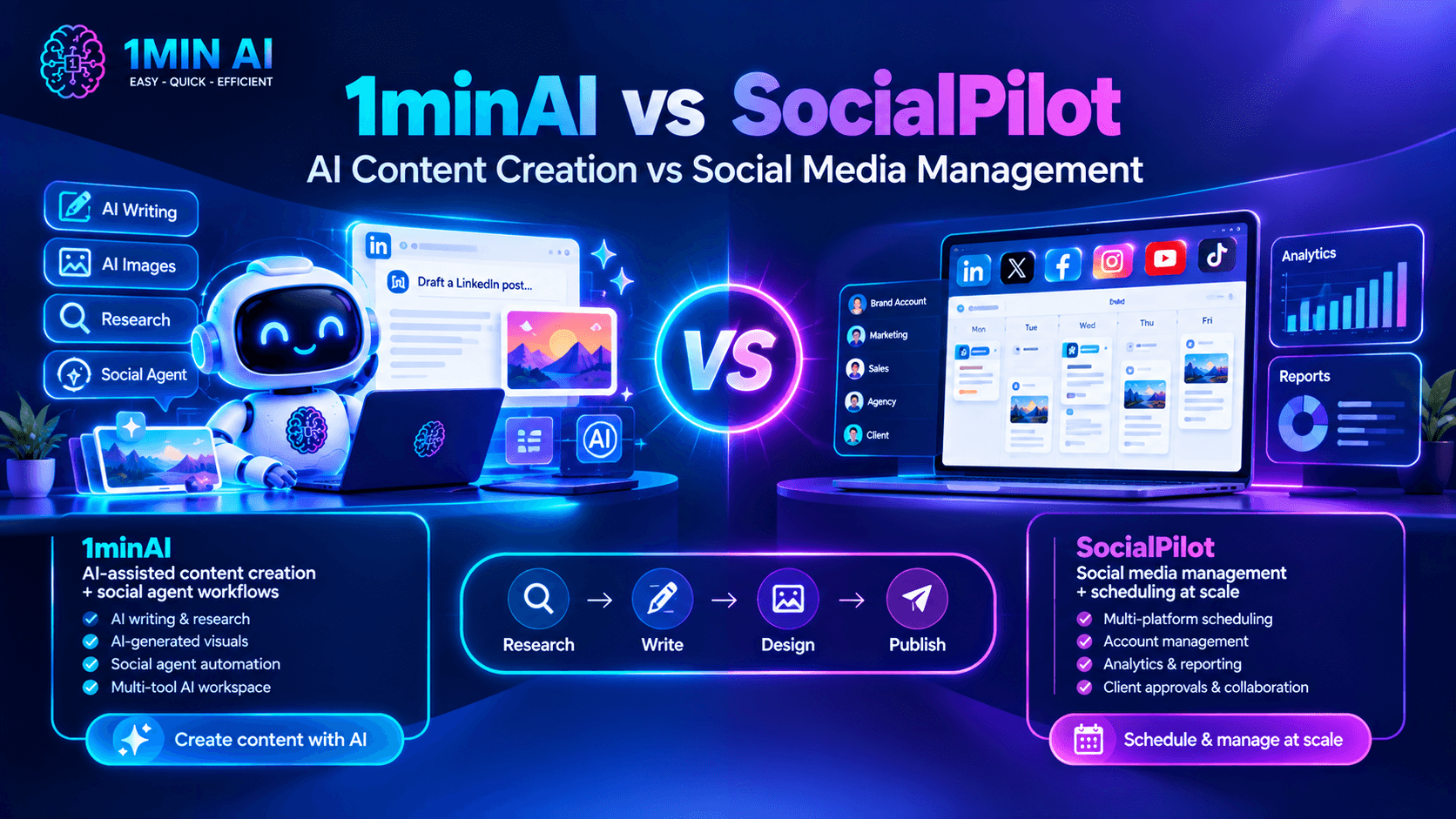
If you're searching for a SocialPilot alternative, first identify which part of your social media workflow takes the most time.
If your team already has content ready and mainly needs account management, reporting, and bulk scheduling, SocialPilot may be the better fit.
But if creating content is the biggest bottleneck, 1minAI offers a different approach.
1. Move Beyond Scheduling to AI-Assisted Content Creation
Scheduling solves one part of social media management: deciding when a post should go live.
It doesn't necessarily solve the work required to create that post.
Before publishing, someone still needs to:
- Find a relevant topic.
- Research the subject.
- Identify an interesting angle.
- Write the post.
- Edit the wording.
- Prepare a supporting image.
- Review the final content.
1minAI's Social Agent connects several of these steps into one workflow.
For example, a founder can provide company information, select a topic, generate a LinkedIn post, create a supporting image, and move the result toward publishing.
This is useful when you want to spend less time on repetitive content tasks and more time developing ideas that matter to your audience.
2. Turn Business Information into Personalized Content
Generic AI-generated posts often lack the details that make business content interesting.
A more useful approach is to start with information about your actual products, services, customers, and expertise.
With 1minAI, you can use saved assets and relevant business information as context for the content-generation process.
For example, a SaaS founder could provide:
- Product descriptions.
- Target audience information.
- Customer pain points.
- Product updates.
- Key differentiators.
- Relevant industry insights.
The agent can then use this information as a starting point for LinkedIn content.
You should still review the generated copy and add personal experience or opinions. AI can help maintain a consistent starting point, but authentic thought leadership requires your perspective.
3. Connect Post Writing with AI Image Generation
Creating a LinkedIn post often involves more than writing text.
A visual can make a complex idea easier to understand, highlight an important statistic, or give a post a more recognizable format.
1minAI connects writing and image generation within its Social Agent workflow.
For example, if you're creating a post about a new product feature, you can generate the copy and then create a supporting visual that illustrates the feature.
This reduces the need to move between separate writing and image-generation tools for every post.
4. Build a More Consistent LinkedIn Publishing Workflow
Consistency is difficult when every post requires starting from scratch.
A repeatable workflow makes content production more manageable.
With 1minAI, you can establish a sequence for gathering information, writing content, designing images, and scheduling posts.
This is particularly useful for:
- Solo founders building a personal brand.
- B2B marketers sharing industry insights.
- Consultants publishing educational content.
- Small teams promoting products and services.
- Content creators who want a more structured production process.
The objective isn't to publish as frequently as possible. It's to make it easier to publish useful content consistently.
5. Access More AI Capabilities in One Workspace
Social media content is often connected to other marketing activities.
A LinkedIn post may originate from a blog article, a customer case study, a product document, or a research report.
1minAI provides a broader AI workspace that can support these related tasks.
You can explore its AI writing, image, document, and chat tools alongside Social Agents.
This is useful if your team wants to use AI for more than social media scheduling.
How to Automate Your LinkedIn Content Workflow with 1minAI
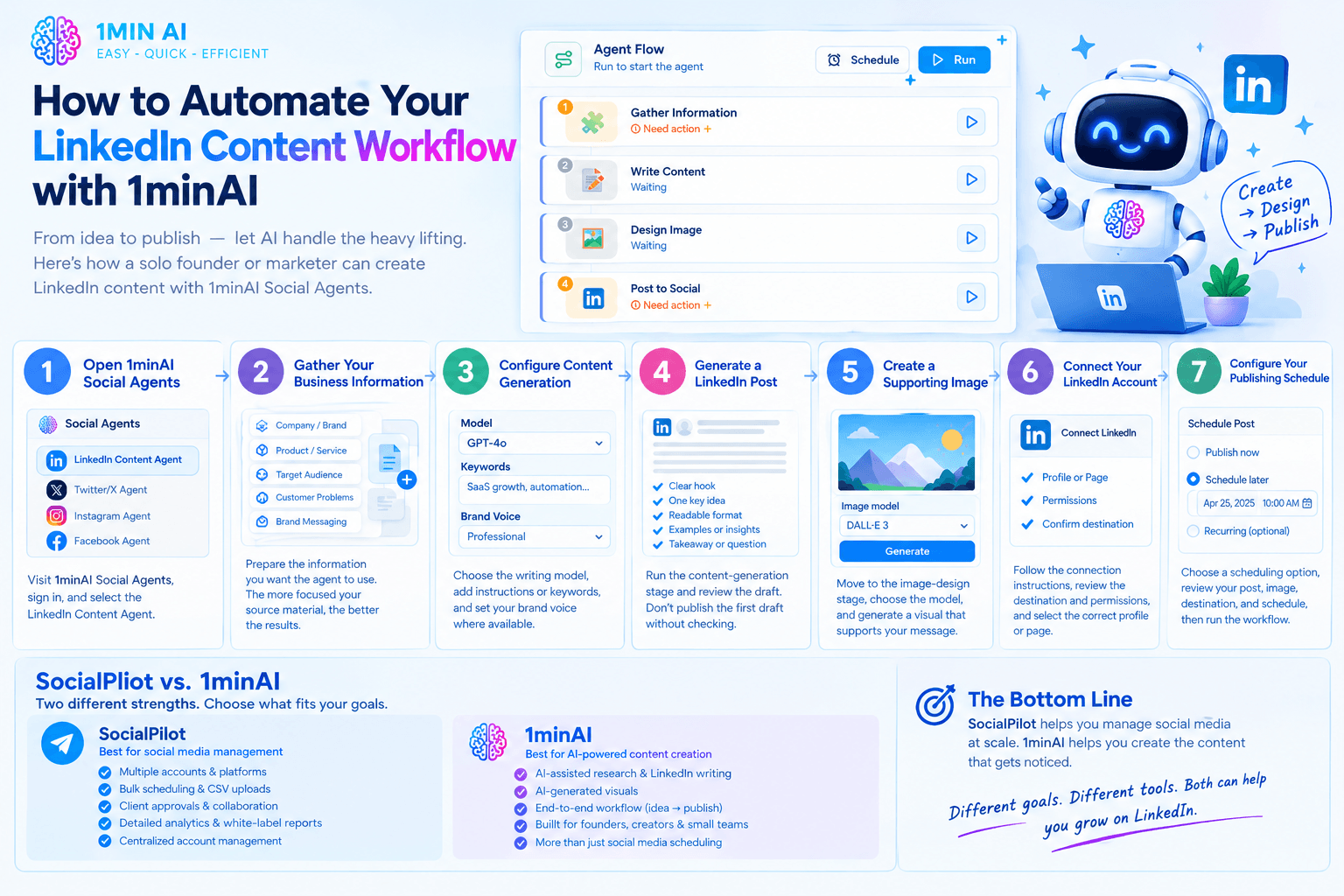
Let's look at a practical example of how a solo founder or marketer can use 1minAI Social Agents to create LinkedIn content.
Step 1: Open 1minAI Social Agents
Visit 1minAI Social Agents and sign in to your account.
Open the available Social Agent options and select the LinkedIn Content Agent.
Step 2: Gather Your Business Information
Prepare the information you want the agent to use.
This could include:
- Company or personal brand details.
- Product or service descriptions.
- Target audience.
- Customer problems.
- Brand messaging.
- Relevant source material.
Select the appropriate saved asset or provide the relevant information through the available input options.
The more focused your source material is, the easier it is to create content that matches your actual business.
Step 3: Configure Content Generation
Open the content-writing stage and review the available settings.
Choose the writing model and provide relevant instructions, keywords, or content preferences where supported.
For example, a B2B founder might focus on topics such as:
- SaaS growth.
- Customer acquisition.
- Business automation.
- Startup challenges.
- Product development.
- Industry trends.
You can also use Brand Voice settings where available to guide the generated content.
Step 4: Generate a LinkedIn Post
Run the content-generation stage and review the draft.
A useful LinkedIn post generally needs:
- A clear opening hook.
- One central idea.
- Readable formatting.
- Relevant examples or supporting information.
- A useful takeaway or discussion question.
Don't publish the first draft automatically without reviewing it. Check whether the post sounds natural and accurately reflects your business.
Step 5: Create a Supporting Image
Move to the image-design stage.
Choose the available image model and review the visual settings. Generate an image that supports the message of your post.
For example, a post about workflow automation could use a simple process illustration rather than a generic technology-themed image.
Step 6: Connect Your LinkedIn Account
Open the publishing stage and follow the available connection instructions.
Review the destination and permissions carefully before authorizing publishing.
Make sure you select the correct LinkedIn profile or page for your content.
Step 7: Configure Your Publishing Schedule
Choose the scheduling option that matches your content plan.
Depending on the available settings, you can generate content on demand, schedule a one-time post, or configure a recurring workflow.
Review the generated post, image, destination, and schedule before running the workflow.
Explore the feature here: 1minAI Social Agents.
Who Should Choose SocialPilot vs 1minAI?
The best platform depends on your team's priorities, not simply the number of features.
Choose SocialPilot If:
- You manage multiple social media accounts across several platforms.
- You work at an agency with many client profiles.
- You need bulk scheduling and CSV uploads.
- Your team relies on client approvals and collaboration.
- You need detailed analytics and white-label reports.
- Your main priority is centralized social media management.
SocialPilot is particularly suitable for agencies and marketing teams that need structured account management and reporting.
Consider 1minAI If:
- Your biggest challenge is creating content consistently.
- You want AI assistance with research and LinkedIn post writing.
- You want to connect content creation with AI-generated visuals.
- You want a repeatable workflow from business information to publishing.
- You are a founder, creator, consultant, or small marketing team.
- You already use AI for other content and productivity tasks.
1minAI is worth exploring if you want an AI-powered content workflow rather than primarily a social media management dashboard.
Frequently Asked Questions
Is 1minAI a good SocialPilot alternative?
It depends on what you need. SocialPilot offers extensive social media management features, including multi-account scheduling, analytics, client approvals, and white-label reporting. 1minAI is more focused on AI-assisted content production, connecting research, writing, image generation, and publishing. It is worth considering if content creation is your main bottleneck.
Does 1minAI support LinkedIn content automation?
Yes. 1minAI's LinkedIn Content Agent connects information gathering, content writing, image generation, and social publishing. It also supports scheduling options through the available workflow settings.
Can I use 1minAI to generate LinkedIn posts?
Yes. The LinkedIn Content Agent helps turn business information and topics into LinkedIn-ready content. You can review the generated draft and adjust it before publishing.
Can 1minAI create images for LinkedIn posts?
Yes. The Social Agent workflow includes an image-design stage that can generate visuals to accompany your content. Review the generated image to ensure it matches your brand and message.
Does SocialPilot support LinkedIn scheduling?
Yes. SocialPilot supports LinkedIn publishing and scheduling, including features such as bulk scheduling, multiple-image posts, LinkedIn document publishing, and first comments. Exact feature availability depends on the subscription plan.
Is SocialPilot better for agencies?
SocialPilot has strong agency-oriented capabilities, including multi-account management, team collaboration, client approvals, advanced analytics, and white-label reports. If these are essential to your agency, it may be the more suitable platform.
Can I use 1minAI for social media platforms beyond LinkedIn?
1minAI provides a broader Social Agents offering. Available agents and publishing destinations may differ, so check the current Social Agents workspace for the options available to your account.
Conclusion: 1minAI vs SocialPilot
SocialPilot and 1minAI address different challenges in social media marketing.
SocialPilot is a strong choice for managing social media operations. Its multi-account scheduling, analytics, client approvals, and white-label reporting make it particularly useful for agencies and teams managing multiple brands.
1minAI is worth considering when AI-powered content creation is the priority. Its Social Agents connect information gathering, LinkedIn post writing, visual generation, and publishing into a more structured workflow.
If your main challenge is managing dozens of social accounts and delivering client reports, SocialPilot may be the better fit.
But if you spend too much time researching topics, drafting posts, creating visuals, and coordinating content production, 1minAI offers a workflow worth exploring.
Ready to make LinkedIn content creation more efficient?
- #Commerce
- #Information
Alternatywy
Odkryj najlepsze alternatywy dla 1minAI i porównaj funkcje, ceny oraz przypadki użycia.

1min.AI kontra OpenRouter
1min.AI kontra OpenRouter: Porównaj gotowy do użycia produkt do tworzenia AI z technicznym narzędziem API. Dowiedz się, czy potrzebujesz kreatywnego studia bez kodowania, czy centrum infrastruktury do kodowania.
 Ngoc Hong

1min.AI kontra Jarvis AI
Porównaj 1min.AI z Jarvis AI, aby odkryć, która platforma AI jest lepsza do pisania, badań, automatyzacji i tworzenia treści. Znajdź najlepszego asystenta AI dla swojego przepływu pracy.
Ngoc Hong
1min. AI vs Dola AI
Szukasz alternatywy dla Dola AI? Porównaj 1min.AI i Dola AI pod kątem generowania wideo, darmowych planów, cen i prywatności, aby wybrać właściwą aplikację AI.
Ngoc HongNarzędzia AI
Odkryj najlepsze narzędzia AI, aby zwiększyć produktywność, kreatywność i codzienną pracę.

Jeden produkt, 10 kreacji UGC: Jak AI ułatwia testowanie treści
Twórz bardziej autentyczne UGC dzięki generatorowi wideo UGC AI, testuj więcej kreatywnych kątów i skaluj treści afiliacyjne bez filmowania każdej wersji.
 Lien Anh Vu

Twórz spójne treści cartoon w zaledwie kilku krokach
Twórz filmy cartoon na TikToka i Reels w 3 prostych krokach z 1min.AI — od researchu pomysłów po postacie i animowane wideo.
Lien Anh Vu
Top 4 Niedrogie Narzędzia AI dla Założycieli Startupów
Odkryj 4 najlepsze niedrogie narzędzia AI dla założycieli startupów, które pomogą zweryfikować pomysły, budować produkty, tworzyć treści i szybciej startować bez nadmiernych wydatków.
 Tram Ta
Funkcje AI
Kompleksowe funkcje AI, które usprawniają przepływy pracy, poprawiają wydajność i umożliwiają zespołom osiąganie więcej.
Jeden produkt, 10 kreacji UGC: Jak AI ułatwia testowanie treści
Twórz bardziej autentyczne UGC dzięki generatorowi wideo UGC AI, testuj więcej kreatywnych kątów i skaluj treści afiliacyjne bez filmowania każdej wersji.
Lien Anh VuTwórz spójne treści cartoon w zaledwie kilku krokach
Twórz filmy cartoon na TikToka i Reels w 3 prostych krokach z 1min.AI — od researchu pomysłów po postacie i animowane wideo.
Lien Anh Vu
1minAI: Darmowy AI korektor gramatyczny
Sprawdź gramatykę za darmo z AI korektorem gramatycznym 1minAI. Wykrywaj błędy gramatyczne, ortograficzne i stylistyczne, poprawiaj klarowność i dopracuj treść w kilka sekund.
Tram TaPrzykłady zastosowań AI
Wyselekcjonowana kolekcja przypadków użycia AI dla biznesu, produktywności i zastosowań branżowych.
Jeden produkt, 10 kreacji UGC: Jak AI ułatwia testowanie treści
Twórz bardziej autentyczne UGC dzięki generatorowi wideo UGC AI, testuj więcej kreatywnych kątów i skaluj treści afiliacyjne bez filmowania każdej wersji.
Lien Anh VuTwórz spójne treści cartoon w zaledwie kilku krokach
Twórz filmy cartoon na TikToka i Reels w 3 prostych krokach z 1min.AI — od researchu pomysłów po postacie i animowane wideo.
Lien Anh Vu
Najlepszy czas na publikację na Instagramie: praktyczny przewodnik po lepszym zaangażowaniu
Odkryj najlepszy czas na publikację na Instagramie, w tym najlepsze dni i godziny dla różnych odbiorców, a także wskazówki, jak znaleźć idealny harmonogram publikacji dla Twojego konta.
Tram TaSamouczki AI
Naucz się korzystać z AI dzięki praktycznym samouczkom krok po kroku.
Twórz spójne treści cartoon w zaledwie kilku krokach
Twórz filmy cartoon na TikToka i Reels w 3 prostych krokach z 1min.AI — od researchu pomysłów po postacie i animowane wideo.
Lien Anh Vu
Oferty Black Friday na narzędzia AI w 2026 roku
Odkryj, co oferują oferty Black Friday na narzędzia AI w 2026 roku. Dowiedz się, jak zdobyć dożywotnią ofertę 1min.AI przez AppSumo, Dealify i Stack Social oraz jak zweryfikować ją na Trustpilot, Slashdot i Software Advice.
 Hang Nguyen

Spójność produktu w AI Image to Video z Seedance, aby zatrzymać deformacje i skalować recenzje produktów
Zatrzymaj deformacje logotypów dzięki spójności produktu AI image to video i twórz dziś materiały recenzenckie w jakości studyjnej na 1min.AI.
Lien Anh VuPoradniki AI
Ucz się AI szybciej dzięki praktycznym przewodnikom, rzeczywistym przykładom i praktycznym najlepszym praktykom.
Twórz spójne treści cartoon w zaledwie kilku krokach
Twórz filmy cartoon na TikToka i Reels w 3 prostych krokach z 1min.AI — od researchu pomysłów po postacie i animowane wideo.
Lien Anh Vu
Bezpieczny zakup narzędzi AI online: przewodnik na Black Friday 2026
Dowiedz się, jak znaleźć i zabezpieczyć najlepsze okazje na AI w Black Friday online. Poznaj sprawdzone strategie, by unikać oszustw, walczyć z subskrypcyjnym zmęczeniem i weryfikować oprogramowanie.
Hang NguyenTop 4 Niedrogie Narzędzia AI dla Założycieli Startupów
Odkryj 4 najlepsze niedrogie narzędzia AI dla założycieli startupów, które pomogą zweryfikować pomysły, budować produkty, tworzyć treści i szybciej startować bez nadmiernych wydatków.
Tram TaRozwiązania AI
Przeglądaj najlepsze rozwiązania AI dla automatyzacji, kodowania, badań, produktywności, obsługi klienta, marketingu i przepływów pracy biznesowych.
Jeden produkt, 10 kreacji UGC: Jak AI ułatwia testowanie treści
Twórz bardziej autentyczne UGC dzięki generatorowi wideo UGC AI, testuj więcej kreatywnych kątów i skaluj treści afiliacyjne bez filmowania każdej wersji.
Lien Anh VuTwórz spójne treści cartoon w zaledwie kilku krokach
Twórz filmy cartoon na TikToka i Reels w 3 prostych krokach z 1min.AI — od researchu pomysłów po postacie i animowane wideo.
Lien Anh Vu
Darmowy generator tatuaży AI: projekty na zamówienie
Przekształć każdy pomysł w indywidualny projekt tatuażu dzięki darmowemu generatorowi tatuaży AI od 1min.AI. Opisz swój pomysł, wybierz styl i pobierz w kilka sekund.
 Trang Tran
Modele AI
Odkryj wiodące modele AI na świecie w jednym miejscu.
Jeden produkt, 10 kreacji UGC: Jak AI ułatwia testowanie treści
Twórz bardziej autentyczne UGC dzięki generatorowi wideo UGC AI, testuj więcej kreatywnych kątów i skaluj treści afiliacyjne bez filmowania każdej wersji.
Lien Anh VuTwórz spójne treści cartoon w zaledwie kilku krokach
Twórz filmy cartoon na TikToka i Reels w 3 prostych krokach z 1min.AI — od researchu pomysłów po postacie i animowane wideo.
Lien Anh VuSpójność produktu w AI Image to Video z Seedance, aby zatrzymać deformacje i skalować recenzje produktów
Zatrzymaj deformacje logotypów dzięki spójności produktu AI image to video i twórz dziś materiały recenzenckie w jakości studyjnej na 1min.AI.
Lien Anh VuPorównania AI
Porównaj narzędzia, modele i platformy AI, aby znaleźć najlepsze dopasowanie do swoich potrzeb.

Kling AI vs Veo 3: Który model wygrywa?
Kling AI vs Veo 3: porównaj ruch, natywne audio, ceny i darmowe plany, aby sprawdzić, który generator wideo AI wygra w Twoim projekcie — wypróbuj oba w 1min.AI.
Trang TranSpójność produktu w AI Image to Video z Seedance, aby zatrzymać deformacje i skalować recenzje produktów
Zatrzymaj deformacje logotypów dzięki spójności produktu AI image to video i twórz dziś materiały recenzenckie w jakości studyjnej na 1min.AI.
Lien Anh Vu
Porównanie DeepSeek V4 Pro vs Flash
Porównaj metryki DeepSeek V4 Pro vs DeepSeek V4 Flash. Zoptymalizuj swoje aplikacje agentowe i popraw weryfikację faktów AI na 1min.ai już dziś.
Integracje AI
Bezproblemowo integruj AI z narzędziami, których już używasz, aby automatyzować pracę i zwiększać produktywność.

Jak używać generatora wideo modowego AI na Fashion Week 2026
Przekształć pomysły na Fashion Week 2026 w zachwycające filmy modowe dzięki AI. Dowiedz się, jak burzyć pomysły, tworzyć wizualizacje i zamieniać obrazy w filmy w jednym prostym workflow.
Lien Anh Vu
POV: Masz ponad 10 postów do stworzenia każdego dnia
Dowiedz się, jak zbudować workflow treści AI, który pomaga twórcom treści szybciej tworzyć ponad 10 postów w mediach społecznościowych dziennie dzięki burzy mózgów z AI, generowaniu obrazów i tworzeniu treści.
Lien Anh Vu
Przestań przełączać się między aplikacjami AI: jak integracja AI zmienia Employer Branding
Odkryj, jak integracja AI pomaga zespołom HR usprawnić employer branding, łącząc pisanie AI, dokumenty, obrazy, wideo i wiele modeli AI w jednym obszarze roboczym.
Tram TaAI dla Przemysłu
Znajdź najlepsze narzędzia i przepływy pracy AI dla opieki zdrowotnej, finansów, edukacji, prawa, produkcji, handlu detalicznego, nieruchomości i innych.

Darmowy generator opisów produktów AI
Pisz opisy produktów, które sprzedają, w kilka minut. Użyj tego darmowego generatora opisów produktów AI, aby zamienić szczegóły lub zdjęcie w tekst zgodny z marką. Wypróbuj 1min.AI.
Trang Tran
Najlepsze narzędzia do produktywności biznesowej dla startupów, by maksymalizować zyski | 1minAI
Odkryj najlepsze narzędzia do produktywności biznesowej dla startupów, aby oszczędzać czas, usprawniać przepływy pracy, ograniczać powtarzalne zadania i wspierać rentowny wzrost dzięki AI.
Tram Ta
Najlepsze narzędzie AI do content marketingu |1minAI
Szukasz najlepszego narzędzia AI do content marketingu? Zobacz, jak 1minAI pomaga marketerom badać, pisać, przerabiać, tworzyć grafiki i skalować treści w jednym środowisku AI.
Tram TaAgenci AI
Odkrywaj i uruchamiaj agentów AI, aby automatyzować zadania w pracy i życiu codziennym.
1minAI: Darmowy AI korektor gramatyczny
Sprawdź gramatykę za darmo z AI korektorem gramatycznym 1minAI. Wykrywaj błędy gramatyczne, ortograficzne i stylistyczne, poprawiaj klarowność i dopracuj treść w kilka sekund.
Tram Ta
Agenci AI dla Facebooka
Użyj Agenta AI do Facebooka, aby tworzyć treści, generować obrazy, planować posty i publikować materiały na podstawie dokumentów oraz rozmów.
Ngoc Hong
AI Agent vs AI Assistant: Który naprawdę oszczędza designerom więcej czasu?
Poznaj różnicę między AI Agent vs AI Assistant i sprawdź, które rozwiązanie pomaga designerom automatyzować powtarzalną pracę, ograniczać poprawki i oszczędzać więcej czasu.
Lien Anh VuPrzepływy pracy AI
Poznaj gotowe do użycia przepływy pracy AI dla produktywności, marketingu, sprzedaży, wsparcia i wielu innych.
Jeden produkt, 10 kreacji UGC: Jak AI ułatwia testowanie treści
Twórz bardziej autentyczne UGC dzięki generatorowi wideo UGC AI, testuj więcej kreatywnych kątów i skaluj treści afiliacyjne bez filmowania każdej wersji.
Lien Anh VuTwórz spójne treści cartoon w zaledwie kilku krokach
Twórz filmy cartoon na TikToka i Reels w 3 prostych krokach z 1min.AI — od researchu pomysłów po postacie i animowane wideo.
Lien Anh VuJak używać generatora wideo modowego AI na Fashion Week 2026
Przekształć pomysły na Fashion Week 2026 w zachwycające filmy modowe dzięki AI. Dowiedz się, jak burzyć pomysły, tworzyć wizualizacje i zamieniać obrazy w filmy w jednym prostym workflow.
Lien Anh VuNewsletter
Cotygodniowe innowacje AI z 1minAI

🔮 Tygodniowe nowości AI #142: Grok 4.7, Opus 5.5 i Sonnet 5.5 w 1min.ai
Uzyskaj dostęp do Grok 4.7, Claude Opus 5.5 i Sonnet 5.5 w 1min.ai. Obniż koszty subskrypcji nawet o 70% i przetwarzaj miliony tokenów w jednym, ujednoliconym środowisku pracy.
Hang Nguyen
🔮 Tygodniowe innowacje AI #143: Aktualizacja Aktualizacja GPT-6, GPT-6.1 i Ideogram 4.0 & Ideogram 4.0
Uzyskaj dostęp do GPT-6 Sol, Luna, GPT-6.1 Sol i Ideogram 4.0 na 1min.ai. Zwiększ dokładność typografii do 98,4% i skróć opóźnienie wnioskowania o 45% na jednej platformie.
Hang Nguyen
🔮 Cotygodniowe innowacje AI #141: Seedance 2.5 i Stable Audio 3: AI nowej generacji
Odkryj Seedance 2.0, 2.5 oraz Stable Audio 3 od StabilityAI na 1min.ai. Generuj dźwięk klasy studyjnej i zsynchronizowany ruch dzięki generatywnej AI nowej generacji.
Hang Nguyen