
TikTok Creative Center Trends for Better Video Ideas
२० नोव्हेंबर, २०२६
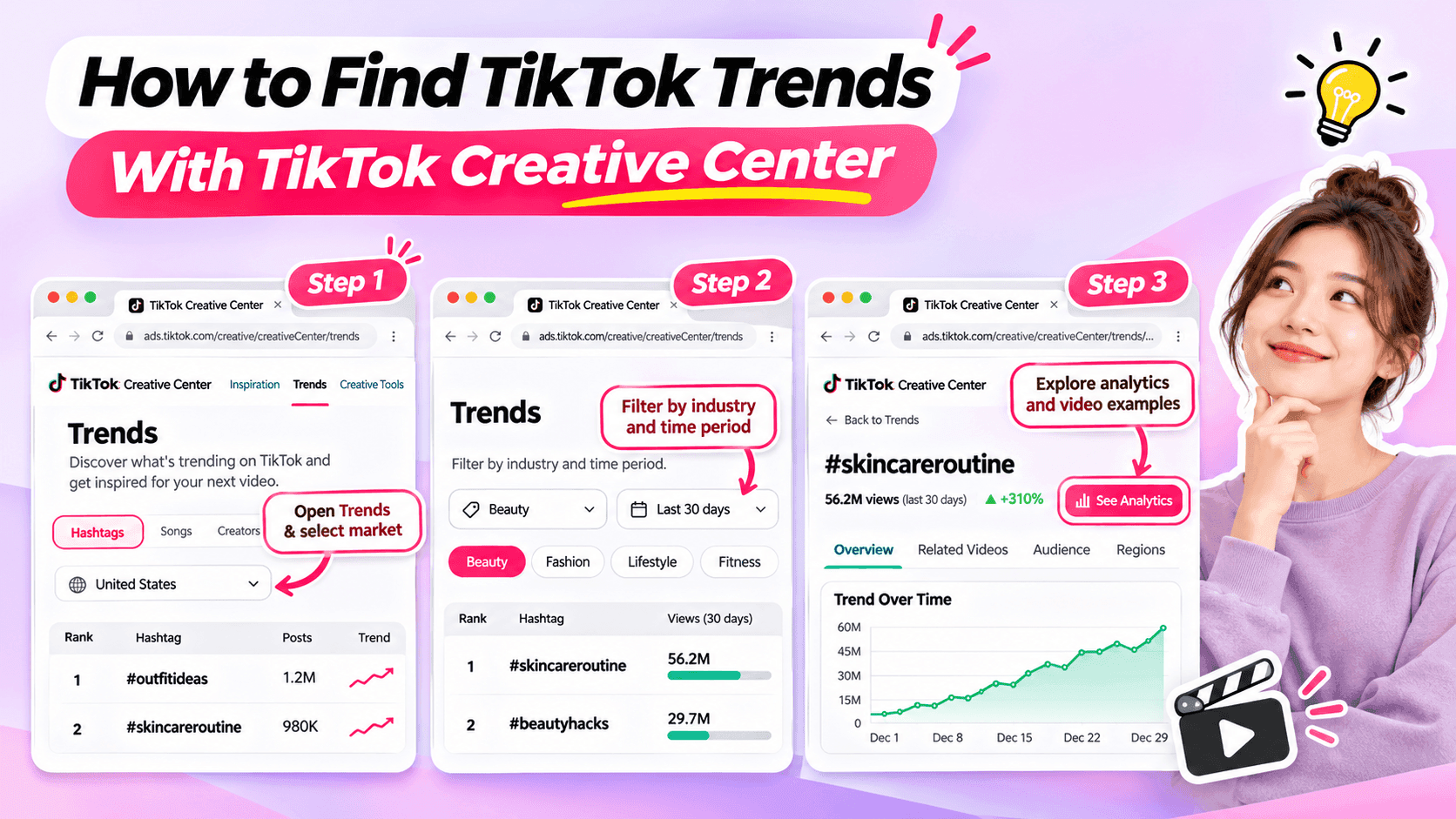
Learn how to use TikTok Creative Center to find trending hashtags and videos. Discover relevant trends and turn them into original ideas for your niche.
Looking for fresh TikTok video ideas but don't know where to start? TikTok Creative Center can help you discover trending hashtags, explore popular video formats, and find inspiration for your next post.
For influencers, the challenge isn't simply finding what's trending. It's choosing trends that match your niche, audience, and personal style.
In this beginner-friendly guide, you'll learn how to use TikTok Creative Center to find trends, understand what makes them interesting, and turn them into original video ideas. You'll also see how AI can help when you need extra inspiration.
What Is TikTok Creative Center?
TikTok Creative Center is a free creative research platform provided by TikTok for Business.
It helps users discover trends, explore creative examples, and learn about content formats on TikTok.
Although the platform includes advertising resources, influencers can also use its trend research features to find inspiration for organic content.
Here are the most useful features for beginners.
| Feature | What It Does | Why Influencers Might Use It |
|---|---|---|
| Trending Hashtags | Shows hashtags and trend information | Discover topics worth exploring |
| Hashtag Analytics | Provides available trend data and related content | Understand how a hashtag is being used |
| Trending Videos | Shows examples of popular TikTok videos where available | Explore creative approaches and formats |
| Top Ads | Provides examples of advertising creatives | Study creative techniques while recognizing that ad results differ from organic performance |
For example, a fashion influencer might use TikTok Creative Center to identify a popular styling theme and explore how people are presenting their outfits.
A fitness influencer might use it to find relevant workout-related discussions or formats.
The key is to use TikTok Creative Center as a source of inspiration, not a list of videos to copy.
How to Find TikTok Trends With Creative Center
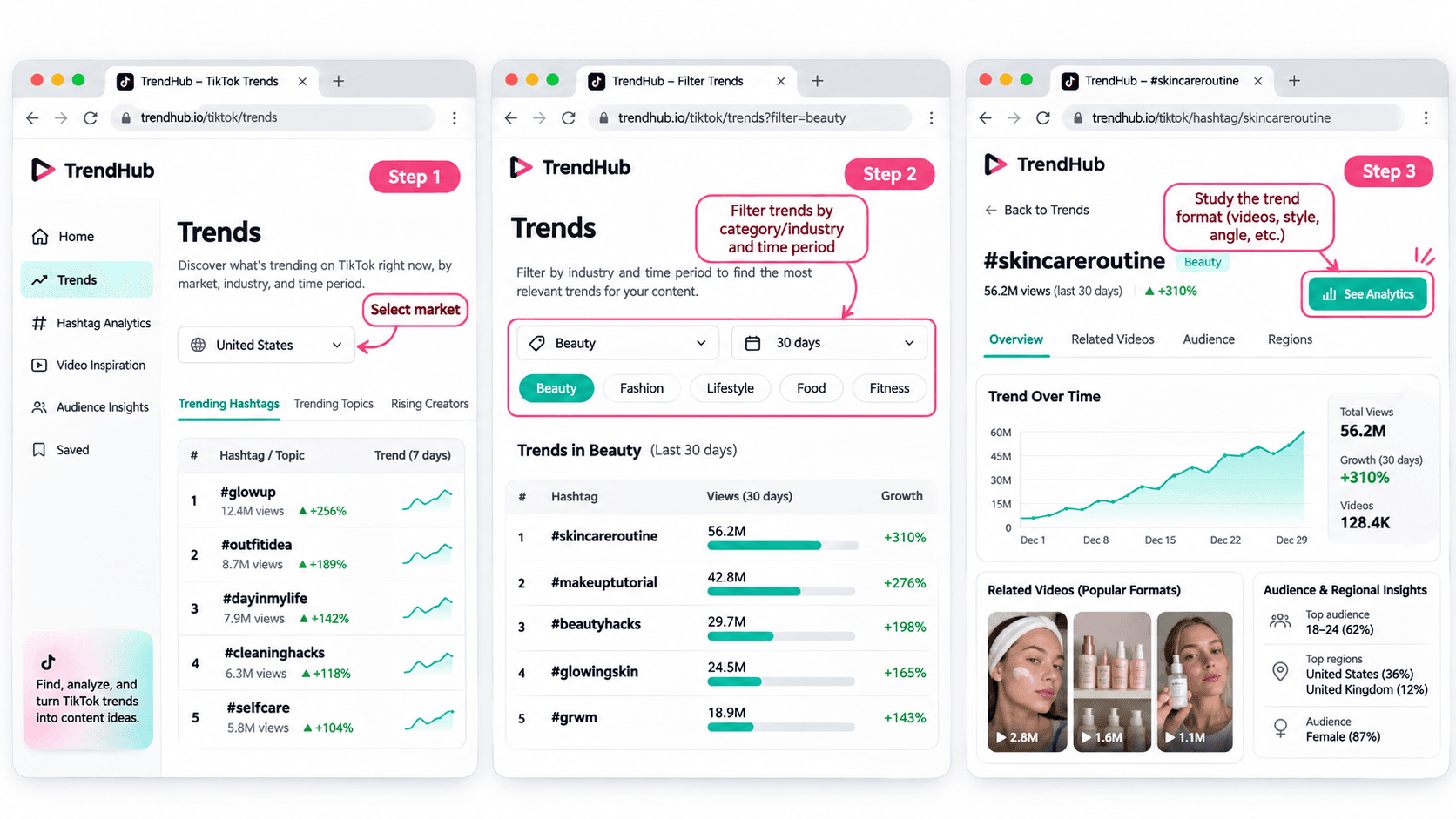
You don't need advanced marketing experience to get started.
Follow these five steps to discover and evaluate trends for your next TikTok video.
Step 1 Open TikTok Creative Center
Tool: TikTok Creative Center
Input: Your target market and influencer niche
Output: A list of trends to explore
Start by visiting the TikTok Creative Center Trends page.
On the platform:
- Open the Trends section.
- Select the Hashtag view if needed.
- Choose your target country or region when the option is available.
- Review the trending hashtags displayed.
You may be asked to log in to access additional rankings or analytics.
For example, if you're a beauty influencer targeting viewers in the United States, choose the United States when researching local trends.
This helps you explore content that may be more relevant to the audience you want to reach.
Beginner tip: Start with one market and one niche. You don't need to research every trend on TikTok.
Step 2 Filter Trends by Industry and Time Period
Input: Your niche and preferred research period
Output: A more focused selection of trends
TikTok Creative Center supports searching or filtering trending hashtags by industry and time frame.
Depending on the available interface, you can narrow your research using relevant categories.
For example:
| Influencer Niche | Research Direction |
|---|---|
| Beauty | Makeup techniques, beauty routines, skincare discussions |
| Fashion | Outfit styling, wardrobe inspiration, personal style |
| Fitness | Workout routines, training experiences, exercise discussions |
| Lifestyle | Everyday routines, organization, personal experiences |
| Technology | Device features, useful tools, technology discussions |
These are example research directions, not verified currently trending hashtags.
Once you have filtered the results, look for hashtags and topics that could make sense for your audience.
Avoid selecting a trend simply because it has the highest number of views.
A smaller, relevant trend may be more useful to your personal brand than a popular topic unrelated to your niche.
Step 3 Explore Hashtag Analytics
Input: A relevant hashtag
Output: More information about the trend and its related videos
When a hashtag catches your attention, select See Analytics if available.
TikTok's official Trends documentation describes several types of information that may appear, including:
- Trendlines showing how interest has changed.
- Related videos.
- Audience insights.
- Regional popularity.
- Related hashtags.
You don't have to analyze every metric.
For beginners, focus on three questions:
Is the topic relevant to my audience?
A popular hashtag is not automatically useful to your followers.
How are people using the hashtag?
Look at the related videos to understand the stories, formats, and approaches people are sharing.
Can I contribute something different?
Consider what personal experience, expertise, or perspective you could add.
For example, if you find a styling-related hashtag, review the videos to identify common approaches.
Some may show outfit combinations. Others may focus on accessories or personal styling tips.
Instead of copying those videos, use them to understand the topic and think about your own angle.
Step 4 Study the Video Format
Input: Related videos from your selected trend
Output: A creative structure you can adapt
Once you've found a relevant trend, watch a few videos and identify what makes the format recognizable.
Pay attention to:
- The opening scene.
- The main idea.
- The order of the shots.
- The visual changes.
- The ending.
For example, consider a before-and-after transformation format.
The structure is simple:
Before → Transformation → After
Different influencers could use that structure in different ways.
| Influencer Niche | Possible Video Idea |
|---|---|
| Fashion | Turn a casual outfit into an evening look |
| Beauty | Show a personal everyday makeup transformation |
| Fitness | Show a genuine change in a workout routine |
| Lifestyle | Transform a messy desk into an organized workspace |
These examples illustrate how a format can be adapted. They are not presented as verified current TikTok trends.
The format can stay similar while the content reflects each influencer's own experiences.
That's how you move from discovering a trend to developing an original idea.
Step 5 Save Your Trend Research
Input: Your selected trend and observations
Output: A short creative brief for your next video
Before leaving Creative Center, save the most useful information.
You can use this simple worksheet.
| Research Field | Example |
|---|---|
| Influencer niche | Everyday fashion |
| Target audience | Young adults who enjoy simple outfit inspiration |
| Trend format | Before-and-after transformation |
| What makes it interesting | A visible change between two looks |
| Personal angle | One jacket styled for different occasions |
| Possible video idea | Three ways to style one jacket |
| Next action | Write a short video concept |
This short brief helps you remember why the format interested you.
It also gives you useful information if you want to brainstorm additional ideas with AI.
How to Choose TikTok Trends That Fit Your Niche
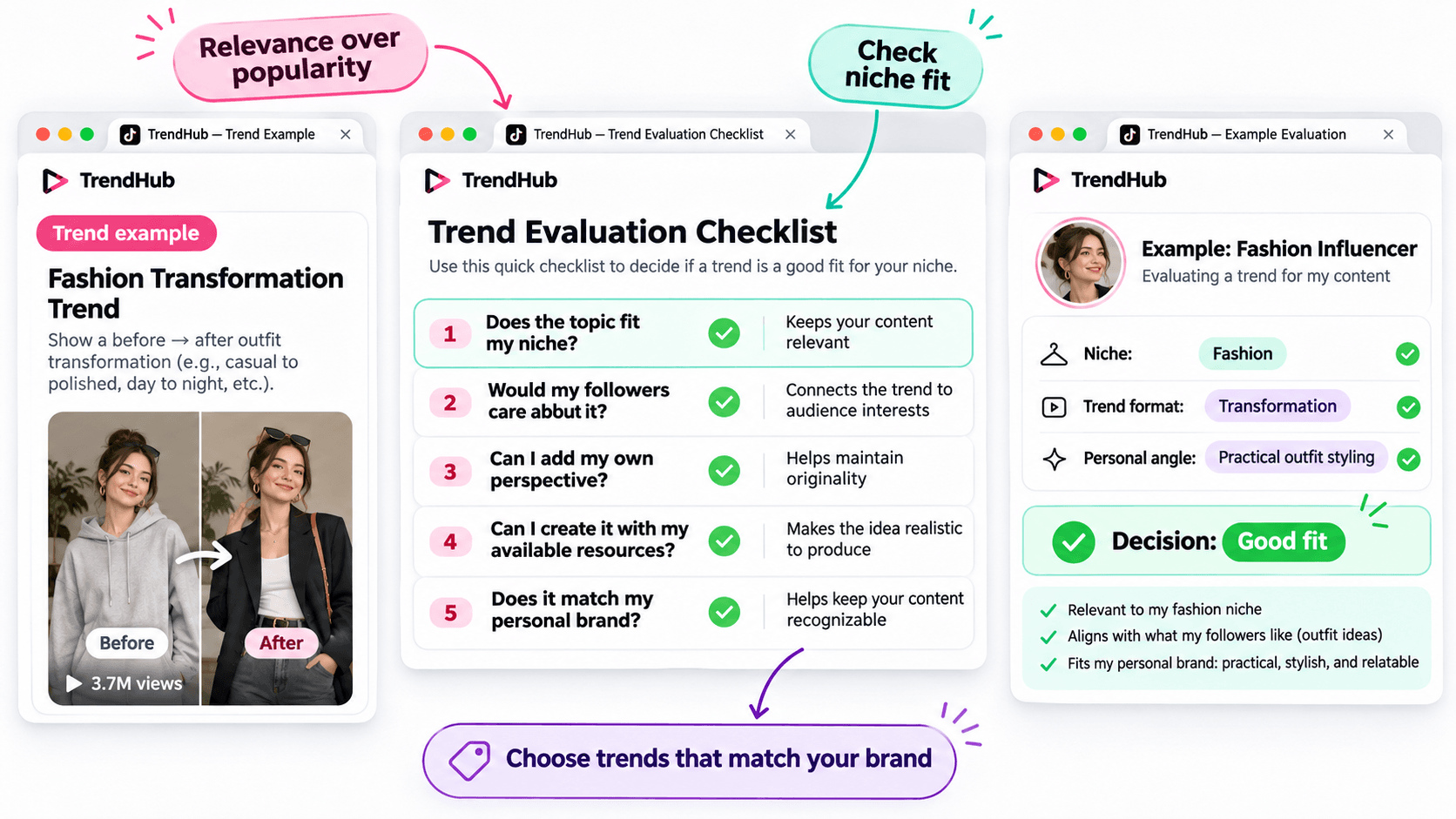
Not every popular trend deserves a place in your content plan.
Before adapting a trend, make sure it matches the kind of content your followers expect from you.
Use this simple checklist.
| Question | Why It Matters |
|---|---|
| Does the topic fit my niche? | Keeps your content relevant |
| Would my followers care about it? | Connects the trend to audience interests |
| Can I add my own perspective? | Helps maintain originality |
| Can I create it with my available resources? | Makes the idea realistic to produce |
| Does it match my personal brand? | Helps keep your content recognizable |
You don't need to answer yes to every question perfectly, but a trend should have a clear reason to belong in your content plan.
For example, imagine you're a fashion influencer who usually shares practical outfit ideas.
A transformation format could be useful if it allows you to demonstrate real styling advice.
However, an unrelated trend may not provide the same value to your audience.
Choose trends based on relevance and creative fit rather than popularity alone.
How to Turn a TikTok Trend Into an Original Video Idea
Finding a trend is only the beginning.
The next challenge is turning it into a video that feels like your own.
You can do this using three simple steps.
Step 1 Identify the Basic Creative Format
Look beyond the hashtag and focus on the structure.
For example:
Format: Before-and-after transformation.
Core idea: Show a visible change.
Possible applications: Outfit styling, makeup, workspace organization, or a genuine personal routine change.
This gives you a flexible creative direction.
Step 2 Add Your Personal Perspective
Ask yourself what you can contribute that another influencer hasn't already shown.
For example, a fashion influencer could use the transformation format to demonstrate how one favorite jacket works with different outfits.
The video could follow this structure:
Opening: Show the jacket and introduce the challenge.
Middle: Demonstrate three outfit combinations.
Ending: Ask followers which look they prefer.
This is a more personal concept than simply recreating a trending video.
Step 3 Develop a Simple Video Concept
Write down your idea before filming.
Example Video Concept
| Element | Example |
|---|---|
| Topic | Styling one jacket |
| Audience | Everyday fashion followers |
| Hook | "Can I style this jacket for three different occasions?" |
| Main Content | Show three outfit combinations |
| Ending | "Which look would you wear?" |
You now have a practical starting point for your next TikTok video.
You can develop the script yourself or use an AI assistant if you'd like to explore more creative approaches.
How to Brainstorm More TikTok Video Ideas With 1min.AI
Sometimes, you find an interesting trend but can't decide how to adapt it.
This is where 1min.AI Multi AI Chat can help.
You can use it to explore different content angles, develop hooks, and organize your ideas.
You don't need to use AI for every trend. It's an optional step when you want additional inspiration.
Step 1 Prepare Your Trend Information
Input: Your niche, audience, trend format, and personal style.
Let's continue with the fashion example.
| Input | Example |
|---|---|
| Niche | Everyday fashion |
| Audience | Young adults interested in practical outfits |
| Personal style | Friendly, natural, and relatable |
| Trend format | Before-and-after transformation |
| Content goal | Generate original outfit video ideas |
This gives AI enough context to generate suggestions that are more relevant than a general list of random TikTok ideas.
Step 2 Use Multi AI Chat to Explore Creative Angles
1min.AI Tool: Multi AI Chat
Output: Several video concepts with hooks and creative approaches.
Open 1min.AI and choose Multi AI Chat.
You can use one available AI model or compare suggestions from multiple models.
Copy the prompt below and replace the example information with your own.
Copyable TikTok Trend Adaptation Prompt
ROLE
Act as a TikTok content strategist who helps influencers create original short-form video ideas.
AUDIENCE
My influencer niche is [your niche].
My followers are [describe your audience].
PERSONAL BRAND
My communication style is [your tone and personality].
TREND INPUT
The TikTok trend or video format I found is [describe the verified format].
The main creative structure is [describe how the format works].
TASK
Suggest 5 original TikTok video ideas inspired by this format.
OUTPUT FORMAT
Create a table with:
- Video Idea
- Creative Angle
- Opening Hook
- Three-Part Video Outline
- Why It Fits My Audience
REQUIREMENTS
Keep the ideas easy to produce, authentic, and relevant to my niche. Do not copy another influencer's content, invent personal experiences, or claim that a trend guarantees viral results.
This format works for different influencer niches because you control the inputs.
For example, a beauty influencer can use the same prompt with a makeup-related trend, while a lifestyle influencer can use it with a home organization format.
Step 3 Review and Personalize the Suggestions
AI can help you explore options, but you should select the concept that genuinely fits your audience.
Here are three illustrative ideas for the fashion example.
| Video Idea | Creative Angle | Opening Hook |
|---|---|---|
| One Jacket Three Occasions | Show styling versatility | "Can one jacket work for three different plans?" |
| Casual to Evening Look | Show a simple outfit transformation | "Here's how I'd change this outfit for the evening." |
| Three Accessories One Outfit | Show how details change a look | "Watch how these accessories change the same outfit." |
These are examples of possible ideas, not documented outputs from a live 1min.AI session.
Choose one and adjust the details based on your own wardrobe and experience.
If you want a more detailed walkthrough of Multi AI Chat, read How Multiple AI Chat Helps Content Creators Create Better Content.
You can also watch the tutorial embedded in that guide to see how different AI models can help you compare content ideas.
For more ways to use AI throughout your creative process, explore Free AI Tools for Influencers to Create More Content.
Common Mistakes When Using TikTok Creative Center
Choosing Trends Only Because They Have High Views
A popular hashtag does not guarantee that your video will perform well.
Consider whether the trend fits your audience and whether you can contribute something useful or entertaining.
Copying Another Influencer's Video
Watching examples is useful for understanding a format.
However, repeating another person's creative work without adding your own contribution will not help you build a distinctive personal brand.
Use trends as inspiration, not finished scripts.
Ignoring Your Target Market
Trends can differ by location and audience.
When possible, choose the market that matches the people you're trying to reach.
Confusing Ad Performance With Organic Video Results
TikTok Creative Center includes advertising resources such as Top Ads.
These examples can provide creative inspiration, but advertising performance should not be treated as proof that a similar organic TikTok video will achieve the same results.
Assuming AI Knows Which Trends Are Currently Popular
AI can generate creative ideas based on the information you provide, but you should not assume it has verified the latest TikTok trends.
Research trends in TikTok Creative Center first, then provide those findings to AI.
Frequently Asked Questions
Is TikTok Creative Center Free?
Yes. TikTok describes Creative Center as a free public resource.
However, some detailed views or features may require logging in, and availability can vary.
How Do I Find Trending Hashtags on TikTok Creative Center?
Open the Trends section, select the available hashtag view, and use the search or filtering options.
When available, select See Analytics to explore more information about a hashtag.
Can Influencers Use TikTok Creative Center?
Yes. Although Creative Center is part of TikTok for Business, influencers can use its publicly available trend information to research topics, formats, and creative inspiration.
Does Using a Trending Hashtag Guarantee More Views?
No. A hashtag's popularity does not guarantee that your video will receive more views or engagement.
The relevance of the topic, the quality of your content, and your audience's response still matter.
What If I Cannot Access Some Creative Center Features?
Check whether you need to log in or whether the feature is available for your region or account.
TikTok's interface and feature availability can change. You can still research relevant videos directly on TikTok when a Creative Center feature is unavailable.
Can 1min.AI Find TikTok Trends Automatically?
This guide uses TikTok Creative Center to find and verify trends.
You can then enter the trend information into 1min.AI Multi AI Chat to brainstorm creative ideas. This workflow does not require automatic importing of TikTok trend data.
Final Thoughts
TikTok Creative Center is a useful starting point when you need fresh video inspiration.
Instead of scrolling through random videos, you can explore trending hashtags, study relevant formats, and evaluate whether an idea fits your personal brand.
Remember the simple workflow:
Find a Trend → Check Its Relevance → Study the Format → Add Your Perspective → Develop Your Video Idea.
You don't need to follow every trend or use complicated tools to get started.
Choose one relevant format, make it your own, and create something your audience can recognize as part of your personal brand.
When you want to explore more creative angles, AI can help you brainstorm without replacing your own ideas.
🚀 Turn TikTok Trends Into Original Video Ideas With 1min.AI Multi AI Chat
- #Navigational
पर्याय
1minAI चे सर्वोत्तम पर्याय शोधा आणि वैशिष्ट्ये, किंमत आणि वापर प्रकरणे यांची तुलना करा.

1min.AI विरुद्ध OpenRouter
1min.AI विरुद्ध OpenRouter: वापरण्यास तयार AI निर्मिती उत्पादनाची तांत्रिक API साधनाशी तुलना करा. तुम्हाला झिरो-कोड क्रिएटिव्ह स्टुडिओ हवा आहे की कोडिंग इन्फ्रास्ट्रक्चर हब, ते शोधा.
 Ngoc Hong

1 मिनिट. AI विरुद्ध Dola AI
Dola AI चा पर्याय शोधत आहात? व्हिडिओ निर्मिती, मोफत योजना, किंमत आणि गोपनीयता याबाबत 1min.AI आणि Dola AI ची तुलना करून योग्य AI अॅप निवडा.
Ngoc Hong
1minAI विरुद्ध Hix AI
AI चॅट, संशोधन, लेखन, प्रतिमा, व्हिडिओ, किंमत, आणि लवचिक AI वर्कफ्लो यांसाठी 5 HIX AI पर्यायांची तुलना करा.
Ngoc HongAI साधने
उत्पादकता, सर्जनशीलता आणि दैनंदिन काम वाढवण्यासाठी सर्वोत्तम AI साधने शोधा.

एक उत्पादन, 10 UGC क्रिएटिव्ह्स: AI कंटेंट टेस्टिंग कशी सोपी करते
AI UGC व्हिडिओ जनरेटरसह अधिक प्रामाणिक UGC तयार करा, अधिक क्रिएटिव्ह अँगल्सची चाचणी घ्या आणि प्रत्येक आवृत्ती चित्रीत न करता अफिलिएट कंटेंट स्केल करा.
 Lien Anh Vu

फक्त काही पायऱ्यांत सातत्यपूर्ण कार्टून कंटेंट तयार करा
1min.AI वापरून 3 सोप्या पायऱ्यांत TikTok आणि Reels साठी कार्टून व्हिडिओ तयार करा — आयडिया रिसर्चपासून पात्रे आणि अॅनिमेटेड व्हिडिओंपर्यंत.
Lien Anh Vu
स्टार्टअप संस्थापकांसाठी 4 परवडणारी सर्वोत्तम AI साधने
स्टार्टअप संस्थापकांसाठी कल्पना पडताळणे, उत्पादने तयार करणे, सामग्री निर्माण करणे आणि जास्त खर्च न करता जलद लॉन्च करणे यासाठीची 4 सर्वोत्तम परवडणारी AI साधने शोधा.
 Tram Ta
एआय वैशिष्ट्ये
वर्कफ्लो सुलभ करणारी, कार्यक्षमता सुधारणारी आणि संघांना अधिक साध्य करण्यात सक्षम सर्वसमावेशक एआय वैशिष्ट्ये.
एक उत्पादन, 10 UGC क्रिएटिव्ह्स: AI कंटेंट टेस्टिंग कशी सोपी करते
AI UGC व्हिडिओ जनरेटरसह अधिक प्रामाणिक UGC तयार करा, अधिक क्रिएटिव्ह अँगल्सची चाचणी घ्या आणि प्रत्येक आवृत्ती चित्रीत न करता अफिलिएट कंटेंट स्केल करा.
Lien Anh Vuफक्त काही पायऱ्यांत सातत्यपूर्ण कार्टून कंटेंट तयार करा
1min.AI वापरून 3 सोप्या पायऱ्यांत TikTok आणि Reels साठी कार्टून व्हिडिओ तयार करा — आयडिया रिसर्चपासून पात्रे आणि अॅनिमेटेड व्हिडिओंपर्यंत.
Lien Anh Vu
1minAI: मोफत AI व्याकरण तपासक
1minAI च्या AI व्याकरण तपासकासह मोफत व्याकरण तपासा. व्याकरण, शब्दलेखन आणि लेखनातील चुका शोधा, स्पष्टता वाढवा आणि काही सेकंदांत तुमचा मजकूर परिष्कृत करा.
Tram Taएआय वापर प्रकरणे
व्यवसाय, उत्पादकता आणि उद्योगविशेष अनुप्रयोगांसाठी विचारपूर्वक निवडलेली एआय वापरप्रकरणे.
एक उत्पादन, 10 UGC क्रिएटिव्ह्स: AI कंटेंट टेस्टिंग कशी सोपी करते
AI UGC व्हिडिओ जनरेटरसह अधिक प्रामाणिक UGC तयार करा, अधिक क्रिएटिव्ह अँगल्सची चाचणी घ्या आणि प्रत्येक आवृत्ती चित्रीत न करता अफिलिएट कंटेंट स्केल करा.
Lien Anh Vuफक्त काही पायऱ्यांत सातत्यपूर्ण कार्टून कंटेंट तयार करा
1min.AI वापरून 3 सोप्या पायऱ्यांत TikTok आणि Reels साठी कार्टून व्हिडिओ तयार करा — आयडिया रिसर्चपासून पात्रे आणि अॅनिमेटेड व्हिडिओंपर्यंत.
Lien Anh Vu
इंस्टाग्रामवर पोस्ट करण्याची सर्वोत्तम वेळ: अधिक एंगेजमेंटसाठी एक व्यावहारिक मार्गदर्शक
इंस्टाग्रामवर पोस्ट करण्याची सर्वोत्तम वेळ शोधा, ज्यात वेगवेगळ्या प्रेक्षकांसाठी सर्वोत्तम दिवस आणि वेळा, तसेच तुमच्या खात्यासाठी आदर्श पोस्टिंग शेड्यूल शोधण्याच्या टिप्सचा समावेश आहे.
Tram TaAI ट्यूटोरियल्स
व्यावहारिक, चरण-दर-चरण ट्यूटोरियल्ससह AI कसे वापरावे ते शिका.
फक्त काही पायऱ्यांत सातत्यपूर्ण कार्टून कंटेंट तयार करा
1min.AI वापरून 3 सोप्या पायऱ्यांत TikTok आणि Reels साठी कार्टून व्हिडिओ तयार करा — आयडिया रिसर्चपासून पात्रे आणि अॅनिमेटेड व्हिडिओंपर्यंत.
Lien Anh Vu
2026 मधील ब्लॅक फ्रायडे AI टूल डील्स
2026 मधील ब्लॅक फ्रायडे AI टूल डील्स काय देऊ शकतात ते शोधा. AppSumo, Dealify, Stack Social वरून 1min.AI लाइफटाइम डील कशी मिळवायची ते जाणून घ्या, आणि Trustpilot, Slashdot व Software Advice वर पडताळणी करा.
 Hang Nguyen

Seedance सह AI इमेज-टू-व्हिडिओ उत्पादन सुसंगतता: वाकडेपणा थांबवा आणि उत्पादन पुनरावलोकने स्केल करा
AI इमेज-टू-व्हिडिओ उत्पादन सुसंगततेने लोगोचा वाकडेपणा थांबवा आणि आजच 1min.AI वर स्टुडिओ-गुणवत्तेची रिव्ह्यू व्हिडिओ तयार करा.
Lien Anh VuAI मार्गदर्शक
व्यावहारिक मार्गदर्शक, वास्तविक जगातील उदाहरणे आणि कृतीशील सर्वोत्तम पद्धतींसह AI जलद शिका.
फक्त काही पायऱ्यांत सातत्यपूर्ण कार्टून कंटेंट तयार करा
1min.AI वापरून 3 सोप्या पायऱ्यांत TikTok आणि Reels साठी कार्टून व्हिडिओ तयार करा — आयडिया रिसर्चपासून पात्रे आणि अॅनिमेटेड व्हिडिओंपर्यंत.
Lien Anh Vu
AI साधने ऑनलाइन सुरक्षितपणे खरेदी करा: 2026 ब्लॅक फ्रायडे मार्गदर्शक
ऑनलाइन सर्वोत्तम ब्लॅक फ्रायडे AI डील्स कशा शोधायच्या आणि सुरक्षित करायच्या ते जाणून घ्या. फसवणुकीपासून वाचण्यासाठी, सबस्क्रिप्शन थकवा कमी करण्यासाठी आणि सॉफ्टवेअरची खातरजमा करण्यासाठी तज्ज्ञ रणनीती शिका.
Hang NguyenSeedance सह AI इमेज-टू-व्हिडिओ उत्पादन सुसंगतता: वाकडेपणा थांबवा आणि उत्पादन पुनरावलोकने स्केल करा
AI इमेज-टू-व्हिडिओ उत्पादन सुसंगततेने लोगोचा वाकडेपणा थांबवा आणि आजच 1min.AI वर स्टुडिओ-गुणवत्तेची रिव्ह्यू व्हिडिओ तयार करा.
Lien Anh Vuएआय सोल्यूशन्स
ऑटोमेशन, कोडिंग, संशोधन, उत्पादकता, ग्राहक समर्थन, मार्केटिंग आणि व्यवसाय वर्कफ्लोसाठी सर्वोत्तम एआय सोल्यूशन्स ब्राउझ करा.
एक उत्पादन, 10 UGC क्रिएटिव्ह्स: AI कंटेंट टेस्टिंग कशी सोपी करते
AI UGC व्हिडिओ जनरेटरसह अधिक प्रामाणिक UGC तयार करा, अधिक क्रिएटिव्ह अँगल्सची चाचणी घ्या आणि प्रत्येक आवृत्ती चित्रीत न करता अफिलिएट कंटेंट स्केल करा.
Lien Anh Vuफक्त काही पायऱ्यांत सातत्यपूर्ण कार्टून कंटेंट तयार करा
1min.AI वापरून 3 सोप्या पायऱ्यांत TikTok आणि Reels साठी कार्टून व्हिडिओ तयार करा — आयडिया रिसर्चपासून पात्रे आणि अॅनिमेटेड व्हिडिओंपर्यंत.
Lien Anh Vu
मोफत एआय टॅटू जनरेटर: कस्टम डिझाइन्स
1min.AI च्या मोफत एआय टॅटू जनरेटरसह कोणतीही कल्पना कस्टम टॅटू डिझाइनमध्ये बदला. तुमची कल्पना वर्णन करा, स्टाइल निवडा, आणि काही सेकंदांत डाउनलोड करा.
 Trang Tran
AI मॉडेल्स
जगातील अग्रगण्य AI मॉडेल्स एकाच ठिकाणी एक्सप्लोर करा.
एक उत्पादन, 10 UGC क्रिएटिव्ह्स: AI कंटेंट टेस्टिंग कशी सोपी करते
AI UGC व्हिडिओ जनरेटरसह अधिक प्रामाणिक UGC तयार करा, अधिक क्रिएटिव्ह अँगल्सची चाचणी घ्या आणि प्रत्येक आवृत्ती चित्रीत न करता अफिलिएट कंटेंट स्केल करा.
Lien Anh Vuफक्त काही पायऱ्यांत सातत्यपूर्ण कार्टून कंटेंट तयार करा
1min.AI वापरून 3 सोप्या पायऱ्यांत TikTok आणि Reels साठी कार्टून व्हिडिओ तयार करा — आयडिया रिसर्चपासून पात्रे आणि अॅनिमेटेड व्हिडिओंपर्यंत.
Lien Anh VuSeedance सह AI इमेज-टू-व्हिडिओ उत्पादन सुसंगतता: वाकडेपणा थांबवा आणि उत्पादन पुनरावलोकने स्केल करा
AI इमेज-टू-व्हिडिओ उत्पादन सुसंगततेने लोगोचा वाकडेपणा थांबवा आणि आजच 1min.AI वर स्टुडिओ-गुणवत्तेची रिव्ह्यू व्हिडिओ तयार करा.
Lien Anh VuAI तुलना
आपल्या गरजेनुसार सर्वोत्तम AI साधने, मॉडेल्स आणि प्लॅटफॉर्म शोधण्यासाठी त्यांची तुलना करा.

Kling AI Vs Veo 3: कोणता मॉडेल जिंकतो?
Kling AI vs Veo 3: motion, native audio, pricing आणि free tiers यांची तुलना करून तुमच्या प्रोजेक्टसाठी कोणता AI video generator जिंकतो ते पाहा - 1min.AI वर दोन्ही ट्राय करा.
Trang TranSeedance सह AI इमेज-टू-व्हिडिओ उत्पादन सुसंगतता: वाकडेपणा थांबवा आणि उत्पादन पुनरावलोकने स्केल करा
AI इमेज-टू-व्हिडिओ उत्पादन सुसंगततेने लोगोचा वाकडेपणा थांबवा आणि आजच 1min.AI वर स्टुडिओ-गुणवत्तेची रिव्ह्यू व्हिडिओ तयार करा.
Lien Anh Vu
DeepSeek V4 Pro vs Flash तुलना
DeepSeek V4 Pro आणि DeepSeek V4 Flash चे मेट्रिक्स तुलना करा. आजच 1min.ai वर तुमच्या एजंटिक ॲप्सचे ऑप्टिमायझेशन करा आणि AI फॅक्ट-चेकिंग सुधारवा.
Ngoc Hongएआय एकत्रीकरण
आपण आधीच वापरत असलेल्या साधनांसोबत एआय सुलभपणे एकत्र करा, कामे स्वयंचलित करा आणि उत्पादकता वाढवा.

फॅशन वीक 2026 साठी AI फॅशन व्हिडिओ जनरेटर कसा वापरावा
AI सोबत Fashion Week 2026 च्या कल्पनांना आकर्षक फॅशन व्हिडिओमध्ये बदला. एका सोप्या वर्कफ्लोमध्ये ब्रेनस्टॉर्मिंग, व्हिज्युअल्स तयार करणे आणि प्रतिमा व्हिडिओमध्ये रूपांतरित करणे कसे करायचे ते शिका.
Lien Anh Vu
POV: तुम्हाला रोज 10+ पोस्ट तयार करायच्या आहेत
AI ब्रेनस्टॉर्मिंग, इमेज जनरेशन आणि कंटेंट क्रिएशनच्या मदतीने कंटेंट क्रिएटर्सना दररोज 10+ सोशल मीडिया पोस्ट जलद तयार करता येतील असा AI कंटेंट वर्कफ्लो कसा तयार करायचा ते शिका.
Lien Anh Vu
AI अॅप्समध्ये सतत स्विच करणे थांबवा: AI इंटिग्रेशन नियोक्ता ब्रँडिंग कसे बदलते
AI इंटिग्रेशन HR टीम्सना AI लेखन, दस्तऐवज, प्रतिमा, व्हिडिओ आणि अनेक AI मॉडेल्स एका वर्कस्पेसमध्ये एकत्र आणून नियोक्ता ब्रँडिंग सुलभ करण्यात कशी मदत करते ते जाणून घ्या.
Tram Taउद्योग क्षेत्रासाठी AI
आरोग्य सेवा, वित्त, शिक्षण, कायदेशीर, उत्पादन, किरकोळ विक्री, स्थावर मालमत्ता आणि अधिकसाठी सर्वोत्तम AI साधने आणि कार्यप्रवाह शोधा.

मोफत AI उत्पादन वर्णन जनरेटर
मिनिटांत विकणारी उत्पादन वर्णने लिहा. तपशील किंवा फोटोला ब्रँडशी सुसंगत कॉपीमध्ये बदलण्यासाठी हा मोफत AI उत्पादन वर्णन जनरेटर वापरा. 1min.AI वापरून पहा.
Trang Tran
स्टार्टअप्ससाठी नफा वाढवण्यासाठी सर्वोत्तम व्यवसाय उत्पादकता साधने | 1minAI
स्टार्टअप्ससाठी सर्वोत्तम व्यवसाय उत्पादकता साधने शोधा, ज्यामुळे वेळ वाचेल, वर्कफ्लो सुलभ होतील, पुनरावृत्तीची कामे कमी होतील आणि AI सह नफ्याच्या वाढीस मदत होईल.
Tram Ta
सामग्री विपणनासाठी सर्वोत्तम AI साधन |1minAI
सामग्री विपणनासाठी सर्वोत्तम AI साधन शोधत आहात? 1minAI मार्केटर्सना एका AI वर्कस्पेसमधून संशोधन, लेखन, पुनर्वापर, दृश्य निर्मिती आणि सामग्री स्केल करण्यात कशी मदत करते ते पहा.
Tram Taएआय एजंट्स
तुमच्या कामातील आणि दैनंदिन जीवनातील कार्ये स्वयंचलित करण्यासाठी एआय एजंट्स शोधा आणि चालवा.
1minAI: मोफत AI व्याकरण तपासक
1minAI च्या AI व्याकरण तपासकासह मोफत व्याकरण तपासा. व्याकरण, शब्दलेखन आणि लेखनातील चुका शोधा, स्पष्टता वाढवा आणि काही सेकंदांत तुमचा मजकूर परिष्कृत करा.
Tram Ta
Facebook साठी AI Agents
Facebook साठी AI Agent वापरून कंटेंट तयार करा, इमेजेस जनरेट करा, पोस्ट्स शेड्यूल करा, आणि तुमच्या दस्तऐवज व संभाषणांमधून प्रकाशित करा.
Ngoc Hong
एआय एजंट विरुद्ध एआय असिस्टंट: डिझायनर्सचा खरा वेळ कोण वाचवतो?
एआय एजंट आणि एआय असिस्टंटमधील फरक जाणून घ्या आणि कोणता उपाय डिझायनर्सना पुनरावृत्तीचे काम स्वयंचलित करायला, दुरुस्त्या कमी करायला आणि अधिक वेळ वाचवायला मदत करतो ते शोधा.
Lien Anh VuAI कार्यप्रवाह
उत्पादकता, विपणन, विक्री, समर्थन आणि अधिकसाठी तयार AI कार्यप्रवाह एक्सप्लोर करा.
एक उत्पादन, 10 UGC क्रिएटिव्ह्स: AI कंटेंट टेस्टिंग कशी सोपी करते
AI UGC व्हिडिओ जनरेटरसह अधिक प्रामाणिक UGC तयार करा, अधिक क्रिएटिव्ह अँगल्सची चाचणी घ्या आणि प्रत्येक आवृत्ती चित्रीत न करता अफिलिएट कंटेंट स्केल करा.
Lien Anh Vuफक्त काही पायऱ्यांत सातत्यपूर्ण कार्टून कंटेंट तयार करा
1min.AI वापरून 3 सोप्या पायऱ्यांत TikTok आणि Reels साठी कार्टून व्हिडिओ तयार करा — आयडिया रिसर्चपासून पात्रे आणि अॅनिमेटेड व्हिडिओंपर्यंत.
Lien Anh Vuफॅशन वीक 2026 साठी AI फॅशन व्हिडिओ जनरेटर कसा वापरावा
AI सोबत Fashion Week 2026 च्या कल्पनांना आकर्षक फॅशन व्हिडिओमध्ये बदला. एका सोप्या वर्कफ्लोमध्ये ब्रेनस्टॉर्मिंग, व्हिज्युअल्स तयार करणे आणि प्रतिमा व्हिडिओमध्ये रूपांतरित करणे कसे करायचे ते शिका.
Lien Anh Vuन्यूजलेटर
1minAI सह साप्ताहिक AI नवकल्पना

🔮 साप्ताहिक AI नवकल्पना #143: Update Update GPT-6, GPT-6.1 & Ideogram 4.0 & Ideogram 4.0
1min.ai वर GPT-6 Sol, Luna, GPT-6.1 Sol, आणि Ideogram 4.0 वापरा. 98.4% टायपोग्राफी अचूकता मिळवा आणि एका प्लॅटफॉर्मवर reasoning latency 45% ने कमी करा.
Hang Nguyen
🔮 साप्ताहिक AI नवकल्पना #142: Grok 4.7, Opus 5.5 आणि Sonnet 5.5 on 1min.ai
1min.ai वर Grok 4.7, Claude Opus 5.5, आणि Sonnet 5.5 मिळवा. सदस्यता खर्च 70% पर्यंत कमी करा आणि एका एकत्रित वर्कस्पेसमध्ये लाखो टोकन्स प्रक्रिया करा.
Hang Nguyen
🔮 साप्ताहिक AI नवकल्पना #141: Seedance 2.5 & Stable Audio 3: पुढील पिढीचे AI
1min.ai वर Seedance 2.0, 2.5 आणि StabilityAI चे Stable Audio 3 एक्सप्लोर करा. पुढील पिढीच्या जनरेटिव्ह AI सह स्टुडिओ-ग्रेड ऑडिओ आणि समकालित मोशन तयार करा.
Hang Nguyen