
Claude Personal Finance Setup and Safety Guide

Trang Tran
२० नोव्हेंबर, २०२६

Claude personal finance explained: how Personal Finance in Claude works and what Claude finance can see. Plus a safe CSV method for non-US users.
Claude personal finance (officially “Personal Finance in Claude”) is an Anthropic beta feature. It links your bank and card accounts through Plaid so you can ask Claude about balances, spending, and bills in plain language. Access is read-only. It is available only to US users on Pro, Max, and Ultra plans. Outside the US, you can get similar results by uploading a redacted CSV statement to a Claude model in 1min.AI.
It is the end of the month and payday is still ten days away. You do not need a spreadsheet to answer “Where did my money go?” You need a clear answer you can trust. This guide covers what the feature does, how to set it up, how safe it is, and how to get similar value if you live outside the US.
What Is Claude Personal Finance?
Personal Finance in Claude is a section of the Claude app where you connect financial accounts and ask questions about your own money. It works on Claude web, Claude Desktop, iOS, and Android. Anthropic states that it has no ads or sponsored recommendations and that it does not offer credit cards, loans, or savings accounts of its own.
Watch the official walkthrough:
What Claude Finance Can Do
Claude finance covers four main jobs:
- Spending summaries: Ask “Where did my money go this month?” and get totals grouped by category such as rent, food, and shopping.
- Problem spotting: Claude can flag duplicate charges, unexpected fees, and bills that crept up over the year.
- Concept explanations: Ask “What is an APR?” and Claude explains the term, then adds up the interest you were charged.
- Dashboard building: Ask for a weekly spending chart, a calendar of what is due, or a custom set of numbers.
Who Can Use Personal Finance in Claude
| Requirement | Details |
|---|---|
| Plans | Pro, Max, and Ultra (not Free, Team, or Enterprise) |
| Region | US banks and US users only |
| Status | Beta with gradual rollout |
| Data access | Read-only: balances, credit limits, up to 24 months of transactions |
| Bank limit | Up to 16 linked banks |
How to Use Personal Finance in Claude
Link Your Bank Through Plaid
- Open Claude and select Personal Finance in the side menu. If you do not see it, check More.
- Select Get started and choose your goals or skip them.
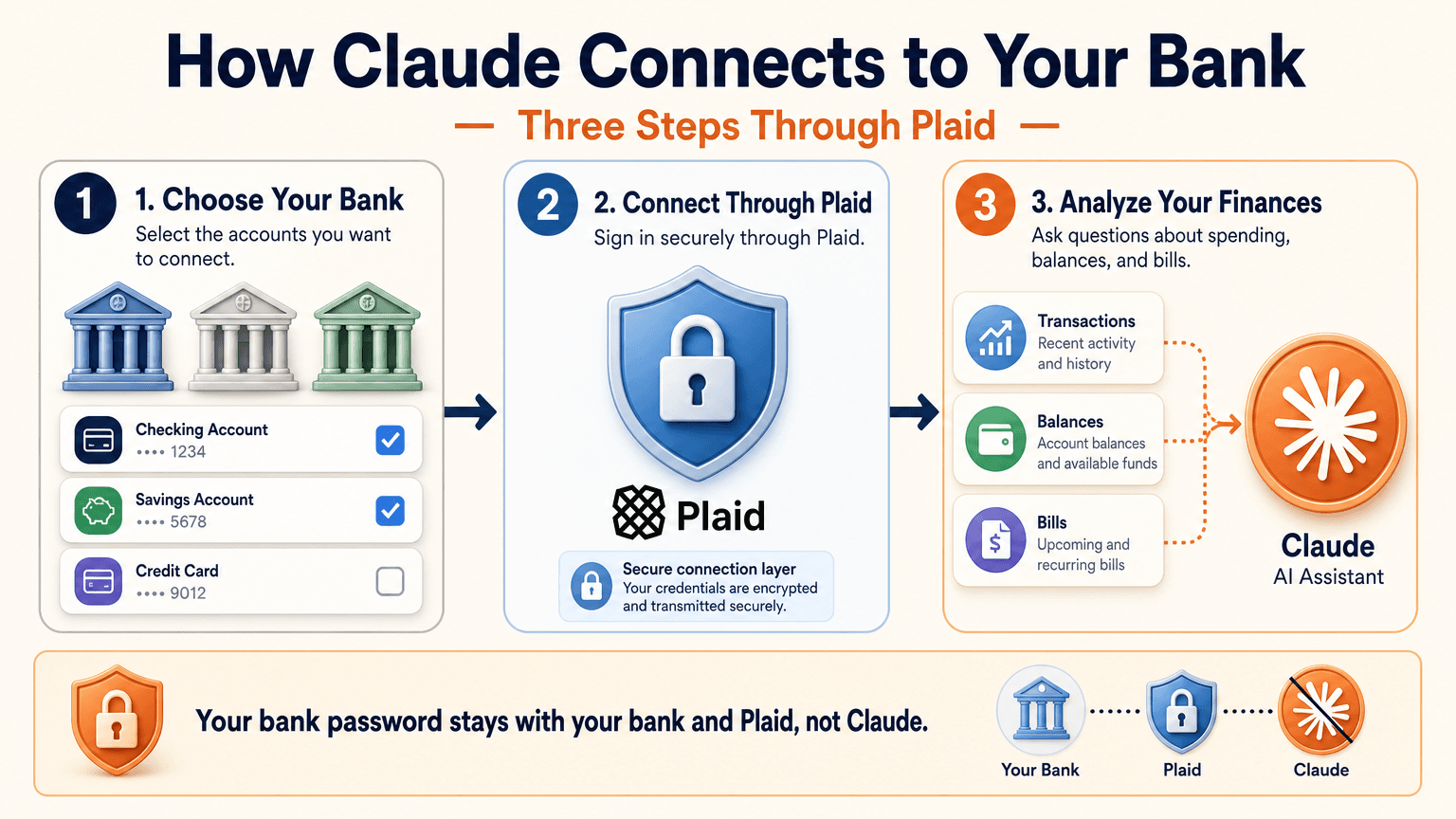
- Select Link accounts with Plaid and review what Claude will be able to access.
- Sign in to your bank inside Plaid and choose the accounts to share.
- Return to Claude within 10 minutes and wait for your accounts to appear.
You sign in through Plaid, so Claude does not ask for or see your bank password. New transactions can take a few minutes to sync.
Use the Claude Personal Finance Dashboard
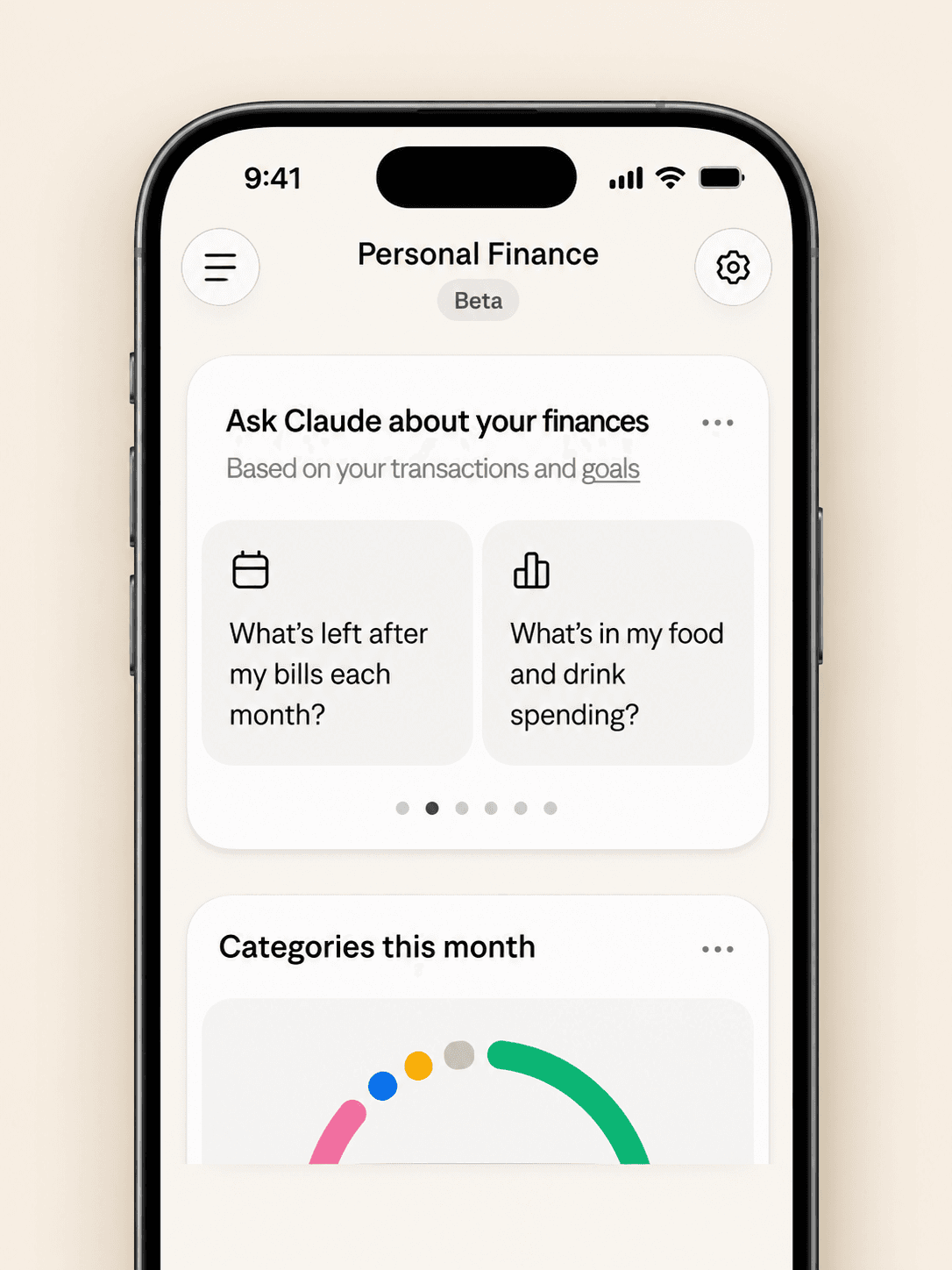
The dashboard puts spending, cash flow, accounts, subscriptions, and upcoming bills on one page. Widgets can be added, edited, removed, and reordered. Start with one account and one question, such as “Can I afford a trip this spring?”
Claude Personal Finance Prompts to Try
Spending and Bills
- “Where did my money go last month, grouped by category?”
- “Which subscriptions am I paying for, and which ones went up in price?”
- “What payments will leave my checking account before payday?”
Smarter Follow-Ups
- “Is that more than usual? Compare the last three months.”
- “Which transactions are behind this number?”
- “Do any charges look duplicated or unexpected?”
The second follow-up matters most. Anthropic itself advises asking which transactions sit behind a figure and checking important numbers with your bank.
Is Claude Personal Finance Safe?
Read-Only Access Through Plaid
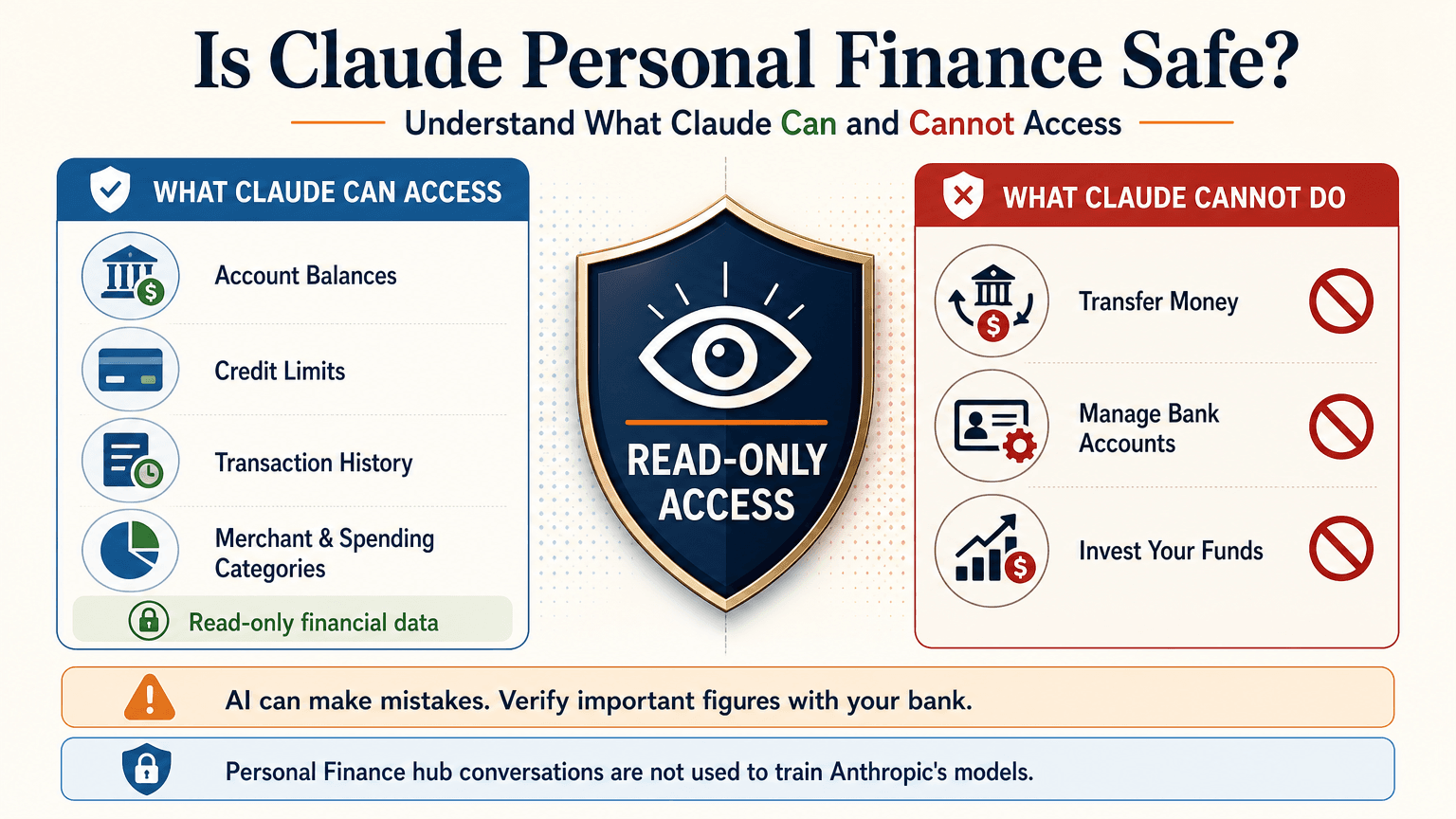
Claude cannot move, manage, or invest your money. Plaid handles the bank sign-in, so your password stays between you and your bank. You can unlink a bank at any time, and Claude can no longer see its data.
What Claude Can See
For the accounts you choose, Claude can read:
- Bank names, account names, types, and last four digits
- Balances and credit limits
- Up to 24 months of transactions with amount, date, merchant, category, and bank description
For investment accounts, loans, and cards, Claude reads balances and credit limits, not holdings, trades, or rates. Conversations in the Personal Finance hub are not used to train Anthropic’s models. For anything you share outside the hub, your normal privacy settings apply.
Accuracy Limits
Claude is AI and can make mistakes. Balances can be a day or two old. An account linked through two logins may be counted twice. Anthropic also says the feature is not designed to give investment advice. Treat Claude as an analyst that organizes and explains your data rather than the final decision maker.
Current Limitations
- US banks only
- No use of linked accounts in scheduled tasks, Cowork tasks, or Claude Code
- Not available on Free, Team, or Enterprise plans
- Saved dashboards are not yet included in data exports
Claude Personal Finance on Reddit: What People Did Before Launch
Personal Finance in Claude only just started rolling out, so real-world reviews of the official feature are still limited. For context, earlier discussions on r/ClaudeAI show how people were managing money with Claude before this feature existed. These are community workflows, not feedback on the new feature.
- Retirement planning: Running Monte Carlo simulations to estimate safe spending rates.
- Custom dashboards: Replacing spreadsheets with net worth and budget views.
- Fee hunting: Comparing bank statements with a fee schedule PDF to dispute wrong charges.
- Bank connections: A few users automated budget emails through Plaid or SimpleFIN, while many preferred uploading redacted CSV files to protect privacy.
That privacy split is useful to know. It is the same trade-off between convenience and control that the official feature and a CSV workflow now represent.
Use Claude Finance Outside the US With a CSV
You do not need account linking to get useful answers. A bank statement export contains the same raw material: dates, merchants, and amounts.
Build a Claude Personal Finance Tracker With 1min.AI
- Export one to three months of transactions from your bank as a CSV.
- Redact account numbers, full names, and addresses before sharing.
- Open Multi AI Chat in 1min.AI and select a Claude model.
- Paste or upload the cleaned data and run your prompt.
- Save the prompt in Prompt List so you can reuse it every month.
A starter prompt: “Categorize these transactions and total each category. List recurring subscriptions and flag duplicates or unusual fees. Show a table and mark any rows you are unsure about.”
1min.AI is not the official Personal Finance in Claude feature and does not connect to your bank. It gives you access to Claude models in one workspace, so this workflow works from any country. For model details, see the page for Claude Opus 5.5 and the guide to Claude Fable 5.1.
Which Claude Model Fits Which Money Task
| Task | Suggested model | Why |
|---|---|---|
| Categorizing many transactions | Claude 5.5 Haiku | Fast and low cost |
| Monthly budget and subscription audit | Claude 5.5 Sonnet | Balanced quality and cost |
| Retirement scenarios and multi-step analysis | Claude 5.5 Opus or 5.1 Fable | Stronger reasoning on complex questions |
Curious how the top models compare? Watch this test:
Claude Personal Finance Plugin Options
Community plugins can extend Claude for finance work. The Claude Cowork guide lists a Finance Tracker plugin for expense tracking and budget analysis. Review any plugin’s permissions before installing it, and never give a tool more financial data than the task needs.
Official Feature vs a CSV Workflow on 1min.AI
| Personal Finance in Claude | CSV workflow on 1min.AI | |
|---|---|---|
| Availability | US beta on paid plans | Global |
| Data source | Live accounts via Plaid | Redacted CSV or pasted rows |
| Dashboard | Built-in widgets | Tables and charts you request |
| Reusable prompts | Suggested questions | Prompt List |
| Model choice | Claude | Haiku, Sonnet, Opus, Fable, and more |
| Best for | Hands-off tracking | Privacy control and non-US users |
Teams that share finance prompts can use Shared Zone. Writers who turn results into reports can try Claude 4.6 for writing. 1min.AI is rated Excellent on Trustpilot and recognized on SourceForge, Slashdot, Capterra, Software Advice, and GetApp. If you want to see how an earlier flagship handles long analysis, try Claude 5 Fable.
Claude Personal Finance FAQ
What is Claude personal finance?
It is Anthropic’s beta feature, officially called Personal Finance in Claude. It links bank and card accounts through Plaid so you can ask about spending, balances, and bills.
Is Personal Finance in Claude free?
No. It is available on Pro, Max, and Ultra plans in the US. It is not available on Free, Team, or Enterprise.
Can Claude move my money?
No. Access is read-only. Claude cannot move, manage, or invest funds.
Can I use Claude finance features outside the US?
The official feature supports US banks only. Outside the US, you can upload a redacted CSV statement to a Claude model and prompt it for categories, subscriptions, and budgets.
Is Claude accurate with financial data?
It can make mistakes. Ask which transactions support each figure and verify key numbers with your bank.
Is this financial advice?
No. This article is educational and is not financial, tax, or investment advice. Consult a licensed professional for major decisions.
Final Thoughts
Claude personal finance turns scattered statements into clear answers. It is still a beta with strict regional limits and normal AI error risk. Use it to organize, categorize, and explain, and verify important figures yourself. If you live outside the US or prefer to keep bank access closed, a redacted CSV with the right Claude model delivers much of the same insight.
- #Information
पर्याय
1minAI चे सर्वोत्तम पर्याय शोधा आणि वैशिष्ट्ये, किंमत आणि वापर प्रकरणे यांची तुलना करा.

1min.AI विरुद्ध OpenRouter
1min.AI विरुद्ध OpenRouter: वापरण्यास तयार AI निर्मिती उत्पादनाची तांत्रिक API साधनाशी तुलना करा. तुम्हाला झिरो-कोड क्रिएटिव्ह स्टुडिओ हवा आहे की कोडिंग इन्फ्रास्ट्रक्चर हब, ते शोधा.
 Ngoc Hong

1 मिनिट. AI विरुद्ध Dola AI
Dola AI चा पर्याय शोधत आहात? व्हिडिओ निर्मिती, मोफत योजना, किंमत आणि गोपनीयता याबाबत 1min.AI आणि Dola AI ची तुलना करून योग्य AI अॅप निवडा.
Ngoc Hong
1minAI विरुद्ध Hix AI
AI चॅट, संशोधन, लेखन, प्रतिमा, व्हिडिओ, किंमत, आणि लवचिक AI वर्कफ्लो यांसाठी 5 HIX AI पर्यायांची तुलना करा.
Ngoc HongAI साधने
उत्पादकता, सर्जनशीलता आणि दैनंदिन काम वाढवण्यासाठी सर्वोत्तम AI साधने शोधा.

एक उत्पादन, 10 UGC क्रिएटिव्ह्स: AI कंटेंट टेस्टिंग कशी सोपी करते
AI UGC व्हिडिओ जनरेटरसह अधिक प्रामाणिक UGC तयार करा, अधिक क्रिएटिव्ह अँगल्सची चाचणी घ्या आणि प्रत्येक आवृत्ती चित्रीत न करता अफिलिएट कंटेंट स्केल करा.
 Lien Anh Vu

फक्त काही पायऱ्यांत सातत्यपूर्ण कार्टून कंटेंट तयार करा
1min.AI वापरून 3 सोप्या पायऱ्यांत TikTok आणि Reels साठी कार्टून व्हिडिओ तयार करा — आयडिया रिसर्चपासून पात्रे आणि अॅनिमेटेड व्हिडिओंपर्यंत.
Lien Anh Vu
स्टार्टअप संस्थापकांसाठी 4 परवडणारी सर्वोत्तम AI साधने
स्टार्टअप संस्थापकांसाठी कल्पना पडताळणे, उत्पादने तयार करणे, सामग्री निर्माण करणे आणि जास्त खर्च न करता जलद लॉन्च करणे यासाठीची 4 सर्वोत्तम परवडणारी AI साधने शोधा.
 Tram Ta
एआय वैशिष्ट्ये
वर्कफ्लो सुलभ करणारी, कार्यक्षमता सुधारणारी आणि संघांना अधिक साध्य करण्यात सक्षम सर्वसमावेशक एआय वैशिष्ट्ये.
एक उत्पादन, 10 UGC क्रिएटिव्ह्स: AI कंटेंट टेस्टिंग कशी सोपी करते
AI UGC व्हिडिओ जनरेटरसह अधिक प्रामाणिक UGC तयार करा, अधिक क्रिएटिव्ह अँगल्सची चाचणी घ्या आणि प्रत्येक आवृत्ती चित्रीत न करता अफिलिएट कंटेंट स्केल करा.
Lien Anh Vuफक्त काही पायऱ्यांत सातत्यपूर्ण कार्टून कंटेंट तयार करा
1min.AI वापरून 3 सोप्या पायऱ्यांत TikTok आणि Reels साठी कार्टून व्हिडिओ तयार करा — आयडिया रिसर्चपासून पात्रे आणि अॅनिमेटेड व्हिडिओंपर्यंत.
Lien Anh Vu
1minAI: मोफत AI व्याकरण तपासक
1minAI च्या AI व्याकरण तपासकासह मोफत व्याकरण तपासा. व्याकरण, शब्दलेखन आणि लेखनातील चुका शोधा, स्पष्टता वाढवा आणि काही सेकंदांत तुमचा मजकूर परिष्कृत करा.
Tram Taएआय वापर प्रकरणे
व्यवसाय, उत्पादकता आणि उद्योगविशेष अनुप्रयोगांसाठी विचारपूर्वक निवडलेली एआय वापरप्रकरणे.
एक उत्पादन, 10 UGC क्रिएटिव्ह्स: AI कंटेंट टेस्टिंग कशी सोपी करते
AI UGC व्हिडिओ जनरेटरसह अधिक प्रामाणिक UGC तयार करा, अधिक क्रिएटिव्ह अँगल्सची चाचणी घ्या आणि प्रत्येक आवृत्ती चित्रीत न करता अफिलिएट कंटेंट स्केल करा.
Lien Anh Vuफक्त काही पायऱ्यांत सातत्यपूर्ण कार्टून कंटेंट तयार करा
1min.AI वापरून 3 सोप्या पायऱ्यांत TikTok आणि Reels साठी कार्टून व्हिडिओ तयार करा — आयडिया रिसर्चपासून पात्रे आणि अॅनिमेटेड व्हिडिओंपर्यंत.
Lien Anh Vu
इंस्टाग्रामवर पोस्ट करण्याची सर्वोत्तम वेळ: अधिक एंगेजमेंटसाठी एक व्यावहारिक मार्गदर्शक
इंस्टाग्रामवर पोस्ट करण्याची सर्वोत्तम वेळ शोधा, ज्यात वेगवेगळ्या प्रेक्षकांसाठी सर्वोत्तम दिवस आणि वेळा, तसेच तुमच्या खात्यासाठी आदर्श पोस्टिंग शेड्यूल शोधण्याच्या टिप्सचा समावेश आहे.
Tram TaAI ट्यूटोरियल्स
व्यावहारिक, चरण-दर-चरण ट्यूटोरियल्ससह AI कसे वापरावे ते शिका.
फक्त काही पायऱ्यांत सातत्यपूर्ण कार्टून कंटेंट तयार करा
1min.AI वापरून 3 सोप्या पायऱ्यांत TikTok आणि Reels साठी कार्टून व्हिडिओ तयार करा — आयडिया रिसर्चपासून पात्रे आणि अॅनिमेटेड व्हिडिओंपर्यंत.
Lien Anh Vu
2026 मधील ब्लॅक फ्रायडे AI टूल डील्स
2026 मधील ब्लॅक फ्रायडे AI टूल डील्स काय देऊ शकतात ते शोधा. AppSumo, Dealify, Stack Social वरून 1min.AI लाइफटाइम डील कशी मिळवायची ते जाणून घ्या, आणि Trustpilot, Slashdot व Software Advice वर पडताळणी करा.
 Hang Nguyen

Seedance सह AI इमेज-टू-व्हिडिओ उत्पादन सुसंगतता: वाकडेपणा थांबवा आणि उत्पादन पुनरावलोकने स्केल करा
AI इमेज-टू-व्हिडिओ उत्पादन सुसंगततेने लोगोचा वाकडेपणा थांबवा आणि आजच 1min.AI वर स्टुडिओ-गुणवत्तेची रिव्ह्यू व्हिडिओ तयार करा.
Lien Anh VuAI मार्गदर्शक
व्यावहारिक मार्गदर्शक, वास्तविक जगातील उदाहरणे आणि कृतीशील सर्वोत्तम पद्धतींसह AI जलद शिका.
फक्त काही पायऱ्यांत सातत्यपूर्ण कार्टून कंटेंट तयार करा
1min.AI वापरून 3 सोप्या पायऱ्यांत TikTok आणि Reels साठी कार्टून व्हिडिओ तयार करा — आयडिया रिसर्चपासून पात्रे आणि अॅनिमेटेड व्हिडिओंपर्यंत.
Lien Anh Vu
AI साधने ऑनलाइन सुरक्षितपणे खरेदी करा: 2026 ब्लॅक फ्रायडे मार्गदर्शक
ऑनलाइन सर्वोत्तम ब्लॅक फ्रायडे AI डील्स कशा शोधायच्या आणि सुरक्षित करायच्या ते जाणून घ्या. फसवणुकीपासून वाचण्यासाठी, सबस्क्रिप्शन थकवा कमी करण्यासाठी आणि सॉफ्टवेअरची खातरजमा करण्यासाठी तज्ज्ञ रणनीती शिका.
Hang NguyenSeedance सह AI इमेज-टू-व्हिडिओ उत्पादन सुसंगतता: वाकडेपणा थांबवा आणि उत्पादन पुनरावलोकने स्केल करा
AI इमेज-टू-व्हिडिओ उत्पादन सुसंगततेने लोगोचा वाकडेपणा थांबवा आणि आजच 1min.AI वर स्टुडिओ-गुणवत्तेची रिव्ह्यू व्हिडिओ तयार करा.
Lien Anh Vuएआय सोल्यूशन्स
ऑटोमेशन, कोडिंग, संशोधन, उत्पादकता, ग्राहक समर्थन, मार्केटिंग आणि व्यवसाय वर्कफ्लोसाठी सर्वोत्तम एआय सोल्यूशन्स ब्राउझ करा.
एक उत्पादन, 10 UGC क्रिएटिव्ह्स: AI कंटेंट टेस्टिंग कशी सोपी करते
AI UGC व्हिडिओ जनरेटरसह अधिक प्रामाणिक UGC तयार करा, अधिक क्रिएटिव्ह अँगल्सची चाचणी घ्या आणि प्रत्येक आवृत्ती चित्रीत न करता अफिलिएट कंटेंट स्केल करा.
Lien Anh Vuफक्त काही पायऱ्यांत सातत्यपूर्ण कार्टून कंटेंट तयार करा
1min.AI वापरून 3 सोप्या पायऱ्यांत TikTok आणि Reels साठी कार्टून व्हिडिओ तयार करा — आयडिया रिसर्चपासून पात्रे आणि अॅनिमेटेड व्हिडिओंपर्यंत.
Lien Anh Vu
मोफत एआय टॅटू जनरेटर: कस्टम डिझाइन्स
1min.AI च्या मोफत एआय टॅटू जनरेटरसह कोणतीही कल्पना कस्टम टॅटू डिझाइनमध्ये बदला. तुमची कल्पना वर्णन करा, स्टाइल निवडा, आणि काही सेकंदांत डाउनलोड करा.
 Trang Tran
AI मॉडेल्स
जगातील अग्रगण्य AI मॉडेल्स एकाच ठिकाणी एक्सप्लोर करा.
एक उत्पादन, 10 UGC क्रिएटिव्ह्स: AI कंटेंट टेस्टिंग कशी सोपी करते
AI UGC व्हिडिओ जनरेटरसह अधिक प्रामाणिक UGC तयार करा, अधिक क्रिएटिव्ह अँगल्सची चाचणी घ्या आणि प्रत्येक आवृत्ती चित्रीत न करता अफिलिएट कंटेंट स्केल करा.
Lien Anh Vuफक्त काही पायऱ्यांत सातत्यपूर्ण कार्टून कंटेंट तयार करा
1min.AI वापरून 3 सोप्या पायऱ्यांत TikTok आणि Reels साठी कार्टून व्हिडिओ तयार करा — आयडिया रिसर्चपासून पात्रे आणि अॅनिमेटेड व्हिडिओंपर्यंत.
Lien Anh VuSeedance सह AI इमेज-टू-व्हिडिओ उत्पादन सुसंगतता: वाकडेपणा थांबवा आणि उत्पादन पुनरावलोकने स्केल करा
AI इमेज-टू-व्हिडिओ उत्पादन सुसंगततेने लोगोचा वाकडेपणा थांबवा आणि आजच 1min.AI वर स्टुडिओ-गुणवत्तेची रिव्ह्यू व्हिडिओ तयार करा.
Lien Anh VuAI तुलना
आपल्या गरजेनुसार सर्वोत्तम AI साधने, मॉडेल्स आणि प्लॅटफॉर्म शोधण्यासाठी त्यांची तुलना करा.

Kling AI Vs Veo 3: कोणता मॉडेल जिंकतो?
Kling AI vs Veo 3: motion, native audio, pricing आणि free tiers यांची तुलना करून तुमच्या प्रोजेक्टसाठी कोणता AI video generator जिंकतो ते पाहा - 1min.AI वर दोन्ही ट्राय करा.
Trang TranSeedance सह AI इमेज-टू-व्हिडिओ उत्पादन सुसंगतता: वाकडेपणा थांबवा आणि उत्पादन पुनरावलोकने स्केल करा
AI इमेज-टू-व्हिडिओ उत्पादन सुसंगततेने लोगोचा वाकडेपणा थांबवा आणि आजच 1min.AI वर स्टुडिओ-गुणवत्तेची रिव्ह्यू व्हिडिओ तयार करा.
Lien Anh Vu
DeepSeek V4 Pro vs Flash तुलना
DeepSeek V4 Pro आणि DeepSeek V4 Flash चे मेट्रिक्स तुलना करा. आजच 1min.ai वर तुमच्या एजंटिक ॲप्सचे ऑप्टिमायझेशन करा आणि AI फॅक्ट-चेकिंग सुधारवा.
Ngoc Hongएआय एकत्रीकरण
आपण आधीच वापरत असलेल्या साधनांसोबत एआय सुलभपणे एकत्र करा, कामे स्वयंचलित करा आणि उत्पादकता वाढवा.

फॅशन वीक 2026 साठी AI फॅशन व्हिडिओ जनरेटर कसा वापरावा
AI सोबत Fashion Week 2026 च्या कल्पनांना आकर्षक फॅशन व्हिडिओमध्ये बदला. एका सोप्या वर्कफ्लोमध्ये ब्रेनस्टॉर्मिंग, व्हिज्युअल्स तयार करणे आणि प्रतिमा व्हिडिओमध्ये रूपांतरित करणे कसे करायचे ते शिका.
Lien Anh Vu
POV: तुम्हाला रोज 10+ पोस्ट तयार करायच्या आहेत
AI ब्रेनस्टॉर्मिंग, इमेज जनरेशन आणि कंटेंट क्रिएशनच्या मदतीने कंटेंट क्रिएटर्सना दररोज 10+ सोशल मीडिया पोस्ट जलद तयार करता येतील असा AI कंटेंट वर्कफ्लो कसा तयार करायचा ते शिका.
Lien Anh Vu
AI अॅप्समध्ये सतत स्विच करणे थांबवा: AI इंटिग्रेशन नियोक्ता ब्रँडिंग कसे बदलते
AI इंटिग्रेशन HR टीम्सना AI लेखन, दस्तऐवज, प्रतिमा, व्हिडिओ आणि अनेक AI मॉडेल्स एका वर्कस्पेसमध्ये एकत्र आणून नियोक्ता ब्रँडिंग सुलभ करण्यात कशी मदत करते ते जाणून घ्या.
Tram Taउद्योग क्षेत्रासाठी AI
आरोग्य सेवा, वित्त, शिक्षण, कायदेशीर, उत्पादन, किरकोळ विक्री, स्थावर मालमत्ता आणि अधिकसाठी सर्वोत्तम AI साधने आणि कार्यप्रवाह शोधा.

मोफत AI उत्पादन वर्णन जनरेटर
मिनिटांत विकणारी उत्पादन वर्णने लिहा. तपशील किंवा फोटोला ब्रँडशी सुसंगत कॉपीमध्ये बदलण्यासाठी हा मोफत AI उत्पादन वर्णन जनरेटर वापरा. 1min.AI वापरून पहा.
Trang Tran
स्टार्टअप्ससाठी नफा वाढवण्यासाठी सर्वोत्तम व्यवसाय उत्पादकता साधने | 1minAI
स्टार्टअप्ससाठी सर्वोत्तम व्यवसाय उत्पादकता साधने शोधा, ज्यामुळे वेळ वाचेल, वर्कफ्लो सुलभ होतील, पुनरावृत्तीची कामे कमी होतील आणि AI सह नफ्याच्या वाढीस मदत होईल.
Tram Ta
सामग्री विपणनासाठी सर्वोत्तम AI साधन |1minAI
सामग्री विपणनासाठी सर्वोत्तम AI साधन शोधत आहात? 1minAI मार्केटर्सना एका AI वर्कस्पेसमधून संशोधन, लेखन, पुनर्वापर, दृश्य निर्मिती आणि सामग्री स्केल करण्यात कशी मदत करते ते पहा.
Tram Taएआय एजंट्स
तुमच्या कामातील आणि दैनंदिन जीवनातील कार्ये स्वयंचलित करण्यासाठी एआय एजंट्स शोधा आणि चालवा.
1minAI: मोफत AI व्याकरण तपासक
1minAI च्या AI व्याकरण तपासकासह मोफत व्याकरण तपासा. व्याकरण, शब्दलेखन आणि लेखनातील चुका शोधा, स्पष्टता वाढवा आणि काही सेकंदांत तुमचा मजकूर परिष्कृत करा.
Tram Ta
Facebook साठी AI Agents
Facebook साठी AI Agent वापरून कंटेंट तयार करा, इमेजेस जनरेट करा, पोस्ट्स शेड्यूल करा, आणि तुमच्या दस्तऐवज व संभाषणांमधून प्रकाशित करा.
Ngoc Hong
एआय एजंट विरुद्ध एआय असिस्टंट: डिझायनर्सचा खरा वेळ कोण वाचवतो?
एआय एजंट आणि एआय असिस्टंटमधील फरक जाणून घ्या आणि कोणता उपाय डिझायनर्सना पुनरावृत्तीचे काम स्वयंचलित करायला, दुरुस्त्या कमी करायला आणि अधिक वेळ वाचवायला मदत करतो ते शोधा.
Lien Anh VuAI कार्यप्रवाह
उत्पादकता, विपणन, विक्री, समर्थन आणि अधिकसाठी तयार AI कार्यप्रवाह एक्सप्लोर करा.
एक उत्पादन, 10 UGC क्रिएटिव्ह्स: AI कंटेंट टेस्टिंग कशी सोपी करते
AI UGC व्हिडिओ जनरेटरसह अधिक प्रामाणिक UGC तयार करा, अधिक क्रिएटिव्ह अँगल्सची चाचणी घ्या आणि प्रत्येक आवृत्ती चित्रीत न करता अफिलिएट कंटेंट स्केल करा.
Lien Anh Vuफक्त काही पायऱ्यांत सातत्यपूर्ण कार्टून कंटेंट तयार करा
1min.AI वापरून 3 सोप्या पायऱ्यांत TikTok आणि Reels साठी कार्टून व्हिडिओ तयार करा — आयडिया रिसर्चपासून पात्रे आणि अॅनिमेटेड व्हिडिओंपर्यंत.
Lien Anh Vuफॅशन वीक 2026 साठी AI फॅशन व्हिडिओ जनरेटर कसा वापरावा
AI सोबत Fashion Week 2026 च्या कल्पनांना आकर्षक फॅशन व्हिडिओमध्ये बदला. एका सोप्या वर्कफ्लोमध्ये ब्रेनस्टॉर्मिंग, व्हिज्युअल्स तयार करणे आणि प्रतिमा व्हिडिओमध्ये रूपांतरित करणे कसे करायचे ते शिका.
Lien Anh Vuन्यूजलेटर
1minAI सह साप्ताहिक AI नवकल्पना

🔮 साप्ताहिक AI नवकल्पना #143: Update Update GPT-6, GPT-6.1 & Ideogram 4.0 & Ideogram 4.0
1min.ai वर GPT-6 Sol, Luna, GPT-6.1 Sol, आणि Ideogram 4.0 वापरा. 98.4% टायपोग्राफी अचूकता मिळवा आणि एका प्लॅटफॉर्मवर reasoning latency 45% ने कमी करा.
Hang Nguyen
🔮 साप्ताहिक AI नवकल्पना #142: Grok 4.7, Opus 5.5 आणि Sonnet 5.5 on 1min.ai
1min.ai वर Grok 4.7, Claude Opus 5.5, आणि Sonnet 5.5 मिळवा. सदस्यता खर्च 70% पर्यंत कमी करा आणि एका एकत्रित वर्कस्पेसमध्ये लाखो टोकन्स प्रक्रिया करा.
Hang Nguyen
🔮 साप्ताहिक AI नवकल्पना #141: Seedance 2.5 & Stable Audio 3: पुढील पिढीचे AI
1min.ai वर Seedance 2.0, 2.5 आणि StabilityAI चे Stable Audio 3 एक्सप्लोर करा. पुढील पिढीच्या जनरेटिव्ह AI सह स्टुडिओ-ग्रेड ऑडिओ आणि समकालित मोशन तयार करा.
Hang Nguyen