
1minAI vs Buffer for LinkedIn Content Creation

Tram Ta
२० नोव्हेंबर, २०२६
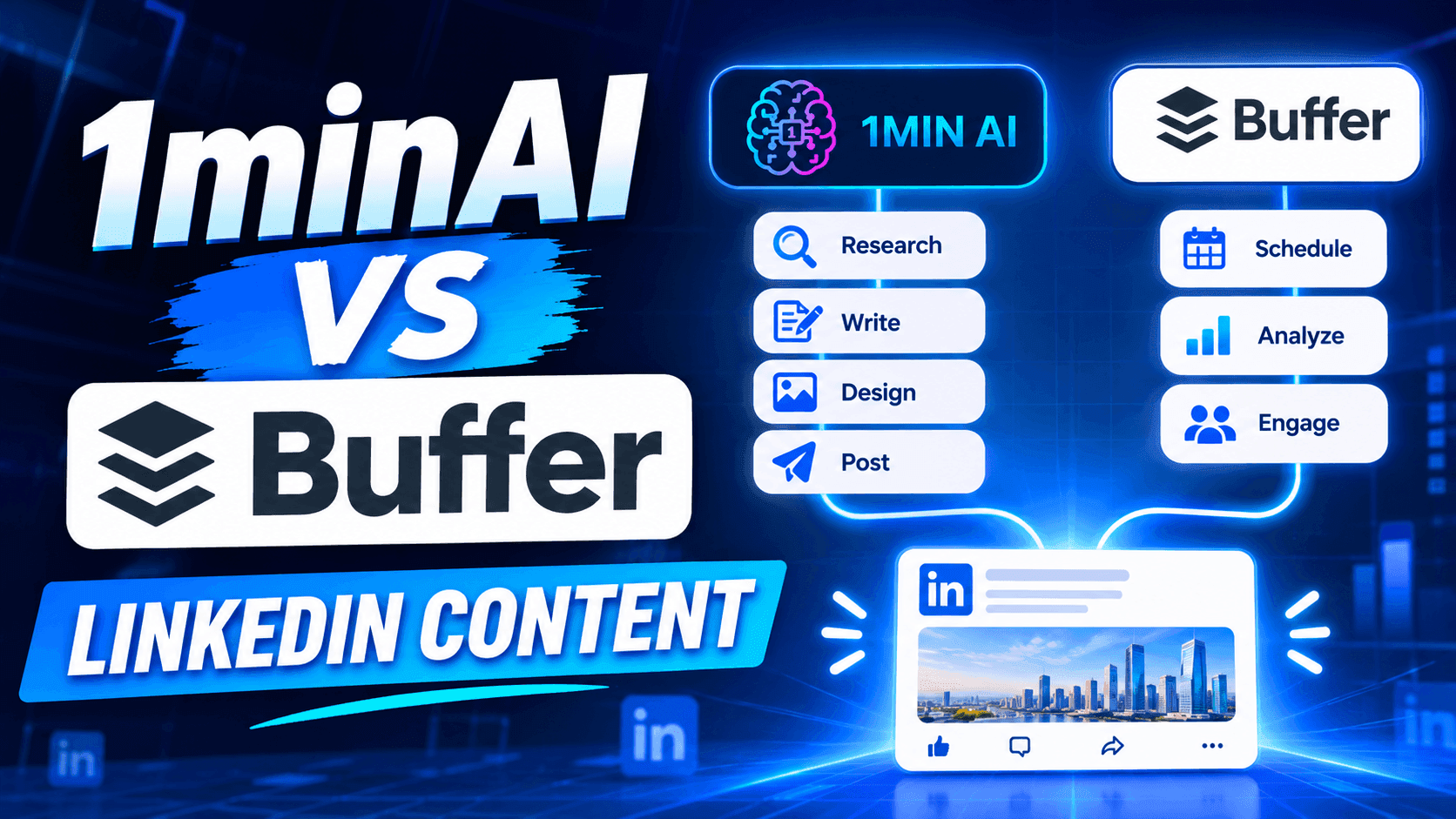
Looking for a Buffer alternative? Compare 1minAI vs Buffer for LinkedIn content creation, AI writing, image generation, scheduling, and automation.
If you're looking for a Buffer alternative, you're probably not searching for another complicated social media platform. You want a simpler way to create content, maintain a consistent posting schedule, and spend less time managing your social media presence.
Buffer is a popular choice for creators and businesses that want a clean content calendar, straightforward scheduling, and an AI Assistant built into the publishing workflow. Its free plan also makes it accessible to individuals who are just getting started. 1minAI takes a more AI-first approach to LinkedIn content. Its LinkedIn Content Agent connects information gathering, post writing, image generation, and publishing in one workflow. So, which platform should you choose?
This guide compares Buffer and 1minAI by features, pricing, workflow, and use cases to help you decide.
What Is Buffer?
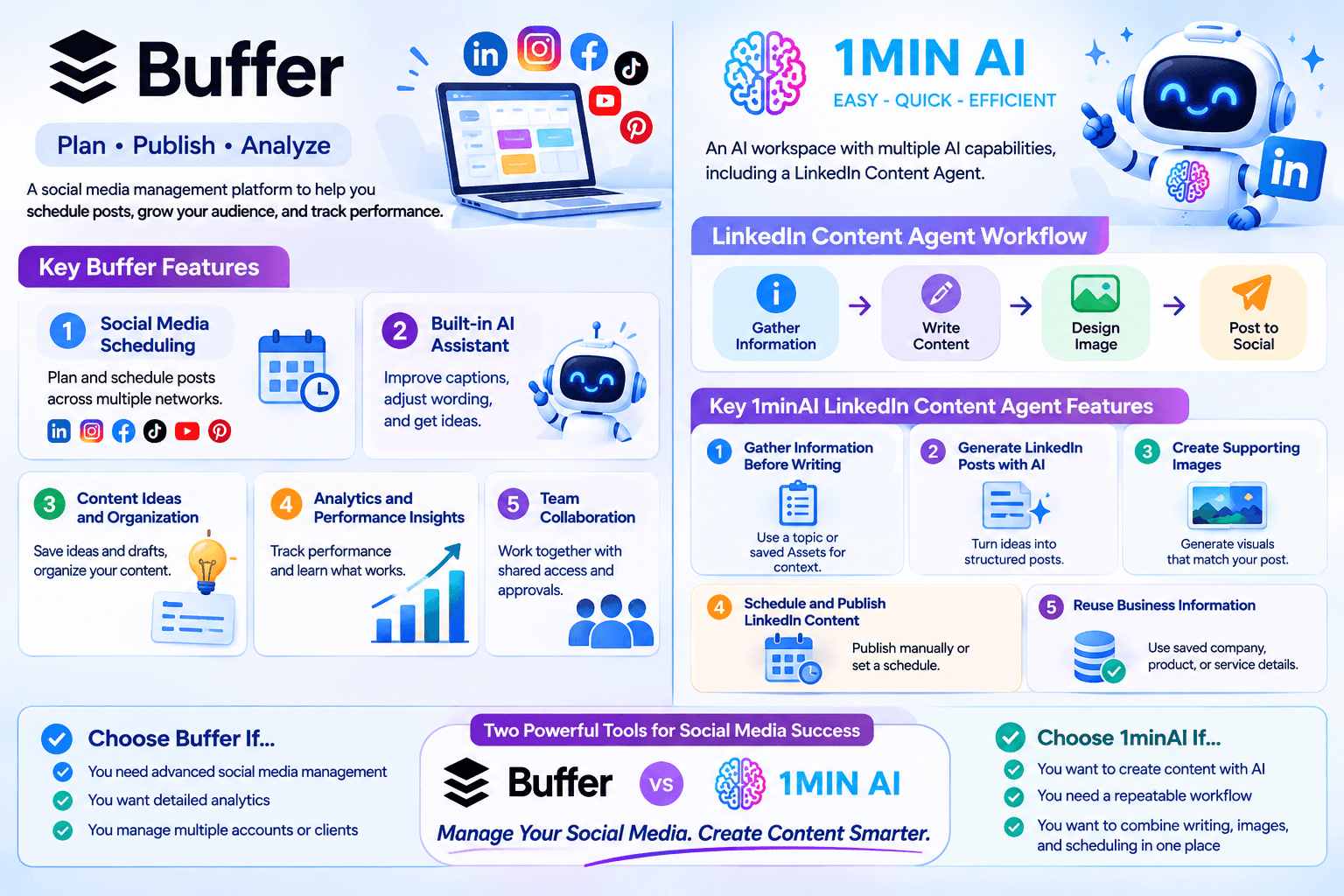
Buffer is a social media management platform designed to help creators, small businesses, and teams plan, publish, and analyze content across multiple social networks.
Rather than logging in to every social platform separately, users can connect their accounts to Buffer and manage their publishing activities from one dashboard.
Key Buffer Features
1. Social Media Scheduling
Buffer lets users plan and schedule posts across supported social networks, including LinkedIn, Instagram, Facebook, TikTok, YouTube, Pinterest, and more.
Its visual content calendar makes it easy to see upcoming posts and maintain a consistent publishing schedule.
2. Built-in AI Assistant
Buffer includes an AI Assistant that helps users refine and repurpose content. You can use it to improve captions, adjust wording, and generate ideas while working in the post composer.
This is convenient because you don't need to switch to a separate AI writing tool whenever you want to improve a caption.
3. Content Ideas and Organization
Buffer provides a space to save content ideas and drafts. Users can organize their ideas and move them toward scheduled posts when they're ready.
This is useful for creators who regularly collect inspiration but don't want to publish everything immediately.
4. Analytics and Performance Insights
Buffer offers analytics to help users understand how their social media content performs.
Depending on the plan and connected channel, users can review engagement and audience metrics, explore performance trends, and make decisions about future content.
5. Team Collaboration
Buffer also supports team collaboration through features such as shared access, notes, and approval workflows on its Team plan.
These features make it useful for businesses and marketing teams that need to coordinate publishing activities.
What Is 1minAI?
1minAI is an AI workspace that brings multiple AI capabilities together, including writing, image generation, document processing, video, audio, and AI Agents.
For LinkedIn creators and marketers, one of its relevant features is the LinkedIn Content Agent, available through 1minAI Social Agents.
Instead of using AI only to improve a caption, the Agent connects several content production stages:
Gather Information → Write Content → Design Image → Post to Social
This workflow is designed to help users turn business information, research topics, and ideas into LinkedIn-ready content.
Key 1minAI LinkedIn Content Agent Features
1. Gather Information Before Writing
A good LinkedIn post should have something useful to say.
The Agent can start with a topic or relevant business information. Users can also select saved Assets containing company, product, or service details.
This helps provide context before generating the post.
For example, a SaaS founder could use information about a new product feature, customer challenges, or industry trends as the starting point for a LinkedIn content workflow.
2. Generate LinkedIn Posts with AI
After gathering information, the Agent moves to the writing stage.
Users can configure the available writing settings and AI model options to generate content based on the selected information.
This is useful for turning a rough idea into a structured post without starting from a blank page.
3. Create Supporting Images
Text isn't the only part of a LinkedIn post.
The Agent also includes a Design Image stage, allowing users to generate a visual that supports the post's message.
This can help founders and marketers create more complete content without having to move between separate writing and image-generation tools.
4. Schedule and Publish LinkedIn Content
Once the content is ready, users can connect their LinkedIn account and configure the publishing workflow.
The Agent supports manual runs and scheduling options, including one-time and recurring schedules.
Users should still review generated content for factual accuracy, relevance, and brand consistency before relying on an automated publishing routine.
5. Reuse Business Information
Saved Assets can provide reusable context for future content.
Instead of repeatedly explaining what your company does, who your audience is, and what your product offers, you can select relevant information as the starting point for new posts.
This is particularly useful for businesses that need consistent messaging across multiple campaigns.
1minAI vs Buffer: Feature-by-Feature Comparison
Buffer and 1minAI support different parts of the social media content process.
Buffer focuses on planning, scheduling, publishing, and managing social media channels. 1minAI focuses on connecting AI-powered content production with LinkedIn publishing.
| Feature | Buffer | 1minAI |
|---|---|---|
| Main purpose | Social media management and scheduling | AI-powered content creation and publishing workflow |
| LinkedIn support | Yes | Yes |
| AI writing | Built-in AI Assistant | LinkedIn Content Agent |
| Topic and information gathering | Ideas and content planning tools | Gather Information workflow |
| Brand context | Content drafts and AI-assisted refinement | Reusable business information through saved Assets |
| AI image generation | Supports media uploads and integrations | Image generation within the Agent workflow |
| Content calendar | Yes | Agent scheduling workflow |
| Publishing | Multiple supported social channels | LinkedIn publishing through connected account |
| Free option | Yes, up to 3 channels | Free daily credits are available |
| Best for | Creators and teams managing multiple social channels | Users who want AI assistance across the LinkedIn content workflow |
The biggest difference is where each platform puts its emphasis.
Buffer helps you organize and publish content efficiently. 1minAI helps you create the content itself, including the research, writing, and visuals, before moving it toward publication.
Why Consider 1minAI as a Buffer Alternative?
You don't necessarily need to replace Buffer if it already handles your publishing workflow well.
However, 1minAI may be a better fit if you want to reduce the manual work involved in creating LinkedIn content.
Here are several reasons to consider it.
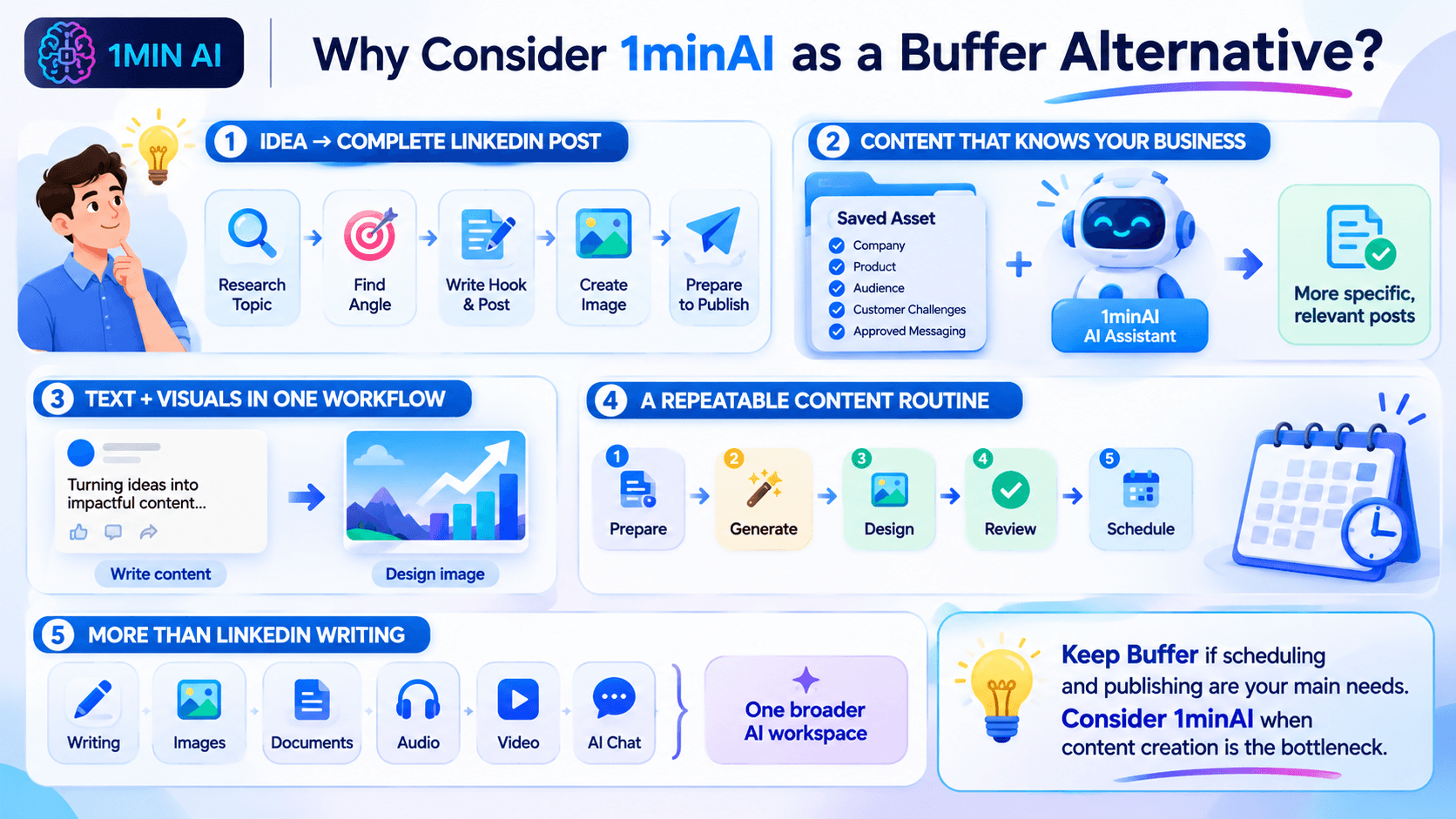
Move from an Idea to a Complete LinkedIn Post
Many creators don't struggle with scheduling. They struggle with the work that happens before scheduling.
You might have an idea for a post but still need to:
- Research the topic.
- Find a useful angle.
- Write an engaging introduction.
- Organize the main points.
- Create a supporting image.
- Prepare the content for publishing.
With 1minAI, these activities are connected through one Agent workflow.
Instead of treating AI writing as a separate task, you can use an AI-assisted process to move from information to a more complete post.
Create Content Based on Your Business Information
Generic AI prompts often produce generic social media content.
Using relevant business information can help make posts more specific and useful.
For example, a company can prepare an Asset containing:
- Company background and positioning.
- Product or service information.
- Target audience.
- Common customer challenges.
- Key product benefits.
- Approved messaging and terminology.
The LinkedIn Content Agent can use that information as context when generating content.
This is especially helpful for founders, consultants, and B2B marketers who want to communicate expertise rather than publish generic motivational posts.
Generate Text and Visuals in One Workflow
A LinkedIn post can become more engaging when its visual supports the message.
With 1minAI, you can generate the written content and move to the Design Image stage without switching to an entirely separate image-generation platform.
For example, if you're creating a post about five ways to improve customer retention, you can generate the post and a related visual as part of the same workflow.
You can then review the result and make adjustments before publishing.
Build a More Consistent Content Routine
Consistency is important for maintaining a professional presence on LinkedIn.
However, publishing every day can become difficult when content creation requires several disconnected tasks.
1minAI helps connect those tasks into a repeatable process:
- Prepare your topic or business information.
- Generate a LinkedIn post.
- Create a supporting visual.
- Review the content.
- Configure your publishing schedule.
You can start with a small number of posts and adjust the schedule based on your audience and available resources.
Use More Than a LinkedIn Writing Tool
1minAI is not limited to LinkedIn content creation.
Its broader AI workspace includes tools for writing, image generation, documents, audio, video, and other AI-powered tasks.
This can be useful when your marketing workflow extends beyond social media.
For example, you might use AI to summarize a report, turn its insights into a LinkedIn post, and create a visual to accompany the post.
How to Create and Schedule LinkedIn Content with 1minAI
If you want to try an AI-first LinkedIn workflow, here's a practical way to get started.
Step 1: Open 1minAI Social Agents
Visit 1minAI Social Agents and open the LinkedIn Content Agent.
Step 2: Prepare Your Information
Choose a topic or select a relevant saved Asset containing your company, product, or service information.
For example, a marketing agency could start with a topic such as:
"Why B2B companies should build a LinkedIn thought leadership strategy."
You can also provide relevant reports or other supporting information where the workflow allows.
Step 3: Configure the Writing Stage
Review the available writing settings and select an appropriate AI model.
Make sure the content reflects your intended audience and communication style.
You can use this prompt as a starting point for a LinkedIn post:
Write a LinkedIn post for B2B marketing professionals about why thought leadership matters for building trust.
Start with a compelling hook, explain three practical benefits, include an actionable takeaway, and end with a question that encourages meaningful discussion.
Use a professional but conversational tone. Avoid exaggerated claims, generic motivational language, and unnecessary jargon.
Step 4: Generate a Supporting Image
Move to the Design Image stage and configure the available image-generation settings.
Choose a visual direction that supports the main message of your post.
For example, a post about B2B thought leadership could use a clean infographic-style visual showing how expertise, useful insights, and consistency contribute to professional credibility.
Step 5: Review and Schedule
Check the generated text and image before publishing.
Verify that:
- The post communicates an accurate message.
- The opening is relevant to your audience.
- The visual supports the written content.
- The content reflects your brand.
- The publishing time fits your content strategy.
Then configure the available publishing and scheduling options.
You can start with a manual run or set a recurring schedule that matches your content capacity.
Frequently Asked Questions
Is 1minAI a good Buffer alternative?
1minAI is worth considering if your priority is AI-assisted LinkedIn content production, including information gathering, writing, image generation, and publishing.
Buffer is generally a stronger fit if you primarily need a social media management platform with multi-channel scheduling, analytics, and community tools.
Can 1minAI generate LinkedIn posts?
Yes. The 1minAI LinkedIn Content Agent includes a writing stage that helps users generate LinkedIn content using topics or relevant business information.
Can 1minAI schedule LinkedIn posts?
The LinkedIn Content Agent supports publishing workflows with manual, one-time, and recurring scheduling options. Available options depend on the connected account and current Agent configuration.
Which is better for solo founders: Buffer or 1minAI?
It depends on the main challenge.
Buffer is useful if you already have content and need a simple way to schedule it across social channels.
1minAI may be more useful if you need help researching topics, writing posts, generating visuals, and preparing LinkedIn content without managing each step separately.
Conclusion: Choose the Workflow That Saves You More Time
Buffer and 1minAI are both useful tools, but they solve different problems. If you mainly need a reliable social media calendar, Buffer may be all you need.
But if you want to spend less time moving between research, writing, design, and publishing tools, 1minAI is a Buffer alternative worth trying.
Ready to turn your ideas and business knowledge into LinkedIn content?
Explore 1minAI Social Agents and build an AI-assisted workflow for your next LinkedIn post.
You can also explore 1minAI's AI features to discover more ways to use AI in your daily workflow.
- #Commerce
- #Information
पर्याय
1minAI चे सर्वोत्तम पर्याय शोधा आणि वैशिष्ट्ये, किंमत आणि वापर प्रकरणे यांची तुलना करा.

1min.AI विरुद्ध OpenRouter
1min.AI विरुद्ध OpenRouter: वापरण्यास तयार AI निर्मिती उत्पादनाची तांत्रिक API साधनाशी तुलना करा. तुम्हाला झिरो-कोड क्रिएटिव्ह स्टुडिओ हवा आहे की कोडिंग इन्फ्रास्ट्रक्चर हब, ते शोधा.
 Ngoc Hong

1 मिनिट. AI विरुद्ध Dola AI
Dola AI चा पर्याय शोधत आहात? व्हिडिओ निर्मिती, मोफत योजना, किंमत आणि गोपनीयता याबाबत 1min.AI आणि Dola AI ची तुलना करून योग्य AI अॅप निवडा.
Ngoc Hong
1minAI विरुद्ध Hix AI
AI चॅट, संशोधन, लेखन, प्रतिमा, व्हिडिओ, किंमत, आणि लवचिक AI वर्कफ्लो यांसाठी 5 HIX AI पर्यायांची तुलना करा.
Ngoc HongAI साधने
उत्पादकता, सर्जनशीलता आणि दैनंदिन काम वाढवण्यासाठी सर्वोत्तम AI साधने शोधा.

एक उत्पादन, 10 UGC क्रिएटिव्ह्स: AI कंटेंट टेस्टिंग कशी सोपी करते
AI UGC व्हिडिओ जनरेटरसह अधिक प्रामाणिक UGC तयार करा, अधिक क्रिएटिव्ह अँगल्सची चाचणी घ्या आणि प्रत्येक आवृत्ती चित्रीत न करता अफिलिएट कंटेंट स्केल करा.
 Lien Anh Vu

फक्त काही पायऱ्यांत सातत्यपूर्ण कार्टून कंटेंट तयार करा
1min.AI वापरून 3 सोप्या पायऱ्यांत TikTok आणि Reels साठी कार्टून व्हिडिओ तयार करा — आयडिया रिसर्चपासून पात्रे आणि अॅनिमेटेड व्हिडिओंपर्यंत.
Lien Anh Vu
स्टार्टअप संस्थापकांसाठी 4 परवडणारी सर्वोत्तम AI साधने
स्टार्टअप संस्थापकांसाठी कल्पना पडताळणे, उत्पादने तयार करणे, सामग्री निर्माण करणे आणि जास्त खर्च न करता जलद लॉन्च करणे यासाठीची 4 सर्वोत्तम परवडणारी AI साधने शोधा.
 Tram Ta
एआय वैशिष्ट्ये
वर्कफ्लो सुलभ करणारी, कार्यक्षमता सुधारणारी आणि संघांना अधिक साध्य करण्यात सक्षम सर्वसमावेशक एआय वैशिष्ट्ये.
एक उत्पादन, 10 UGC क्रिएटिव्ह्स: AI कंटेंट टेस्टिंग कशी सोपी करते
AI UGC व्हिडिओ जनरेटरसह अधिक प्रामाणिक UGC तयार करा, अधिक क्रिएटिव्ह अँगल्सची चाचणी घ्या आणि प्रत्येक आवृत्ती चित्रीत न करता अफिलिएट कंटेंट स्केल करा.
Lien Anh Vuफक्त काही पायऱ्यांत सातत्यपूर्ण कार्टून कंटेंट तयार करा
1min.AI वापरून 3 सोप्या पायऱ्यांत TikTok आणि Reels साठी कार्टून व्हिडिओ तयार करा — आयडिया रिसर्चपासून पात्रे आणि अॅनिमेटेड व्हिडिओंपर्यंत.
Lien Anh Vu
1minAI: मोफत AI व्याकरण तपासक
1minAI च्या AI व्याकरण तपासकासह मोफत व्याकरण तपासा. व्याकरण, शब्दलेखन आणि लेखनातील चुका शोधा, स्पष्टता वाढवा आणि काही सेकंदांत तुमचा मजकूर परिष्कृत करा.
Tram Taएआय वापर प्रकरणे
व्यवसाय, उत्पादकता आणि उद्योगविशेष अनुप्रयोगांसाठी विचारपूर्वक निवडलेली एआय वापरप्रकरणे.
एक उत्पादन, 10 UGC क्रिएटिव्ह्स: AI कंटेंट टेस्टिंग कशी सोपी करते
AI UGC व्हिडिओ जनरेटरसह अधिक प्रामाणिक UGC तयार करा, अधिक क्रिएटिव्ह अँगल्सची चाचणी घ्या आणि प्रत्येक आवृत्ती चित्रीत न करता अफिलिएट कंटेंट स्केल करा.
Lien Anh Vuफक्त काही पायऱ्यांत सातत्यपूर्ण कार्टून कंटेंट तयार करा
1min.AI वापरून 3 सोप्या पायऱ्यांत TikTok आणि Reels साठी कार्टून व्हिडिओ तयार करा — आयडिया रिसर्चपासून पात्रे आणि अॅनिमेटेड व्हिडिओंपर्यंत.
Lien Anh Vu
इंस्टाग्रामवर पोस्ट करण्याची सर्वोत्तम वेळ: अधिक एंगेजमेंटसाठी एक व्यावहारिक मार्गदर्शक
इंस्टाग्रामवर पोस्ट करण्याची सर्वोत्तम वेळ शोधा, ज्यात वेगवेगळ्या प्रेक्षकांसाठी सर्वोत्तम दिवस आणि वेळा, तसेच तुमच्या खात्यासाठी आदर्श पोस्टिंग शेड्यूल शोधण्याच्या टिप्सचा समावेश आहे.
Tram TaAI ट्यूटोरियल्स
व्यावहारिक, चरण-दर-चरण ट्यूटोरियल्ससह AI कसे वापरावे ते शिका.
फक्त काही पायऱ्यांत सातत्यपूर्ण कार्टून कंटेंट तयार करा
1min.AI वापरून 3 सोप्या पायऱ्यांत TikTok आणि Reels साठी कार्टून व्हिडिओ तयार करा — आयडिया रिसर्चपासून पात्रे आणि अॅनिमेटेड व्हिडिओंपर्यंत.
Lien Anh Vu
2026 मधील ब्लॅक फ्रायडे AI टूल डील्स
2026 मधील ब्लॅक फ्रायडे AI टूल डील्स काय देऊ शकतात ते शोधा. AppSumo, Dealify, Stack Social वरून 1min.AI लाइफटाइम डील कशी मिळवायची ते जाणून घ्या, आणि Trustpilot, Slashdot व Software Advice वर पडताळणी करा.
 Hang Nguyen

Seedance सह AI इमेज-टू-व्हिडिओ उत्पादन सुसंगतता: वाकडेपणा थांबवा आणि उत्पादन पुनरावलोकने स्केल करा
AI इमेज-टू-व्हिडिओ उत्पादन सुसंगततेने लोगोचा वाकडेपणा थांबवा आणि आजच 1min.AI वर स्टुडिओ-गुणवत्तेची रिव्ह्यू व्हिडिओ तयार करा.
Lien Anh VuAI मार्गदर्शक
व्यावहारिक मार्गदर्शक, वास्तविक जगातील उदाहरणे आणि कृतीशील सर्वोत्तम पद्धतींसह AI जलद शिका.
फक्त काही पायऱ्यांत सातत्यपूर्ण कार्टून कंटेंट तयार करा
1min.AI वापरून 3 सोप्या पायऱ्यांत TikTok आणि Reels साठी कार्टून व्हिडिओ तयार करा — आयडिया रिसर्चपासून पात्रे आणि अॅनिमेटेड व्हिडिओंपर्यंत.
Lien Anh Vu
AI साधने ऑनलाइन सुरक्षितपणे खरेदी करा: 2026 ब्लॅक फ्रायडे मार्गदर्शक
ऑनलाइन सर्वोत्तम ब्लॅक फ्रायडे AI डील्स कशा शोधायच्या आणि सुरक्षित करायच्या ते जाणून घ्या. फसवणुकीपासून वाचण्यासाठी, सबस्क्रिप्शन थकवा कमी करण्यासाठी आणि सॉफ्टवेअरची खातरजमा करण्यासाठी तज्ज्ञ रणनीती शिका.
Hang NguyenSeedance सह AI इमेज-टू-व्हिडिओ उत्पादन सुसंगतता: वाकडेपणा थांबवा आणि उत्पादन पुनरावलोकने स्केल करा
AI इमेज-टू-व्हिडिओ उत्पादन सुसंगततेने लोगोचा वाकडेपणा थांबवा आणि आजच 1min.AI वर स्टुडिओ-गुणवत्तेची रिव्ह्यू व्हिडिओ तयार करा.
Lien Anh Vuएआय सोल्यूशन्स
ऑटोमेशन, कोडिंग, संशोधन, उत्पादकता, ग्राहक समर्थन, मार्केटिंग आणि व्यवसाय वर्कफ्लोसाठी सर्वोत्तम एआय सोल्यूशन्स ब्राउझ करा.
एक उत्पादन, 10 UGC क्रिएटिव्ह्स: AI कंटेंट टेस्टिंग कशी सोपी करते
AI UGC व्हिडिओ जनरेटरसह अधिक प्रामाणिक UGC तयार करा, अधिक क्रिएटिव्ह अँगल्सची चाचणी घ्या आणि प्रत्येक आवृत्ती चित्रीत न करता अफिलिएट कंटेंट स्केल करा.
Lien Anh Vuफक्त काही पायऱ्यांत सातत्यपूर्ण कार्टून कंटेंट तयार करा
1min.AI वापरून 3 सोप्या पायऱ्यांत TikTok आणि Reels साठी कार्टून व्हिडिओ तयार करा — आयडिया रिसर्चपासून पात्रे आणि अॅनिमेटेड व्हिडिओंपर्यंत.
Lien Anh Vu
मोफत एआय टॅटू जनरेटर: कस्टम डिझाइन्स
1min.AI च्या मोफत एआय टॅटू जनरेटरसह कोणतीही कल्पना कस्टम टॅटू डिझाइनमध्ये बदला. तुमची कल्पना वर्णन करा, स्टाइल निवडा, आणि काही सेकंदांत डाउनलोड करा.
 Trang Tran
AI मॉडेल्स
जगातील अग्रगण्य AI मॉडेल्स एकाच ठिकाणी एक्सप्लोर करा.
एक उत्पादन, 10 UGC क्रिएटिव्ह्स: AI कंटेंट टेस्टिंग कशी सोपी करते
AI UGC व्हिडिओ जनरेटरसह अधिक प्रामाणिक UGC तयार करा, अधिक क्रिएटिव्ह अँगल्सची चाचणी घ्या आणि प्रत्येक आवृत्ती चित्रीत न करता अफिलिएट कंटेंट स्केल करा.
Lien Anh Vuफक्त काही पायऱ्यांत सातत्यपूर्ण कार्टून कंटेंट तयार करा
1min.AI वापरून 3 सोप्या पायऱ्यांत TikTok आणि Reels साठी कार्टून व्हिडिओ तयार करा — आयडिया रिसर्चपासून पात्रे आणि अॅनिमेटेड व्हिडिओंपर्यंत.
Lien Anh VuSeedance सह AI इमेज-टू-व्हिडिओ उत्पादन सुसंगतता: वाकडेपणा थांबवा आणि उत्पादन पुनरावलोकने स्केल करा
AI इमेज-टू-व्हिडिओ उत्पादन सुसंगततेने लोगोचा वाकडेपणा थांबवा आणि आजच 1min.AI वर स्टुडिओ-गुणवत्तेची रिव्ह्यू व्हिडिओ तयार करा.
Lien Anh VuAI तुलना
आपल्या गरजेनुसार सर्वोत्तम AI साधने, मॉडेल्स आणि प्लॅटफॉर्म शोधण्यासाठी त्यांची तुलना करा.

Kling AI Vs Veo 3: कोणता मॉडेल जिंकतो?
Kling AI vs Veo 3: motion, native audio, pricing आणि free tiers यांची तुलना करून तुमच्या प्रोजेक्टसाठी कोणता AI video generator जिंकतो ते पाहा - 1min.AI वर दोन्ही ट्राय करा.
Trang TranSeedance सह AI इमेज-टू-व्हिडिओ उत्पादन सुसंगतता: वाकडेपणा थांबवा आणि उत्पादन पुनरावलोकने स्केल करा
AI इमेज-टू-व्हिडिओ उत्पादन सुसंगततेने लोगोचा वाकडेपणा थांबवा आणि आजच 1min.AI वर स्टुडिओ-गुणवत्तेची रिव्ह्यू व्हिडिओ तयार करा.
Lien Anh Vu
DeepSeek V4 Pro vs Flash तुलना
DeepSeek V4 Pro आणि DeepSeek V4 Flash चे मेट्रिक्स तुलना करा. आजच 1min.ai वर तुमच्या एजंटिक ॲप्सचे ऑप्टिमायझेशन करा आणि AI फॅक्ट-चेकिंग सुधारवा.
Ngoc Hongएआय एकत्रीकरण
आपण आधीच वापरत असलेल्या साधनांसोबत एआय सुलभपणे एकत्र करा, कामे स्वयंचलित करा आणि उत्पादकता वाढवा.

फॅशन वीक 2026 साठी AI फॅशन व्हिडिओ जनरेटर कसा वापरावा
AI सोबत Fashion Week 2026 च्या कल्पनांना आकर्षक फॅशन व्हिडिओमध्ये बदला. एका सोप्या वर्कफ्लोमध्ये ब्रेनस्टॉर्मिंग, व्हिज्युअल्स तयार करणे आणि प्रतिमा व्हिडिओमध्ये रूपांतरित करणे कसे करायचे ते शिका.
Lien Anh Vu
POV: तुम्हाला रोज 10+ पोस्ट तयार करायच्या आहेत
AI ब्रेनस्टॉर्मिंग, इमेज जनरेशन आणि कंटेंट क्रिएशनच्या मदतीने कंटेंट क्रिएटर्सना दररोज 10+ सोशल मीडिया पोस्ट जलद तयार करता येतील असा AI कंटेंट वर्कफ्लो कसा तयार करायचा ते शिका.
Lien Anh Vu
AI अॅप्समध्ये सतत स्विच करणे थांबवा: AI इंटिग्रेशन नियोक्ता ब्रँडिंग कसे बदलते
AI इंटिग्रेशन HR टीम्सना AI लेखन, दस्तऐवज, प्रतिमा, व्हिडिओ आणि अनेक AI मॉडेल्स एका वर्कस्पेसमध्ये एकत्र आणून नियोक्ता ब्रँडिंग सुलभ करण्यात कशी मदत करते ते जाणून घ्या.
Tram Taउद्योग क्षेत्रासाठी AI
आरोग्य सेवा, वित्त, शिक्षण, कायदेशीर, उत्पादन, किरकोळ विक्री, स्थावर मालमत्ता आणि अधिकसाठी सर्वोत्तम AI साधने आणि कार्यप्रवाह शोधा.

मोफत AI उत्पादन वर्णन जनरेटर
मिनिटांत विकणारी उत्पादन वर्णने लिहा. तपशील किंवा फोटोला ब्रँडशी सुसंगत कॉपीमध्ये बदलण्यासाठी हा मोफत AI उत्पादन वर्णन जनरेटर वापरा. 1min.AI वापरून पहा.
Trang Tran
स्टार्टअप्ससाठी नफा वाढवण्यासाठी सर्वोत्तम व्यवसाय उत्पादकता साधने | 1minAI
स्टार्टअप्ससाठी सर्वोत्तम व्यवसाय उत्पादकता साधने शोधा, ज्यामुळे वेळ वाचेल, वर्कफ्लो सुलभ होतील, पुनरावृत्तीची कामे कमी होतील आणि AI सह नफ्याच्या वाढीस मदत होईल.
Tram Ta
सामग्री विपणनासाठी सर्वोत्तम AI साधन |1minAI
सामग्री विपणनासाठी सर्वोत्तम AI साधन शोधत आहात? 1minAI मार्केटर्सना एका AI वर्कस्पेसमधून संशोधन, लेखन, पुनर्वापर, दृश्य निर्मिती आणि सामग्री स्केल करण्यात कशी मदत करते ते पहा.
Tram Taएआय एजंट्स
तुमच्या कामातील आणि दैनंदिन जीवनातील कार्ये स्वयंचलित करण्यासाठी एआय एजंट्स शोधा आणि चालवा.
1minAI: मोफत AI व्याकरण तपासक
1minAI च्या AI व्याकरण तपासकासह मोफत व्याकरण तपासा. व्याकरण, शब्दलेखन आणि लेखनातील चुका शोधा, स्पष्टता वाढवा आणि काही सेकंदांत तुमचा मजकूर परिष्कृत करा.
Tram Ta
Facebook साठी AI Agents
Facebook साठी AI Agent वापरून कंटेंट तयार करा, इमेजेस जनरेट करा, पोस्ट्स शेड्यूल करा, आणि तुमच्या दस्तऐवज व संभाषणांमधून प्रकाशित करा.
Ngoc Hong
एआय एजंट विरुद्ध एआय असिस्टंट: डिझायनर्सचा खरा वेळ कोण वाचवतो?
एआय एजंट आणि एआय असिस्टंटमधील फरक जाणून घ्या आणि कोणता उपाय डिझायनर्सना पुनरावृत्तीचे काम स्वयंचलित करायला, दुरुस्त्या कमी करायला आणि अधिक वेळ वाचवायला मदत करतो ते शोधा.
Lien Anh VuAI कार्यप्रवाह
उत्पादकता, विपणन, विक्री, समर्थन आणि अधिकसाठी तयार AI कार्यप्रवाह एक्सप्लोर करा.
एक उत्पादन, 10 UGC क्रिएटिव्ह्स: AI कंटेंट टेस्टिंग कशी सोपी करते
AI UGC व्हिडिओ जनरेटरसह अधिक प्रामाणिक UGC तयार करा, अधिक क्रिएटिव्ह अँगल्सची चाचणी घ्या आणि प्रत्येक आवृत्ती चित्रीत न करता अफिलिएट कंटेंट स्केल करा.
Lien Anh Vuफक्त काही पायऱ्यांत सातत्यपूर्ण कार्टून कंटेंट तयार करा
1min.AI वापरून 3 सोप्या पायऱ्यांत TikTok आणि Reels साठी कार्टून व्हिडिओ तयार करा — आयडिया रिसर्चपासून पात्रे आणि अॅनिमेटेड व्हिडिओंपर्यंत.
Lien Anh Vuफॅशन वीक 2026 साठी AI फॅशन व्हिडिओ जनरेटर कसा वापरावा
AI सोबत Fashion Week 2026 च्या कल्पनांना आकर्षक फॅशन व्हिडिओमध्ये बदला. एका सोप्या वर्कफ्लोमध्ये ब्रेनस्टॉर्मिंग, व्हिज्युअल्स तयार करणे आणि प्रतिमा व्हिडिओमध्ये रूपांतरित करणे कसे करायचे ते शिका.
Lien Anh Vuन्यूजलेटर
1minAI सह साप्ताहिक AI नवकल्पना

🔮 साप्ताहिक AI नवकल्पना #143: Update Update GPT-6, GPT-6.1 & Ideogram 4.0 & Ideogram 4.0
1min.ai वर GPT-6 Sol, Luna, GPT-6.1 Sol, आणि Ideogram 4.0 वापरा. 98.4% टायपोग्राफी अचूकता मिळवा आणि एका प्लॅटफॉर्मवर reasoning latency 45% ने कमी करा.
Hang Nguyen
🔮 साप्ताहिक AI नवकल्पना #142: Grok 4.7, Opus 5.5 आणि Sonnet 5.5 on 1min.ai
1min.ai वर Grok 4.7, Claude Opus 5.5, आणि Sonnet 5.5 मिळवा. सदस्यता खर्च 70% पर्यंत कमी करा आणि एका एकत्रित वर्कस्पेसमध्ये लाखो टोकन्स प्रक्रिया करा.
Hang Nguyen
🔮 साप्ताहिक AI नवकल्पना #141: Seedance 2.5 & Stable Audio 3: पुढील पिढीचे AI
1min.ai वर Seedance 2.0, 2.5 आणि StabilityAI चे Stable Audio 3 एक्सप्लोर करा. पुढील पिढीच्या जनरेटिव्ह AI सह स्टुडिओ-ग्रेड ऑडिओ आणि समकालित मोशन तयार करा.
Hang Nguyen