
Text To Video AI Free Without Watermark Online

Trang Tran
2026 നവംബർ 20
Create text to video AI free without watermark online with 1min.AI. Pick top models, turn prompts into HD clips, and download clean videos fast. Try it free.
You can create text to video AI free without watermark on 1min.AI. Open the text to video tool, choose a model such as Kling, Veo 3.1, Seedance, or Wan, type your prompt, and download a clean clip with no watermark. You can open 1min.AI and start right away without filling in a sign-up form. Turn one sentence into a short video in minutes, with no camera, no editing timeline, and no stock footage hunt.
Quick facts
- Best for: marketers, creators, small business owners, and beginners
- Output: short HD clips, vertical, horizontal, or square depending on the model
- Watermark: none on your downloads
- Works in: your browser, so no app or APK to install
- Reviewed by: the 1min.AI team, who test these models and settings inside our own workspace
Why Free Text to Video Often Ends in Frustration
You write a perfect prompt, wait for the render, and then find a logo across the corner of your clip. Or the tool asks for an account, a download, and a login before showing any result. Or you cannot tell how long the video can be, which style the model handles best, or what a setting does.
Those are the three problems this guide solves:
- Watermarks that make clips unusable for social posts and ads
- Unclear limits on length, resolution, and aspect ratio
- Too many choices, with no guidance on which model fits your idea
Text to Video AI Free Without Watermark on 1min.AI
1min.AI brings leading video models into one workspace, so you can switch models without switching tabs. Start from a text prompt, then adjust length, ratio, audio, and camera settings to match your platform.
Top Text to Video Models in One Place
| Model | Best for | Key settings |
|---|---|---|
| Kling 3.0 and 3.0 Omni | Cinematic motion and multi-scene stories | 3 to 15 seconds, audio toggle, up to 6 shots |
| Kling 2.5, 2.1 Master, 2.1, 2.0, 1.6 | Reliable short clips with camera control | 5 or 10 seconds, standard or professional mode, camera presets |
| Veo 3.1 and Veo 3 (Fast versions too) | Realistic detail and clips with sound | Fixed 8 seconds, 720p or 1080p, audio toggle |
| Seedance 2.5 | Reference-guided videos | 4 to 30 seconds, reference images, videos, and audio |
| Seedance 2.0, 2.0 Fast, 2.0 Mini | Quick, controlled clips | 4 to 15 seconds, same reference options |
| Wan 2.7 | Flexible ratios and your own audio track | 2 to 15 seconds, five aspect ratios, custom WAV or MP3 |
| Pika | Fast social clips | 5 or 10 seconds, seven aspect ratios, 720p or 1080p |
| Hailuo | Prompt-expanded short clips | v2 offers 6 or 10 seconds |
You will also find Hunyuan AI, Wanx AI, and Animate Diff for creative experiments.
Free Online, No App or APK Needed
1min.AI runs in your browser on desktop or mobile. There is nothing to install, which also means no unofficial APK files to worry about. Open the page, write your prompt, and generate.
Your Workspace Works Around Your Videos
Save reusable prompts in Prompt List, store images and clips in Asset List, and organize work with Tag List. These workspace tools in AI Studio are ready to use, while Shared Zone and History keep your work synced once you create an account.
How to Create Text to Video AI Free Without Watermark in 3 Steps
Step 1: Pick a Model and Write Your Prompt
Open the text to video tool, choose a model, and describe your scene. A strong prompt covers five things:
- Subject: who or what is on screen
- Action: what moves or changes
- Setting: where and when it happens
- Style: cinematic, anime, 3D, product shot, documentary
- Camera: slow pan, zoom in, aerial shot
Example prompt: “A barista pours latte art in a sunlit cafe, slow zoom in, warm tones, cinematic, shallow depth of field.”
Step 2: Adjust Your Settings
Settings differ by model, so here is what matters for each family.
Kling Settings
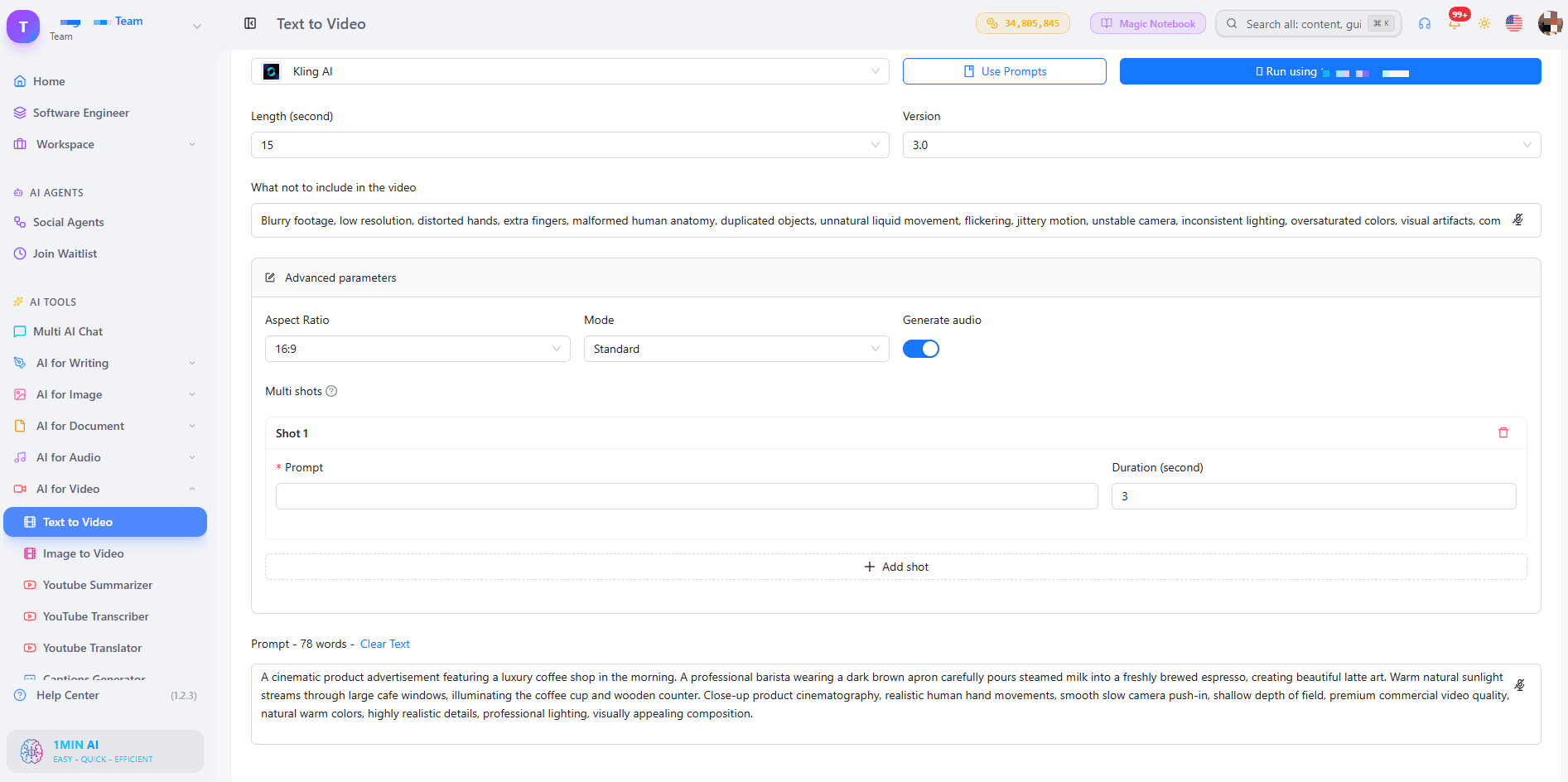
For Kling 1.6 to 2.5, choose a 5 or 10 second length and a camera control such as zoom, pan, tilt, or roll. Standard mode suits quick drafts, while professional mode suits your final version. The default CFG Scale of 0.5 is a good starting point, and raising it makes the clip follow your prompt more strictly. Use the “what not to include” field to remove unwanted elements. Kling 3.0 adds audio and lets you build a multi-shot video of up to 6 shots, each with its own prompt, within 15 seconds total.
Veo Settings
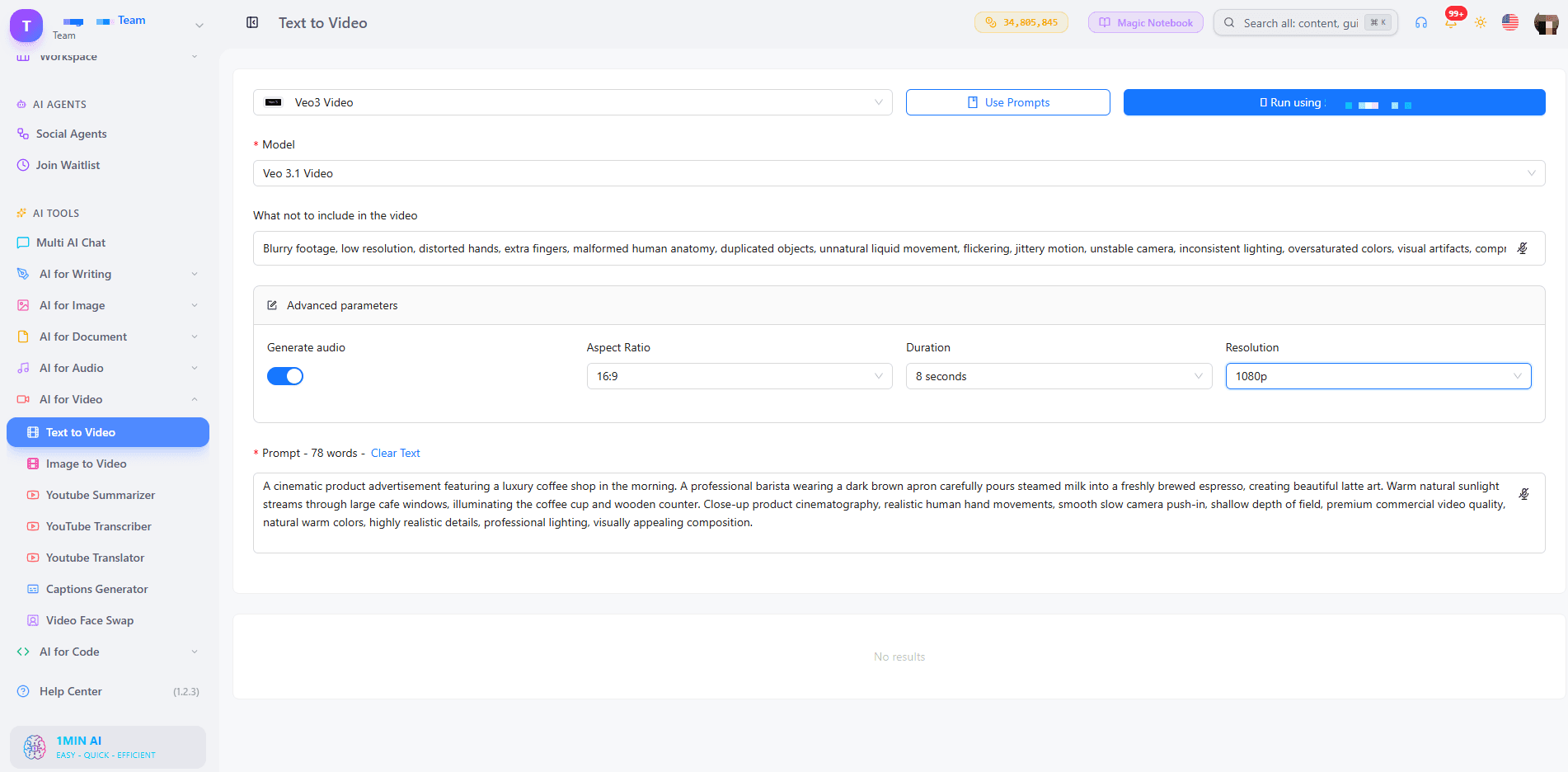
Choose Veo 3.1 when you want the strongest quality, or a Fast version when you are testing ideas. Turn on Generate Audio if you want sound with your picture. Duration is fixed at 8 seconds, with 9:16, 16:9, or auto aspect ratio and 720p or 1080p resolution. Our guide to free AI video generation with Veo 3.1 goes deeper on prompts for this model.
Seedance and Wan Settings
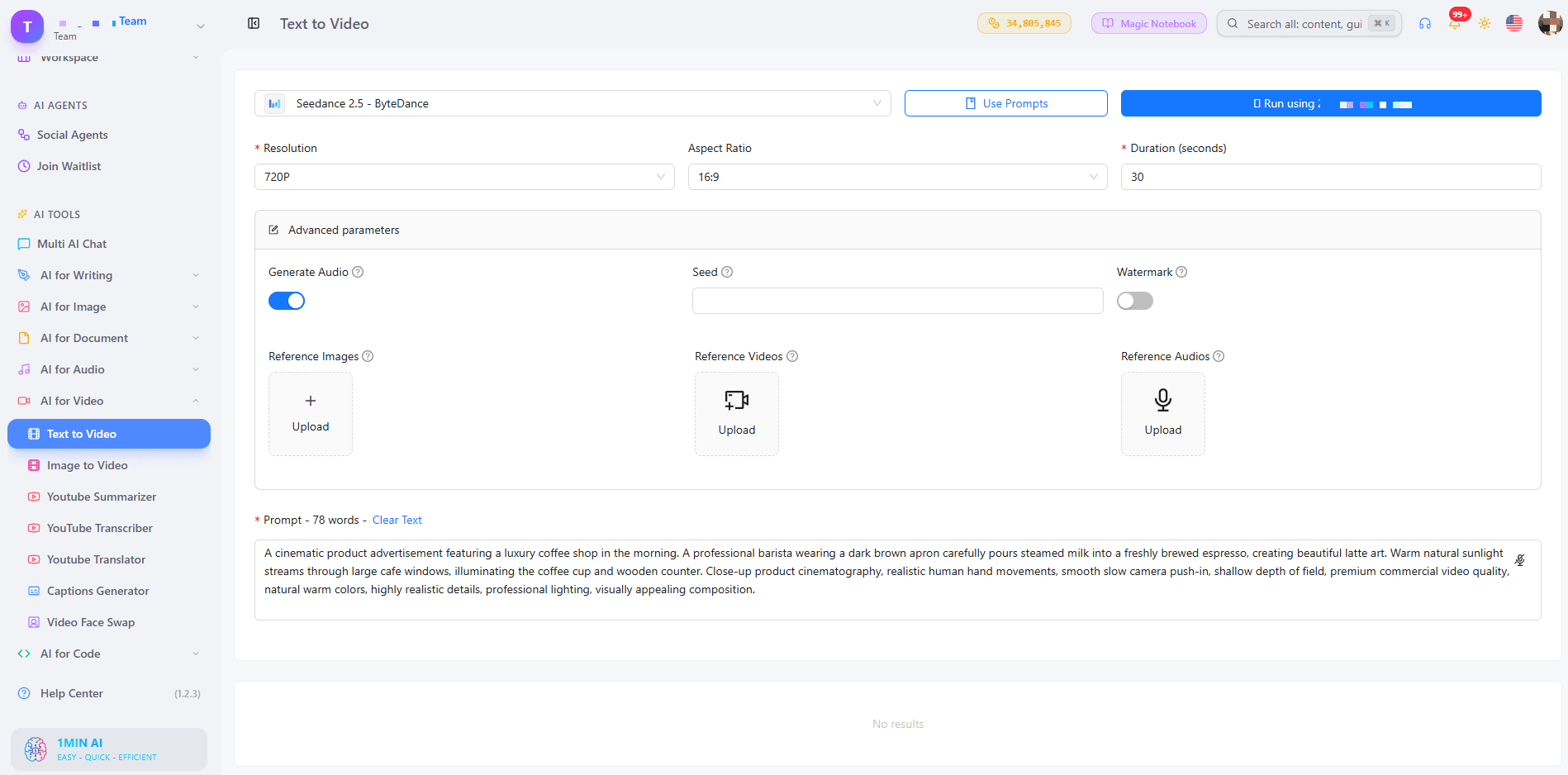
Seedance 2.5 accepts up to 30 reference images, 10 reference videos, and 10 reference audio clips, which helps keep characters and styles consistent. Wan 2.7 lets you upload your own audio (WAV or MP3), choose between 16:9, 9:16, 1:1, 4:3, and 3:4, and switch Enhance Prompt on for short prompts.
Step 3: Generate, Preview, and Download
Click generate, preview the clip, and download it with no watermark. If the result is close but not perfect, change one detail in the prompt and run it again. Small edits often improve a clip more than a full rewrite.
For a visual walkthrough, watch this tutorial:
Which Style and Length Do You Need?
Two questions decide the best setup for your video: what look do you want, and how long should it be?
Choose by Style
- Realistic: Veo 3.1 for natural lighting, motion, and sound
- Cinematic and story-driven: Kling 3.0 with multi-shot scenes
- Brand or character consistency: Seedance 2.5 with reference images
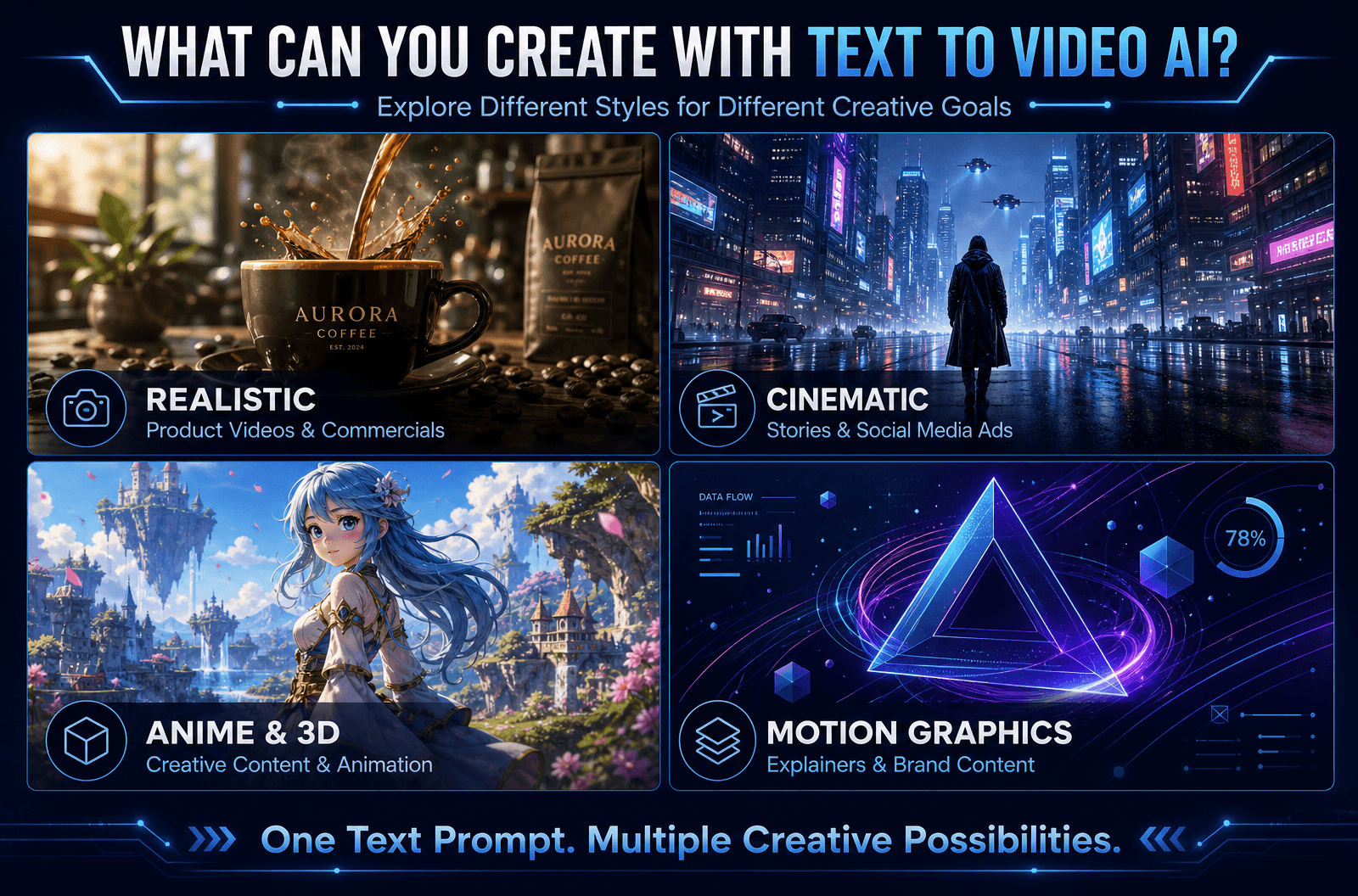
- Anime, 3D, or motion graphics: add the style in your prompt, then test Kling, Wan 2.7, or Pika
Choose by Length
- 2 to 8 seconds: hooks, product teasers, looping social clips (Wan 2.7, Veo, Pika)
- 10 to 15 seconds: short ads and story beats (Kling 3.0, Seedance 2.0)
- Up to 30 seconds: longer scenes (Seedance 2.5)
Want to compare model outputs side by side? This video shows several of them at work:
Prompt Tips for Cleaner, More Accurate Videos
- Be specific: “a red sports car on a coastal road at sunset” beats “a car”
- Keep it short: one or two clear sentences
- Name the camera move: “drone shot,” “slow pan,” “close-up”
- Use the negative field: exclude text overlays, blur, or extra people
- Test one change at a time: it shows you what each edit does
Who Uses Text to Video AI Without Watermarks?
- Marketers: turn a campaign idea into ad variations without a shoot
- Content creators: produce hooks and B-roll for TikTok, Reels, and Shorts
- Small business owners: show a product in motion, with no production budget
- Educators: animate concepts that are hard to film
- Real estate and e-commerce teams: start from a still photo with AI image to video when you already have pictures
If you are building TikTok hooks, this walkthrough helps:
Can You Use the Videos Commercially? What About Copyright?
Videos generated from your own prompts do not rely on stock footage, so there is nothing to license from a library. Commercial-use conditions can vary by model, so check the terms of the model you choose before publishing client or ad work. For a broader overview, read our AI text to video guide.
FAQ
How do I convert text to video for free using AI?
Open 1min.AI’s text to video tool, choose a model, type your prompt, set the length and ratio, and generate. Preview the clip, then download it with no watermark.
Is there a text to video AI free without watermark and login?
Yes. You can open 1min.AI and start generating without creating an account, and your downloads carry no watermark. Our page on text to video AI free with no sign up explains the details.
Which video tool is 100% free with no watermark?
Look for a tool that clearly states no watermark on exports, shows its limits upfront, and runs in the browser. 1min.AI offers free credits to try text to video and exports clean videos.
Can I generate unlimited videos?
You can test as many prompt variations as your credits allow, so start with short clips and refine one detail at a time.
Can an AI chatbot do text to video?
Chatbots focus on text and images. A dedicated text to video tool such as 1min.AI connects you to video models built for motion, audio, and camera control.
Do I need an app or APK?
No. 1min.AI works in your browser on any device.
Is there a script to video option?
Yes. Paste your script or scene description as the prompt. With Kling 3.0 you can split it into up to 6 shots.
Make Your First Watermark-Free Video
Pick a model, write one clear prompt, and see your idea move. Your first clip can be ready in minutes.
- #Transaction
ബദലുകൾ
1minAI-യുടെ മികച്ച ബദലുകൾ കണ്ടെത്തുക, അവയുടെ സവിശേഷതകൾ, വിലനിർണ്ണയം, ഉപയോഗ കേസുകൾ എന്നിവ താരതമ്യം ചെയ്യുക.

1min.AI vs OpenRouter
1min.AI vs. OpenRouter: ഉപയോഗത്തിന് തയ്യാറായ AI സൃഷ്ടി ഉൽപ്പന്നത്തെയും സാങ്കേതിക API ടൂളിനെയും താരതമ്യം ചെയ്യുക. നിങ്ങൾക്ക് zero-code ക്രിയേറ്റീവ് സ്റ്റുഡിയോ വേണമോ, അതോ കോഡിംഗ് അടിസ്ഥാനസൗകര്യ ഹബ് വേണമോ എന്ന് കണ്ടെത്തുക.
 Ngoc Hong

1മിനിറ്റ്. AI vs Dola AI
Dola AI-യ്ക്ക് ഒരു പകരം അന്വേഷിക്കുന്നുണ്ടോ? വീഡിയോ ജനറേഷൻ, സൗജന്യ പ്ലാനുകൾ, വിലനിർണ്ണയം, സ്വകാര്യത എന്നിവയിൽ 1min.AI-യും Dola AI-യും താരതമ്യം ചെയ്ത് ശരിയായ AI ആപ്പ് തിരഞ്ഞെടുക്കൂ.
Ngoc Hong
1minAI vs Hix AI
AI ചാറ്റ്, ഗവേഷണം, എഴുത്ത്, ഇമേജുകൾ, വീഡിയോ, വിലനിർണ്ണയം, കൂടാതെ ഫ്ലെക്സിബിൾ AI വർക്ഫ്ലോകൾ എന്നിവയ്ക്കായി 5 HIX AI বিকল্পങ്ങളെ താരതമ്യം ചെയ്യുക.
Ngoc HongAI ടൂളുകൾ
ഉൽപ്പാദനക്ഷമത, സർഗ്ഗാത്മകത, ദൈനംദിന ജോലികൾ എന്നിവ വർദ്ധിപ്പിക്കുന്നതിനുള്ള മികച്ച AI ടൂളുകൾ കണ്ടെത്തുക.

ഒരു ഉൽപ്പന്നം, 10 UGC ക്രിയേറ്റീവുകൾ: AI ഉള്ളടക്ക പരിശോധന എങ്ങനെ എളുപ്പമാക്കുന്നു
ഒരു AI UGC വീഡിയോ ജനറേറ്റർ ഉപയോഗിച്ച് കൂടുതൽ പ്രാമാണികമായ UGC സൃഷ്ടിക്കുക, കൂടുതൽ ക്രിയേറ്റീവ് ആംഗിളുകൾ പരീക്ഷിക്കുക, ഓരോ വേർഷനും ഷൂട്ട് ചെയ്യാതെ തന്നെ അഫിലിയേറ്റ് ഉള്ളടക്കം സ്കെയിൽ ചെയ്യുക.
 Lien Anh Vu

കുറച്ച് ഘട്ടങ്ങളിൽ സ്ഥിരതയുള്ള കാർട്ടൂൺ ഉള്ളടക്കം സൃഷ്ടിക്കുക
1min.AI ഉപയോഗിച്ച് ആശയങ്ങൾ ഗവേഷണം ചെയ്യുന്നതിൽ നിന്ന് കഥാപാത്രങ്ങളും ആനിമേറ്റഡ് വീഡിയോകളുമുവരെ, 3 ലളിതമായ ഘട്ടങ്ങളിൽ TikTok, Reels എന്നിവയ്ക്ക് കാർട്ടൂൺ വീഡിയോകൾ സൃഷ്ടിക്കുക.
Lien Anh Vu
സ്റ്റാർട്ടപ്പ് സ്ഥാപകർക്കുള്ള വിലക്കുറഞ്ഞ മികച്ച 4 AI ഉപകരണങ്ങൾ
ഐഡിയകൾ ശരിവെക്കാനും, ഉൽപ്പന്നങ്ങൾ നിർമ്മിക്കാനും, ഉള്ളടക്കം സൃഷ്ടിക്കാനും, അധിക ചെലവില്ലാതെ വേഗത്തിൽ ആരംഭിക്കാനും സ്റ്റാർട്ടപ്പ് സ്ഥാപകർക്കുള്ള മികച്ച 4 വിലക്കുറഞ്ഞ AI ഉപകരണങ്ങൾ കണ്ടെത്തൂ.
 Tram Ta
എഐ സവിശേഷതകൾ
പ്രവൃത്തി പ്രവാഹങ്ങൾ ലളിതമാക്കുകയും കാര്യക്ഷമത വർദ്ധിപ്പിക്കുകയും ടീംസുകൾക്ക് കൂടുതൽ നേട്ടങ്ങൾ നേടാൻ ശക്തമാക്കുകയും ചെയ്യുന്ന സമഗ്ര എഐ സവിശേഷതകൾ.
ഒരു ഉൽപ്പന്നം, 10 UGC ക്രിയേറ്റീവുകൾ: AI ഉള്ളടക്ക പരിശോധന എങ്ങനെ എളുപ്പമാക്കുന്നു
ഒരു AI UGC വീഡിയോ ജനറേറ്റർ ഉപയോഗിച്ച് കൂടുതൽ പ്രാമാണികമായ UGC സൃഷ്ടിക്കുക, കൂടുതൽ ക്രിയേറ്റീവ് ആംഗിളുകൾ പരീക്ഷിക്കുക, ഓരോ വേർഷനും ഷൂട്ട് ചെയ്യാതെ തന്നെ അഫിലിയേറ്റ് ഉള്ളടക്കം സ്കെയിൽ ചെയ്യുക.
Lien Anh Vuകുറച്ച് ഘട്ടങ്ങളിൽ സ്ഥിരതയുള്ള കാർട്ടൂൺ ഉള്ളടക്കം സൃഷ്ടിക്കുക
1min.AI ഉപയോഗിച്ച് ആശയങ്ങൾ ഗവേഷണം ചെയ്യുന്നതിൽ നിന്ന് കഥാപാത്രങ്ങളും ആനിമേറ്റഡ് വീഡിയോകളുമുവരെ, 3 ലളിതമായ ഘട്ടങ്ങളിൽ TikTok, Reels എന്നിവയ്ക്ക് കാർട്ടൂൺ വീഡിയോകൾ സൃഷ്ടിക്കുക.
Lien Anh Vu
1minAI: സൗജന്യ AI വ്യാകരണ പരിശോധകൻ
1minAI-യുടെ AI വ്യാകരണ പരിശോധകൻ ഉപയോഗിച്ച് സൗജന്യമായി വ്യാകരണം പരിശോധിക്കാം. വ്യാകരണ, സ്പെല്ലിംഗ്, എഴുത്തിലെ പിശകുകൾ കണ്ടെത്തി, വ്യക്തത മെച്ചപ്പെടുത്തി, നിങ്ങളുടെ ഉള്ളടക്കം സെക്കൻഡുകളിൽ മിനുക്കാം.
Tram Taഎഐ ഉപയോഗ കേസുകൾ
ബിസിനസ്, പ്രവർത്തനക്ഷമത, വ്യവസായ-നിർദ്ദിഷ്ട ആപ്ലിക്കേഷനുകൾക്കുള്ള തിരഞ്ഞെടുത്ത എഐ ഉപയോഗ കേസുകളുടെ ശേഖരം.
ഒരു ഉൽപ്പന്നം, 10 UGC ക്രിയേറ്റീവുകൾ: AI ഉള്ളടക്ക പരിശോധന എങ്ങനെ എളുപ്പമാക്കുന്നു
ഒരു AI UGC വീഡിയോ ജനറേറ്റർ ഉപയോഗിച്ച് കൂടുതൽ പ്രാമാണികമായ UGC സൃഷ്ടിക്കുക, കൂടുതൽ ക്രിയേറ്റീവ് ആംഗിളുകൾ പരീക്ഷിക്കുക, ഓരോ വേർഷനും ഷൂട്ട് ചെയ്യാതെ തന്നെ അഫിലിയേറ്റ് ഉള്ളടക്കം സ്കെയിൽ ചെയ്യുക.
Lien Anh Vuകുറച്ച് ഘട്ടങ്ങളിൽ സ്ഥിരതയുള്ള കാർട്ടൂൺ ഉള്ളടക്കം സൃഷ്ടിക്കുക
1min.AI ഉപയോഗിച്ച് ആശയങ്ങൾ ഗവേഷണം ചെയ്യുന്നതിൽ നിന്ന് കഥാപാത്രങ്ങളും ആനിമേറ്റഡ് വീഡിയോകളുമുവരെ, 3 ലളിതമായ ഘട്ടങ്ങളിൽ TikTok, Reels എന്നിവയ്ക്ക് കാർട്ടൂൺ വീഡിയോകൾ സൃഷ്ടിക്കുക.
Lien Anh Vu
ഇൻസ്റ്റാഗ്രാമിൽ പോസ്റ്റ് ചെയ്യാൻ ഏറ്റവും നല്ല സമയം: മികച്ച എംഗേജ്മെന്റിനുള്ള പ്രായോഗിക ഗൈഡ്
ഇൻസ്റ്റാഗ്രാമിൽ പോസ്റ്റ് ചെയ്യാൻ ഏറ്റവും നല്ല സമയം കണ്ടെത്തൂ — വ്യത്യസ്ത പ്രേക്ഷകർക്കുള്ള മികച്ച ദിവസങ്ങളും സമയങ്ങളും, കൂടാതെ നിങ്ങളുടെ അക്കൗണ്ടിനായി അനുയോജ്യമായ പോസ്റ്റിംഗ് ഷെഡ്യൂൾ കണ്ടെത്തുന്നതിനുള്ള ടിപ്പുകളും ഉൾപ്പെടെ.
Tram TaAI ട്യൂട്ടോറിയലുകൾ
പ്രായോഗികമായ, ഘട്ടം ഘട്ടമായുള്ള ട്യൂട്ടോറിയലുകളിലൂടെ AI എങ്ങനെ ഉപയോഗിക്കാമെന്ന് പഠിക്കുക.
കുറച്ച് ഘട്ടങ്ങളിൽ സ്ഥിരതയുള്ള കാർട്ടൂൺ ഉള്ളടക്കം സൃഷ്ടിക്കുക
1min.AI ഉപയോഗിച്ച് ആശയങ്ങൾ ഗവേഷണം ചെയ്യുന്നതിൽ നിന്ന് കഥാപാത്രങ്ങളും ആനിമേറ്റഡ് വീഡിയോകളുമുവരെ, 3 ലളിതമായ ഘട്ടങ്ങളിൽ TikTok, Reels എന്നിവയ്ക്ക് കാർട്ടൂൺ വീഡിയോകൾ സൃഷ്ടിക്കുക.
Lien Anh Vu
2026-ലെ ബ്ലാക്ക് ഫ്രൈഡേ AI ടൂൾ ഡീലുകൾ
2026-ലെ ബ്ലാക്ക് ഫ്രൈഡേ AI ടൂൾ ഡീലുകൾ എന്തൊക്കെ നൽകുന്നുവെന്ന് കണ്ടെത്തൂ. AppSumo, Dealify, Stack Social എന്നിവ വഴി 1min.AI ലൈഫ്ടൈം ഡീൽ എങ്ങനെ ഉറപ്പാക്കാമെന്ന് അറിയൂ, Trustpilot, Slashdot, Software Advice എന്നിവയിൽ പരിശോധിക്കൂ.
 Hang Nguyen

Seedance ഉപയോഗിച്ച് AI ഇമേജ് ടു വീഡിയോ പ്രൊഡക്ട് കൺസിസ്റ്റൻസി: വാർപ്പിംഗ് നിർത്തി പ്രൊഡക്ട് റിവ്യൂകൾ സ്കെയിൽ ചെയ്യുക
AI ഇമേജ് ടു വീഡിയോ പ്രൊഡക്ട് കൺസിസ്റ്റൻസി ഉപയോഗിച്ച് ലോഗോകളുടെ വാർപ്പിംഗ് നിർത്തി, ഇന്ന് തന്നെ 1min.AI-ൽ സ്റ്റുഡിയോ നിലവാരത്തിലുള്ള റിവ്യൂ വീഡിയോകൾ സൃഷ്ടിക്കുക.
Lien Anh VuAI ഗൈഡുകൾ
പ്രായോഗിക ഗൈഡുകൾ, യഥാർത്ഥ ലോക ഉദാഹരണങ്ങൾ, പ്രായോഗികമായ മികച്ച രീതികൾ എന്നിവ ഉപയോഗിച്ച് AI വേഗത്തിൽ പഠിക്കുക.
കുറച്ച് ഘട്ടങ്ങളിൽ സ്ഥിരതയുള്ള കാർട്ടൂൺ ഉള്ളടക്കം സൃഷ്ടിക്കുക
1min.AI ഉപയോഗിച്ച് ആശയങ്ങൾ ഗവേഷണം ചെയ്യുന്നതിൽ നിന്ന് കഥാപാത്രങ്ങളും ആനിമേറ്റഡ് വീഡിയോകളുമുവരെ, 3 ലളിതമായ ഘട്ടങ്ങളിൽ TikTok, Reels എന്നിവയ്ക്ക് കാർട്ടൂൺ വീഡിയോകൾ സൃഷ്ടിക്കുക.
Lien Anh Vu
സുരക്ഷിതമായി ഓൺലൈനിൽ AI ടൂളുകൾ വാങ്ങുക: 2026 ബ്ലാക്ക് ഫ്രൈഡേ ഗൈഡ്
ഓൺലൈനിൽ മികച്ച ബ്ലാക്ക് ഫ്രൈഡേ AI ഡീലുകൾ കണ്ടെത്താനും സുരക്ഷിതമാക്കാനും എങ്ങനെ എന്ന് കണ്ടെത്തുക. തട്ടിപ്പുകൾ ഒഴിവാക്കാനും, സബ്സ്ക്രിപ്ഷൻ തളർച്ച നേരിടാനും, സോഫ്റ്റ്വെയർ സ്ഥിരീകരിക്കാനും വിദഗ്ധ തന്ത്രങ്ങൾ പഠിക്കുക.
Hang NguyenSeedance ഉപയോഗിച്ച് AI ഇമേജ് ടു വീഡിയോ പ്രൊഡക്ട് കൺസിസ്റ്റൻസി: വാർപ്പിംഗ് നിർത്തി പ്രൊഡക്ട് റിവ്യൂകൾ സ്കെയിൽ ചെയ്യുക
AI ഇമേജ് ടു വീഡിയോ പ്രൊഡക്ട് കൺസിസ്റ്റൻസി ഉപയോഗിച്ച് ലോഗോകളുടെ വാർപ്പിംഗ് നിർത്തി, ഇന്ന് തന്നെ 1min.AI-ൽ സ്റ്റുഡിയോ നിലവാരത്തിലുള്ള റിവ്യൂ വീഡിയോകൾ സൃഷ്ടിക്കുക.
Lien Anh VuAI സൊല്യൂഷൻസ്
ഓട്ടോമേഷൻ, കോഡിംഗ്, ഗവേഷണം, ഉൽപ്പാദനക്ഷമത, ഉപഭോക്തൃ പിന്തുണ, വിപണനം, ബിസിനസ്സ് വർക്ക്ഫ്ലോകൾ എന്നിവയ്ക്കുള്ള മികച്ച AI സൊല്യൂഷനുകൾ ബ്രൗസ് ചെയ്യുക.
ഒരു ഉൽപ്പന്നം, 10 UGC ക്രിയേറ്റീവുകൾ: AI ഉള്ളടക്ക പരിശോധന എങ്ങനെ എളുപ്പമാക്കുന്നു
ഒരു AI UGC വീഡിയോ ജനറേറ്റർ ഉപയോഗിച്ച് കൂടുതൽ പ്രാമാണികമായ UGC സൃഷ്ടിക്കുക, കൂടുതൽ ക്രിയേറ്റീവ് ആംഗിളുകൾ പരീക്ഷിക്കുക, ഓരോ വേർഷനും ഷൂട്ട് ചെയ്യാതെ തന്നെ അഫിലിയേറ്റ് ഉള്ളടക്കം സ്കെയിൽ ചെയ്യുക.
Lien Anh Vuകുറച്ച് ഘട്ടങ്ങളിൽ സ്ഥിരതയുള്ള കാർട്ടൂൺ ഉള്ളടക്കം സൃഷ്ടിക്കുക
1min.AI ഉപയോഗിച്ച് ആശയങ്ങൾ ഗവേഷണം ചെയ്യുന്നതിൽ നിന്ന് കഥാപാത്രങ്ങളും ആനിമേറ്റഡ് വീഡിയോകളുമുവരെ, 3 ലളിതമായ ഘട്ടങ്ങളിൽ TikTok, Reels എന്നിവയ്ക്ക് കാർട്ടൂൺ വീഡിയോകൾ സൃഷ്ടിക്കുക.
Lien Anh Vu
സൗജന്യ AI ടാറ്റൂ ജനറേറ്റർ: കസ്റ്റം ഡിസൈനുകൾ
1min.AI-യുടെ സൗജന്യ AI ടാറ്റൂ ജനറേറ്റർ ഉപയോഗിച്ച് ഏതെങ്കിലും ആശയം ഒരു കസ്റ്റം ടാറ്റൂ ഡിസൈനാക്കി മാറ്റാം. നിങ്ങളുടെ ആശയം വിവരിക്കുക, ഒരു സ്റ്റൈൽ തിരഞ്ഞെടുക്കുക, സെക്കൻഡുകളിൽ ഡൗൺലോഡ് ചെയ്യുക.
 Trang Tran
AI മോഡലുകൾ
ലോകത്തിലെ മുൻനിര AI മോഡലുകൾ ഒരിടത്ത് കണ്ടെത്തുക.
ഒരു ഉൽപ്പന്നം, 10 UGC ക്രിയേറ്റീവുകൾ: AI ഉള്ളടക്ക പരിശോധന എങ്ങനെ എളുപ്പമാക്കുന്നു
ഒരു AI UGC വീഡിയോ ജനറേറ്റർ ഉപയോഗിച്ച് കൂടുതൽ പ്രാമാണികമായ UGC സൃഷ്ടിക്കുക, കൂടുതൽ ക്രിയേറ്റീവ് ആംഗിളുകൾ പരീക്ഷിക്കുക, ഓരോ വേർഷനും ഷൂട്ട് ചെയ്യാതെ തന്നെ അഫിലിയേറ്റ് ഉള്ളടക്കം സ്കെയിൽ ചെയ്യുക.
Lien Anh Vuകുറച്ച് ഘട്ടങ്ങളിൽ സ്ഥിരതയുള്ള കാർട്ടൂൺ ഉള്ളടക്കം സൃഷ്ടിക്കുക
1min.AI ഉപയോഗിച്ച് ആശയങ്ങൾ ഗവേഷണം ചെയ്യുന്നതിൽ നിന്ന് കഥാപാത്രങ്ങളും ആനിമേറ്റഡ് വീഡിയോകളുമുവരെ, 3 ലളിതമായ ഘട്ടങ്ങളിൽ TikTok, Reels എന്നിവയ്ക്ക് കാർട്ടൂൺ വീഡിയോകൾ സൃഷ്ടിക്കുക.
Lien Anh VuSeedance ഉപയോഗിച്ച് AI ഇമേജ് ടു വീഡിയോ പ്രൊഡക്ട് കൺസിസ്റ്റൻസി: വാർപ്പിംഗ് നിർത്തി പ്രൊഡക്ട് റിവ്യൂകൾ സ്കെയിൽ ചെയ്യുക
AI ഇമേജ് ടു വീഡിയോ പ്രൊഡക്ട് കൺസിസ്റ്റൻസി ഉപയോഗിച്ച് ലോഗോകളുടെ വാർപ്പിംഗ് നിർത്തി, ഇന്ന് തന്നെ 1min.AI-ൽ സ്റ്റുഡിയോ നിലവാരത്തിലുള്ള റിവ്യൂ വീഡിയോകൾ സൃഷ്ടിക്കുക.
Lien Anh VuAI താരതമ്യങ്ങൾ
നിങ്ങളുടെ ആവശ്യങ്ങൾക്ക് ഏറ്റവും അനുയോജ്യമായ AI ടൂളുകൾ, മോഡലുകൾ, പ്ലാറ്റ്ഫോമുകൾ എന്നിവ കണ്ടെത്താൻ താരതമ്യം ചെയ്യുക.

Kling AI Vs Veo 3: ഏത് മോഡൽ ജയിക്കും?
Kling AI vs Veo 3: motion, native audio, pricing & free tiers താരതമ്യം ചെയ്ത്, ഏത് AI വീഡിയോ ജനറേറ്ററാണ് നിങ്ങളുടെ പ്രോജക്ടിന് ജയിക്കുന്നത് എന്ന് നോക്കൂ — 1min.AI-ൽ രണ്ടും പരീക്ഷിക്കൂ.
Trang TranSeedance ഉപയോഗിച്ച് AI ഇമേജ് ടു വീഡിയോ പ്രൊഡക്ട് കൺസിസ്റ്റൻസി: വാർപ്പിംഗ് നിർത്തി പ്രൊഡക്ട് റിവ്യൂകൾ സ്കെയിൽ ചെയ്യുക
AI ഇമേജ് ടു വീഡിയോ പ്രൊഡക്ട് കൺസിസ്റ്റൻസി ഉപയോഗിച്ച് ലോഗോകളുടെ വാർപ്പിംഗ് നിർത്തി, ഇന്ന് തന്നെ 1min.AI-ൽ സ്റ്റുഡിയോ നിലവാരത്തിലുള്ള റിവ്യൂ വീഡിയോകൾ സൃഷ്ടിക്കുക.
Lien Anh Vu
DeepSeek V4 Pro vs Flash താരതമ്യം
DeepSeek V4 Proയും DeepSeek V4 Flash മെറ്റ്രിക്സും താരതമ്യം ചെയ്യൂ. നിങ്ങളുടെ ഏജന്റിക് ആപ്പുകൾ ഓപ്റ്റിമൈസ് ചെയ്ത് ഇന്ന് തന്നെ 1min.ai-ൽ AI ഫാക്ട് ചെക്കിംഗ് മെച്ചപ്പെടുത്തൂ.
Ngoc Hongഎഐ ഇന്റഗ്രേഷനുകൾ
നിങ്ങൾ ഇതിനകം ഉപയോഗിക്കുന്ന ടൂളുകളുമായി എഐ ചേരാൻ സ毫രവുമായ് സംയോജിപ്പിച്ച് ജോലികൾ ഓട്ടോമേറ്റ് ചെയ്യാനും ഉൽപ്പാദകത്വം വർദ്ധിപ്പിക്കാനും.

ഫാഷൻ വീക്ക് 2026-നായി AI ഫാഷൻ വീഡിയോ ജനറേറ്റർ എങ്ങനെ ഉപയോഗിക്കാം
ഫാഷൻ വീക്ക് 2026 ആശയങ്ങളെ AI ഉപയോഗിച്ച് അതിമനോഹരമായ ഫാഷൻ വീഡിയോകളാക്കി മാറ്റാം. ഒരു ലളിതമായ വർക്ക്ഫ്ലോയിൽ ബ്രെയിൻസ്റ്റോം ചെയ്യാനും, വിസ്വലുകൾ സൃഷ്ടിക്കാനും, ചിത്രങ്ങളെ വീഡിയോകളാക്കാനും എങ്ങനെ എന്ന് പഠിക്കൂ.
Lien Anh Vu
POV: നിങ്ങൾക്ക് ഓരോ ദിവസവും 10+ പോസ്റ്റുകൾ ഉണ്ടാക്കാനുണ്ട്
AI ബ്രെയിൻസ്റ്റോർമിംഗ്, ഇമേജ് ജനറേഷൻ, ഉള്ളടക്കം സൃഷ്ടിക്കൽ എന്നിവ ഉപയോഗിച്ച് കണ്ടന്റ് ക്രിയേറ്റർമാർക്ക് ദിവസേന 10+ സോഷ്യൽ മീഡിയ പോസ്റ്റുകൾ വേഗത്തിൽ നിർമ്മിക്കാൻ സഹായിക്കുന്ന AI കണ്ടന്റ് വർക്ക്ഫ്ലോ എങ്ങനെ നിർമ്മിക്കാമെന്ന് പഠിക്കൂ.
Lien Anh Vu
AI ആപ്പുകൾ തമ്മിൽ മാറിമാറി ഉപയോഗിക്കുന്നത് നിർത്തൂ: AI ഇന്റഗ്രേഷൻ എങ്ങനെ എംപ്ലോയർ ബ്രാൻഡിംഗ് മാറ്റുന്നു
AI ഇന്റഗ്രേഷൻ AI എഴുത്ത്, ഡോക്യുമെന്റുകൾ, ചിത്രങ്ങൾ, വീഡിയോ, ഒന്നിലധികം AI മോഡലുകൾ എന്നിവയെ ഒരൊറ്റ വർക്ക്സ്പേസിൽ ഒന്നിപ്പിച്ച് HR ടീമുകൾക്ക് എംപ്ലോയർ ബ്രാൻഡിംഗ് ലളിതമാക്കാൻ എങ്ങനെ സഹായിക്കുന്നു എന്നത് കണ്ടെത്തൂ.
Tram Taവ്യവസായങ്ങൾക്കുള്ള എഐ
ആരോഗ്യം, ഫിനാൻസ്, വിദ്യാഭ്യാസം, നിയമം, നിര്മ്മാണം, റീട്ടെയിൽ, റിയൽ എസ്റ്റേറ്റ് എന്നിവയ്ക്ക് അനുയോജ്യമായ മികച്ച എഐ ഉപകരണങ്ങളും പ്രവർത്തനക്രമങ്ങളും കണ്ടെത്തുക.

സൗജന്യ AI ഉൽപ്പന്ന വിവരണം ജനറേറ്റർ
മിനിറ്റുകൾക്കുള്ളിൽ വിൽക്കുന്ന ഉൽപ്പന്ന വിവരണങ്ങൾ എഴുതുക. വിശദാംശങ്ങളെയോ ഒരു ഫോട്ടോയെയോ ബ്രാൻഡിനൊത്ത കോപ്പിയാക്കി മാറ്റാൻ ഈ സൗജന്യ AI ഉൽപ്പന്ന വിവരണം ജനറേറ്റർ ഉപയോഗിക്കുക. 1min.AI പരീക്ഷിക്കുക.
Trang Tran
ലാഭം പരമാവധി വർധിപ്പിക്കാൻ സ്റ്റാർട്ടപ്പുകൾക്കായുള്ള മികച്ച ബിസിനസ് ഉൽപാദകതാ ടൂളുകൾ | 1minAI
സമയം ലാഭിക്കാൻ, പ്രവർത്തനങ്ങൾ ലളിതമാക്കാൻ, ആവർത്തന ജോലികൾ കുറയ്ക്കാൻ, AI ഉപയോഗിച്ച് ലാഭകരമായ വളർച്ചയെ പിന്തുണയ്ക്കാൻ സ്റ്റാർട്ടപ്പുകൾക്കായുള്ള മികച്ച ബിസിനസ് ഉൽപാദകതാ ടൂളുകൾ കണ്ടെത്തൂ.
Tram Ta
ഉള്ളടക്ക മാർക്കറ്റിംഗിനുള്ള മികച്ച AI ടൂൾ |1minAI
ഉള്ളടക്ക മാർക്കറ്റിംഗിനുള്ള മികച്ച AI ടൂൾ അന്വേഷിക്കുകയാണോ? 1minAI മാർക്കറ്റർമാർക്ക് ഒരു AI വർക്ക്സ്പേസിൽ നിന്ന് ഗവേഷണം, എഴുത്ത്, പുനരുപയോഗം, ദൃശ്യസൃഷ്ടി, ഉള്ളടക്ക സ്കെയിലിംഗ് എന്നിവ എങ്ങനെ സഹായിക്കുന്നുവെന്ന് കാണുക.
Tram TaAI ഏജന്റുകൾ
നിങ്ങളുടെ ജോലിയും ദൈനംദിന ജീവിതത്തിലെ കാര്യങ്ങളും യാന്ത്രികമാക്കാൻ AI ഏജന്റുകളെ കണ്ടെത്തുകയും പ്രവർത്തിപ്പിക്കുകയും ചെയ്യുക.
1minAI: സൗജന്യ AI വ്യാകരണ പരിശോധകൻ
1minAI-യുടെ AI വ്യാകരണ പരിശോധകൻ ഉപയോഗിച്ച് സൗജന്യമായി വ്യാകരണം പരിശോധിക്കാം. വ്യാകരണ, സ്പെല്ലിംഗ്, എഴുത്തിലെ പിശകുകൾ കണ്ടെത്തി, വ്യക്തത മെച്ചപ്പെടുത്തി, നിങ്ങളുടെ ഉള്ളടക്കം സെക്കൻഡുകളിൽ മിനുക്കാം.
Tram Ta
Facebook-നുള്ള AI ഏജന്റുകൾ
ഡോക്യുമെന്റുകളും സംഭാഷണങ്ങളും ഉപയോഗിച്ച് ഉള്ളടക്കം സൃഷ്ടിക്കാനും, ചിത്രങ്ങൾ ജനറേറ്റ് ചെയ്യാനും, പോസ്റ്റുകൾ ഷെഡ്യൂൾ ചെയ്യാനും, പ്രസിദ്ധീകരിക്കാനും Facebook-നായി ഒരു AI ഏജന്റ് ഉപയോഗിക്കുക.
Ngoc Hong
AI Agent vs AI Assistant: ഡിസൈനർമാർക്ക് യഥാർത്ഥത്തിൽ കൂടുതൽ സമയം ലാഭിക്കുന്നത് ഏത്?
AI Agent vs AI Assistant തമ്മിലെ വ്യത്യാസം മനസ്സിലാക്കി, ആവർത്തിച്ചുള്ള ജോലികൾ ഓട്ടോമേറ്റ് ചെയ്യാനും, റിവിഷനുകൾ കുറയ്ക്കാനും, കൂടുതൽ സമയം ലാഭിക്കാനും സഹായിക്കുന്ന പരിഹാരം കണ്ടെത്തൂ.
Lien Anh VuAI വർക്ക്ഫ്ലോകൾ
ഉൽപ്പാദനക്ഷമത, വിപണനം, വിൽപ്പന, പിന്തുണ എന്നിവയ്ക്കും മറ്റും തയ്യാറായ AI വർക്ക്ഫ്ലോകൾ കണ്ടെത്തുക.
ഒരു ഉൽപ്പന്നം, 10 UGC ക്രിയേറ്റീവുകൾ: AI ഉള്ളടക്ക പരിശോധന എങ്ങനെ എളുപ്പമാക്കുന്നു
ഒരു AI UGC വീഡിയോ ജനറേറ്റർ ഉപയോഗിച്ച് കൂടുതൽ പ്രാമാണികമായ UGC സൃഷ്ടിക്കുക, കൂടുതൽ ക്രിയേറ്റീവ് ആംഗിളുകൾ പരീക്ഷിക്കുക, ഓരോ വേർഷനും ഷൂട്ട് ചെയ്യാതെ തന്നെ അഫിലിയേറ്റ് ഉള്ളടക്കം സ്കെയിൽ ചെയ്യുക.
Lien Anh Vuകുറച്ച് ഘട്ടങ്ങളിൽ സ്ഥിരതയുള്ള കാർട്ടൂൺ ഉള്ളടക്കം സൃഷ്ടിക്കുക
1min.AI ഉപയോഗിച്ച് ആശയങ്ങൾ ഗവേഷണം ചെയ്യുന്നതിൽ നിന്ന് കഥാപാത്രങ്ങളും ആനിമേറ്റഡ് വീഡിയോകളുമുവരെ, 3 ലളിതമായ ഘട്ടങ്ങളിൽ TikTok, Reels എന്നിവയ്ക്ക് കാർട്ടൂൺ വീഡിയോകൾ സൃഷ്ടിക്കുക.
Lien Anh Vuഫാഷൻ വീക്ക് 2026-നായി AI ഫാഷൻ വീഡിയോ ജനറേറ്റർ എങ്ങനെ ഉപയോഗിക്കാം
ഫാഷൻ വീക്ക് 2026 ആശയങ്ങളെ AI ഉപയോഗിച്ച് അതിമനോഹരമായ ഫാഷൻ വീഡിയോകളാക്കി മാറ്റാം. ഒരു ലളിതമായ വർക്ക്ഫ്ലോയിൽ ബ്രെയിൻസ്റ്റോം ചെയ്യാനും, വിസ്വലുകൾ സൃഷ്ടിക്കാനും, ചിത്രങ്ങളെ വീഡിയോകളാക്കാനും എങ്ങനെ എന്ന് പഠിക്കൂ.
Lien Anh Vuന്യൂസ്ലറ്റർ
1minAI-യുമായി ആഴ്ചതോറും AI നവീകരണങ്ങൾ

🔮 ആഴ്ച്ചയിലെ AI നവീകരണങ്ങൾ #143: GPT-6, GPT-6.1 & Ideogram 4.0 & Ideogram 4.0 അപ്ഡേറ്റ്
1min.ai-യിൽ GPT-6 Sol, Luna, GPT-6.1 Sol, ഒപ്പം Ideogram 4.0 ആക്സസ് ചെയ്യൂ. ഒറ്റ പ്ലാറ്റ്ഫോമിൽ ടൈപ്പോഗ്രഫി കൃത്യത 98.4% വരെ ഉയർത്തുകയും റീസണിംഗ് ലാറ്റൻസി 45% വരെ കുറയ്ക്കുകയും ചെയ്യൂ.
Hang Nguyen
🔮 വാരാന്ത്യ AI നവീകരണങ്ങൾ #142: Grok 4.7, Opus 5.5 & Sonnet 5.5 on 1min.ai
1min.ai-ൽ Grok 4.7, Claude Opus 5.5, மற்றும் Sonnet 5.5 ആക്സസ് ചെയ്യുക. സബ്സ്ക്രിപ്ഷൻ ചെലവുകൾ 70% വരെ കുറച്ച്, ഒരു ഏകീകൃത വർക്ക്സ്പേസിൽ തന്നെ ദശലക്ഷക്കണക്കിന് ടോക്കണുകൾ പ്രോസസ് ചെയ്യാം.
Hang Nguyen
🔮 ആഴ്ചയിലെ AI നവീകരണങ്ങൾ #141: Seedance 2.5 & Stable Audio 3: അടുത്ത തലമുറ AI
1min.ai-യിൽ Seedance 2.0, 2.5, 그리고 StabilityAI-യുടെ Stable Audio 3 എന്നിവ പരിശോധിക്കൂ. അടുത്ത തലമുറ ജനറേറ്റീവ് AI ഉപയോഗിച്ച് സ്റ്റുഡിയോ നിലവാരത്തിലുള്ള ഓഡിയോയും സമന്വയിച്ച ചലനവും സൃഷ്ടിക്കൂ.
Hang Nguyen