
Claude Personal Finance Setup and Safety Guide

Trang Tran
2026 നവംബർ 20

Claude personal finance explained: how Personal Finance in Claude works and what Claude finance can see. Plus a safe CSV method for non-US users.
Claude personal finance (officially “Personal Finance in Claude”) is an Anthropic beta feature. It links your bank and card accounts through Plaid so you can ask Claude about balances, spending, and bills in plain language. Access is read-only. It is available only to US users on Pro, Max, and Ultra plans. Outside the US, you can get similar results by uploading a redacted CSV statement to a Claude model in 1min.AI.
It is the end of the month and payday is still ten days away. You do not need a spreadsheet to answer “Where did my money go?” You need a clear answer you can trust. This guide covers what the feature does, how to set it up, how safe it is, and how to get similar value if you live outside the US.
What Is Claude Personal Finance?
Personal Finance in Claude is a section of the Claude app where you connect financial accounts and ask questions about your own money. It works on Claude web, Claude Desktop, iOS, and Android. Anthropic states that it has no ads or sponsored recommendations and that it does not offer credit cards, loans, or savings accounts of its own.
Watch the official walkthrough:
What Claude Finance Can Do
Claude finance covers four main jobs:
- Spending summaries: Ask “Where did my money go this month?” and get totals grouped by category such as rent, food, and shopping.
- Problem spotting: Claude can flag duplicate charges, unexpected fees, and bills that crept up over the year.
- Concept explanations: Ask “What is an APR?” and Claude explains the term, then adds up the interest you were charged.
- Dashboard building: Ask for a weekly spending chart, a calendar of what is due, or a custom set of numbers.
Who Can Use Personal Finance in Claude
| Requirement | Details |
|---|---|
| Plans | Pro, Max, and Ultra (not Free, Team, or Enterprise) |
| Region | US banks and US users only |
| Status | Beta with gradual rollout |
| Data access | Read-only: balances, credit limits, up to 24 months of transactions |
| Bank limit | Up to 16 linked banks |
How to Use Personal Finance in Claude
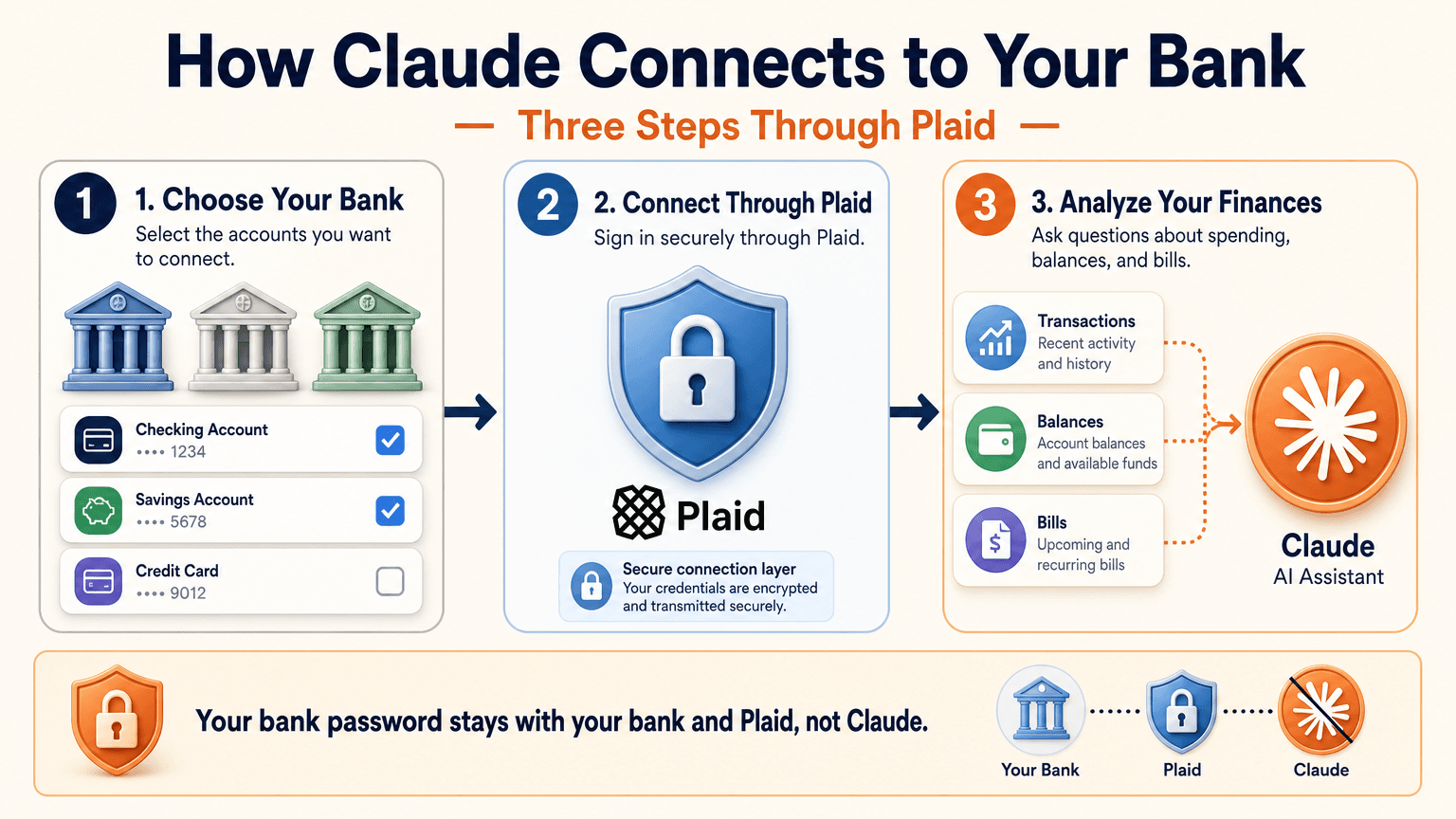
Link Your Bank Through Plaid
- Open Claude and select Personal Finance in the side menu. If you do not see it, check More.
- Select Get started and choose your goals or skip them.
- Select Link accounts with Plaid and review what Claude will be able to access.
- Sign in to your bank inside Plaid and choose the accounts to share.
- Return to Claude within 10 minutes and wait for your accounts to appear.
You sign in through Plaid, so Claude does not ask for or see your bank password. New transactions can take a few minutes to sync.
Use the Claude Personal Finance Dashboard
The dashboard puts spending, cash flow, accounts, subscriptions, and upcoming bills on one page. Widgets can be added, edited, removed, and reordered. Start with one account and one question, such as “Can I afford a trip this spring?”
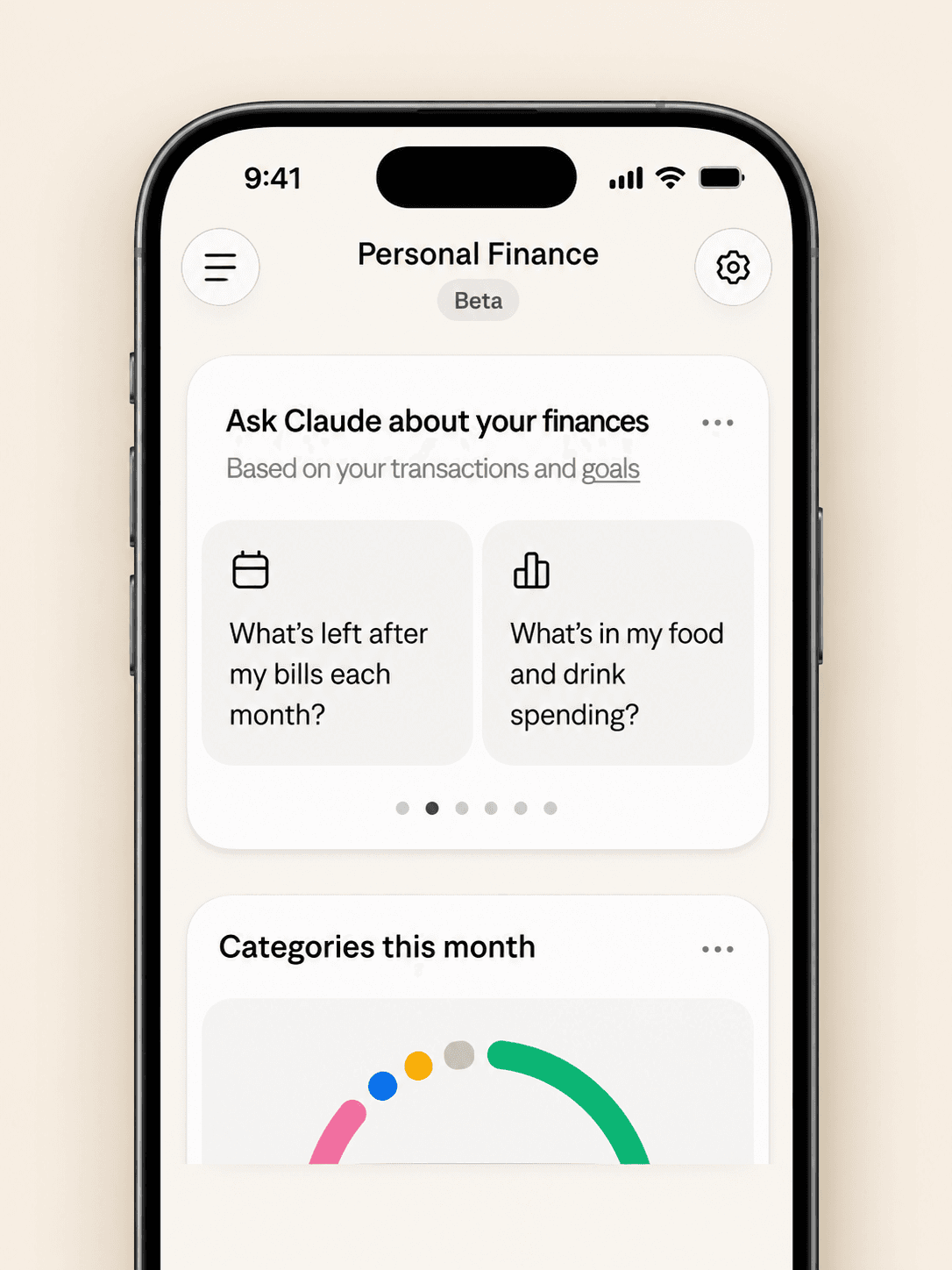
Claude Personal Finance Prompts to Try
Spending and Bills
- “Where did my money go last month, grouped by category?”
- “Which subscriptions am I paying for, and which ones went up in price?”
- “What payments will leave my checking account before payday?”
Smarter Follow-Ups
- “Is that more than usual? Compare the last three months.”
- “Which transactions are behind this number?”
- “Do any charges look duplicated or unexpected?”
The second follow-up matters most. Anthropic itself advises asking which transactions sit behind a figure and checking important numbers with your bank.
Is Claude Personal Finance Safe?
Read-Only Access Through Plaid
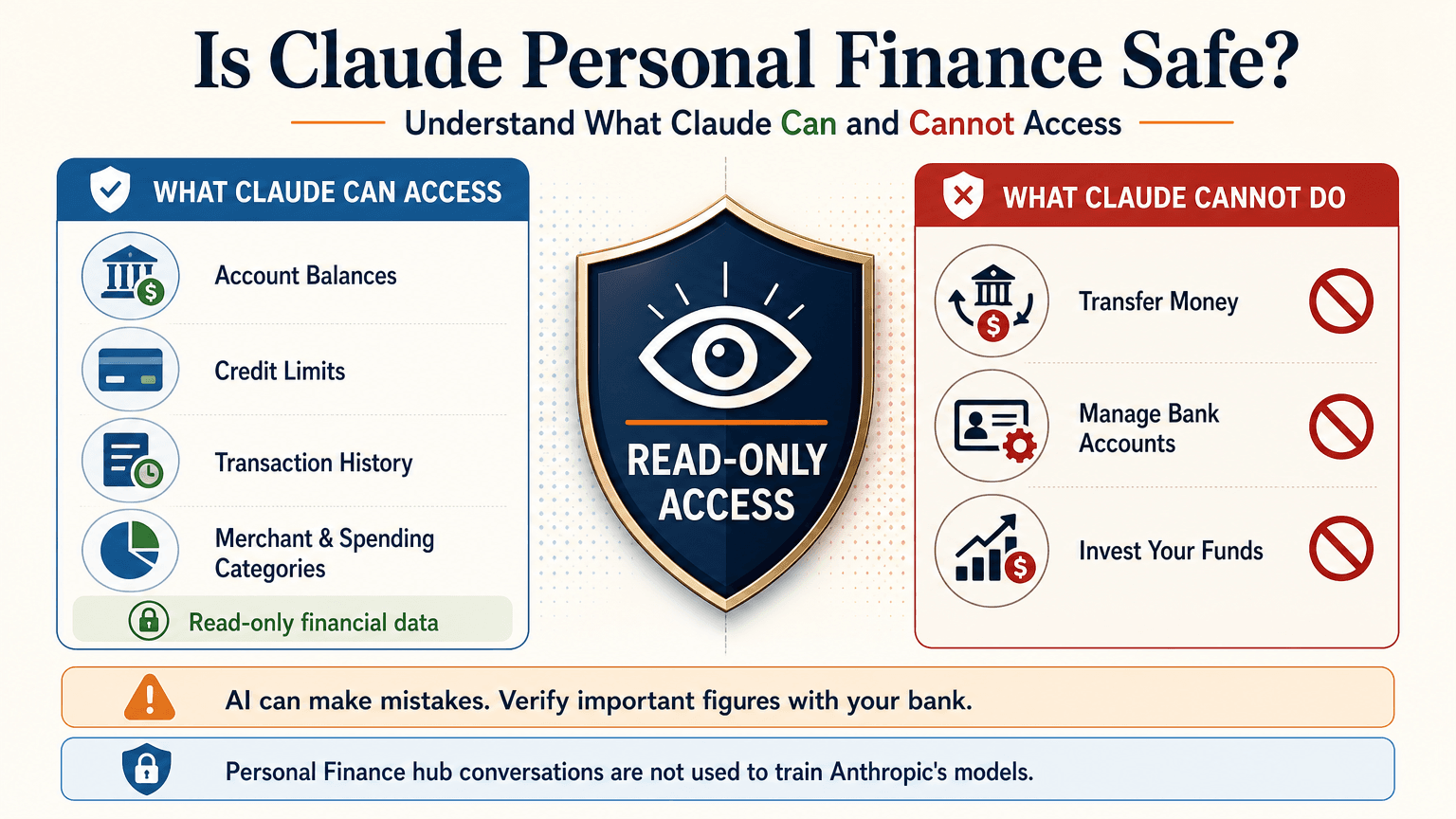
Claude cannot move, manage, or invest your money. Plaid handles the bank sign-in, so your password stays between you and your bank. You can unlink a bank at any time, and Claude can no longer see its data.
What Claude Can See
For the accounts you choose, Claude can read:
- Bank names, account names, types, and last four digits
- Balances and credit limits
- Up to 24 months of transactions with amount, date, merchant, category, and bank description
For investment accounts, loans, and cards, Claude reads balances and credit limits, not holdings, trades, or rates. Conversations in the Personal Finance hub are not used to train Anthropic’s models. For anything you share outside the hub, your normal privacy settings apply.
Accuracy Limits
Claude is AI and can make mistakes. Balances can be a day or two old. An account linked through two logins may be counted twice. Anthropic also says the feature is not designed to give investment advice. Treat Claude as an analyst that organizes and explains your data rather than the final decision maker.
Current Limitations
- US banks only
- No use of linked accounts in scheduled tasks, Cowork tasks, or Claude Code
- Not available on Free, Team, or Enterprise plans
- Saved dashboards are not yet included in data exports
Claude Personal Finance on Reddit: What People Did Before Launch
Personal Finance in Claude only just started rolling out, so real-world reviews of the official feature are still limited. For context, earlier discussions on r/ClaudeAI show how people were managing money with Claude before this feature existed. These are community workflows, not feedback on the new feature.
- Retirement planning: Running Monte Carlo simulations to estimate safe spending rates.
- Custom dashboards: Replacing spreadsheets with net worth and budget views.
- Fee hunting: Comparing bank statements with a fee schedule PDF to dispute wrong charges.
- Bank connections: A few users automated budget emails through Plaid or SimpleFIN, while many preferred uploading redacted CSV files to protect privacy.
That privacy split is useful to know. It is the same trade-off between convenience and control that the official feature and a CSV workflow now represent.
Use Claude Finance Outside the US With a CSV
You do not need account linking to get useful answers. A bank statement export contains the same raw material: dates, merchants, and amounts.
Build a Claude Personal Finance Tracker With 1min.AI
- Export one to three months of transactions from your bank as a CSV.
- Redact account numbers, full names, and addresses before sharing.
- Open Multi AI Chat in 1min.AI and select a Claude model.
- Paste or upload the cleaned data and run your prompt.
- Save the prompt in Prompt List so you can reuse it every month.
A starter prompt: “Categorize these transactions and total each category. List recurring subscriptions and flag duplicates or unusual fees. Show a table and mark any rows you are unsure about.”
1min.AI is not the official Personal Finance in Claude feature and does not connect to your bank. It gives you access to Claude models in one workspace, so this workflow works from any country. For model details, see the page for Claude Opus 5.5 and the guide to Claude Fable 5.1.
Which Claude Model Fits Which Money Task
| Task | Suggested model | Why |
|---|---|---|
| Categorizing many transactions | Claude 5.5 Haiku | Fast and low cost |
| Monthly budget and subscription audit | Claude 5.5 Sonnet | Balanced quality and cost |
| Retirement scenarios and multi-step analysis | Claude 5.5 Opus or 5.1 Fable | Stronger reasoning on complex questions |
Curious how the top models compare? Watch this test:
Claude Personal Finance Plugin Options
Community plugins can extend Claude for finance work. The Claude Cowork guide lists a Finance Tracker plugin for expense tracking and budget analysis. Review any plugin’s permissions before installing it, and never give a tool more financial data than the task needs.
Official Feature vs a CSV Workflow on 1min.AI
| Personal Finance in Claude | CSV workflow on 1min.AI | |
|---|---|---|
| Availability | US beta on paid plans | Global |
| Data source | Live accounts via Plaid | Redacted CSV or pasted rows |
| Dashboard | Built-in widgets | Tables and charts you request |
| Reusable prompts | Suggested questions | Prompt List |
| Model choice | Claude | Haiku, Sonnet, Opus, Fable, and more |
| Best for | Hands-off tracking | Privacy control and non-US users |
Teams that share finance prompts can use Shared Zone. Writers who turn results into reports can try Claude 4.6 for writing. 1min.AI is rated Excellent on Trustpilot and recognized on SourceForge, Slashdot, Capterra, Software Advice, and GetApp. If you want to see how an earlier flagship handles long analysis, try Claude 5 Fable.
Claude Personal Finance FAQ
What is Claude personal finance?
It is Anthropic’s beta feature, officially called Personal Finance in Claude. It links bank and card accounts through Plaid so you can ask about spending, balances, and bills.
Is Personal Finance in Claude free?
No. It is available on Pro, Max, and Ultra plans in the US. It is not available on Free, Team, or Enterprise.
Can Claude move my money?
No. Access is read-only. Claude cannot move, manage, or invest funds.
Can I use Claude finance features outside the US?
The official feature supports US banks only. Outside the US, you can upload a redacted CSV statement to a Claude model and prompt it for categories, subscriptions, and budgets.
Is Claude accurate with financial data?
It can make mistakes. Ask which transactions support each figure and verify key numbers with your bank.
Is this financial advice?
No. This article is educational and is not financial, tax, or investment advice. Consult a licensed professional for major decisions.
Final Thoughts
Claude personal finance turns scattered statements into clear answers. It is still a beta with strict regional limits and normal AI error risk. Use it to organize, categorize, and explain, and verify important figures yourself. If you live outside the US or prefer to keep bank access closed, a redacted CSV with the right Claude model delivers much of the same insight.
- #Information
ബദലുകൾ
1minAI-യുടെ മികച്ച ബദലുകൾ കണ്ടെത്തുക, അവയുടെ സവിശേഷതകൾ, വിലനിർണ്ണയം, ഉപയോഗ കേസുകൾ എന്നിവ താരതമ്യം ചെയ്യുക.

1min.AI vs OpenRouter
1min.AI vs. OpenRouter: ഉപയോഗത്തിന് തയ്യാറായ AI സൃഷ്ടി ഉൽപ്പന്നത്തെയും സാങ്കേതിക API ടൂളിനെയും താരതമ്യം ചെയ്യുക. നിങ്ങൾക്ക് zero-code ക്രിയേറ്റീവ് സ്റ്റുഡിയോ വേണമോ, അതോ കോഡിംഗ് അടിസ്ഥാനസൗകര്യ ഹബ് വേണമോ എന്ന് കണ്ടെത്തുക.
 Ngoc Hong

1മിനിറ്റ്. AI vs Dola AI
Dola AI-യ്ക്ക് ഒരു പകരം അന്വേഷിക്കുന്നുണ്ടോ? വീഡിയോ ജനറേഷൻ, സൗജന്യ പ്ലാനുകൾ, വിലനിർണ്ണയം, സ്വകാര്യത എന്നിവയിൽ 1min.AI-യും Dola AI-യും താരതമ്യം ചെയ്ത് ശരിയായ AI ആപ്പ് തിരഞ്ഞെടുക്കൂ.
Ngoc Hong
1minAI vs Hix AI
AI ചാറ്റ്, ഗവേഷണം, എഴുത്ത്, ഇമേജുകൾ, വീഡിയോ, വിലനിർണ്ണയം, കൂടാതെ ഫ്ലെക്സിബിൾ AI വർക്ഫ്ലോകൾ എന്നിവയ്ക്കായി 5 HIX AI বিকল্পങ്ങളെ താരതമ്യം ചെയ്യുക.
Ngoc HongAI ടൂളുകൾ
ഉൽപ്പാദനക്ഷമത, സർഗ്ഗാത്മകത, ദൈനംദിന ജോലികൾ എന്നിവ വർദ്ധിപ്പിക്കുന്നതിനുള്ള മികച്ച AI ടൂളുകൾ കണ്ടെത്തുക.

ഒരു ഉൽപ്പന്നം, 10 UGC ക്രിയേറ്റീവുകൾ: AI ഉള്ളടക്ക പരിശോധന എങ്ങനെ എളുപ്പമാക്കുന്നു
ഒരു AI UGC വീഡിയോ ജനറേറ്റർ ഉപയോഗിച്ച് കൂടുതൽ പ്രാമാണികമായ UGC സൃഷ്ടിക്കുക, കൂടുതൽ ക്രിയേറ്റീവ് ആംഗിളുകൾ പരീക്ഷിക്കുക, ഓരോ വേർഷനും ഷൂട്ട് ചെയ്യാതെ തന്നെ അഫിലിയേറ്റ് ഉള്ളടക്കം സ്കെയിൽ ചെയ്യുക.
 Lien Anh Vu

കുറച്ച് ഘട്ടങ്ങളിൽ സ്ഥിരതയുള്ള കാർട്ടൂൺ ഉള്ളടക്കം സൃഷ്ടിക്കുക
1min.AI ഉപയോഗിച്ച് ആശയങ്ങൾ ഗവേഷണം ചെയ്യുന്നതിൽ നിന്ന് കഥാപാത്രങ്ങളും ആനിമേറ്റഡ് വീഡിയോകളുമുവരെ, 3 ലളിതമായ ഘട്ടങ്ങളിൽ TikTok, Reels എന്നിവയ്ക്ക് കാർട്ടൂൺ വീഡിയോകൾ സൃഷ്ടിക്കുക.
Lien Anh Vu
സ്റ്റാർട്ടപ്പ് സ്ഥാപകർക്കുള്ള വിലക്കുറഞ്ഞ മികച്ച 4 AI ഉപകരണങ്ങൾ
ഐഡിയകൾ ശരിവെക്കാനും, ഉൽപ്പന്നങ്ങൾ നിർമ്മിക്കാനും, ഉള്ളടക്കം സൃഷ്ടിക്കാനും, അധിക ചെലവില്ലാതെ വേഗത്തിൽ ആരംഭിക്കാനും സ്റ്റാർട്ടപ്പ് സ്ഥാപകർക്കുള്ള മികച്ച 4 വിലക്കുറഞ്ഞ AI ഉപകരണങ്ങൾ കണ്ടെത്തൂ.
 Tram Ta
എഐ സവിശേഷതകൾ
പ്രവൃത്തി പ്രവാഹങ്ങൾ ലളിതമാക്കുകയും കാര്യക്ഷമത വർദ്ധിപ്പിക്കുകയും ടീംസുകൾക്ക് കൂടുതൽ നേട്ടങ്ങൾ നേടാൻ ശക്തമാക്കുകയും ചെയ്യുന്ന സമഗ്ര എഐ സവിശേഷതകൾ.
ഒരു ഉൽപ്പന്നം, 10 UGC ക്രിയേറ്റീവുകൾ: AI ഉള്ളടക്ക പരിശോധന എങ്ങനെ എളുപ്പമാക്കുന്നു
ഒരു AI UGC വീഡിയോ ജനറേറ്റർ ഉപയോഗിച്ച് കൂടുതൽ പ്രാമാണികമായ UGC സൃഷ്ടിക്കുക, കൂടുതൽ ക്രിയേറ്റീവ് ആംഗിളുകൾ പരീക്ഷിക്കുക, ഓരോ വേർഷനും ഷൂട്ട് ചെയ്യാതെ തന്നെ അഫിലിയേറ്റ് ഉള്ളടക്കം സ്കെയിൽ ചെയ്യുക.
Lien Anh Vuകുറച്ച് ഘട്ടങ്ങളിൽ സ്ഥിരതയുള്ള കാർട്ടൂൺ ഉള്ളടക്കം സൃഷ്ടിക്കുക
1min.AI ഉപയോഗിച്ച് ആശയങ്ങൾ ഗവേഷണം ചെയ്യുന്നതിൽ നിന്ന് കഥാപാത്രങ്ങളും ആനിമേറ്റഡ് വീഡിയോകളുമുവരെ, 3 ലളിതമായ ഘട്ടങ്ങളിൽ TikTok, Reels എന്നിവയ്ക്ക് കാർട്ടൂൺ വീഡിയോകൾ സൃഷ്ടിക്കുക.
Lien Anh Vu
1minAI: സൗജന്യ AI വ്യാകരണ പരിശോധകൻ
1minAI-യുടെ AI വ്യാകരണ പരിശോധകൻ ഉപയോഗിച്ച് സൗജന്യമായി വ്യാകരണം പരിശോധിക്കാം. വ്യാകരണ, സ്പെല്ലിംഗ്, എഴുത്തിലെ പിശകുകൾ കണ്ടെത്തി, വ്യക്തത മെച്ചപ്പെടുത്തി, നിങ്ങളുടെ ഉള്ളടക്കം സെക്കൻഡുകളിൽ മിനുക്കാം.
Tram Taഎഐ ഉപയോഗ കേസുകൾ
ബിസിനസ്, പ്രവർത്തനക്ഷമത, വ്യവസായ-നിർദ്ദിഷ്ട ആപ്ലിക്കേഷനുകൾക്കുള്ള തിരഞ്ഞെടുത്ത എഐ ഉപയോഗ കേസുകളുടെ ശേഖരം.
ഒരു ഉൽപ്പന്നം, 10 UGC ക്രിയേറ്റീവുകൾ: AI ഉള്ളടക്ക പരിശോധന എങ്ങനെ എളുപ്പമാക്കുന്നു
ഒരു AI UGC വീഡിയോ ജനറേറ്റർ ഉപയോഗിച്ച് കൂടുതൽ പ്രാമാണികമായ UGC സൃഷ്ടിക്കുക, കൂടുതൽ ക്രിയേറ്റീവ് ആംഗിളുകൾ പരീക്ഷിക്കുക, ഓരോ വേർഷനും ഷൂട്ട് ചെയ്യാതെ തന്നെ അഫിലിയേറ്റ് ഉള്ളടക്കം സ്കെയിൽ ചെയ്യുക.
Lien Anh Vuകുറച്ച് ഘട്ടങ്ങളിൽ സ്ഥിരതയുള്ള കാർട്ടൂൺ ഉള്ളടക്കം സൃഷ്ടിക്കുക
1min.AI ഉപയോഗിച്ച് ആശയങ്ങൾ ഗവേഷണം ചെയ്യുന്നതിൽ നിന്ന് കഥാപാത്രങ്ങളും ആനിമേറ്റഡ് വീഡിയോകളുമുവരെ, 3 ലളിതമായ ഘട്ടങ്ങളിൽ TikTok, Reels എന്നിവയ്ക്ക് കാർട്ടൂൺ വീഡിയോകൾ സൃഷ്ടിക്കുക.
Lien Anh Vu
ഇൻസ്റ്റാഗ്രാമിൽ പോസ്റ്റ് ചെയ്യാൻ ഏറ്റവും നല്ല സമയം: മികച്ച എംഗേജ്മെന്റിനുള്ള പ്രായോഗിക ഗൈഡ്
ഇൻസ്റ്റാഗ്രാമിൽ പോസ്റ്റ് ചെയ്യാൻ ഏറ്റവും നല്ല സമയം കണ്ടെത്തൂ — വ്യത്യസ്ത പ്രേക്ഷകർക്കുള്ള മികച്ച ദിവസങ്ങളും സമയങ്ങളും, കൂടാതെ നിങ്ങളുടെ അക്കൗണ്ടിനായി അനുയോജ്യമായ പോസ്റ്റിംഗ് ഷെഡ്യൂൾ കണ്ടെത്തുന്നതിനുള്ള ടിപ്പുകളും ഉൾപ്പെടെ.
Tram TaAI ട്യൂട്ടോറിയലുകൾ
പ്രായോഗികമായ, ഘട്ടം ഘട്ടമായുള്ള ട്യൂട്ടോറിയലുകളിലൂടെ AI എങ്ങനെ ഉപയോഗിക്കാമെന്ന് പഠിക്കുക.
കുറച്ച് ഘട്ടങ്ങളിൽ സ്ഥിരതയുള്ള കാർട്ടൂൺ ഉള്ളടക്കം സൃഷ്ടിക്കുക
1min.AI ഉപയോഗിച്ച് ആശയങ്ങൾ ഗവേഷണം ചെയ്യുന്നതിൽ നിന്ന് കഥാപാത്രങ്ങളും ആനിമേറ്റഡ് വീഡിയോകളുമുവരെ, 3 ലളിതമായ ഘട്ടങ്ങളിൽ TikTok, Reels എന്നിവയ്ക്ക് കാർട്ടൂൺ വീഡിയോകൾ സൃഷ്ടിക്കുക.
Lien Anh Vu
2026-ലെ ബ്ലാക്ക് ഫ്രൈഡേ AI ടൂൾ ഡീലുകൾ
2026-ലെ ബ്ലാക്ക് ഫ്രൈഡേ AI ടൂൾ ഡീലുകൾ എന്തൊക്കെ നൽകുന്നുവെന്ന് കണ്ടെത്തൂ. AppSumo, Dealify, Stack Social എന്നിവ വഴി 1min.AI ലൈഫ്ടൈം ഡീൽ എങ്ങനെ ഉറപ്പാക്കാമെന്ന് അറിയൂ, Trustpilot, Slashdot, Software Advice എന്നിവയിൽ പരിശോധിക്കൂ.
 Hang Nguyen

Seedance ഉപയോഗിച്ച് AI ഇമേജ് ടു വീഡിയോ പ്രൊഡക്ട് കൺസിസ്റ്റൻസി: വാർപ്പിംഗ് നിർത്തി പ്രൊഡക്ട് റിവ്യൂകൾ സ്കെയിൽ ചെയ്യുക
AI ഇമേജ് ടു വീഡിയോ പ്രൊഡക്ട് കൺസിസ്റ്റൻസി ഉപയോഗിച്ച് ലോഗോകളുടെ വാർപ്പിംഗ് നിർത്തി, ഇന്ന് തന്നെ 1min.AI-ൽ സ്റ്റുഡിയോ നിലവാരത്തിലുള്ള റിവ്യൂ വീഡിയോകൾ സൃഷ്ടിക്കുക.
Lien Anh VuAI ഗൈഡുകൾ
പ്രായോഗിക ഗൈഡുകൾ, യഥാർത്ഥ ലോക ഉദാഹരണങ്ങൾ, പ്രായോഗികമായ മികച്ച രീതികൾ എന്നിവ ഉപയോഗിച്ച് AI വേഗത്തിൽ പഠിക്കുക.
കുറച്ച് ഘട്ടങ്ങളിൽ സ്ഥിരതയുള്ള കാർട്ടൂൺ ഉള്ളടക്കം സൃഷ്ടിക്കുക
1min.AI ഉപയോഗിച്ച് ആശയങ്ങൾ ഗവേഷണം ചെയ്യുന്നതിൽ നിന്ന് കഥാപാത്രങ്ങളും ആനിമേറ്റഡ് വീഡിയോകളുമുവരെ, 3 ലളിതമായ ഘട്ടങ്ങളിൽ TikTok, Reels എന്നിവയ്ക്ക് കാർട്ടൂൺ വീഡിയോകൾ സൃഷ്ടിക്കുക.
Lien Anh Vu
സുരക്ഷിതമായി ഓൺലൈനിൽ AI ടൂളുകൾ വാങ്ങുക: 2026 ബ്ലാക്ക് ഫ്രൈഡേ ഗൈഡ്
ഓൺലൈനിൽ മികച്ച ബ്ലാക്ക് ഫ്രൈഡേ AI ഡീലുകൾ കണ്ടെത്താനും സുരക്ഷിതമാക്കാനും എങ്ങനെ എന്ന് കണ്ടെത്തുക. തട്ടിപ്പുകൾ ഒഴിവാക്കാനും, സബ്സ്ക്രിപ്ഷൻ തളർച്ച നേരിടാനും, സോഫ്റ്റ്വെയർ സ്ഥിരീകരിക്കാനും വിദഗ്ധ തന്ത്രങ്ങൾ പഠിക്കുക.
Hang NguyenSeedance ഉപയോഗിച്ച് AI ഇമേജ് ടു വീഡിയോ പ്രൊഡക്ട് കൺസിസ്റ്റൻസി: വാർപ്പിംഗ് നിർത്തി പ്രൊഡക്ട് റിവ്യൂകൾ സ്കെയിൽ ചെയ്യുക
AI ഇമേജ് ടു വീഡിയോ പ്രൊഡക്ട് കൺസിസ്റ്റൻസി ഉപയോഗിച്ച് ലോഗോകളുടെ വാർപ്പിംഗ് നിർത്തി, ഇന്ന് തന്നെ 1min.AI-ൽ സ്റ്റുഡിയോ നിലവാരത്തിലുള്ള റിവ്യൂ വീഡിയോകൾ സൃഷ്ടിക്കുക.
Lien Anh VuAI സൊല്യൂഷൻസ്
ഓട്ടോമേഷൻ, കോഡിംഗ്, ഗവേഷണം, ഉൽപ്പാദനക്ഷമത, ഉപഭോക്തൃ പിന്തുണ, വിപണനം, ബിസിനസ്സ് വർക്ക്ഫ്ലോകൾ എന്നിവയ്ക്കുള്ള മികച്ച AI സൊല്യൂഷനുകൾ ബ്രൗസ് ചെയ്യുക.
ഒരു ഉൽപ്പന്നം, 10 UGC ക്രിയേറ്റീവുകൾ: AI ഉള്ളടക്ക പരിശോധന എങ്ങനെ എളുപ്പമാക്കുന്നു
ഒരു AI UGC വീഡിയോ ജനറേറ്റർ ഉപയോഗിച്ച് കൂടുതൽ പ്രാമാണികമായ UGC സൃഷ്ടിക്കുക, കൂടുതൽ ക്രിയേറ്റീവ് ആംഗിളുകൾ പരീക്ഷിക്കുക, ഓരോ വേർഷനും ഷൂട്ട് ചെയ്യാതെ തന്നെ അഫിലിയേറ്റ് ഉള്ളടക്കം സ്കെയിൽ ചെയ്യുക.
Lien Anh Vuകുറച്ച് ഘട്ടങ്ങളിൽ സ്ഥിരതയുള്ള കാർട്ടൂൺ ഉള്ളടക്കം സൃഷ്ടിക്കുക
1min.AI ഉപയോഗിച്ച് ആശയങ്ങൾ ഗവേഷണം ചെയ്യുന്നതിൽ നിന്ന് കഥാപാത്രങ്ങളും ആനിമേറ്റഡ് വീഡിയോകളുമുവരെ, 3 ലളിതമായ ഘട്ടങ്ങളിൽ TikTok, Reels എന്നിവയ്ക്ക് കാർട്ടൂൺ വീഡിയോകൾ സൃഷ്ടിക്കുക.
Lien Anh Vu
സൗജന്യ AI ടാറ്റൂ ജനറേറ്റർ: കസ്റ്റം ഡിസൈനുകൾ
1min.AI-യുടെ സൗജന്യ AI ടാറ്റൂ ജനറേറ്റർ ഉപയോഗിച്ച് ഏതെങ്കിലും ആശയം ഒരു കസ്റ്റം ടാറ്റൂ ഡിസൈനാക്കി മാറ്റാം. നിങ്ങളുടെ ആശയം വിവരിക്കുക, ഒരു സ്റ്റൈൽ തിരഞ്ഞെടുക്കുക, സെക്കൻഡുകളിൽ ഡൗൺലോഡ് ചെയ്യുക.
 Trang Tran
AI മോഡലുകൾ
ലോകത്തിലെ മുൻനിര AI മോഡലുകൾ ഒരിടത്ത് കണ്ടെത്തുക.
ഒരു ഉൽപ്പന്നം, 10 UGC ക്രിയേറ്റീവുകൾ: AI ഉള്ളടക്ക പരിശോധന എങ്ങനെ എളുപ്പമാക്കുന്നു
ഒരു AI UGC വീഡിയോ ജനറേറ്റർ ഉപയോഗിച്ച് കൂടുതൽ പ്രാമാണികമായ UGC സൃഷ്ടിക്കുക, കൂടുതൽ ക്രിയേറ്റീവ് ആംഗിളുകൾ പരീക്ഷിക്കുക, ഓരോ വേർഷനും ഷൂട്ട് ചെയ്യാതെ തന്നെ അഫിലിയേറ്റ് ഉള്ളടക്കം സ്കെയിൽ ചെയ്യുക.
Lien Anh Vuകുറച്ച് ഘട്ടങ്ങളിൽ സ്ഥിരതയുള്ള കാർട്ടൂൺ ഉള്ളടക്കം സൃഷ്ടിക്കുക
1min.AI ഉപയോഗിച്ച് ആശയങ്ങൾ ഗവേഷണം ചെയ്യുന്നതിൽ നിന്ന് കഥാപാത്രങ്ങളും ആനിമേറ്റഡ് വീഡിയോകളുമുവരെ, 3 ലളിതമായ ഘട്ടങ്ങളിൽ TikTok, Reels എന്നിവയ്ക്ക് കാർട്ടൂൺ വീഡിയോകൾ സൃഷ്ടിക്കുക.
Lien Anh VuSeedance ഉപയോഗിച്ച് AI ഇമേജ് ടു വീഡിയോ പ്രൊഡക്ട് കൺസിസ്റ്റൻസി: വാർപ്പിംഗ് നിർത്തി പ്രൊഡക്ട് റിവ്യൂകൾ സ്കെയിൽ ചെയ്യുക
AI ഇമേജ് ടു വീഡിയോ പ്രൊഡക്ട് കൺസിസ്റ്റൻസി ഉപയോഗിച്ച് ലോഗോകളുടെ വാർപ്പിംഗ് നിർത്തി, ഇന്ന് തന്നെ 1min.AI-ൽ സ്റ്റുഡിയോ നിലവാരത്തിലുള്ള റിവ്യൂ വീഡിയോകൾ സൃഷ്ടിക്കുക.
Lien Anh VuAI താരതമ്യങ്ങൾ
നിങ്ങളുടെ ആവശ്യങ്ങൾക്ക് ഏറ്റവും അനുയോജ്യമായ AI ടൂളുകൾ, മോഡലുകൾ, പ്ലാറ്റ്ഫോമുകൾ എന്നിവ കണ്ടെത്താൻ താരതമ്യം ചെയ്യുക.

Kling AI Vs Veo 3: ഏത് മോഡൽ ജയിക്കും?
Kling AI vs Veo 3: motion, native audio, pricing & free tiers താരതമ്യം ചെയ്ത്, ഏത് AI വീഡിയോ ജനറേറ്ററാണ് നിങ്ങളുടെ പ്രോജക്ടിന് ജയിക്കുന്നത് എന്ന് നോക്കൂ — 1min.AI-ൽ രണ്ടും പരീക്ഷിക്കൂ.
Trang TranSeedance ഉപയോഗിച്ച് AI ഇമേജ് ടു വീഡിയോ പ്രൊഡക്ട് കൺസിസ്റ്റൻസി: വാർപ്പിംഗ് നിർത്തി പ്രൊഡക്ട് റിവ്യൂകൾ സ്കെയിൽ ചെയ്യുക
AI ഇമേജ് ടു വീഡിയോ പ്രൊഡക്ട് കൺസിസ്റ്റൻസി ഉപയോഗിച്ച് ലോഗോകളുടെ വാർപ്പിംഗ് നിർത്തി, ഇന്ന് തന്നെ 1min.AI-ൽ സ്റ്റുഡിയോ നിലവാരത്തിലുള്ള റിവ്യൂ വീഡിയോകൾ സൃഷ്ടിക്കുക.
Lien Anh Vu
DeepSeek V4 Pro vs Flash താരതമ്യം
DeepSeek V4 Proയും DeepSeek V4 Flash മെറ്റ്രിക്സും താരതമ്യം ചെയ്യൂ. നിങ്ങളുടെ ഏജന്റിക് ആപ്പുകൾ ഓപ്റ്റിമൈസ് ചെയ്ത് ഇന്ന് തന്നെ 1min.ai-ൽ AI ഫാക്ട് ചെക്കിംഗ് മെച്ചപ്പെടുത്തൂ.
Ngoc Hongഎഐ ഇന്റഗ്രേഷനുകൾ
നിങ്ങൾ ഇതിനകം ഉപയോഗിക്കുന്ന ടൂളുകളുമായി എഐ ചേരാൻ സ毫രവുമായ് സംയോജിപ്പിച്ച് ജോലികൾ ഓട്ടോമേറ്റ് ചെയ്യാനും ഉൽപ്പാദകത്വം വർദ്ധിപ്പിക്കാനും.

ഫാഷൻ വീക്ക് 2026-നായി AI ഫാഷൻ വീഡിയോ ജനറേറ്റർ എങ്ങനെ ഉപയോഗിക്കാം
ഫാഷൻ വീക്ക് 2026 ആശയങ്ങളെ AI ഉപയോഗിച്ച് അതിമനോഹരമായ ഫാഷൻ വീഡിയോകളാക്കി മാറ്റാം. ഒരു ലളിതമായ വർക്ക്ഫ്ലോയിൽ ബ്രെയിൻസ്റ്റോം ചെയ്യാനും, വിസ്വലുകൾ സൃഷ്ടിക്കാനും, ചിത്രങ്ങളെ വീഡിയോകളാക്കാനും എങ്ങനെ എന്ന് പഠിക്കൂ.
Lien Anh Vu
POV: നിങ്ങൾക്ക് ഓരോ ദിവസവും 10+ പോസ്റ്റുകൾ ഉണ്ടാക്കാനുണ്ട്
AI ബ്രെയിൻസ്റ്റോർമിംഗ്, ഇമേജ് ജനറേഷൻ, ഉള്ളടക്കം സൃഷ്ടിക്കൽ എന്നിവ ഉപയോഗിച്ച് കണ്ടന്റ് ക്രിയേറ്റർമാർക്ക് ദിവസേന 10+ സോഷ്യൽ മീഡിയ പോസ്റ്റുകൾ വേഗത്തിൽ നിർമ്മിക്കാൻ സഹായിക്കുന്ന AI കണ്ടന്റ് വർക്ക്ഫ്ലോ എങ്ങനെ നിർമ്മിക്കാമെന്ന് പഠിക്കൂ.
Lien Anh Vu
AI ആപ്പുകൾ തമ്മിൽ മാറിമാറി ഉപയോഗിക്കുന്നത് നിർത്തൂ: AI ഇന്റഗ്രേഷൻ എങ്ങനെ എംപ്ലോയർ ബ്രാൻഡിംഗ് മാറ്റുന്നു
AI ഇന്റഗ്രേഷൻ AI എഴുത്ത്, ഡോക്യുമെന്റുകൾ, ചിത്രങ്ങൾ, വീഡിയോ, ഒന്നിലധികം AI മോഡലുകൾ എന്നിവയെ ഒരൊറ്റ വർക്ക്സ്പേസിൽ ഒന്നിപ്പിച്ച് HR ടീമുകൾക്ക് എംപ്ലോയർ ബ്രാൻഡിംഗ് ലളിതമാക്കാൻ എങ്ങനെ സഹായിക്കുന്നു എന്നത് കണ്ടെത്തൂ.
Tram Taവ്യവസായങ്ങൾക്കുള്ള എഐ
ആരോഗ്യം, ഫിനാൻസ്, വിദ്യാഭ്യാസം, നിയമം, നിര്മ്മാണം, റീട്ടെയിൽ, റിയൽ എസ്റ്റേറ്റ് എന്നിവയ്ക്ക് അനുയോജ്യമായ മികച്ച എഐ ഉപകരണങ്ങളും പ്രവർത്തനക്രമങ്ങളും കണ്ടെത്തുക.

സൗജന്യ AI ഉൽപ്പന്ന വിവരണം ജനറേറ്റർ
മിനിറ്റുകൾക്കുള്ളിൽ വിൽക്കുന്ന ഉൽപ്പന്ന വിവരണങ്ങൾ എഴുതുക. വിശദാംശങ്ങളെയോ ഒരു ഫോട്ടോയെയോ ബ്രാൻഡിനൊത്ത കോപ്പിയാക്കി മാറ്റാൻ ഈ സൗജന്യ AI ഉൽപ്പന്ന വിവരണം ജനറേറ്റർ ഉപയോഗിക്കുക. 1min.AI പരീക്ഷിക്കുക.
Trang Tran
ലാഭം പരമാവധി വർധിപ്പിക്കാൻ സ്റ്റാർട്ടപ്പുകൾക്കായുള്ള മികച്ച ബിസിനസ് ഉൽപാദകതാ ടൂളുകൾ | 1minAI
സമയം ലാഭിക്കാൻ, പ്രവർത്തനങ്ങൾ ലളിതമാക്കാൻ, ആവർത്തന ജോലികൾ കുറയ്ക്കാൻ, AI ഉപയോഗിച്ച് ലാഭകരമായ വളർച്ചയെ പിന്തുണയ്ക്കാൻ സ്റ്റാർട്ടപ്പുകൾക്കായുള്ള മികച്ച ബിസിനസ് ഉൽപാദകതാ ടൂളുകൾ കണ്ടെത്തൂ.
Tram Ta
ഉള്ളടക്ക മാർക്കറ്റിംഗിനുള്ള മികച്ച AI ടൂൾ |1minAI
ഉള്ളടക്ക മാർക്കറ്റിംഗിനുള്ള മികച്ച AI ടൂൾ അന്വേഷിക്കുകയാണോ? 1minAI മാർക്കറ്റർമാർക്ക് ഒരു AI വർക്ക്സ്പേസിൽ നിന്ന് ഗവേഷണം, എഴുത്ത്, പുനരുപയോഗം, ദൃശ്യസൃഷ്ടി, ഉള്ളടക്ക സ്കെയിലിംഗ് എന്നിവ എങ്ങനെ സഹായിക്കുന്നുവെന്ന് കാണുക.
Tram TaAI ഏജന്റുകൾ
നിങ്ങളുടെ ജോലിയും ദൈനംദിന ജീവിതത്തിലെ കാര്യങ്ങളും യാന്ത്രികമാക്കാൻ AI ഏജന്റുകളെ കണ്ടെത്തുകയും പ്രവർത്തിപ്പിക്കുകയും ചെയ്യുക.
1minAI: സൗജന്യ AI വ്യാകരണ പരിശോധകൻ
1minAI-യുടെ AI വ്യാകരണ പരിശോധകൻ ഉപയോഗിച്ച് സൗജന്യമായി വ്യാകരണം പരിശോധിക്കാം. വ്യാകരണ, സ്പെല്ലിംഗ്, എഴുത്തിലെ പിശകുകൾ കണ്ടെത്തി, വ്യക്തത മെച്ചപ്പെടുത്തി, നിങ്ങളുടെ ഉള്ളടക്കം സെക്കൻഡുകളിൽ മിനുക്കാം.
Tram Ta
Facebook-നുള്ള AI ഏജന്റുകൾ
ഡോക്യുമെന്റുകളും സംഭാഷണങ്ങളും ഉപയോഗിച്ച് ഉള്ളടക്കം സൃഷ്ടിക്കാനും, ചിത്രങ്ങൾ ജനറേറ്റ് ചെയ്യാനും, പോസ്റ്റുകൾ ഷെഡ്യൂൾ ചെയ്യാനും, പ്രസിദ്ധീകരിക്കാനും Facebook-നായി ഒരു AI ഏജന്റ് ഉപയോഗിക്കുക.
Ngoc Hong
AI Agent vs AI Assistant: ഡിസൈനർമാർക്ക് യഥാർത്ഥത്തിൽ കൂടുതൽ സമയം ലാഭിക്കുന്നത് ഏത്?
AI Agent vs AI Assistant തമ്മിലെ വ്യത്യാസം മനസ്സിലാക്കി, ആവർത്തിച്ചുള്ള ജോലികൾ ഓട്ടോമേറ്റ് ചെയ്യാനും, റിവിഷനുകൾ കുറയ്ക്കാനും, കൂടുതൽ സമയം ലാഭിക്കാനും സഹായിക്കുന്ന പരിഹാരം കണ്ടെത്തൂ.
Lien Anh VuAI വർക്ക്ഫ്ലോകൾ
ഉൽപ്പാദനക്ഷമത, വിപണനം, വിൽപ്പന, പിന്തുണ എന്നിവയ്ക്കും മറ്റും തയ്യാറായ AI വർക്ക്ഫ്ലോകൾ കണ്ടെത്തുക.
ഒരു ഉൽപ്പന്നം, 10 UGC ക്രിയേറ്റീവുകൾ: AI ഉള്ളടക്ക പരിശോധന എങ്ങനെ എളുപ്പമാക്കുന്നു
ഒരു AI UGC വീഡിയോ ജനറേറ്റർ ഉപയോഗിച്ച് കൂടുതൽ പ്രാമാണികമായ UGC സൃഷ്ടിക്കുക, കൂടുതൽ ക്രിയേറ്റീവ് ആംഗിളുകൾ പരീക്ഷിക്കുക, ഓരോ വേർഷനും ഷൂട്ട് ചെയ്യാതെ തന്നെ അഫിലിയേറ്റ് ഉള്ളടക്കം സ്കെയിൽ ചെയ്യുക.
Lien Anh Vuകുറച്ച് ഘട്ടങ്ങളിൽ സ്ഥിരതയുള്ള കാർട്ടൂൺ ഉള്ളടക്കം സൃഷ്ടിക്കുക
1min.AI ഉപയോഗിച്ച് ആശയങ്ങൾ ഗവേഷണം ചെയ്യുന്നതിൽ നിന്ന് കഥാപാത്രങ്ങളും ആനിമേറ്റഡ് വീഡിയോകളുമുവരെ, 3 ലളിതമായ ഘട്ടങ്ങളിൽ TikTok, Reels എന്നിവയ്ക്ക് കാർട്ടൂൺ വീഡിയോകൾ സൃഷ്ടിക്കുക.
Lien Anh Vuഫാഷൻ വീക്ക് 2026-നായി AI ഫാഷൻ വീഡിയോ ജനറേറ്റർ എങ്ങനെ ഉപയോഗിക്കാം
ഫാഷൻ വീക്ക് 2026 ആശയങ്ങളെ AI ഉപയോഗിച്ച് അതിമനോഹരമായ ഫാഷൻ വീഡിയോകളാക്കി മാറ്റാം. ഒരു ലളിതമായ വർക്ക്ഫ്ലോയിൽ ബ്രെയിൻസ്റ്റോം ചെയ്യാനും, വിസ്വലുകൾ സൃഷ്ടിക്കാനും, ചിത്രങ്ങളെ വീഡിയോകളാക്കാനും എങ്ങനെ എന്ന് പഠിക്കൂ.
Lien Anh Vuന്യൂസ്ലറ്റർ
1minAI-യുമായി ആഴ്ചതോറും AI നവീകരണങ്ങൾ

🔮 ആഴ്ച്ചയിലെ AI നവീകരണങ്ങൾ #143: GPT-6, GPT-6.1 & Ideogram 4.0 & Ideogram 4.0 അപ്ഡേറ്റ്
1min.ai-യിൽ GPT-6 Sol, Luna, GPT-6.1 Sol, ഒപ്പം Ideogram 4.0 ആക്സസ് ചെയ്യൂ. ഒറ്റ പ്ലാറ്റ്ഫോമിൽ ടൈപ്പോഗ്രഫി കൃത്യത 98.4% വരെ ഉയർത്തുകയും റീസണിംഗ് ലാറ്റൻസി 45% വരെ കുറയ്ക്കുകയും ചെയ്യൂ.
Hang Nguyen
🔮 വാരാന്ത്യ AI നവീകരണങ്ങൾ #142: Grok 4.7, Opus 5.5 & Sonnet 5.5 on 1min.ai
1min.ai-ൽ Grok 4.7, Claude Opus 5.5, மற்றும் Sonnet 5.5 ആക്സസ് ചെയ്യുക. സബ്സ്ക്രിപ്ഷൻ ചെലവുകൾ 70% വരെ കുറച്ച്, ഒരു ഏകീകൃത വർക്ക്സ്പേസിൽ തന്നെ ദശലക്ഷക്കണക്കിന് ടോക്കണുകൾ പ്രോസസ് ചെയ്യാം.
Hang Nguyen
🔮 ആഴ്ചയിലെ AI നവീകരണങ്ങൾ #141: Seedance 2.5 & Stable Audio 3: അടുത്ത തലമുറ AI
1min.ai-യിൽ Seedance 2.0, 2.5, 그리고 StabilityAI-യുടെ Stable Audio 3 എന്നിവ പരിശോധിക്കൂ. അടുത്ത തലമുറ ജനറേറ്റീവ് AI ഉപയോഗിച്ച് സ്റ്റുഡിയോ നിലവാരത്തിലുള്ള ഓഡിയോയും സമന്വയിച്ച ചലനവും സൃഷ്ടിക്കൂ.
Hang Nguyen