
Claude Personal Finance Setup and Safety Guide

Trang Tran
20 ნოემბერი, 2026

Claude personal finance explained: how Personal Finance in Claude works and what Claude finance can see. Plus a safe CSV method for non-US users.
Claude personal finance (officially “Personal Finance in Claude”) is an Anthropic beta feature. It links your bank and card accounts through Plaid so you can ask Claude about balances, spending, and bills in plain language. Access is read-only. It is available only to US users on Pro, Max, and Ultra plans. Outside the US, you can get similar results by uploading a redacted CSV statement to a Claude model in 1min.AI.
It is the end of the month and payday is still ten days away. You do not need a spreadsheet to answer “Where did my money go?” You need a clear answer you can trust. This guide covers what the feature does, how to set it up, how safe it is, and how to get similar value if you live outside the US.
What Is Claude Personal Finance?
Personal Finance in Claude is a section of the Claude app where you connect financial accounts and ask questions about your own money. It works on Claude web, Claude Desktop, iOS, and Android. Anthropic states that it has no ads or sponsored recommendations and that it does not offer credit cards, loans, or savings accounts of its own.
Watch the official walkthrough:
What Claude Finance Can Do
Claude finance covers four main jobs:
- Spending summaries: Ask “Where did my money go this month?” and get totals grouped by category such as rent, food, and shopping.
- Problem spotting: Claude can flag duplicate charges, unexpected fees, and bills that crept up over the year.
- Concept explanations: Ask “What is an APR?” and Claude explains the term, then adds up the interest you were charged.
- Dashboard building: Ask for a weekly spending chart, a calendar of what is due, or a custom set of numbers.
Who Can Use Personal Finance in Claude
| Requirement | Details |
|---|---|
| Plans | Pro, Max, and Ultra (not Free, Team, or Enterprise) |
| Region | US banks and US users only |
| Status | Beta with gradual rollout |
| Data access | Read-only: balances, credit limits, up to 24 months of transactions |
| Bank limit | Up to 16 linked banks |
How to Use Personal Finance in Claude
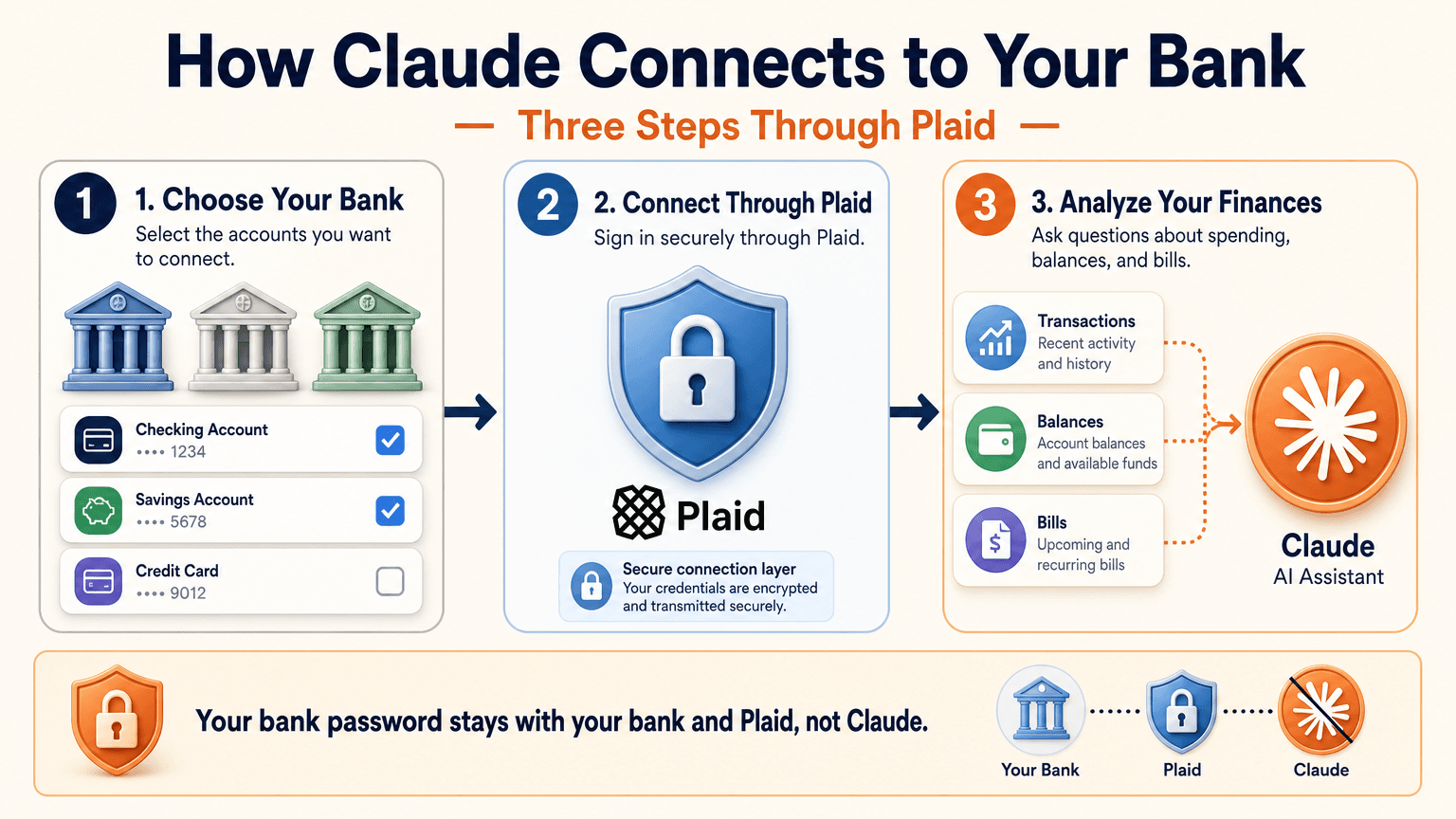
Link Your Bank Through Plaid
- Open Claude and select Personal Finance in the side menu. If you do not see it, check More.
- Select Get started and choose your goals or skip them.
- Select Link accounts with Plaid and review what Claude will be able to access.
- Sign in to your bank inside Plaid and choose the accounts to share.
- Return to Claude within 10 minutes and wait for your accounts to appear.
You sign in through Plaid, so Claude does not ask for or see your bank password. New transactions can take a few minutes to sync.
Use the Claude Personal Finance Dashboard
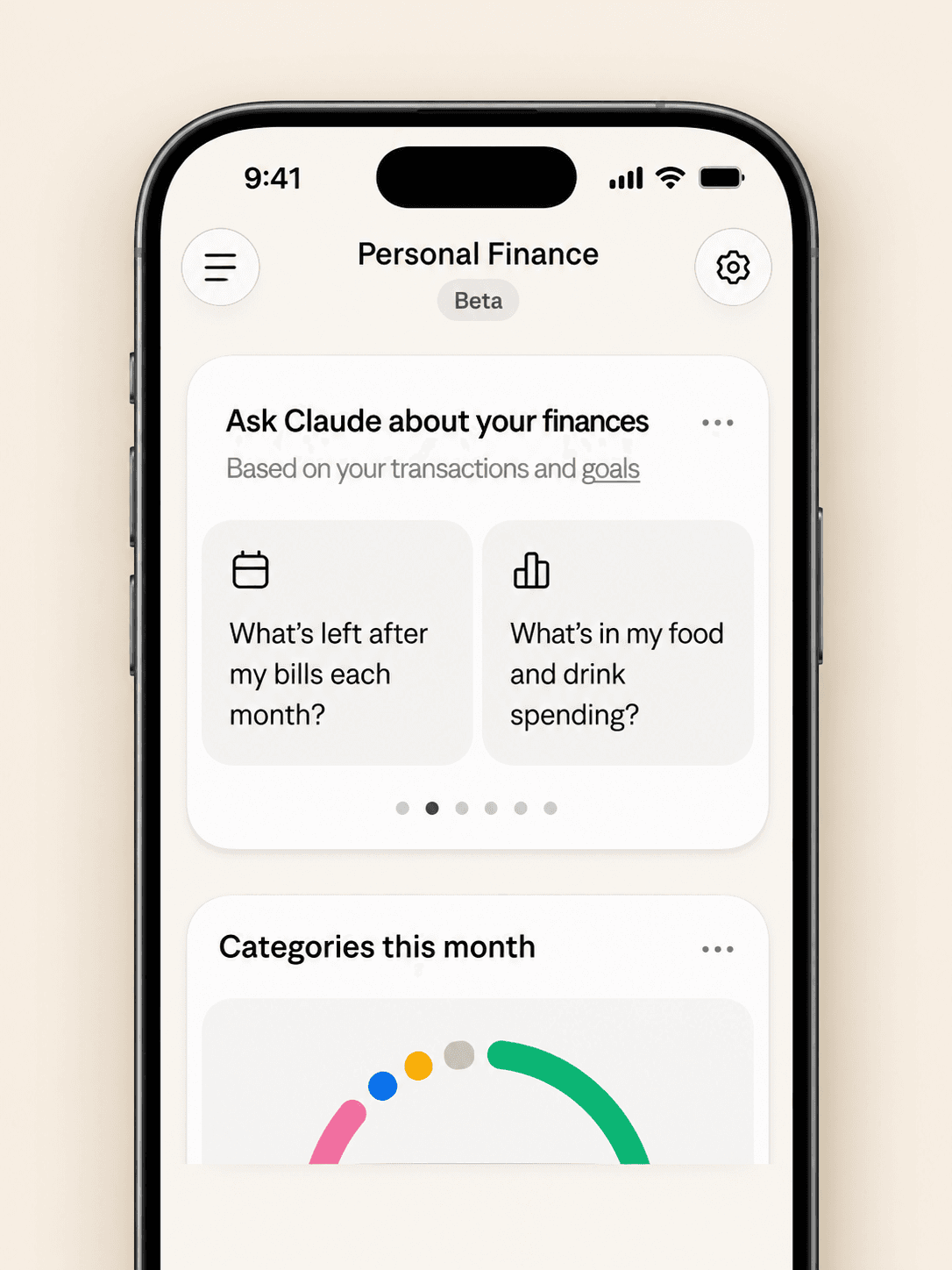
The dashboard puts spending, cash flow, accounts, subscriptions, and upcoming bills on one page. Widgets can be added, edited, removed, and reordered. Start with one account and one question, such as “Can I afford a trip this spring?”
Claude Personal Finance Prompts to Try
Spending and Bills
- “Where did my money go last month, grouped by category?”
- “Which subscriptions am I paying for, and which ones went up in price?”
- “What payments will leave my checking account before payday?”
Smarter Follow-Ups
- “Is that more than usual? Compare the last three months.”
- “Which transactions are behind this number?”
- “Do any charges look duplicated or unexpected?”
The second follow-up matters most. Anthropic itself advises asking which transactions sit behind a figure and checking important numbers with your bank.
Is Claude Personal Finance Safe?
Read-Only Access Through Plaid
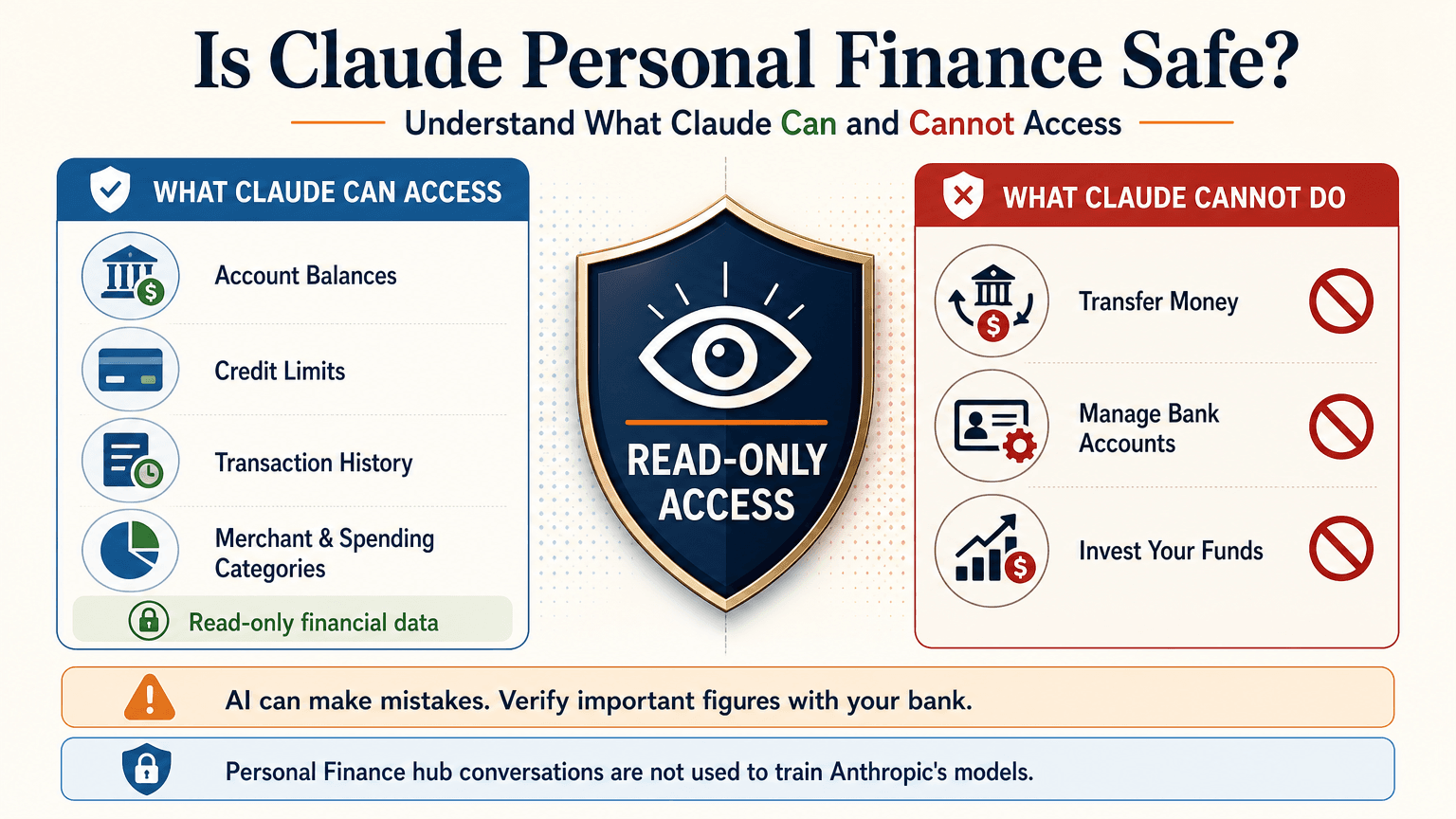
Claude cannot move, manage, or invest your money. Plaid handles the bank sign-in, so your password stays between you and your bank. You can unlink a bank at any time, and Claude can no longer see its data.
What Claude Can See
For the accounts you choose, Claude can read:
- Bank names, account names, types, and last four digits
- Balances and credit limits
- Up to 24 months of transactions with amount, date, merchant, category, and bank description
For investment accounts, loans, and cards, Claude reads balances and credit limits, not holdings, trades, or rates. Conversations in the Personal Finance hub are not used to train Anthropic’s models. For anything you share outside the hub, your normal privacy settings apply.
Accuracy Limits
Claude is AI and can make mistakes. Balances can be a day or two old. An account linked through two logins may be counted twice. Anthropic also says the feature is not designed to give investment advice. Treat Claude as an analyst that organizes and explains your data rather than the final decision maker.
Current Limitations
- US banks only
- No use of linked accounts in scheduled tasks, Cowork tasks, or Claude Code
- Not available on Free, Team, or Enterprise plans
- Saved dashboards are not yet included in data exports
Claude Personal Finance on Reddit: What People Did Before Launch
Personal Finance in Claude only just started rolling out, so real-world reviews of the official feature are still limited. For context, earlier discussions on r/ClaudeAI show how people were managing money with Claude before this feature existed. These are community workflows, not feedback on the new feature.
- Retirement planning: Running Monte Carlo simulations to estimate safe spending rates.
- Custom dashboards: Replacing spreadsheets with net worth and budget views.
- Fee hunting: Comparing bank statements with a fee schedule PDF to dispute wrong charges.
- Bank connections: A few users automated budget emails through Plaid or SimpleFIN, while many preferred uploading redacted CSV files to protect privacy.
That privacy split is useful to know. It is the same trade-off between convenience and control that the official feature and a CSV workflow now represent.
Use Claude Finance Outside the US With a CSV
You do not need account linking to get useful answers. A bank statement export contains the same raw material: dates, merchants, and amounts.
Build a Claude Personal Finance Tracker With 1min.AI
- Export one to three months of transactions from your bank as a CSV.
- Redact account numbers, full names, and addresses before sharing.
- Open Multi AI Chat in 1min.AI and select a Claude model.
- Paste or upload the cleaned data and run your prompt.
- Save the prompt in Prompt List so you can reuse it every month.
A starter prompt: “Categorize these transactions and total each category. List recurring subscriptions and flag duplicates or unusual fees. Show a table and mark any rows you are unsure about.”
1min.AI is not the official Personal Finance in Claude feature and does not connect to your bank. It gives you access to Claude models in one workspace, so this workflow works from any country. For model details, see the page for Claude Opus 5.5 and the guide to Claude Fable 5.1.
Which Claude Model Fits Which Money Task
| Task | Suggested model | Why |
|---|---|---|
| Categorizing many transactions | Claude 5.5 Haiku | Fast and low cost |
| Monthly budget and subscription audit | Claude 5.5 Sonnet | Balanced quality and cost |
| Retirement scenarios and multi-step analysis | Claude 5.5 Opus or 5.1 Fable | Stronger reasoning on complex questions |
Curious how the top models compare? Watch this test:
Claude Personal Finance Plugin Options
Community plugins can extend Claude for finance work. The Claude Cowork guide lists a Finance Tracker plugin for expense tracking and budget analysis. Review any plugin’s permissions before installing it, and never give a tool more financial data than the task needs.
Official Feature vs a CSV Workflow on 1min.AI
| Personal Finance in Claude | CSV workflow on 1min.AI | |
|---|---|---|
| Availability | US beta on paid plans | Global |
| Data source | Live accounts via Plaid | Redacted CSV or pasted rows |
| Dashboard | Built-in widgets | Tables and charts you request |
| Reusable prompts | Suggested questions | Prompt List |
| Model choice | Claude | Haiku, Sonnet, Opus, Fable, and more |
| Best for | Hands-off tracking | Privacy control and non-US users |
Teams that share finance prompts can use Shared Zone. Writers who turn results into reports can try Claude 4.6 for writing. 1min.AI is rated Excellent on Trustpilot and recognized on SourceForge, Slashdot, Capterra, Software Advice, and GetApp. If you want to see how an earlier flagship handles long analysis, try Claude 5 Fable.
Claude Personal Finance FAQ
What is Claude personal finance?
It is Anthropic’s beta feature, officially called Personal Finance in Claude. It links bank and card accounts through Plaid so you can ask about spending, balances, and bills.
Is Personal Finance in Claude free?
No. It is available on Pro, Max, and Ultra plans in the US. It is not available on Free, Team, or Enterprise.
Can Claude move my money?
No. Access is read-only. Claude cannot move, manage, or invest funds.
Can I use Claude finance features outside the US?
The official feature supports US banks only. Outside the US, you can upload a redacted CSV statement to a Claude model and prompt it for categories, subscriptions, and budgets.
Is Claude accurate with financial data?
It can make mistakes. Ask which transactions support each figure and verify key numbers with your bank.
Is this financial advice?
No. This article is educational and is not financial, tax, or investment advice. Consult a licensed professional for major decisions.
Final Thoughts
Claude personal finance turns scattered statements into clear answers. It is still a beta with strict regional limits and normal AI error risk. Use it to organize, categorize, and explain, and verify important figures yourself. If you live outside the US or prefer to keep bank access closed, a redacted CSV with the right Claude model delivers much of the same insight.
- #Information
ალტერნატივები
აღმოაჩინეთ 1minAI-ის საუკეთესო ალტერნატივები და შეადარეთ ფუნქციები, ფასები და გამოყენების შემთხვევები.

1min.AI vs OpenRouter
1min.AI vs. OpenRouter: შეადარეთ მზა AI შექმნის პროდუქტი ტექნიკურ API ხელსაწყოსთან. გაარკვიეთ, გჭირდებათ თუ არა ნულოვანი კოდის მქონე კრეატიული სტუდია ან კოდირების ინფრასტრუქტურის ჰაბი.
 Ngoc Hong

1წთ. AI vs Dola AI
ეძებთ Dola AI-ის ალტერნატივას? შეადარეთ 1min.AI და Dola AI ვიდეოგენერაციაში, უფასო გეგმებში, ფასებში და კონფიდენციალურობაში, რომ აირჩიოთ თქვენთვის სწორი AI აპი.
Ngoc Hong
1minAI vs Hix AI
შეადარეთ HIX AI-ის 5 ალტერნატივა AI ჩატისთვის, კვლევისთვის, წერისთვის, სურათებისთვის, ვიდეოსთვის, ფასებისა და მოქნილი AI სამუშაო პროცესებისთვის.
Ngoc Hongხელოვნური ინტელექტის ხელსაწყოები
აღმოაჩინეთ ხელოვნური ინტელექტის საუკეთესო ხელსაწყოები პროდუქტიულობის, კრეატიულობისა და ყოველდღიური მუშაობის გასაძლიერებლად.

მხიარული ანიმაციური კონტენტის შექმნა სულ რამდენიმე ნაბიჯში
შექმენით ანიმაციური ვიდეოები TikTok-სა და Reels-ისთვის 3 მარტივ ნაბიჯში 1min.AI-ის დახმარებით, იდეების კვლევიდან პერსონაჟებამდე და ანიმირებულ ვიდეოებამდე.
 Lien Anh Vu

ერთი პროდუქტი, 10 UGC კრეატივი: როგორ ამარტივებს AI კონტენტის ტესტირებას
შექმენით უფრო ავთენტური UGC AI UGC ვიდეოგენერატორით, ტესტეთ მეტი კრეატიული კუთხე და გააფართოვეთ affiliate კონტენტი ყოველი ვერსიის გადაღების გარეშე.
Lien Anh Vu
სტარტაპ დამფუძნებლებისთვის 4 ხელმისაწვდომი AI ხელსაწყო
აღმოაჩინეთ სტარტაპ დამფუძნებლებისთვის 4 საუკეთესო ხელმისაწვდომი AI ხელსაწყო იდეების შესამოწმებლად, პროდუქტების შესაქმნელად, კონტენტის დასამზადებლად და უფრო სწრაფად გასაშვებად ზედმეტი ხარჯის გარეშე.
 Tram Ta
ხელოვნური ინტელექტის ფუნქციები
სრულიფასოვანი ხელოვნური ინტელექტის ფუნქციები, რომლებიც ამარტივებენ სამუშაო პროცესებს, აუმჯობესებენ ეფექტურობას და აძლევენ გუნდებს საშუალებას მეტი მიაღწიონ.
მხიარული ანიმაციური კონტენტის შექმნა სულ რამდენიმე ნაბიჯში
შექმენით ანიმაციური ვიდეოები TikTok-სა და Reels-ისთვის 3 მარტივ ნაბიჯში 1min.AI-ის დახმარებით, იდეების კვლევიდან პერსონაჟებამდე და ანიმირებულ ვიდეოებამდე.
Lien Anh Vuერთი პროდუქტი, 10 UGC კრეატივი: როგორ ამარტივებს AI კონტენტის ტესტირებას
შექმენით უფრო ავთენტური UGC AI UGC ვიდეოგენერატორით, ტესტეთ მეტი კრეატიული კუთხე და გააფართოვეთ affiliate კონტენტი ყოველი ვერსიის გადაღების გარეშე.
Lien Anh Vu
1minAI: უფასო AI გრამატიკის შემმოწმებელი
შეამოწმეთ გრამატიკა უფასოდ 1minAI-ის AI გრამატიკის შემმოწმებლით. იპოვეთ გრამატიკული, ორთოგრაფიული და წერის შეცდომები, გააუმჯობესეთ სიცხადე და გაალამაზეთ თქვენი ტექსტი წამებში.
Tram Taხელოვნური ინტელექტის გამოყენების შემთხვევები
ყურადღებით შერჩეული ხელოვნური ინტელექტის გამოყენების შემთხვევების კოლექცია ბიზნესის, პროდუქტიულობისა და სხვადასხვა ინდუსტრიების სპეციფიკური საჭიროებებისათვის.
მხიარული ანიმაციური კონტენტის შექმნა სულ რამდენიმე ნაბიჯში
შექმენით ანიმაციური ვიდეოები TikTok-სა და Reels-ისთვის 3 მარტივ ნაბიჯში 1min.AI-ის დახმარებით, იდეების კვლევიდან პერსონაჟებამდე და ანიმირებულ ვიდეოებამდე.
Lien Anh Vuერთი პროდუქტი, 10 UGC კრეატივი: როგორ ამარტივებს AI კონტენტის ტესტირებას
შექმენით უფრო ავთენტური UGC AI UGC ვიდეოგენერატორით, ტესტეთ მეტი კრეატიული კუთხე და გააფართოვეთ affiliate კონტენტი ყოველი ვერსიის გადაღების გარეშე.
Lien Anh Vu
ინსტაგრამზე პოსტვის საუკეთესო დრო: უკეთესი ჩართულობის პრაქტიკული გზამკვლევი
აღმოაჩინეთ ინსტაგრამზე პოსტვის საუკეთესო დრო — საუკეთესო დღეები და საათები სხვადასხვა აუდიტორიისთვის, ასევე რჩევები, როგორ იპოვოთ თქვენი ანგარიშისთვის იდეალური განრიგი.
Tram TaAI გაკვეთილები
ისწავლეთ AI-ის გამოყენება პრაქტიკული, ნაბიჯ-ნაბიჯ გაკვეთილებით.
მხიარული ანიმაციური კონტენტის შექმნა სულ რამდენიმე ნაბიჯში
შექმენით ანიმაციური ვიდეოები TikTok-სა და Reels-ისთვის 3 მარტივ ნაბიჯში 1min.AI-ის დახმარებით, იდეების კვლევიდან პერსონაჟებამდე და ანიმირებულ ვიდეოებამდე.
Lien Anh Vu
Black Friday AI Tool Deals in 2026
აღმოაჩინეთ, რას გთავაზობთ Black Friday AI tool deals 2026. გაიგეთ, როგორ უზრუნველყოთ 1min.AI-ის lifetime deal AppSumo-ზე, Dealify-ზე, Stack Social-ზე და გადაამოწმეთ Trustpilot-ზე, Slashdot-ზე და Software Advice-ზე.
 Hang Nguyen

Seedance-ით AI სურათიდან ვიდეოზე პროდუქტის თანმიმდევრულობა, რათა შეაჩეროთ დეფორმაცია და გააფართოოთ პროდუქტის მიმოხილვები
შეაჩერეთ ლოგოების დეფორმაცია AI სურათიდან ვიდეოზე პროდუქტის თანმიმდევრულობით და დღესვე შექმენით სტუდიური ხარისხის მიმოხილვის ვიდეოები 1min.AI-ზე.
Lien Anh Vuხელოვნური ინტელექტის სახელმძღვანელოები
ისწავლეთ ხელოვნური ინტელექტი უფრო სწრაფად პრაქტიკული სახელმძღვანელოებით, რეალური მაგალითებითა და ქმედითი საუკეთესო პრაქტიკებით.
მხიარული ანიმაციური კონტენტის შექმნა სულ რამდენიმე ნაბიჯში
შექმენით ანიმაციური ვიდეოები TikTok-სა და Reels-ისთვის 3 მარტივ ნაბიჯში 1min.AI-ის დახმარებით, იდეების კვლევიდან პერსონაჟებამდე და ანიმირებულ ვიდეოებამდე.
Lien Anh Vu
უსაფრთხოდ შეიძინეთ AI ხელსაწყოები ონლაინ: 2026 წლის შავი პარასკევის გზამკვლევი
გაიგეთ, როგორ იპოვოთ და უზრუნველყოთ საუკეთესო შავი პარასკევის AI შეთავაზებები ონლაინ. ისწავლეთ ექსპერტული სტრატეგიები თაღლითობის თავიდან ასაცილებლად, subscription fatigue-სთან საბრძოლველად და პროგრამული უზრუნველყოფის გადამოწმებისთვის.
Hang NguyenSeedance-ით AI სურათიდან ვიდეოზე პროდუქტის თანმიმდევრულობა, რათა შეაჩეროთ დეფორმაცია და გააფართოოთ პროდუქტის მიმოხილვები
შეაჩერეთ ლოგოების დეფორმაცია AI სურათიდან ვიდეოზე პროდუქტის თანმიმდევრულობით და დღესვე შექმენით სტუდიური ხარისხის მიმოხილვის ვიდეოები 1min.AI-ზე.
Lien Anh VuAI გადაწყვეტილებები
დაათვალიერეთ საუკეთესო AI გადაწყვეტილებები ავტომატიზაციისთვის, კოდირებისთვის, კვლევისთვის, პროდუქტიულობისთვის, მომხმარებელთა მხარდაჭერისთვის, მარკეტინგისა და ბიზნესის სამუშაო პროცესებისთვის.
მხიარული ანიმაციური კონტენტის შექმნა სულ რამდენიმე ნაბიჯში
შექმენით ანიმაციური ვიდეოები TikTok-სა და Reels-ისთვის 3 მარტივ ნაბიჯში 1min.AI-ის დახმარებით, იდეების კვლევიდან პერსონაჟებამდე და ანიმირებულ ვიდეოებამდე.
Lien Anh Vuერთი პროდუქტი, 10 UGC კრეატივი: როგორ ამარტივებს AI კონტენტის ტესტირებას
შექმენით უფრო ავთენტური UGC AI UGC ვიდეოგენერატორით, ტესტეთ მეტი კრეატიული კუთხე და გააფართოვეთ affiliate კონტენტი ყოველი ვერსიის გადაღების გარეშე.
Lien Anh Vu
უფასო AI ტატუს გენერატორი: პერსონალური დიზაინები
გადაიქციეთ ნებისმიერი იდეა პერსონალურ ტატუს დიზაინად 1min.AI-ის უფასო AI ტატუს გენერატორით. აღწერეთ თქვენი იდეა, აირჩიეთ სტილი და ჩამოტვირთეთ წამებში.
 Trang Tran
AI მოდელები
გამოიკვლიეთ მსოფლიოს წამყვანი AI მოდელები ერთ ადგილას.
მხიარული ანიმაციური კონტენტის შექმნა სულ რამდენიმე ნაბიჯში
შექმენით ანიმაციური ვიდეოები TikTok-სა და Reels-ისთვის 3 მარტივ ნაბიჯში 1min.AI-ის დახმარებით, იდეების კვლევიდან პერსონაჟებამდე და ანიმირებულ ვიდეოებამდე.
Lien Anh Vuერთი პროდუქტი, 10 UGC კრეატივი: როგორ ამარტივებს AI კონტენტის ტესტირებას
შექმენით უფრო ავთენტური UGC AI UGC ვიდეოგენერატორით, ტესტეთ მეტი კრეატიული კუთხე და გააფართოვეთ affiliate კონტენტი ყოველი ვერსიის გადაღების გარეშე.
Lien Anh VuSeedance-ით AI სურათიდან ვიდეოზე პროდუქტის თანმიმდევრულობა, რათა შეაჩეროთ დეფორმაცია და გააფართოოთ პროდუქტის მიმოხილვები
შეაჩერეთ ლოგოების დეფორმაცია AI სურათიდან ვიდეოზე პროდუქტის თანმიმდევრულობით და დღესვე შექმენით სტუდიური ხარისხის მიმოხილვის ვიდეოები 1min.AI-ზე.
Lien Anh VuAI შედარებები
შეადარეთ AI ინსტრუმენტები, მოდელები და პლატფორმები თქვენი საჭიროებებისთვის საუკეთესოს მოსაძებნად.

Kling AI vs Veo 3: რომელი მოდელი იმარჯვებს?
Kling AI vs Veo 3: შეადარეთ მოძრაობა, ნატიური აუდიო, ფასები და უფასო ტიერები, რათა ნახოთ, რომელი AI ვიდეოგენერატორი მოიგებს თქვენს პროექტისთვის — სცადეთ ორივე 1min.AI-ზე.
Trang TranSeedance-ით AI სურათიდან ვიდეოზე პროდუქტის თანმიმდევრულობა, რათა შეაჩეროთ დეფორმაცია და გააფართოოთ პროდუქტის მიმოხილვები
შეაჩერეთ ლოგოების დეფორმაცია AI სურათიდან ვიდეოზე პროდუქტის თანმიმდევრულობით და დღესვე შექმენით სტუდიური ხარისხის მიმოხილვის ვიდეოები 1min.AI-ზე.
Lien Anh Vu
DeepSeek V4 Pro vs Flash შედარება
შეადარეთ DeepSeek V4 Pro და DeepSeek V4 Flash-ის მეტრიკები. დღესვე გააუმჯობესეთ თქვენი agentic აპები და AI ფაქტების შემოწმება 1min.ai-ზე.
Ngoc Hongხელოვნური ინტელექტის ინტეგრაციები
გააერთიანეთ ხელოვნური ინტელექტი იმ ინსტრუმენტებთან, რომლებიც უკვე იყენებთ, რათა ავტომატიზოთ სამუშაოები და გაზარდოთ პროდუქტიულობა.

როგორ გამოვიყენოთ AI მოდის ვიდეო გენერატორი Fashion Week 2026-ისთვის
გარდაქმენით Fashion Week 2026-ის იდეები განსაცვიფრებელ მოდის ვიდეოებად AI-ის დახმარებით. ისწავლეთ როგორ მოიფიქროთ იდეები, შექმნათ ვიზუალები და გადააქციოთ სურათები ვიდეოებად ერთი მარტივი სამუშაო პროცესით.
Lien Anh Vu
POV: დღეში 10+ პოსტის შექმნა გიწევს
გაიგეთ, როგორ ააწყოთ AI კონტენტ-ვორკფლოუ, რომელიც კონტენტის შემქმნელებს ეხმარება დღეში 10+ სოციალური მედიის პოსტის უფრო სწრაფად შექმნაში AI-ბრეინსტორმინგის, გამოსახულების გენერაციისა და კონტენტის შექმნის მეშვეობით.
Lien Anh Vu
შეწყვიტეთ AI აპებს შორის გადართვა: როგორ ცვლის AI ინტეგრაცია დამსაქმებლის ბრენდინგს
აღმოაჩინეთ, როგორ ეხმარება AI ინტეგრაცია HR გუნდებს დამსაქმებლის ბრენდინგის გამარტივებაში, AI წერის, დოკუმენტების, სურათების, ვიდეოს და მრავალი AI მოდელის ერთ სამუშაო სივრცეში გაერთიანებით.
Tram TaAI ინდუსტრიებისთვის
იპოვეთ საუკეთესო AI ხელსაწყოები და სამუშაო პროცესები ჯანდაცვის, ფინანსების, განათლების, იურიდიული, წარმოების, საცალო ვაჭრობის, უძრავი ქონების და სხვა სფეროებისთვის.

უფასო AI პროდუქტის აღწერის გენერატორი
დაწერეთ პროდუქტების აღწერები, რომლებიც წუთებში ყიდის. გამოიყენეთ ეს უფასო AI პროდუქტის აღწერის გენერატორი, რომ დეტალები ან ფოტო ბრენდთან შესაბამის ტექსტად აქციოთ. სცადეთ 1min.AI.
Trang Tran
საუკეთესო ბიზნეს პროდუქტიულობის ხელსაწყოები სტარტაპებისთვის მოგების მაქსიმიზაციისთვის | 1minAI
აღმოაჩინეთ სტარტაპებისთვის საუკეთესო ბიზნეს პროდუქტიულობის ხელსაწყოები, რათა დაზოგოთ დრო, გაამარტივოთ სამუშაო პროცესები, შეამციროთ განმეორებადი დავალებები და AI-ის დახმარებით ხელი შეუწყოთ მომგებიან ზრდას.
Tram Ta
საუკეთესო AI ინსტრუმენტი კონტენტ მარკეტინგისთვის |1minAI
ეძებთ საუკეთესო AI ინსტრუმენტს კონტენტ მარკეტინგისთვის? ნახეთ, როგორ ეხმარება 1minAI მარკეტერებს კვლევაში, წერაში, გადამუშავებაში, ვიზუალების შექმნასა და კონტენტის მასშტაბირებაში ერთი AI სამუშაო სივრციდან.
Tram Taხელოვნური ინტელექტის აგენტები
აღმოაჩინეთ და გაუშვით AI აგენტები თქვენი სამუშაოსა და ყოველდღიური ცხოვრების ამოცანების ავტომატიზაციისთვის.
1minAI: უფასო AI გრამატიკის შემმოწმებელი
შეამოწმეთ გრამატიკა უფასოდ 1minAI-ის AI გრამატიკის შემმოწმებლით. იპოვეთ გრამატიკული, ორთოგრაფიული და წერის შეცდომები, გააუმჯობესეთ სიცხადე და გაალამაზეთ თქვენი ტექსტი წამებში.
Tram Ta
Facebook-ისთვის AI აგენტები
გამოიყენეთ AI აგენტი Facebook-ისთვის, რომ შექმნათ კონტენტი, გენერიროთ სურათები, დაგეგმოთ პოსტები და გამოაქვეყნოთ თქვენი დოკუმენტებიდან და საუბრებიდან.
Ngoc Hong
AI აგენტი vs AI ასისტენტი: რომელი რეალურად ზოგავს დიზაინერებს მეტ დროს?
გაიგეთ განსხვავება AI აგენტსა და AI ასისტენტს შორის და აღმოაჩინეთ, რომელი გადაწყვეტა ეხმარება დიზაინერებს განმეორებადი სამუშაოს ავტომატიზაციაში, რევიზიების შემცირებასა და დროის დაზოგვაში.
Lien Anh VuAI სამუშაო პროცესები
გამოიკვლიეთ მზა AI სამუშაო პროცესები პროდუქტიულობის, მარკეტინგის, გაყიდვების, მხარდაჭერისა და სხვა მიზნებისთვის.
მხიარული ანიმაციური კონტენტის შექმნა სულ რამდენიმე ნაბიჯში
შექმენით ანიმაციური ვიდეოები TikTok-სა და Reels-ისთვის 3 მარტივ ნაბიჯში 1min.AI-ის დახმარებით, იდეების კვლევიდან პერსონაჟებამდე და ანიმირებულ ვიდეოებამდე.
Lien Anh Vuერთი პროდუქტი, 10 UGC კრეატივი: როგორ ამარტივებს AI კონტენტის ტესტირებას
შექმენით უფრო ავთენტური UGC AI UGC ვიდეოგენერატორით, ტესტეთ მეტი კრეატიული კუთხე და გააფართოვეთ affiliate კონტენტი ყოველი ვერსიის გადაღების გარეშე.
Lien Anh Vuროგორ გამოვიყენოთ AI მოდის ვიდეო გენერატორი Fashion Week 2026-ისთვის
გარდაქმენით Fashion Week 2026-ის იდეები განსაცვიფრებელ მოდის ვიდეოებად AI-ის დახმარებით. ისწავლეთ როგორ მოიფიქროთ იდეები, შექმნათ ვიზუალები და გადააქციოთ სურათები ვიდეოებად ერთი მარტივი სამუშაო პროცესით.
Lien Anh Vuბიულეტენი
კვირეული ხელოვნური ინტელექტის ინოვაციები 1minAI-დან

🔮 AI ინოვაციების ყოველკვირეული მიმოხილვა #143: განახლება განახლება GPT-6, GPT-6.1 და Ideogram 4.0 და Ideogram 4.0
წვდომა GPT-6 Sol, Luna, GPT-6.1 Sol და Ideogram 4.0-ზე 1min.ai-ზე. გაზარდეთ ტიპოგრაფიის სიზუსტე 98.4%-მდე და შეამცირეთ მსჯელობის ლატენტობა 45%-ით ერთ პლატფორმაზე.
Hang Nguyen
🔮 AI-ის ყოველკვირეული ინოვაციები #142: Grok 4.7, Opus 5.5 & Sonnet 5.5 1min.ai-ზე
მიიღეთ წვდომა Grok 4.7-ზე, Claude Opus 5.5-სა და Sonnet 5.5-ზე 1min.ai-ზე. შეამცირეთ გამოწერის ხარჯები 70%-მდე და დაამუშავეთ მილიონობით ტოკენი ერთიან სამუშაო სივრცეში.
Hang Nguyen
🔮 ყოველკვირეული AI ინოვაციები #141: Seedance 2.5 & Stable Audio 3: შემდეგი თაობის AI
გაეცანით Seedance 2.0-ს, 2.5-ს და StabilityAI-ის Stable Audio 3-ს 1min.ai-ზე. შექმენით სტუდიური ხარისხის აუდიო და სინქრონიზებული მოძრაობა შემდეგი თაობის გენერაციული AI-ით.
Hang Nguyen