
Text To Video AI Free Without Watermark Online

Trang Tran
20. nóvember 2026
Create text to video AI free without watermark online with 1min.AI. Pick top models, turn prompts into HD clips, and download clean videos fast. Try it free.
You can create text to video AI free without watermark on 1min.AI. Open the text to video tool, choose a model such as Kling, Veo 3.1, Seedance, or Wan, type your prompt, and download a clean clip with no watermark. You can open 1min.AI and start right away without filling in a sign-up form. Turn one sentence into a short video in minutes, with no camera, no editing timeline, and no stock footage hunt.
Quick facts
- Best for: marketers, creators, small business owners, and beginners
- Output: short HD clips, vertical, horizontal, or square depending on the model
- Watermark: none on your downloads
- Works in: your browser, so no app or APK to install
- Reviewed by: the 1min.AI team, who test these models and settings inside our own workspace
Why Free Text to Video Often Ends in Frustration
You write a perfect prompt, wait for the render, and then find a logo across the corner of your clip. Or the tool asks for an account, a download, and a login before showing any result. Or you cannot tell how long the video can be, which style the model handles best, or what a setting does.
Those are the three problems this guide solves:
- Watermarks that make clips unusable for social posts and ads
- Unclear limits on length, resolution, and aspect ratio
- Too many choices, with no guidance on which model fits your idea
Text to Video AI Free Without Watermark on 1min.AI
1min.AI brings leading video models into one workspace, so you can switch models without switching tabs. Start from a text prompt, then adjust length, ratio, audio, and camera settings to match your platform.
Top Text to Video Models in One Place
| Model | Best for | Key settings |
|---|---|---|
| Kling 3.0 and 3.0 Omni | Cinematic motion and multi-scene stories | 3 to 15 seconds, audio toggle, up to 6 shots |
| Kling 2.5, 2.1 Master, 2.1, 2.0, 1.6 | Reliable short clips with camera control | 5 or 10 seconds, standard or professional mode, camera presets |
| Veo 3.1 and Veo 3 (Fast versions too) | Realistic detail and clips with sound | Fixed 8 seconds, 720p or 1080p, audio toggle |
| Seedance 2.5 | Reference-guided videos | 4 to 30 seconds, reference images, videos, and audio |
| Seedance 2.0, 2.0 Fast, 2.0 Mini | Quick, controlled clips | 4 to 15 seconds, same reference options |
| Wan 2.7 | Flexible ratios and your own audio track | 2 to 15 seconds, five aspect ratios, custom WAV or MP3 |
| Pika | Fast social clips | 5 or 10 seconds, seven aspect ratios, 720p or 1080p |
| Hailuo | Prompt-expanded short clips | v2 offers 6 or 10 seconds |
You will also find Hunyuan AI, Wanx AI, and Animate Diff for creative experiments.
Free Online, No App or APK Needed
1min.AI runs in your browser on desktop or mobile. There is nothing to install, which also means no unofficial APK files to worry about. Open the page, write your prompt, and generate.
Your Workspace Works Around Your Videos
Save reusable prompts in Prompt List, store images and clips in Asset List, and organize work with Tag List. These workspace tools in AI Studio are ready to use, while Shared Zone and History keep your work synced once you create an account.
How to Create Text to Video AI Free Without Watermark in 3 Steps
Step 1: Pick a Model and Write Your Prompt
Open the text to video tool, choose a model, and describe your scene. A strong prompt covers five things:
- Subject: who or what is on screen
- Action: what moves or changes
- Setting: where and when it happens
- Style: cinematic, anime, 3D, product shot, documentary
- Camera: slow pan, zoom in, aerial shot
Example prompt: “A barista pours latte art in a sunlit cafe, slow zoom in, warm tones, cinematic, shallow depth of field.”
Step 2: Adjust Your Settings
Settings differ by model, so here is what matters for each family.
Kling Settings
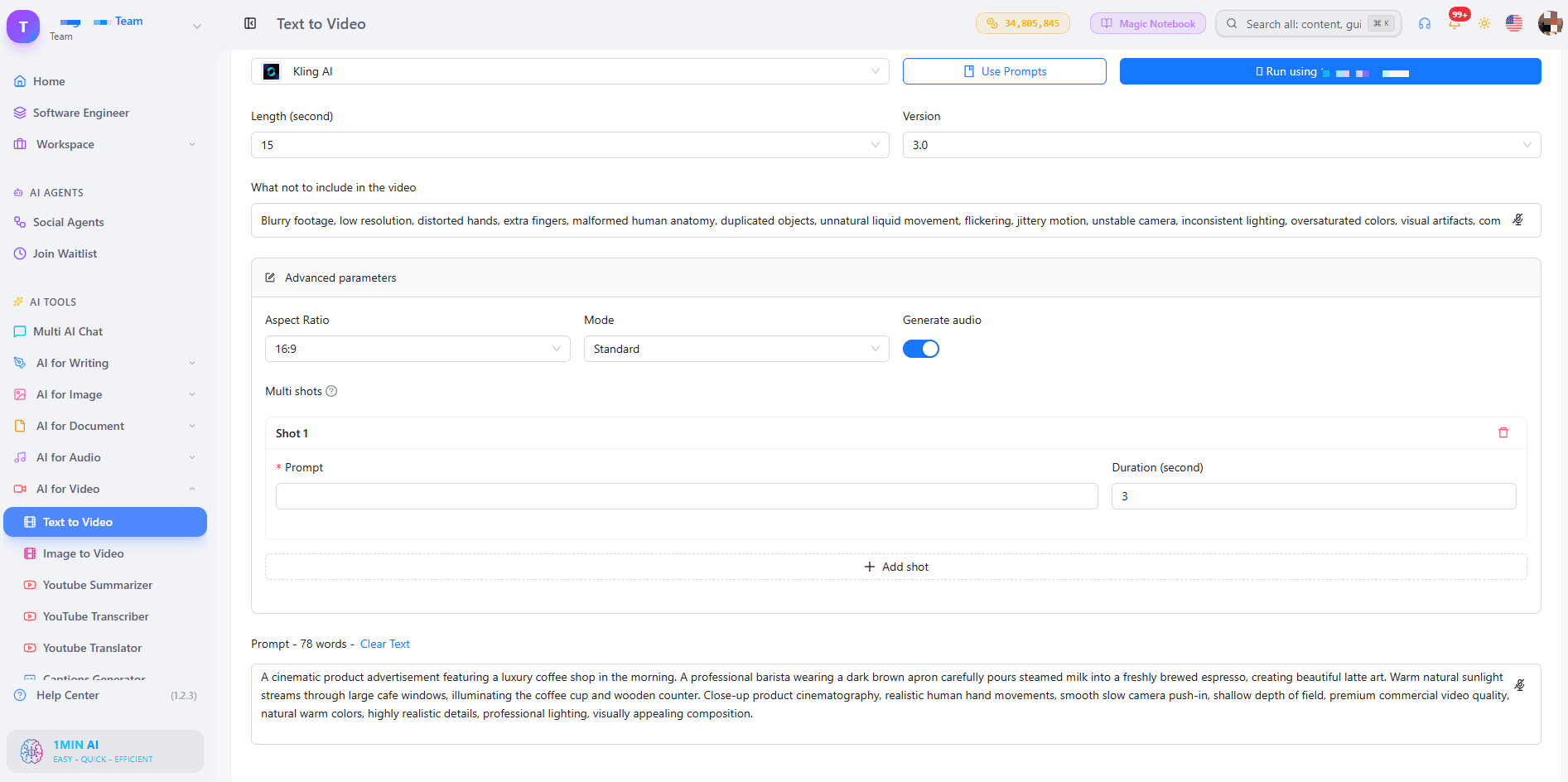
For Kling 1.6 to 2.5, choose a 5 or 10 second length and a camera control such as zoom, pan, tilt, or roll. Standard mode suits quick drafts, while professional mode suits your final version. The default CFG Scale of 0.5 is a good starting point, and raising it makes the clip follow your prompt more strictly. Use the “what not to include” field to remove unwanted elements. Kling 3.0 adds audio and lets you build a multi-shot video of up to 6 shots, each with its own prompt, within 15 seconds total.
Veo Settings
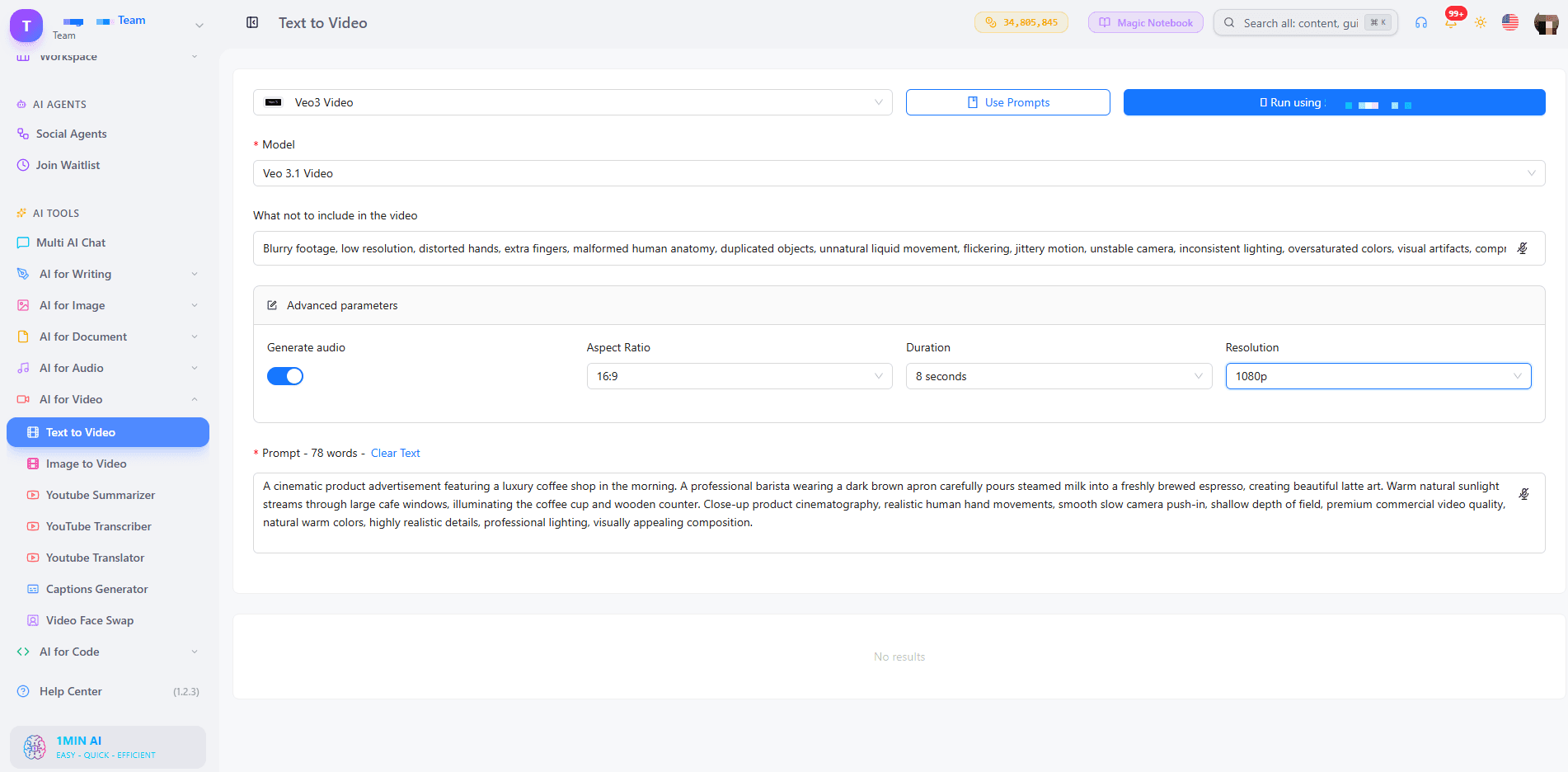
Choose Veo 3.1 when you want the strongest quality, or a Fast version when you are testing ideas. Turn on Generate Audio if you want sound with your picture. Duration is fixed at 8 seconds, with 9:16, 16:9, or auto aspect ratio and 720p or 1080p resolution. Our guide to free AI video generation with Veo 3.1 goes deeper on prompts for this model.
Seedance and Wan Settings
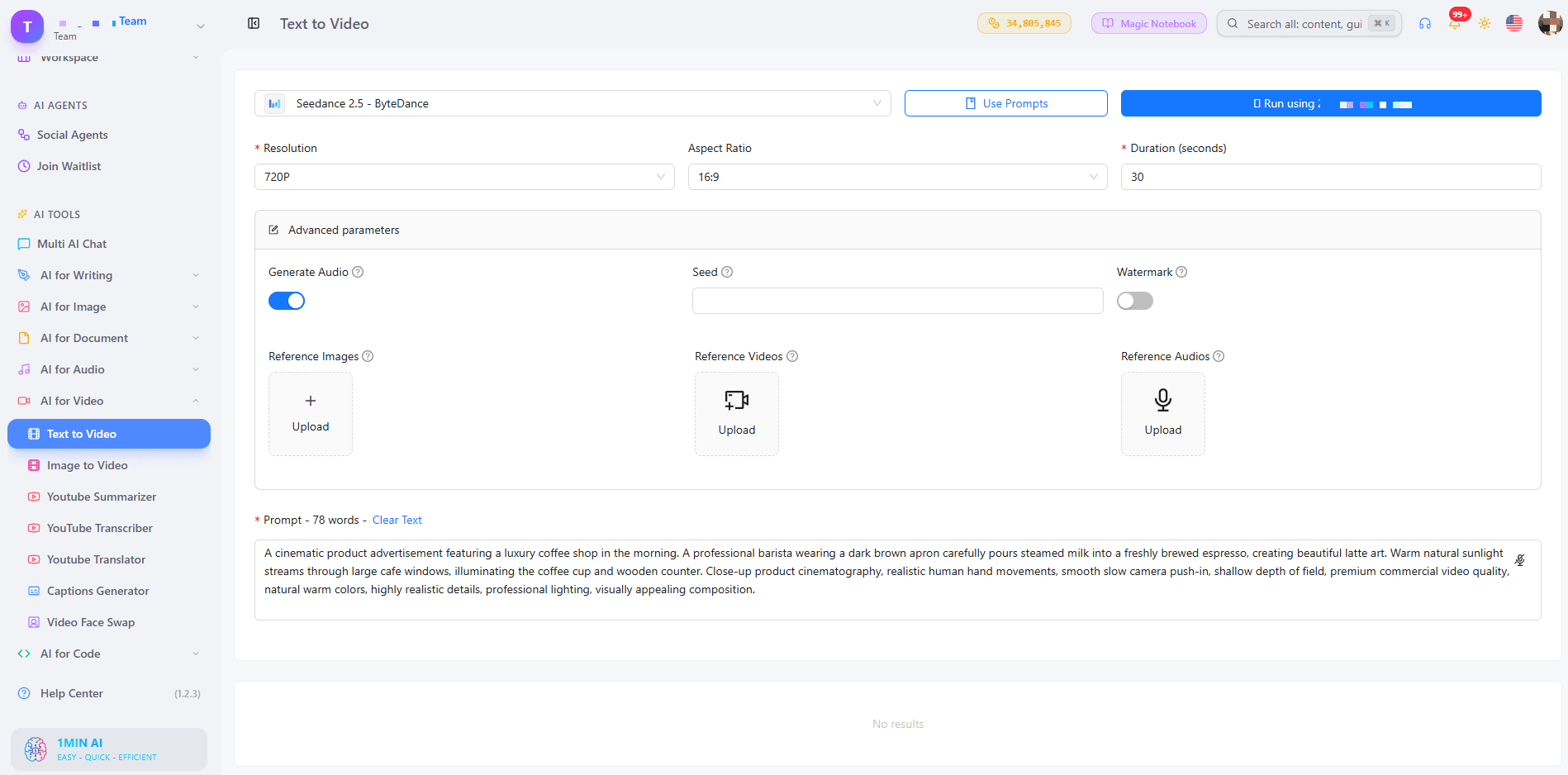
Seedance 2.5 accepts up to 30 reference images, 10 reference videos, and 10 reference audio clips, which helps keep characters and styles consistent. Wan 2.7 lets you upload your own audio (WAV or MP3), choose between 16:9, 9:16, 1:1, 4:3, and 3:4, and switch Enhance Prompt on for short prompts.
Step 3: Generate, Preview, and Download
Click generate, preview the clip, and download it with no watermark. If the result is close but not perfect, change one detail in the prompt and run it again. Small edits often improve a clip more than a full rewrite.
For a visual walkthrough, watch this tutorial:
Which Style and Length Do You Need?
Two questions decide the best setup for your video: what look do you want, and how long should it be?
Choose by Style
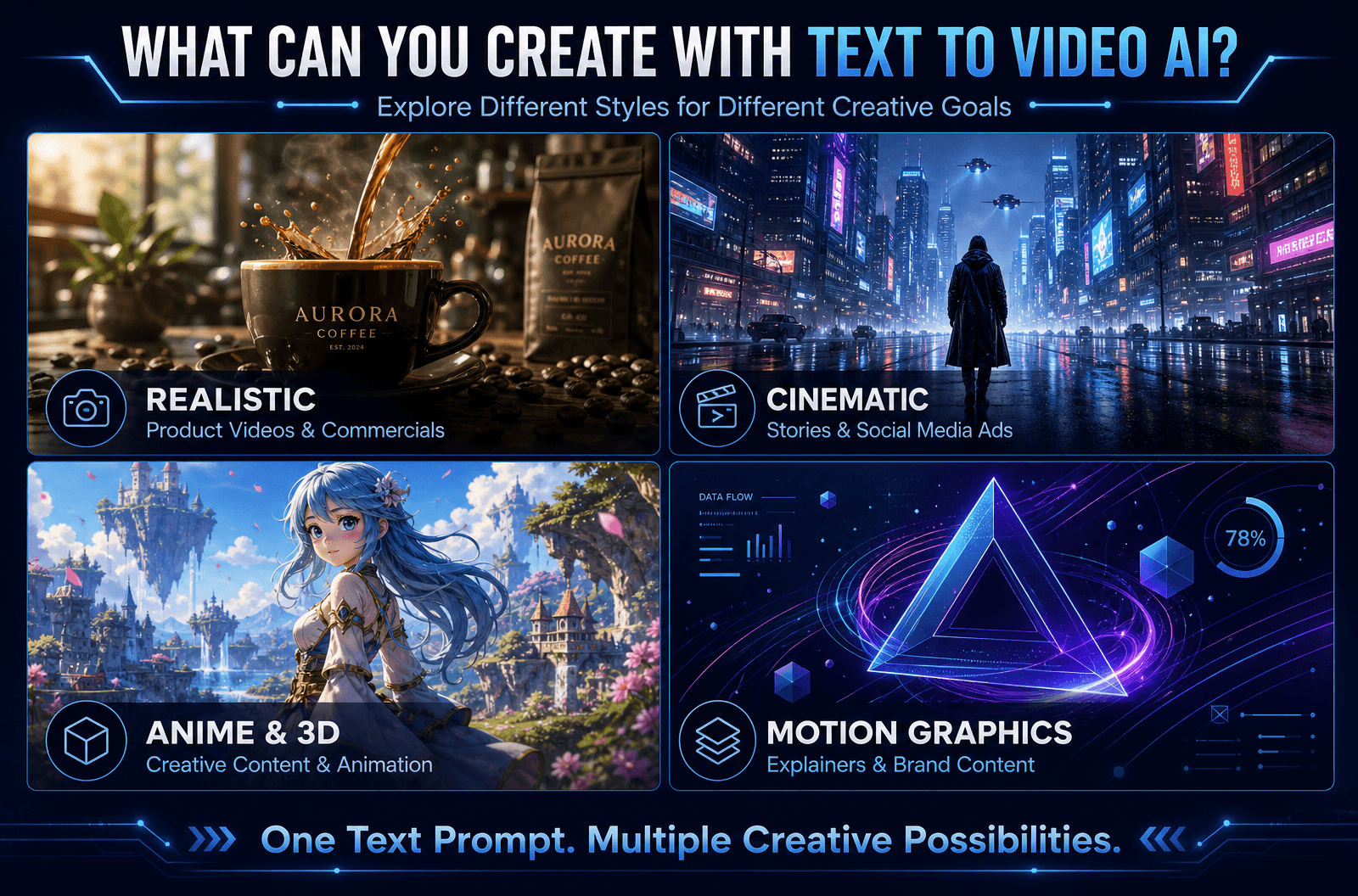
- Realistic: Veo 3.1 for natural lighting, motion, and sound
- Cinematic and story-driven: Kling 3.0 with multi-shot scenes
- Brand or character consistency: Seedance 2.5 with reference images
- Anime, 3D, or motion graphics: add the style in your prompt, then test Kling, Wan 2.7, or Pika
Choose by Length
- 2 to 8 seconds: hooks, product teasers, looping social clips (Wan 2.7, Veo, Pika)
- 10 to 15 seconds: short ads and story beats (Kling 3.0, Seedance 2.0)
- Up to 30 seconds: longer scenes (Seedance 2.5)
Want to compare model outputs side by side? This video shows several of them at work:
Prompt Tips for Cleaner, More Accurate Videos
- Be specific: “a red sports car on a coastal road at sunset” beats “a car”
- Keep it short: one or two clear sentences
- Name the camera move: “drone shot,” “slow pan,” “close-up”
- Use the negative field: exclude text overlays, blur, or extra people
- Test one change at a time: it shows you what each edit does
Who Uses Text to Video AI Without Watermarks?
- Marketers: turn a campaign idea into ad variations without a shoot
- Content creators: produce hooks and B-roll for TikTok, Reels, and Shorts
- Small business owners: show a product in motion, with no production budget
- Educators: animate concepts that are hard to film
- Real estate and e-commerce teams: start from a still photo with AI image to video when you already have pictures
If you are building TikTok hooks, this walkthrough helps:
Can You Use the Videos Commercially? What About Copyright?
Videos generated from your own prompts do not rely on stock footage, so there is nothing to license from a library. Commercial-use conditions can vary by model, so check the terms of the model you choose before publishing client or ad work. For a broader overview, read our AI text to video guide.
FAQ
How do I convert text to video for free using AI?
Open 1min.AI’s text to video tool, choose a model, type your prompt, set the length and ratio, and generate. Preview the clip, then download it with no watermark.
Is there a text to video AI free without watermark and login?
Yes. You can open 1min.AI and start generating without creating an account, and your downloads carry no watermark. Our page on text to video AI free with no sign up explains the details.
Which video tool is 100% free with no watermark?
Look for a tool that clearly states no watermark on exports, shows its limits upfront, and runs in the browser. 1min.AI offers free credits to try text to video and exports clean videos.
Can I generate unlimited videos?
You can test as many prompt variations as your credits allow, so start with short clips and refine one detail at a time.
Can an AI chatbot do text to video?
Chatbots focus on text and images. A dedicated text to video tool such as 1min.AI connects you to video models built for motion, audio, and camera control.
Do I need an app or APK?
No. 1min.AI works in your browser on any device.
Is there a script to video option?
Yes. Paste your script or scene description as the prompt. With Kling 3.0 you can split it into up to 6 shots.
Make Your First Watermark-Free Video
Pick a model, write one clear prompt, and see your idea move. Your first clip can be ready in minutes.
- #Transaction
Valmöguleikar
Uppgötvaðu bestu valmöguleikana við 1minAI og berðu saman eiginleika, verð og notkunartilvik.

1min.AI vs OpenRouter
1min.AI vs. OpenRouter: Berðu saman tilbúna gervigreindarhönnunarvöruna og tæknilega API-verkfærið. Finndu út hvort þú þurfir skapandi vinnustofu án kóðunar eða miðstöð fyrir kóðunarinnviði.
 Ngoc Hong

1min AI vs Buffer
Compare 1min.AI vs Buffer for Facebook content creation, AI writing, image generation, scheduling, pricing, and everyday marketing workflows.
Ngoc Hong
1min.AI vs. Hootsuite: Which Social Media Tool Fits Your Workflow?
Compare 1min.AI vs. Hootsuite to explore their AI content creation, social media publishing, analytics, pricing, and collaboration features. Find the right tool for your workflow.
Gervafræðitól
Uppgötvaðu bestu gervigreindartólin til að auka framleiðni, sköpunargáfu og daglegt starf.

4 hagkvæmustu gervigreindarverkfærin fyrir stofnendur sprotafyrirtækja
Skoðaðu 4 hagkvæmustu gervigreindarverkfærin fyrir stofnendur sprotafyrirtækja til að sannprófa hugmyndir, byggja vörur, skapa efni og hefja vöxt hraðar án þess að eyða of miklu.
 Tram Ta

POV: Þú þarft að búa til 10+ færslur á hverjum degi
Lærðu hvernig á að byggja AI-efnisvinnuflæði sem hjálpar efnissköpurum að framleiða 10+ færslur á samfélagsmiðlum á dag hraðar með AI hugmyndavinnu, myndagerð og efnissköpun.
 Lien Anh Vu

Gerðu „Gera það betra“ að betra efni með gervigreind
Notaðu gervigreind til að breyta óljósri endurgjöf viðskiptavina í skýrar breytingar, fækka óþarfa breytingum og skila betra efni hraðar.
Lien Anh VuGervigreindareiginleikar
Alhliða gervigreindareiginleikar sem einfalda vinnuflæði, auka skilvirkni og gera teymum kleift að ná meira.

1minAI: Ókeypis gervigreindar málfræðiprófari
Athugaðu málfræði ókeypis með gervigreindar málfræðiprófara 1minAI. Finndu málfræði-, stafsetningar- og skrifvillur, bættu skýrleika og pússaðu efnið þitt á nokkrum sekúndum.
Tram Ta
Byggðu ferilskráarvef hraðar með 1min.AI
Lærðu hvernig sjálfstætt starfandi skapendur geta notað 1min.AI til að skipuleggja, skrifa, hanna og búa til faglegan ferilskráarvef hraðar, jafnvel án sterkra forritunarfærni.
Lien Anh Vu
Ókeypis AI X athugasemd
Búðu til fyndnar, fyndnar eða innsæar athugasemdir fyrir Twitter með AI-knúna Twitter athugasemdaforritinu okkar. Auktu þátttöku þína og skera þig úr hópnum!
 Trang Tran
Notkunartilvik gervigreindar
Vandað safn notkunartilvika gervigreindar fyrir fyrirtæki, aukna skilvirkni og greinasértækar lausnir.

Besti tíminn til að birta á Instagram: Hagnýt leiðarvísir fyrir betri þátttöku
Finndu út hvenær best er að birta á Instagram, þar á meðal bestu daga og tíma fyrir ólíka markhópa, ásamt ráðum til að finna kjöráætlun fyrir reikninginn þinn.
Tram TaByggðu ferilskráarvef hraðar með 1min.AI
Lærðu hvernig sjálfstætt starfandi skapendur geta notað 1min.AI til að skipuleggja, skrifa, hanna og búa til faglegan ferilskráarvef hraðar, jafnvel án sterkra forritunarfærni.
Lien Anh VuGerðu „Gera það betra“ að betra efni með gervigreind
Notaðu gervigreind til að breyta óljósri endurgjöf viðskiptavina í skýrar breytingar, fækka óþarfa breytingum og skila betra efni hraðar.
Lien Anh VuGervigreindarkennslur
Lærðu að nota gervigreind með hagnýtum, skref-fyrir-skref kennslum.

Black Friday gervigreindartilboð á verkfærum árið 2026
Kynntu þér hvað Black Friday gervigreindartilboð á verkfærum árið 2026 hefur upp á að bjóða. Finndu út hvernig þú getur tryggt þér ævintilboðið á 1min.AI í gegnum AppSumo, Dealify, Stack Social og staðfest á Trustpilot, Slashdot og Software Advice.
 Hang Nguyen

Upplifðu tískuvikuna fyrir $0 með 1minAI Face Swap
Upplifðu tískuvikuna fyrir $0 með 1minAI Face Swap. Hladdu upp myndinni þinni, veldu tískuvikumyndband og búðu til þitt eigið AI-tískuaugnablik.
Ngoc Hong
Viral Reels á nokkrum mínútum: Hvernig á að nota Text-to-Speech frá 1minAI fyrir hæðnislegar talsetningar
Lærðu hvernig stjórnendur hæðnissíðna nota Text-to-Speech eiginleikann frá 1minAI til að búa til tafarlausar fréttalesara- og dramatískar talsetningar fyrir TikTok, Shorts og Instagram Reels.
Leiðbeiningar um gervigreind
Lærðu gervigreind hraðar með hagnýtum leiðbeiningum, raunverulegum dæmum og framkvæmanlegum bestu venjum.

Kauptu gervigreindarverkfæri á öruggan hátt á netinu: leiðarvísir fyrir svartan föstudag 2026
Sjáðu hvernig þú finnur og tryggir þér bestu Black Friday tilboðin á gervigreind á netinu. Lærðu ráð frá sérfræðingum til að forðast svindl, vinna gegn áskriftarþreytu og sannreyna hugbúnað.
Hang Nguyen
Hvernig á að hefja gervigreindarfyrirtæki án þess að byggja frá grunni
Lærðu hvernig á að hefja gervigreindarfyrirtæki, sannreyna hugmyndina þína og koma hraðar á markað án þess að byggja dýran gervigreindarinnviði frá grunni.
Ngoc Hong
AI Fashion Video Generator With Seedance 2.5 and HeyGen
Learn how to create AI fashion videos with Seedance 2.5 and HeyGen. Turn outfit photos into cinematic videos featuring your own face with 1min.AI.
Lien Anh VuGervigreindarlausnir
Skoðaðu bestu gervigreindarlausnirnar fyrir sjálfvirkni, kóðun, rannsóknir, framleiðni, þjónustuver, markaðssetningu og viðskiptaferla.

Ókeypis gervigreindar húðflúrsgjafi: Sérsniðnar hönnunir
Gerðu hvaða hugmynd sem er að sérsniðnu húðflúrmynstri með ókeypis gervigreindar húðflúrsgjafa 1min.AI. Lýstu hugmyndinni, veldu stíl og halaðu niður á sekúndum.
Trang TranKauptu gervigreindarverkfæri á öruggan hátt á netinu: leiðarvísir fyrir svartan föstudag 2026
Sjáðu hvernig þú finnur og tryggir þér bestu Black Friday tilboðin á gervigreind á netinu. Lærðu ráð frá sérfræðingum til að forðast svindl, vinna gegn áskriftarþreytu og sannreyna hugbúnað.
Hang NguyenUpplifðu tískuvikuna fyrir $0 með 1minAI Face Swap
Upplifðu tískuvikuna fyrir $0 með 1minAI Face Swap. Hladdu upp myndinni þinni, veldu tískuvikumyndband og búðu til þitt eigið AI-tískuaugnablik.
Ngoc HongGervigreindarlíkön
Kannaðu leiðandi gervigreindarlíkön heims á einum stað.

Free AI Chat With Claude Fable 5.2 On 1min.AI
Free AI chat with Claude Fable 5.2 on 1min.AI. Compare Fable 5.2 vs Opus 5.5, see Fable 5.2 benchmarks, and start chatting in minutes.
Trang Tran
GPT-6.2 Sol: Specs, Pricing & Free Access
Explore GPT-6.2 Sol specs, pricing, and how it compares with GPT-6.1 Sol and Claude Opus 5.5, then try it free in 1min.AI Multi AI Chat.
Trang Tran
GPT 6.2 Astra: Pricing, Benchmarks & Free Access
GPT 6.2 Astra release date, pricing, Reddit feedback and Opus 5.5 comparison. See what it does best and chat with it on 1min.AI for free.
Trang TranGervigreindarsamanburður
Berðu saman gervigreindarverkfæri, líkön og vettvanga til að finna það sem hentar þínum þörfum best.

Gemini 4 Neon vs Hydrogen: Specs, Price & Picks
Gemini 4 Neon vs Hydrogen, Carbon and Argon: compare price, benchmarks and use cases to pick the right model, then test them side by side on 1min.AI.
Trang Tran
Kling AI vs Veo 3: Hvor kemur sigurvegarinn fram?
Kling AI vs Veo 3: berðu saman hreyfingu, innbyggt hljóð, verð og ókeypis áskriftir til að sjá hvor gervigreindarmyndbandsgeneratorinn hentar verkefninu þínu best - prófaðu báða á 1min.AI.
Trang Tran
DeepSeek V4 Pro vs Flash samanburður
Berðu saman mælikvarða DeepSeek V4 Pro og DeepSeek V4 Flash. Fínstilltu agentic forritin þín og bættu staðreyndaskoðun gervigreindar á 1min.ai í dag.
Ngoc HongGervigreindarsamþættingar
Samþættu gervigreind hnökralaust við verkfærin sem þú notar nú þegar til að sjálfvirknivæða vinnu og auka framleiðni.
POV: Þú þarft að búa til 10+ færslur á hverjum degi
Lærðu hvernig á að byggja AI-efnisvinnuflæði sem hjálpar efnissköpurum að framleiða 10+ færslur á samfélagsmiðlum á dag hraðar með AI hugmyndavinnu, myndagerð og efnissköpun.
Lien Anh Vu
Hættu að skipta á milli AI-forrita: Hvernig AI-samþætting umbreytir vinnustaðaímyndun
Kynntu þér hvernig AI-samþætting hjálpar mannauðsteymum að einfalda vinnustaðaímyndun með því að sameina AI-skrif, skjöl, myndir, myndbönd og margar AI-líkön í eitt vinnusvæði.
Tram Ta
Skýring á AI API safnara fyrir forritara
AI API safnari gefur forriturum eitt sameinað API til að kalla á fleiri en eina gervigreindarlíkön og dregur þannig úr samþættingartíma og birgjabindingu.
Trang TranGervigreind fyrir iðnaðinn
Finndu bestu gervigreindarverkfærin og vinnuflæðin fyrir heilbrigðisþjónustu, fjármál, menntun, lögfræði, framleiðslu, smásölu, fasteignir og fleira.

Voice Cloning AI Free: How to Clone Any Voice Online in Minutes
Try voice cloning AI free with 1min.AI. Upload a 5-second clip, pick an ElevenLabs model, choose from 32 languages, and turn text to speech in your own voice.
Trang Tran
Free AI Image Editor With Prompt No Restrictions
Looking for a free AI image editor with prompt no restrictions? Edit backgrounds, objects and text by typing, no watermark. Try 1min.AI’s flexible editor now.
Trang Tran
Claude Personal Finance Setup and Safety Guide
Claude personal finance explained: how Personal Finance in Claude works and what Claude finance can see. Plus a safe CSV method for non-US users.
Trang TranGervigreindarumboðsmenn
Uppgötvaðu og keyrðu gervigreindarumboðsmenn til að sjálfvirka verkefni í vinnunni og daglegu lífi.
1minAI: Ókeypis gervigreindar málfræðiprófari
Athugaðu málfræði ókeypis með gervigreindar málfræðiprófara 1minAI. Finndu málfræði-, stafsetningar- og skrifvillur, bættu skýrleika og pússaðu efnið þitt á nokkrum sekúndum.
Tram Ta
AI-umboðir fyrir Facebook
Notaðu AI-umboð fyrir Facebook til að búa til efni, skapa myndir, tímasetja færslur og birta úr skjölum og samtölum þínum.
Ngoc Hong
AI-umboðsaðili vs. AI-aðstoðarmaður: Hvor sparar hönnuðum í raun meiri tíma?
Lærðu muninn á AI-umboðsmanni og AI-aðstoðarmanni og uppgötvaðu hvaða lausn hjálpar hönnuðum að sjálfvirknivæða endurtekið vinnu, minnka endurskoðanir og spara meiri tíma.
Lien Anh VuGervigreindarverkflæði
Kannaðu tilbúin gervigreindarverkflæði fyrir framleiðni, markaðssetningu, sölu, þjónustu og fleira.
POV: Þú þarft að búa til 10+ færslur á hverjum degi
Lærðu hvernig á að byggja AI-efnisvinnuflæði sem hjálpar efnissköpurum að framleiða 10+ færslur á samfélagsmiðlum á dag hraðar með AI hugmyndavinnu, myndagerð og efnissköpun.
Lien Anh VuAI Fashion Video Generator With Seedance 2.5 and HeyGen
Learn how to create AI fashion videos with Seedance 2.5 and HeyGen. Turn outfit photos into cinematic videos featuring your own face with 1min.AI.
Lien Anh Vu
Is Seedance 2.5 the Best AI Video Generator of 2026?
Is Seedance 2.5 the best AI video generator in 2026? Explore its features, compare it with Kling and Veo, and learn how to create AI videos on 1min.AI.
Lien Anh VuFréttabréf
Vikulegar nýjungar í gervigreind með 1minAI

🔮 Weekly AI Innovations #145: X Content Agent & GPT 6.1 Terra on 1min.ai
Scale viral reach with the X Content Agent on 1min.ai. Discover an end-to-end 4-stage pipeline with zero token burn, plus the launch of GPT 6.1 Terra.
Hang Nguyen
🔮 Weekly AI Innovations #144: LinkedIn Content Agent: Complete B2B Publishing Pipeline
Scale B2B influence with the LinkedIn Content Agent on 1min.ai. Discover an end-to-end 4-stage pipeline with zero redundant token burn and 1-click publishing.
Hang Nguyen
🔮 Weekly AI Innovations #146: Mistral 3.5, Qwen Image & Cohere A+ are ready on 1min.ai
Deploy Mistral Large 3, Qwen Image 3.0, and Cohere Command A+ on 1min.ai. Boost RAG accuracy and cut visual generation latency in one unified AI workspace.
Hang Nguyen