
Free AI Image Editor With Prompt No Restrictions

Trang Tran
20 નવેમ્બર, 2026

Looking for a free AI image editor with prompt no restrictions? Edit backgrounds, objects and text by typing, no watermark. Try 1min.AI’s flexible editor now.
You have a photo and a clear idea of how it should look. What you do not have is time for layers, masks and menus that only accept five preset commands. A free AI image editor with prompt no restrictions solves that. You type the change in plain English and the edit appears in seconds: a new background, a different jacket color, a stray object gone, sale text rewritten.
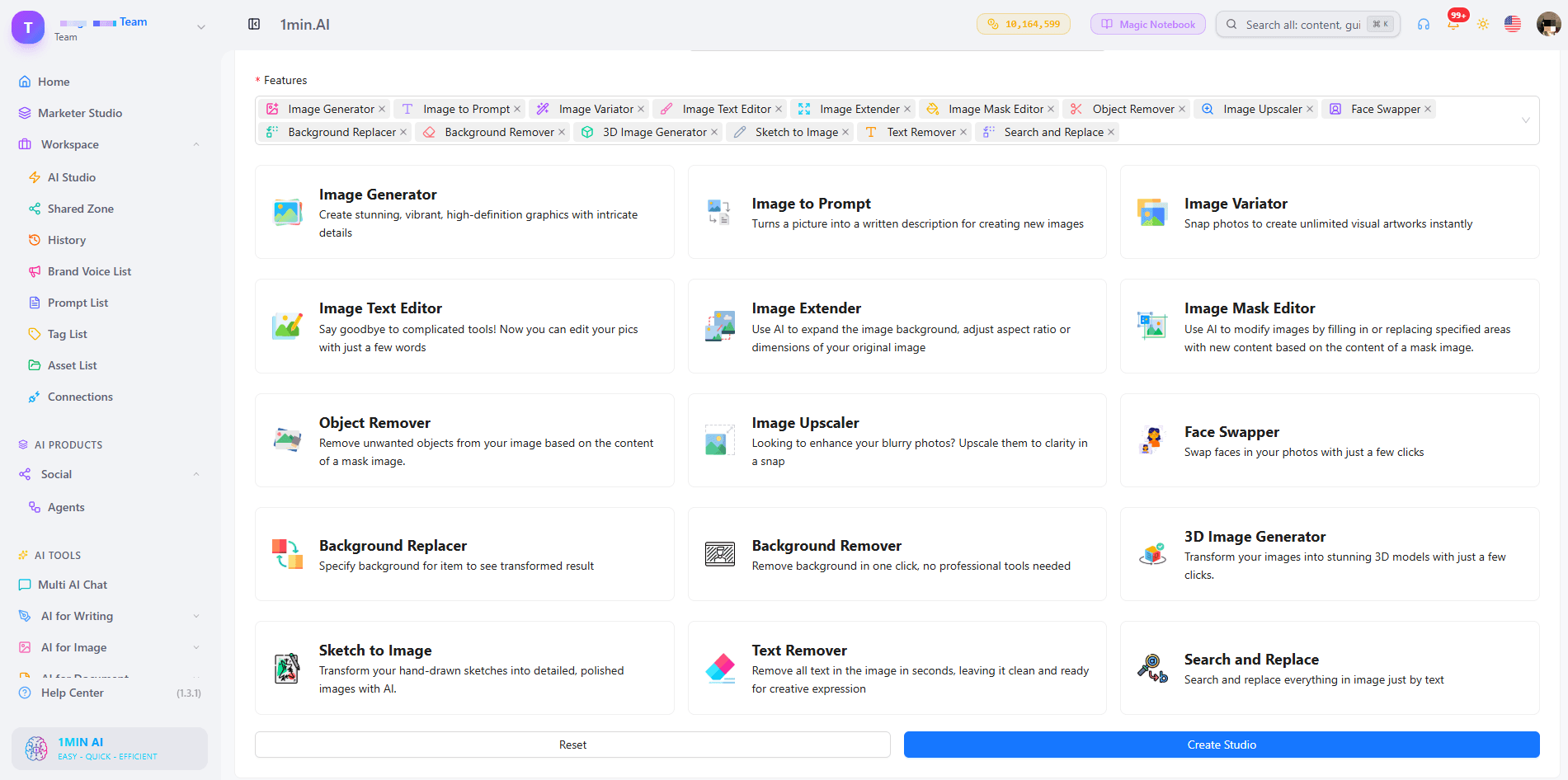
1min.AI puts these prompt-based tools in one workspace. Open an image, describe the edit and download the result with no watermark.
Quick answer: An AI image editor with prompt no restrictions lets you describe any edit in your own words instead of choosing from a locked list of actions. With 1min.AI you can replace backgrounds, swap objects, edit text inside images, repaint masked areas, expand and upscale, all from one place. Legal rules and each AI model’s safety policies still apply.
What Does “No Restrictions” Mean in an AI Image Editor?
Most people searching for an unrestricted AI image editor are not trying to break rules. They are tired of tools that get in the way. In practice, “no restrictions” usually means four things:
| What you run into | What “no restrictions” should mean |
|---|---|
| A short list of approved commands | Full-sentence prompts: object, position, result |
| One action available, the rest locked | Many edit types on the same image |
| Watermarked downloads | Clean results you can use right away |
| Registration before you can test anything | Open the tool and start editing |
A modern AI image editor reads your picture and your sentence together, works out which pixels need to change and leaves the rest alone. That is why one plain-language prompt can replace hours of manual selection.
Where the Limits Still Are
“No restrictions” describes freedom of workflow, not freedom from the law. Illegal content, content involving minors, and non-consensual or deceptive images of real people are off limits with any responsible provider. 1min.AI follows the usage policies of the AI models it offers. Inside those boundaries, you decide what to change and how to say it.
What Can You Edit With a Prompt in 1min.AI?
| Edit goal | Example prompt | 1min.AI tool |
|---|---|---|
| Swap an object or outfit | “Replace the blue jacket with a red leather jacket” | Search and Replace |
| Build a new scene | “Place the sneaker on a wet city street at dusk” | Background Replacer |
| Fix one precise area | Paint the area, then “Add a small window with a plant” | Image Mask Editor |
| Change wording in a design | “Change 20% OFF to 30% OFF” | Image Text Editor |
| Clean up clutter | “Remove the person behind the table” | Object Remover |
| Resize or sharpen | Widen the canvas, then upscale | Image Extender, Image Upscaler |
Replace Objects and Outfits With Search and Replace
Name what you want to find and what should replace it. The tool handles the selection, so you can run object search and replace edits, such as changing a sofa’s fabric or a product’s packaging color, without drawing an outline. Add “keep everything else unchanged” to protect the rest of the scene. For a deeper walkthrough, see this guide to object search and replace.
Swap Backgrounds Without Cutting Anything Out
Background Replacer removes the old scene and builds a new one from your description. Mention the place, time of day and mood, for example “sunlit studio with a soft white backdrop”. Here is a quick walkthrough:
Repaint Only the Area You Choose
The Image Mask Editor is for edits that need precision. Paint over a region, then describe what belongs there. This kind of mask-based editing keeps faces, logos and everything outside the mask untouched.
Edit Text Inside an Image
Image Text Editor lets you rewrite text that already sits inside a banner, label or screenshot. Type the new wording and the tool works to match the surrounding style. It is a fast way to update prices, dates and captions without rebuilding the design.
Start From Scratch, Then Edit
No source photo yet? Generate a base image first, then refine it with the editing tools. Creating and editing in one workspace means you never export, re-upload and start over.
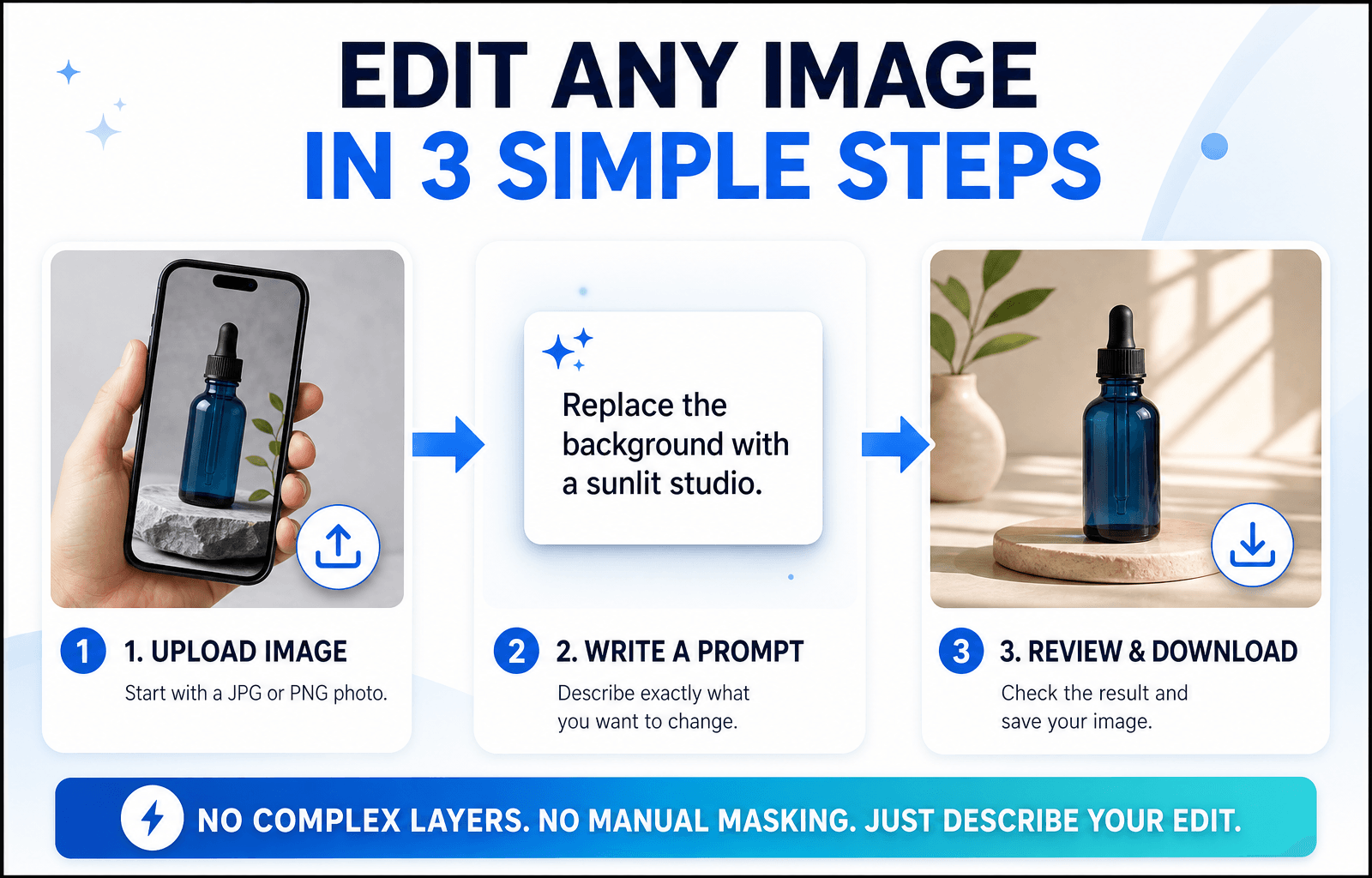
How to Edit an Image With a Prompt in 3 Steps
Step 1: Open the Editor and Upload Your Image
Choose the tool that matches your goal and upload a JPG or PNG. A sharp, well-lit photo with a clear subject gives the AI more to work with, so your edit looks more accurate.
Step 2: Write a Specific Prompt
Specific beats clever. Say what should change and what should stay the same.
The Prompt Formula
Object + Action + Style or Lighting + What stays unchanged
Three Prompts You Can Copy
- “Change the red jacket on the left to dark green denim. Keep the face and background unchanged.”
- “Replace the background with a sunlit studio and a soft white backdrop. Keep natural shadows under the product.”
- “Remove the cables on the desk and fill the area with the same wood texture.”
Edits usually miss because the prompt is too broad. This short video covers the most common mistakes:
Step 3: Review, Refine and Download
Zoom in and check edges, hands, text and shadows. If one detail is off, run a second prompt on that detail instead of stacking several requests in one line. Then download your image, which has no watermark. Save prompts that worked to your Prompt List so you can reuse them.
Editing People, Products or Landscapes: Which Setup Fits?
Photos of People
Describe clothing, hair color or background changes and add “keep the face unchanged”. For small fixes, use the mask tool so only the chosen area changes.
Product Photos
Swap backgrounds, remove reflections and recolor packaging while keeping labels sharp. Consistent backgrounds help a whole catalog look uniform.
Landscapes and Travel Shots
Remove crowds, adjust the sky or extend the frame to a wider format. Mention light and weather (“golden hour, clear sky”) so the edit blends naturally.
Browser Editor or Local Open-Source Model?
Open-source models run on your own computer. They offer deep control, but you manage installation, hardware and updates. A browser-based editor like 1min.AI needs none of that: open a tab, choose a tool and edit. If you want to start quickly or work across devices, the browser route is simpler. If you enjoy tuning models yourself, a local setup may suit you better.
What to Look for in the Best Free AI Image Editor With No Restrictions Online
Use this checklist for any tool you test:
- Full-sentence prompts rather than a fixed command menu
- Several edit types on the same image
- Precise control, such as masks for local changes
- Clean exports without a watermark
- Reusable prompts and assets so repeat work gets faster
- Clear policies about what the models can and cannot do
1min.AI covers each point in one workspace, with tools for text editing, object swapping, backgrounds, masks, extending and upscaling. AI Studio, Prompt List and Asset List are ready to use, and you can add a Shared Zone and History when you create an account.
You can also check how others rate the platform. 1min.AI holds SourceForge and Slashdot Top Business Software badges, is rated Excellent on Trustpilot and is listed on Capterra, Software Advice and GetApp.


FAQ
What is an AI image editor with prompt no restrictions?
It is an editor where you describe any change in your own words instead of picking from a locked list of actions. It still follows legal and model safety rules.
Is there a free AI image editor with prompt no restrictions?
Yes. You can try 1min.AI’s image editing tools free and download results without a watermark.
Does “no restrictions” mean anything goes?
No. Illegal content, content involving minors and deceptive or non-consensual images of real people are not allowed. Everything else is up to your creativity.
Which 1min.AI tool should I use to change text in an image?
Use Image Text Editor. Type the new wording and it updates the text inside the picture.
Do I need design skills?
No. If you can describe the change the way you would to a designer, you can edit with a prompt.
How do I write better edit prompts?
Name the object, state the action and add what should stay unchanged. Make one change per pass for the cleanest result.
Ready to Edit Your First Image?
Your next edit is one sentence away. Upload an image, type what you want to change and see the result in seconds.
- #Transaction
વિકલ્પો
1minAI ના શ્રેષ્ઠ વિકલ્પો શોધો અને સુવિધાઓ, કિંમત નિર્ધારણ અને ઉપયોગના કિસ્સાઓની તુલના કરો.

1min.AI vs OpenRouter
1min.AI vs. OpenRouter: તૈયાર-થી-વાપરી શકાય તેવા AI સર્જન પ્રોડક્ટની તુલના ટેક્નિકલ API ટૂલ સાથે કરો. જાણો કે તમને ઝીરો-કોડ ક્રિએટિવ સ્ટુડિયો જોઈએ છે કે કોડિંગ ઇન્ફ્રાસ્ટ્રક્ચર હબ.
 Ngoc Hong

1મિનિ. AI vs Dola AI
Dola AIનો વિકલ્પ શોધી રહ્યા છો? યોગ્ય AI એપ પસંદ કરવા માટે વિડિયો જનરેશન, ફ્રી પ્લાન, કિંમતો અને ગોપનીયતાના આધાર પર 1min.AI vs Dola AIની તુલના કરો.
Ngoc Hong
1minAI સામે Hix AI
AI ચેટ, રિસર્ચ, લખાણ, ઇમેજ, વિડિયો, કિંમત અને લવચીક AI વર્કફ્લોઝ માટે 5 HIX AI વિકલ્પોની તુલના કરો.
Ngoc HongAI સાધનો
ઉત્પાદકતા, સર્જનાત્મકતા અને રોજિંદા કાર્યને વેગ આપવા માટે શ્રેષ્ઠ AI સાધનો શોધો.

માત્ર થોડાં પગલાંમાં સાતત્યપૂર્ણ કાર્ટૂન કન્ટેન્ટ બનાવો
1min.AI સાથે 3 સરળ પગલાંમાં TikTok અને Reels માટે કાર્ટૂન વિડિયો બનાવો, આઈડિયાની રિસર્ચથી લઈને પાત્રો અને એનિમેટેડ વિડિયો સુધી.
 Lien Anh Vu

એક પ્રોડક્ટ, 10 UGC ક્રિએટિવ્સ: AI કન્ટેન્ટ ટેસ્ટિંગને કેવી રીતે વધુ સરળ બનાવે છે
AI UGC વિડિયો જનરેટર સાથે વધુ અસલી UGC બનાવો, વધુ ક્રિએટિવ એંગલ્સ ટેસ્ટ કરો અને દરેક વર્ઝન શૂટ કર્યા વગર affiliate કન્ટેન્ટ સ્કેલ કરો.
Lien Anh Vu
સ્ટાર્ટઅપ સ્થાપકો માટેના ટોચના 4 સસ્તા AI ટૂલ્સ
સ્ટાર્ટઅપ સ્થાપકો માટે વિચારોની ચકાસણી, પ્રોડક્ટ બનાવવું, કન્ટેન્ટ બનાવવું અને વધુ ખર્ચ કર્યા વિના ઝડપથી લોન્ચ કરવા માટેના ટોચના 4 સસ્તા AI ટૂલ્સ શોધો.
 Tram Ta
એઆઈ સુવિધાઓ
વ્યાપક એઆઈ સુવિધાઓ જે કાર્યપ્રવાહને સરળ બનાવે છે, કાર્યક્ષમતા વધારે છે અને ટીમોને વધુ હાંસલ કરવા સક્ષમ બનાવે છે.
માત્ર થોડાં પગલાંમાં સાતત્યપૂર્ણ કાર્ટૂન કન્ટેન્ટ બનાવો
1min.AI સાથે 3 સરળ પગલાંમાં TikTok અને Reels માટે કાર્ટૂન વિડિયો બનાવો, આઈડિયાની રિસર્ચથી લઈને પાત્રો અને એનિમેટેડ વિડિયો સુધી.
Lien Anh Vuએક પ્રોડક્ટ, 10 UGC ક્રિએટિવ્સ: AI કન્ટેન્ટ ટેસ્ટિંગને કેવી રીતે વધુ સરળ બનાવે છે
AI UGC વિડિયો જનરેટર સાથે વધુ અસલી UGC બનાવો, વધુ ક્રિએટિવ એંગલ્સ ટેસ્ટ કરો અને દરેક વર્ઝન શૂટ કર્યા વગર affiliate કન્ટેન્ટ સ્કેલ કરો.
Lien Anh Vu
1minAI: મફત AI વ્યાકરણ ચેકર
1minAIના AI વ્યાકરણ ચેકરથી મફતમાં વ્યાકરણ ચકાસો. વ્યાકરણ, જોડણી અને લખાણની ભૂલો શોધો, સ્પષ્ટતા વધારો, અને તમારી સામગ્રીને સેકન્ડોમાં સુધારો.
Tram Taએઆઈ ઉપયોગ કિસ્સાઓ
વ્યવસાય, ઉત્પાદકતા અને ઉદ્યોગ-વિશિષ્ટ અરજીઓ માટેની પસંદ કરેલી એઆઈ ઉપયોગ કિસ્સાઓનો સંગ્રહ.
માત્ર થોડાં પગલાંમાં સાતત્યપૂર્ણ કાર્ટૂન કન્ટેન્ટ બનાવો
1min.AI સાથે 3 સરળ પગલાંમાં TikTok અને Reels માટે કાર્ટૂન વિડિયો બનાવો, આઈડિયાની રિસર્ચથી લઈને પાત્રો અને એનિમેટેડ વિડિયો સુધી.
Lien Anh Vuએક પ્રોડક્ટ, 10 UGC ક્રિએટિવ્સ: AI કન્ટેન્ટ ટેસ્ટિંગને કેવી રીતે વધુ સરળ બનાવે છે
AI UGC વિડિયો જનરેટર સાથે વધુ અસલી UGC બનાવો, વધુ ક્રિએટિવ એંગલ્સ ટેસ્ટ કરો અને દરેક વર્ઝન શૂટ કર્યા વગર affiliate કન્ટેન્ટ સ્કેલ કરો.
Lien Anh Vu
Instagram પર પોસ્ટ કરવાનો શ્રેષ્ઠ સમય: વધુ એંગેજમેન્ટ માટે એક પ્રાયોગિક માર્ગદર્શિકા
Instagram પર પોસ્ટ કરવાનો શ્રેષ્ઠ સમય જાણો, જેમાં વિવિધ ઓડિયન્સ માટેના શ્રેષ્ઠ દિવસો અને સમય, તેમજ તમારા અકાઉન્ટ માટે આદર્શ પોસ્ટિંગ શેડ્યૂલ શોધવાની ટીપ્સ સામેલ છે.
Tram TaAI ટ્યુટોરિયલ્સ
વ્યવહારુ, સ્ટેપ-બાય-સ્ટેપ ટ્યુટોરિયલ્સ સાથે AI નો ઉપયોગ કેવી રીતે કરવો તે શીખો.
માત્ર થોડાં પગલાંમાં સાતત્યપૂર્ણ કાર્ટૂન કન્ટેન્ટ બનાવો
1min.AI સાથે 3 સરળ પગલાંમાં TikTok અને Reels માટે કાર્ટૂન વિડિયો બનાવો, આઈડિયાની રિસર્ચથી લઈને પાત્રો અને એનિમેટેડ વિડિયો સુધી.
Lien Anh Vu
2026 માટેના બ્લેક ફ્રાઇડે AI ટૂલ ડીલ્સ
2026ના બ્લેક ફ્રાઇડે AI ટૂલ ડીલ્સ શું શું આપે છે તે જાણો. AppSumo, Dealify, Stack Social મારફતે 1min.AI લાઈફટાઈમ ડીલ કેવી રીતે મેળવી શકાય અને Trustpilot, Slashdot, Software Advice પર કેવી રીતે ચકાસવું તે જાણો.
 Hang Nguyen

Seedance સાથે AI ઇમેજ-થી-વિડિયો પ્રોડક્ટ કન્સિસ્ટન્સીથી વૉર્પિંગ રોકો અને પ્રોડક્ટ રિવ્યૂઝ સ્કેલ કરો
AI ઇમેજ-થી-વિડિયો પ્રોડક્ટ કન્સિસ્ટન્સીથી લોગોઝનું વૉર્પિંગ રોકો અને આજે જ 1min.AI પર સ્ટુડિયો-ગ્રેડ રિવ્યૂ વીડિયો બનાવો.
Lien Anh VuAI માર્ગદર્શિકાઓ
વ્યવહારુ માર્ગદર્શિકાઓ, વાસ્તવિક-વિશ્વના ઉદાહરણો અને કાર્યક્ષમ શ્રેષ્ઠ પ્રથાઓ સાથે AI ઝડપથી શીખો.
માત્ર થોડાં પગલાંમાં સાતત્યપૂર્ણ કાર્ટૂન કન્ટેન્ટ બનાવો
1min.AI સાથે 3 સરળ પગલાંમાં TikTok અને Reels માટે કાર્ટૂન વિડિયો બનાવો, આઈડિયાની રિસર્ચથી લઈને પાત્રો અને એનિમેટેડ વિડિયો સુધી.
Lien Anh Vu
સુરક્ષિત રીતે AI ટૂલ્સ ઑનલાઇન ખરીદો: 2026 બ્લેક ફ્રાઇડે ગાઇડ
શ્રેષ્ઠ બ્લેક ફ્રાઇડે AI ડીલ્સ ઑનલાઇન કેવી રીતે શોધવી અને સુરક્ષિત કરવી તે જાણો. સ્કેમથી બચવા, સબ્સ્ક્રિપ્શન થાકનો સામનો કરવા અને સોફ્ટવેર વેરીફાય કરવા માટે નિષ્ણાત રણનીતિઓ શીખો.
Hang NguyenSeedance સાથે AI ઇમેજ-થી-વિડિયો પ્રોડક્ટ કન્સિસ્ટન્સીથી વૉર્પિંગ રોકો અને પ્રોડક્ટ રિવ્યૂઝ સ્કેલ કરો
AI ઇમેજ-થી-વિડિયો પ્રોડક્ટ કન્સિસ્ટન્સીથી લોગોઝનું વૉર્પિંગ રોકો અને આજે જ 1min.AI પર સ્ટુડિયો-ગ્રેડ રિવ્યૂ વીડિયો બનાવો.
Lien Anh VuAI સોલ્યુશન્સ
ઓટોમેશન, કોડિંગ, સંશોધન, ઉત્પાદકતા, ગ્રાહક સપોર્ટ, માર્કેટિંગ અને વ્યવસાય વર્કફ્લો માટે શ્રેષ્ઠ AI સોલ્યુશન્સ બ્રાઉઝ કરો.
માત્ર થોડાં પગલાંમાં સાતત્યપૂર્ણ કાર્ટૂન કન્ટેન્ટ બનાવો
1min.AI સાથે 3 સરળ પગલાંમાં TikTok અને Reels માટે કાર્ટૂન વિડિયો બનાવો, આઈડિયાની રિસર્ચથી લઈને પાત્રો અને એનિમેટેડ વિડિયો સુધી.
Lien Anh Vuએક પ્રોડક્ટ, 10 UGC ક્રિએટિવ્સ: AI કન્ટેન્ટ ટેસ્ટિંગને કેવી રીતે વધુ સરળ બનાવે છે
AI UGC વિડિયો જનરેટર સાથે વધુ અસલી UGC બનાવો, વધુ ક્રિએટિવ એંગલ્સ ટેસ્ટ કરો અને દરેક વર્ઝન શૂટ કર્યા વગર affiliate કન્ટેન્ટ સ્કેલ કરો.
Lien Anh Vu
મફત AI ટેટૂ જનરેટર: કસ્ટમ ડિઝાઇન્સ
1min.AIના મફત AI ટેટૂ જનરેટર સાથે કોઈપણ વિચારને કસ્ટમ ટેટૂ ડિઝાઇનમાં ફેરવો. તમારો વિચાર વર્ણવો, સ્ટાઇલ પસંદ કરો, અને સેકન્ડોમાં ડાઉનલોડ કરો.
 Trang Tran
AI મોડેલ્સ
વિશ્વના અગ્રણી AI મોડેલોને એક જ જગ્યાએ શોધો.
માત્ર થોડાં પગલાંમાં સાતત્યપૂર્ણ કાર્ટૂન કન્ટેન્ટ બનાવો
1min.AI સાથે 3 સરળ પગલાંમાં TikTok અને Reels માટે કાર્ટૂન વિડિયો બનાવો, આઈડિયાની રિસર્ચથી લઈને પાત્રો અને એનિમેટેડ વિડિયો સુધી.
Lien Anh Vuએક પ્રોડક્ટ, 10 UGC ક્રિએટિવ્સ: AI કન્ટેન્ટ ટેસ્ટિંગને કેવી રીતે વધુ સરળ બનાવે છે
AI UGC વિડિયો જનરેટર સાથે વધુ અસલી UGC બનાવો, વધુ ક્રિએટિવ એંગલ્સ ટેસ્ટ કરો અને દરેક વર્ઝન શૂટ કર્યા વગર affiliate કન્ટેન્ટ સ્કેલ કરો.
Lien Anh VuSeedance સાથે AI ઇમેજ-થી-વિડિયો પ્રોડક્ટ કન્સિસ્ટન્સીથી વૉર્પિંગ રોકો અને પ્રોડક્ટ રિવ્યૂઝ સ્કેલ કરો
AI ઇમેજ-થી-વિડિયો પ્રોડક્ટ કન્સિસ્ટન્સીથી લોગોઝનું વૉર્પિંગ રોકો અને આજે જ 1min.AI પર સ્ટુડિયો-ગ્રેડ રિવ્યૂ વીડિયો બનાવો.
Lien Anh VuAI સરખામણીઓ
તમારી જરૂરિયાતો માટે શ્રેષ્ઠ AI સાધનો, મોડેલો અને પ્લેટફોર્મ્સ શોધવા માટે સરખામણી કરો.

Kling AI Vs Veo 3: કયો મોડેલ જીતે છે?
Kling AI vs Veo 3: ગતિ, નેટિવ ઑડિયો, કિંમતો અને ફ્રી ટિયર સરખાવો અને જુઓ કે તમારા પ્રોજેક્ટ માટે કયો AI વિડિયો જનરેટર જીતે છે - બંનેને 1min.AI પર અજમાવો.
Trang TranSeedance સાથે AI ઇમેજ-થી-વિડિયો પ્રોડક્ટ કન્સિસ્ટન્સીથી વૉર્પિંગ રોકો અને પ્રોડક્ટ રિવ્યૂઝ સ્કેલ કરો
AI ઇમેજ-થી-વિડિયો પ્રોડક્ટ કન્સિસ્ટન્સીથી લોગોઝનું વૉર્પિંગ રોકો અને આજે જ 1min.AI પર સ્ટુડિયો-ગ્રેડ રિવ્યૂ વીડિયો બનાવો.
Lien Anh Vu
DeepSeek V4 Pro vs Flash સરખામણી
DeepSeek V4 Pro vs DeepSeek V4 Flash મેટ્રિક્સની સરખામણી કરો. આજે જ 1min.ai પર તમારા એજન્ટિક એપ્સને ઑપ્ટિમાઇઝ કરો અને AI ફેક્ટ-ચેકિંગ સુધારો.
Ngoc Hongએઆઇ એકીકરણો
તમારા પહેલેથી જ ઉપયોગમાં આવેલા સાધનો સાથે એઆઇને સુગમ રીતે એકીકૃત કરો જેથી કામ ઓટોમેટ થાય અને ઉત્પાદનક્ષમતા વધે.

ફેશન વીક 2026 માટે AI ફેશન વિડિયો જનરેટર કેવી રીતે ઉપયોગ કરવો
AI સાથે ફેશન વીક 2026 ના વિચારોને અદ્ભુત ફેશન વિડિયોમાં બદલો. એક સરળ વર્કફ્લો વડે બ્રેઈનસ્ટોર્મ, વિઝ્યુઅલ્સ બનાવવું, અને ઇમેજને વિડિયોમાં ફેરવવું શીખો.
Lien Anh Vu
POV: તમને દરરોજ 10+ પોસ્ટ્સ બનાવવી છે
AI બ્રેઇનસ્ટોર્મિંગ, ઈમેજ જનરેશન અને કન્ટેન્ટ ક્રિએશન સાથે કન્ટેન્ટ ક્રિએટર્સને દરરોજ 10+ સોશિયલ મીડિયા પોસ્ટ્સ વધુ ઝડપથી બનાવવામાં મદદરૂપ AI કન્ટેન્ટ વર્કફ્લો કેવી રીતે બનાવવો તે શીખો.
Lien Anh Vu
AI એપ્સ વચ્ચે સ્વિચ કરવું બંધ કરો: AI ઈન્ટિગ્રેશન એમ્પ્લોયર બ્રાન્ડિંગને કેવી રીતે બદલે છે
જાણો કે AI ઈન્ટિગ્રેશન HR ટીમોને AI લેખન, દસ્તાવેજો, છબીઓ, વિડિયો અને અનેક AI મોડેલો એક જ વર્કસ્પેસમાં જોડીને એમ્પ્લોયર બ્રાન્ડિંગ સરળ બનાવવામાં કેવી રીતે મદદ કરે છે.
Tram Taઉદ્યોગો માટે AI
હેલ્થકેર, ફાઇનાન્સ, શિક્ષણ, કાનૂની, ઉત્પાદન, રિટેલ, રિયલ એસ્ટેટ અને વધુ માટે શ્રેષ્ઠ AI સાધનો અને વર્કફ્લો શોધો.

મફત AI પ્રોડક્ટ વર્ણન જનરેટર
મિનિટોમાં વેચાણ કરાવે એવા પ્રોડક્ટ વર્ણનો લખો. આ મફત AI પ્રોડક્ટ વર્ણન જનરેટરનો ઉપયોગ કરીને વિગતો અથવા ફોટોને બ્રાન્ડ-મેળ ખાતી કૉપીમાં બદલો. 1min.AI અજમાવો.
Trang Tran
સ્ટાર્ટઅપ્સ માટે નફો વધારવા માટેના શ્રેષ્ઠ બિઝનેસ પ્રોડક્ટિવિટી ટૂલ્સ | 1minAI
સમય બચાવવા, વર્કફ્લો સરળ બનાવવા, પુનરાવર્તિત કાર્યો ઘટાડવા અને AI સાથે લાભદાયક વૃદ્ધિને ટેકો આપવા સ્ટાર્ટઅપ્સ માટેના શ્રેષ્ઠ બિઝનેસ પ્રોડક્ટિવિટી ટૂલ્સ શોધો.
Tram Ta
સામગ્રી માર્કેટિંગ માટે શ્રેષ્ઠ AI ટૂલ |1minAI
સામગ્રી માર્કેટિંગ માટે શ્રેષ્ઠ AI ટૂલ શોધી રહ્યા છો? જુઓ કે 1minAI કેવી રીતે માર્કેટર્સને એક જ AI વર્કસ્પેસમાંથી રિસર્ચ, લખાણ, રીપર્પોઝ, વિઝ્યુઅલ્સ બનાવવા અને સામગ્રીને સ્કેલ કરવામાં મદદ કરે છે.
Tram TaAI એજન્ટ્સ
તમારા કાર્ય અને દૈનિક જીવનમાં કાર્યોને સ્વચાલિત કરવા માટે AI એજન્ટ્સ શોધો અને ચલાવો.
1minAI: મફત AI વ્યાકરણ ચેકર
1minAIના AI વ્યાકરણ ચેકરથી મફતમાં વ્યાકરણ ચકાસો. વ્યાકરણ, જોડણી અને લખાણની ભૂલો શોધો, સ્પષ્ટતા વધારો, અને તમારી સામગ્રીને સેકન્ડોમાં સુધારો.
Tram Ta
Facebook માટે AI એજન્ટ્સ
Facebook માટે AI એજન્ટનો ઉપયોગ કરીને કન્ટેન્ટ બનાવો, છબીઓ જનરેટ કરો, પોસ્ટ્સ શેડ્યૂલ કરો અને તમારા દસ્તાવેજો તથા વાર્તાલાપમાંથી પ્રકાશિત કરો.
Ngoc Hong
AI એજન્ટ vs AI સહાયક: ડિઝાઇનર્સનો ખરેખર વધુ સમય કોણ બચાવે છે?
AI Agent vs AI Assistant વચ્ચેનો ફરક જાણો અને શોધો કે કયો ઉકેલ ડિઝાઇનર્સને પુનરાવર્તિત કામ ઓટોમેટ કરવા, સુધારાઓ ઘટાડવા અને વધુ સમય બચાવવા મદદ કરે છે.
Lien Anh VuAI કાર્યપ્રવાહો
ઉત્પાદકતા, માર્કેટિંગ, વેચાણ, સપોર્ટ અને વધુ માટે તૈયાર AI વર્કફ્લોનું અન્વેષણ કરો.
માત્ર થોડાં પગલાંમાં સાતત્યપૂર્ણ કાર્ટૂન કન્ટેન્ટ બનાવો
1min.AI સાથે 3 સરળ પગલાંમાં TikTok અને Reels માટે કાર્ટૂન વિડિયો બનાવો, આઈડિયાની રિસર્ચથી લઈને પાત્રો અને એનિમેટેડ વિડિયો સુધી.
Lien Anh Vuએક પ્રોડક્ટ, 10 UGC ક્રિએટિવ્સ: AI કન્ટેન્ટ ટેસ્ટિંગને કેવી રીતે વધુ સરળ બનાવે છે
AI UGC વિડિયો જનરેટર સાથે વધુ અસલી UGC બનાવો, વધુ ક્રિએટિવ એંગલ્સ ટેસ્ટ કરો અને દરેક વર્ઝન શૂટ કર્યા વગર affiliate કન્ટેન્ટ સ્કેલ કરો.
Lien Anh Vuફેશન વીક 2026 માટે AI ફેશન વિડિયો જનરેટર કેવી રીતે ઉપયોગ કરવો
AI સાથે ફેશન વીક 2026 ના વિચારોને અદ્ભુત ફેશન વિડિયોમાં બદલો. એક સરળ વર્કફ્લો વડે બ્રેઈનસ્ટોર્મ, વિઝ્યુઅલ્સ બનાવવું, અને ઇમેજને વિડિયોમાં ફેરવવું શીખો.
Lien Anh Vuન્યૂઝલેટર
1minAI સાથેની સાપ્તાહિક AI નવીનતાઓ

🔮 સાપ્તાહિક AI નવીનતાઓ #143: અપડેટ અપડેટ GPT-6, GPT-6.1 & Ideogram 4.0 & Ideogram 4.0
1min.ai પર GPT-6 Sol, Luna, GPT-6.1 Sol, અને Ideogram 4.0 સુધી પહોંચ મેળવો. એક જ પ્લેટફોર્મમાં ટાઇપોગ્રાફી ચોકસાઈ 98.4% સુધી વધારો અને રીઝનિંગ લેટન્સી 45% ઘટાડો.
Hang Nguyen
🔮 સાપ્તાહિક AI નવીનતાઓ #142: Grok 4.7, Opus 5.5 અને Sonnet 5.5 on 1min.ai
1min.ai પર Grok 4.7, Claude Opus 5.5, અને Sonnet 5.5 નો ઍક્સેસ મેળવો. સબ્સ્ક્રિપ્શન ખર્ચમાં 70% સુધી ઘટાડો કરો અને એક જ એકીકૃત વર્કસ્પેસમાં લાખો ટોકન્સ પ્રોસેસ કરો.
Hang Nguyen
🔮 સાપ્તાહિક AI નવाचार #141: Seedance 2.5 અને Stable Audio 3: નેક્સ્ટ-જન AI
1min.ai પર Seedance 2.0, 2.5 અને StabilityAIનું Stable Audio 3 શોધો. નેક્સ્ટ-જન જનરેટિવ AI વડે સ્ટુડિયો-ગ્રેડ ઓડિયો અને સુમેળિત ગતિ બનાવો.
Hang Nguyen