
Transcribe Audio to Text Free with AI

Trang Tran
11 de setembro de 2026
Transcribe audio to text free with 1min.AI. Carga o teu ficheiro, escolle un modelo de IA e converte audio a texto en liña en máis de 60 ভাষas en minutos.
Podes transcribir audio a texto de balde usando** 1min.AI's Speech to Text tool**. Sube o teu ficheiro de audio, escolle un modelo de transcrición de IA, selecciona unha lingua e obtén unha transcrición limpa e editable en minutos. Sen tomar notas a man, sen repetir o mesmo clip cinco veces para coller unha palabra.
Tanto se estás a converter unha entrevista nun artigo, unha clase en apuntamentos de estudo ou unha chamada de vendas nun rexistro buscable, converter audio a texto en liña afórrache horas de traballo manual. Esta guía amosa exactamente como facelo con 1min.AI, que modelo de IA escoller para o teu audio e por que un espazo de traballo todo nun evita un conversor de uso único.
How to Transcribe Audio to Text with 1min.AI
The process takes three steps and works entirely in your browser.
Step 1: Upload Your Audio File
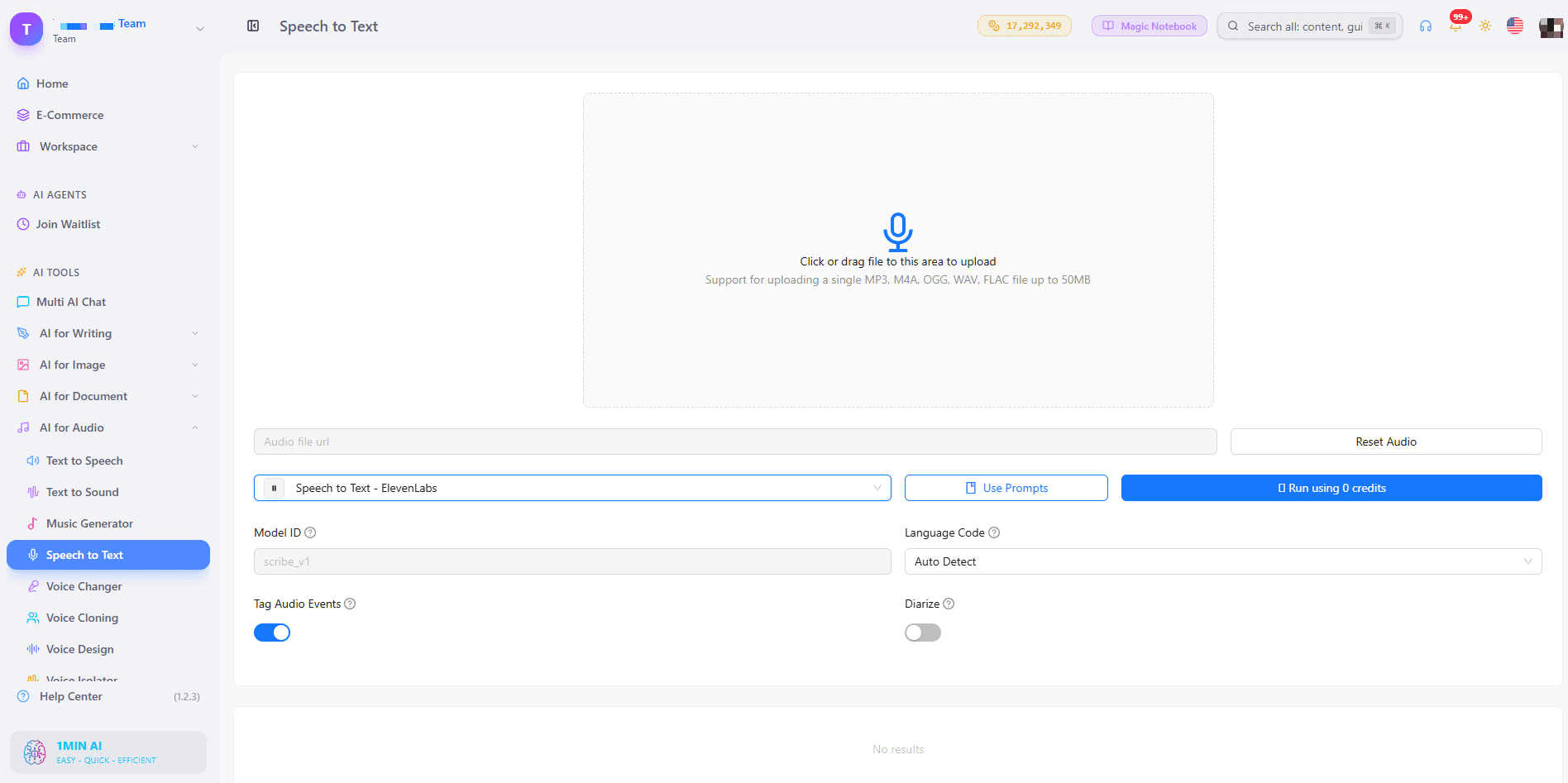
Click or drag your file into the upload area. 1min.AI's audio to text converter accepts MP3, M4A, OGG, WAV, and FLAC files up to 50MB, which covers most interviews, voice memos, podcast episodes, and short lecture recordings without needing to convert the file first.
Step 2: Choose an AI Transcription Model
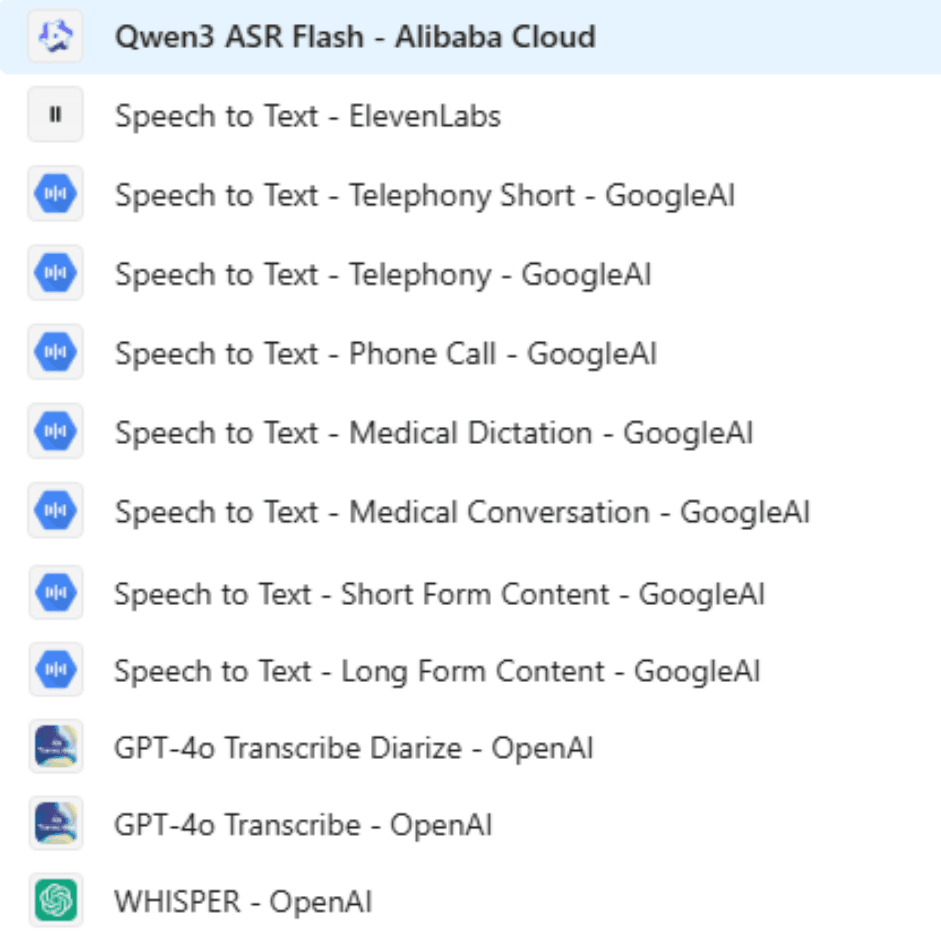
This is where 1min.AI differs from most free converters. Instead of locking you into one engine, you pick from 11 speech to text models across four providers, including Qwen3 ASR Flash, ElevenLabs, Google, and OpenAI. Each model is tuned for a different kind of audio, so the right choice depends on what you are transcribing (more on this below).
Step 3: Select Your Language and Export the Transcript
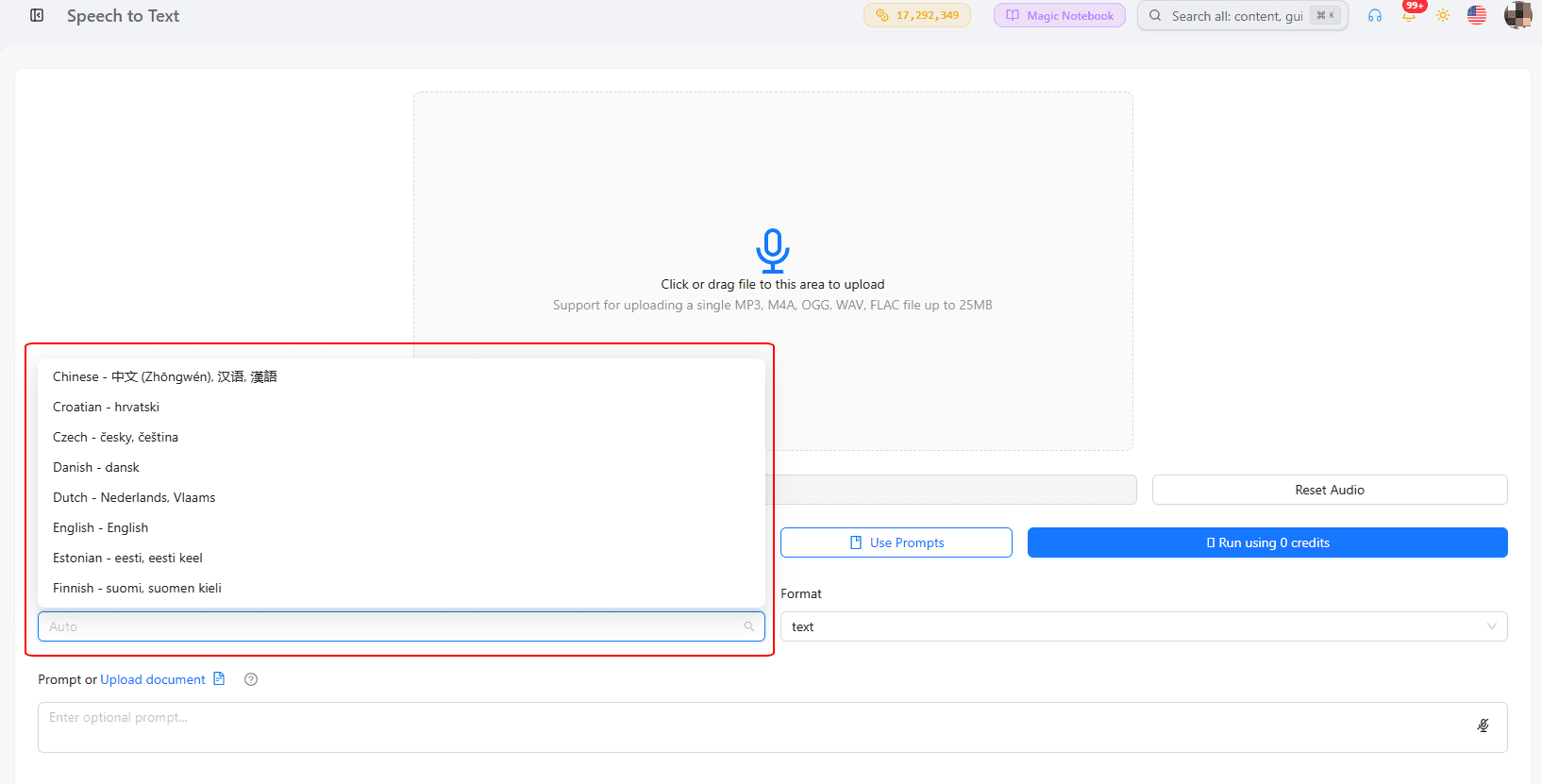
Choose from 60 plus languages and locales, including US, UK, Indian, and Australian English, Mandarin and Cantonese Chinese, Spanish, French, Arabic, Hindi, Japanese, Korean, Vietnamese, and dozens more regional variants. Run the transcription, review the text, and copy or export the result.
Which AI Model Should You Pick to Convert Audio to Text?
Not every audio file needs the same model. Here is how to match your recording to the right one.
| Your audio | Recommended model |
|---|---|
| General interviews, meetings, voice memos | GPT-4o Transcribe or Whisper (OpenAI) |
| Multiple speakers you need labeled | GPT-4o Transcribe Diarize |
| Doctor visits or clinical notes | Speech to Text - Medical Dictation or Medical Conversation (Google) |
| Call center recordings or phone calls | Speech to Text - Telephony or Phone Call (Google) |
| Podcasts or long recordings | Speech to Text - Long Form Content (Google) or Speech to Text (ElevenLabs) |
| Short clips, quick clips to text | Speech to Text - Short Form Content (Google) or Qwen3 ASR Flash |
Best for Speaker Labeling
If you are transcribing a panel discussion, a podcast with co-hosts, or a group interview, GPT-4o Transcribe Diarize identifies who is speaking so you are not left guessing which line belongs to which person.
Best for Niche or Industry Audio
Google's Medical Dictation, Medical Conversation, and Telephony models exist because healthcare and call center audio behave differently from a casual voice memo. Background noise, medical terminology, and phone line compression all need a model trained for that context, and 1min.AI gives you that choice instead of forcing one general model on every file.
Why Choose 1min.AI to Transcribe Speech to Text
Most free audio to text tools give you one engine and one language list. 1min.AI is built as an AI workspace, so your transcription tool sits next to writing, image, and video AI tools you likely already use for the same project.
| Feature | 1min.AI | Typical single-purpose converters |
|---|---|---|
| AI models available | 11 models from 4 providers | Usually 1 fixed engine |
| Speaker labeling | Yes, via GPT-4o Transcribe Diarize | Varies, often a paid add-on |
| Languages supported | 60+ locales | Often limited or English-first |
| Industry-specific models | Medical, telephony, long form, short form | Rarely offered |
| Works alongside other AI tools | Yes, in the same workspace | No, standalone tool only |
Who Uses Audio to Text Transcription?
Podcasters and Content Creators
Turn a recorded episode into a blog post, show notes, or social captions without retyping a single word. Automatic audio transcription also makes old episodes searchable, so you can pull a quote from an episode months later in seconds.
Students and Researchers
Convert lectures, seminars, or interview recordings into text you can highlight, search, and cite. This is especially useful for qualitative research, where finding one specific quote inside hours of audio by ear is impractical.
Business Teams and Call Centers
Meetings, sales calls, and support calls become searchable records instead of audio files nobody replays. The telephony and phone call models are built specifically for this kind of recording quality.
Frequently Asked Questions
Can ChatGPT Transcribe an Audio File?
ChatGPT can transcribe short audio clips when Whisper is available in the interface, but it is not built as a dedicated transcription workspace with speaker labeling, format export, or industry-specific models. A tool built around Speech to Text, like 1min.AI, is better suited for regular transcription work.
Is Google Transcribe Free?
Google's built in voice typing tool in Google Docs is free but works only through live microphone dictation, not uploaded audio files. To transcribe an existing recording, you need a tool that accepts file uploads, such as 1min.AI's Speech to Text feature.
What Audio Formats Can I Upload?
1min.AI accepts MP3, M4A, OGG, WAV, and FLAC files, up to 50MB per upload.
Does 1min.AI Support Multiple Speakers?
Yes. Selecting GPT-4o Transcribe Diarize labels each speaker in the transcript, so multi-person recordings come back organized instead of as one unbroken block of text.
Alternativas
Descubre as mellores alternativas a 1minAI e compara características, prezos e casos de uso.

1min.AI vs OpenRouter
1min.AI vs. OpenRouter: Compara o produto de creación con IA listo para usar coa ferramenta técnica de API. Descobre se precisas un estudo creativo sen código ou un centro de infraestrutura para desenvolvemento.
 Ngoc Hong
1min.AI vs Chatplayground AI
Compara 1min.AI (Clonación de voz, Eliminación de obxectos, plans para equipos) vs. ChatPlayground AI (máis de 14 modelos, integración con Teams/O365). Descobre a plataforma superior para prezos previsibles e o crecemento a longo prazo na produción de contido.
Ngoc Hong
1min.AI fronte a MerlinAI
Comparar 1min.AI e Merlin AI en modelos de IA, prezos, xeración de imaxes, vídeo, audio, integración co navegador e ferramentas de produtividade. Descubre que plataforma de IA ofrece o mellor valor para creadores, profesionais e empresas.
Ngoc HongFerramentas de IA
Descobre as mellores ferramentas de IA para impulsar a produtividade, a creatividade e o traballo diario.

As 4 mellores ferramentas de IA asequibles para fundadores de startups
Descobre as 4 mellores ferramentas de IA asequibles para fundadores de startups para validar ideas, construír produtos, crear contido e lanzar máis rápido sen gastar de máis.
 Tram Ta
Consistencia de produto de imaxe a vídeo con IA con Seedance para deter a deformación e escalar as reseñas de produtos
Deter a deformación dos logotipos coa consistencia de produto de imaxe a vídeo con IA e xera hoxe mesmo vídeos de reseñas de calidade de estudo en 1min.AI.
 Lien Anh Vu
Como usar un xerador de vídeos de moda con IA para a Fashion Week 2026
Transforma ideas da Fashion Week 2026 en vídeos de moda abraiantes con IA. Aprende a idear, crear visuais e converter imaxes en vídeos cun fluxo de traballo sinxelo.
Lien Anh VuFuncións de IA
Funcións de IA completas que simplifican os fluxos de traballo, melloran a eficiencia e axudan aos equipos a conseguir máis.

Crea contido de debuxos animados consistente en só uns poucos pasos
Crea vídeos de debuxos animados para TikTok e Reels en 3 pasos sinxelos con 1min.AI, desde a investigación de ideas ata os personaxes e os vídeos animados.
Lien Anh Vu
1minAI: Corrector gramatical con IA gratuíto
Revisa a gramática gratis co corrector gramatical con IA de 1minAI. Atopa erros de gramática, ortografía e escritura, mellora a claridade e pule o teu contido en segundos.
Tram Ta
Un produto, 10 creatividades UGC: como a IA fai máis doado probar contido
Crea UGC máis auténtico cun xerador de vídeos UGC con IA, proba máis ángulos creativos e escala contido de afiliación sen gravar cada versión.
Lien Anh VuCasos de uso de IA
Unha colección curada de casos de uso de IA para empresas, produtividade e aplicacións específicas por sector.
Un produto, 10 creatividades UGC: como a IA fai máis doado probar contido
Crea UGC máis auténtico cun xerador de vídeos UGC con IA, proba máis ángulos creativos e escala contido de afiliación sen gravar cada versión.
Lien Anh Vu
Mellor hora para publicar en Instagram: unha guía práctica para mellorar o engagement
Descubre a mellor hora para publicar en Instagram, incluíndo os mellores días e horas para diferentes públicos, ademais de consellos para atopar o horario ideal de publicación para a túa conta.
Tram Ta
Constrúe un sitio web de portafolio máis rápido con 1min.AI
Aprende como as persoas creativas freelance poden usar 1min.AI para planificar, escribir, deseñar e xerar un sitio web profesional de portafolio máis rápido, mesmo sen fortes habilidades de programación.
Lien Anh VuTutoriais de Intelixencia Artificial
Aprende a usar a intelixencia artificial con tutoriais prácticos e paso a paso.
Crea contido de debuxos animados consistente en só uns poucos pasos
Crea vídeos de debuxos animados para TikTok e Reels en 3 pasos sinxelos con 1min.AI, desde a investigación de ideas ata os personaxes e os vídeos animados.
Lien Anh Vu
Ofertas de ferramentas de IA para Black Friday en 2026
Descubre o que ofrecen as ofertas de ferramentas de IA para Black Friday 2026. Descobre como asegurar a oferta de por vida de 1min.AI a través de AppSumo, Dealify e Stack Social, e verifica en Trustpilot, Slashdot e Software Advice.
 Hang Nguyen
Consistencia de produto de imaxe a vídeo con IA con Seedance para deter a deformación e escalar as reseñas de produtos
Deter a deformación dos logotipos coa consistencia de produto de imaxe a vídeo con IA e xera hoxe mesmo vídeos de reseñas de calidade de estudo en 1min.AI.
Lien Anh VuGuías de IA
Aprende IA máis rápido con guías prácticas, exemplos do mundo real e as mellores prácticas accionables.
Crea contido de debuxos animados consistente en só uns poucos pasos
Crea vídeos de debuxos animados para TikTok e Reels en 3 pasos sinxelos con 1min.AI, desde a investigación de ideas ata os personaxes e os vídeos animados.
Lien Anh Vu
Merca con seguridade ferramentas de IA en liña: guía de Black Friday 2026
Descubre como atopar e asegurar as mellores ofertas de Black Friday en ferramentas de IA en liña. Aprende estratexias expertas para evitar estafas, combater a fatiga de subscricións e verificar o software.
Hang NguyenConsistencia de produto de imaxe a vídeo con IA con Seedance para deter a deformación e escalar as reseñas de produtos
Deter a deformación dos logotipos coa consistencia de produto de imaxe a vídeo con IA e xera hoxe mesmo vídeos de reseñas de calidade de estudo en 1min.AI.
Lien Anh VuSolucións de IA
Explore as mellores solucións de IA para automatización, codificación, investigación, produtividade, atención ao cliente, mercadotecnia e fluxos de traballo empresariais.

Xerador gratuíto de tatuaxes con IA: deseños personalizados
Convierte calquera idea nun deseño de tatuaxe personalizado co xerador gratuíto de tatuaxes con IA de 1min.AI. Describe a túa idea, escolle un estilo e descárgao en segundos.
 Trang Tran
Merca con seguridade ferramentas de IA en liña: guía de Black Friday 2026
Descubre como atopar e asegurar as mellores ofertas de Black Friday en ferramentas de IA en liña. Aprende estratexias expertas para evitar estafas, combater a fatiga de subscricións e verificar o software.
Hang NguyenConsistencia de produto de imaxe a vídeo con IA con Seedance para deter a deformación e escalar as reseñas de produtos
Deter a deformación dos logotipos coa consistencia de produto de imaxe a vídeo con IA e xera hoxe mesmo vídeos de reseñas de calidade de estudo en 1min.AI.
Lien Anh VuModelos de IA
Explora os modelos de IA líderes do mundo nun só lugar.
Crea contido de debuxos animados consistente en só uns poucos pasos
Crea vídeos de debuxos animados para TikTok e Reels en 3 pasos sinxelos con 1min.AI, desde a investigación de ideas ata os personaxes e os vídeos animados.
Lien Anh VuUn produto, 10 creatividades UGC: como a IA fai máis doado probar contido
Crea UGC máis auténtico cun xerador de vídeos UGC con IA, proba máis ángulos creativos e escala contido de afiliación sen gravar cada versión.
Lien Anh VuConsistencia de produto de imaxe a vídeo con IA con Seedance para deter a deformación e escalar as reseñas de produtos
Deter a deformación dos logotipos coa consistencia de produto de imaxe a vídeo con IA e xera hoxe mesmo vídeos de reseñas de calidade de estudo en 1min.AI.
Lien Anh VuComparacións de IA
Compara ferramentas, modelos e plataformas de IA para atopar a que mellor se adapta ás túas necesidades.

Kling AI Vs Veo 3: Cal modelo gaña?
Kling AI vs Veo 3: compara movemento, audio nativo, prezos e plans gratuítos para ver que xerador de vídeo con IA gaña para o teu proxecto - proba ambos en 1min.AI.
Trang TranConsistencia de produto de imaxe a vídeo con IA con Seedance para deter a deformación e escalar as reseñas de produtos
Deter a deformación dos logotipos coa consistencia de produto de imaxe a vídeo con IA e xera hoxe mesmo vídeos de reseñas de calidade de estudo en 1min.AI.
Lien Anh Vu
Comparación entre DeepSeek V4 Pro e Flash
Compara as métricas de DeepSeek V4 Pro e DeepSeek V4 Flash. Optimiza as túas apps axénticas e mellora hoxe a verificación de feitos con IA en 1min.ai.
Ngoc HongIntegracións de IA
Integra a IA de xeito fluído coas ferramentas que xa usas para automatizar tarefas e aumentar a produtividade.
Como usar un xerador de vídeos de moda con IA para a Fashion Week 2026
Transforma ideas da Fashion Week 2026 en vídeos de moda abraiantes con IA. Aprende a idear, crear visuais e converter imaxes en vídeos cun fluxo de traballo sinxelo.
Lien Anh Vu
POV: Tes máis de 10 publicacións que facer cada día
Aprende a crear un fluxo de traballo de contido con IA que axude ás persoas creadoras de contido a producir máis de 10 publicacións ao día máis rápido con brainstorming con IA, xeración de imaxes e creación de contido.
Lien Anh Vu
Deixa de Cambiar entre Apps de IA: Como a Integración da IA Transforma a Marca Empregadora
Descubre como a integración da IA axuda aos equipos de RR. HH. a simplificar a marca empregadora combinando escritura con IA, documentos, imaxes, vídeo e múltiples modelos de IA nun único espazo de traballo.
Tram TaIA para Industrias
Atopa as mellores ferramentas e fluxos de traballo de IA para sanidade, finanzas, educación, dereito, fabricación, venda polo miúdo, inmobles e moito máis.

O problema co deseño con IA? Parece demasiado IA
Os deseños xerados por IA poden parecer pulidos, pero seguir transmitindo artificialidade. Aquí tes 5 técnicas de prompts que os deseñadores poden usar para crear visuais máis realistas e intencionais.
Lien Anh Vu
Xerador gratuíto de vídeos inmobiliarios con IA
Convierte fotos de anuncios en vídeos de propiedades narrados con ferramentas de vídeo inmobiliario con IA. Mira como 1min.AI crea percorridos, locucións e subtítulos en minutos.
Trang Tran
Como lanzar un SaaS de IA sen construír modelos de IA desde cero
Aprende como lanzar un SaaS de IA sen construír modelos de IA desde cero. Explora a IA white-label, a estratexia de produto, a marca, os prezos e como 1minAI pode axudar.
Tram TaAxentes de IA
Descubre e executa axentes de IA para automatizar tarefas no teu traballo e vida diaria.
1minAI: Corrector gramatical con IA gratuíto
Revisa a gramática gratis co corrector gramatical con IA de 1minAI. Atopa erros de gramática, ortografía e escritura, mellora a claridade e pule o teu contido en segundos.
Tram Ta
Axentes de IA para Facebook
Usa un Axente de IA para Facebook para crear contido, xerar imaxes, programar publicacións e publicar a partir dos teus documentos e conversas.
Ngoc Hong
Axente de IA vs Asistente de IA: Cal dos dous aforra realmente máis tempo aos deseñadores?
Aprende a diferenza entre Axente de IA e Asistente de IA e descobre que solución axuda aos deseñadores a automatizar o traballo repetitivo, reducir revisións e aforrar máis tempo.
Lien Anh VuFluxos de traballo de IA
Explora fluxos de traballo de IA listos para usar para produtividade, marketing, vendas, soporte e moito máis.
Crea contido de debuxos animados consistente en só uns poucos pasos
Crea vídeos de debuxos animados para TikTok e Reels en 3 pasos sinxelos con 1min.AI, desde a investigación de ideas ata os personaxes e os vídeos animados.
Lien Anh VuComo usar un xerador de vídeos de moda con IA para a Fashion Week 2026
Transforma ideas da Fashion Week 2026 en vídeos de moda abraiantes con IA. Aprende a idear, crear visuais e converter imaxes en vídeos cun fluxo de traballo sinxelo.
Lien Anh VuPOV: Tes máis de 10 publicacións que facer cada día
Aprende a crear un fluxo de traballo de contido con IA que axude ás persoas creadoras de contido a producir máis de 10 publicacións ao día máis rápido con brainstorming con IA, xeración de imaxes e creación de contido.
Lien Anh VuBoletín
Innovacións semanais en IA con 1minAI

🔮 Novidades semanais de IA #137: ElevenLabs Music e control de perfís sociais con IA
As últimas actualizacións de 1min.ai ofrecen xeración profesional de música e ferramentas de privacidade moi solicitadas. Descobre hoxe un fluxo de traballo fluído!
Hang Nguyen
🔮 Innovacións semanais de IA #136: Grok 4.6 e retención intelixente de datos
Descubre as últimas actualizacións de 1min.ai! Actualiza a Grok 4.6 para unha IA ultrarrápida e consulta as nosas novas políticas de retención de datos para protexer os teus ficheiros hoxe mesmo.
Hang Nguyen
🔮 Innovacións semanais de IA #135: Claude Opus 5 e novas funcións sociais de IA
Experimenta o potente modelo Claude Opus 5 e explora novas funcións sociais de IA como as páxinas de usuario e seguir creadores.
Hang Nguyen