
How Designers Can Use Claude Opus 5.5 for Creative Projects

Lien Anh Vu
20 Samhain 2026

Learn how to use Claude Opus 5.5 on 1min.AI to brainstorm design ideas, develop brand identities, and turn creative concepts into real projects.
Have a design project in mind but don't know where to start?
Claude Opus 5.5 can help designers brainstorm ideas, explore visual styles, choose color palettes, and develop brand concepts before starting the actual design work.
In this tutorial, we'll show you how to use Claude Opus 5.5 on 1min.AI to develop a creative concept for Morrow Coffee, a fictional specialty coffee brand.
What Can Claude Opus 5.5 Do for Designers?
Claude works as a brainstorming assistant, helping you develop ideas from a simple design brief.
You can use it to:
- Brainstorm concepts: Explore different creative directions for a project.
- Develop brand identities: Define brand personality, messaging, and visual style.
- Choose colors and typography: Get suggested HEX codes and font combinations.
- Refine ideas: Compare concepts and improve your selected direction.
Instead of jumping straight into design software, you can first establish a clear creative direction.
If you're working with clients, having a strong concept early can also make it easier to communicate your ideas and reduce unnecessary revisions. Learn more about this approach in The Vision Before the Draft.
How to Use Claude Opus 5.5 on 1min.AI
Let's create a branding concept for Morrow Coffee using Claude.
Step 1: Open Multi AI Chat
First, visit 1min.AI and open Multi AI Chat.
Select Claude 5.5 Opus from the available models.
Now, describe your creative project, including the brand, target audience, and design style you want to explore.
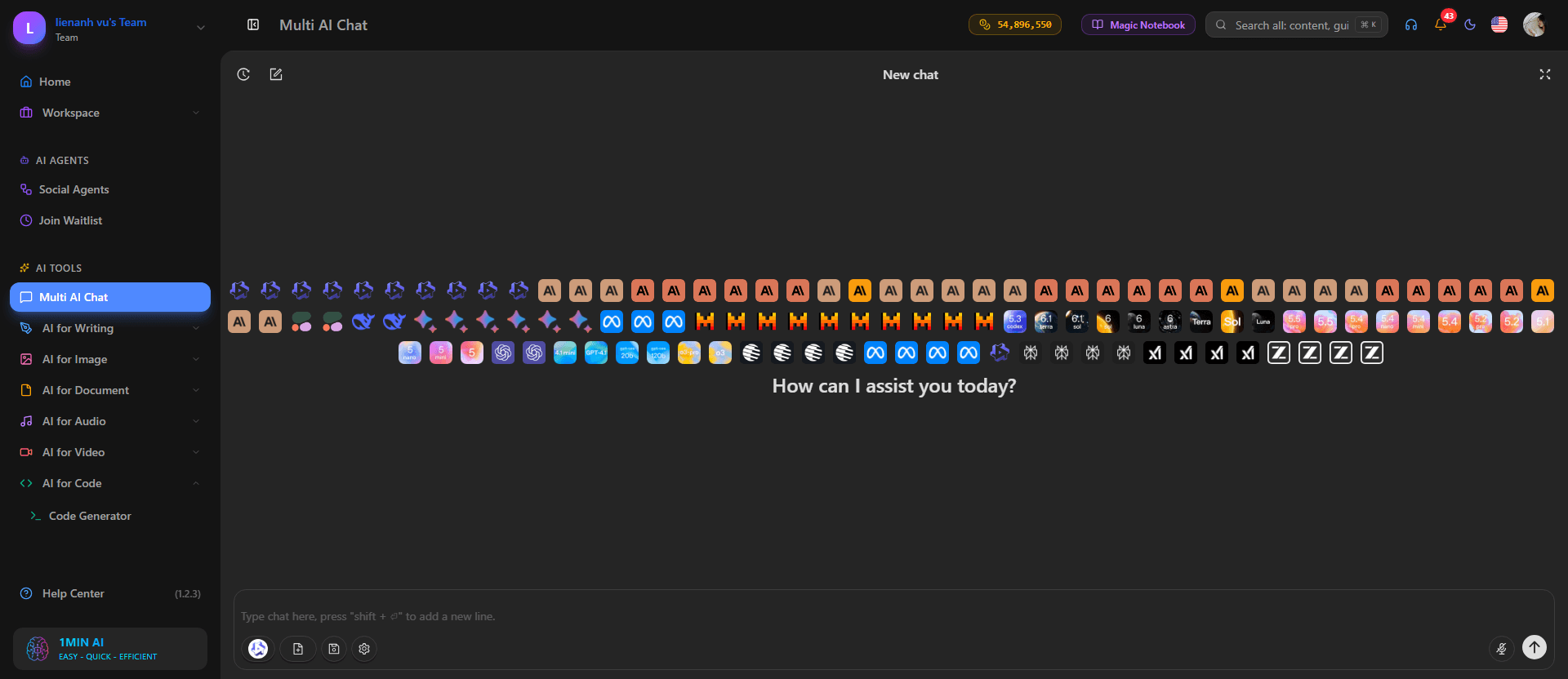
Step 2: Enter Your Creative Prompt
For this example, we're creating a warm, minimal visual identity inspired by peaceful mornings.
Copy this prompt into Multi AI Chat:
Copy-Ready Prompt
Act as a professional brand strategist and creative director.
Help me develop 3 creative branding concepts for Morrow Coffee, a specialty coffee brand.
Brand details:
- Target audience: Young professionals and coffee lovers.
- Brand personality: Warm, calm, modern, and premium.
- Visual style: Minimal, elegant, and inspired by morning sunlight.
For each concept, provide:
- Concept name and brand story.
- Color palette with HEX codes.
- Typography suggestions.
- Logo and graphic element ideas.
- Packaging and Instagram design direction.
Make each concept unique and explain why it fits the brand. Finish with a comparison of all 3 concepts.
Click Send and let Claude brainstorm different creative directions.
You can customize this prompt for your own branding, photography, packaging, or marketing projects.
Step 3: Choose Your Favorite Concept
Once Claude generates the suggestions, review each concept and choose the one that best matches your vision.
For Morrow Coffee, we selected First Light, a concept inspired by the warmth and quietness of early mornings.
It combines soft colors, editorial typography, and simple coffee-inspired graphics to create a calm, premium brand identity.
Remember, Claude provides suggestions, but you decide which direction works best.
Step 4: Refine Your Creative Direction
After choosing First Light, continue the same conversation and ask Claude to develop the concept further.
Try this follow-up prompt:
Let's develop the First Light concept for Morrow Coffee.
Refine the color palette, typography, logo ideas, and packaging direction.
Keep everything minimal, warm, and consistent with the brand personality. Explain how each element supports the overall concept.
Claude will suggest more detailed design guidelines that you can use as a starting point for your visual work.
Quick tip: Be specific about your desired style, colors, and composition. Clearer instructions usually produce more relevant suggestions. For additional prompting techniques, read The Problem With AI Design? It Looks Too AI.
From Creative Idea to Finished Design
Once your concept is ready, you can take it further.
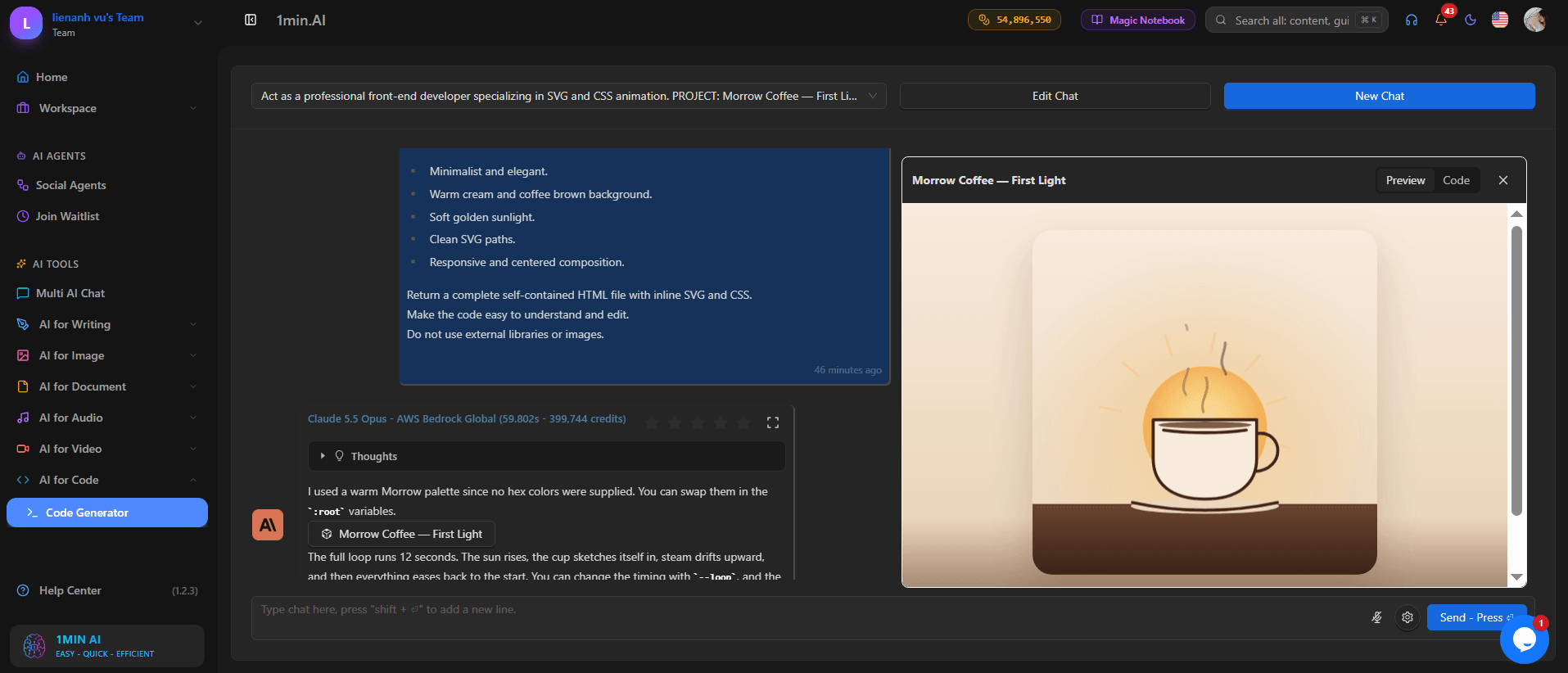
For our Morrow Coffee project, we used the First Light direction to create:
- An animated SVG coffee illustration with gentle steam and sunrise-inspired colors.
- A portfolio website showcasing the brand story, colors, typography, and design elements.
- Social media captions adapted for different platforms.
This shows how one creative idea can become the foundation for multiple design deliverables.
Want to see the complete process? Watch our Claude tutorial on YouTube to follow the Morrow Coffee project from brainstorming to the finished portfolio.
Start Creating With Claude on 1min.AI
Claude Opus 5.5 can make the early stages of a creative project easier by helping you explore ideas, develop brand concepts, and organize your design direction.
You don't need complicated prompts to get started. Just describe your project, review Claude's suggestions, and refine the concept that works best for you.
Your creativity still leads the process — Claude simply helps you explore more possibilities.
🚀 Try Claude Opus 5.5 on 1min.AI and bring your next creative idea to life.
- #Informational
Roghanna Eile
Faigh amach na roghanna eile is fearr ar 1minAI agus déan comparáid idir gnéithe, praghsáil agus cásanna úsáide.

1min.AI i gcoinne OpenRouter
1min.AI i gcoinne OpenRouter: Déan comparáid idir an táirge cruthaithe AI réidh le húsáid agus an uirlis API theicniúil. Faigh amach an bhfuil stiúideo cruthaitheach gan chód uait nó mol bonneagair chódúcháin.
 Ngoc Hong

1 nóim. AI vs Dola AI
Ag lorg rogha eile seachas Dola AI? Déan comparáid idir 1min.AI agus Dola AI maidir le giniúint físe, pleananna saor in aisce, praghsáil agus príobháideachas chun an aip AI cheart a roghnú.
Ngoc Hong
1minAI vs Hix AI
Déan comparáid ar 5 rogha eile seachas HIX AI le haghaidh comhrá AI, taighde, scríbhneoireacht, íomhánna, físeán, praghsáil, agus sreafaí oibre AI solúbtha.
Ngoc HongUirlisí AI
Faigh amach na huirlisí AI is fearr chun táirgiúlacht, cruthaitheacht agus obair laethúil a threisiú.

Cruthaigh Ábhar Cartúin Comhsheasmhach i nDíreach Cúpla Céim
Cruthaigh físeáin chartúin do TikTok agus Reels i 3 chéim shimplí le 1min.AI, ó thaighde ar smaointe go carachtair agus físeáin bheoite.
 Lien Anh Vu

Aon Táirge, 10 Chruthú UGC: Conas a Dhéanann AI Tástáil Ábhair Níos Éasca
Cruthaigh níos mó UGC barántúil le gineadóir físe UGC AI, déan tástáil ar níos mó uillinneacha cruthaitheacha agus scálaigh ábhar affiliate gan gach leagan a scannánú.
Lien Anh Vu
Na 4 Uirlisí AI is Inacmhainne is Fearr do Bhunaitheoirí Nuathionscanta
Faigh amach na 4 uirlis AI is inacmhainne is fearr do bhunaitheoirí nuathionscanta chun smaointe a bhailíochtú, táirgí a thógáil, ábhar a chruthú, agus seoladh níos tapúla gan róchaiteachas.
 Tram Ta
Gnéithe AI
Gnéithe AI cuimsitheacha a éascaíonn sreafaí oibre, a fheabhsaíonn éifeachtúlacht agus a chuireann ar chumas foirne níos mó a bhaint amach.
Cruthaigh Ábhar Cartúin Comhsheasmhach i nDíreach Cúpla Céim
Cruthaigh físeáin chartúin do TikTok agus Reels i 3 chéim shimplí le 1min.AI, ó thaighde ar smaointe go carachtair agus físeáin bheoite.
Lien Anh VuAon Táirge, 10 Chruthú UGC: Conas a Dhéanann AI Tástáil Ábhair Níos Éasca
Cruthaigh níos mó UGC barántúil le gineadóir físe UGC AI, déan tástáil ar níos mó uillinneacha cruthaitheacha agus scálaigh ábhar affiliate gan gach leagan a scannánú.
Lien Anh Vu
1minAI: Seiceálaí Gramadaí AI In Aisce
Seiceáil gramadach saor in aisce le seiceálaí gramadaí AI 1minAI. Aimsigh botúin ghramadaí, litrithe agus scríbhneoireachta, feabhsaigh soiléireacht, agus snasigh d’ábhar i gceann soicindí.
Tram TaCásanna úsáide AI
Bailiúchán roghnaithe de chásanna úsáide AI do ghnó, táirgiúlachta agus iarratais shonracha tionscail.
Cruthaigh Ábhar Cartúin Comhsheasmhach i nDíreach Cúpla Céim
Cruthaigh físeáin chartúin do TikTok agus Reels i 3 chéim shimplí le 1min.AI, ó thaighde ar smaointe go carachtair agus físeáin bheoite.
Lien Anh VuAon Táirge, 10 Chruthú UGC: Conas a Dhéanann AI Tástáil Ábhair Níos Éasca
Cruthaigh níos mó UGC barántúil le gineadóir físe UGC AI, déan tástáil ar níos mó uillinneacha cruthaitheacha agus scálaigh ábhar affiliate gan gach leagan a scannánú.
Lien Anh Vu
An tAm is Fearr le Postáil ar Instagram: Treoir Phraiticiúil chun Rannpháirtíocht Níos Fearr
Faigh amach an t-am is fearr le postáil ar Instagram, lena n-áirítear na laethanta agus na hamanna is fearr do lucht féachana éagsúla, chomh maith le leideanna chun an sceideal postála idéalach do do chuntas a aimsiú.
Tram TaRanganna Teagaisc Intleacht Shaorga
Foghlaim conas AI a úsáid le ranganna teagaisc praiticiúla, céim ar chéim.
Cruthaigh Ábhar Cartúin Comhsheasmhach i nDíreach Cúpla Céim
Cruthaigh físeáin chartúin do TikTok agus Reels i 3 chéim shimplí le 1min.AI, ó thaighde ar smaointe go carachtair agus físeáin bheoite.
Lien Anh Vu
Margaí Uirlisí AI don Aoine Dhubh in 2026
Faigh amach cad atá ar fáil i margaí uirlisí AI an Aoine Dhubh 2026. Faigh amach conas an tairiscint saoil 1min.AI a chinntiú trí AppSumo, Dealify, Stack Social, agus fíoraigh é ar Trustpilot, Slashdot, agus Software Advice.
 Hang Nguyen

Comhsheasmhacht Táirge ó Íomhá go Físeán le hAI le Seedance chun Saobhadh a Stopadh agus Léirmheasanna Táirge a Scálú
Stop saobhadh lógónna le comhsheasmhacht táirge ó íomhá go físeán le hAI agus giniúint físeáin léirmheasa ar chaighdeán stiúideo ar 1min.AI inniu.
Lien Anh VuTreoracha Intleachta Saorga
Foghlaim AI níos tapúla le treoracha praiticiúla, samplaí ón saol réadúil, agus dea-chleachtais inghníomhaithe.
Cruthaigh Ábhar Cartúin Comhsheasmhach i nDíreach Cúpla Céim
Cruthaigh físeáin chartúin do TikTok agus Reels i 3 chéim shimplí le 1min.AI, ó thaighde ar smaointe go carachtair agus físeáin bheoite.
Lien Anh Vu
AI Uirlisí a Cheannach go Sábháilte Ar Líne: Treoir Dé hAoine na hDubh 2026
Faigh amach conas na margaí AI Dé hAoine na hDubh is fearr ar líne a aimsiú agus a dhaingniú. Foghlaim straitéisí saineolaithe chun camscéimeanna a sheachaint, tuirse síntiús a chomhrac, agus bogearraí a fhíorú.
Hang NguyenComhsheasmhacht Táirge ó Íomhá go Físeán le hAI le Seedance chun Saobhadh a Stopadh agus Léirmheasanna Táirge a Scálú
Stop saobhadh lógónna le comhsheasmhacht táirge ó íomhá go físeán le hAI agus giniúint físeáin léirmheasa ar chaighdeán stiúideo ar 1min.AI inniu.
Lien Anh VuRéitigh AI
Brabhsáil na réitigh AI is fearr le haghaidh uathoibrithe, códaithe, taighde, táirgiúlachta, tacaíochta custaiméirí, margaíochta, agus sreafaí oibre gnó.
Cruthaigh Ábhar Cartúin Comhsheasmhach i nDíreach Cúpla Céim
Cruthaigh físeáin chartúin do TikTok agus Reels i 3 chéim shimplí le 1min.AI, ó thaighde ar smaointe go carachtair agus físeáin bheoite.
Lien Anh VuAon Táirge, 10 Chruthú UGC: Conas a Dhéanann AI Tástáil Ábhair Níos Éasca
Cruthaigh níos mó UGC barántúil le gineadóir físe UGC AI, déan tástáil ar níos mó uillinneacha cruthaitheacha agus scálaigh ábhar affiliate gan gach leagan a scannánú.
Lien Anh Vu
Gineadóir Tatú AI Saor in Aisce: Dearaí Saincheaptha
Cas aon smaoineamh ina dhearadh tatú saincheaptha le gineadóir tatú AI saor in aisce 1min.AI. Déan cur síos ar do smaoineamh, roghnaigh stíl, agus íoslódáil i gceann cúpla soicind.
 Trang Tran
Múnlaí Intleachta Saorga
Déan iniúchadh ar na múnlaí intleachta saorga is mó ar domhan in aon áit amháin.
Cruthaigh Ábhar Cartúin Comhsheasmhach i nDíreach Cúpla Céim
Cruthaigh físeáin chartúin do TikTok agus Reels i 3 chéim shimplí le 1min.AI, ó thaighde ar smaointe go carachtair agus físeáin bheoite.
Lien Anh VuAon Táirge, 10 Chruthú UGC: Conas a Dhéanann AI Tástáil Ábhair Níos Éasca
Cruthaigh níos mó UGC barántúil le gineadóir físe UGC AI, déan tástáil ar níos mó uillinneacha cruthaitheacha agus scálaigh ábhar affiliate gan gach leagan a scannánú.
Lien Anh VuComhsheasmhacht Táirge ó Íomhá go Físeán le hAI le Seedance chun Saobhadh a Stopadh agus Léirmheasanna Táirge a Scálú
Stop saobhadh lógónna le comhsheasmhacht táirge ó íomhá go físeán le hAI agus giniúint físeáin léirmheasa ar chaighdeán stiúideo ar 1min.AI inniu.
Lien Anh VuComparáidí AI
Déan comparáid idir uirlisí, samhlacha, agus ardáin AI chun an ceann is fearr a oireann do do riachtanais a fháil.

Kling AI Vs Veo 3: Cé acu Múnla a Bhuaileann?
Kling AI vs Veo 3: déan comparáid idir gluaiseacht, fuaim dhúchasach, praghsáil agus sraitheanna saor in aisce le fáil amach cén gineadóir físe AI a bhuaileann do thionscadal - bain triail as an mbeirt ar 1min.AI.
Trang TranComhsheasmhacht Táirge ó Íomhá go Físeán le hAI le Seedance chun Saobhadh a Stopadh agus Léirmheasanna Táirge a Scálú
Stop saobhadh lógónna le comhsheasmhacht táirge ó íomhá go físeán le hAI agus giniúint físeáin léirmheasa ar chaighdeán stiúideo ar 1min.AI inniu.
Lien Anh Vu
Comparáid DeepSeek V4 Pro vs Flash
Cuir méadrachtaí DeepSeek V4 Pro i gcomparáid le DeepSeek V4 Flash. Uasmhéadaigh do chuid aipeanna gníomhairiúla agus feabhsaigh fíorú fíricí AI ar 1min.ai inniu.
Ngoc HongComhtháthú AI
Comhtháthú AI gan uaim leis na huirlisí a úsáideann tú cheana féin chun obair a uathoibriú agus táirgiúlacht a mhéadú.

Conas AI Fashion Video Generator a Úsáid do Fashion Week 2026
Cas smaointe Fashion Week 2026 ina fhíseáin fhaisin iontacha le AI. Foghlaim conas smaointe a phlé, íomhánna a chruthú, agus íomhánna a athrú ina bhfíseáin le sreabhadh oibre simplí amháin.
Lien Anh Vu
POV: Tá Níos Mó Ná 10 bPost le Déanamh Gach Lá Agat
Foghlaim conas sreabhadh oibre ábhair le AI a thógáil a chuidíonn le cruthaitheoirí ábhair níos mó ná 10 bpost meán sóisialta in aghaidh an lae a tháirgeadh níos tapúla le smaointeoireacht, giniúint íomhánna, agus cruthú ábhair le AI.
Lien Anh Vu
Stop Switching Between AI Apps: Conas a Chlaochlaíonn Comhtháthú AI Brandáil Fostóra
Faigh amach conas a chuidíonn comhtháthú AI le foirne AD brandáil fostóra a shruthlíniú trí scríobh AI, cáipéisí, íomhánna, físeán, agus iliomad samhlacha AI a thabhairt le chéile i spás oibre amháin.
Tram TaAI do Thionscail
Faigh na huirlisí agus na sreafaí oibre AI is fearr do chúram sláinte, airgeadas, oideachas, dlí, déantúsaíocht, miondíol, eastát réadach, agus go leor eile.

Gineadóir Saor in Aisce Cur Síos Táirge AI
Scríobh cur síos táirge a dhíolann i gceann cúpla nóiméad. Bain úsáid as an ngineadóir saor in aisce seo chun sonraí nó grianghraf a iompú ina chóip a oireann do do bhranda. Bain triail as 1min.AI.
Trang Tran
Na Uirlisí Táirgiúlachta Gnó is Fearr do Thosaitheoirí chun Brabúis a Uasmhéadú | 1minAI
Faigh amach na huirlisí táirgiúlachta gnó is fearr do thosaitheoirí chun am a shábháil, sreafaí oibre a shimpliú, tascanna athchleachtacha a laghdú, agus fás brabúsach a thacú le AI.
Tram Ta
An Uirlis AI is Fearr do Margaíocht Ábhair |1minAI
Ag lorg na huirlise AI is fearr do mhargaíocht ábhair? Féach conas a chuidíonn 1minAI le margaitheoirí taighde a dhéanamh, scríobh, athúsáid, amharcanna a chruthú, agus ábhar a scálú ó spás oibre AI amháin.
Tram TaGníomhairí Intleacht Shaorga
Faigh amach agus rith gníomhairí AI chun tascanna a uathoibriú i do chuid oibre agus i do shaol laethúil.
1minAI: Seiceálaí Gramadaí AI In Aisce
Seiceáil gramadach saor in aisce le seiceálaí gramadaí AI 1minAI. Aimsigh botúin ghramadaí, litrithe agus scríbhneoireachta, feabhsaigh soiléireacht, agus snasigh d’ábhar i gceann soicindí.
Tram Ta
Gníomhairí AI do Facebook
Úsáid Gníomhaire AI do Facebook chun ábhar a chruthú, íomhánna a ghiniúint, poist a sceidealú, agus foilsiú ó do dhoiciméid agus do chomhráite.
Ngoc Hong
Gníomhaire AI vs Cúntóir AI: Cé acu a shábhálann níos mó ama do dhearthóirí i ndáiríre?
Faigh amach an difear idir Gníomhaire AI vs Cúntóir AI agus faigh amach cén réiteach a chuidíonn le dearthóirí obair athchleachtach a uathoibriú, athbhreithnithe a laghdú, agus níos mó ama a shábháil.
Lien Anh VuSreafaí Oibre AI
Déan iniúchadh ar shreafaí oibre AI atá réidh le húsáid le haghaidh táirgiúlachta, margaíochta, díolacháin, tacaíochta, agus eile.
Cruthaigh Ábhar Cartúin Comhsheasmhach i nDíreach Cúpla Céim
Cruthaigh físeáin chartúin do TikTok agus Reels i 3 chéim shimplí le 1min.AI, ó thaighde ar smaointe go carachtair agus físeáin bheoite.
Lien Anh VuAon Táirge, 10 Chruthú UGC: Conas a Dhéanann AI Tástáil Ábhair Níos Éasca
Cruthaigh níos mó UGC barántúil le gineadóir físe UGC AI, déan tástáil ar níos mó uillinneacha cruthaitheacha agus scálaigh ábhar affiliate gan gach leagan a scannánú.
Lien Anh VuConas AI Fashion Video Generator a Úsáid do Fashion Week 2026
Cas smaointe Fashion Week 2026 ina fhíseáin fhaisin iontacha le AI. Foghlaim conas smaointe a phlé, íomhánna a chruthú, agus íomhánna a athrú ina bhfíseáin le sreabhadh oibre simplí amháin.
Lien Anh VuNuachtlitir
Nuálaíochtaí AI seachtainiúla le 1minAI

🔮 Nuálaíochtaí AI Seachtainiúla #143: Nuashonrú Nuashonrú GPT-6, GPT-6.1 & Ideogram 4.0 & Ideogram 4.0
Faigh rochtain ar GPT-6 Sol, Luna, GPT-6.1 Sol, agus Ideogram 4.0 ar 1min.ai. Treisigh cruinneas na clóghrafaíochta go 98.4% agus laghdaigh latántacht réasúnaíochta faoi 45% in aon ardán amháin.
Hang Nguyen
🔮 Nuálaíochtaí Seachtainiúla AI #142: Grok 4.7, Opus 5.5 & Sonnet 5.5 ar 1min.ai
Faigh rochtain ar Grok 4.7, Claude Opus 5.5, agus Sonnet 5.5 ar 1min.ai. Laghdaigh costais síntiúis suas le 70% agus próiseáil na milliúin comhthéacs token in aon spás oibre aontaithe amháin.
Hang Nguyen
🔮 Nuálaíochtaí Seachtainiúla AI #141: Seedance 2.5 & Stable Audio 3: AI na Chéad Ghlúine Eile
Déan iniúchadh ar Seedance 2.0, 2.5, agus Stable Audio 3 ó StabilityAI ar 1min.ai. Gineadh fuaim ar chaighdeán stiúideo agus gluaiseacht shioncronaithe le AI giniúna na chéad ghlúine eile.
Hang Nguyen