
TikTok Creative Center Trends for Better Video Ideas
20. marraskuuta 2026
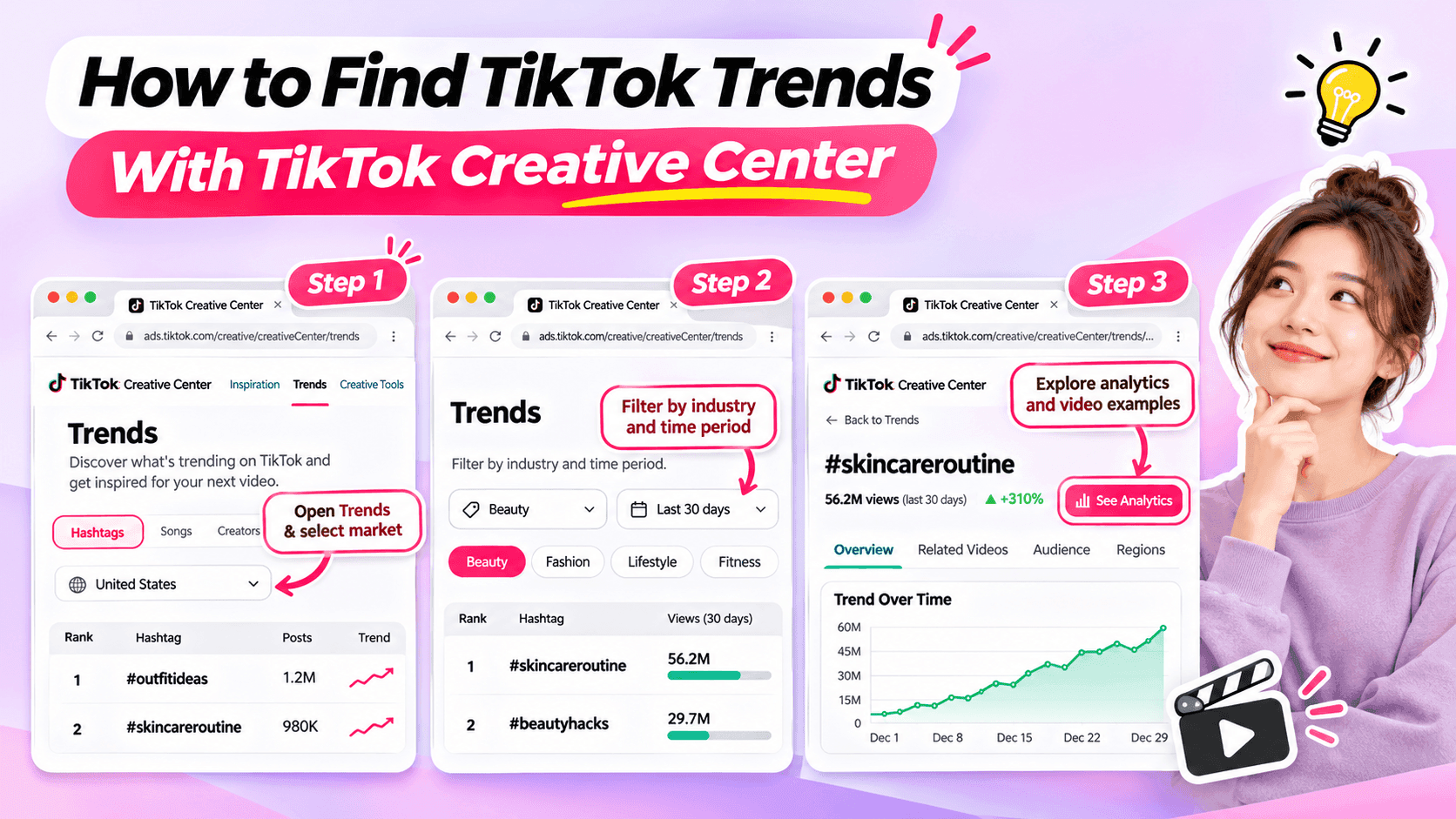
Learn how to use TikTok Creative Center to find trending hashtags and videos. Discover relevant trends and turn them into original ideas for your niche.
Looking for fresh TikTok video ideas but don't know where to start? TikTok Creative Center can help you discover trending hashtags, explore popular video formats, and find inspiration for your next post.
For influencers, the challenge isn't simply finding what's trending. It's choosing trends that match your niche, audience, and personal style.
In this beginner-friendly guide, you'll learn how to use TikTok Creative Center to find trends, understand what makes them interesting, and turn them into original video ideas. You'll also see how AI can help when you need extra inspiration.
What Is TikTok Creative Center?
TikTok Creative Center is a free creative research platform provided by TikTok for Business.
It helps users discover trends, explore creative examples, and learn about content formats on TikTok.
Although the platform includes advertising resources, influencers can also use its trend research features to find inspiration for organic content.
Here are the most useful features for beginners.
| Feature | What It Does | Why Influencers Might Use It |
|---|---|---|
| Trending Hashtags | Shows hashtags and trend information | Discover topics worth exploring |
| Hashtag Analytics | Provides available trend data and related content | Understand how a hashtag is being used |
| Trending Videos | Shows examples of popular TikTok videos where available | Explore creative approaches and formats |
| Top Ads | Provides examples of advertising creatives | Study creative techniques while recognizing that ad results differ from organic performance |
For example, a fashion influencer might use TikTok Creative Center to identify a popular styling theme and explore how people are presenting their outfits.
A fitness influencer might use it to find relevant workout-related discussions or formats.
The key is to use TikTok Creative Center as a source of inspiration, not a list of videos to copy.
How to Find TikTok Trends With Creative Center
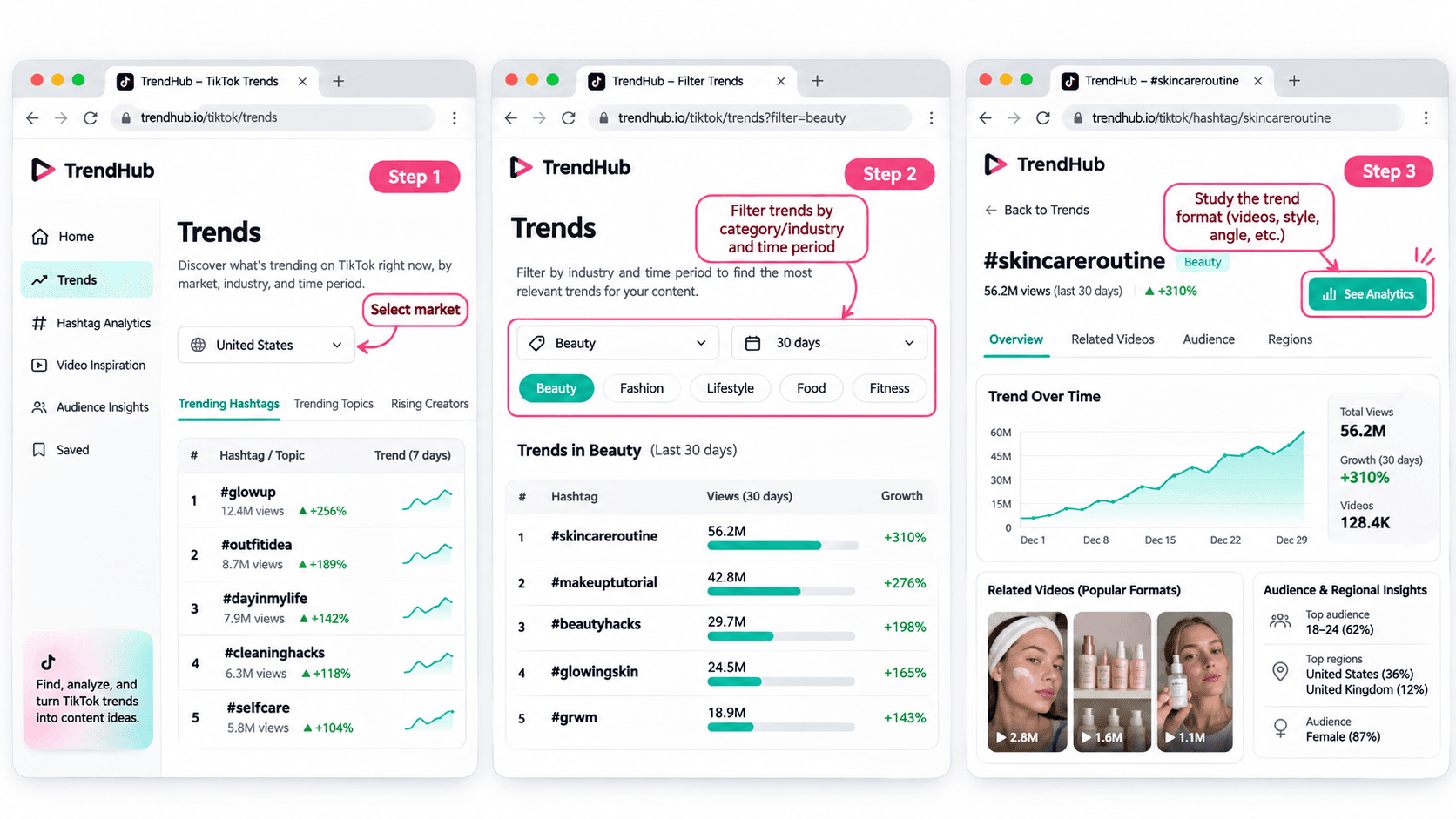
You don't need advanced marketing experience to get started.
Follow these five steps to discover and evaluate trends for your next TikTok video.
Step 1 Open TikTok Creative Center
Tool: TikTok Creative Center
Input: Your target market and influencer niche
Output: A list of trends to explore
Start by visiting the TikTok Creative Center Trends page.
On the platform:
- Open the Trends section.
- Select the Hashtag view if needed.
- Choose your target country or region when the option is available.
- Review the trending hashtags displayed.
You may be asked to log in to access additional rankings or analytics.
For example, if you're a beauty influencer targeting viewers in the United States, choose the United States when researching local trends.
This helps you explore content that may be more relevant to the audience you want to reach.
Beginner tip: Start with one market and one niche. You don't need to research every trend on TikTok.
Step 2 Filter Trends by Industry and Time Period
Input: Your niche and preferred research period
Output: A more focused selection of trends
TikTok Creative Center supports searching or filtering trending hashtags by industry and time frame.
Depending on the available interface, you can narrow your research using relevant categories.
For example:
| Influencer Niche | Research Direction |
|---|---|
| Beauty | Makeup techniques, beauty routines, skincare discussions |
| Fashion | Outfit styling, wardrobe inspiration, personal style |
| Fitness | Workout routines, training experiences, exercise discussions |
| Lifestyle | Everyday routines, organization, personal experiences |
| Technology | Device features, useful tools, technology discussions |
These are example research directions, not verified currently trending hashtags.
Once you have filtered the results, look for hashtags and topics that could make sense for your audience.
Avoid selecting a trend simply because it has the highest number of views.
A smaller, relevant trend may be more useful to your personal brand than a popular topic unrelated to your niche.
Step 3 Explore Hashtag Analytics
Input: A relevant hashtag
Output: More information about the trend and its related videos
When a hashtag catches your attention, select See Analytics if available.
TikTok's official Trends documentation describes several types of information that may appear, including:
- Trendlines showing how interest has changed.
- Related videos.
- Audience insights.
- Regional popularity.
- Related hashtags.
You don't have to analyze every metric.
For beginners, focus on three questions:
Is the topic relevant to my audience?
A popular hashtag is not automatically useful to your followers.
How are people using the hashtag?
Look at the related videos to understand the stories, formats, and approaches people are sharing.
Can I contribute something different?
Consider what personal experience, expertise, or perspective you could add.
For example, if you find a styling-related hashtag, review the videos to identify common approaches.
Some may show outfit combinations. Others may focus on accessories or personal styling tips.
Instead of copying those videos, use them to understand the topic and think about your own angle.
Step 4 Study the Video Format
Input: Related videos from your selected trend
Output: A creative structure you can adapt
Once you've found a relevant trend, watch a few videos and identify what makes the format recognizable.
Pay attention to:
- The opening scene.
- The main idea.
- The order of the shots.
- The visual changes.
- The ending.
For example, consider a before-and-after transformation format.
The structure is simple:
Before → Transformation → After
Different influencers could use that structure in different ways.
| Influencer Niche | Possible Video Idea |
|---|---|
| Fashion | Turn a casual outfit into an evening look |
| Beauty | Show a personal everyday makeup transformation |
| Fitness | Show a genuine change in a workout routine |
| Lifestyle | Transform a messy desk into an organized workspace |
These examples illustrate how a format can be adapted. They are not presented as verified current TikTok trends.
The format can stay similar while the content reflects each influencer's own experiences.
That's how you move from discovering a trend to developing an original idea.
Step 5 Save Your Trend Research
Input: Your selected trend and observations
Output: A short creative brief for your next video
Before leaving Creative Center, save the most useful information.
You can use this simple worksheet.
| Research Field | Example |
|---|---|
| Influencer niche | Everyday fashion |
| Target audience | Young adults who enjoy simple outfit inspiration |
| Trend format | Before-and-after transformation |
| What makes it interesting | A visible change between two looks |
| Personal angle | One jacket styled for different occasions |
| Possible video idea | Three ways to style one jacket |
| Next action | Write a short video concept |
This short brief helps you remember why the format interested you.
It also gives you useful information if you want to brainstorm additional ideas with AI.
How to Choose TikTok Trends That Fit Your Niche
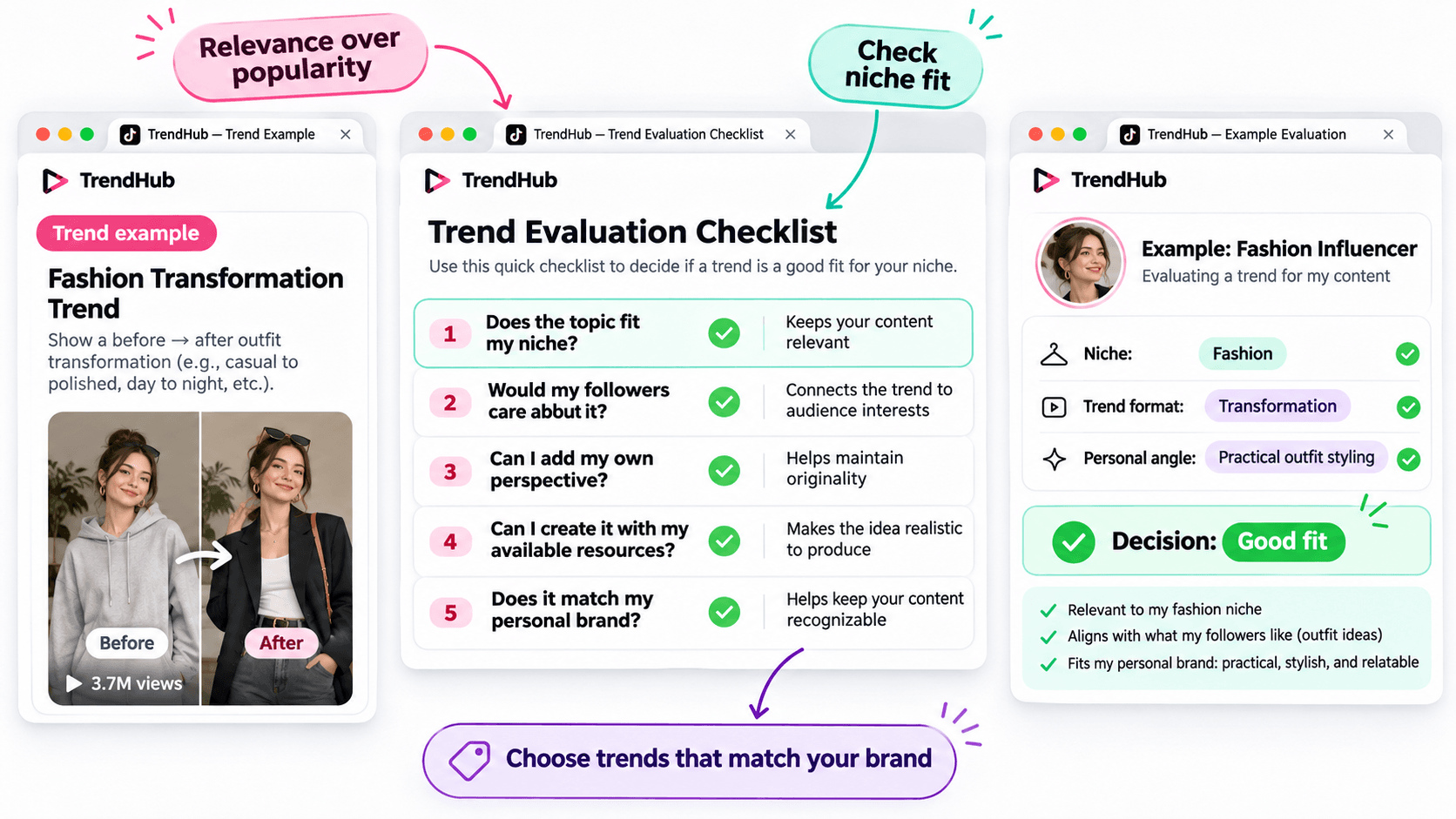
Not every popular trend deserves a place in your content plan.
Before adapting a trend, make sure it matches the kind of content your followers expect from you.
Use this simple checklist.
| Question | Why It Matters |
|---|---|
| Does the topic fit my niche? | Keeps your content relevant |
| Would my followers care about it? | Connects the trend to audience interests |
| Can I add my own perspective? | Helps maintain originality |
| Can I create it with my available resources? | Makes the idea realistic to produce |
| Does it match my personal brand? | Helps keep your content recognizable |
You don't need to answer yes to every question perfectly, but a trend should have a clear reason to belong in your content plan.
For example, imagine you're a fashion influencer who usually shares practical outfit ideas.
A transformation format could be useful if it allows you to demonstrate real styling advice.
However, an unrelated trend may not provide the same value to your audience.
Choose trends based on relevance and creative fit rather than popularity alone.
How to Turn a TikTok Trend Into an Original Video Idea
Finding a trend is only the beginning.
The next challenge is turning it into a video that feels like your own.
You can do this using three simple steps.
Step 1 Identify the Basic Creative Format
Look beyond the hashtag and focus on the structure.
For example:
Format: Before-and-after transformation.
Core idea: Show a visible change.
Possible applications: Outfit styling, makeup, workspace organization, or a genuine personal routine change.
This gives you a flexible creative direction.
Step 2 Add Your Personal Perspective
Ask yourself what you can contribute that another influencer hasn't already shown.
For example, a fashion influencer could use the transformation format to demonstrate how one favorite jacket works with different outfits.
The video could follow this structure:
Opening: Show the jacket and introduce the challenge.
Middle: Demonstrate three outfit combinations.
Ending: Ask followers which look they prefer.
This is a more personal concept than simply recreating a trending video.
Step 3 Develop a Simple Video Concept
Write down your idea before filming.
Example Video Concept
| Element | Example |
|---|---|
| Topic | Styling one jacket |
| Audience | Everyday fashion followers |
| Hook | "Can I style this jacket for three different occasions?" |
| Main Content | Show three outfit combinations |
| Ending | "Which look would you wear?" |
You now have a practical starting point for your next TikTok video.
You can develop the script yourself or use an AI assistant if you'd like to explore more creative approaches.
How to Brainstorm More TikTok Video Ideas With 1min.AI
Sometimes, you find an interesting trend but can't decide how to adapt it.
This is where 1min.AI Multi AI Chat can help.
You can use it to explore different content angles, develop hooks, and organize your ideas.
You don't need to use AI for every trend. It's an optional step when you want additional inspiration.
Step 1 Prepare Your Trend Information
Input: Your niche, audience, trend format, and personal style.
Let's continue with the fashion example.
| Input | Example |
|---|---|
| Niche | Everyday fashion |
| Audience | Young adults interested in practical outfits |
| Personal style | Friendly, natural, and relatable |
| Trend format | Before-and-after transformation |
| Content goal | Generate original outfit video ideas |
This gives AI enough context to generate suggestions that are more relevant than a general list of random TikTok ideas.
Step 2 Use Multi AI Chat to Explore Creative Angles
1min.AI Tool: Multi AI Chat
Output: Several video concepts with hooks and creative approaches.
Open 1min.AI and choose Multi AI Chat.
You can use one available AI model or compare suggestions from multiple models.
Copy the prompt below and replace the example information with your own.
Copyable TikTok Trend Adaptation Prompt
ROLE
Act as a TikTok content strategist who helps influencers create original short-form video ideas.
AUDIENCE
My influencer niche is [your niche].
My followers are [describe your audience].
PERSONAL BRAND
My communication style is [your tone and personality].
TREND INPUT
The TikTok trend or video format I found is [describe the verified format].
The main creative structure is [describe how the format works].
TASK
Suggest 5 original TikTok video ideas inspired by this format.
OUTPUT FORMAT
Create a table with:
- Video Idea
- Creative Angle
- Opening Hook
- Three-Part Video Outline
- Why It Fits My Audience
REQUIREMENTS
Keep the ideas easy to produce, authentic, and relevant to my niche. Do not copy another influencer's content, invent personal experiences, or claim that a trend guarantees viral results.
This format works for different influencer niches because you control the inputs.
For example, a beauty influencer can use the same prompt with a makeup-related trend, while a lifestyle influencer can use it with a home organization format.
Step 3 Review and Personalize the Suggestions
AI can help you explore options, but you should select the concept that genuinely fits your audience.
Here are three illustrative ideas for the fashion example.
| Video Idea | Creative Angle | Opening Hook |
|---|---|---|
| One Jacket Three Occasions | Show styling versatility | "Can one jacket work for three different plans?" |
| Casual to Evening Look | Show a simple outfit transformation | "Here's how I'd change this outfit for the evening." |
| Three Accessories One Outfit | Show how details change a look | "Watch how these accessories change the same outfit." |
These are examples of possible ideas, not documented outputs from a live 1min.AI session.
Choose one and adjust the details based on your own wardrobe and experience.
If you want a more detailed walkthrough of Multi AI Chat, read How Multiple AI Chat Helps Content Creators Create Better Content.
You can also watch the tutorial embedded in that guide to see how different AI models can help you compare content ideas.
For more ways to use AI throughout your creative process, explore Free AI Tools for Influencers to Create More Content.
Common Mistakes When Using TikTok Creative Center
Choosing Trends Only Because They Have High Views
A popular hashtag does not guarantee that your video will perform well.
Consider whether the trend fits your audience and whether you can contribute something useful or entertaining.
Copying Another Influencer's Video
Watching examples is useful for understanding a format.
However, repeating another person's creative work without adding your own contribution will not help you build a distinctive personal brand.
Use trends as inspiration, not finished scripts.
Ignoring Your Target Market
Trends can differ by location and audience.
When possible, choose the market that matches the people you're trying to reach.
Confusing Ad Performance With Organic Video Results
TikTok Creative Center includes advertising resources such as Top Ads.
These examples can provide creative inspiration, but advertising performance should not be treated as proof that a similar organic TikTok video will achieve the same results.
Assuming AI Knows Which Trends Are Currently Popular
AI can generate creative ideas based on the information you provide, but you should not assume it has verified the latest TikTok trends.
Research trends in TikTok Creative Center first, then provide those findings to AI.
Frequently Asked Questions
Is TikTok Creative Center Free?
Yes. TikTok describes Creative Center as a free public resource.
However, some detailed views or features may require logging in, and availability can vary.
How Do I Find Trending Hashtags on TikTok Creative Center?
Open the Trends section, select the available hashtag view, and use the search or filtering options.
When available, select See Analytics to explore more information about a hashtag.
Can Influencers Use TikTok Creative Center?
Yes. Although Creative Center is part of TikTok for Business, influencers can use its publicly available trend information to research topics, formats, and creative inspiration.
Does Using a Trending Hashtag Guarantee More Views?
No. A hashtag's popularity does not guarantee that your video will receive more views or engagement.
The relevance of the topic, the quality of your content, and your audience's response still matter.
What If I Cannot Access Some Creative Center Features?
Check whether you need to log in or whether the feature is available for your region or account.
TikTok's interface and feature availability can change. You can still research relevant videos directly on TikTok when a Creative Center feature is unavailable.
Can 1min.AI Find TikTok Trends Automatically?
This guide uses TikTok Creative Center to find and verify trends.
You can then enter the trend information into 1min.AI Multi AI Chat to brainstorm creative ideas. This workflow does not require automatic importing of TikTok trend data.
Final Thoughts
TikTok Creative Center is a useful starting point when you need fresh video inspiration.
Instead of scrolling through random videos, you can explore trending hashtags, study relevant formats, and evaluate whether an idea fits your personal brand.
Remember the simple workflow:
Find a Trend → Check Its Relevance → Study the Format → Add Your Perspective → Develop Your Video Idea.
You don't need to follow every trend or use complicated tools to get started.
Choose one relevant format, make it your own, and create something your audience can recognize as part of your personal brand.
When you want to explore more creative angles, AI can help you brainstorm without replacing your own ideas.
🚀 Turn TikTok Trends Into Original Video Ideas With 1min.AI Multi AI Chat
- #Navigational
Vaihtoehdot
Löydä parhaat vaihtoehdot 1minAI:lle ja vertaile ominaisuuksia, hinnoittelua ja käyttötapauksia.

1min.AI vs. OpenRouter
1min.AI vs. OpenRouter: Vertaa valmista tekoälyn luontituotetta tekniseen API-työkaluun. Selvitä, tarvitsetko koodittoman luovan studion vai koodausinfrastruktuurikeskuksen.
 Ngoc Hong

1min. AI vs Dola AI
Etsitkö vaihtoehtoa Dola AI:lle? Vertaa 1min.AI:ta ja Dola AI:ta videon luomisessa, ilmaisissa suunnitelmissa, hinnoittelussa ja yksityisyydessä löytääksesi oikean AI-sovelluksen.
Ngoc Hong
1minAI vs Hix AI
Vertaa 5 HIX AI -vaihtoehtoa AI-chatin, tutkimuksen, kirjoittamisen, kuvien, videon, hinnoittelun ja joustavien AI-työnkulkujen osalta.
Ngoc HongTekoälytyökalut
Löydä parhaat tekoälytyökalut tuottavuuden, luovuuden ja päivittäisen työn tehostamiseen.

Yksi tuote, 10 UGC-kreatiivia: Näin tekoäly helpottaa sisällön testaamista
Luo aidompaa UGC-sisältöä AI UGC -videogeneraattorilla, testaa enemmän luovia kulmia ja skaalaa affiliate-sisältöä ilman että kuvaat jokaisen version erikseen.
 Lien Anh Vu

Luo yhtenäistä sarjakuvasisältöä vain muutamassa vaiheessa
Luo sarjakuvavideoita TikTokiin ja Reelseihin kolmessa yksinkertaisessa vaiheessa 1min.AI:lla, ideoinnista hahmoihin ja animoituihin videoihin.
Lien Anh Vu
4 parasta edullista tekoälytyökalua startup-perustajille
Tutustu 4 parhaaseen edulliseen tekoälytyökaluun startup-perustajille ideoiden validoimiseksi, tuotteiden rakentamiseksi, sisällön luomiseksi ja nopeammaksi lanseeraukseksi ilman liiallista kulutusta.
 Tram Ta
Tekoälyominaisuudet
Kattavat tekoälyominaisuudet, jotka virtaviivaistavat työnkulkuja, parantavat tehokkuutta ja antavat tiimeille mahdollisuuden saavuttaa enemmän.
Yksi tuote, 10 UGC-kreatiivia: Näin tekoäly helpottaa sisällön testaamista
Luo aidompaa UGC-sisältöä AI UGC -videogeneraattorilla, testaa enemmän luovia kulmia ja skaalaa affiliate-sisältöä ilman että kuvaat jokaisen version erikseen.
Lien Anh VuLuo yhtenäistä sarjakuvasisältöä vain muutamassa vaiheessa
Luo sarjakuvavideoita TikTokiin ja Reelseihin kolmessa yksinkertaisessa vaiheessa 1min.AI:lla, ideoinnista hahmoihin ja animoituihin videoihin.
Lien Anh Vu
1minAI: Ilmainen tekoälypohjainen kielioppitarkistin
Tarkista kielioppi ilmaiseksi 1minAI:n tekoälypohjaisella kielioppitarkistimella. Löydä kielioppi-, oikeinkirjoitus- ja kirjoitusvirheet, paranna selkeyttä ja viimeistele sisältösi sekunneissa.
Tram TaTekoälyn käyttötapaukset
Kuratoitu kokoelma tekoälyn käyttötapauksia liiketoimintaan, tuottavuuteen ja toimialakohtaisiin sovelluksiin.
Yksi tuote, 10 UGC-kreatiivia: Näin tekoäly helpottaa sisällön testaamista
Luo aidompaa UGC-sisältöä AI UGC -videogeneraattorilla, testaa enemmän luovia kulmia ja skaalaa affiliate-sisältöä ilman että kuvaat jokaisen version erikseen.
Lien Anh VuLuo yhtenäistä sarjakuvasisältöä vain muutamassa vaiheessa
Luo sarjakuvavideoita TikTokiin ja Reelseihin kolmessa yksinkertaisessa vaiheessa 1min.AI:lla, ideoinnista hahmoihin ja animoituihin videoihin.
Lien Anh Vu
Paras aika julkaista Instagramissa: Käytännön opas parempaan sitoutumiseen
Tutustu parhaaseen aikaan julkaista Instagramissa, mukaan lukien parhaat päivät ja kellonajat eri yleisöille sekä vinkit oman tilisi ihanteellisen julkaisuaikataulun löytämiseen.
Tram TaTekoälytutoriaalit
Opi käyttämään tekoälyä käytännöllisten, vaiheittaisten opetusohjelmien avulla.
Luo yhtenäistä sarjakuvasisältöä vain muutamassa vaiheessa
Luo sarjakuvavideoita TikTokiin ja Reelseihin kolmessa yksinkertaisessa vaiheessa 1min.AI:lla, ideoinnista hahmoihin ja animoituihin videoihin.
Lien Anh Vu
Black Friday AI-työkalutarjoukset vuonna 2026
Tutustu siihen, mitä Black Friday AI-työkalutarjoukset 2026 tarjoaa. Ota selvää, miten varmistat 1min.AI:n lifetime-dealin AppSumon, Dealifyn ja Stack Socialin kautta, ja tarkista se Trustpilotissa, Slashdotissa ja Software Advicessa.
 Hang Nguyen

AI-kuvasta videoksi -tuotejohdonmukaisuus Seedancen avulla estää vääristymät ja skaalaa tuotearvostelut
Lopeta logojen vääristymät AI-kuvasta videoksi -tuotejohdonmukaisuudella ja luo studiotasoisia arvosteluvideoita 1min.AI:ssa jo tänään.
Lien Anh VuTekoälyoppaat
Opi tekoälyä nopeammin käytännön oppaiden, tosielämän esimerkkien ja toimivien parhaiden käytäntöjen avulla.
Luo yhtenäistä sarjakuvasisältöä vain muutamassa vaiheessa
Luo sarjakuvavideoita TikTokiin ja Reelseihin kolmessa yksinkertaisessa vaiheessa 1min.AI:lla, ideoinnista hahmoihin ja animoituihin videoihin.
Lien Anh Vu
Osta AI-työkaluja turvallisesti verkosta: Black Friday 2026 -opas
Löydä, miten löydät ja varmistat parhaat Black Friday AI-tarjoukset verkossa. Opi asiantuntijakeinot huijausten välttämiseen, tilausväsymyksen torjumiseen ja ohjelmistojen tarkistamiseen.
Hang Nguyen4 parasta edullista tekoälytyökalua startup-perustajille
Tutustu 4 parhaaseen edulliseen tekoälytyökaluun startup-perustajille ideoiden validoimiseksi, tuotteiden rakentamiseksi, sisällön luomiseksi ja nopeammaksi lanseeraukseksi ilman liiallista kulutusta.
Tram TaTekoälyratkaisut
Selaa parhaita tekoälyratkaisuja automaatioon, koodaukseen, tutkimukseen, tuottavuuteen, asiakastukeen, markkinointiin ja liiketoiminnan työnkulkuihin.
Yksi tuote, 10 UGC-kreatiivia: Näin tekoäly helpottaa sisällön testaamista
Luo aidompaa UGC-sisältöä AI UGC -videogeneraattorilla, testaa enemmän luovia kulmia ja skaalaa affiliate-sisältöä ilman että kuvaat jokaisen version erikseen.
Lien Anh VuLuo yhtenäistä sarjakuvasisältöä vain muutamassa vaiheessa
Luo sarjakuvavideoita TikTokiin ja Reelseihin kolmessa yksinkertaisessa vaiheessa 1min.AI:lla, ideoinnista hahmoihin ja animoituihin videoihin.
Lien Anh Vu
Ilmainen AI-tatuointigeneraattori: Räätälöidyt suunnitelmat
Muuta mikä tahansa idea räätälöidyksi tatuointisuunnitelmaksi 1min.AI:n ilmaisella AI-tatuointigeneraattorilla. Kuvaile ideasi, valitse tyyli ja lataa se sekunneissa.
 Trang Tran
Tekoälymallit
Tutustu maailman johtaviin tekoälymalleihin yhdessä paikassa.
Yksi tuote, 10 UGC-kreatiivia: Näin tekoäly helpottaa sisällön testaamista
Luo aidompaa UGC-sisältöä AI UGC -videogeneraattorilla, testaa enemmän luovia kulmia ja skaalaa affiliate-sisältöä ilman että kuvaat jokaisen version erikseen.
Lien Anh VuLuo yhtenäistä sarjakuvasisältöä vain muutamassa vaiheessa
Luo sarjakuvavideoita TikTokiin ja Reelseihin kolmessa yksinkertaisessa vaiheessa 1min.AI:lla, ideoinnista hahmoihin ja animoituihin videoihin.
Lien Anh VuAI-kuvasta videoksi -tuotejohdonmukaisuus Seedancen avulla estää vääristymät ja skaalaa tuotearvostelut
Lopeta logojen vääristymät AI-kuvasta videoksi -tuotejohdonmukaisuudella ja luo studiotasoisia arvosteluvideoita 1min.AI:ssa jo tänään.
Lien Anh VuTekoälyvertailut
Vertaa tekoälytyökaluja, -malleja ja -alustoja löytääksesi parhaan vaihtoehdon tarpeisiisi.

Kling AI vs Veo 3: Kumpi malli voittaa?
Kling AI vs Veo 3: vertaa liikettä, natiivia ääntä, hinnoittelua ja ilmaisia tasoja nähdäksesi, mikä tekoälyvideogeneraattori voittaa projektissasi - kokeile molempia 1min.AI:ssa.
Trang TranAI-kuvasta videoksi -tuotejohdonmukaisuus Seedancen avulla estää vääristymät ja skaalaa tuotearvostelut
Lopeta logojen vääristymät AI-kuvasta videoksi -tuotejohdonmukaisuudella ja luo studiotasoisia arvosteluvideoita 1min.AI:ssa jo tänään.
Lien Anh Vu
DeepSeek V4 Pro vs Flash -vertailu
Vertaa DeepSeek V4 Pro vs DeepSeek V4 Flash -mittareita. Optimoi agenttisovelluksesi ja paranna tekoälyn faktantarkistusta osoitteessa 1min.ai tänään.
Tekoälyintegraatiot
Integroi tekoäly saumattomasti jo käyttämiisi työkaluihin työn automatisoimiseksi ja tuottavuuden lisäämiseksi.

Kuinka käyttää AI-muotovideogeneraattoria Fashion Week 2026 -tapahtumaan
Muuta Fashion Week 2026 -ideat näyttäviksi muotovideoiksi AI:n avulla. Opi ideoimaan, luomaan visuaaleja ja muuttamaan kuvat videoiksi yhdellä yksinkertaisella työnkululla.
Lien Anh Vu
POV: Sinulla on yli 10 julkaisua tehtävänä joka päivä
Opi rakentamaan AI-sisällön työnkulku, joka auttaa sisällöntuottajia tekemään yli 10 somejulkaisua päivässä nopeammin AI-ideoinnin, kuvageneroinnin ja sisällöntuotannon avulla.
Lien Anh Vu
Lopeta sovellusten välillä vaihtelu: Kuinka tekoälyn integrointi muuttaa työnantajabrändäystä
Löydä, kuinka tekoälyn integrointi auttaa HR-tiimejä virtaviivaistamaan työnantajabrändäystä yhdistämällä tekoälykirjoituksen, asiakirjat, kuvat, videon ja useita tekoälymalleja yhteen työtilaan.
Tram TaTekoäly teollisuudelle
Löydä parhaat tekoälytyökalut ja työnkulut terveydenhuoltoon, rahoitukseen, koulutukseen, lakiin, valmistukseen, vähittäiskauppaan, kiinteistöihin ja muuhun.

Ilmainen AI-tuotekuvausten generaattori
Kirjoita myyvät tuotekuvaukset minuuteissa. Käytä tätä ilmaista AI-tuotekuvausten generaattoria ja muunna tiedot tai kuva brändisi mukaiseksi tekstiksi. Kokeile 1min.AI:tä.
Trang Tran
Parhaat liiketoiminnan tuottavuustyökalut startup-yrityksille voittojen kasvattamiseen | 1minAI
Tutustu parhaisiin liiketoiminnan tuottavuustyökaluihin startup-yrityksille, joilla säästät aikaa, sujuvoitat työnkulkuja, vähennät toistuvia tehtäviä ja tuet kannattavaa kasvua tekoälyn avulla.
Tram Ta
Paras AI-työkalu sisältömarkkinointiin |1minAI
Etsitkö parasta AI-työkalua sisältömarkkinointiin? Katso, miten 1minAI auttaa markkinoijia tutkimaan, kirjoittamaan, muokkaamaan, luomaan visuaaleja ja skaalaamaan sisältöä yhdestä AI-työtilasta.
Tram TaTekoälyagentit
Löydä ja suorita tekoälyagentteja automatisoidaksesi tehtäviä työssäsi ja arjessasi.
1minAI: Ilmainen tekoälypohjainen kielioppitarkistin
Tarkista kielioppi ilmaiseksi 1minAI:n tekoälypohjaisella kielioppitarkistimella. Löydä kielioppi-, oikeinkirjoitus- ja kirjoitusvirheet, paranna selkeyttä ja viimeistele sisältösi sekunneissa.
Tram Ta
AI-agentit Facebookiin
Käytä Facebookin AI-agenttia sisällön luomiseen, kuvien generointiin, julkaisujen ajastamiseen ja julkaisemiseen dokumenteistasi ja keskusteluistasi.
Ngoc Hong
AI-agentti vs. AI-avustaja: kumpi oikeasti säästää suunnittelijoilta enemmän aikaa?
Opi AI-agentin ja AI-avustajan ero ja selvitä, mikä ratkaisu auttaa suunnittelijoita automatisoimaan toistuvat työt, vähentämään korjauksia ja säästämään enemmän aikaa.
Lien Anh VuTekoälytyönkulut
Tutustu valmiisiin tekoälytyönkulkuihin tuottavuuden, markkinoinnin, myynnin, tuen ja muiden alojen tarpeisiin.
Yksi tuote, 10 UGC-kreatiivia: Näin tekoäly helpottaa sisällön testaamista
Luo aidompaa UGC-sisältöä AI UGC -videogeneraattorilla, testaa enemmän luovia kulmia ja skaalaa affiliate-sisältöä ilman että kuvaat jokaisen version erikseen.
Lien Anh VuLuo yhtenäistä sarjakuvasisältöä vain muutamassa vaiheessa
Luo sarjakuvavideoita TikTokiin ja Reelseihin kolmessa yksinkertaisessa vaiheessa 1min.AI:lla, ideoinnista hahmoihin ja animoituihin videoihin.
Lien Anh VuKuinka käyttää AI-muotovideogeneraattoria Fashion Week 2026 -tapahtumaan
Muuta Fashion Week 2026 -ideat näyttäviksi muotovideoiksi AI:n avulla. Opi ideoimaan, luomaan visuaaleja ja muuttamaan kuvat videoiksi yhdellä yksinkertaisella työnkululla.
Lien Anh VuUutiskirje
Viikoittaiset tekoälyinnovaatiot 1minAI:n avulla

🔮 Viikoittaiset tekoälyinnovaatiot #142: Grok 4.7, Opus 5.5 & Sonnet 5.5 1min.ai:ssa
Käytä Grok 4.7:ää, Claude Opus 5.5:tä ja Sonnet 5.5:tä 1min.ai:ssa. Leikkaa tilauskustannuksia jopa 70 % ja käsittele miljoonia tokeneita yhdessä yhtenäisessä työtilassa.
Hang Nguyen
🔮 Viikoittaiset AI-innovaatiot #143: Päivitys Päivitys GPT-6, GPT-6.1 & Ideogram 4.0 & Ideogram 4.0
Käytä GPT-6 Solia, Lunaa, GPT-6.1 Solia ja Ideogram 4.0:aa 1min.ai:ssa. Nosta typografian tarkkuus 98,4 %:iin ja leikkaa päättelyviive 45 % yhdellä alustalla.
Hang Nguyen
🔮 Weekly AI Innovations #141: Seedance 2.5 & Stable Audio 3: Seuraavan sukupolven AI
Tutustu Seedance 2.0:aan, 2.5:een ja StabilityAI:n Stable Audio 3:een 1min.ai:ssa. Luo studiotasoinen ääni ja synkronoitu liike seuraavan sukupolven generatiivisella AI:lla.
Hang Nguyen