
TikTok Creative Center Trends for Better Video Ideas
2026(e)ko azaroaren 20(a)
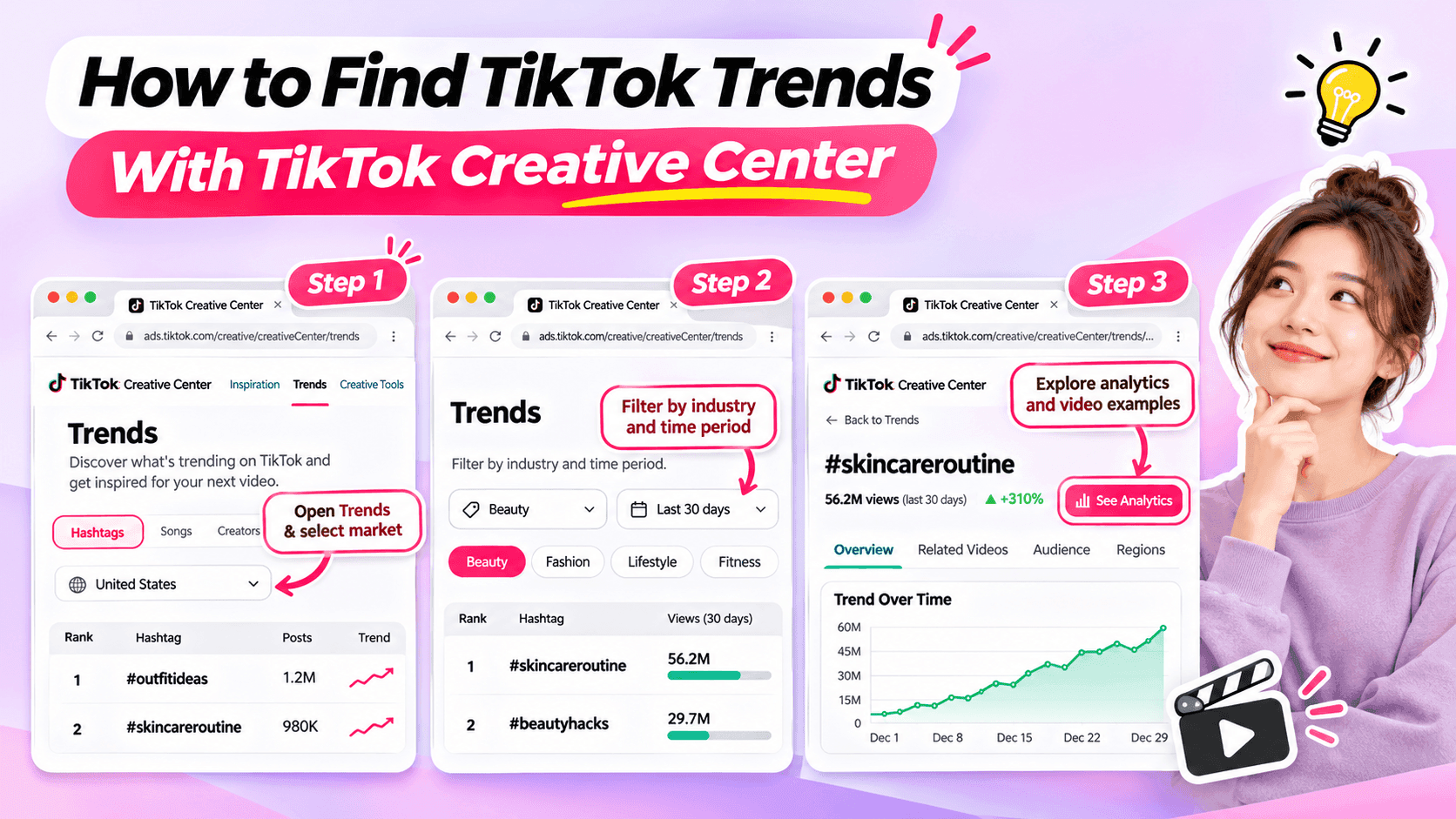
Learn how to use TikTok Creative Center to find trending hashtags and videos. Discover relevant trends and turn them into original ideas for your niche.
Looking for fresh TikTok video ideas but don't know where to start? TikTok Creative Center can help you discover trending hashtags, explore popular video formats, and find inspiration for your next post.
For influencers, the challenge isn't simply finding what's trending. It's choosing trends that match your niche, audience, and personal style.
In this beginner-friendly guide, you'll learn how to use TikTok Creative Center to find trends, understand what makes them interesting, and turn them into original video ideas. You'll also see how AI can help when you need extra inspiration.
What Is TikTok Creative Center?
TikTok Creative Center is a free creative research platform provided by TikTok for Business.
It helps users discover trends, explore creative examples, and learn about content formats on TikTok.
Although the platform includes advertising resources, influencers can also use its trend research features to find inspiration for organic content.
Here are the most useful features for beginners.
| Feature | What It Does | Why Influencers Might Use It |
|---|---|---|
| Trending Hashtags | Shows hashtags and trend information | Discover topics worth exploring |
| Hashtag Analytics | Provides available trend data and related content | Understand how a hashtag is being used |
| Trending Videos | Shows examples of popular TikTok videos where available | Explore creative approaches and formats |
| Top Ads | Provides examples of advertising creatives | Study creative techniques while recognizing that ad results differ from organic performance |
For example, a fashion influencer might use TikTok Creative Center to identify a popular styling theme and explore how people are presenting their outfits.
A fitness influencer might use it to find relevant workout-related discussions or formats.
The key is to use TikTok Creative Center as a source of inspiration, not a list of videos to copy.
How to Find TikTok Trends With Creative Center
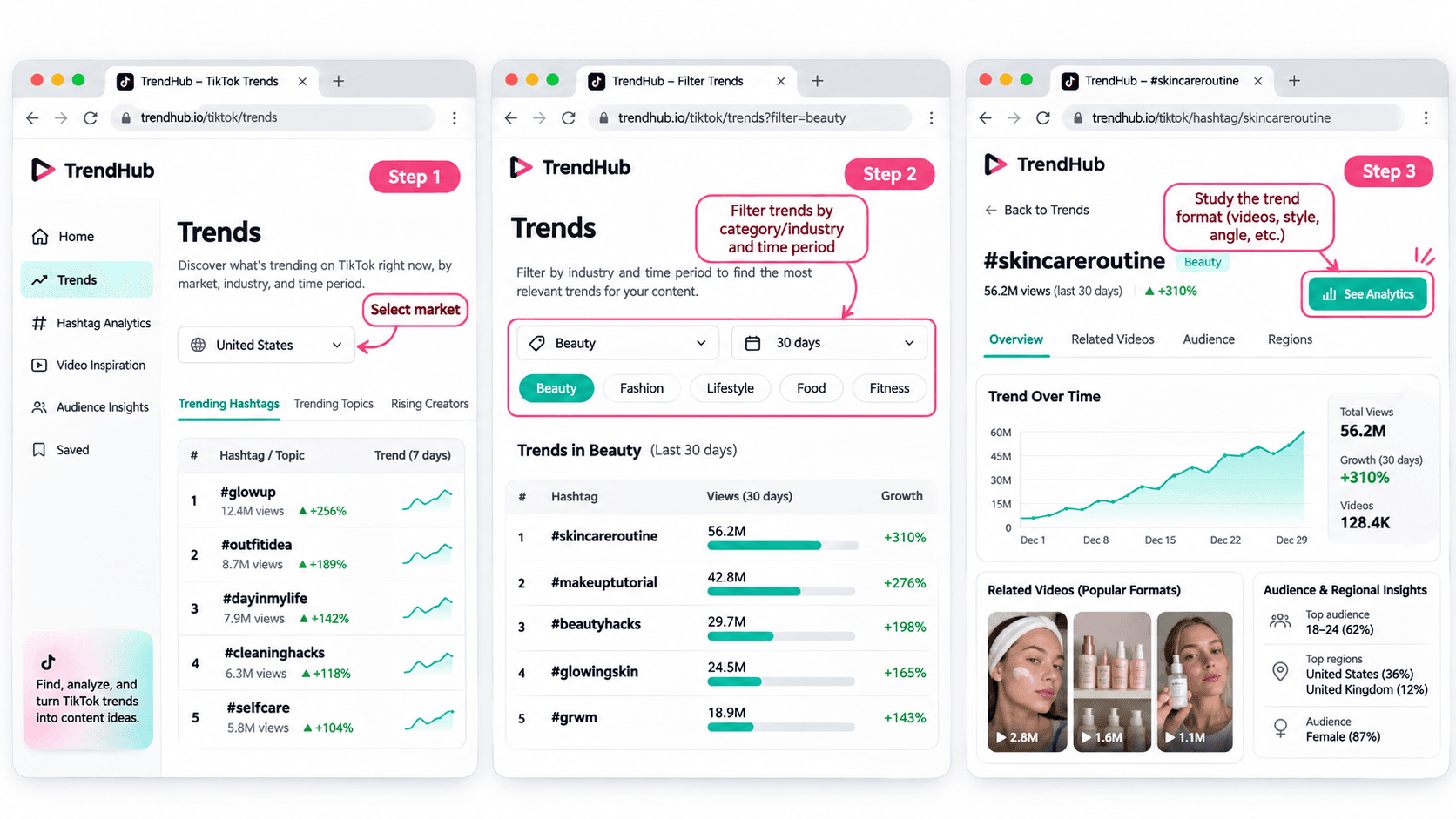
You don't need advanced marketing experience to get started.
Follow these five steps to discover and evaluate trends for your next TikTok video.
Step 1 Open TikTok Creative Center
Tool: TikTok Creative Center
Input: Your target market and influencer niche
Output: A list of trends to explore
Start by visiting the TikTok Creative Center Trends page.
On the platform:
- Open the Trends section.
- Select the Hashtag view if needed.
- Choose your target country or region when the option is available.
- Review the trending hashtags displayed.
You may be asked to log in to access additional rankings or analytics.
For example, if you're a beauty influencer targeting viewers in the United States, choose the United States when researching local trends.
This helps you explore content that may be more relevant to the audience you want to reach.
Beginner tip: Start with one market and one niche. You don't need to research every trend on TikTok.
Step 2 Filter Trends by Industry and Time Period
Input: Your niche and preferred research period
Output: A more focused selection of trends
TikTok Creative Center supports searching or filtering trending hashtags by industry and time frame.
Depending on the available interface, you can narrow your research using relevant categories.
For example:
| Influencer Niche | Research Direction |
|---|---|
| Beauty | Makeup techniques, beauty routines, skincare discussions |
| Fashion | Outfit styling, wardrobe inspiration, personal style |
| Fitness | Workout routines, training experiences, exercise discussions |
| Lifestyle | Everyday routines, organization, personal experiences |
| Technology | Device features, useful tools, technology discussions |
These are example research directions, not verified currently trending hashtags.
Once you have filtered the results, look for hashtags and topics that could make sense for your audience.
Avoid selecting a trend simply because it has the highest number of views.
A smaller, relevant trend may be more useful to your personal brand than a popular topic unrelated to your niche.
Step 3 Explore Hashtag Analytics
Input: A relevant hashtag
Output: More information about the trend and its related videos
When a hashtag catches your attention, select See Analytics if available.
TikTok's official Trends documentation describes several types of information that may appear, including:
- Trendlines showing how interest has changed.
- Related videos.
- Audience insights.
- Regional popularity.
- Related hashtags.
You don't have to analyze every metric.
For beginners, focus on three questions:
Is the topic relevant to my audience?
A popular hashtag is not automatically useful to your followers.
How are people using the hashtag?
Look at the related videos to understand the stories, formats, and approaches people are sharing.
Can I contribute something different?
Consider what personal experience, expertise, or perspective you could add.
For example, if you find a styling-related hashtag, review the videos to identify common approaches.
Some may show outfit combinations. Others may focus on accessories or personal styling tips.
Instead of copying those videos, use them to understand the topic and think about your own angle.
Step 4 Study the Video Format
Input: Related videos from your selected trend
Output: A creative structure you can adapt
Once you've found a relevant trend, watch a few videos and identify what makes the format recognizable.
Pay attention to:
- The opening scene.
- The main idea.
- The order of the shots.
- The visual changes.
- The ending.
For example, consider a before-and-after transformation format.
The structure is simple:
Before → Transformation → After
Different influencers could use that structure in different ways.
| Influencer Niche | Possible Video Idea |
|---|---|
| Fashion | Turn a casual outfit into an evening look |
| Beauty | Show a personal everyday makeup transformation |
| Fitness | Show a genuine change in a workout routine |
| Lifestyle | Transform a messy desk into an organized workspace |
These examples illustrate how a format can be adapted. They are not presented as verified current TikTok trends.
The format can stay similar while the content reflects each influencer's own experiences.
That's how you move from discovering a trend to developing an original idea.
Step 5 Save Your Trend Research
Input: Your selected trend and observations
Output: A short creative brief for your next video
Before leaving Creative Center, save the most useful information.
You can use this simple worksheet.
| Research Field | Example |
|---|---|
| Influencer niche | Everyday fashion |
| Target audience | Young adults who enjoy simple outfit inspiration |
| Trend format | Before-and-after transformation |
| What makes it interesting | A visible change between two looks |
| Personal angle | One jacket styled for different occasions |
| Possible video idea | Three ways to style one jacket |
| Next action | Write a short video concept |
This short brief helps you remember why the format interested you.
It also gives you useful information if you want to brainstorm additional ideas with AI.
How to Choose TikTok Trends That Fit Your Niche
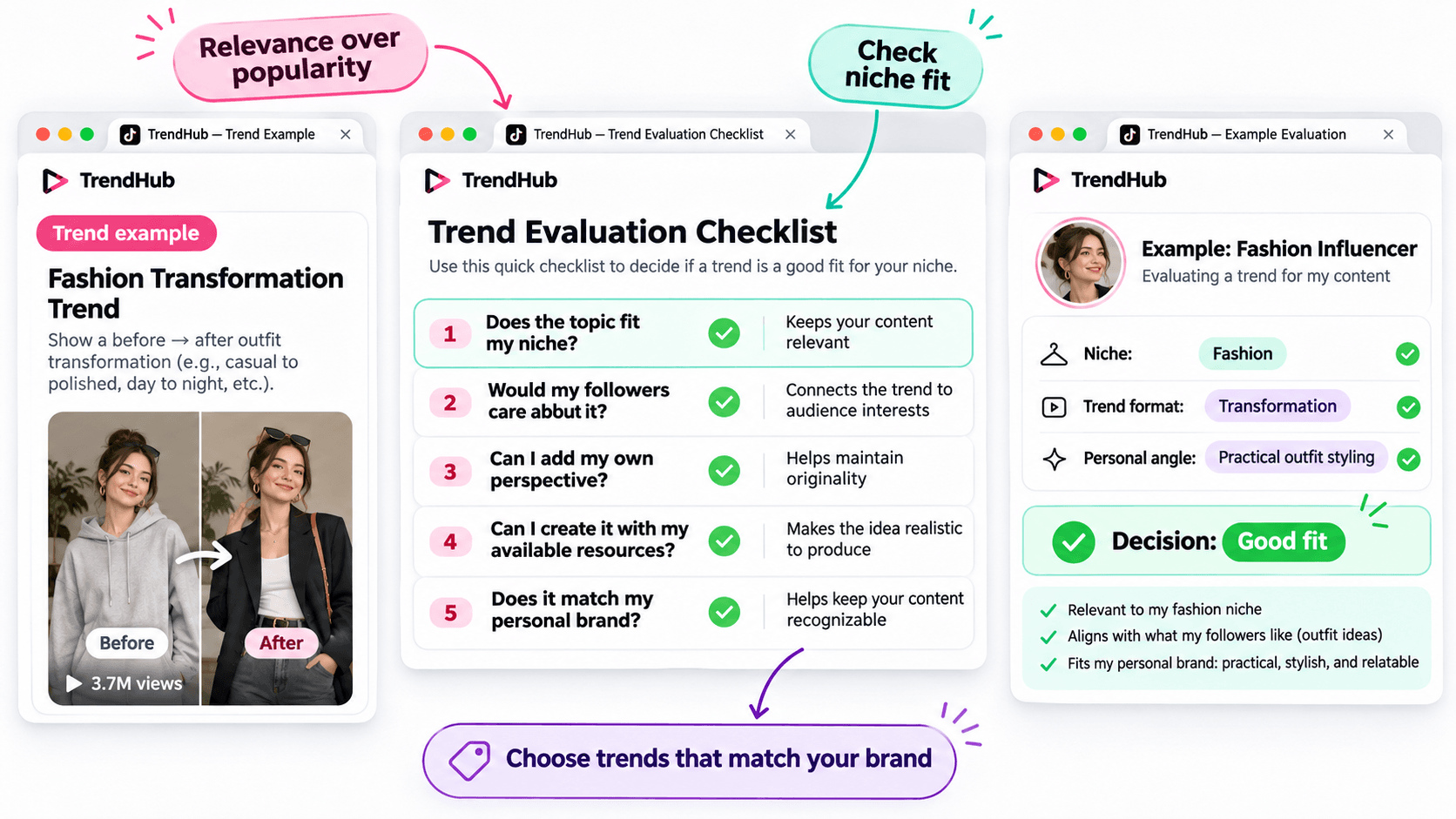
Not every popular trend deserves a place in your content plan.
Before adapting a trend, make sure it matches the kind of content your followers expect from you.
Use this simple checklist.
| Question | Why It Matters |
|---|---|
| Does the topic fit my niche? | Keeps your content relevant |
| Would my followers care about it? | Connects the trend to audience interests |
| Can I add my own perspective? | Helps maintain originality |
| Can I create it with my available resources? | Makes the idea realistic to produce |
| Does it match my personal brand? | Helps keep your content recognizable |
You don't need to answer yes to every question perfectly, but a trend should have a clear reason to belong in your content plan.
For example, imagine you're a fashion influencer who usually shares practical outfit ideas.
A transformation format could be useful if it allows you to demonstrate real styling advice.
However, an unrelated trend may not provide the same value to your audience.
Choose trends based on relevance and creative fit rather than popularity alone.
How to Turn a TikTok Trend Into an Original Video Idea
Finding a trend is only the beginning.
The next challenge is turning it into a video that feels like your own.
You can do this using three simple steps.
Step 1 Identify the Basic Creative Format
Look beyond the hashtag and focus on the structure.
For example:
Format: Before-and-after transformation.
Core idea: Show a visible change.
Possible applications: Outfit styling, makeup, workspace organization, or a genuine personal routine change.
This gives you a flexible creative direction.
Step 2 Add Your Personal Perspective
Ask yourself what you can contribute that another influencer hasn't already shown.
For example, a fashion influencer could use the transformation format to demonstrate how one favorite jacket works with different outfits.
The video could follow this structure:
Opening: Show the jacket and introduce the challenge.
Middle: Demonstrate three outfit combinations.
Ending: Ask followers which look they prefer.
This is a more personal concept than simply recreating a trending video.
Step 3 Develop a Simple Video Concept
Write down your idea before filming.
Example Video Concept
| Element | Example |
|---|---|
| Topic | Styling one jacket |
| Audience | Everyday fashion followers |
| Hook | "Can I style this jacket for three different occasions?" |
| Main Content | Show three outfit combinations |
| Ending | "Which look would you wear?" |
You now have a practical starting point for your next TikTok video.
You can develop the script yourself or use an AI assistant if you'd like to explore more creative approaches.
How to Brainstorm More TikTok Video Ideas With 1min.AI
Sometimes, you find an interesting trend but can't decide how to adapt it.
This is where 1min.AI Multi AI Chat can help.
You can use it to explore different content angles, develop hooks, and organize your ideas.
You don't need to use AI for every trend. It's an optional step when you want additional inspiration.
Step 1 Prepare Your Trend Information
Input: Your niche, audience, trend format, and personal style.
Let's continue with the fashion example.
| Input | Example |
|---|---|
| Niche | Everyday fashion |
| Audience | Young adults interested in practical outfits |
| Personal style | Friendly, natural, and relatable |
| Trend format | Before-and-after transformation |
| Content goal | Generate original outfit video ideas |
This gives AI enough context to generate suggestions that are more relevant than a general list of random TikTok ideas.
Step 2 Use Multi AI Chat to Explore Creative Angles
1min.AI Tool: Multi AI Chat
Output: Several video concepts with hooks and creative approaches.
Open 1min.AI and choose Multi AI Chat.
You can use one available AI model or compare suggestions from multiple models.
Copy the prompt below and replace the example information with your own.
Copyable TikTok Trend Adaptation Prompt
ROLE
Act as a TikTok content strategist who helps influencers create original short-form video ideas.
AUDIENCE
My influencer niche is [your niche].
My followers are [describe your audience].
PERSONAL BRAND
My communication style is [your tone and personality].
TREND INPUT
The TikTok trend or video format I found is [describe the verified format].
The main creative structure is [describe how the format works].
TASK
Suggest 5 original TikTok video ideas inspired by this format.
OUTPUT FORMAT
Create a table with:
- Video Idea
- Creative Angle
- Opening Hook
- Three-Part Video Outline
- Why It Fits My Audience
REQUIREMENTS
Keep the ideas easy to produce, authentic, and relevant to my niche. Do not copy another influencer's content, invent personal experiences, or claim that a trend guarantees viral results.
This format works for different influencer niches because you control the inputs.
For example, a beauty influencer can use the same prompt with a makeup-related trend, while a lifestyle influencer can use it with a home organization format.
Step 3 Review and Personalize the Suggestions
AI can help you explore options, but you should select the concept that genuinely fits your audience.
Here are three illustrative ideas for the fashion example.
| Video Idea | Creative Angle | Opening Hook |
|---|---|---|
| One Jacket Three Occasions | Show styling versatility | "Can one jacket work for three different plans?" |
| Casual to Evening Look | Show a simple outfit transformation | "Here's how I'd change this outfit for the evening." |
| Three Accessories One Outfit | Show how details change a look | "Watch how these accessories change the same outfit." |
These are examples of possible ideas, not documented outputs from a live 1min.AI session.
Choose one and adjust the details based on your own wardrobe and experience.
If you want a more detailed walkthrough of Multi AI Chat, read How Multiple AI Chat Helps Content Creators Create Better Content.
You can also watch the tutorial embedded in that guide to see how different AI models can help you compare content ideas.
For more ways to use AI throughout your creative process, explore Free AI Tools for Influencers to Create More Content.
Common Mistakes When Using TikTok Creative Center
Choosing Trends Only Because They Have High Views
A popular hashtag does not guarantee that your video will perform well.
Consider whether the trend fits your audience and whether you can contribute something useful or entertaining.
Copying Another Influencer's Video
Watching examples is useful for understanding a format.
However, repeating another person's creative work without adding your own contribution will not help you build a distinctive personal brand.
Use trends as inspiration, not finished scripts.
Ignoring Your Target Market
Trends can differ by location and audience.
When possible, choose the market that matches the people you're trying to reach.
Confusing Ad Performance With Organic Video Results
TikTok Creative Center includes advertising resources such as Top Ads.
These examples can provide creative inspiration, but advertising performance should not be treated as proof that a similar organic TikTok video will achieve the same results.
Assuming AI Knows Which Trends Are Currently Popular
AI can generate creative ideas based on the information you provide, but you should not assume it has verified the latest TikTok trends.
Research trends in TikTok Creative Center first, then provide those findings to AI.
Frequently Asked Questions
Is TikTok Creative Center Free?
Yes. TikTok describes Creative Center as a free public resource.
However, some detailed views or features may require logging in, and availability can vary.
How Do I Find Trending Hashtags on TikTok Creative Center?
Open the Trends section, select the available hashtag view, and use the search or filtering options.
When available, select See Analytics to explore more information about a hashtag.
Can Influencers Use TikTok Creative Center?
Yes. Although Creative Center is part of TikTok for Business, influencers can use its publicly available trend information to research topics, formats, and creative inspiration.
Does Using a Trending Hashtag Guarantee More Views?
No. A hashtag's popularity does not guarantee that your video will receive more views or engagement.
The relevance of the topic, the quality of your content, and your audience's response still matter.
What If I Cannot Access Some Creative Center Features?
Check whether you need to log in or whether the feature is available for your region or account.
TikTok's interface and feature availability can change. You can still research relevant videos directly on TikTok when a Creative Center feature is unavailable.
Can 1min.AI Find TikTok Trends Automatically?
This guide uses TikTok Creative Center to find and verify trends.
You can then enter the trend information into 1min.AI Multi AI Chat to brainstorm creative ideas. This workflow does not require automatic importing of TikTok trend data.
Final Thoughts
TikTok Creative Center is a useful starting point when you need fresh video inspiration.
Instead of scrolling through random videos, you can explore trending hashtags, study relevant formats, and evaluate whether an idea fits your personal brand.
Remember the simple workflow:
Find a Trend → Check Its Relevance → Study the Format → Add Your Perspective → Develop Your Video Idea.
You don't need to follow every trend or use complicated tools to get started.
Choose one relevant format, make it your own, and create something your audience can recognize as part of your personal brand.
When you want to explore more creative angles, AI can help you brainstorm without replacing your own ideas.
🚀 Turn TikTok Trends Into Original Video Ideas With 1min.AI Multi AI Chat
- #Navigational
Alternatibak
Ezagutu 1minAI-ren alternatiba onenak eta alderatu ezaugarriak, prezioak eta erabilera kasuak.

1min.AI vs OpenRouter
1min.AI vs. OpenRouter: alderatu erabilerarako prest dagoen AI sorkuntza-produktua eta API tresna teknikoa. Jakin ezazu zero-code sormen-estudio bat behar duzun edo kode bidezko azpiegitura-zentro bat.
 Ngoc Hong

1min. AI vs Dola AI
Dola AI alternatiba baten bila? Konparatu 1min.AI eta Dola AI bideo-sorkuntzan, doako planetan, prezioetan eta pribatutasunean, zuretzat egokia den AI aplikazioa aukeratzeko.
Ngoc Hong
1minAI vs Hix AI
5 HIX AI alternatiba alderatu AI txat, ikerketa, idazketa, irudiak, bideoa, prezioak eta AI lan-fluxu malguetarako.
Ngoc HongAdimen Artifizialeko Tresnak
Produktibitatea, sormena eta eguneroko lana bultzatzeko AI tresna onenak ezagutu.

Sortu marrazki bizidun eduki koherentea urrats gutxitan
Sortu marrazki bizidunetako bideoak TikTok eta Reelserako 3 urrats errazetan 1min.AI-rekin, ideiak ikertzetik pertsonaia eta bideo animatuetara.
 Lien Anh Vu

Produktu Bat, 10 UGC Sormen: Nola Errazten duen AI-k Edukien Probak
Sortu UGC benetakoagoa AI UGC bideo-sorgailu batekin, probatu sormen-ikuspegi gehiago eta eskalatu afiliatu edukia bertsio bakoitza grabatu gabe.
Lien Anh Vu
Sortzaileentzako Aurrekontu Neurriko 4 AI Tresna Nagusiak
Ezagutu startup-sortzaileentzako aurrekontu neurriko 4 AI tresna nagusiak: ideiak baliozkotzeko, produktuak eraikitzeko, edukia sortzeko eta azkarrago abiarazteko, gehiegi gastatu gabe.
 Tram Ta
Adimen Artifizialeko Ezaugarriak
Adimen Artifizialeko ezaugarri osoak: lan-prozesuak errazten dituzte, eraginkortasuna hobetzen dute eta taldeei gehiago lortzen laguntzen diote.
Sortu marrazki bizidun eduki koherentea urrats gutxitan
Sortu marrazki bizidunetako bideoak TikTok eta Reelserako 3 urrats errazetan 1min.AI-rekin, ideiak ikertzetik pertsonaia eta bideo animatuetara.
Lien Anh VuProduktu Bat, 10 UGC Sormen: Nola Errazten duen AI-k Edukien Probak
Sortu UGC benetakoagoa AI UGC bideo-sorgailu batekin, probatu sormen-ikuspegi gehiago eta eskalatu afiliatu edukia bertsio bakoitza grabatu gabe.
Lien Anh Vu
1minAI: Doako AI Gramatika Egiaztatzailea
Egiaztatu gramatika doan 1minAIren AI gramatika egiaztatzailearekin. Aurkitu gramatika-, ortografia- eta idazketa-akatsak, hobetu argitasuna eta findu zure edukia segundotan.
Tram TaAdimen Artifizialaren erabilera-kasuak
Enpresa-, produktibitate- eta sektore-espezifikoko aplikazioetarako aukeratutako Adimen Artifizialaren erabilera-kasuak.
Sortu marrazki bizidun eduki koherentea urrats gutxitan
Sortu marrazki bizidunetako bideoak TikTok eta Reelserako 3 urrats errazetan 1min.AI-rekin, ideiak ikertzetik pertsonaia eta bideo animatuetara.
Lien Anh VuProduktu Bat, 10 UGC Sormen: Nola Errazten duen AI-k Edukien Probak
Sortu UGC benetakoagoa AI UGC bideo-sorgailu batekin, probatu sormen-ikuspegi gehiago eta eskalatu afiliatu edukia bertsio bakoitza grabatu gabe.
Lien Anh Vu
Instagramen argitaratzeko unerik onena: konpromiso hobea lortzeko gida praktikoa
Ezagutu Instagramen argitaratzeko unerik onena, audientzia desberdinetarako egun eta ordu onenak barne, eta zure konturako argitaratze-egutegi aproposa aurkitzeko aholkuak.
Tram TaAdimen Artifizialeko Tutorialak
Ikasi adimen artifiziala erabiltzen urratsez urratseko tutorial praktikoekin.
Sortu marrazki bizidun eduki koherentea urrats gutxitan
Sortu marrazki bizidunetako bideoak TikTok eta Reelserako 3 urrats errazetan 1min.AI-rekin, ideiak ikertzetik pertsonaia eta bideo animatuetara.
Lien Anh Vu
2026ko Black Friday AI tresnen eskaintzak
Ezagutu 2026ko Black Friday AI tresnen eskaintzek zer eskaintzen duten. Jakin nola lortu 1min.AI-ren bizitza osorako eskaintza AppSumo, Dealify eta Stack Social bidez, eta egiaztatu Trustpilot, Slashdot eta Software Advice-n.
 Hang Nguyen

AI irudi-bideora produktu koherentzia Seedance-rekin, distortsioak geldiarazteko eta produktu-iruzkinak eskalatzeko
Gelditu logotipoen distortsioa AI irudi-bideora produktu koherentzia erabiliz eta sortu estudio-mailako berrikuspen-bideoak gaur bertan 1min.AI-n.
Lien Anh VuAI Gidak
Ikasi AI azkarrago gida praktikoekin, mundu errealeko adibideekin eta ekintzaileentzako praktika onenekin.
Sortu marrazki bizidun eduki koherentea urrats gutxitan
Sortu marrazki bizidunetako bideoak TikTok eta Reelserako 3 urrats errazetan 1min.AI-rekin, ideiak ikertzetik pertsonaia eta bideo animatuetara.
Lien Anh Vu
Safely Buy AI Tools Online: 2026 Black Friday Guide
Ezagutu nola aurkitu eta ziurtatu online Black Friday-ko AI eskaintzarik onenak. Ikasi iruzurrak saihesteko, harpidetza-nekea gainditzeko eta softwarea egiaztatzeko estrategia adituak.
Hang NguyenAI irudi-bideora produktu koherentzia Seedance-rekin, distortsioak geldiarazteko eta produktu-iruzkinak eskalatzeko
Gelditu logotipoen distortsioa AI irudi-bideora produktu koherentzia erabiliz eta sortu estudio-mailako berrikuspen-bideoak gaur bertan 1min.AI-n.
Lien Anh VuAdimen Artifizialeko Soluzioak
Arakatu adimen artifizialeko irtenbide onenak automatizaziorako, kodetzerako, ikerketarako, produktibitaterako, bezeroarentzako arretarako, marketinerako eta negozio-fluxuetarako.
Sortu marrazki bizidun eduki koherentea urrats gutxitan
Sortu marrazki bizidunetako bideoak TikTok eta Reelserako 3 urrats errazetan 1min.AI-rekin, ideiak ikertzetik pertsonaia eta bideo animatuetara.
Lien Anh VuProduktu Bat, 10 UGC Sormen: Nola Errazten duen AI-k Edukien Probak
Sortu UGC benetakoagoa AI UGC bideo-sorgailu batekin, probatu sormen-ikuspegi gehiago eta eskalatu afiliatu edukia bertsio bakoitza grabatu gabe.
Lien Anh Vu
AI Tatuaje Sortzaile Doakoa: Diseinu Pertsonalizatuak
Bihurtu edozein ideia tatuaje diseinu pertsonalizatu batean 1min.AI-ren AI tatuaje sortzaile doakoarekin. Deskribatu zure ideia, aukeratu estilo bat, eta deskargatu segundotan.
 Trang Tran
AI Ereduak
Arakatu munduko AI eredu nagusiak leku bakarrean.
Sortu marrazki bizidun eduki koherentea urrats gutxitan
Sortu marrazki bizidunetako bideoak TikTok eta Reelserako 3 urrats errazetan 1min.AI-rekin, ideiak ikertzetik pertsonaia eta bideo animatuetara.
Lien Anh VuProduktu Bat, 10 UGC Sormen: Nola Errazten duen AI-k Edukien Probak
Sortu UGC benetakoagoa AI UGC bideo-sorgailu batekin, probatu sormen-ikuspegi gehiago eta eskalatu afiliatu edukia bertsio bakoitza grabatu gabe.
Lien Anh VuAI irudi-bideora produktu koherentzia Seedance-rekin, distortsioak geldiarazteko eta produktu-iruzkinak eskalatzeko
Gelditu logotipoen distortsioa AI irudi-bideora produktu koherentzia erabiliz eta sortu estudio-mailako berrikuspen-bideoak gaur bertan 1min.AI-n.
Lien Anh VuAI Konparaketak
Konparatu AI tresnak, ereduak eta plataformak zure beharretara hobekien egokitzen dena aurkitzeko.

Kling AI Vs Veo 3: Zein ereduk irabazten du?
Kling AI vs Veo 3: alderatu mugimendua, jatorrizko audioa, prezioak eta doako planak zure proiekturako zein AI bideo-sortzaile den hobea ikusteko — saiatu biak 1min.AI-n.
Trang TranAI irudi-bideora produktu koherentzia Seedance-rekin, distortsioak geldiarazteko eta produktu-iruzkinak eskalatzeko
Gelditu logotipoen distortsioa AI irudi-bideora produktu koherentzia erabiliz eta sortu estudio-mailako berrikuspen-bideoak gaur bertan 1min.AI-n.
Lien Anh Vu
DeepSeek V4 Pro vs Flash Konparazioa
Konparatu DeepSeek V4 Pro eta DeepSeek V4 Flash-en metrikak. Optimizatu zure agente-aplikazioak eta hobetu AI egiaztapena 1min.ai-n gaur.
Ngoc HongAdimen Artifizialaren integrazioak
Integratu Adimen Artifiziala zure dagoeneko erabiltzen dituzun tresnekin modu erraz eta eraginkorrean, lanak automatizatzeko eta produktibitatea handitzeko.

Nola Erabili AI Moda Bideo Sortzaile bat Fashion Week 2026rako
Bihurtu Fashion Week 2026ko ideiak moda-bideo harrigarrietan AI-rekin. Ikasi nola ideiak sortu, ikus-entzunezkoak sortu eta irudiak bideo bihurtu lan-fluxu erraz bakar batekin.
Lien Anh Vu
POV: Egunero 10+ argitalpen egin behar dituzu
Ikasi nola eraiki AI edukien workflow bat, edukia sortzen duten pertsonei egunean 10+ sare sozialetako argitalpen azkarrago ekoizten laguntzeko, AI bidezko brainstorming, irudi-sorkuntza eta edukien sorkuntzarekin.
Lien Anh Vu
Utzi AI aplikazioen artean salto egiteari: Nola eraldatzen duen AI integrazioak enplegatzailearen marka
Ezagutu nola laguntzen duen AI integrazioak HR taldeei enplegatzailearen marka arintzen, AI idazketa, dokumentuak, irudiak, bideoa eta AI eredu anitz lan-eremu bakarrean uztartuz.
Tram TaAdimen Artifiziala Industrietarako
Aurkitu adimen artifizialeko tresna eta lan-fluxu onenak osasungintzan, finantzetan, hezkuntzan, zuzenbidean, manufakturan, txikizkako merkataritzan, higiezinetan eta gehiagotan.

AI Produktu Deskribapen Sortzaile Doakoa
Idatzi salmenta egiten duten produktu-deskribapenak minutu gutxitan. Erabili AI produktu-deskribapen sortzaile doako hau xehetasunak edo argazki bat marka-tonuarekin bat datorren testu bihurtzeko. Saiatu 1min.AI.
Trang Tran
Startupearentzako negozio-ekoizkortasuneko tresna onenak irabaziak maximizatzeko | 1minAI
Ezagutu startupearentzako negozio-ekoizkortasuneko tresna onenak denbora aurrezteko, lan-fluxuak errazteko, zeregin errepikakorrak murrizteko eta hazkunde errentagarria AIarekin babesteko.
Tram Ta
Eduki marketinerako AI tresna onena |1minAI
Eduki marketinerako AI tresna onena bilatzen ari zara? Ikusi nola laguntzen dien 1minAI-k marketineko profesionalei ikertzen, idazten, birpentsatzen, ikus-entzunezkoak sortzen eta edukia AI lan-espazio bakar batetik eskalatzen.
Tram TaAdimen Artifizialeko Agenteak
Ezagutu eta exekutatu AI agenteak zure laneko eta eguneroko bizitzako zereginak automatizatzeko.
1minAI: Doako AI Gramatika Egiaztatzailea
Egiaztatu gramatika doan 1minAIren AI gramatika egiaztatzailearekin. Aurkitu gramatika-, ortografia- eta idazketa-akatsak, hobetu argitasuna eta findu zure edukia segundotan.
Tram Ta
AI agenteak Facebookerako
Erabili AI agente bat Facebookerako edukia sortzeko, irudiak sortzeko, argitalpenak programatzeko eta zure dokumentu eta elkarrizketetatik argitaratzeko.
Ngoc Hong
AI Agent vs AI Assistant: Diseinatzaileei zeinek aurrezten die denbora gehiago benetan?
Ikasi AI Agent vs AI Assistant arteko aldea, eta aurkitu zein irtenbidek laguntzen dien diseinatzaileei lan errepikakorrak automatizatzen, berrikuspenak murrizten eta denbora gehiago aurrezten.
Lien Anh VuAdimen Artifizialeko Lan-fluxuak
Arakatu prest dauden Adimen Artifizialeko lan-fluxuak produktibitaterako, marketinerako, salmentarako, euskararako eta gehiagorako.
Sortu marrazki bizidun eduki koherentea urrats gutxitan
Sortu marrazki bizidunetako bideoak TikTok eta Reelserako 3 urrats errazetan 1min.AI-rekin, ideiak ikertzetik pertsonaia eta bideo animatuetara.
Lien Anh VuProduktu Bat, 10 UGC Sormen: Nola Errazten duen AI-k Edukien Probak
Sortu UGC benetakoagoa AI UGC bideo-sorgailu batekin, probatu sormen-ikuspegi gehiago eta eskalatu afiliatu edukia bertsio bakoitza grabatu gabe.
Lien Anh VuNola Erabili AI Moda Bideo Sortzaile bat Fashion Week 2026rako
Bihurtu Fashion Week 2026ko ideiak moda-bideo harrigarrietan AI-rekin. Ikasi nola ideiak sortu, ikus-entzunezkoak sortu eta irudiak bideo bihurtu lan-fluxu erraz bakar batekin.
Lien Anh VuBuletina
Astero 1minAIrekin AIko berrikuntzak

🔮 Asteko AI Berrikuntzak #142: Grok 4.7, Opus 5.5 eta Sonnet 5.5 1min.ai-n
Sartu Grok 4.7, Claude Opus 5.5 eta Sonnet 5.5 1min.ai-n. Murriztu harpidetza-gastuak %70eraino eta prozesatu milioika token lan-gune bateratu bakar batean.
Hang Nguyen
🔮 Asteko AI Berrikuntzak #143: Eguneraketa Eguneraketa GPT-6, GPT-6.1 eta Ideogram 4.0 eta Ideogram 4.0
Sartu GPT-6 Sol, Luna, GPT-6.1 Sol eta Ideogram 4.0 1min.ai-n. Hobetu tipografiaren zehaztasuna %98,4ra eta murriztu arrazoiketa-latentzia %45ean plataforma bakarrean.
Hang Nguyen
🔮 AI Berrikuntzak Astero #141: Seedance 2.5 eta Stable Audio 3: Hurrengo Belaunaldiko AI
Arakatu Seedance 2.0, 2.5 eta StabilityAI-ren Stable Audio 3 1min.ai-n. Sortu estudio-mailako audioa eta mugimendu sinkronizatua hurrengo belaunaldiko AI sortzailearekin.
Hang Nguyen