
How to Create SVG Animations With Claude Fable 5.1

Lien Anh Vu
2026(e)ko azaroaren 20(a)
Learn how to create SVG animations with Claude Fable 5.1 on 1min.AI. Follow a simple tutorial to generate, preview, and refine animated designs.
Want to add smooth animations to your designs but don't know how to code?
Claude Fable 5.1 can help you create SVG animations by turning simple text prompts into HTML, SVG, and CSS code. Instead of building every animation from scratch, you can describe what you want, generate the code, and preview the result in your browser.
In this tutorial, we'll use Claude Fable 5.1 on 1min.AI to create an animated coffee cup for our fictional Morrow Coffee branding project.
You'll learn how to generate, preview, and customize your first SVG animation, even if you're new to coding.
What Is SVG Animation?
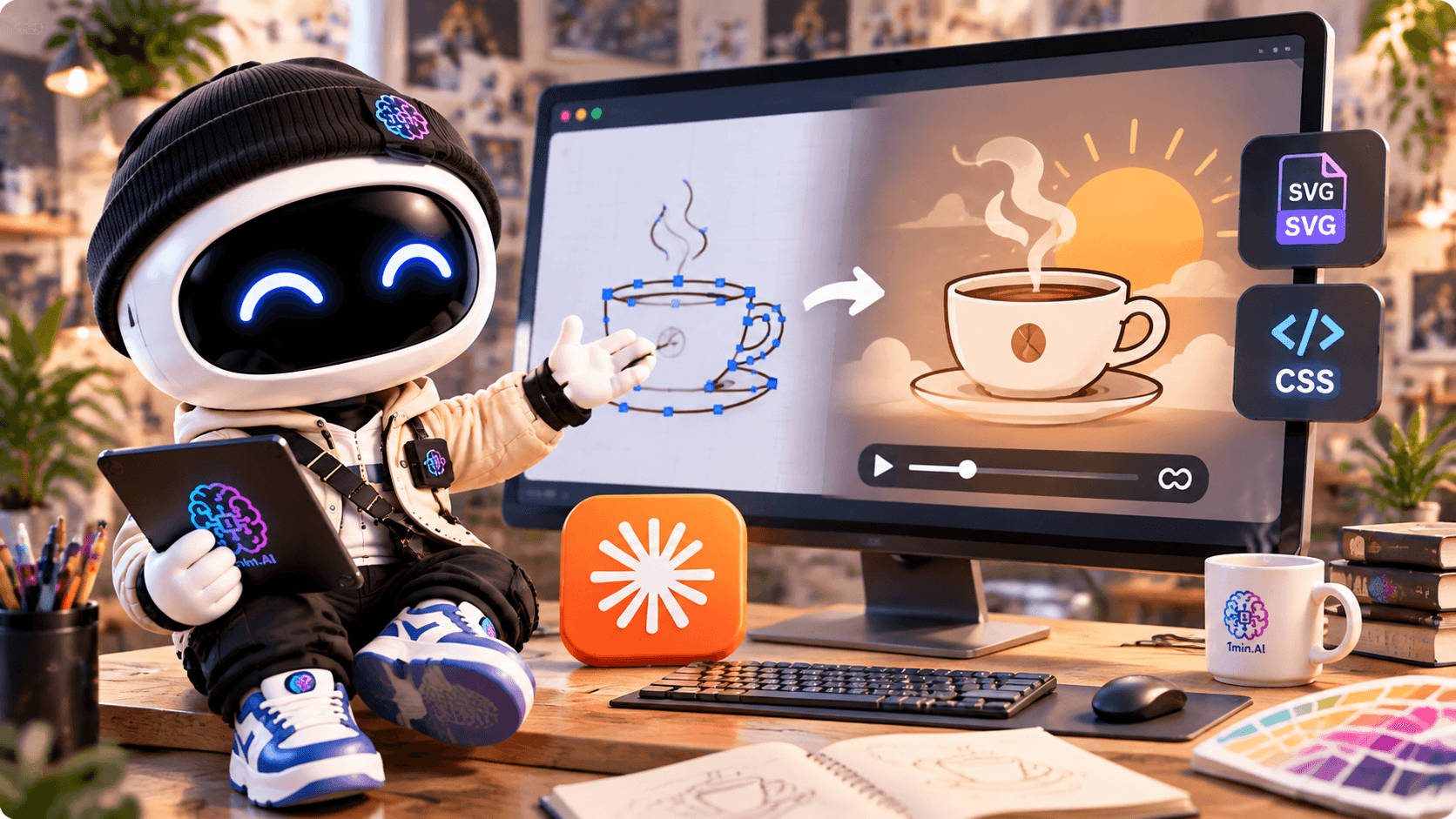
SVG (Scalable Vector Graphics) is a vector image format commonly used for icons, logos, illustrations, and website graphics.
Unlike regular images, SVG graphics can scale without losing sharpness. By adding CSS or SVG animation, you can bring individual elements to life.
For example, you can animate:
- A logo appearing smoothly.
- Steam rising from a coffee cup.
- A sun slowly moving across the background.
- Simple illustrations used in websites or portfolios.
SVG animations are especially useful for designers who want to add subtle movement to digital projects without relying on a video.
The challenge? Creating them manually often requires knowledge of SVG and CSS.
That's where Claude Fable 5.1 can help.
How to Create SVG Animations With Claude on 1min.AI
Let's create a simple coffee cup animation using Claude Fable 5.1.
Our example is inspired by Morrow Coffee — First Light, a fictional branding concept built around warm morning sunlight, calm colors, and minimal design.
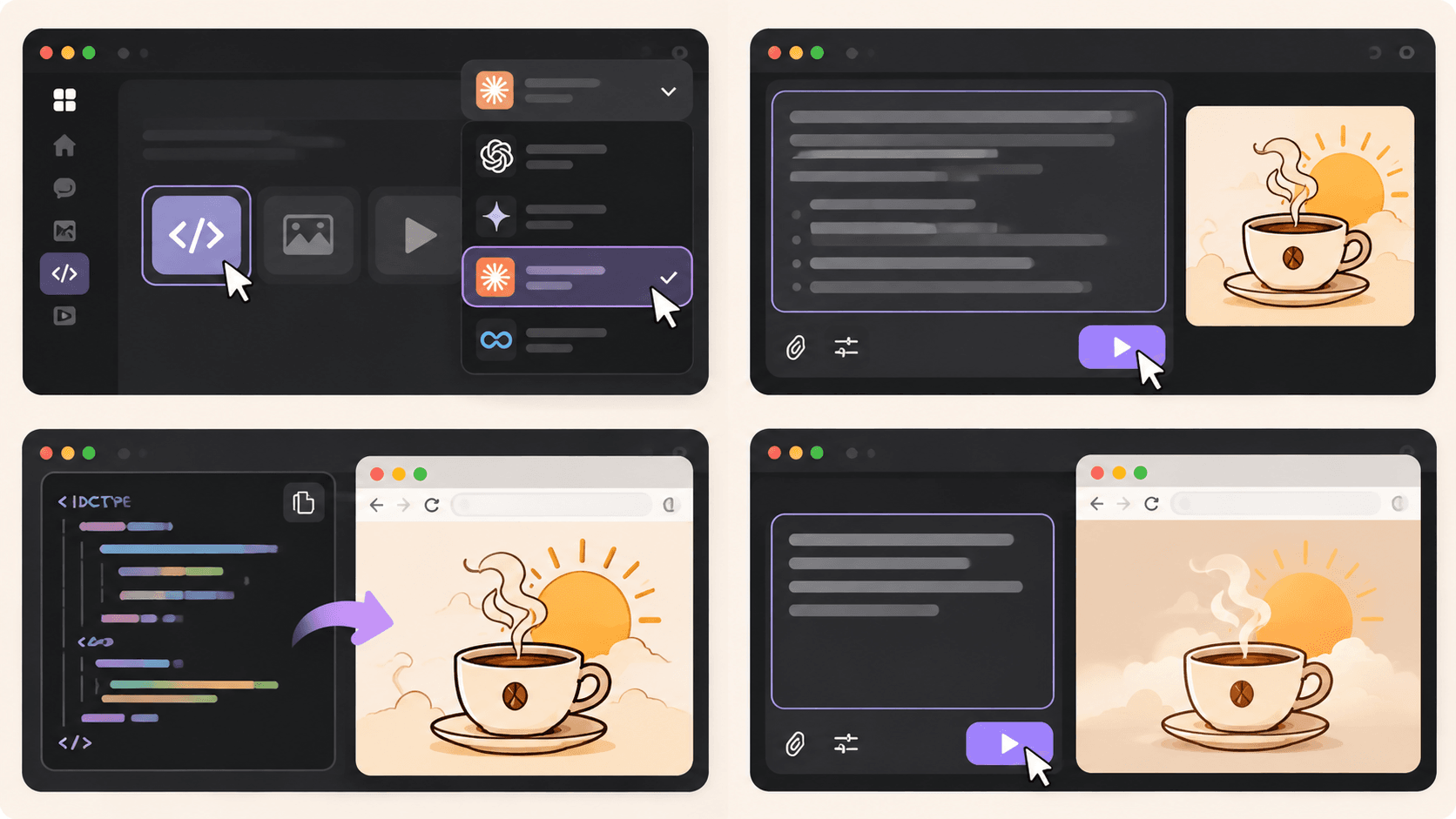
Step 1: Open AI Code and Select Claude Fable 5.1
First, visit 1min.AI's Code Generator.
Open AI for Code → Code Generator and select Claude Fable 5.1 from the available AI models.
Next, think about the animation you want to create.
For our coffee brand, we want a hand-drawn coffee cup with gently rising steam and a warm sunrise in the background.
The more clearly you describe your idea, the easier it is for Claude to understand the intended design.
Step 2: Enter Your SVG Animation Prompt
Now, let's turn that idea into an animation.
You don't need to write the SVG or CSS yourself. Start with a detailed prompt that describes the illustration, colors, and movement.
Copy-Ready Prompt — Animated Coffee Cup
Act as a creative front-end developer specializing in SVG animations.
Create a complete, self-contained HTML file with an animated SVG illustration for Morrow Coffee, a fictional specialty coffee brand.
Creative direction: First Light — warm, minimal, calm, and inspired by peaceful mornings.
Design requirements:
- A hand-drawn coffee cup as the main illustration.
- Soft steam gently rising from the cup.
- A golden sun slowly appearing behind the cup.
- A minimal background with warm cream colors.
Brand color palette:
- First Light: #F2C98A
- Dawn Blush: #E7B497
- Morning Linen: #EADFCB
- Roast: #6B4A3A
Animation requirements:
- Use inline SVG and CSS animations.
- Make the steam move naturally and continuously.
- Add a slow, subtle sunrise effect.
- Keep the animation smooth, responsive, and seamlessly looping.
- Support
prefers-reduced-motionwith a static version.- Do not use external libraries, images, or fonts.
- Include all HTML, CSS, and SVG in one file.
Return the complete HTML code so I can save it as
coffee-animation.htmland open it directly in Chrome.
Once you've entered the prompt, click Run and let Claude generate the code.
The result should be a complete HTML file containing your SVG illustration and animation styles.
Step 3: Preview Your SVG Animation
Once Claude finishes generating the code, it's time to see your design in action.
Follow these simple steps:
- Copy the complete HTML code generated by Claude.
- Open a text editor such as Notepad or Visual Studio Code.
- Paste the code and save it as
coffee-animation.html. If you're using Notepad, choose All Files as the file type. - Double-click the HTML file to open it in Chrome.
You should now see your animated coffee cup in the browser.
For our Morrow Coffee concept, the illustration features a minimal coffee cup, rising steam, and a soft golden sun.
Tip: Save the generated code as an .html file, not a .txt file. This lets the browser render the SVG and run its CSS animations.
The preview is a web page containing an animated SVG, rather than an exported GIF or video.
Step 4: Customize Your Animation
Your first result doesn't have to be perfect.
Maybe the steam moves too quickly, the sun feels too bright, or the illustration doesn't quite match your brand.
You can return to Claude and describe what you'd like to change.
Try this follow-up prompt:
Refine the SVG animation to make it feel more natural and elegant.
Slow down the rising steam, soften the sunrise effect, and keep the movement subtle.
Maintain the original First Light color palette and illustration style.
Return the complete updated HTML code so I can replace my previous version.
Generate the updated code, save your file again, and refresh the browser to compare the results.
This process makes it easier to experiment with different animation styles without manually editing every line of CSS.
For better visual results, you can also explore our guide on how to write more intentional AI design prompts.
Real Example: Morrow Coffee SVG Animation
For our Morrow Coffee project, we wanted to create an animation that matched the brand's calm, premium personality.
Instead of using fast transitions or dramatic effects, we focused on three simple elements:
The coffee cup: A minimal, hand-drawn illustration representing the brand.
The rising steam: Gentle movement that makes the illustration feel warm and inviting.
The morning sun: A subtle sunrise effect that connects the animation to the First Light concept.
Together, these elements create a small animated illustration that could be used in a website hero section or a creative portfolio.
The most important lesson is that a good SVG animation doesn't need complicated effects. A few carefully chosen movements can make a design more engaging while preserving its visual identity.
Watch the Full Claude Animation Tutorial
Want to see the actual workflow?
In our video, we use Claude on 1min.AI to brainstorm the Morrow Coffee concept, generate an animated SVG illustration, and build a creative portfolio website.
You'll see how a simple creative idea can become working animation code.
Tips for Creating Better SVG Animations With AI
If you're using an AI SVG animation generator, a few small changes to your prompts can make a big difference.
1. Describe the movement clearly
Instead of asking for "a cool animation," explain exactly what should move and how. For example, ask for steam that rises slowly and fades naturally.
- Keep the animation simple
Start with one or two moving elements. Too many effects can distract from the design and make the animation feel overwhelming.
3. Use your brand colors
Provide specific HEX codes so Claude can keep the illustration consistent with your visual identity.
4. Test your animation in the browser
Check that everything displays correctly, loops smoothly, and works at different screen sizes. Reduce unnecessary motion and provide a static alternative when appropriate.
Where Can You Use SVG Animations?
Once your animation is working, you can use similar techniques for website illustrations, animated brand graphics, loading indicators, and portfolio presentations.
For example, a freelance designer could use an animated illustration to make a project case study more engaging.
If you want to take the next step, our guide on building a portfolio website with 1min.AI explains how to create a website using AI-generated code.
For a broader creative process, you can also explore how to organize your design workflow with 1min.AI.
Before publishing, test the animation in its intended environment. Some platforms restrict inline SVG or custom CSS, so you may need to adjust how the animation is embedded.
Start Creating SVG Animations With Claude
Creating SVG animations doesn't have to mean writing code from scratch.
With Claude Fable 5.1 on 1min.AI, you can describe an illustration, generate the HTML and SVG code, preview the animation, and refine the result until it matches your creative direction.
Whether you're experimenting with animated logos, website illustrations, or personal branding projects, start with a simple idea and build from there.
🚀 Try Claude Fable 5.1 on 1min.AI and bring your designs to life with SVG animation.
- #Informational
Alternatibak
Ezagutu 1minAI-ren alternatiba onenak eta alderatu ezaugarriak, prezioak eta erabilera kasuak.

1min.AI vs OpenRouter
1min.AI vs. OpenRouter: alderatu erabilerarako prest dagoen AI sorkuntza-produktua eta API tresna teknikoa. Jakin ezazu zero-code sormen-estudio bat behar duzun edo kode bidezko azpiegitura-zentro bat.
 Ngoc Hong

1min. AI vs Dola AI
Dola AI alternatiba baten bila? Konparatu 1min.AI eta Dola AI bideo-sorkuntzan, doako planetan, prezioetan eta pribatutasunean, zuretzat egokia den AI aplikazioa aukeratzeko.
Ngoc Hong
1minAI vs Hix AI
5 HIX AI alternatiba alderatu AI txat, ikerketa, idazketa, irudiak, bideoa, prezioak eta AI lan-fluxu malguetarako.
Ngoc HongAdimen Artifizialeko Tresnak
Produktibitatea, sormena eta eguneroko lana bultzatzeko AI tresna onenak ezagutu.

Sortu marrazki bizidun eduki koherentea urrats gutxitan
Sortu marrazki bizidunetako bideoak TikTok eta Reelserako 3 urrats errazetan 1min.AI-rekin, ideiak ikertzetik pertsonaia eta bideo animatuetara.
 Lien Anh Vu

Produktu Bat, 10 UGC Sormen: Nola Errazten duen AI-k Edukien Probak
Sortu UGC benetakoagoa AI UGC bideo-sorgailu batekin, probatu sormen-ikuspegi gehiago eta eskalatu afiliatu edukia bertsio bakoitza grabatu gabe.
Lien Anh Vu
Sortzaileentzako Aurrekontu Neurriko 4 AI Tresna Nagusiak
Ezagutu startup-sortzaileentzako aurrekontu neurriko 4 AI tresna nagusiak: ideiak baliozkotzeko, produktuak eraikitzeko, edukia sortzeko eta azkarrago abiarazteko, gehiegi gastatu gabe.
 Tram Ta
Adimen Artifizialeko Ezaugarriak
Adimen Artifizialeko ezaugarri osoak: lan-prozesuak errazten dituzte, eraginkortasuna hobetzen dute eta taldeei gehiago lortzen laguntzen diote.
Sortu marrazki bizidun eduki koherentea urrats gutxitan
Sortu marrazki bizidunetako bideoak TikTok eta Reelserako 3 urrats errazetan 1min.AI-rekin, ideiak ikertzetik pertsonaia eta bideo animatuetara.
Lien Anh VuProduktu Bat, 10 UGC Sormen: Nola Errazten duen AI-k Edukien Probak
Sortu UGC benetakoagoa AI UGC bideo-sorgailu batekin, probatu sormen-ikuspegi gehiago eta eskalatu afiliatu edukia bertsio bakoitza grabatu gabe.
Lien Anh Vu
1minAI: Doako AI Gramatika Egiaztatzailea
Egiaztatu gramatika doan 1minAIren AI gramatika egiaztatzailearekin. Aurkitu gramatika-, ortografia- eta idazketa-akatsak, hobetu argitasuna eta findu zure edukia segundotan.
Tram TaAdimen Artifizialaren erabilera-kasuak
Enpresa-, produktibitate- eta sektore-espezifikoko aplikazioetarako aukeratutako Adimen Artifizialaren erabilera-kasuak.
Sortu marrazki bizidun eduki koherentea urrats gutxitan
Sortu marrazki bizidunetako bideoak TikTok eta Reelserako 3 urrats errazetan 1min.AI-rekin, ideiak ikertzetik pertsonaia eta bideo animatuetara.
Lien Anh VuProduktu Bat, 10 UGC Sormen: Nola Errazten duen AI-k Edukien Probak
Sortu UGC benetakoagoa AI UGC bideo-sorgailu batekin, probatu sormen-ikuspegi gehiago eta eskalatu afiliatu edukia bertsio bakoitza grabatu gabe.
Lien Anh Vu
Instagramen argitaratzeko unerik onena: konpromiso hobea lortzeko gida praktikoa
Ezagutu Instagramen argitaratzeko unerik onena, audientzia desberdinetarako egun eta ordu onenak barne, eta zure konturako argitaratze-egutegi aproposa aurkitzeko aholkuak.
Tram TaAdimen Artifizialeko Tutorialak
Ikasi adimen artifiziala erabiltzen urratsez urratseko tutorial praktikoekin.
Sortu marrazki bizidun eduki koherentea urrats gutxitan
Sortu marrazki bizidunetako bideoak TikTok eta Reelserako 3 urrats errazetan 1min.AI-rekin, ideiak ikertzetik pertsonaia eta bideo animatuetara.
Lien Anh Vu
2026ko Black Friday AI tresnen eskaintzak
Ezagutu 2026ko Black Friday AI tresnen eskaintzek zer eskaintzen duten. Jakin nola lortu 1min.AI-ren bizitza osorako eskaintza AppSumo, Dealify eta Stack Social bidez, eta egiaztatu Trustpilot, Slashdot eta Software Advice-n.
 Hang Nguyen

AI irudi-bideora produktu koherentzia Seedance-rekin, distortsioak geldiarazteko eta produktu-iruzkinak eskalatzeko
Gelditu logotipoen distortsioa AI irudi-bideora produktu koherentzia erabiliz eta sortu estudio-mailako berrikuspen-bideoak gaur bertan 1min.AI-n.
Lien Anh VuAI Gidak
Ikasi AI azkarrago gida praktikoekin, mundu errealeko adibideekin eta ekintzaileentzako praktika onenekin.
Sortu marrazki bizidun eduki koherentea urrats gutxitan
Sortu marrazki bizidunetako bideoak TikTok eta Reelserako 3 urrats errazetan 1min.AI-rekin, ideiak ikertzetik pertsonaia eta bideo animatuetara.
Lien Anh Vu
Safely Buy AI Tools Online: 2026 Black Friday Guide
Ezagutu nola aurkitu eta ziurtatu online Black Friday-ko AI eskaintzarik onenak. Ikasi iruzurrak saihesteko, harpidetza-nekea gainditzeko eta softwarea egiaztatzeko estrategia adituak.
Hang NguyenAI irudi-bideora produktu koherentzia Seedance-rekin, distortsioak geldiarazteko eta produktu-iruzkinak eskalatzeko
Gelditu logotipoen distortsioa AI irudi-bideora produktu koherentzia erabiliz eta sortu estudio-mailako berrikuspen-bideoak gaur bertan 1min.AI-n.
Lien Anh VuAdimen Artifizialeko Soluzioak
Arakatu adimen artifizialeko irtenbide onenak automatizaziorako, kodetzerako, ikerketarako, produktibitaterako, bezeroarentzako arretarako, marketinerako eta negozio-fluxuetarako.
Sortu marrazki bizidun eduki koherentea urrats gutxitan
Sortu marrazki bizidunetako bideoak TikTok eta Reelserako 3 urrats errazetan 1min.AI-rekin, ideiak ikertzetik pertsonaia eta bideo animatuetara.
Lien Anh VuProduktu Bat, 10 UGC Sormen: Nola Errazten duen AI-k Edukien Probak
Sortu UGC benetakoagoa AI UGC bideo-sorgailu batekin, probatu sormen-ikuspegi gehiago eta eskalatu afiliatu edukia bertsio bakoitza grabatu gabe.
Lien Anh Vu
AI Tatuaje Sortzaile Doakoa: Diseinu Pertsonalizatuak
Bihurtu edozein ideia tatuaje diseinu pertsonalizatu batean 1min.AI-ren AI tatuaje sortzaile doakoarekin. Deskribatu zure ideia, aukeratu estilo bat, eta deskargatu segundotan.
 Trang Tran
AI Ereduak
Arakatu munduko AI eredu nagusiak leku bakarrean.
Sortu marrazki bizidun eduki koherentea urrats gutxitan
Sortu marrazki bizidunetako bideoak TikTok eta Reelserako 3 urrats errazetan 1min.AI-rekin, ideiak ikertzetik pertsonaia eta bideo animatuetara.
Lien Anh VuProduktu Bat, 10 UGC Sormen: Nola Errazten duen AI-k Edukien Probak
Sortu UGC benetakoagoa AI UGC bideo-sorgailu batekin, probatu sormen-ikuspegi gehiago eta eskalatu afiliatu edukia bertsio bakoitza grabatu gabe.
Lien Anh VuAI irudi-bideora produktu koherentzia Seedance-rekin, distortsioak geldiarazteko eta produktu-iruzkinak eskalatzeko
Gelditu logotipoen distortsioa AI irudi-bideora produktu koherentzia erabiliz eta sortu estudio-mailako berrikuspen-bideoak gaur bertan 1min.AI-n.
Lien Anh VuAI Konparaketak
Konparatu AI tresnak, ereduak eta plataformak zure beharretara hobekien egokitzen dena aurkitzeko.

Kling AI Vs Veo 3: Zein ereduk irabazten du?
Kling AI vs Veo 3: alderatu mugimendua, jatorrizko audioa, prezioak eta doako planak zure proiekturako zein AI bideo-sortzaile den hobea ikusteko — saiatu biak 1min.AI-n.
Trang TranAI irudi-bideora produktu koherentzia Seedance-rekin, distortsioak geldiarazteko eta produktu-iruzkinak eskalatzeko
Gelditu logotipoen distortsioa AI irudi-bideora produktu koherentzia erabiliz eta sortu estudio-mailako berrikuspen-bideoak gaur bertan 1min.AI-n.
Lien Anh Vu
DeepSeek V4 Pro vs Flash Konparazioa
Konparatu DeepSeek V4 Pro eta DeepSeek V4 Flash-en metrikak. Optimizatu zure agente-aplikazioak eta hobetu AI egiaztapena 1min.ai-n gaur.
Ngoc HongAdimen Artifizialaren integrazioak
Integratu Adimen Artifiziala zure dagoeneko erabiltzen dituzun tresnekin modu erraz eta eraginkorrean, lanak automatizatzeko eta produktibitatea handitzeko.

Nola Erabili AI Moda Bideo Sortzaile bat Fashion Week 2026rako
Bihurtu Fashion Week 2026ko ideiak moda-bideo harrigarrietan AI-rekin. Ikasi nola ideiak sortu, ikus-entzunezkoak sortu eta irudiak bideo bihurtu lan-fluxu erraz bakar batekin.
Lien Anh Vu
POV: Egunero 10+ argitalpen egin behar dituzu
Ikasi nola eraiki AI edukien workflow bat, edukia sortzen duten pertsonei egunean 10+ sare sozialetako argitalpen azkarrago ekoizten laguntzeko, AI bidezko brainstorming, irudi-sorkuntza eta edukien sorkuntzarekin.
Lien Anh Vu
Utzi AI aplikazioen artean salto egiteari: Nola eraldatzen duen AI integrazioak enplegatzailearen marka
Ezagutu nola laguntzen duen AI integrazioak HR taldeei enplegatzailearen marka arintzen, AI idazketa, dokumentuak, irudiak, bideoa eta AI eredu anitz lan-eremu bakarrean uztartuz.
Tram TaAdimen Artifiziala Industrietarako
Aurkitu adimen artifizialeko tresna eta lan-fluxu onenak osasungintzan, finantzetan, hezkuntzan, zuzenbidean, manufakturan, txikizkako merkataritzan, higiezinetan eta gehiagotan.

AI Produktu Deskribapen Sortzaile Doakoa
Idatzi salmenta egiten duten produktu-deskribapenak minutu gutxitan. Erabili AI produktu-deskribapen sortzaile doako hau xehetasunak edo argazki bat marka-tonuarekin bat datorren testu bihurtzeko. Saiatu 1min.AI.
Trang Tran
Startupearentzako negozio-ekoizkortasuneko tresna onenak irabaziak maximizatzeko | 1minAI
Ezagutu startupearentzako negozio-ekoizkortasuneko tresna onenak denbora aurrezteko, lan-fluxuak errazteko, zeregin errepikakorrak murrizteko eta hazkunde errentagarria AIarekin babesteko.
Tram Ta
Eduki marketinerako AI tresna onena |1minAI
Eduki marketinerako AI tresna onena bilatzen ari zara? Ikusi nola laguntzen dien 1minAI-k marketineko profesionalei ikertzen, idazten, birpentsatzen, ikus-entzunezkoak sortzen eta edukia AI lan-espazio bakar batetik eskalatzen.
Tram TaAdimen Artifizialeko Agenteak
Ezagutu eta exekutatu AI agenteak zure laneko eta eguneroko bizitzako zereginak automatizatzeko.
1minAI: Doako AI Gramatika Egiaztatzailea
Egiaztatu gramatika doan 1minAIren AI gramatika egiaztatzailearekin. Aurkitu gramatika-, ortografia- eta idazketa-akatsak, hobetu argitasuna eta findu zure edukia segundotan.
Tram Ta
AI agenteak Facebookerako
Erabili AI agente bat Facebookerako edukia sortzeko, irudiak sortzeko, argitalpenak programatzeko eta zure dokumentu eta elkarrizketetatik argitaratzeko.
Ngoc Hong
AI Agent vs AI Assistant: Diseinatzaileei zeinek aurrezten die denbora gehiago benetan?
Ikasi AI Agent vs AI Assistant arteko aldea, eta aurkitu zein irtenbidek laguntzen dien diseinatzaileei lan errepikakorrak automatizatzen, berrikuspenak murrizten eta denbora gehiago aurrezten.
Lien Anh VuAdimen Artifizialeko Lan-fluxuak
Arakatu prest dauden Adimen Artifizialeko lan-fluxuak produktibitaterako, marketinerako, salmentarako, euskararako eta gehiagorako.
Sortu marrazki bizidun eduki koherentea urrats gutxitan
Sortu marrazki bizidunetako bideoak TikTok eta Reelserako 3 urrats errazetan 1min.AI-rekin, ideiak ikertzetik pertsonaia eta bideo animatuetara.
Lien Anh VuProduktu Bat, 10 UGC Sormen: Nola Errazten duen AI-k Edukien Probak
Sortu UGC benetakoagoa AI UGC bideo-sorgailu batekin, probatu sormen-ikuspegi gehiago eta eskalatu afiliatu edukia bertsio bakoitza grabatu gabe.
Lien Anh VuNola Erabili AI Moda Bideo Sortzaile bat Fashion Week 2026rako
Bihurtu Fashion Week 2026ko ideiak moda-bideo harrigarrietan AI-rekin. Ikasi nola ideiak sortu, ikus-entzunezkoak sortu eta irudiak bideo bihurtu lan-fluxu erraz bakar batekin.
Lien Anh VuBuletina
Astero 1minAIrekin AIko berrikuntzak

🔮 Asteko AI Berrikuntzak #142: Grok 4.7, Opus 5.5 eta Sonnet 5.5 1min.ai-n
Sartu Grok 4.7, Claude Opus 5.5 eta Sonnet 5.5 1min.ai-n. Murriztu harpidetza-gastuak %70eraino eta prozesatu milioika token lan-gune bateratu bakar batean.
Hang Nguyen
🔮 Asteko AI Berrikuntzak #143: Eguneraketa Eguneraketa GPT-6, GPT-6.1 eta Ideogram 4.0 eta Ideogram 4.0
Sartu GPT-6 Sol, Luna, GPT-6.1 Sol eta Ideogram 4.0 1min.ai-n. Hobetu tipografiaren zehaztasuna %98,4ra eta murriztu arrazoiketa-latentzia %45ean plataforma bakarrean.
Hang Nguyen
🔮 AI Berrikuntzak Astero #141: Seedance 2.5 eta Stable Audio 3: Hurrengo Belaunaldiko AI
Arakatu Seedance 2.0, 2.5 eta StabilityAI-ren Stable Audio 3 1min.ai-n. Sortu estudio-mailako audioa eta mugimendu sinkronizatua hurrengo belaunaldiko AI sortzailearekin.
Hang Nguyen