
TikTok Creative Center Trends for Better Video Ideas
20 de novembre del 2026
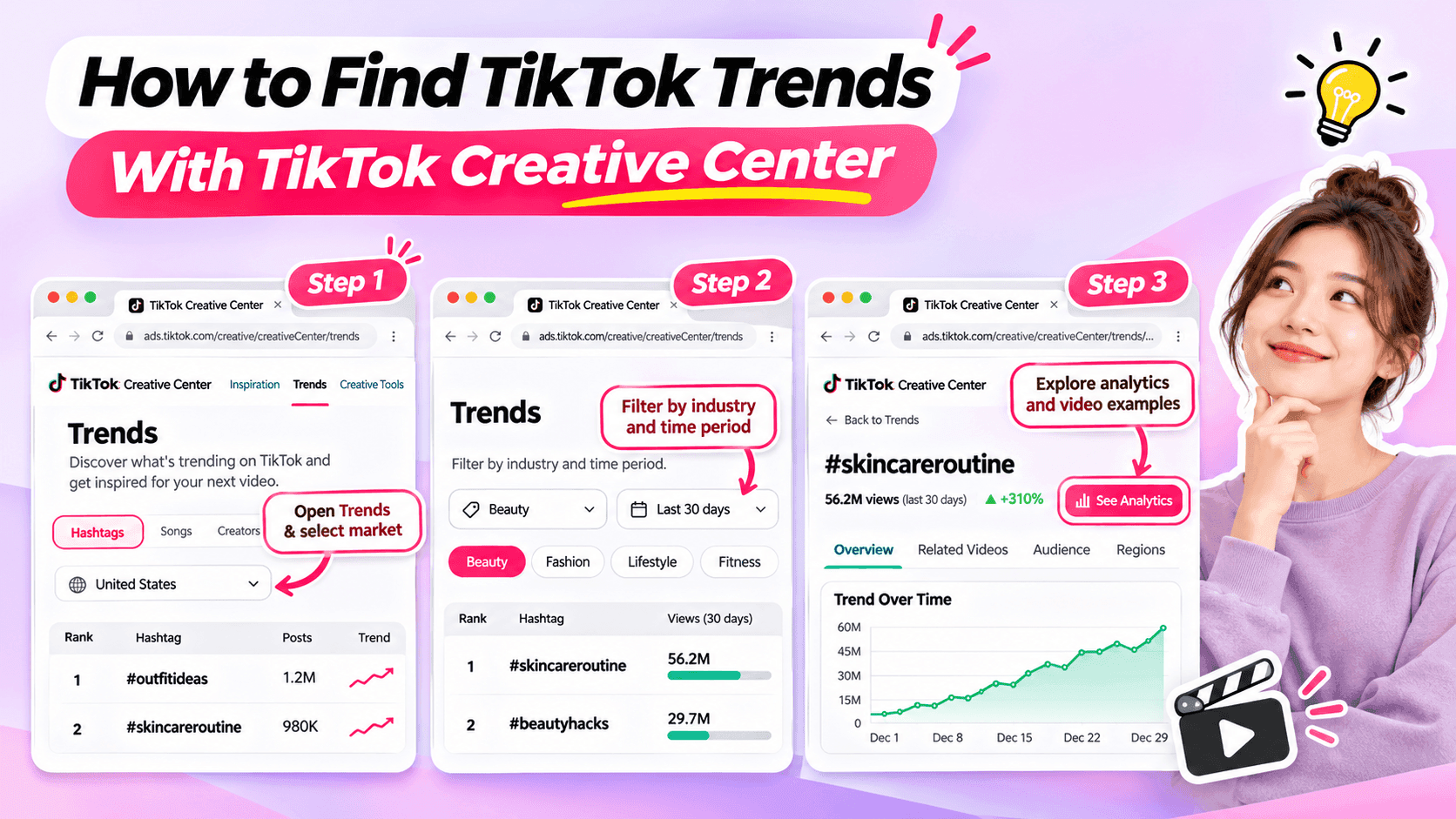
Learn how to use TikTok Creative Center to find trending hashtags and videos. Discover relevant trends and turn them into original ideas for your niche.
Looking for fresh TikTok video ideas but don't know where to start? TikTok Creative Center can help you discover trending hashtags, explore popular video formats, and find inspiration for your next post.
For influencers, the challenge isn't simply finding what's trending. It's choosing trends that match your niche, audience, and personal style.
In this beginner-friendly guide, you'll learn how to use TikTok Creative Center to find trends, understand what makes them interesting, and turn them into original video ideas. You'll also see how AI can help when you need extra inspiration.
What Is TikTok Creative Center?
TikTok Creative Center is a free creative research platform provided by TikTok for Business.
It helps users discover trends, explore creative examples, and learn about content formats on TikTok.
Although the platform includes advertising resources, influencers can also use its trend research features to find inspiration for organic content.
Here are the most useful features for beginners.
| Feature | What It Does | Why Influencers Might Use It |
|---|---|---|
| Trending Hashtags | Shows hashtags and trend information | Discover topics worth exploring |
| Hashtag Analytics | Provides available trend data and related content | Understand how a hashtag is being used |
| Trending Videos | Shows examples of popular TikTok videos where available | Explore creative approaches and formats |
| Top Ads | Provides examples of advertising creatives | Study creative techniques while recognizing that ad results differ from organic performance |
For example, a fashion influencer might use TikTok Creative Center to identify a popular styling theme and explore how people are presenting their outfits.
A fitness influencer might use it to find relevant workout-related discussions or formats.
The key is to use TikTok Creative Center as a source of inspiration, not a list of videos to copy.
How to Find TikTok Trends With Creative Center
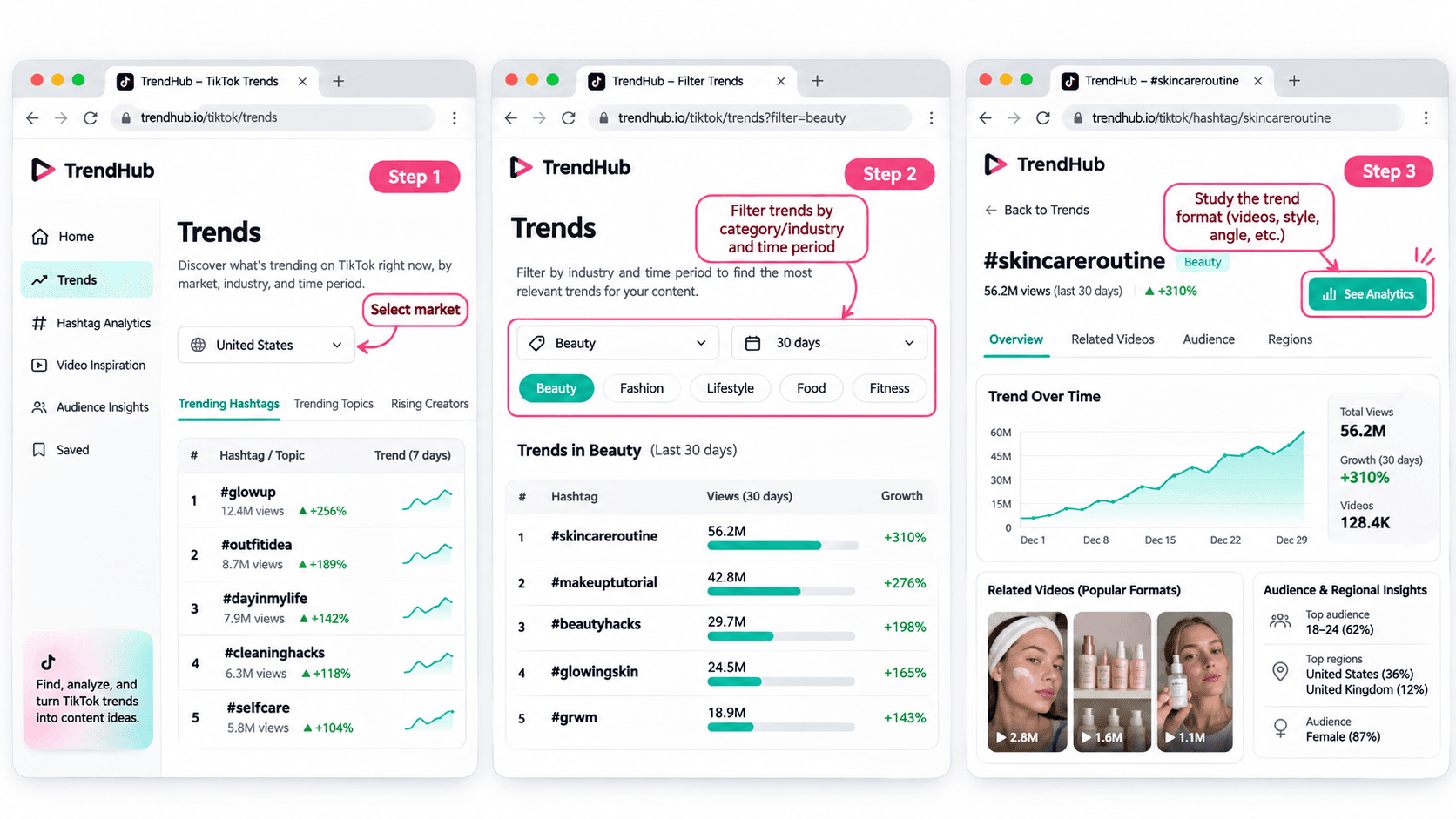
You don't need advanced marketing experience to get started.
Follow these five steps to discover and evaluate trends for your next TikTok video.
Step 1 Open TikTok Creative Center
Tool: TikTok Creative Center
Input: Your target market and influencer niche
Output: A list of trends to explore
Start by visiting the TikTok Creative Center Trends page.
On the platform:
- Open the Trends section.
- Select the Hashtag view if needed.
- Choose your target country or region when the option is available.
- Review the trending hashtags displayed.
You may be asked to log in to access additional rankings or analytics.
For example, if you're a beauty influencer targeting viewers in the United States, choose the United States when researching local trends.
This helps you explore content that may be more relevant to the audience you want to reach.
Beginner tip: Start with one market and one niche. You don't need to research every trend on TikTok.
Step 2 Filter Trends by Industry and Time Period
Input: Your niche and preferred research period
Output: A more focused selection of trends
TikTok Creative Center supports searching or filtering trending hashtags by industry and time frame.
Depending on the available interface, you can narrow your research using relevant categories.
For example:
| Influencer Niche | Research Direction |
|---|---|
| Beauty | Makeup techniques, beauty routines, skincare discussions |
| Fashion | Outfit styling, wardrobe inspiration, personal style |
| Fitness | Workout routines, training experiences, exercise discussions |
| Lifestyle | Everyday routines, organization, personal experiences |
| Technology | Device features, useful tools, technology discussions |
These are example research directions, not verified currently trending hashtags.
Once you have filtered the results, look for hashtags and topics that could make sense for your audience.
Avoid selecting a trend simply because it has the highest number of views.
A smaller, relevant trend may be more useful to your personal brand than a popular topic unrelated to your niche.
Step 3 Explore Hashtag Analytics
Input: A relevant hashtag
Output: More information about the trend and its related videos
When a hashtag catches your attention, select See Analytics if available.
TikTok's official Trends documentation describes several types of information that may appear, including:
- Trendlines showing how interest has changed.
- Related videos.
- Audience insights.
- Regional popularity.
- Related hashtags.
You don't have to analyze every metric.
For beginners, focus on three questions:
Is the topic relevant to my audience?
A popular hashtag is not automatically useful to your followers.
How are people using the hashtag?
Look at the related videos to understand the stories, formats, and approaches people are sharing.
Can I contribute something different?
Consider what personal experience, expertise, or perspective you could add.
For example, if you find a styling-related hashtag, review the videos to identify common approaches.
Some may show outfit combinations. Others may focus on accessories or personal styling tips.
Instead of copying those videos, use them to understand the topic and think about your own angle.
Step 4 Study the Video Format
Input: Related videos from your selected trend
Output: A creative structure you can adapt
Once you've found a relevant trend, watch a few videos and identify what makes the format recognizable.
Pay attention to:
- The opening scene.
- The main idea.
- The order of the shots.
- The visual changes.
- The ending.
For example, consider a before-and-after transformation format.
The structure is simple:
Before → Transformation → After
Different influencers could use that structure in different ways.
| Influencer Niche | Possible Video Idea |
|---|---|
| Fashion | Turn a casual outfit into an evening look |
| Beauty | Show a personal everyday makeup transformation |
| Fitness | Show a genuine change in a workout routine |
| Lifestyle | Transform a messy desk into an organized workspace |
These examples illustrate how a format can be adapted. They are not presented as verified current TikTok trends.
The format can stay similar while the content reflects each influencer's own experiences.
That's how you move from discovering a trend to developing an original idea.
Step 5 Save Your Trend Research
Input: Your selected trend and observations
Output: A short creative brief for your next video
Before leaving Creative Center, save the most useful information.
You can use this simple worksheet.
| Research Field | Example |
|---|---|
| Influencer niche | Everyday fashion |
| Target audience | Young adults who enjoy simple outfit inspiration |
| Trend format | Before-and-after transformation |
| What makes it interesting | A visible change between two looks |
| Personal angle | One jacket styled for different occasions |
| Possible video idea | Three ways to style one jacket |
| Next action | Write a short video concept |
This short brief helps you remember why the format interested you.
It also gives you useful information if you want to brainstorm additional ideas with AI.
How to Choose TikTok Trends That Fit Your Niche
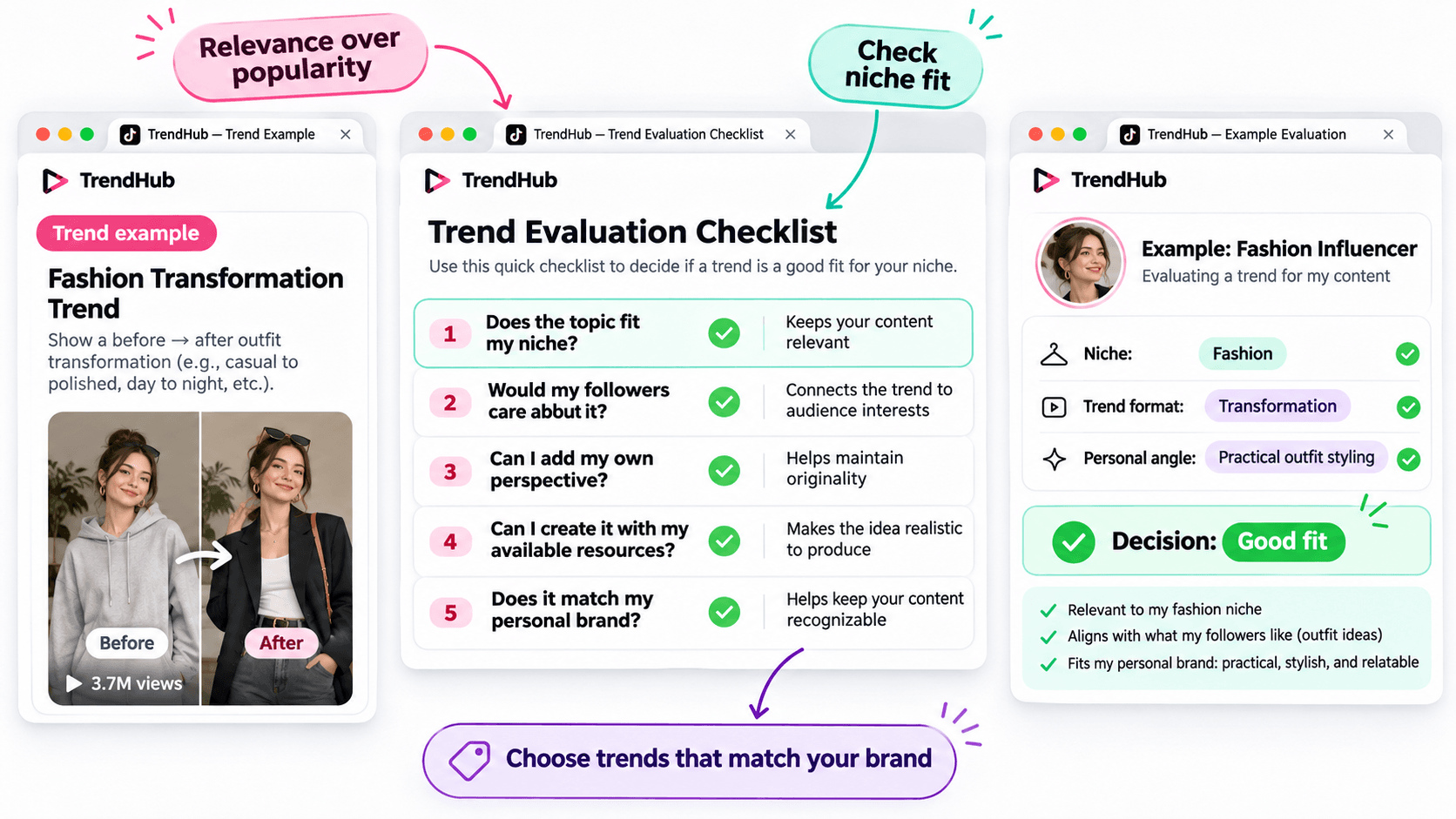
Not every popular trend deserves a place in your content plan.
Before adapting a trend, make sure it matches the kind of content your followers expect from you.
Use this simple checklist.
| Question | Why It Matters |
|---|---|
| Does the topic fit my niche? | Keeps your content relevant |
| Would my followers care about it? | Connects the trend to audience interests |
| Can I add my own perspective? | Helps maintain originality |
| Can I create it with my available resources? | Makes the idea realistic to produce |
| Does it match my personal brand? | Helps keep your content recognizable |
You don't need to answer yes to every question perfectly, but a trend should have a clear reason to belong in your content plan.
For example, imagine you're a fashion influencer who usually shares practical outfit ideas.
A transformation format could be useful if it allows you to demonstrate real styling advice.
However, an unrelated trend may not provide the same value to your audience.
Choose trends based on relevance and creative fit rather than popularity alone.
How to Turn a TikTok Trend Into an Original Video Idea
Finding a trend is only the beginning.
The next challenge is turning it into a video that feels like your own.
You can do this using three simple steps.
Step 1 Identify the Basic Creative Format
Look beyond the hashtag and focus on the structure.
For example:
Format: Before-and-after transformation.
Core idea: Show a visible change.
Possible applications: Outfit styling, makeup, workspace organization, or a genuine personal routine change.
This gives you a flexible creative direction.
Step 2 Add Your Personal Perspective
Ask yourself what you can contribute that another influencer hasn't already shown.
For example, a fashion influencer could use the transformation format to demonstrate how one favorite jacket works with different outfits.
The video could follow this structure:
Opening: Show the jacket and introduce the challenge.
Middle: Demonstrate three outfit combinations.
Ending: Ask followers which look they prefer.
This is a more personal concept than simply recreating a trending video.
Step 3 Develop a Simple Video Concept
Write down your idea before filming.
Example Video Concept
| Element | Example |
|---|---|
| Topic | Styling one jacket |
| Audience | Everyday fashion followers |
| Hook | "Can I style this jacket for three different occasions?" |
| Main Content | Show three outfit combinations |
| Ending | "Which look would you wear?" |
You now have a practical starting point for your next TikTok video.
You can develop the script yourself or use an AI assistant if you'd like to explore more creative approaches.
How to Brainstorm More TikTok Video Ideas With 1min.AI
Sometimes, you find an interesting trend but can't decide how to adapt it.
This is where 1min.AI Multi AI Chat can help.
You can use it to explore different content angles, develop hooks, and organize your ideas.
You don't need to use AI for every trend. It's an optional step when you want additional inspiration.
Step 1 Prepare Your Trend Information
Input: Your niche, audience, trend format, and personal style.
Let's continue with the fashion example.
| Input | Example |
|---|---|
| Niche | Everyday fashion |
| Audience | Young adults interested in practical outfits |
| Personal style | Friendly, natural, and relatable |
| Trend format | Before-and-after transformation |
| Content goal | Generate original outfit video ideas |
This gives AI enough context to generate suggestions that are more relevant than a general list of random TikTok ideas.
Step 2 Use Multi AI Chat to Explore Creative Angles
1min.AI Tool: Multi AI Chat
Output: Several video concepts with hooks and creative approaches.
Open 1min.AI and choose Multi AI Chat.
You can use one available AI model or compare suggestions from multiple models.
Copy the prompt below and replace the example information with your own.
Copyable TikTok Trend Adaptation Prompt
ROLE
Act as a TikTok content strategist who helps influencers create original short-form video ideas.
AUDIENCE
My influencer niche is [your niche].
My followers are [describe your audience].
PERSONAL BRAND
My communication style is [your tone and personality].
TREND INPUT
The TikTok trend or video format I found is [describe the verified format].
The main creative structure is [describe how the format works].
TASK
Suggest 5 original TikTok video ideas inspired by this format.
OUTPUT FORMAT
Create a table with:
- Video Idea
- Creative Angle
- Opening Hook
- Three-Part Video Outline
- Why It Fits My Audience
REQUIREMENTS
Keep the ideas easy to produce, authentic, and relevant to my niche. Do not copy another influencer's content, invent personal experiences, or claim that a trend guarantees viral results.
This format works for different influencer niches because you control the inputs.
For example, a beauty influencer can use the same prompt with a makeup-related trend, while a lifestyle influencer can use it with a home organization format.
Step 3 Review and Personalize the Suggestions
AI can help you explore options, but you should select the concept that genuinely fits your audience.
Here are three illustrative ideas for the fashion example.
| Video Idea | Creative Angle | Opening Hook |
|---|---|---|
| One Jacket Three Occasions | Show styling versatility | "Can one jacket work for three different plans?" |
| Casual to Evening Look | Show a simple outfit transformation | "Here's how I'd change this outfit for the evening." |
| Three Accessories One Outfit | Show how details change a look | "Watch how these accessories change the same outfit." |
These are examples of possible ideas, not documented outputs from a live 1min.AI session.
Choose one and adjust the details based on your own wardrobe and experience.
If you want a more detailed walkthrough of Multi AI Chat, read How Multiple AI Chat Helps Content Creators Create Better Content.
You can also watch the tutorial embedded in that guide to see how different AI models can help you compare content ideas.
For more ways to use AI throughout your creative process, explore Free AI Tools for Influencers to Create More Content.
Common Mistakes When Using TikTok Creative Center
Choosing Trends Only Because They Have High Views
A popular hashtag does not guarantee that your video will perform well.
Consider whether the trend fits your audience and whether you can contribute something useful or entertaining.
Copying Another Influencer's Video
Watching examples is useful for understanding a format.
However, repeating another person's creative work without adding your own contribution will not help you build a distinctive personal brand.
Use trends as inspiration, not finished scripts.
Ignoring Your Target Market
Trends can differ by location and audience.
When possible, choose the market that matches the people you're trying to reach.
Confusing Ad Performance With Organic Video Results
TikTok Creative Center includes advertising resources such as Top Ads.
These examples can provide creative inspiration, but advertising performance should not be treated as proof that a similar organic TikTok video will achieve the same results.
Assuming AI Knows Which Trends Are Currently Popular
AI can generate creative ideas based on the information you provide, but you should not assume it has verified the latest TikTok trends.
Research trends in TikTok Creative Center first, then provide those findings to AI.
Frequently Asked Questions
Is TikTok Creative Center Free?
Yes. TikTok describes Creative Center as a free public resource.
However, some detailed views or features may require logging in, and availability can vary.
How Do I Find Trending Hashtags on TikTok Creative Center?
Open the Trends section, select the available hashtag view, and use the search or filtering options.
When available, select See Analytics to explore more information about a hashtag.
Can Influencers Use TikTok Creative Center?
Yes. Although Creative Center is part of TikTok for Business, influencers can use its publicly available trend information to research topics, formats, and creative inspiration.
Does Using a Trending Hashtag Guarantee More Views?
No. A hashtag's popularity does not guarantee that your video will receive more views or engagement.
The relevance of the topic, the quality of your content, and your audience's response still matter.
What If I Cannot Access Some Creative Center Features?
Check whether you need to log in or whether the feature is available for your region or account.
TikTok's interface and feature availability can change. You can still research relevant videos directly on TikTok when a Creative Center feature is unavailable.
Can 1min.AI Find TikTok Trends Automatically?
This guide uses TikTok Creative Center to find and verify trends.
You can then enter the trend information into 1min.AI Multi AI Chat to brainstorm creative ideas. This workflow does not require automatic importing of TikTok trend data.
Final Thoughts
TikTok Creative Center is a useful starting point when you need fresh video inspiration.
Instead of scrolling through random videos, you can explore trending hashtags, study relevant formats, and evaluate whether an idea fits your personal brand.
Remember the simple workflow:
Find a Trend → Check Its Relevance → Study the Format → Add Your Perspective → Develop Your Video Idea.
You don't need to follow every trend or use complicated tools to get started.
Choose one relevant format, make it your own, and create something your audience can recognize as part of your personal brand.
When you want to explore more creative angles, AI can help you brainstorm without replacing your own ideas.
🚀 Turn TikTok Trends Into Original Video Ideas With 1min.AI Multi AI Chat
- #Navigational
Alternatives
Descobreix les millors alternatives a 1minAI i compara característiques, preus i casos d'ús.

1min.AI vs OpenRouter
1min.AI vs. OpenRouter: Compara el producte de creació d’IA llest per utilitzar amb l’eina tècnica d’API. Descobreix si necessites un estudi creatiu sense codi o un hub d’infraestructura per a programar.
 Ngoc Hong

Alternativa a 1min. AI vs Dola AI
Busques una alternativa a Dola AI? Compara 1min.AI vs Dola AI en generació de vídeo, plans gratuïts, preus i privacitat per triar l’app d’IA adequada.
Ngoc Hong
1minAI vs Hix AI
Compara 5 alternatives a HIX AI per a xat amb IA, recerca, escriptura, imatges, vídeo, preus i fluxos de treball flexibles amb IA.
Ngoc HongEines d'IA
Descobreix les millors eines d'IA per augmentar la productivitat, la creativitat i el treball diari.

Crea contingut de dibuixos animats coherent en només uns quants passos
Crea vídeos de dibuixos animats per a TikTok i Reels en 3 passos senzills amb 1min.AI, des de la recerca d’idees fins als personatges i els vídeos animats.
 Lien Anh Vu

Un producte, 10 creativitats UGC: com la IA fa més fàcil provar continguts
Crea UGC més autèntic amb un generador de vídeo UGC amb IA, prova més angles creatius i escala el contingut d’afiliació sense filmar cada versió.
Lien Anh Vu
Les 4 millors eines d’IA assequibles per a fundadors de startups
Descobreix les 4 millors eines d’IA assequibles per a fundadors de startups per validar idees, crear productes, generar contingut i llançar-te més ràpid sense gastar de més.
 Tram Ta
Funcions d'IA
Funcions completes d'IA que simplifiquen els fluxos de treball, milloren l'eficiència i permeten als equips assolir més.
Crea contingut de dibuixos animats coherent en només uns quants passos
Crea vídeos de dibuixos animats per a TikTok i Reels en 3 passos senzills amb 1min.AI, des de la recerca d’idees fins als personatges i els vídeos animats.
Lien Anh VuUn producte, 10 creativitats UGC: com la IA fa més fàcil provar continguts
Crea UGC més autèntic amb un generador de vídeo UGC amb IA, prova més angles creatius i escala el contingut d’afiliació sense filmar cada versió.
Lien Anh Vu
1minAI: Corrector gramatical d’IA gratuït
Revisa la gramàtica gratis amb el corrector gramatical d’IA de 1minAI. Troba errors de gramàtica, ortografia i redacció, millora la claredat i poliu el teu contingut en segons.
Tram TaCasos d'ús d'IA
Una col·lecció curada de casos d'ús d'IA per a negocis, productivitat i aplicacions específiques de cada indústria.
Crea contingut de dibuixos animats coherent en només uns quants passos
Crea vídeos de dibuixos animats per a TikTok i Reels en 3 passos senzills amb 1min.AI, des de la recerca d’idees fins als personatges i els vídeos animats.
Lien Anh VuUn producte, 10 creativitats UGC: com la IA fa més fàcil provar continguts
Crea UGC més autèntic amb un generador de vídeo UGC amb IA, prova més angles creatius i escala el contingut d’afiliació sense filmar cada versió.
Lien Anh Vu
Millor hora per publicar a Instagram: una guia pràctica per millorar l’engagement
Descobreix la millor hora per publicar a Instagram, incloent els millors dies i hores per a diferents públics, més consells per trobar l’horari ideal de publicació per al teu compte.
Tram TaTutorials d'IA
Aprèn a utilitzar la IA amb tutorials pràctics pas a pas.
Crea contingut de dibuixos animats coherent en només uns quants passos
Crea vídeos de dibuixos animats per a TikTok i Reels en 3 passos senzills amb 1min.AI, des de la recerca d’idees fins als personatges i els vídeos animats.
Lien Anh Vu
Ofertes d’eines d’IA per al Black Friday el 2026
Descobreix què ofereixen les ofertes d’eines d’IA del Black Friday 2026. Descobreix com aconseguir l’oferta de per vida de 1min.AI a través d’AppSumo, Dealify, Stack Social, i verifica-ho a Trustpilot, Slashdot i Software Advice.
 Hang Nguyen

Consistència de producte de text a vídeo amb IA i Seedance per aturar la deformació i escalar les ressenyes de productes
Atura la deformació dels logotips amb la consistència de producte de text a vídeo amb IA i genera avui mateix vídeos de ressenyes d’estudi a 1min.AI.
Lien Anh VuGuies d'IA
Aprèn IA més ràpidament amb guies pràctiques, exemples del món real i les millors pràctiques aplicables.
Crea contingut de dibuixos animats coherent en només uns quants passos
Crea vídeos de dibuixos animats per a TikTok i Reels en 3 passos senzills amb 1min.AI, des de la recerca d’idees fins als personatges i els vídeos animats.
Lien Anh Vu
Compra amb seguretat eines d’IA en línia: Guia de Black Friday 2026
Descobreix com trobar i assegurar les millors ofertes de Black Friday d’IA en línia. Aprèn estratègies expertes per evitar estafes, combatre la fatiga de subscripcions i verificar el programari.
Hang NguyenConsistència de producte de text a vídeo amb IA i Seedance per aturar la deformació i escalar les ressenyes de productes
Atura la deformació dels logotips amb la consistència de producte de text a vídeo amb IA i genera avui mateix vídeos de ressenyes d’estudi a 1min.AI.
Lien Anh VuSolucions d'IA
Exploreu les millors solucions d'IA per a l'automatització, la codificació, la recerca, la productivitat, l'atenció al client, el màrqueting i els fluxos de treball empresarials.
Crea contingut de dibuixos animats coherent en només uns quants passos
Crea vídeos de dibuixos animats per a TikTok i Reels en 3 passos senzills amb 1min.AI, des de la recerca d’idees fins als personatges i els vídeos animats.
Lien Anh VuUn producte, 10 creativitats UGC: com la IA fa més fàcil provar continguts
Crea UGC més autèntic amb un generador de vídeo UGC amb IA, prova més angles creatius i escala el contingut d’afiliació sense filmar cada versió.
Lien Anh Vu
Generador gratuït de tatuatges amb IA: dissenys personalitzats
Transforma qualsevol idea en un disseny de tatuatge personalitzat amb el generador gratuït de tatuatges amb IA de 1min.AI. Descriu la teva idea, tria un estil i baixa-la en segons.
 Trang Tran
Models d'IA
Exploreu els models d'IA líders del món en un sol lloc.
Crea contingut de dibuixos animats coherent en només uns quants passos
Crea vídeos de dibuixos animats per a TikTok i Reels en 3 passos senzills amb 1min.AI, des de la recerca d’idees fins als personatges i els vídeos animats.
Lien Anh VuUn producte, 10 creativitats UGC: com la IA fa més fàcil provar continguts
Crea UGC més autèntic amb un generador de vídeo UGC amb IA, prova més angles creatius i escala el contingut d’afiliació sense filmar cada versió.
Lien Anh VuConsistència de producte de text a vídeo amb IA i Seedance per aturar la deformació i escalar les ressenyes de productes
Atura la deformació dels logotips amb la consistència de producte de text a vídeo amb IA i genera avui mateix vídeos de ressenyes d’estudi a 1min.AI.
Lien Anh VuComparacions d'IA
Compareu eines, models i plataformes d'IA per trobar la que millor s'adapti a les vostres necessitats.

Kling AI Vs Veo 3: Quin model guanya?
Kling AI vs Veo 3: compara moviment, àudio natiu, preus i plans gratuïts per veure quin generador de vídeo amb IA guanya per al teu projecte — prova tots dos a 1min.AI.
Trang TranConsistència de producte de text a vídeo amb IA i Seedance per aturar la deformació i escalar les ressenyes de productes
Atura la deformació dels logotips amb la consistència de producte de text a vídeo amb IA i genera avui mateix vídeos de ressenyes d’estudi a 1min.AI.
Lien Anh Vu
Comparació de DeepSeek V4 Pro vs Flash
Compara les mètriques de DeepSeek V4 Pro vs DeepSeek V4 Flash. Optimitza les teves apps agentiques i millora avui mateix la verificació de fets amb IA a 1min.ai.
Ngoc HongIntegracions d'IA
Integra l'IA de manera fluida amb les eines que ja utilitzes per automatitzar tasques i augmentar la productivitat.

Com utilitzar un generador de vídeos de moda amb IA per a la Fashion Week 2026
Converteix les idees de la Fashion Week 2026 en vídeos de moda impressionants amb IA. Aprèn a fer pluja d’idees, crear visuals i transformar imatges en vídeos amb un flux de treball senzill.
Lien Anh Vu
POV: Tens més de 10 publicacions per crear cada dia
Aprèn a crear un flux de treball de contingut amb IA que ajuda els creadors de contingut a produir més de 10 publicacions per a xarxes socials al dia més ràpidament amb ideació amb IA, generació d'imatges i creació de contingut.
Lien Anh Vu
Deixa de canviar entre apps d’IA: com la integració d’IA transforma el employer branding
Descobreix com la integració d’IA ajuda els equips de RR. HH. a agilitzar el employer branding combinant redacció amb IA, documents, imatges, vídeo i múltiples models d’IA en un sol espai de treball.
Tram TaIA per a Indústries
Troba les millors eines i fluxos de treball d'IA per a la salut, les finances, l'educació, el sector legal, la manufactura, el comerç minorista, els béns immobles i més.

Generador gratuït de descripcions de producte amb IA
Escriu descripcions de producte que venen en minuts. Fes servir aquest generador gratuït de descripcions de producte amb IA per convertir detalls o una foto en text alineat amb la teva marca. Prova 1min.AI.
Trang Tran
Les millors eines de productivitat empresarial per a startups per maximitzar els beneficis | 1minAI
Descobreix les millors eines de productivitat empresarial per a startups per estalviar temps, optimitzar fluxos de treball, reduir tasques repetitives i impulsar un creixement rendible amb IA.
Tram Ta
La millor eina d’IA per al màrqueting de continguts |1minAI
Busques la millor eina d’IA per al màrqueting de continguts? Descobreix com 1minAI ajuda els professionals del màrqueting a investigar, escriure, reutilitzar, crear visuals i escalar contingut des d’un sol espai de treball amb IA.
Tram TaAgents d'IA
Descobreix i executa agents d'IA per automatitzar tasques en la teva feina i vida diària.
1minAI: Corrector gramatical d’IA gratuït
Revisa la gramàtica gratis amb el corrector gramatical d’IA de 1minAI. Troba errors de gramàtica, ortografia i redacció, millora la claredat i poliu el teu contingut en segons.
Tram Ta
Agents d’IA per a Facebook
Utilitza un Agent d’IA per a Facebook per crear contingut, generar imatges, programar publicacions i publicar des dels teus documents i converses.
Ngoc Hong
Agent d’IA vs assistent d’IA: quina opció realment estalvia més temps als dissenyadors?
Aprèn la diferència entre Agent d’IA vs assistent d’IA i descobreix quina solució ajuda els dissenyadors a automatitzar la feina repetitiva, reduir revisions i estalviar més temps.
Lien Anh VuFluxos de treball d'IA
Exploreu fluxos de treball d'IA ja preparats per a la productivitat, el màrqueting, les vendes, el suport i molt més.
Crea contingut de dibuixos animats coherent en només uns quants passos
Crea vídeos de dibuixos animats per a TikTok i Reels en 3 passos senzills amb 1min.AI, des de la recerca d’idees fins als personatges i els vídeos animats.
Lien Anh VuUn producte, 10 creativitats UGC: com la IA fa més fàcil provar continguts
Crea UGC més autèntic amb un generador de vídeo UGC amb IA, prova més angles creatius i escala el contingut d’afiliació sense filmar cada versió.
Lien Anh VuCom utilitzar un generador de vídeos de moda amb IA per a la Fashion Week 2026
Converteix les idees de la Fashion Week 2026 en vídeos de moda impressionants amb IA. Aprèn a fer pluja d’idees, crear visuals i transformar imatges en vídeos amb un flux de treball senzill.
Lien Anh VuButlletí
Innovacions setmanals en IA amb 1minAI

🔮 Innovacions d'IA setmanals #143: Actualització Actualització GPT-6, GPT-6.1 i Ideogram 4.0 i Ideogram 4.0
Accedeix a GPT-6 Sol, Luna, GPT-6.1 Sol i Ideogram 4.0 a 1min.ai. Augmenta la precisió tipogràfica fins al 98,4% i redueix la latència de raonament un 45% en una sola plataforma.
Hang Nguyen
🔮 Innovacions d’IA de la setmana #142: Grok 4.7, Opus 5.5 i Sonnet 5.5 a 1min.ai
Accedeix a Grok 4.7, Claude Opus 5.5 i Sonnet 5.5 a 1min.ai. Redueix els costos de subscripció fins a un 70% i processa milions de tokens en un únic espai de treball unificat.
Hang Nguyen
🔮 Innovacions setmanals en IA #141: Seedance 2.5 i Stable Audio 3: IA de nova generació
Explora Seedance 2.0, 2.5 i Stable Audio 3 de StabilityAI a 1min.ai. Genera àudio d’estudi i moviment sincronitzat amb IA generativa de nova generació.
Hang Nguyen