
Free AI Image Editor No Restrictions with 1minAI

Tram Ta
20 نوفمبر 2026
Looking for a free AI image editor with no restrictions? Edit photos with prompts, replace objects, remove text, change backgrounds, and transform images with 1minAI.
You have a photo that is almost perfect, but something needs to change. Maybe the background does not match your campaign, an unwanted object distracts from the subject, or the image needs a different size for social media.
Traditional photo editing can require multiple tools, complicated selections, and time-consuming manual adjustments. A free AI image editor offers a simpler approach: upload an image, describe the change you want, and let AI help transform it.
But what does "no restrictions" really mean? Does it mean unlimited editing, no watermarks, or the freedom to create any image?
With 1minAI, the focus is on giving creators more flexibility over how they edit. You can use natural-language prompts to replace objects, change backgrounds, modify selected areas, remove text, extend images, and explore creative variations in one workspace.
This guide explains how to use a free AI image editor, which tools to choose for different editing tasks, and how to write better prompts to get the results you want.
What Can You Do With 1minAI's Free AI Image Editor?
1minAI brings multiple AI image capabilities into one workspace. Instead of relying on one editor for every task, you can choose a tool based on the specific change you want to make.
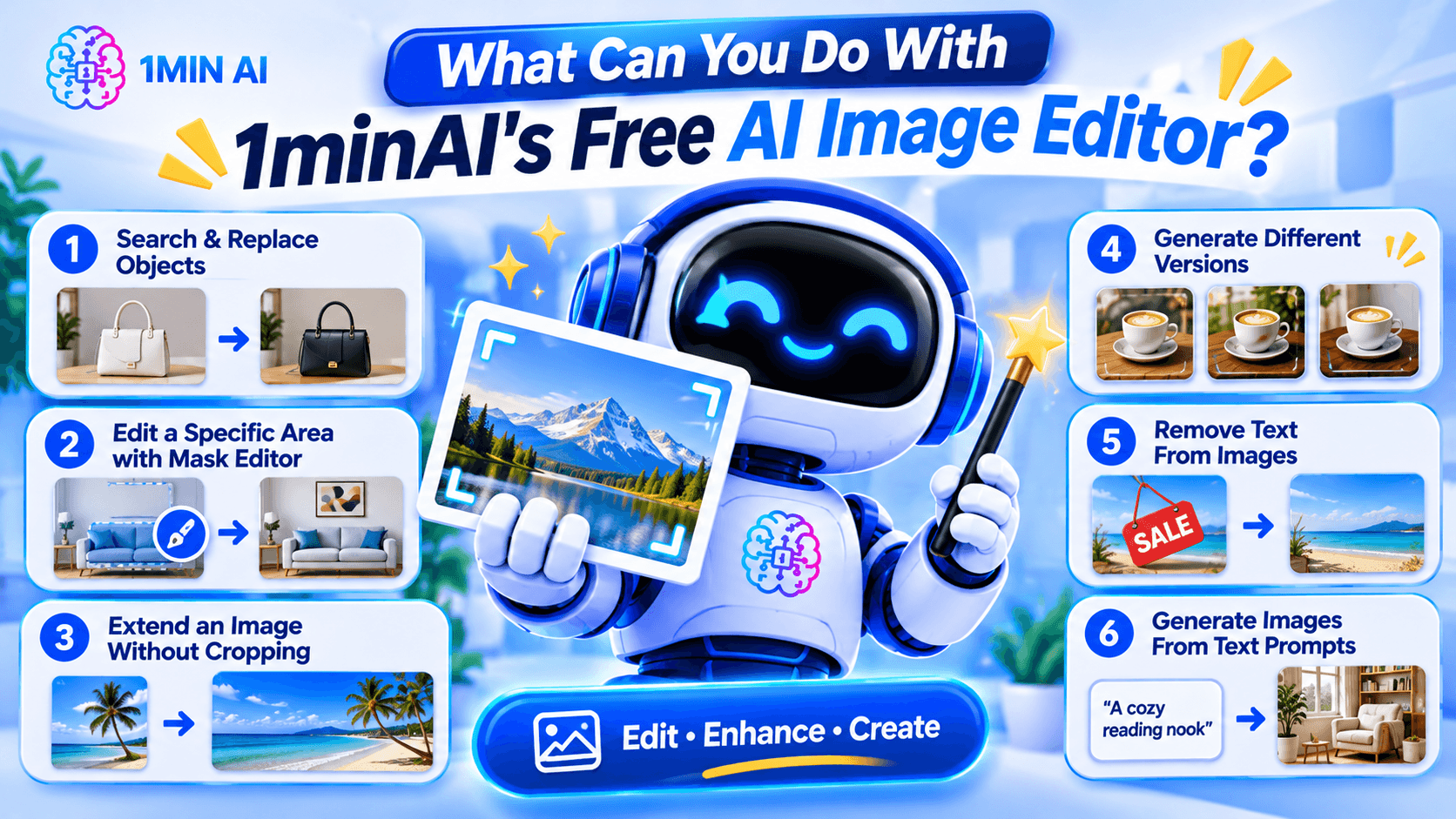
Here are some of the main editing workflows.
1. Search and Replace Objects in an Image
AI photo editing before after product image object replacement example replacing handbag color or furniture with new object realistic seamless edit" aspectRatio="16:9" width="100%" />
Sometimes an image is good except for one object.
For example, you may like a product photo but want to change the packaging color, replace a piece of furniture, or swap an accessory.
1minAI's AI Image Object Search and Replace lets you identify an object and describe what should replace it.
Example prompt:
"Replace the white ceramic vase on the table with a matte black vase. Keep the flowers, table, wall, and lighting unchanged."
This can be useful for:
- E-commerce product photography.
- Marketing and advertising creatives.
- Interior design concepts.
- Social media content.
- Creative experimentation.
The main advantage is that you can focus on the object you want to change instead of manually rebuilding the whole image.
2. Edit a Specific Area With the Image Mask Editor
Sometimes you want to modify only one part of an image while preserving everything else.
The 1minAI Image Mask Editor lets you select the area you want to edit, then describe what should appear in that region.
For example, you could:
- Change an object in the background.
- Add a decorative element.
- Fix an unwanted detail.
- Change the color of a selected item.
- Refresh part of an older image.
Example prompt:
"Replace the selected empty wall area with a framed abstract painting in warm neutral colors. Keep the furniture and room lighting unchanged."
This is especially useful when a full-image transformation would change details you want to preserve.
3. Extend an Image Without Cropping the Original Subject
Have you ever created a square image but later needed a wide banner?
Cropping may remove important details, while stretching can distort the subject.
The 1minAI Image Extender expands the canvas by generating additional background around the original image.
You can use it to:
- Turn square images into landscape banners.
- Adapt product photos for website headers.
- Create more space for advertising text.
- Reformat social media visuals.
- Expand portraits or landscapes.
Example instruction:
"Extend this image to a wide landscape composition. Continue the existing studio background naturally and keep the product centered at its original size."
This helps you adapt existing visuals to different layouts without starting over.
4. Generate Different Versions With AI Image Variator
If you like the original image but want to explore alternative styles, use the 1minAI AI Image Variator.
It creates alternative versions of an existing image while maintaining its core subject.
You can experiment with:
- Different color palettes.
- New backgrounds.
- Alternative lighting.
- Different artistic styles.
- Fresh compositions.
- Different visual moods.
Example prompt:
"Create three visual variations of this coffee product photo. Version one should have a warm minimalist kitchen background, version two should use a modern dark studio, and version three should feature a bright outdoor café setting. Keep the product design recognizable."
This can help marketers and creators explore different creative directions before choosing a final visual.
5. Remove Text From Images
Sometimes an image contains text that you no longer need.
For example, you may have an old promotional graphic with an expired discount, an outdated date, or a caption that no longer fits your campaign.
1minAI provides a Stable Diffusion XL Text Remover API for removing text elements from images through an API workflow.
The documented endpoint uses the TEXT_REMOVER feature type and stable-diffusion-xl model identifier. It accepts an image path and supports PNG, JPEG, and WebP output formats.
This is particularly useful for developers who want to integrate text removal into an image-processing application.
Example use case:
A marketing team has an old promotional image with a previous campaign date. They can use text removal to clear the outdated text and prepare the image for a new design.
Always review the result carefully, especially when text overlaps detailed textures, logos, or important visual elements.
6. Generate Images From Text Prompts
You do not always need an existing photo to start editing.
With the 1minAI AI Image Generator, you can create a new visual from a written description.
Describe:
- The main subject.
- The environment.
- The visual style.
- The lighting.
- The composition.
- The mood and color palette.
Example prompt:
"A premium skincare serum bottle on a natural stone surface, surrounded by soft green leaves, bright morning sunlight, minimalist luxury product photography, neutral beige background, realistic texture, professional commercial advertising style."
Once you have a base image, you can continue refining it with the other editing tools.
How to Edit an Image With AI in 1minAI
You do not need to master complicated editing software to get started. A simple workflow can take you from an existing photo to a refined visual.
Step 1: Open the Image Editing Workspace
Visit 1minAI's Create, Edit, and Transform Images page to explore the available image tools.
Choose the tool that matches your goal:
- Object replacement.
- Mask-based editing.
- Image extension.
- Image variation.
- Text removal.
- Image generation.
If you already have a photo, upload it to the relevant editing tool.
Step 2: Describe the Change You Want
Write a prompt explaining what should change.
A useful prompt should be specific enough for the AI to understand the subject, action, and desired result.
Try this formula:
Object + Action + Style or Setting + Details to Preserve
For example:
"Replace the wooden chair with a modern cream-colored armchair, use a Scandinavian interior style, and keep the original room layout, lighting, and camera angle unchanged."
The more clearly you describe the desired edit, the easier it is to evaluate the result.
Step 3: Generate and Review the Result
Run the edit and inspect the generated image.
Pay attention to:
- Object shapes and proportions.
- Lighting and shadows.
- Edges around edited areas.
- Text and logos.
- Background consistency.
- Unwanted changes to the original subject.
AI editing may not produce a perfect result on the first attempt. If something looks wrong, refine the prompt or make a smaller edit.
Step 4: Download and Use Your Image
Once the result looks right, download it and prepare it for your intended project.
Before using an image commercially, check the applicable tool terms, model licenses, and rights associated with any source images, logos, or people shown in the visual.
How to Choose the Right AI Image Editing Tool
Not every editing task needs the same tool.
Choosing the right workflow can save time and reduce unnecessary edits.
| Your goal | Recommended 1minAI tool |
|---|---|
| Create an image from a text description | AI Image Generator |
| Find and replace an object | AI Image Object Search and Replace |
| Change one specific area | Image Mask Editor |
| Expand the image canvas | Image Extender |
| Generate alternative versions | AI Image Variator |
| Remove text through an API | Stable Diffusion XL Text Remover |
| Explore several image tools in one place | Create, Edit, and Transform Images |
What If You Do Not Know How to Write an Image Prompt?
You can use 1minAI Image to Prompt to analyze an existing image and turn its visual details into a written prompt.
This can help you understand how to describe:
- Main subjects.
- Colors and lighting.
- Composition.
- Camera perspective.
- Artistic style.
- Background details.
For example, if you find a product image with a style you like, you can use Image to Prompt to generate a description that helps you create a similar visual direction.
Remember to use reference images you have the right to use, and avoid copying protected designs or branding without permission.
Who Can Benefit From a Free AI Image Editor?
AI image editing is useful for more than professional designers. Different types of users can apply it to everyday creative work.
E-commerce Sellers
Online sellers need product visuals for listings, advertisements, and social media.
An AI image editor can help them:
- Change product backgrounds.
- Create lifestyle product scenes.
- Explore packaging variations.
- Remove distracting objects.
- Adapt photos for different platforms.
For example, a seller could start with one product photo and create several campaign concepts for seasonal promotions.
Digital Marketers
Marketing teams often need multiple creative assets for different campaigns.
They can use AI editing to test different backgrounds, colors, product placements, and visual styles without rebuilding every design from scratch.
Content Creators
Creators may need images for blog posts, thumbnails, social media, and presentations.
AI tools can help them turn a basic photo into a more polished visual, extend the canvas, or create alternative styles.
Small Business Owners
Small businesses may not have an in-house designer.
A prompt-based editor gives owners a way to make straightforward visual adjustments, prepare promotional materials, and explore design ideas without mastering professional editing software.
Designers and Creative Professionals
AI does not replace professional creative judgment. However, it can help designers explore concepts, generate alternatives, and handle repetitive editing tasks.
Professionals can use it as an additional tool in their creative process while retaining control over the final design.
Conclusion
A free AI image editor can make visual editing easier by turning written instructions into practical image transformations.
Whether you want to replace an object, remove text, extend a photo, create alternative versions, or generate a new visual, the right AI tool can reduce repetitive manual work and help you explore more creative ideas.
With 1minAI, you can move between image generation and editing tools in one workspace. Start with an existing photo or a text prompt, describe the change you want, review the result, and refine it until it fits your project.
More creative control starts with a clearer prompt. Try 1minAI's AI image tools and turn your next image-editing idea into reality.
- #Commerce
- #Information
بدائل
اكتشف أفضل البدائل لـ 1minAI وقارن الميزات والأسعار وحالات الاستخدام.

1min.AI مقابل OpenRouter
1min.AI مقابل OpenRouter: قارن منتج إنشاء الذكاء الاصطناعي الجاهز للاستخدام بأداة واجهة برمجة التطبيقات التقنية. اكتشف ما إذا كنت بحاجة إلى استوديو إبداعي بدون أي برمجة أو مركز بنية تحتية للترميز.
 Ngoc Hong

1min. AI مقابل Dola AI
هل تبحث عن بديل لـ Dola AI؟ قارن بين 1min.AI وDola AI من حيث إنشاء الفيديو، الخطط المجانية، التسعير والخصوصية لاختيار تطبيق الذكاء الاصطناعي المناسب.
Ngoc Hong
1minAI مقابل Hix AI
قارن 5 بدائل لـ HIX AI للدردشة بالذكاء الاصطناعي، والبحث، والكتابة، والصور، والفيديو، والتسعير، وسير العمل المرن للذكاء الاصطناعي.
Ngoc Hongأدوات الذكاء الاصطناعي
اكتشف أفضل أدوات الذكاء الاصطناعي لتعزيز الإنتاجية والإبداع والعمل اليومي.

أنشئ محتوى كرتونيًا متناسقًا في بضع خطوات فقط
أنشئ فيديوهات كرتونية لـ TikTok وReels في 3 خطوات بسيطة مع 1min.AI، من البحث عن الأفكار إلى الشخصيات والفيديوهات المتحركة.
 Lien Anh Vu

منتج واحد، 10 إبداعات UGC: كيف يجعل الذكاء الاصطناعي اختبار المحتوى أسهل
أنشئ محتوى UGC أكثر أصالة باستخدام مولّد فيديو UGC بالذكاء الاصطناعي، واختبر زوايا إبداعية أكثر، ووسّع محتوى التسويق بالعمولة دون تصوير كل نسخة.
Lien Anh Vu
أفضل 4 أدوات ذكاء اصطناعي بأسعار معقولة لمؤسسي الشركات الناشئة
اكتشف أفضل 4 أدوات ذكاء اصطناعي بأسعار معقولة لمؤسسي الشركات الناشئة للتحقق من صحة الأفكار وبناء المنتجات وإنشاء المحتوى وإطلاقها بشكل أسرع دون الإفراط في الإنفاق.
 Tram Ta
ميزات الذكاء الاصطناعي
ميزات شاملة للذكاء الاصطناعي تبسط سير العمل، وتحسن الكفاءة، وتمكن الفرق من تحقيق المزيد.
أنشئ محتوى كرتونيًا متناسقًا في بضع خطوات فقط
أنشئ فيديوهات كرتونية لـ TikTok وReels في 3 خطوات بسيطة مع 1min.AI، من البحث عن الأفكار إلى الشخصيات والفيديوهات المتحركة.
Lien Anh Vuمنتج واحد، 10 إبداعات UGC: كيف يجعل الذكاء الاصطناعي اختبار المحتوى أسهل
أنشئ محتوى UGC أكثر أصالة باستخدام مولّد فيديو UGC بالذكاء الاصطناعي، واختبر زوايا إبداعية أكثر، ووسّع محتوى التسويق بالعمولة دون تصوير كل نسخة.
Lien Anh Vu
1minAI: مدقق قواعد نحوية مجاني بالذكاء الاصطناعي
تحقق من القواعد مجانًا مع مدقق القواعد بالذكاء الاصطناعي من 1minAI. اعثر على أخطاء القواعد والإملاء والكتابة، وحسّن الوضوح، وصقل محتواك في ثوانٍ.
Tram Taحالات استخدام الذكاء الاصطناعي
مجموعة منسقة من حالات استخدام الذكاء الاصطناعي للأعمال والإنتاجية والتطبيقات الخاصة بالصناعة.
أنشئ محتوى كرتونيًا متناسقًا في بضع خطوات فقط
أنشئ فيديوهات كرتونية لـ TikTok وReels في 3 خطوات بسيطة مع 1min.AI، من البحث عن الأفكار إلى الشخصيات والفيديوهات المتحركة.
Lien Anh Vuمنتج واحد، 10 إبداعات UGC: كيف يجعل الذكاء الاصطناعي اختبار المحتوى أسهل
أنشئ محتوى UGC أكثر أصالة باستخدام مولّد فيديو UGC بالذكاء الاصطناعي، واختبر زوايا إبداعية أكثر، ووسّع محتوى التسويق بالعمولة دون تصوير كل نسخة.
Lien Anh Vu
أفضل وقت للنشر على إنستغرام: دليل عملي لتحقيق تفاعل أفضل
اكتشف أفضل وقت للنشر على إنستغرام، بما في ذلك أفضل الأيام والأوقات لجماهير مختلفة، بالإضافة إلى نصائح للعثور على جدول النشر المثالي لحسابك.
Tram Taدروس الذكاء الاصطناعي
تعلم كيفية استخدام الذكاء الاصطناعي من خلال دروس عملية وخطوة بخطوة.
أنشئ محتوى كرتونيًا متناسقًا في بضع خطوات فقط
أنشئ فيديوهات كرتونية لـ TikTok وReels في 3 خطوات بسيطة مع 1min.AI، من البحث عن الأفكار إلى الشخصيات والفيديوهات المتحركة.
Lien Anh Vu
عروض أدوات الذكاء الاصطناعي في الجمعة السوداء 2026
اكتشف ما الذي تقدمه عروض أدوات الذكاء الاصطناعي في الجمعة السوداء 2026. تعرّف على كيفية الحصول على صفقة 1min.AI مدى الحياة عبر AppSumo وDealify وStack Social، وتحقق من Trustpilot وSlashdot وSoftware Advice.
 Hang Nguyen

اتساق المنتج من صورة إلى فيديو بالذكاء الاصطناعي مع Seedance لإيقاف التشوّه وتوسيع مراجعات المنتجات
أوقف تشوّه الشعارات مع اتساق المنتج من صورة إلى فيديو بالذكاء الاصطناعي وأنشئ اليوم على 1min.AI فيديوهات مراجعة بجودة استوديو.
Lien Anh Vuأدلة الذكاء الاصطناعي
تعلم الذكاء الاصطناعي بشكل أسرع باستخدام أدلة عملية وأمثلة واقعية وأفضل الممارسات القابلة للتطبيق.
أنشئ محتوى كرتونيًا متناسقًا في بضع خطوات فقط
أنشئ فيديوهات كرتونية لـ TikTok وReels في 3 خطوات بسيطة مع 1min.AI، من البحث عن الأفكار إلى الشخصيات والفيديوهات المتحركة.
Lien Anh Vu
اشترِ أدوات الذكاء الاصطناعي بأمان عبر الإنترنت: دليل الجمعة السوداء 2026
اكتشف كيف تجد أفضل عروض الجمعة السوداء على أدوات الذكاء الاصطناعي وتحصل عليها بأمان عبر الإنترنت. تعلّم استراتيجيات خبراء لتجنب الاحتيال، والتغلب على إرهاق الاشتراكات، والتحقق من البرامج.
Hang Nguyenاتساق المنتج من صورة إلى فيديو بالذكاء الاصطناعي مع Seedance لإيقاف التشوّه وتوسيع مراجعات المنتجات
أوقف تشوّه الشعارات مع اتساق المنتج من صورة إلى فيديو بالذكاء الاصطناعي وأنشئ اليوم على 1min.AI فيديوهات مراجعة بجودة استوديو.
Lien Anh Vuحلول الذكاء الاصطناعي
تصفح أفضل حلول الذكاء الاصطناعي للأتمتة، والبرمجة، والبحث، والإنتاجية، ودعم العملاء، والتسويق، وسير عمل الأعمال.
أنشئ محتوى كرتونيًا متناسقًا في بضع خطوات فقط
أنشئ فيديوهات كرتونية لـ TikTok وReels في 3 خطوات بسيطة مع 1min.AI، من البحث عن الأفكار إلى الشخصيات والفيديوهات المتحركة.
Lien Anh Vuمنتج واحد، 10 إبداعات UGC: كيف يجعل الذكاء الاصطناعي اختبار المحتوى أسهل
أنشئ محتوى UGC أكثر أصالة باستخدام مولّد فيديو UGC بالذكاء الاصطناعي، واختبر زوايا إبداعية أكثر، ووسّع محتوى التسويق بالعمولة دون تصوير كل نسخة.
Lien Anh Vu
مولّد وشوم بالذكاء الاصطناعي مجانًا: تصاميم مخصصة
حوّل أي فكرة إلى تصميم وشم مخصص باستخدام مولّد الوشوم بالذكاء الاصطناعي المجاني من 1min.AI. صف فكرتك، واختر النمط، وحمّلها في ثوانٍ.
 Trang Tran
نماذج الذكاء الاصطناعي
استكشف أبرز نماذج الذكاء الاصطناعي في مكان واحد.
أنشئ محتوى كرتونيًا متناسقًا في بضع خطوات فقط
أنشئ فيديوهات كرتونية لـ TikTok وReels في 3 خطوات بسيطة مع 1min.AI، من البحث عن الأفكار إلى الشخصيات والفيديوهات المتحركة.
Lien Anh Vuمنتج واحد، 10 إبداعات UGC: كيف يجعل الذكاء الاصطناعي اختبار المحتوى أسهل
أنشئ محتوى UGC أكثر أصالة باستخدام مولّد فيديو UGC بالذكاء الاصطناعي، واختبر زوايا إبداعية أكثر، ووسّع محتوى التسويق بالعمولة دون تصوير كل نسخة.
Lien Anh Vuاتساق المنتج من صورة إلى فيديو بالذكاء الاصطناعي مع Seedance لإيقاف التشوّه وتوسيع مراجعات المنتجات
أوقف تشوّه الشعارات مع اتساق المنتج من صورة إلى فيديو بالذكاء الاصطناعي وأنشئ اليوم على 1min.AI فيديوهات مراجعة بجودة استوديو.
Lien Anh Vuمقارنات الذكاء الاصطناعي
قارن أدوات ونماذج ومنصات الذكاء الاصطناعي للعثور على الأنسب لاحتياجاتك.

Kling AI مقابل Veo 3: أي نموذج يفوز؟
Kling AI مقابل Veo 3: قارن الحركة والصوت الأصلي والتسعير والخطط المجانية لمعرفة أي مولّد فيديو بالذكاء الاصطناعي يناسب مشروعك - جرّب كليهما على 1min.AI.
Trang Tranاتساق المنتج من صورة إلى فيديو بالذكاء الاصطناعي مع Seedance لإيقاف التشوّه وتوسيع مراجعات المنتجات
أوقف تشوّه الشعارات مع اتساق المنتج من صورة إلى فيديو بالذكاء الاصطناعي وأنشئ اليوم على 1min.AI فيديوهات مراجعة بجودة استوديو.
Lien Anh Vu
مقارنة DeepSeek V4 Pro مقابل Flash
قارن مقاييس DeepSeek V4 Pro مقابل DeepSeek V4 Flash. قم بتحسين تطبيقاتك الوكيلة وتحسين التحقق من حقائق الذكاء الاصطناعي على 1min.ai اليوم.
تكاملات الذكاء الاصطناعي
ادمج الذكاء الاصطناعي بسلاسة مع الأدوات التي تستخدمها بالفعل لأتمتة العمل وتعزيز الإنتاجية.

كيفية استخدام مولّد فيديو أزياء بالذكاء الاصطناعي لأسبوع الموضة 2026
حوّل أفكار أسبوع الموضة 2026 إلى مقاطع فيديو أزياء مذهلة باستخدام الذكاء الاصطناعي. تعلّم كيف تولّد الأفكار، وتبتكر المرئيات، وتحول الصور إلى فيديوهات عبر سير عمل بسيط واحد.
Lien Anh Vu
منظور الشخص: لديك أكثر من 10 منشورات لتُنشئها كل يوم
تعرّف على كيفية بناء سير عمل للمحتوى بالذكاء الاصطناعي يساعد صنّاع المحتوى على إنتاج أكثر من 10 منشورات يوميًا بشكل أسرع عبر العصف الذهني بالذكاء الاصطناعي، وتوليد الصور، وإنشاء المحتوى.
Lien Anh Vu
توقف عن التبديل بين تطبيقات الذكاء الاصطناعي: كيف يحوّل تكامل الذكاء الاصطناعي العلامة التجارية لصاحب العمل
اكتشف كيف يساعد تكامل الذكاء الاصطناعي فرق الموارد البشرية على تبسيط العلامة التجارية لصاحب العمل من خلال الجمع بين الكتابة بالذكاء الاصطناعي، المستندات، الصور، الفيديو، ونماذج الذكاء الاصطناعي المتعددة في مساحة عمل واحدة.
Tram Taالذكاء الاصطناعي للصناعات
اكتشف أفضل أدوات الذكاء الاصطناعي وسير العمل للرعاية الصحية، المالية، التعليم، القانون، التصنيع، التجزئة، العقارات، والمزيد.

مولّد مجاني لوصف المنتجات بالذكاء الاصطناعي
اكتب أوصاف منتجات تبيع خلال دقائق. استخدم هذا المولّد المجاني لوصف المنتجات بالذكاء الاصطناعي لتحويل التفاصيل أو صورة إلى نص متوافق مع علامتك. جرّب 1min.AI.
Trang Tran
أفضل أدوات إنتاجية الأعمال للشركات الناشئة لتعظيم الأرباح | 1minAI
اكتشف أفضل أدوات إنتاجية الأعمال للشركات الناشئة لتوفير الوقت، وتبسيط سير العمل، وتقليل المهام المتكررة، ودعم النمو المربح بالذكاء الاصطناعي.
Tram Ta
أفضل أداة ذكاء اصطناعي لتسويق المحتوى |1minAI
هل تبحث عن أفضل أداة ذكاء اصطناعي لتسويق المحتوى؟ اكتشف كيف تساعد 1minAI المسوقين على البحث والكتابة وإعادة التوظيف وإنشاء المرئيات وتوسيع المحتوى من مساحة عمل واحدة للذكاء الاصطناعي.
Tram Taوكلاء الذكاء الاصطناعي
اكتشف وقم بتشغيل وكلاء الذكاء الاصطناعي لأتمتة المهام عبر عملك وحياتك اليومية.
1minAI: مدقق قواعد نحوية مجاني بالذكاء الاصطناعي
تحقق من القواعد مجانًا مع مدقق القواعد بالذكاء الاصطناعي من 1minAI. اعثر على أخطاء القواعد والإملاء والكتابة، وحسّن الوضوح، وصقل محتواك في ثوانٍ.
Tram Ta
وكلاء الذكاء الاصطناعي لفيسبوك
استخدم وكيل ذكاء اصطناعي لفيسبوك لإنشاء المحتوى، وتوليد الصور، وجدولة المنشورات، والنشر من مستنداتك ومحادثاتك.
Ngoc Hong
وكيل الذكاء الاصطناعي أم مساعد الذكاء الاصطناعي: أيهما يوفّر للمصممين وقتًا أكثر فعلًا؟
تعرّف على الفرق بين وكيل الذكاء الاصطناعي ومساعد الذكاء الاصطناعي، واكتشف أي حل يساعد المصممين على أتمتة الأعمال المتكررة وتقليل المراجعات وتوفير المزيد من الوقت.
Lien Anh Vuسير عمل الذكاء الاصطناعي
استكشف سير عمل الذكاء الاصطناعي الجاهزة للاستخدام للإنتاجية والتسويق والمبيعات والدعم والمزيد.
أنشئ محتوى كرتونيًا متناسقًا في بضع خطوات فقط
أنشئ فيديوهات كرتونية لـ TikTok وReels في 3 خطوات بسيطة مع 1min.AI، من البحث عن الأفكار إلى الشخصيات والفيديوهات المتحركة.
Lien Anh Vuمنتج واحد، 10 إبداعات UGC: كيف يجعل الذكاء الاصطناعي اختبار المحتوى أسهل
أنشئ محتوى UGC أكثر أصالة باستخدام مولّد فيديو UGC بالذكاء الاصطناعي، واختبر زوايا إبداعية أكثر، ووسّع محتوى التسويق بالعمولة دون تصوير كل نسخة.
Lien Anh Vuكيفية استخدام مولّد فيديو أزياء بالذكاء الاصطناعي لأسبوع الموضة 2026
حوّل أفكار أسبوع الموضة 2026 إلى مقاطع فيديو أزياء مذهلة باستخدام الذكاء الاصطناعي. تعلّم كيف تولّد الأفكار، وتبتكر المرئيات، وتحول الصور إلى فيديوهات عبر سير عمل بسيط واحد.
Lien Anh Vuالنشرة الإخبارية
ابتكارات الذكاء الاصطناعي الأسبوعية مع 1minAI

🔮 ابتكارات الذكاء الاصطناعي الأسبوعية #142: Grok 4.7 وOpus 5.5 وSonnet 5.5 على 1min.ai
احصل على Grok 4.7 وClaude Opus 5.5 وSonnet 5.5 على 1min.ai. خفّض تكاليف الاشتراك بنسبة تصل إلى 70% وعالج ملايين الرموز في مساحة عمل موحّدة واحدة.
Hang Nguyen
🔮 تحديثات الذكاء الاصطناعي الأسبوعية #143: تحديث تحديث GPT-6 وGPT-6.1 وIdeogram 4.0 وIdeogram 4.0
تَصِل إلى GPT-6 Sol وLuna وGPT-6.1 Sol وIdeogram 4.0 على 1min.ai. ارفع دقة الطباعة إلى 98.4% وخفّض زمن الاستدلال بنسبة 45% في منصة واحدة.
Hang Nguyen
🔮 ابتكارات الذكاء الاصطناعي الأسبوعية #141: Seedance 2.5 و Stable Audio 3: الجيل التالي من الذكاء الاصطناعي
استكشف Seedance 2.0 و2.5 وStable Audio 3 من StabilityAI على 1min.ai. أنشئ صوتًا بجودة الاستوديو وحركة متزامنة باستخدام الذكاء الاصطناعي التوليدي من الجيل التالي.
Hang Nguyen