
Claude Personal Finance Setup and Safety Guide

Trang Tran
20 نوفمبر 2026

Claude personal finance explained: how Personal Finance in Claude works and what Claude finance can see. Plus a safe CSV method for non-US users.
Claude personal finance (officially “Personal Finance in Claude”) is an Anthropic beta feature. It links your bank and card accounts through Plaid so you can ask Claude about balances, spending, and bills in plain language. Access is read-only. It is available only to US users on Pro, Max, and Ultra plans. Outside the US, you can get similar results by uploading a redacted CSV statement to a Claude model in 1min.AI.
It is the end of the month and payday is still ten days away. You do not need a spreadsheet to answer “Where did my money go?” You need a clear answer you can trust. This guide covers what the feature does, how to set it up, how safe it is, and how to get similar value if you live outside the US.
What Is Claude Personal Finance?
Personal Finance in Claude is a section of the Claude app where you connect financial accounts and ask questions about your own money. It works on Claude web, Claude Desktop, iOS, and Android. Anthropic states that it has no ads or sponsored recommendations and that it does not offer credit cards, loans, or savings accounts of its own.
Watch the official walkthrough:
What Claude Finance Can Do
Claude finance covers four main jobs:
- Spending summaries: Ask “Where did my money go this month?” and get totals grouped by category such as rent, food, and shopping.
- Problem spotting: Claude can flag duplicate charges, unexpected fees, and bills that crept up over the year.
- Concept explanations: Ask “What is an APR?” and Claude explains the term, then adds up the interest you were charged.
- Dashboard building: Ask for a weekly spending chart, a calendar of what is due, or a custom set of numbers.
Who Can Use Personal Finance in Claude
| Requirement | Details |
|---|---|
| Plans | Pro, Max, and Ultra (not Free, Team, or Enterprise) |
| Region | US banks and US users only |
| Status | Beta with gradual rollout |
| Data access | Read-only: balances, credit limits, up to 24 months of transactions |
| Bank limit | Up to 16 linked banks |
How to Use Personal Finance in Claude
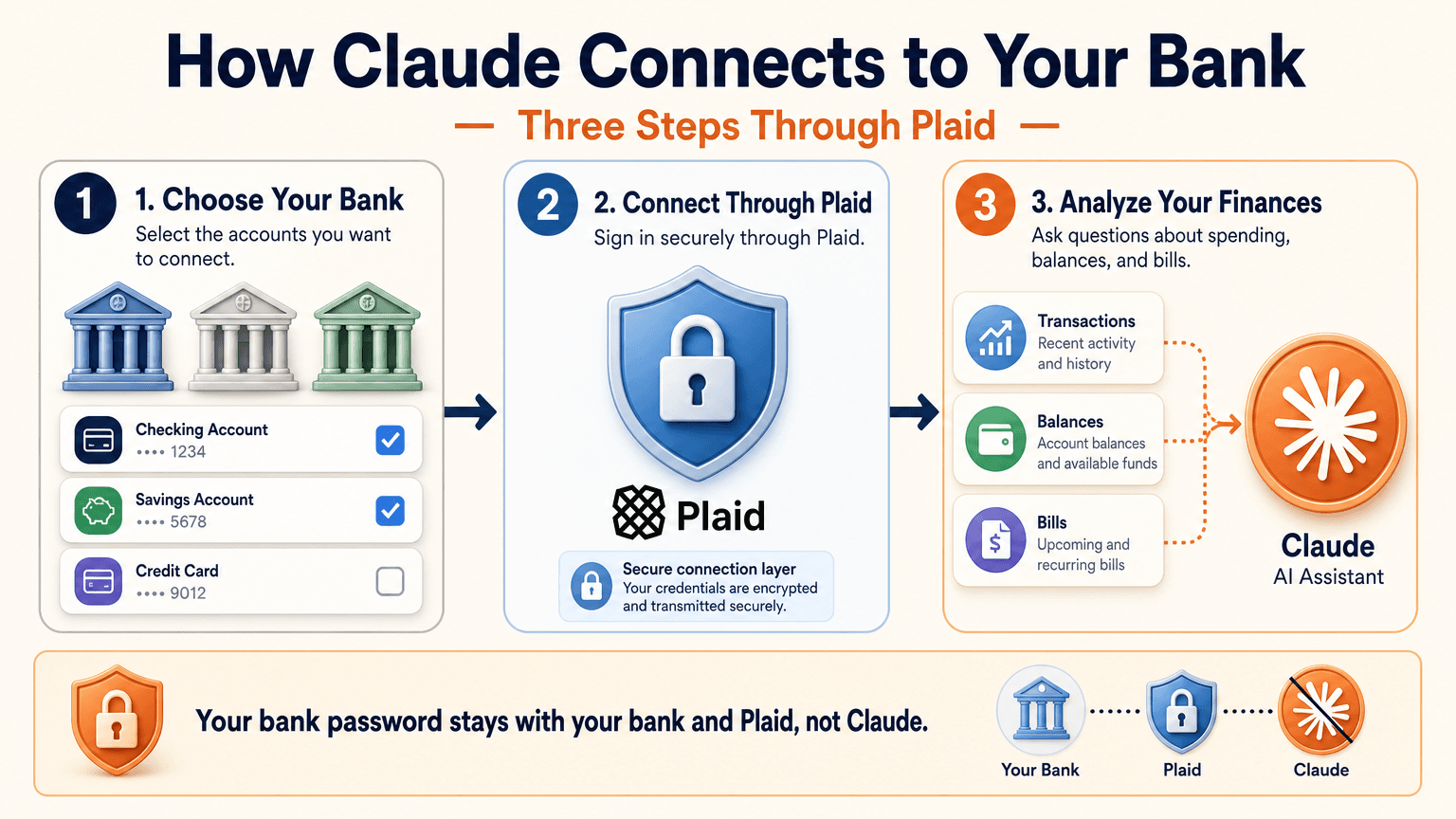
Link Your Bank Through Plaid
- Open Claude and select Personal Finance in the side menu. If you do not see it, check More.
- Select Get started and choose your goals or skip them.
- Select Link accounts with Plaid and review what Claude will be able to access.
- Sign in to your bank inside Plaid and choose the accounts to share.
- Return to Claude within 10 minutes and wait for your accounts to appear.
You sign in through Plaid, so Claude does not ask for or see your bank password. New transactions can take a few minutes to sync.
Use the Claude Personal Finance Dashboard
The dashboard puts spending, cash flow, accounts, subscriptions, and upcoming bills on one page. Widgets can be added, edited, removed, and reordered. Start with one account and one question, such as “Can I afford a trip this spring?”
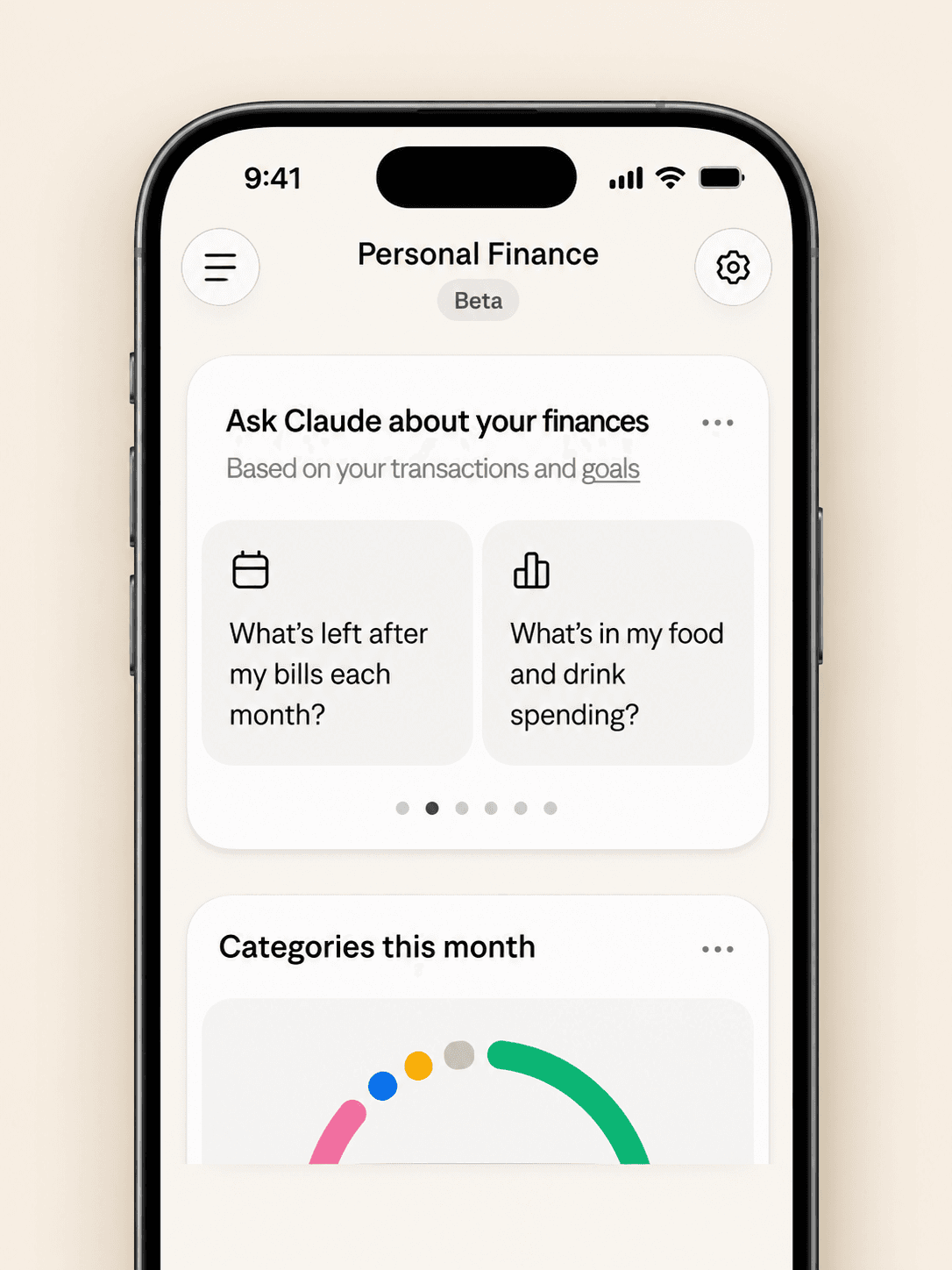
Claude Personal Finance Prompts to Try
Spending and Bills
- “Where did my money go last month, grouped by category?”
- “Which subscriptions am I paying for, and which ones went up in price?”
- “What payments will leave my checking account before payday?”
Smarter Follow-Ups
- “Is that more than usual? Compare the last three months.”
- “Which transactions are behind this number?”
- “Do any charges look duplicated or unexpected?”
The second follow-up matters most. Anthropic itself advises asking which transactions sit behind a figure and checking important numbers with your bank.
Is Claude Personal Finance Safe?
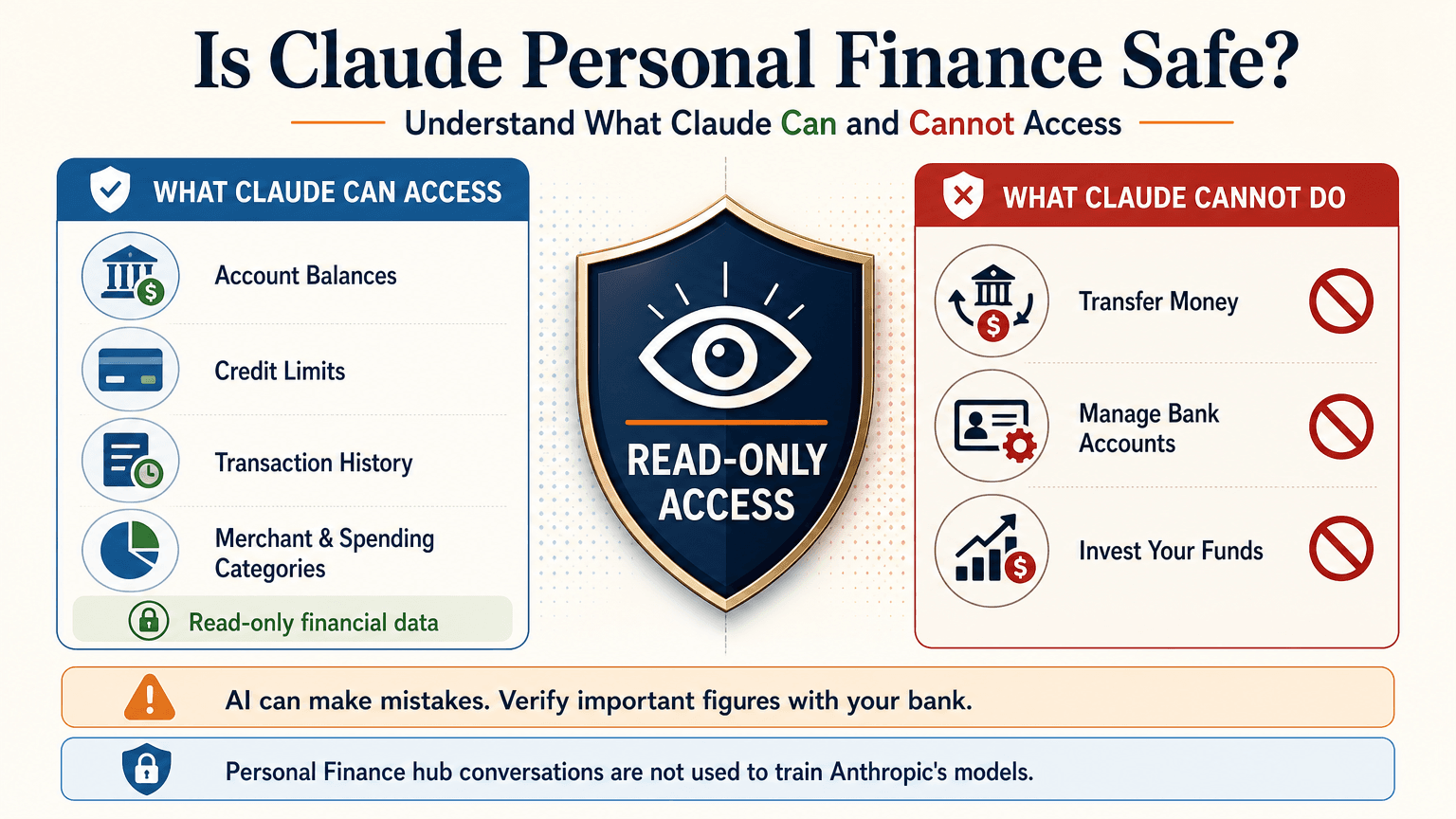
Read-Only Access Through Plaid
Claude cannot move, manage, or invest your money. Plaid handles the bank sign-in, so your password stays between you and your bank. You can unlink a bank at any time, and Claude can no longer see its data.
What Claude Can See
For the accounts you choose, Claude can read:
- Bank names, account names, types, and last four digits
- Balances and credit limits
- Up to 24 months of transactions with amount, date, merchant, category, and bank description
For investment accounts, loans, and cards, Claude reads balances and credit limits, not holdings, trades, or rates. Conversations in the Personal Finance hub are not used to train Anthropic’s models. For anything you share outside the hub, your normal privacy settings apply.
Accuracy Limits
Claude is AI and can make mistakes. Balances can be a day or two old. An account linked through two logins may be counted twice. Anthropic also says the feature is not designed to give investment advice. Treat Claude as an analyst that organizes and explains your data rather than the final decision maker.
Current Limitations
- US banks only
- No use of linked accounts in scheduled tasks, Cowork tasks, or Claude Code
- Not available on Free, Team, or Enterprise plans
- Saved dashboards are not yet included in data exports
Claude Personal Finance on Reddit: What People Did Before Launch
Personal Finance in Claude only just started rolling out, so real-world reviews of the official feature are still limited. For context, earlier discussions on r/ClaudeAI show how people were managing money with Claude before this feature existed. These are community workflows, not feedback on the new feature.
- Retirement planning: Running Monte Carlo simulations to estimate safe spending rates.
- Custom dashboards: Replacing spreadsheets with net worth and budget views.
- Fee hunting: Comparing bank statements with a fee schedule PDF to dispute wrong charges.
- Bank connections: A few users automated budget emails through Plaid or SimpleFIN, while many preferred uploading redacted CSV files to protect privacy.
That privacy split is useful to know. It is the same trade-off between convenience and control that the official feature and a CSV workflow now represent.
Use Claude Finance Outside the US With a CSV
You do not need account linking to get useful answers. A bank statement export contains the same raw material: dates, merchants, and amounts.
Build a Claude Personal Finance Tracker With 1min.AI
- Export one to three months of transactions from your bank as a CSV.
- Redact account numbers, full names, and addresses before sharing.
- Open Multi AI Chat in 1min.AI and select a Claude model.
- Paste or upload the cleaned data and run your prompt.
- Save the prompt in Prompt List so you can reuse it every month.
A starter prompt: “Categorize these transactions and total each category. List recurring subscriptions and flag duplicates or unusual fees. Show a table and mark any rows you are unsure about.”
1min.AI is not the official Personal Finance in Claude feature and does not connect to your bank. It gives you access to Claude models in one workspace, so this workflow works from any country. For model details, see the page for Claude Opus 5.5 and the guide to Claude Fable 5.1.
Which Claude Model Fits Which Money Task
| Task | Suggested model | Why |
|---|---|---|
| Categorizing many transactions | Claude 5.5 Haiku | Fast and low cost |
| Monthly budget and subscription audit | Claude 5.5 Sonnet | Balanced quality and cost |
| Retirement scenarios and multi-step analysis | Claude 5.5 Opus or 5.1 Fable | Stronger reasoning on complex questions |
Curious how the top models compare? Watch this test:
Claude Personal Finance Plugin Options
Community plugins can extend Claude for finance work. The Claude Cowork guide lists a Finance Tracker plugin for expense tracking and budget analysis. Review any plugin’s permissions before installing it, and never give a tool more financial data than the task needs.
Official Feature vs a CSV Workflow on 1min.AI
| Personal Finance in Claude | CSV workflow on 1min.AI | |
|---|---|---|
| Availability | US beta on paid plans | Global |
| Data source | Live accounts via Plaid | Redacted CSV or pasted rows |
| Dashboard | Built-in widgets | Tables and charts you request |
| Reusable prompts | Suggested questions | Prompt List |
| Model choice | Claude | Haiku, Sonnet, Opus, Fable, and more |
| Best for | Hands-off tracking | Privacy control and non-US users |
Teams that share finance prompts can use Shared Zone. Writers who turn results into reports can try Claude 4.6 for writing. 1min.AI is rated Excellent on Trustpilot and recognized on SourceForge, Slashdot, Capterra, Software Advice, and GetApp. If you want to see how an earlier flagship handles long analysis, try Claude 5 Fable.
Claude Personal Finance FAQ
What is Claude personal finance?
It is Anthropic’s beta feature, officially called Personal Finance in Claude. It links bank and card accounts through Plaid so you can ask about spending, balances, and bills.
Is Personal Finance in Claude free?
No. It is available on Pro, Max, and Ultra plans in the US. It is not available on Free, Team, or Enterprise.
Can Claude move my money?
No. Access is read-only. Claude cannot move, manage, or invest funds.
Can I use Claude finance features outside the US?
The official feature supports US banks only. Outside the US, you can upload a redacted CSV statement to a Claude model and prompt it for categories, subscriptions, and budgets.
Is Claude accurate with financial data?
It can make mistakes. Ask which transactions support each figure and verify key numbers with your bank.
Is this financial advice?
No. This article is educational and is not financial, tax, or investment advice. Consult a licensed professional for major decisions.
Final Thoughts
Claude personal finance turns scattered statements into clear answers. It is still a beta with strict regional limits and normal AI error risk. Use it to organize, categorize, and explain, and verify important figures yourself. If you live outside the US or prefer to keep bank access closed, a redacted CSV with the right Claude model delivers much of the same insight.
- #Information
بدائل
اكتشف أفضل البدائل لـ 1minAI وقارن الميزات والأسعار وحالات الاستخدام.

1min.AI مقابل OpenRouter
1min.AI مقابل OpenRouter: قارن منتج إنشاء الذكاء الاصطناعي الجاهز للاستخدام بأداة واجهة برمجة التطبيقات التقنية. اكتشف ما إذا كنت بحاجة إلى استوديو إبداعي بدون أي برمجة أو مركز بنية تحتية للترميز.
 Ngoc Hong

1min. AI مقابل Dola AI
هل تبحث عن بديل لـ Dola AI؟ قارن بين 1min.AI وDola AI من حيث إنشاء الفيديو، الخطط المجانية، التسعير والخصوصية لاختيار تطبيق الذكاء الاصطناعي المناسب.
Ngoc Hong
1minAI مقابل Hix AI
قارن 5 بدائل لـ HIX AI للدردشة بالذكاء الاصطناعي، والبحث، والكتابة، والصور، والفيديو، والتسعير، وسير العمل المرن للذكاء الاصطناعي.
Ngoc Hongأدوات الذكاء الاصطناعي
اكتشف أفضل أدوات الذكاء الاصطناعي لتعزيز الإنتاجية والإبداع والعمل اليومي.

أنشئ محتوى كرتونيًا متناسقًا في بضع خطوات فقط
أنشئ فيديوهات كرتونية لـ TikTok وReels في 3 خطوات بسيطة مع 1min.AI، من البحث عن الأفكار إلى الشخصيات والفيديوهات المتحركة.
 Lien Anh Vu

منتج واحد، 10 إبداعات UGC: كيف يجعل الذكاء الاصطناعي اختبار المحتوى أسهل
أنشئ محتوى UGC أكثر أصالة باستخدام مولّد فيديو UGC بالذكاء الاصطناعي، واختبر زوايا إبداعية أكثر، ووسّع محتوى التسويق بالعمولة دون تصوير كل نسخة.
Lien Anh Vu
أفضل 4 أدوات ذكاء اصطناعي بأسعار معقولة لمؤسسي الشركات الناشئة
اكتشف أفضل 4 أدوات ذكاء اصطناعي بأسعار معقولة لمؤسسي الشركات الناشئة للتحقق من صحة الأفكار وبناء المنتجات وإنشاء المحتوى وإطلاقها بشكل أسرع دون الإفراط في الإنفاق.
 Tram Ta
ميزات الذكاء الاصطناعي
ميزات شاملة للذكاء الاصطناعي تبسط سير العمل، وتحسن الكفاءة، وتمكن الفرق من تحقيق المزيد.
أنشئ محتوى كرتونيًا متناسقًا في بضع خطوات فقط
أنشئ فيديوهات كرتونية لـ TikTok وReels في 3 خطوات بسيطة مع 1min.AI، من البحث عن الأفكار إلى الشخصيات والفيديوهات المتحركة.
Lien Anh Vuمنتج واحد، 10 إبداعات UGC: كيف يجعل الذكاء الاصطناعي اختبار المحتوى أسهل
أنشئ محتوى UGC أكثر أصالة باستخدام مولّد فيديو UGC بالذكاء الاصطناعي، واختبر زوايا إبداعية أكثر، ووسّع محتوى التسويق بالعمولة دون تصوير كل نسخة.
Lien Anh Vu
1minAI: مدقق قواعد نحوية مجاني بالذكاء الاصطناعي
تحقق من القواعد مجانًا مع مدقق القواعد بالذكاء الاصطناعي من 1minAI. اعثر على أخطاء القواعد والإملاء والكتابة، وحسّن الوضوح، وصقل محتواك في ثوانٍ.
Tram Taحالات استخدام الذكاء الاصطناعي
مجموعة منسقة من حالات استخدام الذكاء الاصطناعي للأعمال والإنتاجية والتطبيقات الخاصة بالصناعة.
أنشئ محتوى كرتونيًا متناسقًا في بضع خطوات فقط
أنشئ فيديوهات كرتونية لـ TikTok وReels في 3 خطوات بسيطة مع 1min.AI، من البحث عن الأفكار إلى الشخصيات والفيديوهات المتحركة.
Lien Anh Vuمنتج واحد، 10 إبداعات UGC: كيف يجعل الذكاء الاصطناعي اختبار المحتوى أسهل
أنشئ محتوى UGC أكثر أصالة باستخدام مولّد فيديو UGC بالذكاء الاصطناعي، واختبر زوايا إبداعية أكثر، ووسّع محتوى التسويق بالعمولة دون تصوير كل نسخة.
Lien Anh Vu
أفضل وقت للنشر على إنستغرام: دليل عملي لتحقيق تفاعل أفضل
اكتشف أفضل وقت للنشر على إنستغرام، بما في ذلك أفضل الأيام والأوقات لجماهير مختلفة، بالإضافة إلى نصائح للعثور على جدول النشر المثالي لحسابك.
Tram Taدروس الذكاء الاصطناعي
تعلم كيفية استخدام الذكاء الاصطناعي من خلال دروس عملية وخطوة بخطوة.
أنشئ محتوى كرتونيًا متناسقًا في بضع خطوات فقط
أنشئ فيديوهات كرتونية لـ TikTok وReels في 3 خطوات بسيطة مع 1min.AI، من البحث عن الأفكار إلى الشخصيات والفيديوهات المتحركة.
Lien Anh Vu
عروض أدوات الذكاء الاصطناعي في الجمعة السوداء 2026
اكتشف ما الذي تقدمه عروض أدوات الذكاء الاصطناعي في الجمعة السوداء 2026. تعرّف على كيفية الحصول على صفقة 1min.AI مدى الحياة عبر AppSumo وDealify وStack Social، وتحقق من Trustpilot وSlashdot وSoftware Advice.
 Hang Nguyen

اتساق المنتج من صورة إلى فيديو بالذكاء الاصطناعي مع Seedance لإيقاف التشوّه وتوسيع مراجعات المنتجات
أوقف تشوّه الشعارات مع اتساق المنتج من صورة إلى فيديو بالذكاء الاصطناعي وأنشئ اليوم على 1min.AI فيديوهات مراجعة بجودة استوديو.
Lien Anh Vuأدلة الذكاء الاصطناعي
تعلم الذكاء الاصطناعي بشكل أسرع باستخدام أدلة عملية وأمثلة واقعية وأفضل الممارسات القابلة للتطبيق.
أنشئ محتوى كرتونيًا متناسقًا في بضع خطوات فقط
أنشئ فيديوهات كرتونية لـ TikTok وReels في 3 خطوات بسيطة مع 1min.AI، من البحث عن الأفكار إلى الشخصيات والفيديوهات المتحركة.
Lien Anh Vu
اشترِ أدوات الذكاء الاصطناعي بأمان عبر الإنترنت: دليل الجمعة السوداء 2026
اكتشف كيف تجد أفضل عروض الجمعة السوداء على أدوات الذكاء الاصطناعي وتحصل عليها بأمان عبر الإنترنت. تعلّم استراتيجيات خبراء لتجنب الاحتيال، والتغلب على إرهاق الاشتراكات، والتحقق من البرامج.
Hang Nguyenاتساق المنتج من صورة إلى فيديو بالذكاء الاصطناعي مع Seedance لإيقاف التشوّه وتوسيع مراجعات المنتجات
أوقف تشوّه الشعارات مع اتساق المنتج من صورة إلى فيديو بالذكاء الاصطناعي وأنشئ اليوم على 1min.AI فيديوهات مراجعة بجودة استوديو.
Lien Anh Vuحلول الذكاء الاصطناعي
تصفح أفضل حلول الذكاء الاصطناعي للأتمتة، والبرمجة، والبحث، والإنتاجية، ودعم العملاء، والتسويق، وسير عمل الأعمال.
أنشئ محتوى كرتونيًا متناسقًا في بضع خطوات فقط
أنشئ فيديوهات كرتونية لـ TikTok وReels في 3 خطوات بسيطة مع 1min.AI، من البحث عن الأفكار إلى الشخصيات والفيديوهات المتحركة.
Lien Anh Vuمنتج واحد، 10 إبداعات UGC: كيف يجعل الذكاء الاصطناعي اختبار المحتوى أسهل
أنشئ محتوى UGC أكثر أصالة باستخدام مولّد فيديو UGC بالذكاء الاصطناعي، واختبر زوايا إبداعية أكثر، ووسّع محتوى التسويق بالعمولة دون تصوير كل نسخة.
Lien Anh Vu
مولّد وشوم بالذكاء الاصطناعي مجانًا: تصاميم مخصصة
حوّل أي فكرة إلى تصميم وشم مخصص باستخدام مولّد الوشوم بالذكاء الاصطناعي المجاني من 1min.AI. صف فكرتك، واختر النمط، وحمّلها في ثوانٍ.
 Trang Tran
نماذج الذكاء الاصطناعي
استكشف أبرز نماذج الذكاء الاصطناعي في مكان واحد.
أنشئ محتوى كرتونيًا متناسقًا في بضع خطوات فقط
أنشئ فيديوهات كرتونية لـ TikTok وReels في 3 خطوات بسيطة مع 1min.AI، من البحث عن الأفكار إلى الشخصيات والفيديوهات المتحركة.
Lien Anh Vuمنتج واحد، 10 إبداعات UGC: كيف يجعل الذكاء الاصطناعي اختبار المحتوى أسهل
أنشئ محتوى UGC أكثر أصالة باستخدام مولّد فيديو UGC بالذكاء الاصطناعي، واختبر زوايا إبداعية أكثر، ووسّع محتوى التسويق بالعمولة دون تصوير كل نسخة.
Lien Anh Vuاتساق المنتج من صورة إلى فيديو بالذكاء الاصطناعي مع Seedance لإيقاف التشوّه وتوسيع مراجعات المنتجات
أوقف تشوّه الشعارات مع اتساق المنتج من صورة إلى فيديو بالذكاء الاصطناعي وأنشئ اليوم على 1min.AI فيديوهات مراجعة بجودة استوديو.
Lien Anh Vuمقارنات الذكاء الاصطناعي
قارن أدوات ونماذج ومنصات الذكاء الاصطناعي للعثور على الأنسب لاحتياجاتك.

Kling AI مقابل Veo 3: أي نموذج يفوز؟
Kling AI مقابل Veo 3: قارن الحركة والصوت الأصلي والتسعير والخطط المجانية لمعرفة أي مولّد فيديو بالذكاء الاصطناعي يناسب مشروعك - جرّب كليهما على 1min.AI.
Trang Tranاتساق المنتج من صورة إلى فيديو بالذكاء الاصطناعي مع Seedance لإيقاف التشوّه وتوسيع مراجعات المنتجات
أوقف تشوّه الشعارات مع اتساق المنتج من صورة إلى فيديو بالذكاء الاصطناعي وأنشئ اليوم على 1min.AI فيديوهات مراجعة بجودة استوديو.
Lien Anh Vu
مقارنة DeepSeek V4 Pro مقابل Flash
قارن مقاييس DeepSeek V4 Pro مقابل DeepSeek V4 Flash. قم بتحسين تطبيقاتك الوكيلة وتحسين التحقق من حقائق الذكاء الاصطناعي على 1min.ai اليوم.
تكاملات الذكاء الاصطناعي
ادمج الذكاء الاصطناعي بسلاسة مع الأدوات التي تستخدمها بالفعل لأتمتة العمل وتعزيز الإنتاجية.

كيفية استخدام مولّد فيديو أزياء بالذكاء الاصطناعي لأسبوع الموضة 2026
حوّل أفكار أسبوع الموضة 2026 إلى مقاطع فيديو أزياء مذهلة باستخدام الذكاء الاصطناعي. تعلّم كيف تولّد الأفكار، وتبتكر المرئيات، وتحول الصور إلى فيديوهات عبر سير عمل بسيط واحد.
Lien Anh Vu
منظور الشخص: لديك أكثر من 10 منشورات لتُنشئها كل يوم
تعرّف على كيفية بناء سير عمل للمحتوى بالذكاء الاصطناعي يساعد صنّاع المحتوى على إنتاج أكثر من 10 منشورات يوميًا بشكل أسرع عبر العصف الذهني بالذكاء الاصطناعي، وتوليد الصور، وإنشاء المحتوى.
Lien Anh Vu
توقف عن التبديل بين تطبيقات الذكاء الاصطناعي: كيف يحوّل تكامل الذكاء الاصطناعي العلامة التجارية لصاحب العمل
اكتشف كيف يساعد تكامل الذكاء الاصطناعي فرق الموارد البشرية على تبسيط العلامة التجارية لصاحب العمل من خلال الجمع بين الكتابة بالذكاء الاصطناعي، المستندات، الصور، الفيديو، ونماذج الذكاء الاصطناعي المتعددة في مساحة عمل واحدة.
Tram Taالذكاء الاصطناعي للصناعات
اكتشف أفضل أدوات الذكاء الاصطناعي وسير العمل للرعاية الصحية، المالية، التعليم، القانون، التصنيع، التجزئة، العقارات، والمزيد.

مولّد مجاني لوصف المنتجات بالذكاء الاصطناعي
اكتب أوصاف منتجات تبيع خلال دقائق. استخدم هذا المولّد المجاني لوصف المنتجات بالذكاء الاصطناعي لتحويل التفاصيل أو صورة إلى نص متوافق مع علامتك. جرّب 1min.AI.
Trang Tran
أفضل أدوات إنتاجية الأعمال للشركات الناشئة لتعظيم الأرباح | 1minAI
اكتشف أفضل أدوات إنتاجية الأعمال للشركات الناشئة لتوفير الوقت، وتبسيط سير العمل، وتقليل المهام المتكررة، ودعم النمو المربح بالذكاء الاصطناعي.
Tram Ta
أفضل أداة ذكاء اصطناعي لتسويق المحتوى |1minAI
هل تبحث عن أفضل أداة ذكاء اصطناعي لتسويق المحتوى؟ اكتشف كيف تساعد 1minAI المسوقين على البحث والكتابة وإعادة التوظيف وإنشاء المرئيات وتوسيع المحتوى من مساحة عمل واحدة للذكاء الاصطناعي.
Tram Taوكلاء الذكاء الاصطناعي
اكتشف وقم بتشغيل وكلاء الذكاء الاصطناعي لأتمتة المهام عبر عملك وحياتك اليومية.
1minAI: مدقق قواعد نحوية مجاني بالذكاء الاصطناعي
تحقق من القواعد مجانًا مع مدقق القواعد بالذكاء الاصطناعي من 1minAI. اعثر على أخطاء القواعد والإملاء والكتابة، وحسّن الوضوح، وصقل محتواك في ثوانٍ.
Tram Ta
وكلاء الذكاء الاصطناعي لفيسبوك
استخدم وكيل ذكاء اصطناعي لفيسبوك لإنشاء المحتوى، وتوليد الصور، وجدولة المنشورات، والنشر من مستنداتك ومحادثاتك.
Ngoc Hong
وكيل الذكاء الاصطناعي أم مساعد الذكاء الاصطناعي: أيهما يوفّر للمصممين وقتًا أكثر فعلًا؟
تعرّف على الفرق بين وكيل الذكاء الاصطناعي ومساعد الذكاء الاصطناعي، واكتشف أي حل يساعد المصممين على أتمتة الأعمال المتكررة وتقليل المراجعات وتوفير المزيد من الوقت.
Lien Anh Vuسير عمل الذكاء الاصطناعي
استكشف سير عمل الذكاء الاصطناعي الجاهزة للاستخدام للإنتاجية والتسويق والمبيعات والدعم والمزيد.
أنشئ محتوى كرتونيًا متناسقًا في بضع خطوات فقط
أنشئ فيديوهات كرتونية لـ TikTok وReels في 3 خطوات بسيطة مع 1min.AI، من البحث عن الأفكار إلى الشخصيات والفيديوهات المتحركة.
Lien Anh Vuمنتج واحد، 10 إبداعات UGC: كيف يجعل الذكاء الاصطناعي اختبار المحتوى أسهل
أنشئ محتوى UGC أكثر أصالة باستخدام مولّد فيديو UGC بالذكاء الاصطناعي، واختبر زوايا إبداعية أكثر، ووسّع محتوى التسويق بالعمولة دون تصوير كل نسخة.
Lien Anh Vuكيفية استخدام مولّد فيديو أزياء بالذكاء الاصطناعي لأسبوع الموضة 2026
حوّل أفكار أسبوع الموضة 2026 إلى مقاطع فيديو أزياء مذهلة باستخدام الذكاء الاصطناعي. تعلّم كيف تولّد الأفكار، وتبتكر المرئيات، وتحول الصور إلى فيديوهات عبر سير عمل بسيط واحد.
Lien Anh Vuالنشرة الإخبارية
ابتكارات الذكاء الاصطناعي الأسبوعية مع 1minAI

🔮 ابتكارات الذكاء الاصطناعي الأسبوعية #142: Grok 4.7 وOpus 5.5 وSonnet 5.5 على 1min.ai
احصل على Grok 4.7 وClaude Opus 5.5 وSonnet 5.5 على 1min.ai. خفّض تكاليف الاشتراك بنسبة تصل إلى 70% وعالج ملايين الرموز في مساحة عمل موحّدة واحدة.
Hang Nguyen
🔮 تحديثات الذكاء الاصطناعي الأسبوعية #143: تحديث تحديث GPT-6 وGPT-6.1 وIdeogram 4.0 وIdeogram 4.0
تَصِل إلى GPT-6 Sol وLuna وGPT-6.1 Sol وIdeogram 4.0 على 1min.ai. ارفع دقة الطباعة إلى 98.4% وخفّض زمن الاستدلال بنسبة 45% في منصة واحدة.
Hang Nguyen
🔮 ابتكارات الذكاء الاصطناعي الأسبوعية #141: Seedance 2.5 و Stable Audio 3: الجيل التالي من الذكاء الاصطناعي
استكشف Seedance 2.0 و2.5 وStable Audio 3 من StabilityAI على 1min.ai. أنشئ صوتًا بجودة الاستوديو وحركة متزامنة باستخدام الذكاء الاصطناعي التوليدي من الجيل التالي.
Hang Nguyen